Email Content Spam Checker: How to Test Cold Emails in 2026
Spam checkers grade your copy, but content is only one of three things that decide inbox placement. Here's what these tools actually catch, what they miss, and how to test cold emails properly.
TL;DR
- An email content spam checker scores your subject line, body copy, links, and HTML against filter heuristics — it does not test your domain reputation, authentication, or list quality.
- Content is roughly the third-most important placement factor in 2026, behind sender reputation and recipient engagement. A perfect content score with a bad list still lands in spam.
- The highest-value checks are practical: text-to-image ratio, link count and link domain reputation, unsubscribe presence, and whether your HTML renders as plain text.
- "Spam word" lists are largely obsolete. Gmail and Outlook filter on behavioral signals, not on the word "free."
- Run a content check on every new template, then pair it with a seed-inbox test and a clean list. Skipping list hygiene is what actually breaks campaigns.
What Is an Email Content Spam Checker?#
An email content spam checker is a tool that analyzes the text, HTML, and links inside a message and predicts how spam filters will score it. You paste your subject and body, it returns a number — often modeled on SpamAssassin's rule set — plus a list of triggered rules and suggested fixes.
Think of it like a spell-checker for deliverability. It catches obvious mistakes in the thing you wrote. It cannot tell you whether the person you're writing to wants to hear from you, and that second question is the one modern filters actually care about.
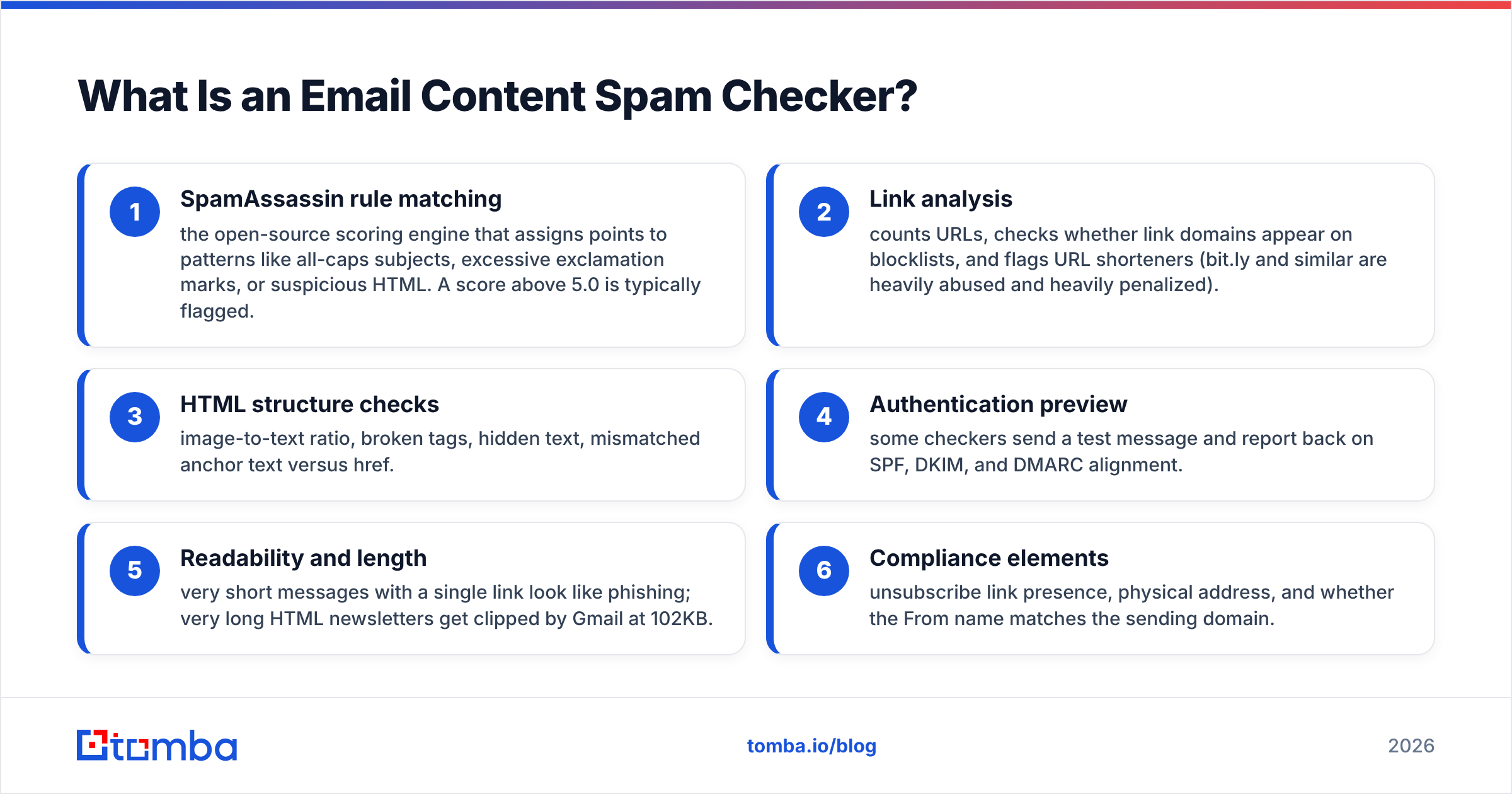
Most checkers run some combination of these analyses:
- SpamAssassin rule matching — the open-source scoring engine that assigns points to patterns like all-caps subjects, excessive exclamation marks, or suspicious HTML. A score above 5.0 is typically flagged.
- Link analysis — counts URLs, checks whether link domains appear on blocklists, and flags URL shorteners (bit.ly and similar are heavily abused and heavily penalized).
- HTML structure checks — image-to-text ratio, broken tags, hidden text, mismatched anchor text versus href.
- Authentication preview — some checkers send a test message and report back on SPF, DKIM, and DMARC alignment.
- Readability and length — very short messages with a single link look like phishing; very long HTML newsletters get clipped by Gmail at 102KB.
- Compliance elements — unsubscribe link presence, physical address, and whether the From name matches the sending domain.
Only the first, second, third, and fifth of those are true content checks. The rest are infrastructure checks that happen to live inside the same tool.
Do Spam Words Still Matter in 2026?#
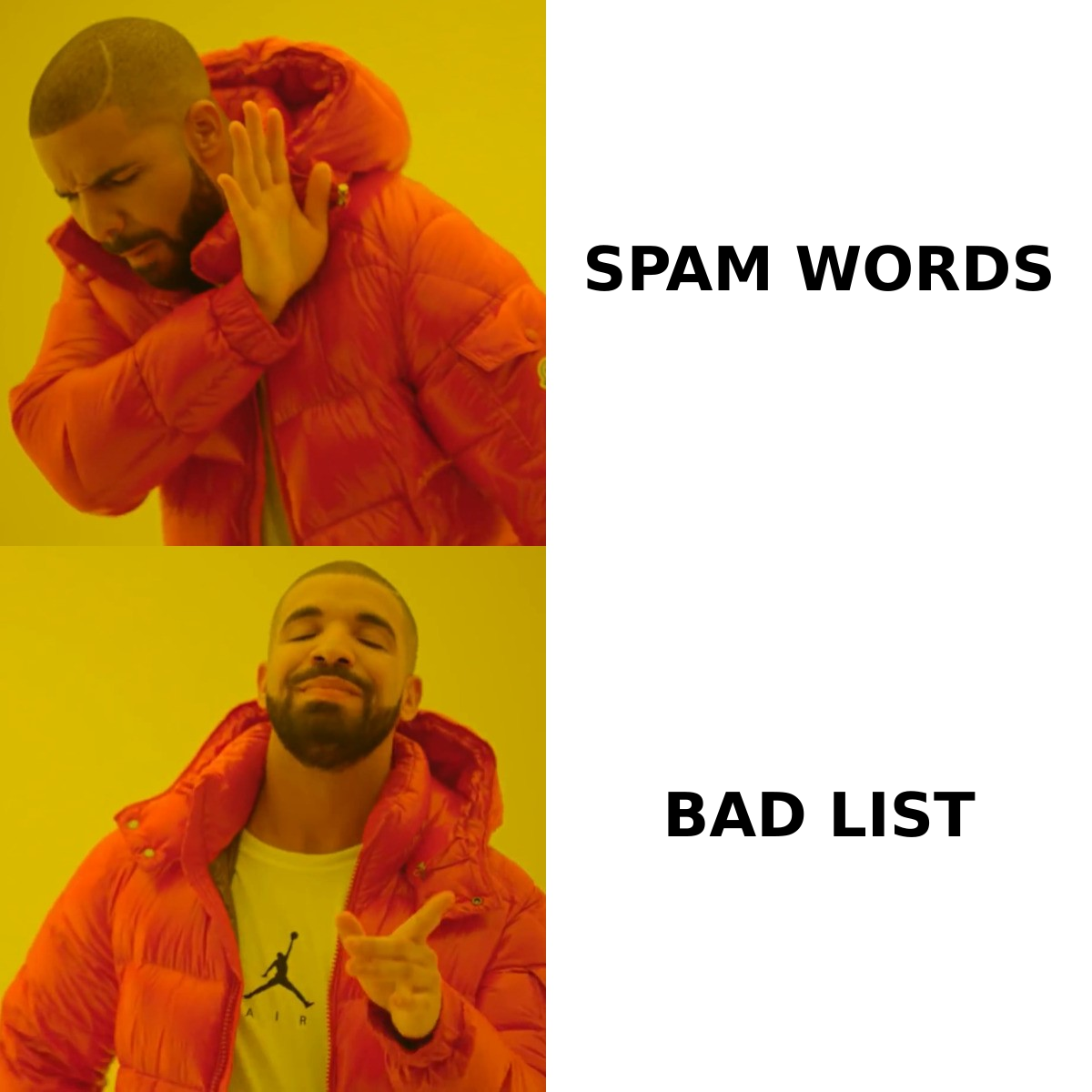
Mostly no, and this is the single biggest misconception a spam checker will reinforce.
The "spam trigger word" lists floating around — free, guarantee, act now, limited time — descend from Bayesian filters trained on early-2000s spam corpora. Gmail, Outlook, and Yahoo have since moved to machine-learning classifiers that weight sender behavior far more heavily than vocabulary. Google's own Postmaster Tools documentation centers on domain reputation, IP reputation, spam rate, and authentication — not word lists.
You can prove this to yourself in thirty seconds. Every SaaS onboarding email says "free trial." Every e-commerce email says "limited time." They land in the inbox because the sender has good reputation and recipients open the mail.
Where wording still costs you:
- Aggressive all-caps or excessive punctuation in subject lines still triggers SpamAssassin rules and reads as low-effort to humans.
- Obfuscation attempts — writing "F.R.E.E" or "V1AGRA" — is explicitly modeled as evasion and scores worse than the plain word.
- Financial and pharma claim patterns ("guaranteed returns," "lose 30 lbs") sit in high-confidence classifier territory because they correlate with actual fraud.
- Mismatched subject and body — a subject promising one thing and a body selling another is a strong deceptive-content signal.
So use the checker's word flags as a copy-quality nudge, not a compliance requirement. If it tells you to remove "free" from a genuinely free offer, ignore it.
Which Signals Actually Decide Inbox Placement?#
Three buckets, roughly in order of weight.
Sender reputation. Your domain and IP history: complaint rate, spam-trap hits, bounce rate, authentication pass rate. Google enforces a spam complaint rate under 0.3%, with 0.1% as the practical target. This is the dominant factor and no amount of copy editing moves it.
Recipient engagement. Opens, replies, forwards, "not spam" marks, and — negatively — deletes-without-open and complaint clicks. Cold email is structurally disadvantaged here, which is why targeting matters more than templating.
Message content. Everything a spam checker measures. Real, but smaller than the other two.
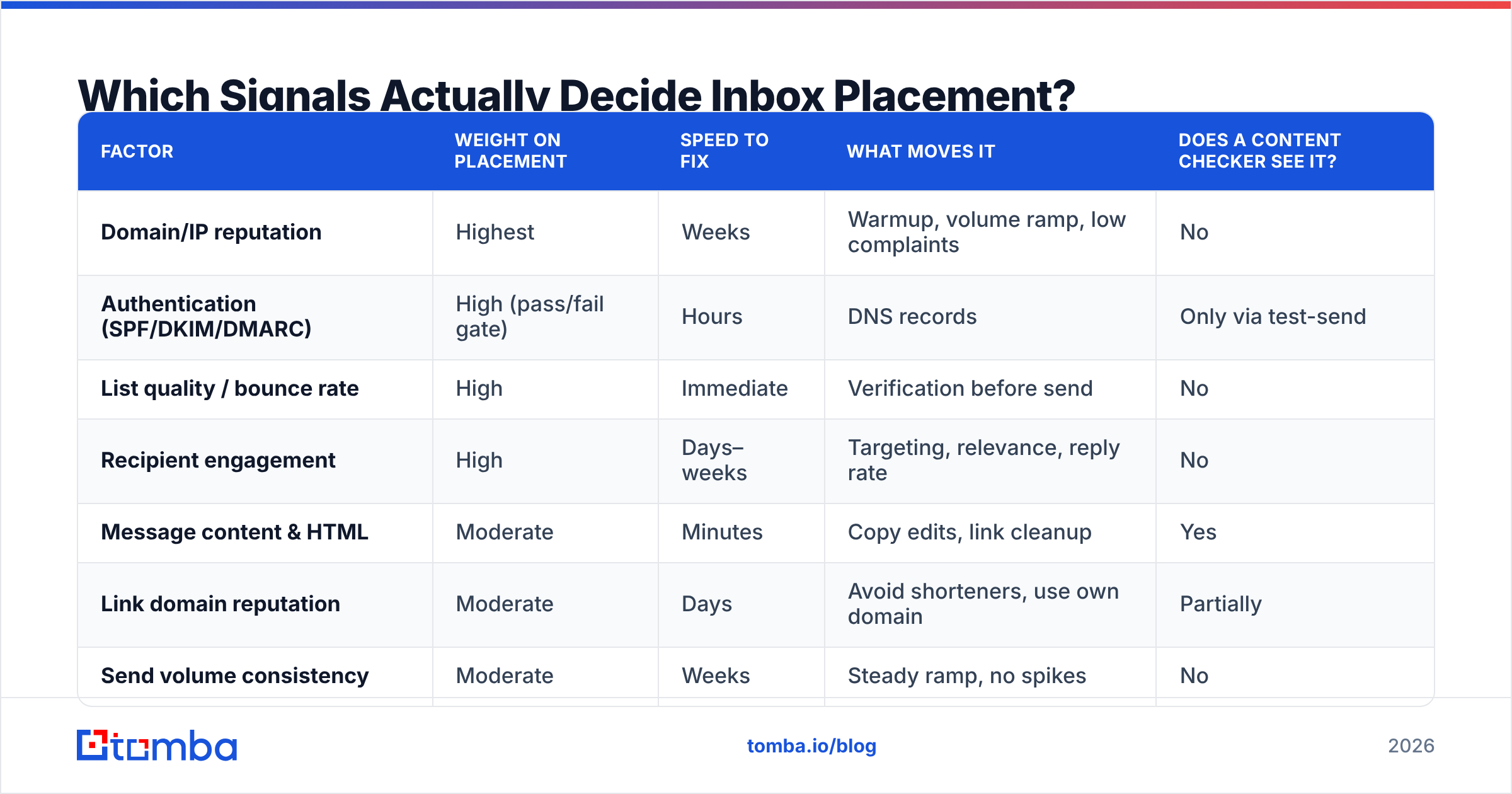
Here's how the three compare on what you can control and how fast a change shows up:
| Factor | Weight on placement | Speed to fix | What moves it | Does a content checker see it? |
|---|---|---|---|---|
| Domain/IP reputation | Highest | Weeks | Warmup, volume ramp, low complaints | No |
| Authentication (SPF/DKIM/DMARC) | High (pass/fail gate) | Hours | DNS records | Only via test-send |
| List quality / bounce rate | High | Immediate | Verification before send | No |
| Recipient engagement | High | Days–weeks | Targeting, relevance, reply rate | No |
| Message content & HTML | Moderate | Minutes | Copy edits, link cleanup | Yes |
| Link domain reputation | Moderate | Days | Avoid shorteners, use own domain | Partially |
| Send volume consistency | Moderate | Weeks | Steady ramp, no spikes | No |
The lesson from that table: a content checker covers one and a half rows out of seven. It's useful, it's cheap, and it is not a deliverability strategy.
How Do the Main Spam Checker Tools Compare?#
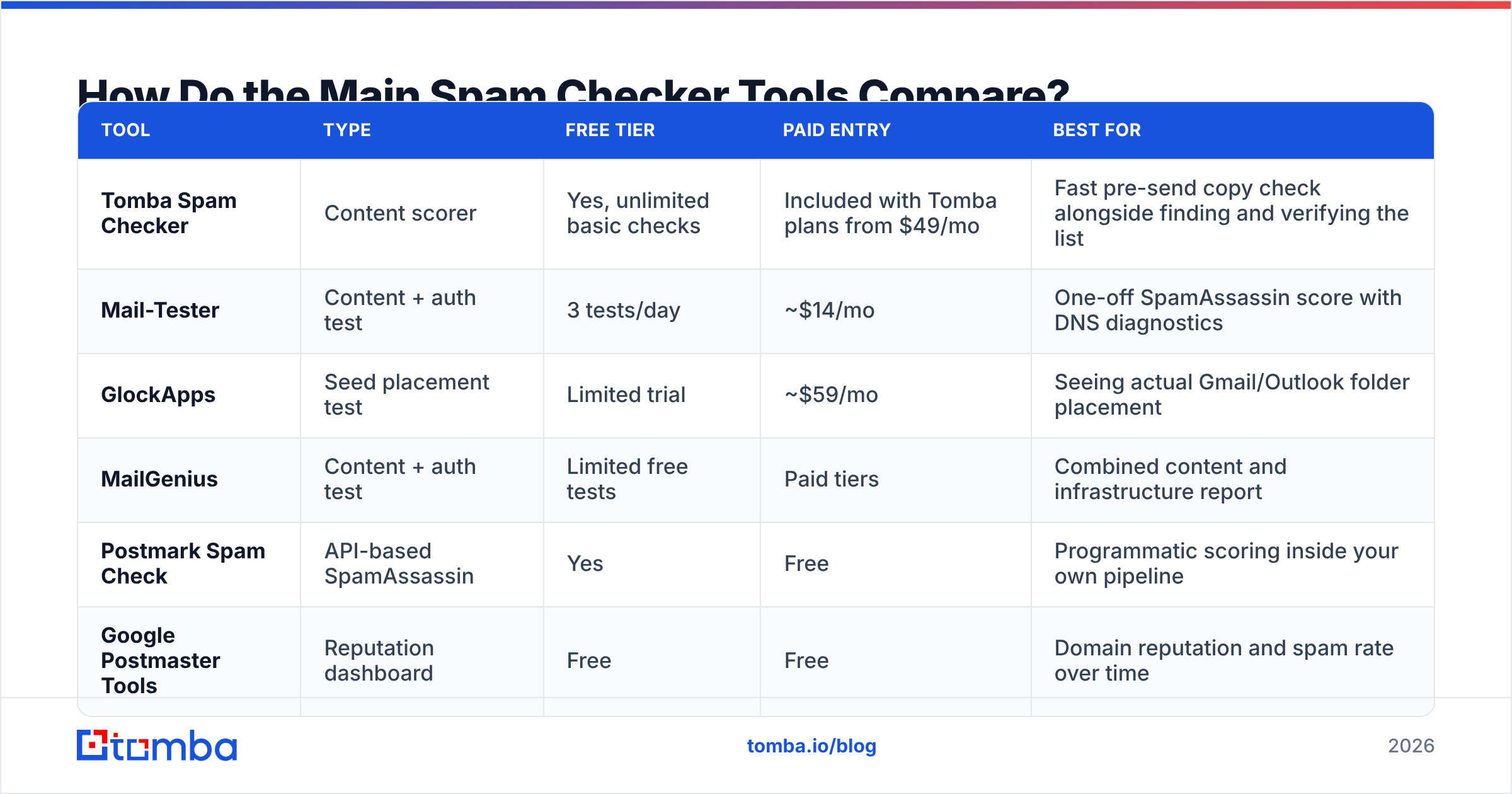
Most tools fall into three categories: pure content scorers, seed-list placement testers, and full deliverability suites. They solve different problems and the pricing reflects that.
| Tool | Type | Free tier | Paid entry | Best for |
|---|---|---|---|---|
| Tomba Spam Checker | Content scorer | Yes, unlimited basic checks | Included with Tomba plans from $49/mo | Fast pre-send copy check alongside finding and verifying the list |
| Mail-Tester | Content + auth test | 3 tests/day | ~$14/mo | One-off SpamAssassin score with DNS diagnostics |
| GlockApps | Seed placement test | Limited trial | ~$59/mo | Seeing actual Gmail/Outlook folder placement |
| MailGenius | Content + auth test | Limited free tests | Paid tiers | Combined content and infrastructure report |
| Postmark Spam Check | API-based SpamAssassin | Yes | Free | Programmatic scoring inside your own pipeline |
| Google Postmaster Tools | Reputation dashboard | Free | Free | Domain reputation and spam rate over time |
A practical stack: use a free content scorer on every new template, a seed-placement test before any campaign above a few thousand sends, and Postmaster Tools continuously to watch reputation drift. You don't need to pay for all three categories.
If your budget only stretches to one paid tool, buy the one that fixes list quality — not the one that grades copy. Bad addresses generate hard bounces and spam-trap hits, and those damage reputation permanently. A free email checker handles one-off validation; an email verifier handles the list.
How Do You Actually Test a Cold Email Before Sending?#
Run this sequence. It takes about twenty minutes for a new template and catches nearly everything that a content-only check misses.
1. Verify the list first. Strip invalids, role accounts (info@, sales@), and catch-all domains you can't confirm. Anything above a 3% bounce rate on send is a reputation problem, and Gmail treats repeated hard bounces as a strong negative signal. Use a catch-all verifier for the ambiguous domains rather than guessing.
2. Check authentication. Confirm SPF, DKIM, and DMARC all pass for your sending domain. Since 2024, bulk senders to Gmail and Yahoo must have DMARC configured. Run an SPF checker and confirm your record has no more than 10 DNS lookups.
3. Score the content. Paste subject and body into a spam checker. Target a SpamAssassin score below 3.0. Fix anything structural — broken HTML, image-only body, five links in a 90-word email.
4. Send to seed inboxes. At minimum, one Gmail, one Outlook/Microsoft 365, and one corporate domain you control. Look at where the message actually lands, not just where a tool predicts it will.
5. Check the plain-text rendering. Many corporate clients strip HTML. If your email is incomprehensible as plain text, roughly a third of B2B recipients see gibberish. Convert with an HTML to text pass and read it.
6. Warm up and ramp. New domains need 3–6 weeks of gradual volume increase. Jumping from zero to 500 sends per day on a fresh domain is the single fastest way to get filtered regardless of how clean your copy is.
What Does a Content Checker Miss That Kills Campaigns?#
Four things, consistently.
Spam traps. Recycled or pristine trap addresses sitting in a purchased list. No content check sees them; hitting a handful can blocklist your domain. This is why list source matters more than list size — providers like BookYourData and other reputable database vendors invest heavily in trap avoidance, and that's the specific thing you're paying for when you buy verified data rather than scraping.
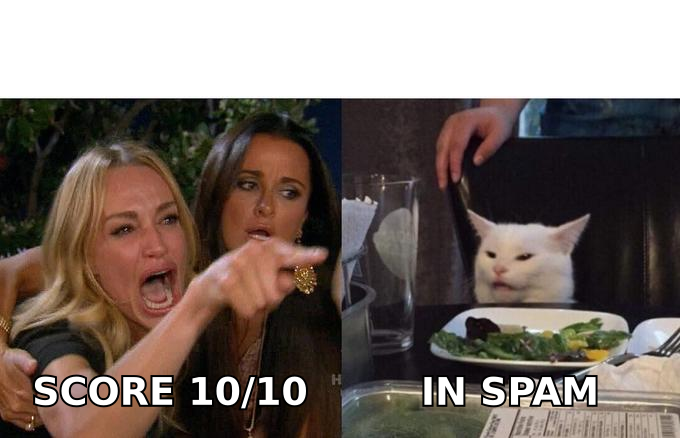
Reply-rate collapse. If nobody replies, engagement signals decay and placement degrades over weeks. Your content score stays 10/10 the whole time. The fix is targeting, not copy — sending to 200 genuinely relevant contacts beats 2,000 loosely relevant ones on every metric that filters watch.
Sending infrastructure problems. Shared IPs with noisy neighbors, missing reverse DNS, or a mail server your ESP flagged. Invisible to content analysis.
Link domain contamination. Your copy can be immaculate while the tracking domain you link to is on a blocklist because someone else on the shared tracking infrastructure abused it. Use a custom tracking domain and check it with a blacklist checker before every major campaign.
The pattern across all four: the failure lives outside the message body. That's the structural limit of any content-only tool, and it's why "my spam score is perfect but I'm in the junk folder" is the most common deliverability complaint on G2 and vendor forums alike.
What Content Rules Are Actually Worth Following?#
Strip away the folklore and a short list survives:
- Keep it under 150 words for cold outreach. Short messages read as human and score better on nearly every heuristic. They also get replies.
- One link, maximum two. Every additional URL raises risk. Zero links in a first-touch email is a legitimate strategy.
- No images in the first email. Image-heavy first contact from an unknown sender is a strong spam correlate, and images often don't load anyway.
- Plain text or minimal HTML. Skip the newsletter template. A cold email should look like a person typed it.
- No tracking pixel on first touch. Some filters flag 1x1 images from unknown senders; you also lose nothing since open rates have been unreliable since Apple Mail Privacy Protection.
- Consistent From name and reply-to. Mismatches between the display name, envelope sender, and reply-to address are a classic phishing pattern.
- Include a real unsubscribe path. Even for one-to-one cold email, a plain "reply STOP and I'll remove you" line reduces complaints, and complaints are the metric that hurts most.
Notice that none of these are about which words you use. They're about structure, length, and honesty of presentation — which is exactly what modern classifiers evaluate.
For subject lines specifically, a subject line tester will catch length and punctuation problems faster than reading it aloud. Keep it under 50 characters, sentence case, and no punctuation beyond a question mark.
How Often Should You Re-Test?#
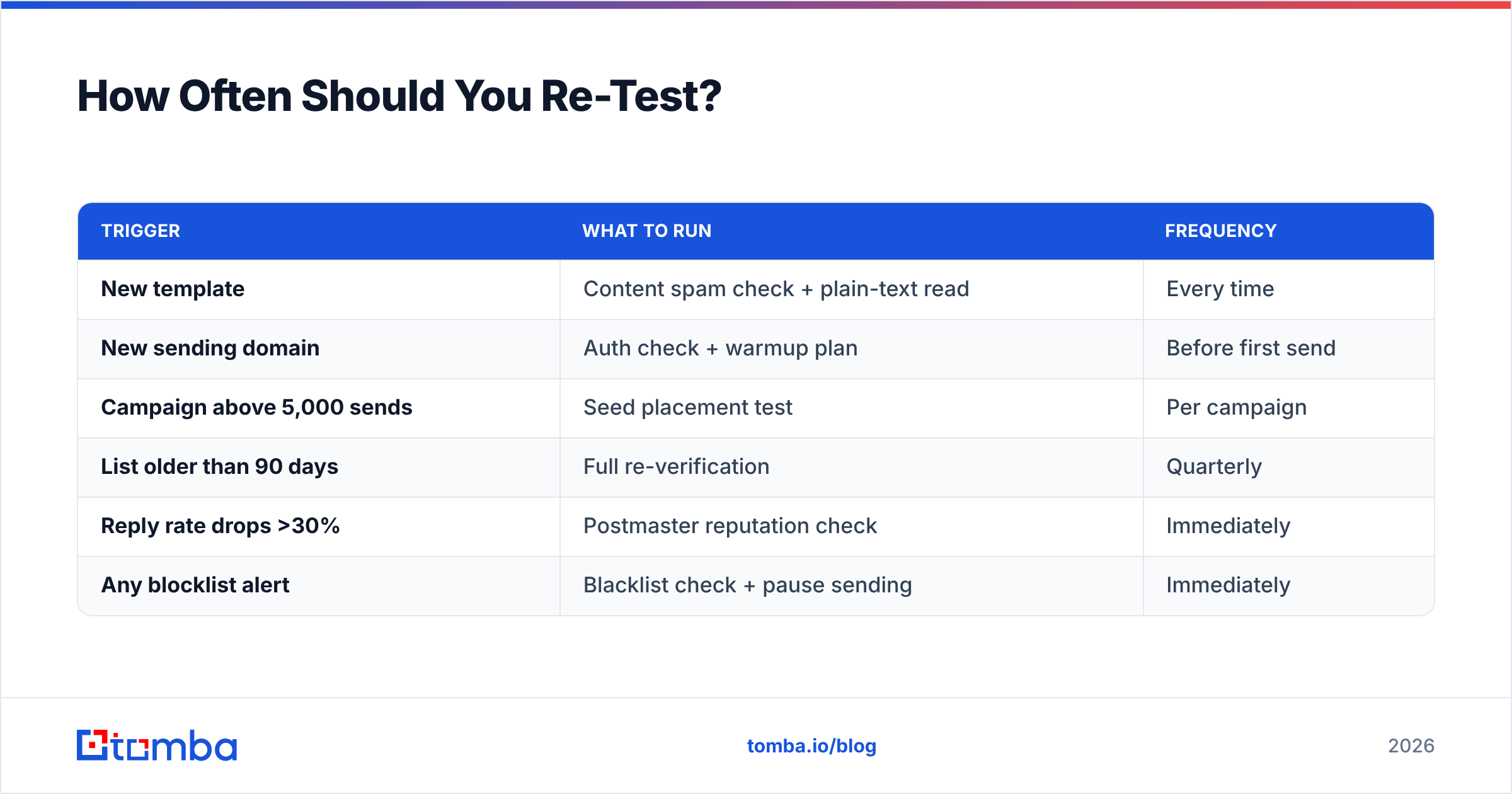
Re-test content whenever you change the template, and re-test infrastructure on a schedule regardless of whether anything changed.
| Trigger | What to run | Frequency |
|---|---|---|
| New template | Content spam check + plain-text read | Every time |
| New sending domain | Auth check + warmup plan | Before first send |
| Campaign above 5,000 sends | Seed placement test | Per campaign |
| List older than 90 days | Full re-verification | Quarterly |
| Reply rate drops >30% | Postmaster reputation check | Immediately |
| Any blocklist alert | Blacklist check + pause sending | Immediately |
The quarterly re-verification is the one people skip. B2B email addresses decay at roughly 22–30% per year as people change jobs, so a list you verified in January is measurably worse by April. Running a bulk verify pass on your active segments costs less than the reputation damage from one bounce-heavy send.
Where Does a Spam Checker Fit in Your Stack?#
At the end of the process, not the beginning.
Build the sequence in dependency order: source accurate contacts, verify them, configure authentication, warm the domain, write a short honest message, then run the content check as a final sanity pass. Teams that invert this — perfecting copy against a spam scorer while sending to an unverified scraped list — get the worst of both: time spent on the lowest-leverage factor and a reputation that keeps degrading.
The content check is genuinely useful for catching the specific, embarrassing mistakes: a broken HTML tag, a shortener URL you forgot to swap, a subject line in caps, an image-only body. Those cost you placement and take two minutes to fix. Just don't confuse a clean score with a working campaign.
For the parts a spam checker can't see, start with the data. Find verified, current contacts with Tomba Email Finder — search by domain, name, or company, with confidence scoring and SMTP verification built in so bounce rates stay low from the first send. The free tier covers 25 searches per month; paid Tomba plans start at $49/mo when you're ready to run volume. Clean data first, clean copy second — in that order, the spam checker becomes what it should be: the last box you tick, not the first thing you worry about.
Related guides#
Ready to find emails that actually work?
Join 150,000+ professionals who stopped guessing and started sending. Free credits on signup — no credit card required.
Get the Tomba newsletter
Practical outbound tactics and product updates — once every two weeks.
About the author