Email Deliverability Audit: The Complete 2026 Checklist
Inbox placement problems almost always trace back to five fixable layers. Here is the full email deliverability audit checklist for 2026 — what to test, which tools to use, and the exact numbers that count as a pass.
TL;DR
- An email deliverability audit is a structured pass over five layers: authentication, list quality, sending reputation, infrastructure, and content. Skip one and the other four lie to you.
- Authentication is the cheapest fix and the most commonly broken. As of 2024, Google and Yahoo require SPF, DKIM, and DMARC for bulk senders — and enforcement has only tightened since.
- List hygiene is the single biggest lever on reputation. A hard-bounce rate above 2% will drag your domain down faster than any subject line ever could.
- Reputation is measured, not guessed. Google Postmaster Tools, Microsoft SNDS, and blacklist checks give you actual numbers instead of vibes.
- Run the full audit quarterly, and run the list-hygiene slice before every campaign over 1,000 recipients.
What is an email deliverability audit?#
An email deliverability audit is a systematic inspection of everything between your "send" button and the recipient's inbox — DNS records, list quality, domain reputation, sending infrastructure, and message content — scored against known thresholds.
Think of it like a pre-flight checklist. A pilot doesn't check the fuel gauge because they suspect a leak; they check it because the cost of finding out mid-flight is catastrophic. Same logic here. You don't audit because opens dropped last week. You audit on a schedule so that the week opens drop, you already know which of the five layers changed.
The distinction that matters: delivery means the receiving server accepted your message. Deliverability means it landed in the inbox rather than spam. Most ESP dashboards report the first number and let you assume the second. A 99.2% "delivered" rate is perfectly compatible with 40% of your mail sitting in Promotions or Junk, and nothing in your sending platform will tell you that.
Which five layers should the audit cover?#
Work them in this order. Each layer's results are only trustworthy if the layer above it passed.
- Authentication — SPF, DKIM, DMARC, and increasingly BIMI. Binary, cheap to fix, and a hard gate at Gmail and Outlook. If these fail, nothing downstream matters.
- List quality — bounce rate, spam-trap exposure, catch-all share, role-account share, and list age. This is where most reputation damage originates.
- Sending reputation — domain and IP reputation as reported by the mailbox providers themselves, plus blacklist status across the major RBLs.
- Infrastructure — sending domain strategy, subdomain separation, IP type (shared vs dedicated), warmup state, and volume ramp curve.
- Content and engagement — spam-trigger language, image-to-text ratio, link reputation, unsubscribe mechanics, and reply/open behavior.
A useful mental model: layers 1 and 4 decide whether the mailbox provider trusts you. Layers 2 and 3 decide whether it likes you. Layer 5 decides whether it keeps liking you next month.

How do you audit authentication?#
Start here, and finish it in under an hour. Every check below is a DNS lookup you can run for free.
SPF. Publish one — and only one — SPF TXT record per sending domain. Confirm it resolves in fewer than 10 DNS lookups; exceeding the limit produces a permerror that many receivers treat as a fail. Include every service that sends on your behalf: your ESP, your CRM, your transactional provider, your helpdesk. Run the record through an SPF checker and read the resolved include chain, not just the pass/fail badge.
DKIM. Verify a 2048-bit key is published and that your ESP is actually signing with it. A common failure: the key is in DNS, but the platform still signs with a legacy 1024-bit selector or a default shared domain. Send a test message to yourself and inspect the raw headers for dkim=pass with a d= value matching your own domain — not your vendor's.
DMARC. Publish a record at _dmarc.yourdomain.com. If you're starting from nothing, p=none with an rua= reporting address is the right first step; it collects data without rejecting anything. Then read the aggregate reports for two to four weeks, fix the sources that fail alignment, and move to p=quarantine, then p=reject. The DMARC specification is worth a skim if you're the one making the policy call.
Alignment. This is the check people miss. SPF and DKIM can both pass while DMARC still fails, because DMARC requires the passing domain to align with the visible From: domain. If your From: address is you@company.com but your Return-Path resolves to bounces.esp-vendor.net and your DKIM signs as esp-vendor.net, you have two passes and one failure. Custom return-path and branded sending domains fix this.
Reverse DNS and TLS. Your sending IP should have a PTR record resolving to a hostname you control, and that hostname should forward-resolve back to the same IP. Opportunistic TLS should be on. Both are table stakes for anything over a few thousand messages a day. Google's bulk sender guidelines spell out the current requirements.
How bad is your list, really?#
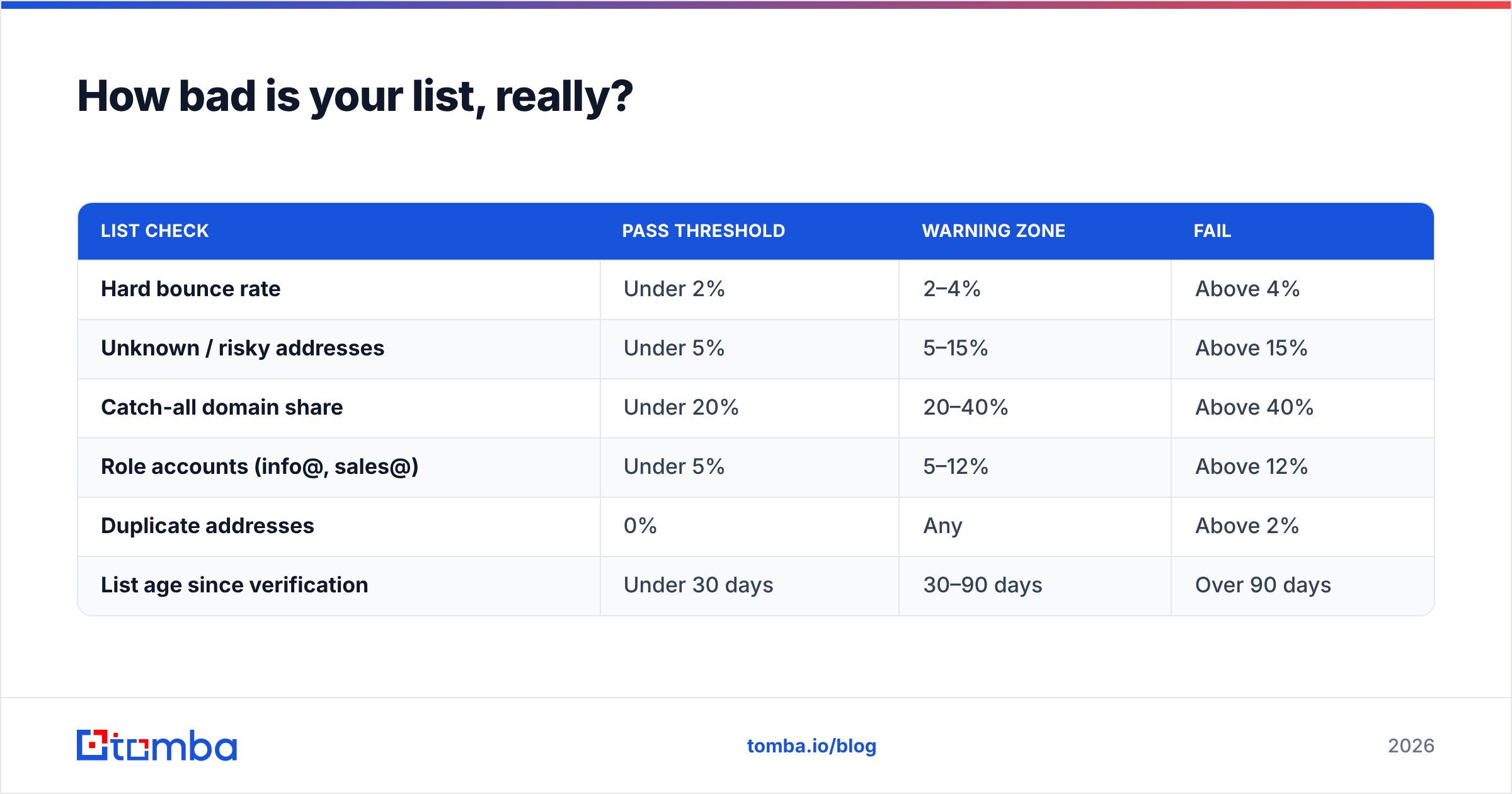
Bounce rate is the number that decides your fate, and it's determined almost entirely by data collected before you hit send.
Here's the arithmetic that surprises people. B2B email data decays at roughly 22–30% per year — people change jobs, companies rebrand, domains get retired. A list you scraped or bought fourteen months ago is, statistically, about a quarter dead. Send to it cold and you're looking at a 15–25% hard bounce rate. Gmail starts throttling well before that. Two campaigns like that and your domain reputation is in a hole that takes months of clean sending to climb out of.
The audit here is mechanical:
| List check | Pass threshold | Warning zone | Fail |
|---|---|---|---|
| Hard bounce rate | Under 2% | 2–4% | Above 4% |
| Unknown / risky addresses | Under 5% | 5–15% | Above 15% |
| Catch-all domain share | Under 20% | 20–40% | Above 40% |
| Role accounts (info@, sales@) | Under 5% | 5–12% | Above 12% |
| Duplicate addresses | 0% | Any | Above 2% |
| List age since verification | Under 30 days | 30–90 days | Over 90 days |
Run every list through an email verifier before it touches a sequence, and re-verify anything older than 90 days. For lists over a few thousand rows, a bulk verify pass is faster and cheaper than the reputation damage of skipping it.
Catch-all domains deserve their own note. A catch-all server accepts mail for every address at the domain, so standard SMTP verification returns "accepted" for asdfgh@company.com just as readily as for a real employee. That's why a naive verifier reports 98% valid on a list that's actually half garbage. Use a dedicated catch-all verifier that scores these separately instead of counting them as clean.
Spam traps are the other silent killer. Pristine traps are addresses that never belonged to a human — if you're hitting them, your acquisition source is scraping. Recycled traps are old abandoned addresses reactivated by the provider; you hit those by mailing stale data. Both are invisible in your ESP dashboard. The only defense is verification plus disciplined re-permissioning.
What does your sending reputation actually say?#
Stop inferring reputation from open rates. Measure it directly.
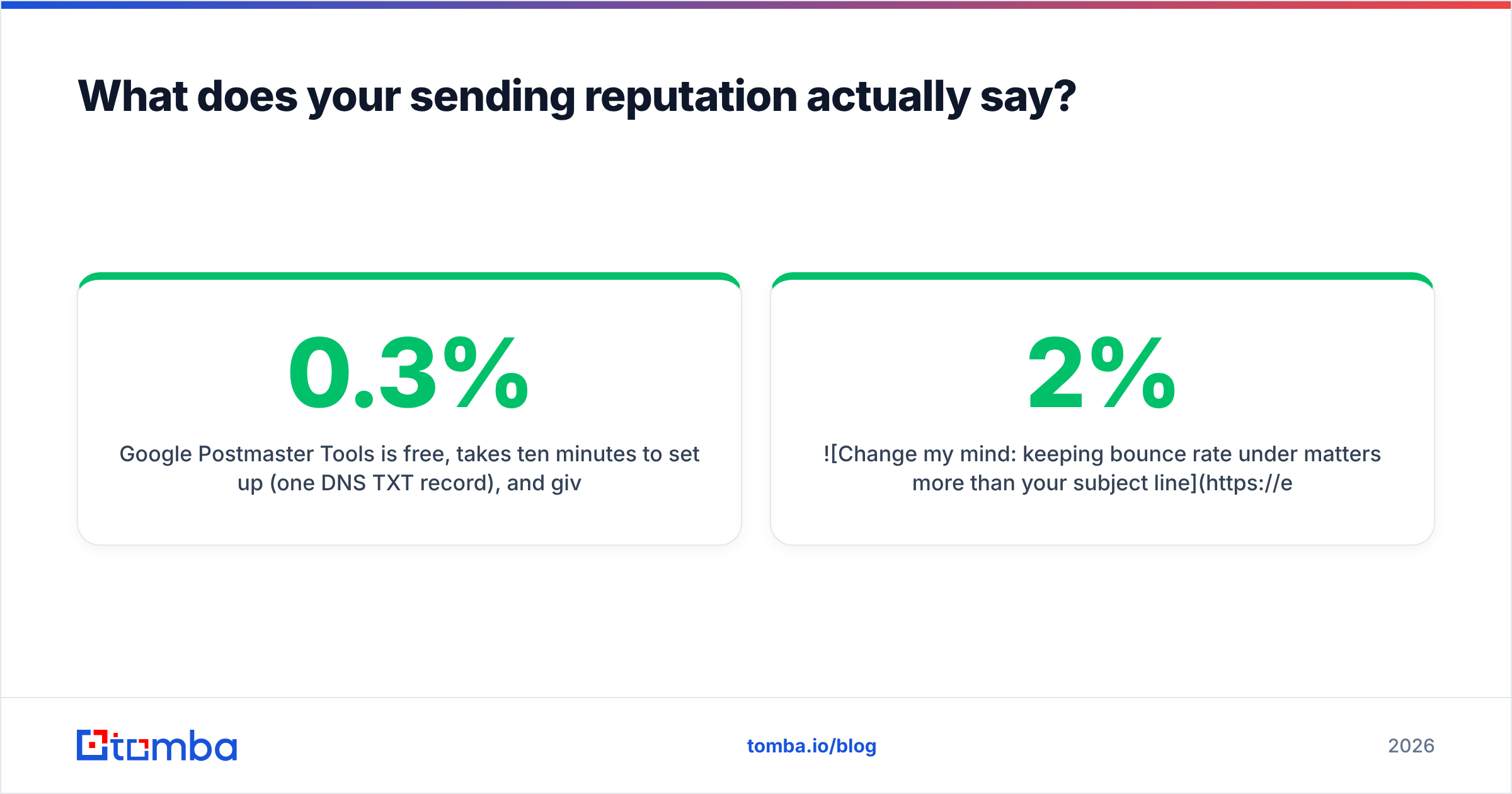
Google Postmaster Tools is free, takes ten minutes to set up (one DNS TXT record), and gives you domain reputation on a High/Medium/Low/Bad scale, spam complaint rate, authentication pass rates, and delivery errors — straight from Gmail. If you send meaningful B2B volume and haven't connected it, that's the highest-ROI thirty minutes in this entire audit. Watch the user-reported spam rate specifically: Google's stated threshold is 0.3%, and you want to sit comfortably under 0.1%.
Microsoft SNDS and JMRP do the equivalent for Outlook, Hotmail, and Live, though they're IP-based rather than domain-based, so they're most useful if you're on a dedicated IP.
Blacklist status. Check your sending domain and IP against the major RBLs — Spamhaus, SORBS, Barracuda, SpamCop. Most listings are automated and temporary, but an active Spamhaus SBL listing is a five-alarm fire that will tank delivery across dozens of receivers simultaneously. A blacklist checker run should be part of your monthly routine, not something you reach for after the fact.
Seed testing. Send to a panel of real inboxes across Gmail, Outlook, Yahoo, and a few corporate Microsoft 365 tenants, then record where each one landed. Inbox vs Promotions vs Spam. This is the only way to see placement rather than acceptance, and it's the number your ESP will never show you.

Which tools should you use for each audit layer?#
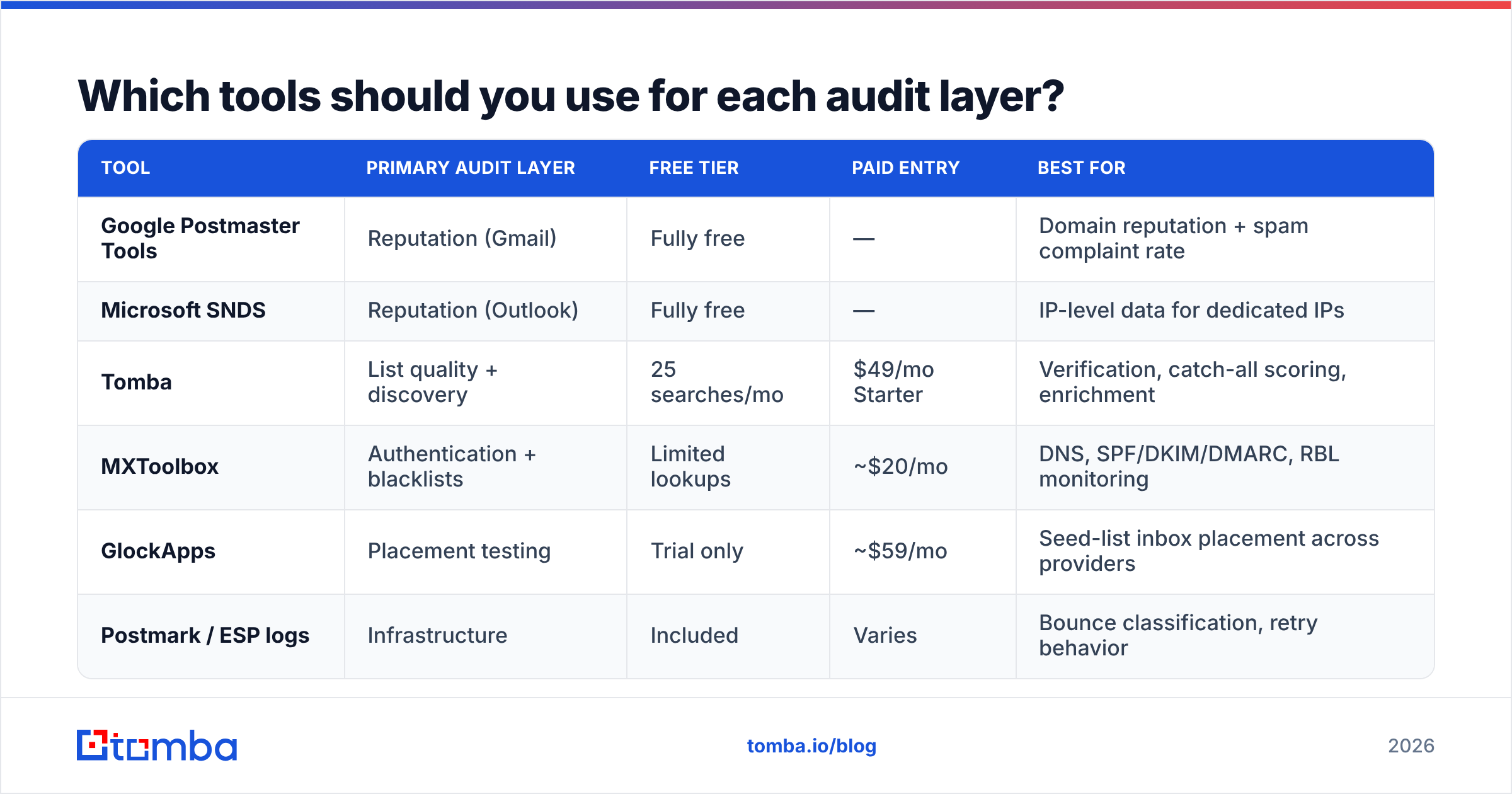
You don't need all of these. You need one credible option per layer, and you need to actually run them on a schedule.
| Tool | Primary audit layer | Free tier | Paid entry | Best for |
|---|---|---|---|---|
| Google Postmaster Tools | Reputation (Gmail) | Fully free | — | Domain reputation + spam complaint rate |
| Microsoft SNDS | Reputation (Outlook) | Fully free | — | IP-level data for dedicated IPs |
| Tomba | List quality + discovery | 25 searches/mo | $49/mo Starter | Verification, catch-all scoring, enrichment |
| MXToolbox | Authentication + blacklists | Limited lookups | ~$20/mo | DNS, SPF/DKIM/DMARC, RBL monitoring |
| GlockApps | Placement testing | Trial only | ~$59/mo | Seed-list inbox placement across providers |
| Postmark / ESP logs | Infrastructure | Included | Varies | Bounce classification, retry behavior |
Two notes on reading this table. First, the free reputation tools from Google and Microsoft are not consolation prizes — they're first-party data, which makes them more authoritative than any third-party estimate. Second, verification and placement testing solve different problems and don't substitute for each other. Verification stops you from sending to bad addresses; placement testing tells you where the good addresses' mail actually lands.
If you're evaluating vendors more broadly, G2's email deliverability category is a reasonable starting point for peer reviews, though treat any leaderboard as a shortlist generator rather than an answer. Check Tomba pricing directly if the verification and finding layers are what you're missing.
How do you audit infrastructure and content?#
Infrastructure. Cold outbound should never run from your primary corporate domain. Use a separate but related domain (getcompany.com, company-mail.com), warm it for four to six weeks before real volume, and cap per-mailbox daily sends at 30–50 for cold sequences. If you're pushing volume across multiple mailboxes, confirm each one is individually authenticated — a single misconfigured inbox in a rotation drags the whole domain's alignment stats down.
Check your ramp curve too. Going from 200 sends a day to 2,000 overnight looks exactly like a compromised account to a filtering system. Double volume weekly at most.
Content. The audit here is less about forbidden words than it is about signals of automation. Scan for: image-to-text ratio (keep text dominant), link count (one or two, not six), link domain reputation (shortened URLs and shared tracking domains are penalized), and a working one-click unsubscribe header — now required for bulk senders at Gmail and Yahoo. Run a draft through a spam checker before the sequence goes live.
Engagement is content's scoreboard. Reply rate influences reputation more than open rate does, and open rate itself has been noisy since Apple Mail Privacy Protection started pre-fetching images. If a segment shows sustained non-engagement over 90 days, suppress it. Continuing to mail people who never open is one of the fastest ways to convert a good sender reputation into a mediocre one.
What does a passing audit look like?#
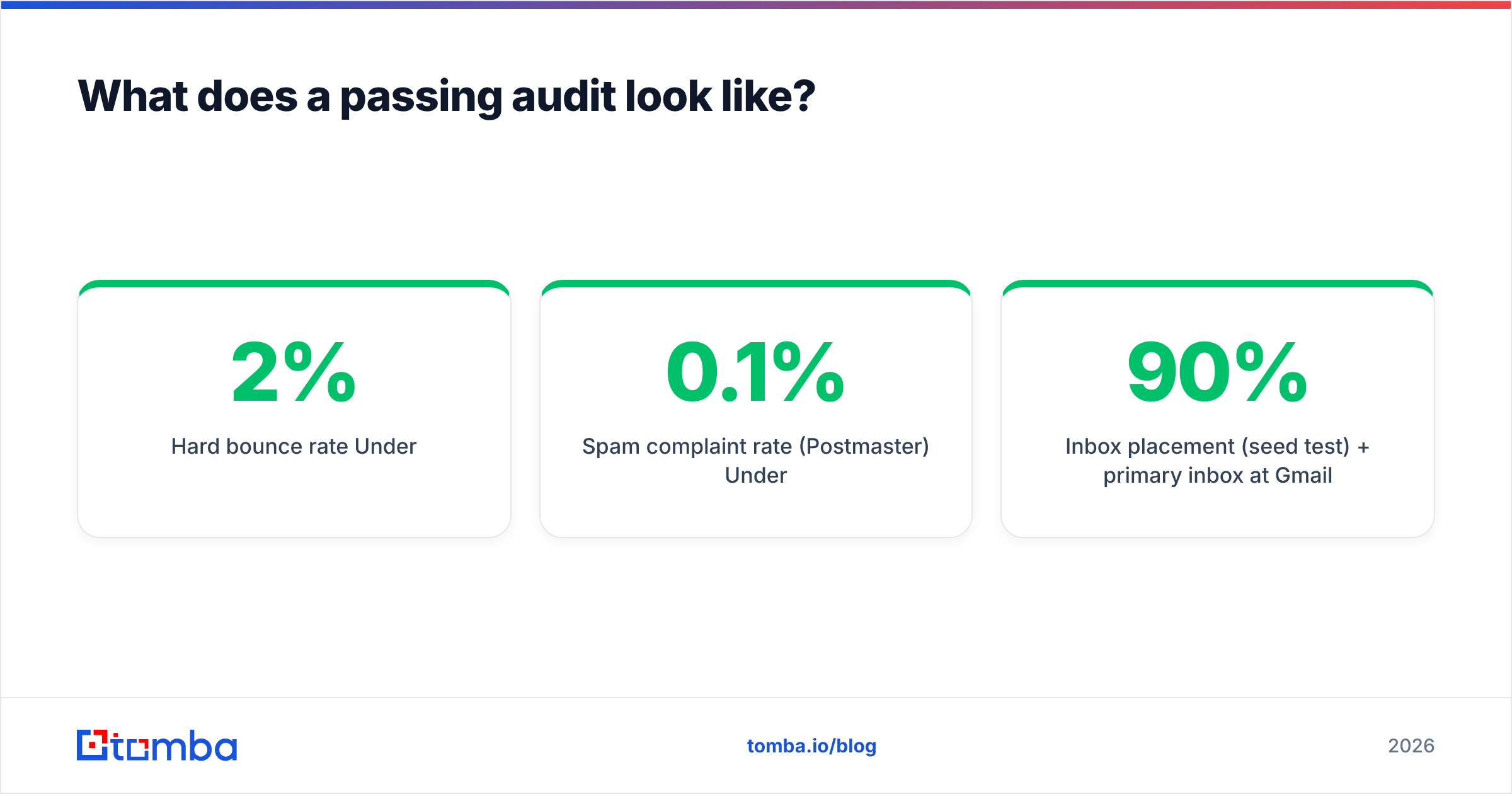
Score yourself honestly. A pass on every row below means your deliverability problems, if you have any, are targeting or offer problems — not technical ones.
| Check | Passing result |
|---|---|
| SPF | Single record, resolves under 10 lookups, all senders included |
| DKIM | 2048-bit, signing with your own domain |
| DMARC | Published, alignment passing, policy at quarantine or reject |
| Hard bounce rate | Under 2% |
| Spam complaint rate (Postmaster) | Under 0.1% |
| Domain reputation (Postmaster) | High or Medium |
| Blacklists | Zero active listings on major RBLs |
| Inbox placement (seed test) | 90%+ primary inbox at Gmail |
| List verification recency | Under 90 days |
| One-click unsubscribe | Present in headers |
How often should you re-run it?#
Three cadences, not one.
Before every campaign over 1,000 recipients: verify the list, check the send domain against blacklists, confirm the unsubscribe header works. Fifteen minutes.
Monthly: review Postmaster Tools trends, spam complaint rate, and bounce classification from your ESP. Look for direction, not absolute values — reputation sliding from High to Medium is more actionable than any single day's number.
Quarterly: the full five-layer pass, including authentication re-verification (vendors change, records get edited) and a seed placement test. Also re-check your data source. If your bounce rates are creeping up campaign over campaign despite verification, the problem is upstream in how you're sourcing contacts, not downstream in how you're sending to them.
The uncomfortable truth from most audits: technical configuration is usually fine after one afternoon of fixes, and the persistent problems are almost always data problems. Stale lists, unverified imports, and contacts sourced from directories that were accurate two job changes ago.
That's the layer worth investing in permanently. Tomba's email finder pulls verified professional addresses at the point of discovery — with catch-all scoring and confidence levels attached — so your lists start clean instead of getting cleaned after the damage is done. The free tier covers 25 searches a month if you want to test accuracy against your own known-good contacts before committing to anything.
Related guides#
Ready to find emails that actually work?
Join 150,000+ professionals who stopped guessing and started sending. Free credits on signup — no credit card required.
Get the Tomba newsletter
Practical outbound tactics and product updates — once every two weeks.
About the author