Email Deliverability Changes: What Actually Broke Since 2024
Google and Yahoo's 2024 bulk-sender rules were only the opening move. Here's what changed since, what enforcement looks like in 2026, and the checklist that keeps cold email landing in the inbox.
Email deliverability changes have not stopped since February 2024. Google and Yahoo's bulk-sender rules were the opening move, not the finish line. Here is what shifted since, what enforcement looks like in 2026, and the fix order that keeps cold email in the inbox.
TL;DR
- The February 2024 Google/Yahoo bulk-sender rules are no longer new. They are the baseline. Enforcement is now silent and automatic.
- The rules: SPF and DKIM, a DMARC record on the sending domain, one-click unsubscribe, and a spam-complaint rate under 0.3%.
- Microsoft brought the same rules to Outlook.com in May 2025. That closed the last big consumer mailbox where sloppy authentication still worked.
- The biggest of the email deliverability changes since 2024 is not about authentication at all. Engagement now outweighs volume. A domain sending 200 emails a day to a stale list gets throttled faster than one sending 2,000 to a clean, active list.
- List hygiene is now the highest-leverage lever you have. Bounce rate and complaint rate are the two numbers that get you filtered.
- Fix things in this order: authenticate, verify the list, warm the domain, cap volume per inbox, then check your complaint rate every week.
What were the 2024 email deliverability changes?#
On February 1, 2024, Google and Yahoo started enforcing a shared set of rules for bulk senders. A bulk sender is anyone sending roughly 5,000+ messages a day to Gmail or Yahoo addresses. The rules themselves were unremarkable. Anyone doing email properly already met them. What made them matter was enforcement, and enforcement meant rejection rather than a warning banner.
The four requirements:
- Use both SPF and DKIM. One used to be enough to stay out of the spam folder. After February 2024, missing either can get your mail rejected at the SMTP layer.
- Publish a DMARC record on the sending domain. Even
p=nonemet the bar. But the record had to exist, and it had to align with the From domain. - Offer one-click unsubscribe through the
List-UnsubscribeandList-Unsubscribe-Postheaders, honored within two days. This covers marketing and subscribed mail, not one-to-one notes. - Keep spam complaints under 0.3%, measured in Google Postmaster Tools. Google's stated target is 0.1%. At 0.3%, filtering turns harsh.
Google published these in its Email sender guidelines, and it has quietly tightened them since. The 2024 rollout was the loud part. The email deliverability changes that followed arrived without announcements.

What has changed since 2024?#
Three things stand out for cold outbound.
Microsoft joined in May 2025. Outlook.com, Hotmail, and Live now require SPF, DKIM, and DMARC from high-volume senders. Mail that fails goes to junk instead of being rejected. For B2B senders this mattered more than the Google change. Many B2B recipients sit on Microsoft 365 tenants, and those tenants inherit consumer-side filtering.
Volume thresholds got fuzzier. The old "5,000 per day" number was a rule of thumb, not a switch. Mailbox providers score each domain's reputation continuously. A brand-new domain sending 300 emails a day with a 4% bounce rate is treated worse than an established domain sending 20,000 with a 0.2% bounce rate. What matters is your reputation curve, not your send count.
Engagement became the top signal. Opens are unreliable since Apple Mail Privacy Protection. So providers lean on replies, folder moves, contact adds, deletes without reading, and manual spam reports. Most cold-email teams still miss this. Your list quality now drives your inbox placement, because sending to people who ignore you is a negative signal.
Of all the email deliverability changes since 2024, that last one has the longest tail.
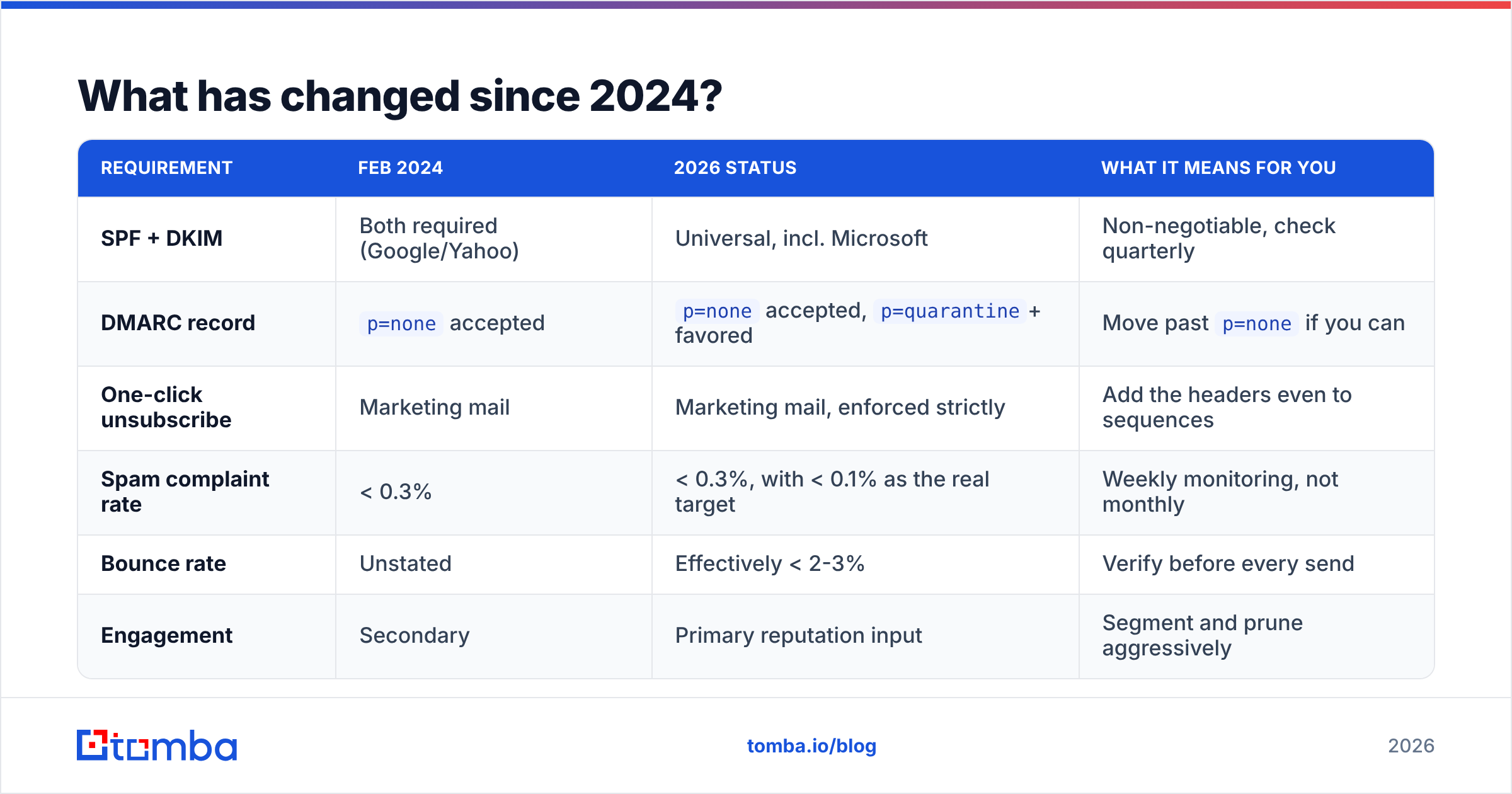
Bulk-sender rules: 2024 baseline vs 2026 reality
| Requirement | Feb 2024 | 2026 status | What it means for you |
|---|---|---|---|
| SPF + DKIM | Both required (Google/Yahoo) | Universal, incl. Microsoft | Non-negotiable, check quarterly |
| DMARC record | p=none accepted |
p=none accepted, p=quarantine+ favored |
Move past p=none if you can |
| One-click unsubscribe | Marketing mail | Marketing mail, enforced strictly | Add the headers even to sequences |
| Spam complaint rate | < 0.3% | < 0.3%, with < 0.1% as the real target | Weekly monitoring, not monthly |
| Bounce rate | Unstated | Effectively < 2-3% | Verify before every send |
| Engagement | Secondary | Primary reputation input | Segment and prune aggressively |
Why do most senders still fail after fixing authentication?#
Because authentication is a pass/fail gate, and reputation is a score. Passing the gate gets you evaluated. It does not get you delivered.
Think of it like airport security. SPF, DKIM, and DMARC are the boarding pass and ID check. Without them you never reach the gate. Once you are through, your seat depends on your frequent-flyer history. Mailbox providers work the same way. Authentication lets you in, and past behavior decides placement.
That history comes from a few inputs you can measure:
- Bounce rate — hard bounces tell providers you bought or scraped a list. Above roughly 3%, filtering tightens fast. It is the quickest fix and the one most teams skip.
- Spam complaint rate — the most damaging signal of all. One complaint per 1,000 sends (0.1%) is healthy. Three per 1,000 (0.3%) triggers throttling. Above that, expect the spam folder or a block.
- Replies and positive actions — replies, stars, and "not spam" clicks are the strongest good signals you can earn. This is why relevance beats volume.
- Sending consistency — a domain that sends 50, then 400, then 30, then 900 looks hacked. Steady daily volume with a slow ramp reads as legitimate.
- Domain and IP age — a new domain has no history, and no history reads as mild suspicion. Warm it for two to four weeks before any real volume.
- Content and link reputation — shortened links, blacklisted tracking domains, and heavy HTML in a supposedly personal email all drag placement down.
Did you fix DNS in 2024 and still watch reply rates fall? The cause is almost always #1 and #2. The list was never verified. The email deliverability changes reward clean data, and a bought list is the opposite of that.
How do you audit your current setup?#
Run these in order. Each takes minutes. Order matters, because fixing later steps on a broken foundation wastes your time.
Step 1 — verify DNS. Check that your SPF record resolves. It must stay under 10 DNS lookups and include every sending service you use. Confirm it with an SPF checker. Then check the DKIM selector for each provider. Last, make sure a DMARC record sits at _dmarc.yourdomain.com.
Step 2 — check for blacklists. A single listing on a major RBL will sink placement, no matter how clean your DNS looks. Run your sending IP and domain through a blacklist checker before you change anything else. Getting delisted is a prerequisite, not an optimization.
Step 3 — pull Postmaster Tools data. Google Postmaster Tools shows spam rate, domain reputation, IP reputation, and authentication pass rates for Gmail traffic. Does your domain reputation read "Low" or "Bad"? Stop sending cold volume from it and fix hygiene first. Microsoft's SNDS gives you a rough equivalent for Outlook.
Step 4 — measure your list, not your copy. Take a random 500-contact sample and run it through an email verifier. If more than 5% come back invalid, bounce rate is your problem. No amount of subject-line testing will fix that. Catch-all domains need their own handling. A catch-all verifier tells you which catch-alls are safe and which are spam traps.
Step 5 — check sender reputation outside your ESP. ESP dashboards report what the ESP sees, which is a filtered view. A third-party sender reputation checker gives you an outside read.
Which fixes give the biggest return?#
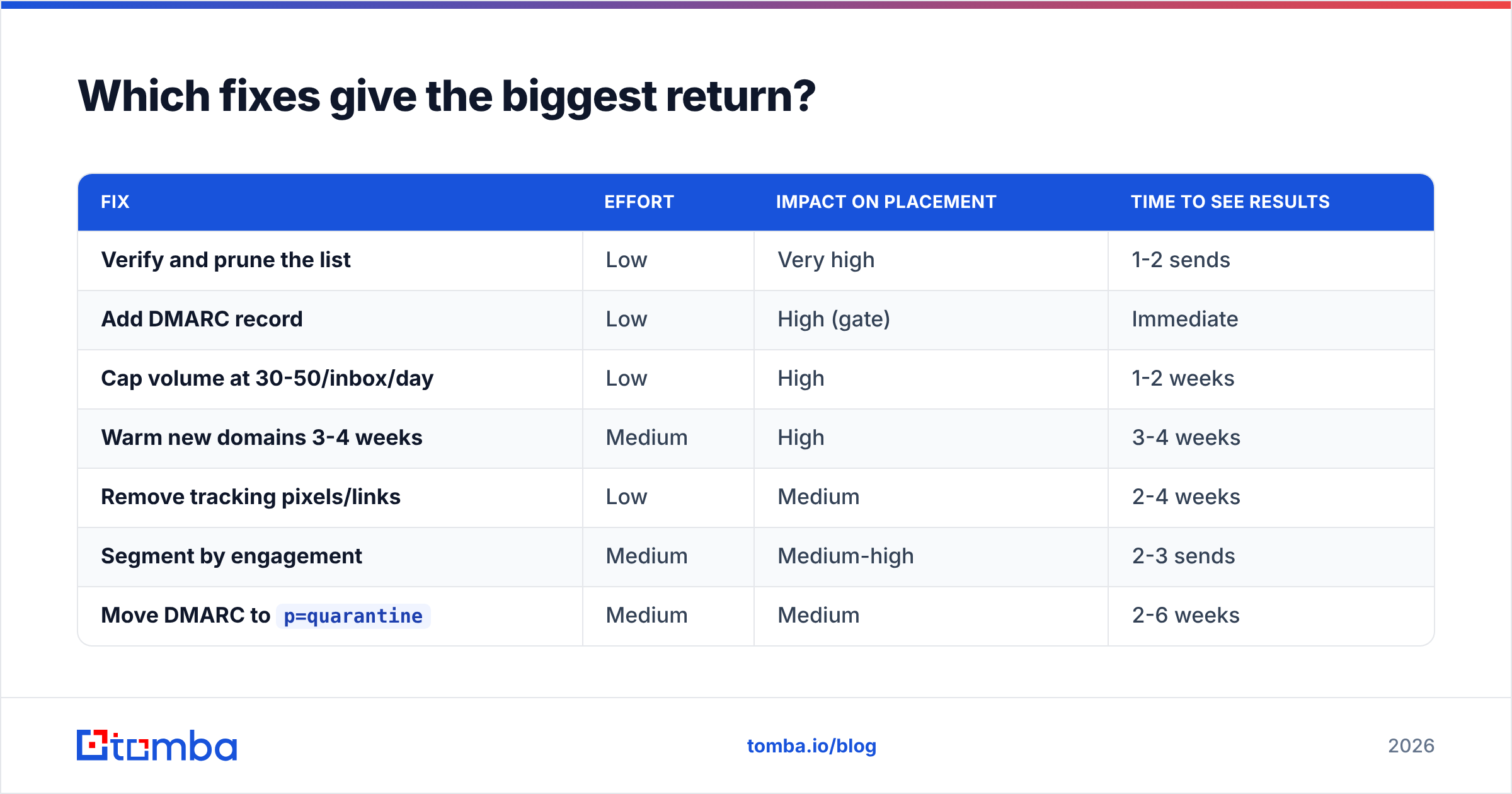
Ranked by impact per hour of work, based on what consistently moves placement:
| Fix | Effort | Impact on placement | Time to see results |
|---|---|---|---|
| Verify and prune the list | Low | Very high | 1-2 sends |
| Add DMARC record | Low | High (gate) | Immediate |
| Cap volume at 30-50/inbox/day | Low | High | 1-2 weeks |
| Warm new domains 3-4 weeks | Medium | High | 3-4 weeks |
| Remove tracking pixels/links | Low | Medium | 2-4 weeks |
| Segment by engagement | Medium | Medium-high | 2-3 sends |
Move DMARC to p=quarantine |
Medium | Medium | 2-6 weeks |
| Rewrite copy | High | Low-medium | Varies |
The order surprises people. Copy rewriting sits at the bottom, and that is where most teams spend their energy. Copy lifts reply rate, and reply rate lifts reputation. But that only works once your mail reaches inboxes. Fix the plumbing first.
Volume caps are underrated#
Per-inbox volume is the most common self-inflicted deliverability wound in 2026. Providers score reputation per sending identity. Blasting 200 messages a day from one Google Workspace inbox looks nothing like human behavior, and the filters know it.
Practical numbers that hold up:
- New domain, weeks 1-2: 5-15 sends a day per inbox, mostly to warm or seed addresses
- Weeks 3-4: ramp to 25-30 a day
- Established domain: 40-50 a day per inbox is a safe ceiling for cold outbound
- Scaling: add inboxes and domains, not volume per inbox
Plan the ramp with an email warmup calculator instead of guessing. Keep the warmup running at low volume for good, too. Reputation fades when you stop.
Do these email deliverability changes affect cold outbound differently?#
Yes. And the difference works in cold email's favor if you play it right.
One-click unsubscribe targets bulk marketing mail: newsletters, promos, transactional blasts. Genuine one-to-one prospecting from a personal mailbox at low volume sits outside the bulk-sender definition. That is not a loophole to exploit. It is a description of what legitimate cold email looks like. Low volume, plain text, personalized, from a real person's mailbox, with an easy opt-out line at the end.
Cold email gets hit harder on list quality. Marketing lists are usually opt-in, so bounce rates stay low. Cold lists come from scraping, buying, or guessing patterns. Guessing is where bounce rates explode. Is your workflow "guess firstname.lastname@company.com and send"? Then you are generating hard bounces at 15-30%, and your domain reputation will not recover within a month.
There is a simpler path. Use addresses that are verified at the source. A proper email finder returns a confidence score and a verification status with each address. You can drop anything below your threshold before it ever enters a sequence. Building lists company by company? Domain search returns known-good addresses plus the company's real email pattern. That beats a permutator's guesses.
How do the main deliverability tool categories compare?#
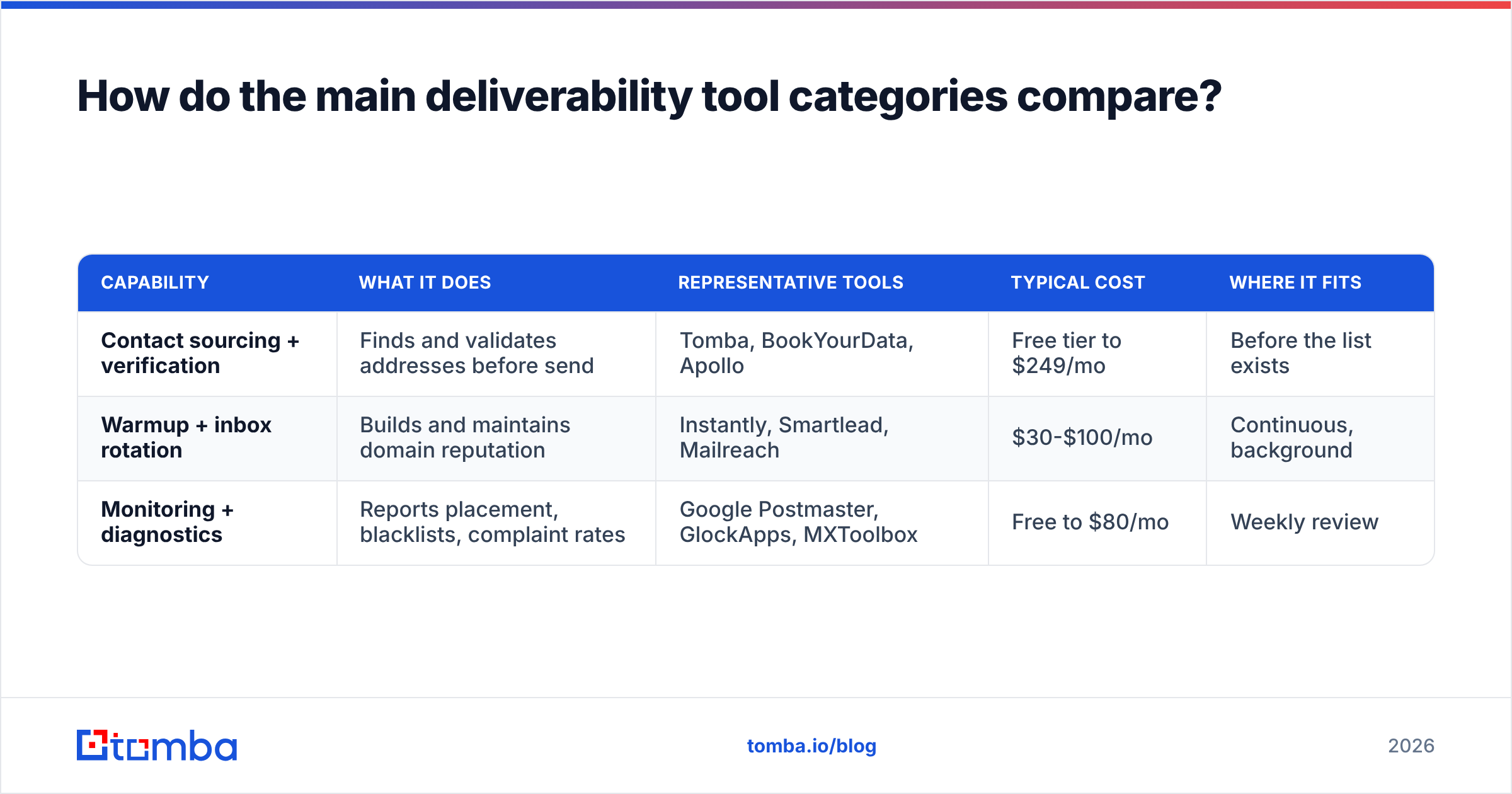
You need three distinct capabilities, and no single tool covers all three well. Here is how the categories stack up:
| Capability | What it does | Representative tools | Typical cost | Where it fits |
|---|---|---|---|---|
| Contact sourcing + verification | Finds and validates addresses before send | Tomba, BookYourData, Apollo | Free tier to $249/mo | Before the list exists |
| Warmup + inbox rotation | Builds and maintains domain reputation | Instantly, Smartlead, Mailreach | $30-$100/mo | Continuous, background |
| Monitoring + diagnostics | Reports placement, blacklists, complaint rates | Google Postmaster, GlockApps, MXToolbox | Free to $80/mo | Weekly review |
A note on sourcing. BookYourData sells pre-verified B2B contact lists with a bounce guarantee. That suits teams who want a list handed to them. Tomba works the other way. You find and verify addresses on demand against live sources, which fits when you target specific accounts instead of buying a segment. Both solve the same problem: do not send to invalid addresses.
Cost matters at scale for the verification layer. Tomba pricing starts with a free tier at 25 searches a month. Starter is $49/mo, Growth is $99/mo, and Pro is $249/mo. Verification is included rather than billed as a separate product, which is the split most standalone verifiers use.
What should your monitoring cadence look like?#
Deliverability is not a project you finish. It is a metric you watch. Here is the minimum viable cadence:
- Weekly: spam complaint rate and bounce rate from your sending platform. Any week above 0.3% complaints or 3% bounces, pause and diagnose.
- Bi-weekly: Google Postmaster domain reputation. Watch the trend line, not the daily value.
- Monthly: blacklist check on every sending domain and IP. Audit your DNS too, since SPF lookups creep up as you add tools.
- Quarterly: re-verify the entire active list.
- Before any new campaign: verify the segment. Seed-test placement across Gmail, Outlook, and at least one corporate domain.
That quarterly item earns its place. Contact data decays by roughly 2-3% a month as people change jobs. A year-old list is about 25% stale, even if it was perfect when you built it. "We verified this list" is a statement with an expiry date. Do you have CRM contacts from 18 months ago that were never re-checked? A bulk data enrichment pass will tell you which ones still exist before you find out the hard way.
What does a clean 2026 sending stack look like?#
Here is the concrete setup for a B2B team running cold outbound:
- Sending domains: 2-5 secondary domains, never the primary corporate domain. Each needs SPF, DKIM, DMARC at
p=quarantine, and a real website behind it. - Inboxes: 3-5 per domain, warmed continuously, capped at 40-50 cold sends a day each
- List: verified within 30 days of send, catch-alls handled on their own, hard-bounce suppression shared across all campaigns
- Content: plain text or close to it, one link at most, no tracking pixel on the first touch, a plain opt-out line
- Monitoring: Postmaster Tools connected on day one, weekly complaint-rate review, monthly blacklist sweep
None of this is exotic. It is the boring version of email, and boring is what survives filtering.
Teams that struggled through 2024 and 2025 mostly treated the email deliverability changes as a DNS task. Set the records, declare victory, keep blasting the same stale list. Teams that came out fine treated them as a data-quality task. Authentication is table stakes. The list is the product.
Start where the leverage is. Do not rewrite another subject line or buy another warmup tool yet. First find out how much of your current list is actually deliverable. Run your target accounts through Tomba Email Finder to source verified addresses with confidence scores attached. Then push your existing list through the verifier and strip the bounces out before they cost you a domain. The free tier gives you 25 searches. That is enough to test this email deliverability changes checklist against your own data.
Related guides#
// get started
Find, verify and enrich your first contacts today
Start on the free plan with 25 searches a month, then scale when your team is ready.
Free plan · No credit card required · GDPR & CCPA
// about the author