Email Deliverability Monitoring: A Practical 2026 Guide
Most teams find out about a deliverability problem when replies stop — three weeks too late. Here is the monitoring stack, the metrics that actually predict inbox placement, and what to check daily.

TL;DR
- Open rate is the worst deliverability signal you have in 2026 — Apple Mail Privacy Protection and Gmail image proxying inflate it. Bounce classification, spam-complaint rate, and reply rate are the honest three.
- Google and Yahoo enforce a 0.30% spam-complaint ceiling for bulk senders, with 0.10% as the practical working target. Postmaster Tools is the only free place you see that number.
- A real monitoring stack has four layers: authentication (SPF/DKIM/DMARC), reputation (Postmaster, Microsoft SNDS), placement (seed tests), and list hygiene (verification before send).
- Most "deliverability collapses" are list problems, not content problems. A 4% hard-bounce rate does more damage than any subject line.
- Monitor daily on three numbers, weekly on four, monthly on the rest. Anything more granular becomes noise you learn to ignore.
Your reply rate dropped 60% last Tuesday and nobody noticed until Friday. By then you had sent 4,000 more emails into a spam folder, trained three mailbox providers that your domain is low-value, and burned a sending domain you spent eight weeks warming.
That is the actual cost of not having email deliverability monitoring: not the bad week, but the recovery cycle that follows it.
What is email deliverability monitoring?#
Email deliverability monitoring is the ongoing measurement of whether your messages reach the inbox — not whether they were accepted by the receiving server. Those are different events, and the gap between them is where most B2B outbound quietly dies.
Think of it like a restaurant health inspection versus customer reviews. Your ESP dashboard tells you the food left the kitchen (delivered = 98%). Deliverability monitoring tells you whether anyone actually ate it. A message can be "delivered" and sit in Promotions, Junk, or a quarantine folder the recipient checks twice a year.
Technically, you are tracking four independent layers:
- Authentication health — Do SPF, DKIM, and DMARC pass on every message, from every sending source, including the forwarded ones? A single misconfigured subdomain breaks alignment silently.
- Sender reputation — What do Gmail, Microsoft, and Yahoo think of your domain and IP? This is scored per-provider and they do not agree with each other.
- Inbox placement — Of messages accepted, what share land in Primary versus Promotions versus Spam? Only seed testing and reply-rate inference give you this.
- List quality — What percentage of your sends hit invalid, catch-all, role-based, or spam-trap addresses? This is the upstream cause of most reputation damage.
Miss any one layer and you get a blind spot large enough to hide a domain burn.
Why is open rate a broken deliverability metric?#
Because roughly half your opens are fictional, and you cannot tell which half.
Apple Mail Privacy Protection, launched in 2021 and now default across the Apple ecosystem, pre-fetches tracking pixels regardless of whether the human opened anything. Gmail proxies images through its own servers. The result: a campaign that lands 100% in spam can still report a 42% open rate if enough recipients use Apple Mail.
Teams still anchor on open rate because it is the number their sequencer puts in the biggest font. That is a UI accident, not a measurement decision.
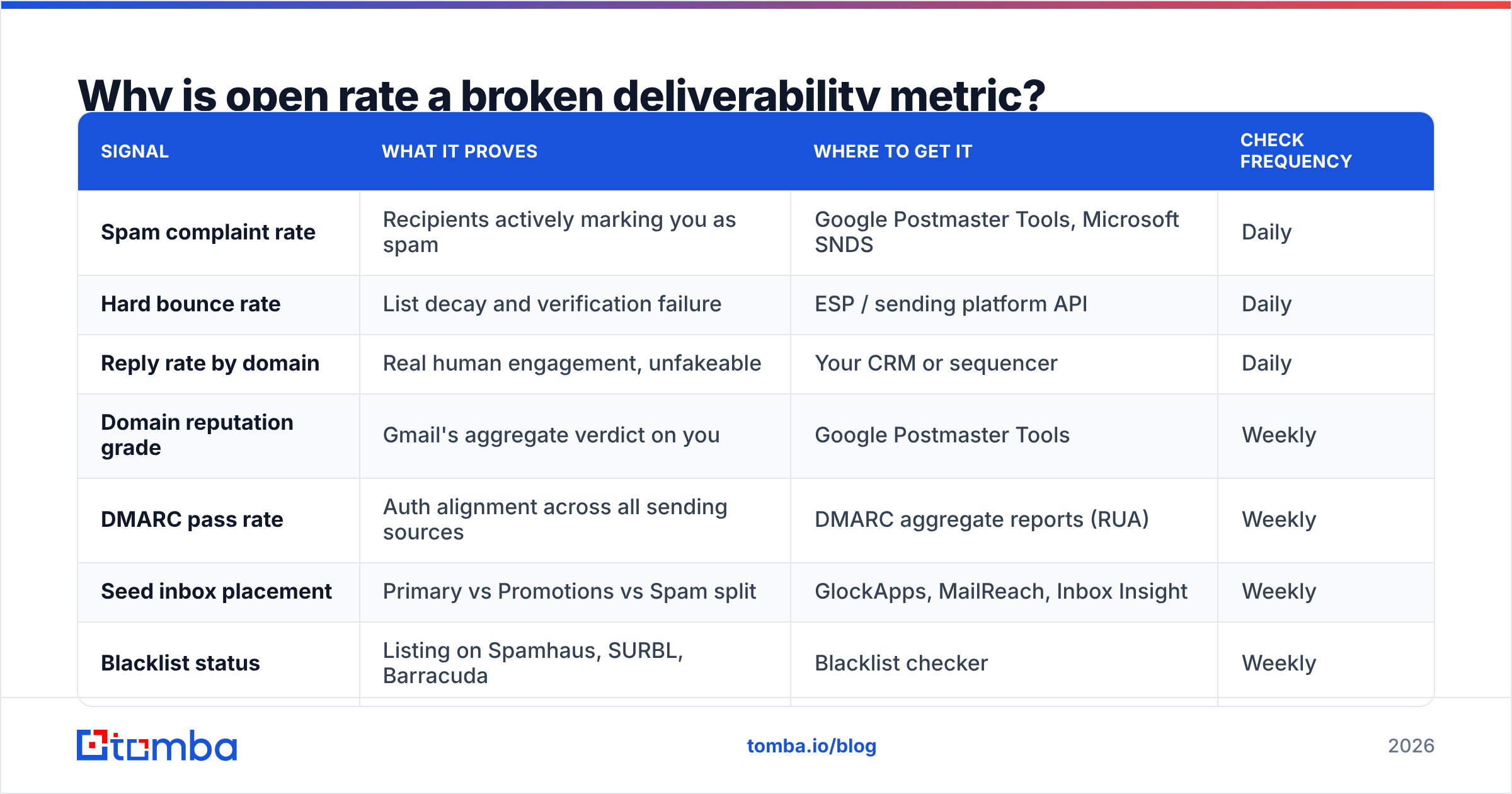
Here is what to watch instead, and what each signal actually proves:
| Signal | What it proves | Where to get it | Check frequency |
|---|---|---|---|
| Spam complaint rate | Recipients actively marking you as spam | Google Postmaster Tools, Microsoft SNDS | Daily |
| Hard bounce rate | List decay and verification failure | ESP / sending platform API | Daily |
| Reply rate by domain | Real human engagement, unfakeable | Your CRM or sequencer | Daily |
| Domain reputation grade | Gmail's aggregate verdict on you | Google Postmaster Tools | Weekly |
| DMARC pass rate | Auth alignment across all sending sources | DMARC aggregate reports (RUA) | Weekly |
| Seed inbox placement | Primary vs Promotions vs Spam split | GlockApps, MailReach, Inbox Insight | Weekly |
| Blacklist status | Listing on Spamhaus, SURBL, Barracuda | Blacklist checker | Weekly |
| Open rate | Almost nothing in 2026 | Your ESP | Ignore as a primary signal |
Reply rate segmented by recipient domain is the single most underused signal in this list. If your gmail.com replies hold steady while outlook.com replies fall to zero over four days, you have a Microsoft filtering problem, not a copy problem. No dashboard will tell you that — you have to slice it yourself.
What are the 2026 sender requirements you must meet?#
Google and Yahoo's bulk-sender rules, in force since February 2024 and tightened since, set the floor. Microsoft followed with its own enforcement for high-volume senders in 2025. If you send more than 5,000 messages a day to any one of these providers, all of the following are mandatory rather than advisable:
- SPF and DKIM on every sending domain. Not one or the other. Both, aligned to the From domain.
- A DMARC record, minimum
p=none, with an RUA address that someone actually reads. - One-click unsubscribe (RFC 8058
List-Unsubscribe-Post) on marketing mail, honored within two days. - Spam complaint rate under 0.30%, measured in Postmaster Tools. Treat 0.10% as your internal ceiling — at 0.30% the damage has already happened.
- Forward and reverse DNS that match, with TLS on delivery.
The complaint threshold deserves emphasis because of how the arithmetic works. At 10,000 sends, 0.30% is thirty complaints. Thirty people. That is a smaller number than most teams intuit, and it is why a single badly-targeted segment can tank a domain that behaved for a year.
Run a SPF checker against every sending domain and subdomain you own — including the ones your marketing team spun up for a webinar in 2024 and forgot. Unauthenticated shadow senders are a top-three cause of DMARC failure in audits.
Which email deliverability monitoring tools should you use?#
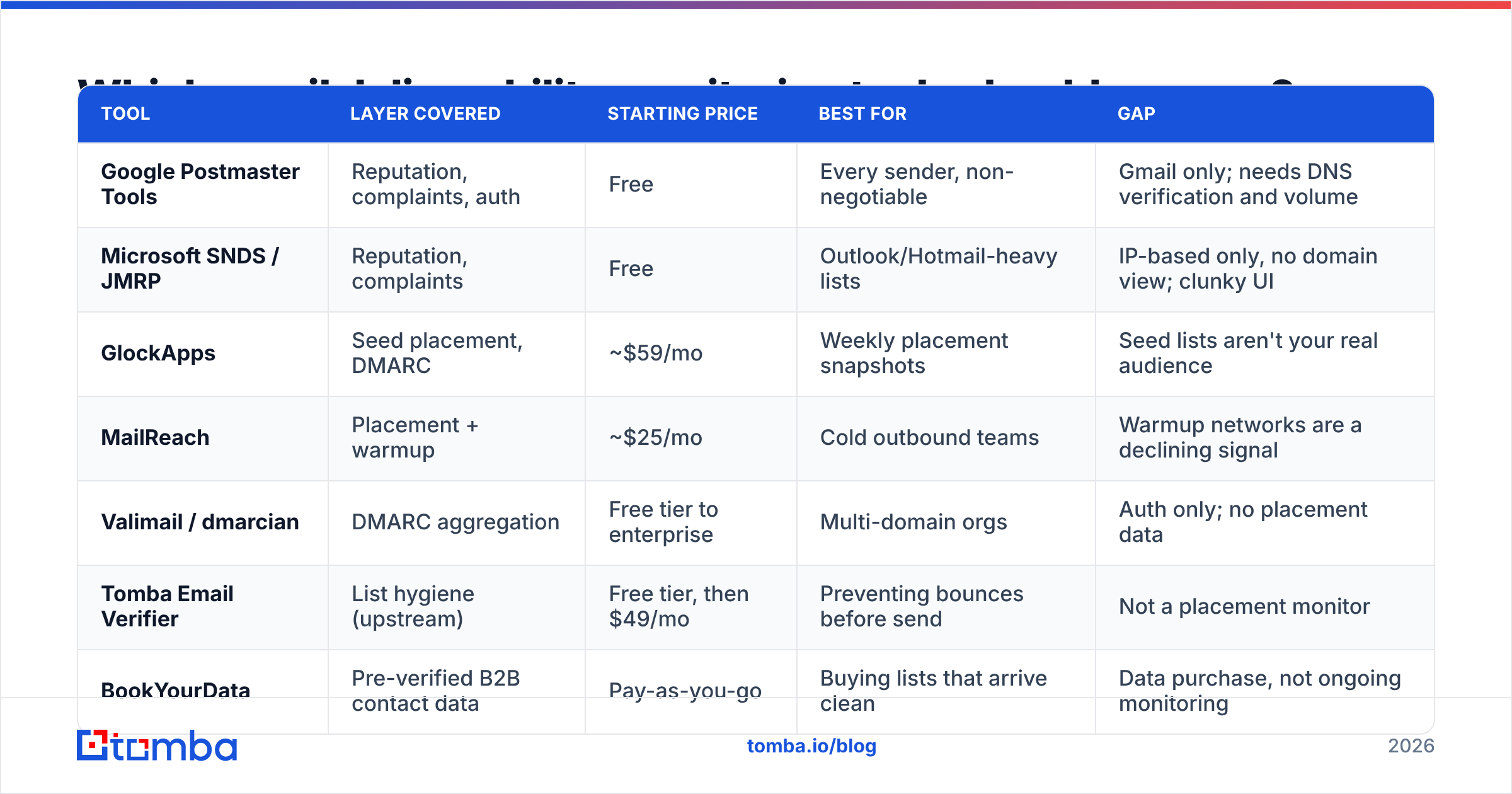
There is no single tool that covers all four layers, and vendors that claim otherwise are usually strong at one and thin at the rest. Build a stack instead.
| Tool | Layer covered | Starting price | Best for | Gap |
|---|---|---|---|---|
| Google Postmaster Tools | Reputation, complaints, auth | Free | Every sender, non-negotiable | Gmail only; needs DNS verification and volume |
| Microsoft SNDS / JMRP | Reputation, complaints | Free | Outlook/Hotmail-heavy lists | IP-based only, no domain view; clunky UI |
| GlockApps | Seed placement, DMARC | ~$59/mo | Weekly placement snapshots | Seed lists aren't your real audience |
| MailReach | Placement + warmup | ~$25/mo | Cold outbound teams | Warmup networks are a declining signal |
| Valimail / dmarcian | DMARC aggregation | Free tier to enterprise | Multi-domain orgs | Auth only; no placement data |
| Tomba Email Verifier | List hygiene (upstream) | Free tier, then $49/mo | Preventing bounces before send | Not a placement monitor |
| BookYourData | Pre-verified B2B contact data | Pay-as-you-go | Buying lists that arrive clean | Data purchase, not ongoing monitoring |
Two notes on that table.
First, Postmaster Tools and SNDS are free and irreplaceable. If you are paying for a monitoring platform but have not verified your domain in Postmaster, you have bought a second opinion before getting the first one.
Second, the cheapest layer to fix is the one furthest upstream. Bounce prevention costs a fraction of a cent per address; reputation repair after a bad send costs six to eight weeks of throttled volume. This is where an email verifier earns its keep — not as a deliverability tool per se, but as the thing that stops the deliverability problem from starting.
How do bounces destroy sender reputation?#
Every hard bounce is a small vote that you do not know who your recipients are. Mailbox providers aggregate those votes.
The mechanism is straightforward. Gmail sees you attempt delivery to 400 addresses that do not exist across a week. It concludes you are working from a scraped or stale list. Legitimate senders with permissioned lists produce hard-bounce rates near 0.5%; list buyers produce 8-20%. The gap is obvious from the receiving side, and reputation adjusts within days.
The practical thresholds:
- Under 2% — normal decay, no action needed
- 2-4% — investigate your list source; something is stale
- Over 4% — pause sending, re-verify the entire list before the next send
- Over 10% — assume reputation damage has already occurred; expect a warmup cycle
Catch-all domains complicate this. A catch-all server accepts every address at the domain, so standard verification returns "unknown" and you are guessing. Roughly a fifth of B2B domains are configured this way, disproportionately at mid-market and enterprise companies — exactly the accounts you want. A dedicated catch-all verifier resolves a meaningful share of those to a real verdict instead of leaving them in an ambiguous bucket you either over-send to or discard entirely.
What does a real monitoring routine look like?#
Monitoring fails when it is either too sparse to catch problems or so noisy that alerts get muted. The fix is cadence discipline: three things daily, four weekly, the rest monthly.
Daily (5 minutes)
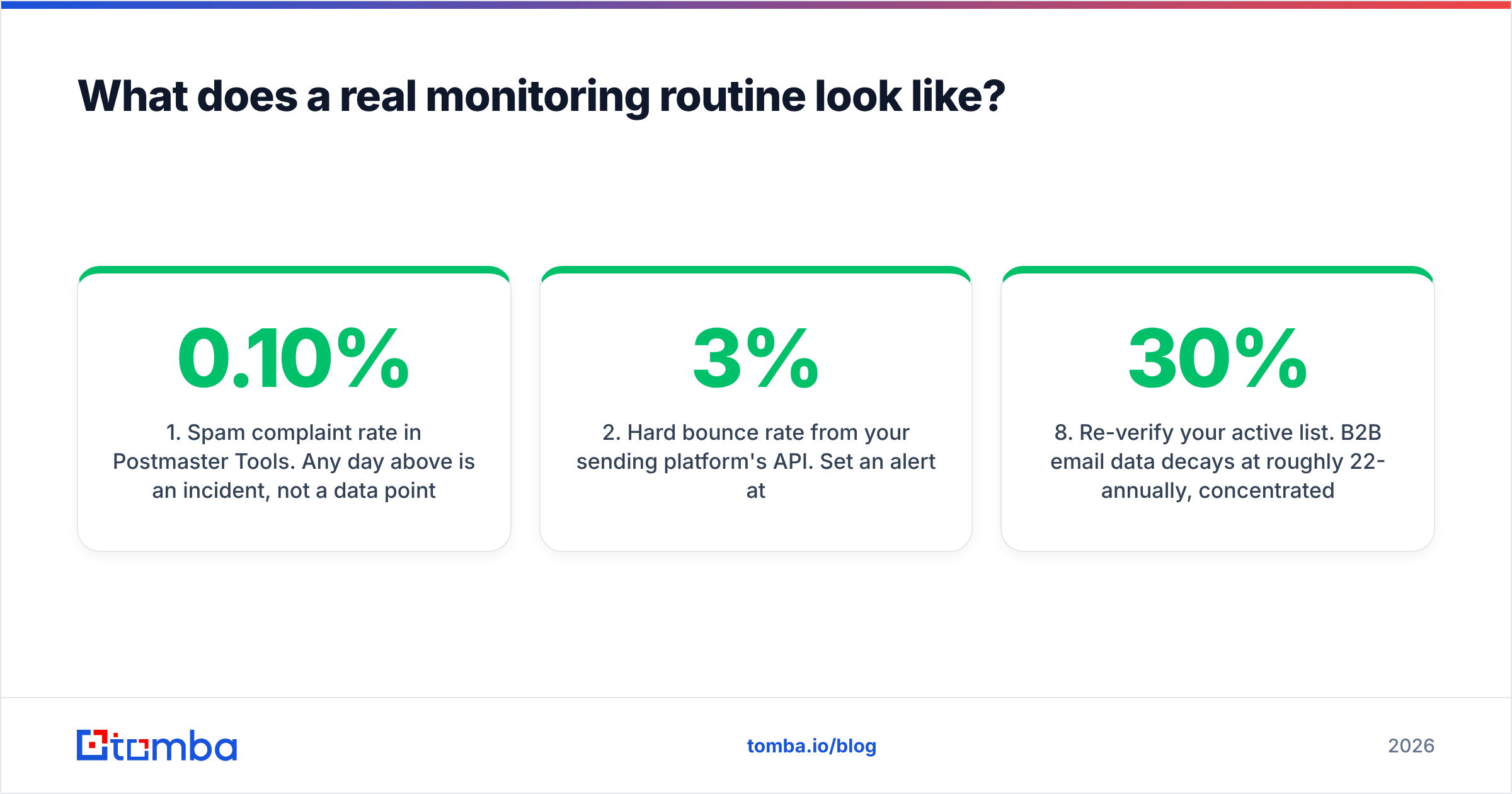
- Spam complaint rate in Postmaster Tools. Any day above 0.10% is an incident, not a data point.
- Hard bounce rate from your sending platform's API. Set an alert at 3%.
- Reply rate, segmented by recipient domain. A provider-specific cliff is your earliest warning of filtering — usually 5-10 days before Postmaster reflects it.
Weekly (30 minutes)
- Domain reputation grade in Postmaster. A drop from High to Medium means you have roughly two weeks before it becomes a Low and volume gets throttled.
- Seed test placement — one send through a seed list covering Gmail, Outlook, Yahoo, and at least one corporate Microsoft 365 tenant. Corporate tenants filter differently from consumer Outlook, and that difference matters more for B2B.
- DMARC aggregate reports. Look specifically for sending sources you do not recognize.
- Blacklist check across the major RBLs. Spamhaus SBL/CSS listings are the ones that actually block mail.
Monthly (2 hours)
- Re-verify your active list. B2B email data decays at roughly 22-30% annually, concentrated in high-churn segments — sales, marketing, and startups above all.
- Audit every sending domain and subdomain for SPF/DKIM/DMARC alignment.
- Review content patterns against a spam checker — link ratios, image-to-text balance, tracking-domain reputation.
- Rotate or retire any sending domain whose reputation has not recovered after a corrective cycle.
The reason daily reply-rate segmentation sits at the top of that list is timing. Postmaster Tools reports on a lag. Complaint data is aggregated. Reply rate is real-time and it is generated by humans who either saw your message or did not. When outlook.com replies flatline while gmail.com holds, you know within a day — and you can pause that segment before you send another 3,000 messages into a filter.
Is deliverability a content problem or a list problem?#
Overwhelmingly a list problem, and the industry's obsession with spam-trigger words has aged badly.
Modern filters at Google and Microsoft are engagement-driven machine-learned classifiers. They weight who opens, replies, moves-to-inbox, and marks-as-spam far more heavily than whether your subject line contains "free." Writing around a 2011 spam-word list is optimizing for a filter that no longer exists.
What genuinely moves placement, ranked by impact:
- List accuracy — invalid addresses and spam traps. The single largest lever, by a wide margin.
- Targeting relevance — sending to people with no plausible reason to care generates complaints, and complaints are scored heavily.
- Authentication and infrastructure — table stakes; failing here caps your ceiling regardless of everything else.
- Volume consistency — spikes from 200/day to 3,000/day read as compromise or list purchase.
- Content — real, but a distant fifth. Excessive links, tracking domains on shared blacklisted infrastructure, and image-only emails still hurt.
For a fuller treatment of the mechanics behind each of these, the email deliverability and sender reputation entries in Tomba's glossary cover the underlying definitions. Google's own sender guidelines remain the authoritative source for what Gmail specifically enforces, and Microsoft's Smart Network Data Services documentation covers the Outlook side.
How do you recover once deliverability has already dropped?#
Recovery is slower than the fall. Plan for four to six weeks, not four to six days.
Week 1 — stop the bleeding. Pause all cold sending on the affected domain. Do not "send less" — send nothing. Every additional message into a spam folder reinforces the classifier's verdict.
Week 1-2 — find the cause. Pull the last 30 days of sends and segment by list source. In most audits, one list — one webinar export, one purchased file, one scraped batch — accounts for the majority of complaints and bounces. Find it and quarantine it.
Week 2 — rebuild the list. Re-verify everything. Drop role-based addresses (info@, sales@, admin@) that produce complaints without ever producing replies. Drop anyone who has received five or more messages with zero engagement across any channel.
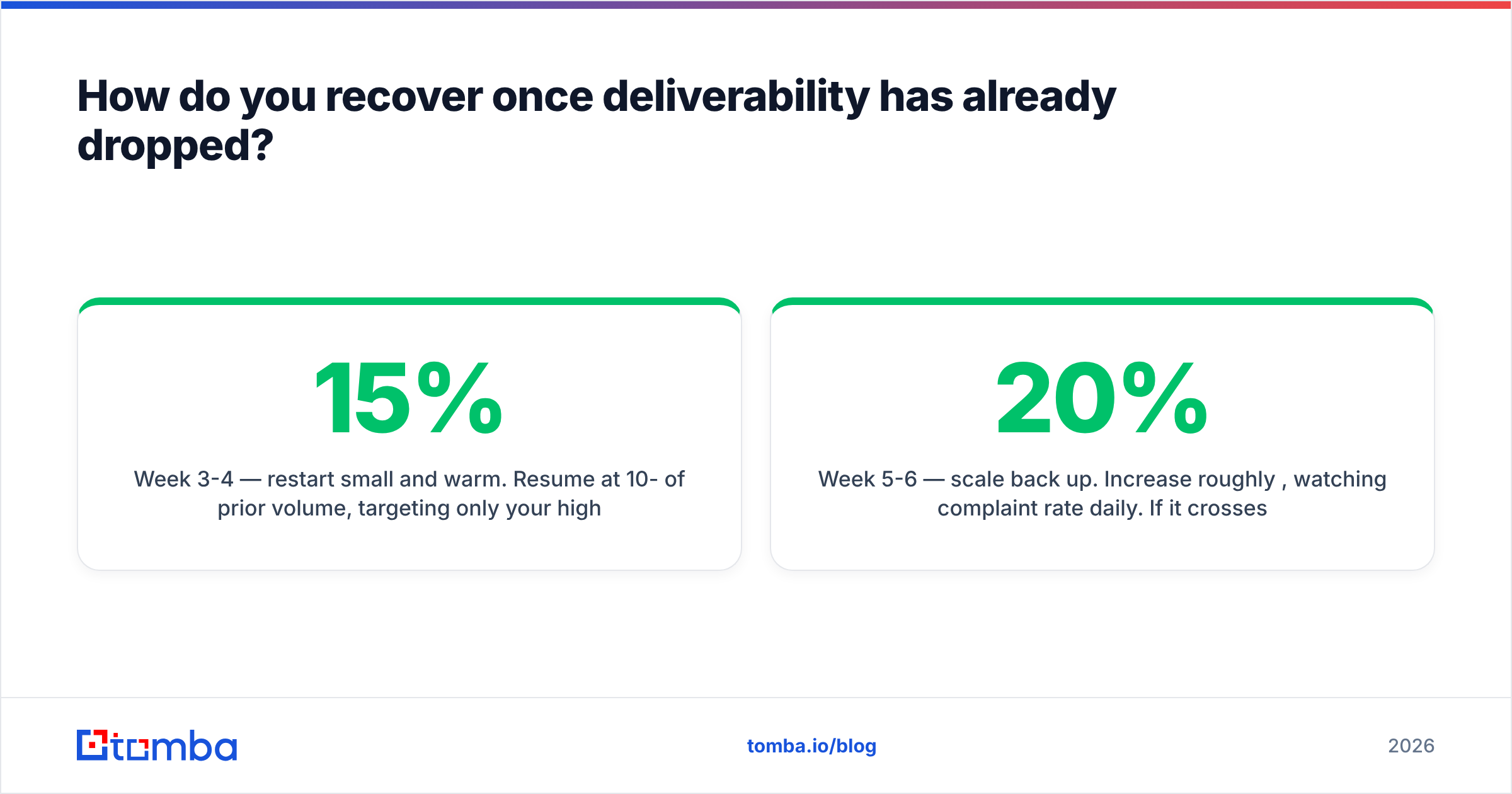
Week 3-4 — restart small and warm. Resume at 10-15% of prior volume, targeting only your highest-confidence segment — accounts that have replied, visited, or converted before. You are manufacturing positive engagement signals to overwrite the negative ones.
Week 5-6 — scale back up. Increase roughly 20% per week, watching complaint rate daily. If it crosses 0.10% at any point, hold volume flat for a week rather than pushing through.
If reputation has not moved after six weeks of clean sending, the domain may be structurally damaged. Move to a fresh sending subdomain and warm it properly — but only after fixing the list, or you will burn the new one on the same schedule.
What should you do this week?#
Pick the three that apply and do them before your next send.
- Verify your domain in Google Postmaster Tools. It takes ten minutes and it is the only free window into what Gmail thinks of you.
- Run a full SPF/DKIM/DMARC audit across every sending domain, including the forgotten ones.
- Segment last month's reply rate by recipient domain. If one provider is materially below the others, you have found a filtering problem that no aggregate metric would have surfaced.
- Re-verify your active list if it has not been checked in 90 days.
- Set an alert at 3% hard-bounce rate in whatever tool sends your mail.
The uncomfortable truth of deliverability monitoring is that the best version of it is preventive. Dashboards tell you what already broke. Clean data stops it from breaking.
That is where the work starts: knowing that every address you send to is real, current, and belongs to a person who exists at that company today. The Tomba Email Finder sources verified professional addresses with confidence scoring at the point of discovery, and the email verifier re-checks them before each campaign — including catch-all domains that other tools return as "unknown." The free tier covers 25 searches a month to test accuracy against your own known-good contacts; paid plans start at $49/mo on Tomba pricing, with API and bulk access for teams running verification as a scheduled job rather than a manual chore.
Monitor the four layers. Fix the list first. Your inbox placement follows from there.
Related guides#
Ready to find emails that actually work?
Join 150,000+ professionals who stopped guessing and started sending. Free credits on signup — no credit card required.
Get the Tomba newsletter
Practical outbound tactics and product updates — once every two weeks.
About the author