Email Deliverability Tools Comparison: 9 Picks for 2026
Warmup, inbox placement, DMARC monitoring, list hygiene — four different jobs sold under one word. Here's what each category of deliverability tool actually fixes in 2026, what it costs, and where the money is wasted.

TL;DR
- "Email deliverability tool" is four different product categories wearing one label: inbox-placement testing, mailbox warmup, authentication/DMARC monitoring, and list hygiene. Buying two tools from the same category and none from the others is the most common mistake.
- Free telemetry from Google Postmaster Tools and Microsoft SNDS is more diagnostic than most paid dashboards. Start there before you spend anything.
- Warmup tools still work, but their marginal value dropped after 2024's bulk-sender rules. They fix a cold-domain problem, not a bad-list problem.
- List hygiene is the cheapest lever with the biggest effect. A 2% bounce rate is the ceiling Gmail and Yahoo enforce; verification is how you stay under it.
- Realistic stack for a small outbound team: $0 (Postmaster + SNDS + DMARC) + ~$20–$50/mo verification + optional ~$30–$60/mo warmup. Anything past $300/mo needs a volume justification.
What is an email deliverability tool, exactly?#
A deliverability tool is a diagnostic instrument, not a cure. It tells you where your mail landed and why — it does not make bad mail good.
Think of your sending setup like a car that keeps failing emissions tests. A placement tester is the exhaust probe. A DMARC monitor is the engine warning light. A warmup service is the mechanic idling the engine to burn off carbon. A verification tool is the person stopping you from pouring the wrong fuel in. All four are useful. None of them replaces the others, and only one of them stops the problem at the source.
The category breaks down into five distinct jobs:
- Inbox placement testing — sends seed messages to a panel of real mailboxes across Gmail, Outlook, Yahoo, and corporate hosts, then reports inbox vs. spam vs. missing. Examples: GlockApps, Mailtrap, Mail-Tester.
- Reputation and telemetry monitoring — reads what the mailbox providers themselves publish about your domain and IP. Examples: Google Postmaster Tools, Microsoft SNDS, blacklist monitors.
- Authentication management — validates and monitors SPF, DKIM, and DMARC, then reports aggregate failures. Examples: EasyDMARC, Valimail, Postmark's DMARC digest.
- Mailbox warmup — automated peer-to-peer sending between managed inboxes to build engagement history on a new domain. Examples: MailReach, Warmy, Instantly's warmup.
- List hygiene and verification — removes invalid, role-based, disposable, and risky addresses before you send. Examples: Tomba's email verifier, ZeroBounce, NeverBounce, Bouncer.
Most teams shopping for an "email deliverability tools comparison" are actually shopping in category 4 or 5 while their real problem lives in category 3.
What actually breaks deliverability in 2026?#
Since Google and Yahoo's bulk-sender requirements took effect in February 2024 and tightened through 2025, three thresholds define the game:
- Authentication is mandatory. SPF, DKIM, and a published DMARC policy — at minimum
p=nonewith a reporting address. No exceptions for bulk senders. The spec and the reporting format are documented at dmarc.org. - Spam complaint rate must stay under 0.3%, measured in Postmaster Tools. Above 0.1% you are already in a warning band.
- One-click unsubscribe (List-Unsubscribe-Post header) on commercial mail.
Bounce rate is not in the published spec, but every ESP enforces its own ceiling — usually 2–5% before throttling or suspension. That single number is why hygiene beats warmup for most senders.

Nothing in that list is fixed by a warmup subscription. Warmup helps a clean, authenticated domain build history faster. It does not offset a list where a quarter of the addresses no longer exist.
How do the tool categories compare?#
| Category | What it measures | What it cannot fix | Typical entry price |
|---|---|---|---|
| Inbox placement testing | Seed-list inbox vs. spam ratio | Real recipient engagement | $0–$59/mo |
| Reputation telemetry | Domain/IP reputation, complaint rate | Anything, on its own — read-only | Free |
| Authentication monitoring | SPF/DKIM/DMARC pass rates | Content and list quality | $0–$40/mo |
| Mailbox warmup | Engagement signal on new domains | Invalid addresses, spam traps | $25–$99/mo |
| List hygiene | Bounce risk before sending | Reputation already burned | $0.001–$0.008/email |
Read that table as a sequence, not a menu. Authentication first (free), telemetry second (free), hygiene third (cheap), warmup fourth (optional), placement testing last (nice-to-have verification).
Which email deliverability tools compare best in 2026?#
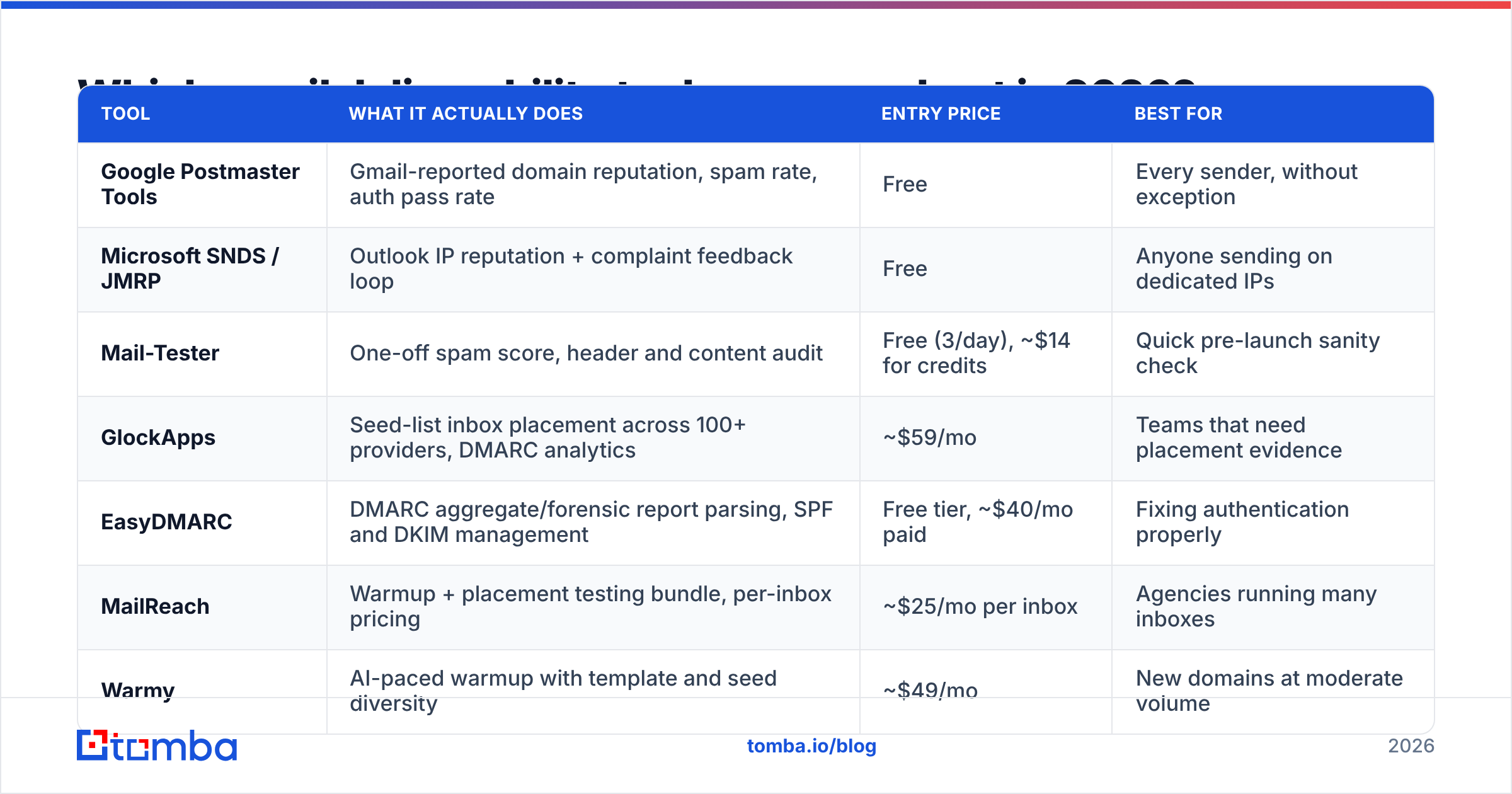
Prices below are list prices at the time of writing on each vendor's public pricing page. Verify before you buy — this category re-prices often.
| Tool | What it actually does | Entry price | Best for |
|---|---|---|---|
| Google Postmaster Tools | Gmail-reported domain reputation, spam rate, auth pass rate | Free | Every sender, without exception |
| Microsoft SNDS / JMRP | Outlook IP reputation + complaint feedback loop | Free | Anyone sending on dedicated IPs |
| Mail-Tester | One-off spam score, header and content audit | Free (3/day), ~$14 for credits | Quick pre-launch sanity check |
| GlockApps | Seed-list inbox placement across 100+ providers, DMARC analytics | ~$59/mo | Teams that need placement evidence |
| EasyDMARC | DMARC aggregate/forensic report parsing, SPF and DKIM management | Free tier, ~$40/mo paid | Fixing authentication properly |
| MailReach | Warmup + placement testing bundle, per-inbox pricing | ~$25/mo per inbox | Agencies running many inboxes |
| Warmy | AI-paced warmup with template and seed diversity | ~$49/mo | New domains at moderate volume |
| Tomba Email Verifier | SMTP-level validation, catch-all detection, bulk and API | Free 25/mo; $49/mo Starter | Stopping bounces before they happen |
| ZeroBounce | Verification plus activity scoring and abuse detection | Pay-as-you-go credits | High-volume marketing lists |
A few honest notes on that table:
GlockApps' seed lists are not your audience. Seed accounts have no engagement history with you. A 92% seed inbox rate and a 40% real inbox rate can coexist. Treat placement tests as a relative signal — did placement drop after Tuesday's change? — not as an absolute number to report to a board.
MailReach and Warmy are close substitutes. Pick on pricing model: MailReach charges per inbox, which favours agencies with predictable seat counts; Warmy's tiers favour a single domain scaling volume. Neither will save a domain that's already on Spamhaus.
Verification vendors differ mostly on catch-all handling. Every verifier can flag a hard bounce. The separation is what happens on catch-all domains, which are now roughly a third of corporate mail servers. Tomba's catch-all verifier returns a confidence signal instead of a shrug, which matters when the catch-all bucket is half your B2B list.
Do inbox placement tests reflect reality?#
Partially — and the gap is widening.
Seed testing was designed for an era when filtering was mostly content- and reputation-based. Modern Gmail filtering is heavily personalised: it weighs whether this specific recipient has opened, replied, or moved your mail before. A seed mailbox has none of that history, so it measures the impersonal half of the filter only.
Use placement tests for three things:
- Regression detection. You changed your template, added a tracking domain, or moved ESPs. Did placement move?
- Provider-specific breakouts. If Outlook placement collapses while Gmail holds, the problem is almost always IP reputation or SNDS-visible complaints, not content.
- Authentication verification in-flight. Most testers show the received headers, which is the fastest way to catch a DKIM alignment failure.
Do not use them to forecast campaign performance. For that, your own reply and bounce data beats any seed panel. If you want a free first pass, run the domain through an SPF checker and a blacklist checker before you pay for a placement subscription — those two catch a surprising share of "my emails go to spam" tickets.
Is warmup still worth paying for?#
Yes, but for a narrower window than vendors imply.
Warmup earns its keep in exactly one scenario: a brand-new sending domain or a domain returning from a long silence. The tool generates positive engagement signal — opens, replies, moves out of spam — over 2–6 weeks so your first real campaign doesn't arrive with a blank reputation record.
Where it stops earning:
- On an established domain with good sender reputation. You're paying to simulate a signal you already have organically.
- When your list is the problem. Warmup traffic goes to real, monitored inboxes. Your campaign traffic goes to addresses that may not exist. Warmup improves the numerator; bad data destroys the denominator.
- On networks that have been fingerprinted. Warmup pools with recycled inboxes and formulaic message bodies are detectable, and providers have gotten better at detecting them. A pool with template diversity and real domain variety is worth more than a cheap one.
Rule of thumb: budget 3–4 weeks of warmup ramping to roughly 20–40 sends/day before your first real campaign, then taper. Our email warmup calculator will map the ramp against your target daily volume so you don't jump from 15 to 200 sends overnight.

How much does list quality actually matter?#
More than every other lever combined, and it's the cheapest one.
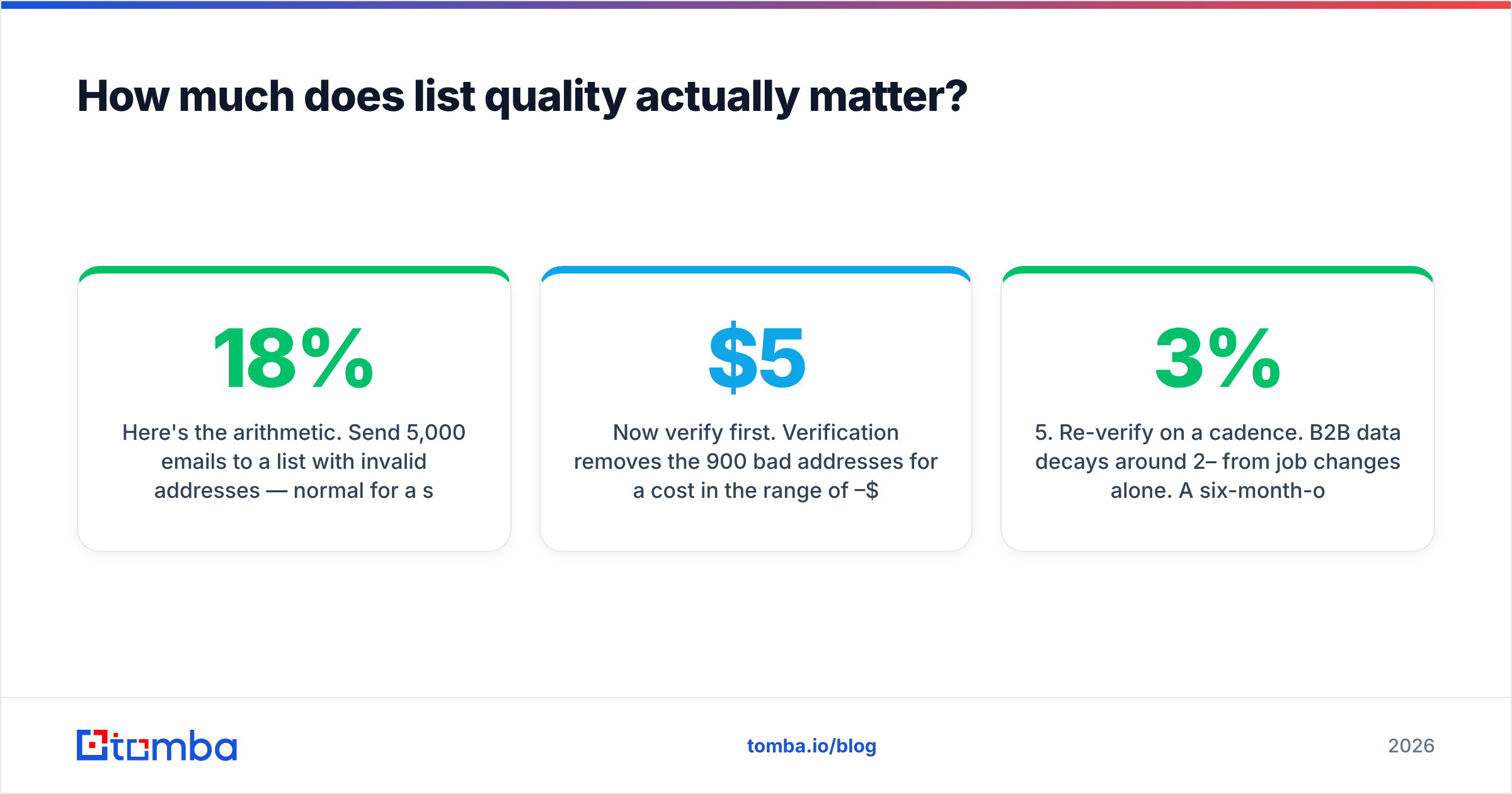
Here's the arithmetic. Send 5,000 emails to a list with 18% invalid addresses — normal for a scraped or year-old list. That's 900 hard bounces, an 18% bounce rate, and roughly six to nine times the tolerance most ESPs allow. Your domain reputation drops within a single campaign, and no warmup subscription undoes that in under a month.
Now verify first. Verification removes the 900 bad addresses for a cost in the range of $5–$40 depending on vendor and volume. You send 4,100 emails at a sub-1% bounce rate. Reputation holds. Same campaign, same copy, entirely different outcome.
The order that matters:
- Source deliberately. Where the data comes from sets your ceiling. Verified-at-source providers like BookYourData and enrichment-first platforms both start you further ahead than a scraped export ever will.
- Deduplicate. The same person on three rows means three complaint opportunities from one annoyed human.
- Verify at SMTP level. Syntax checks catch typos; SMTP probes catch dead mailboxes. You need the second kind.
- Segment catch-alls. Don't discard them and don't blast them — send them at lower volume from a secondary domain.
- Re-verify on a cadence. B2B data decays around 2–3% per month from job changes alone. A six-month-old verified list is not a verified list.
That decay rate is why point-in-time verification isn't enough for lists you re-use. If you're running quarterly campaigns to the same base, re-verification is a line item, not a one-off.
What should you actually buy?#
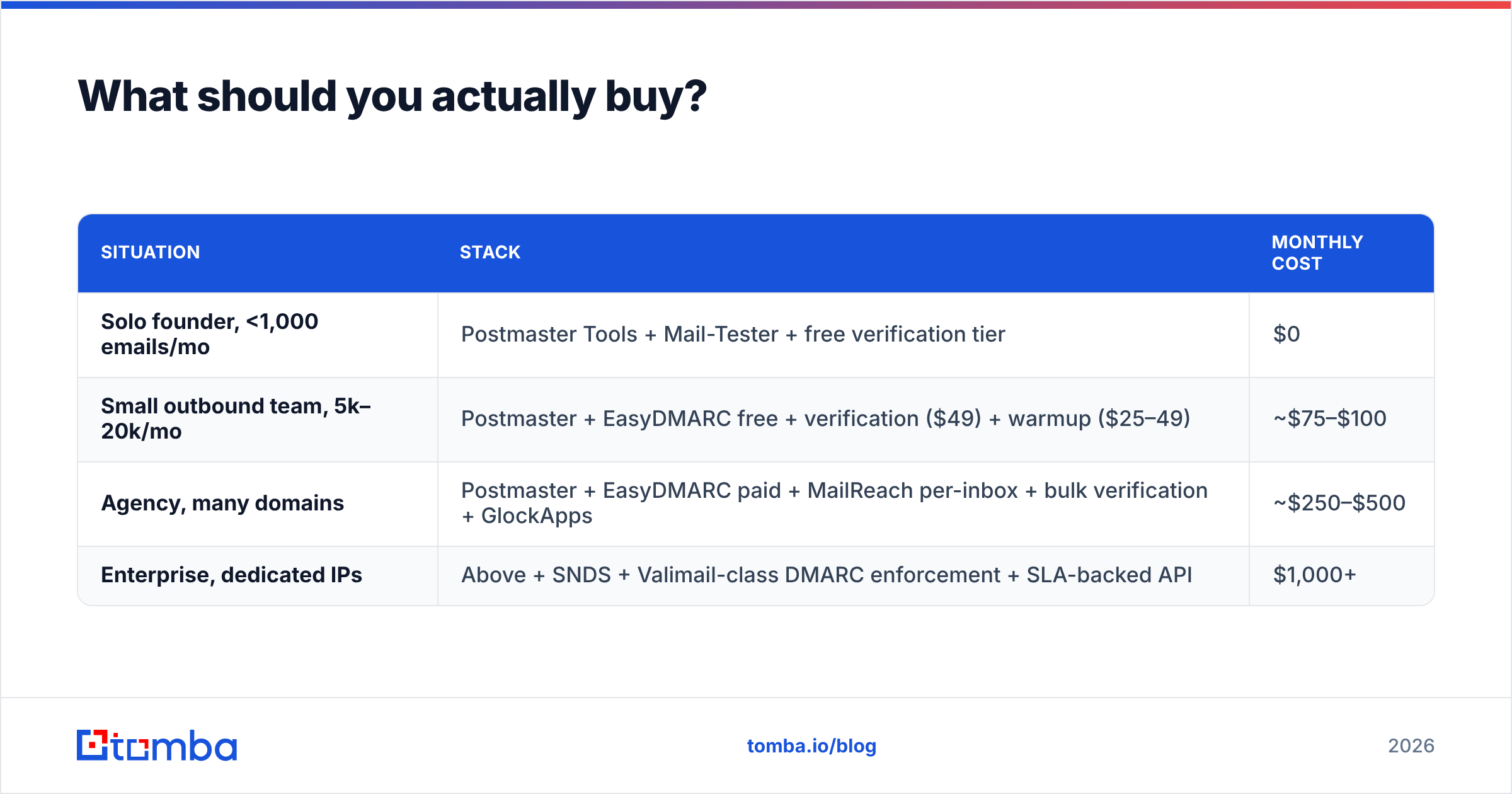
Three realistic stacks, by situation.
| Situation | Stack | Monthly cost |
|---|---|---|
| Solo founder, <1,000 emails/mo | Postmaster Tools + Mail-Tester + free verification tier | $0 |
| Small outbound team, 5k–20k/mo | Postmaster + EasyDMARC free + verification ($49) + warmup ($25–49) | ~$75–$100 |
| Agency, many domains | Postmaster + EasyDMARC paid + MailReach per-inbox + bulk verification + GlockApps | ~$250–$500 |
| Enterprise, dedicated IPs | Above + SNDS + Valimail-class DMARC enforcement + SLA-backed API | $1,000+ |
Two spending traps worth naming. First, buying a placement tester before fixing authentication — you'll pay $59/mo to be told your DKIM is misaligned, which a free header check would have shown in ten seconds. Second, buying warmup for an aged, healthy domain because a dashboard showed a yellow badge. Read Postmaster Tools instead; it's the only reputation score Gmail actually acts on.
If you want peer signal on any of these vendors before committing, the G2 deliverability category surfaces real volume-tier complaints that vendor pages don't, and Google Postmaster Tools remains the single free source of truth for Gmail reputation.
How do you know it's working?#
Track four numbers weekly. Everything else is noise.
- Bounce rate — target under 2%. Above that, stop sending and re-verify.
- Spam complaint rate in Postmaster Tools — target under 0.1%, hard ceiling 0.3%.
- Domain reputation in Postmaster Tools — "High" or "Medium." A drop to "Low" is a 2–4 week recovery.
- Reply rate — the only metric that correlates with revenue and the strongest positive engagement signal you can send a filter.
If bounce rate is your failing metric, no monitoring tool will fix it. If complaint rate is failing, your targeting or copy is wrong and warmup won't help. If authentication is failing, it's a 30-minute DNS job, not a subscription.
Get the data layer right first#
Every tool in this comparison operates downstream of one decision: whether the addresses you send to are real. Monitoring, warmup, and placement testing are all ways of managing the consequences of that decision. Verification is how you avoid having consequences to manage.
Tomba Email Finder finds verified professional addresses by domain, name, or company, with SMTP-level validation and catch-all confidence scoring built in — so the list you hand to your sequencer is clean before the first send, not audited after the first bounce report. Start on the free tier (25 searches/month), or check Tomba pricing for bulk and API volumes. It's the cheapest deliverability tool in your stack, because it's the one that keeps the others from having work to do.
Related guides#
Ready to find emails that actually work?
Join 150,000+ professionals who stopped guessing and started sending. Free credits on signup — no credit card required.
Get the Tomba newsletter
Practical outbound tactics and product updates — once every two weeks.
About the author