Email Delivery in 2026: How to Reach the Inbox Every Time
Email delivery is decided long before you press send. Here's the 2026 playbook: authentication, list hygiene, sending volume, and the diagnostics that tell you which one is actually broken.
TL;DR
- Email delivery and email deliverability are not the same thing. Delivery means the receiving server accepted your message. Deliverability means a human can actually find it. You can hit 99% delivery and still land 60% of your mail in spam.
- Since February 2024, Gmail and Yahoo enforce SPF, DKIM, DMARC, one-click unsubscribe, and a spam-complaint rate under 0.3% for bulk senders. In 2026 those are table stakes, not differentiators.
- The single highest-leverage fix for most teams is list quality. Bounces above 3% degrade your sending reputation faster than any subject line can recover it.
- Diagnose in this order: authentication → list hygiene → volume and ramp → content and engagement. Skipping to step four is why most "deliverability audits" waste a week.
- Verify before you send, not after you bounce. A pre-send email verifier pass is cheaper than a burned domain.
What is email delivery, and how is it different from deliverability?#
Email delivery is the binary event: did the receiving mail server accept your message, or did it reject it with a bounce? That's it. A 2xx SMTP response means delivered.
Deliverability is the harder question: once accepted, where did the message go — inbox, Promotions, Updates, or spam?
Think of it like a package courier. Delivery is the driver leaving the box at the building. Deliverability is whether the box reaches the right apartment or sits in a mailroom nobody checks. Most senders celebrate the first and never measure the second.
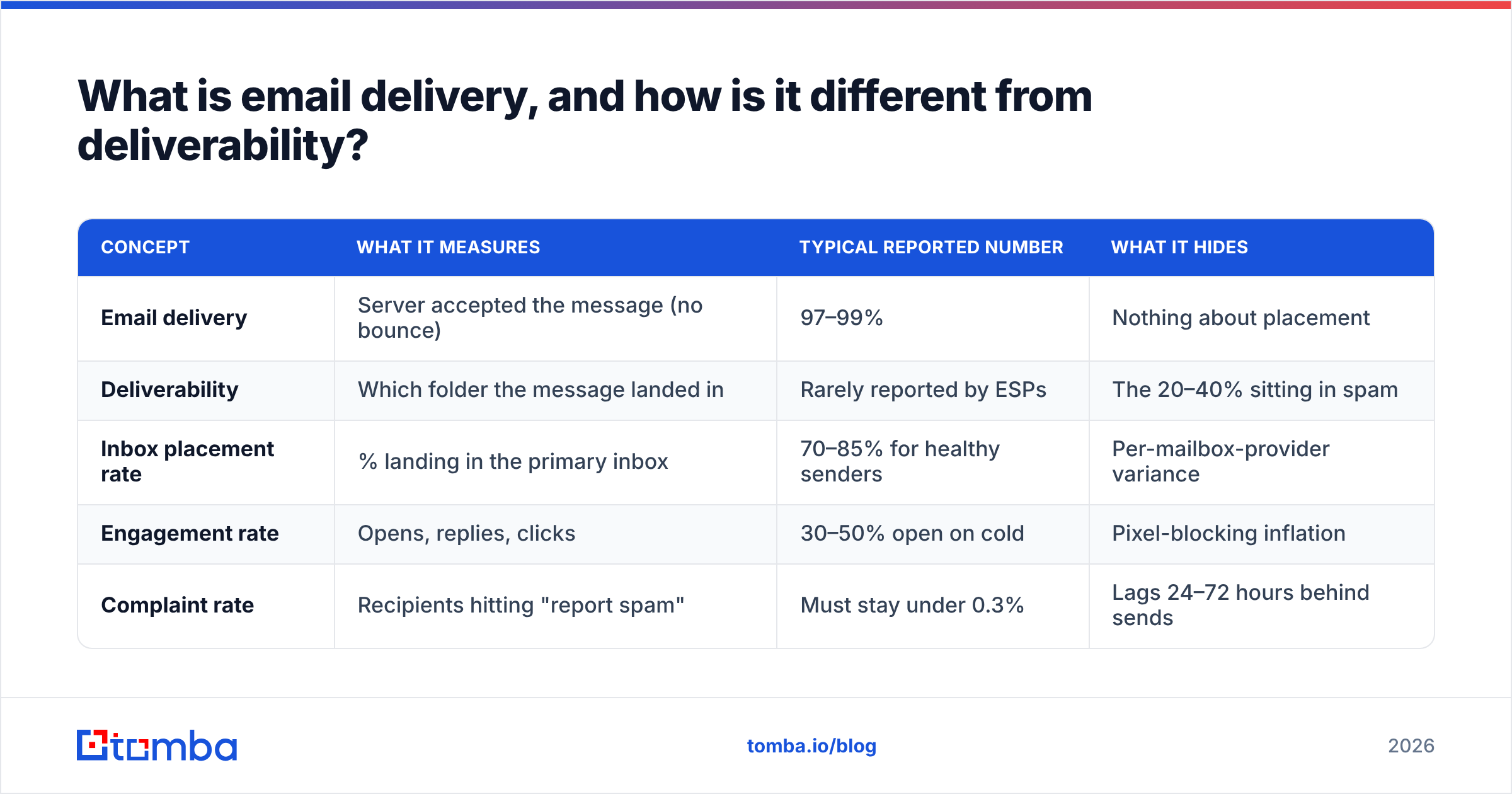
Here's the distinction laid out against the metric that actually matters to revenue:
| Concept | What it measures | Typical reported number | What it hides |
|---|---|---|---|
| Email delivery | Server accepted the message (no bounce) | 97–99% | Nothing about placement |
| Deliverability | Which folder the message landed in | Rarely reported by ESPs | The 20–40% sitting in spam |
| Inbox placement rate | % landing in the primary inbox | 70–85% for healthy senders | Per-mailbox-provider variance |
| Engagement rate | Opens, replies, clicks | 30–50% open on cold | Pixel-blocking inflation |
| Complaint rate | Recipients hitting "report spam" | Must stay under 0.3% | Lags 24–72 hours behind sends |
The gap between row one and row three is where campaigns quietly die. Your ESP dashboard shows 98.4% delivered, your reply rate is 0.2%, and nobody can explain why. The messages were accepted and then filtered.

Why does email delivery fail in 2026?#
Five root causes account for nearly every failure. They are not equally weighted, and they are not independent — a bad list creates bounces, bounces damage reputation, and damaged reputation causes filtering that looks like a content problem.
- Broken or partial authentication. SPF passes but DKIM isn't aligned with the From domain, so DMARC fails. Gmail and Yahoo now reject or junk this outright for bulk senders. Check your record with a free SPF checker before assuming DNS is fine — a single extra
include:can push you over the 10-lookup limit and silently void the whole record. - Dirty lists. Scraped, purchased, or two-year-old contact data produces hard bounces and spam-trap hits. Recycled traps — real addresses abandoned and repurposed by mailbox providers — are the most damaging because they prove you're not practicing hygiene.
- Volume shocks. Going from 50 sends a day to 2,000 on a new domain reads as a compromised account. Providers throttle first and ask questions never.
- Low engagement signals. Nobody opens, nobody replies, several people archive without reading. Gmail's filters weight recipient behavior heavily, and a sustained flat line moves you to Promotions and then spam.
- Content and infrastructure mismatches. Link shorteners on a domain with a bad reputation, image-only emails, tracking domains that don't match the sending domain, and unsubscribe links buried in a footer image.
Notice that only the last item is what most people mean when they say "my email copy is getting flagged." Copy matters, but it's the fifth lever, not the first.
What are the technical requirements for email delivery?#
Three DNS records plus two list-management behaviors. Get these right and you clear the mechanical bar.
SPF (Sender Policy Framework) publishes which servers may send on behalf of your domain. It's a TXT record. Keep it under 10 DNS lookups and never publish two SPF records for one domain — that's an automatic fail.
DKIM (DomainKeys Identified Mail) cryptographically signs your messages so the receiver can confirm nothing was altered in transit and that the signing domain is who it claims to be. Use a 2048-bit key. Rotate it annually.
DMARC tells receivers what to do when SPF and DKIM both fail, and where to send reports. Start at p=none with a reporting address, read the aggregate reports for two weeks, then move to p=quarantine and eventually p=reject. The DMARC specification is worth reading once if you own this at your company; the alignment rules are where most teams get it wrong.
One-click unsubscribe (RFC 8058) is required for bulk senders. It's a header, not a footer link. If your ESP doesn't set List-Unsubscribe-Post, you're out of compliance with Gmail's sender guidelines.
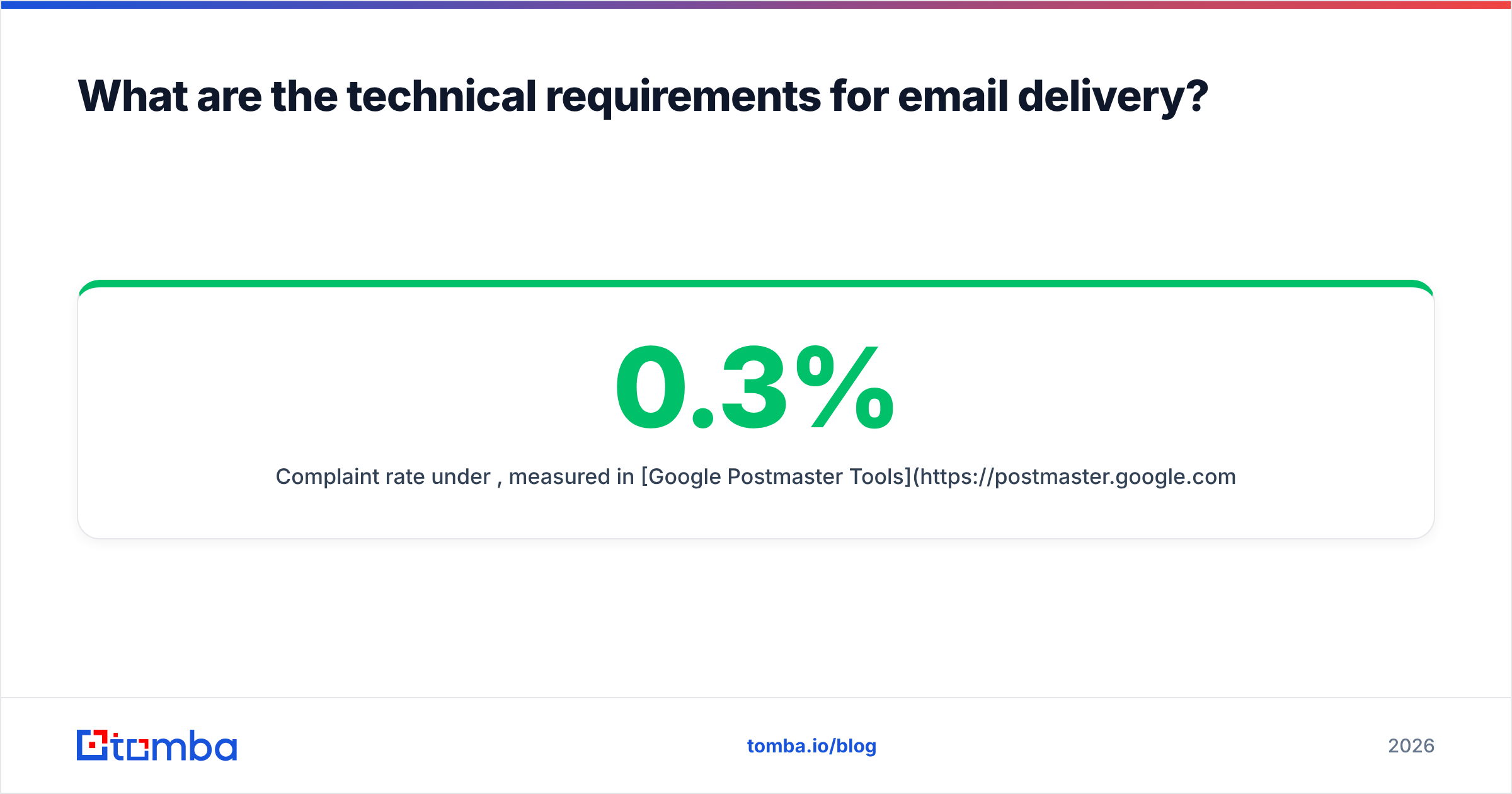
Complaint rate under 0.3%, measured in Google Postmaster Tools. Above 0.3% you get throttled. Above 0.5% you get filtered wholesale, and it takes weeks of clean sending to recover.
That's the compliance floor. Clearing it doesn't get you into the inbox — it gets you eligible to be considered.
How do you diagnose an email delivery problem?#
Work the layers in order. Each layer's data invalidates conclusions you'd draw at the layer below it.
Layer 1 — Authentication (30 minutes). Send a test message to a Gmail address, open "Show original," and confirm SPF, DKIM, and DMARC all read PASS. If any fails, stop here. Nothing downstream matters.
Layer 2 — List quality (a few hours). Pull your last 90 days of sends and calculate hard bounce rate. Under 2% is healthy. Between 2% and 5% means your acquisition source is leaking bad data. Over 5% means stop sending today and clean the list. Run the full list through verification and segment out catch-all domains for separate treatment — a catch-all verifier can tell you which accept-all domains are actually safe to mail versus which will silently discard.
Layer 3 — Volume and reputation (one week of observation). Open Google Postmaster Tools and look at Domain Reputation and IP Reputation. "High" or "Medium" is workable. "Low" or "Bad" means you're in a hole and the only exit is reduced volume plus engaged recipients only, for 2–4 weeks.
Layer 4 — Content and engagement (ongoing). Seed-test placement across Gmail, Outlook, and a corporate Microsoft 365 tenant. Compare reply rates per segment. Now — and only now — is it worth rewriting subject lines.
Teams that skip to Layer 4 because it's the fun part are the same teams still debugging six weeks later.
Which fixes actually move the needle?#
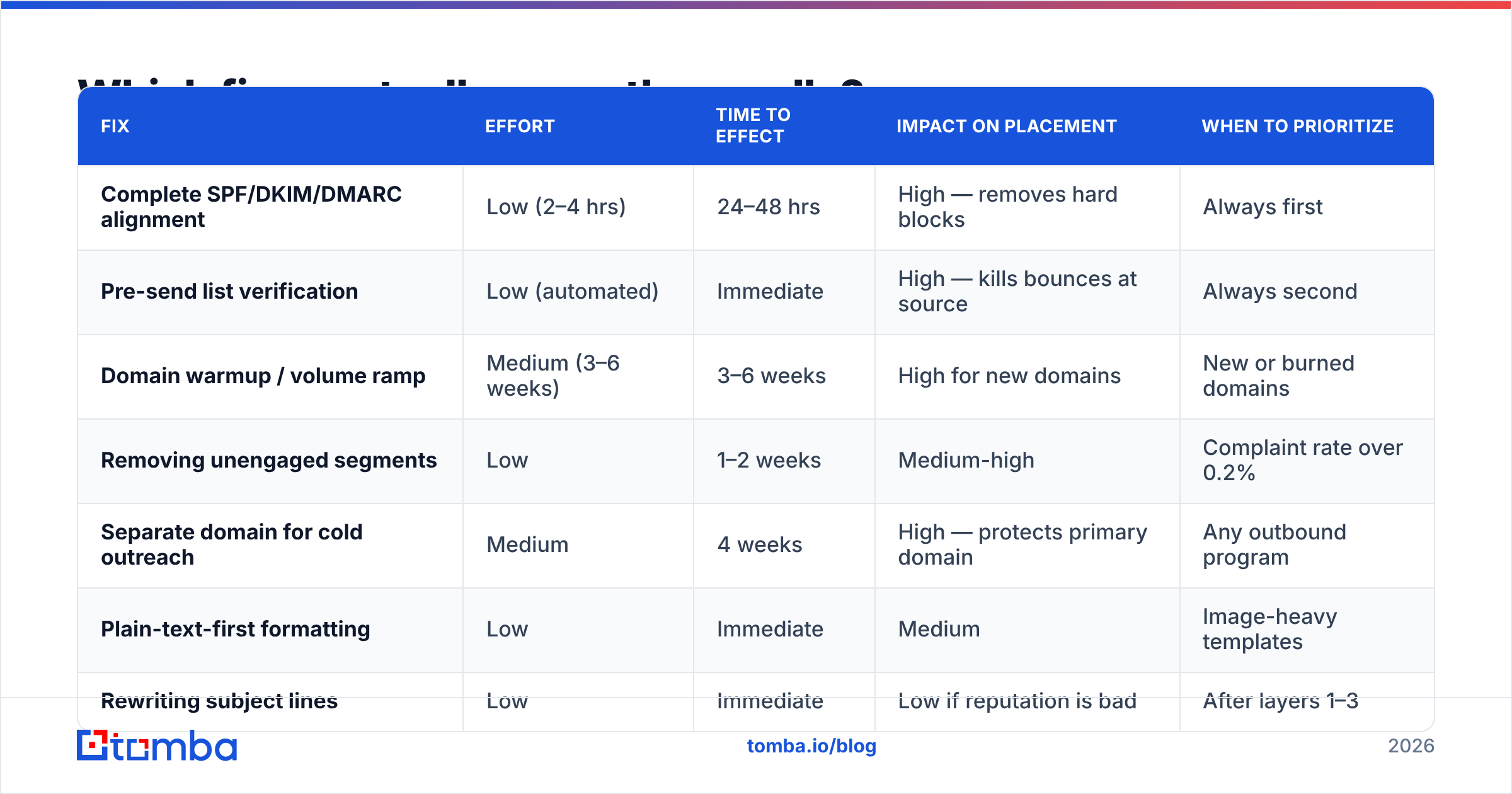
Not all remediation is worth the same. Here's how the common interventions compare on effort versus impact, based on what typically shifts inbox placement for a B2B sender with a damaged domain:
| Fix | Effort | Time to effect | Impact on placement | When to prioritize |
|---|---|---|---|---|
| Complete SPF/DKIM/DMARC alignment | Low (2–4 hrs) | 24–48 hrs | High — removes hard blocks | Always first |
| Pre-send list verification | Low (automated) | Immediate | High — kills bounces at source | Always second |
| Domain warmup / volume ramp | Medium (3–6 weeks) | 3–6 weeks | High for new domains | New or burned domains |
| Removing unengaged segments | Low | 1–2 weeks | Medium-high | Complaint rate over 0.2% |
| Separate domain for cold outreach | Medium | 4 weeks | High — protects primary domain | Any outbound program |
| Plain-text-first formatting | Low | Immediate | Medium | Image-heavy templates |
| Rewriting subject lines | Low | Immediate | Low if reputation is bad | After layers 1–3 |
| Switching ESP | High | 4–8 weeks | Low — reputation follows the domain | Rarely the answer |
The last row deserves emphasis. Changing sending platforms is the most common panic move and the least effective one. Reputation attaches to your domain and, to a lesser extent, your sending IP. A new ESP with the same domain and the same list reproduces the same result in about ten days.

How does list hygiene affect email delivery?#
More than anything else you control. A bounce is a direct, unambiguous signal to the mailbox provider that you're mailing addresses you have no relationship with.
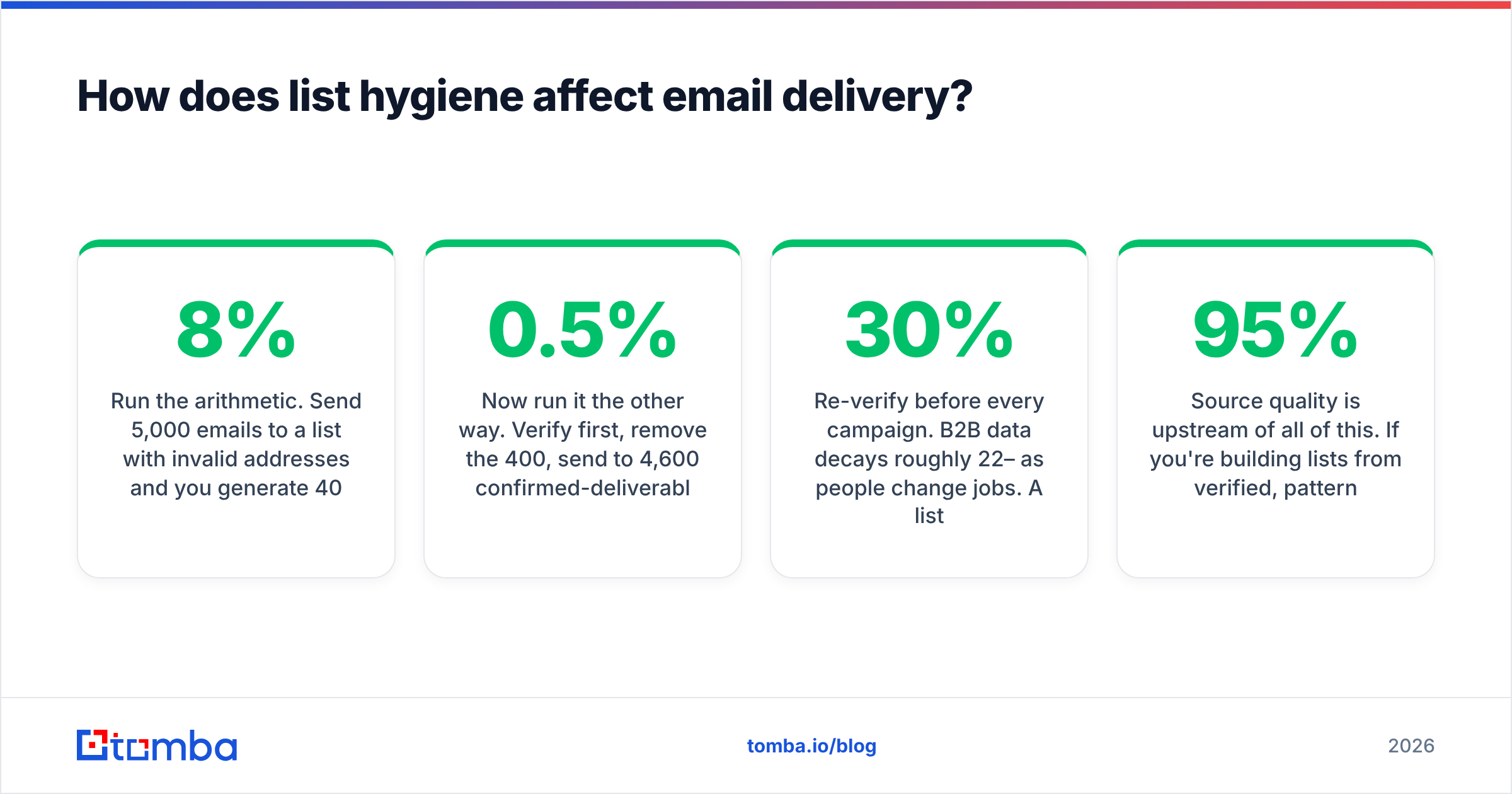
Run the arithmetic. Send 5,000 emails to a list with 8% invalid addresses and you generate 400 hard bounces in a single batch. Gmail sees 400 rejections from your domain inside an hour. Your domain reputation drops that day, and the 4,600 valid recipients — the people you actually wanted to reach — get filtered because of the 400 who never existed.
Now run it the other way. Verify first, remove the 400, send to 4,600 confirmed-deliverable addresses. Bounce rate lands near 0.5%. Reputation holds. The same campaign, the same copy, a completely different outcome.
This is why verification belongs in the workflow, not the post-mortem. Practical implementation:
- Verify at capture. Any form, import, or enrichment job hits a validation API before the record lands in your CRM. The email verification API makes this a single call in your existing pipeline.
- Re-verify before every campaign. B2B data decays roughly 22–30% per year as people change jobs. A list verified six months ago is not a verified list.
- Batch-clean quarterly. Push the whole database through a bulk verify run and archive anything that comes back invalid or risky.
- Suppress permanently. Hard bounces go on a suppression list forever. Never let a re-import resurrect them.
- Treat catch-alls separately. They're neither valid nor invalid. Mail them in a smaller, separate segment so their behavior doesn't contaminate your main sending reputation.
Source quality is upstream of all of this. If you're building lists from verified, pattern-confirmed sources rather than scraping, you start at a 95%+ valid rate instead of clawing your way there. Providers like BookYourData and Tomba both approach this from the accuracy-first angle rather than volume-first, which is the right instinct — a list of 500 confirmed contacts outperforms 10,000 guesses on every metric that matters, including the one your domain reputation depends on.
What should your email delivery stack look like?#
A workable 2026 setup for a B2B outbound team:
- Sending domains — your primary domain for transactional and marketing mail, plus one or two lookalike domains dedicated to cold outreach. Never send cold from the domain your invoices go out on.
- Authentication — SPF, DKIM (2048-bit), DMARC at
p=quarantineminimum, and a custom tracking domain aligned to the sending domain. - Data layer — a source of contact records with verification built in, feeding your CRM through native integrations rather than CSV round-trips.
- Verification gate — an API call that blocks invalid addresses from entering a sequence at all.
- Warmup — automated for the first 4–6 weeks on any new domain, then maintained at low volume indefinitely.
- Monitoring — Google Postmaster Tools, a blocklist monitor, and weekly seed tests across at least three mailbox providers.
Every layer is cheap relative to the cost of a burned domain, which is measured in months of lost pipeline, not dollars.
What's changing in email delivery going forward?#
Three trends worth planning around.
BIMI and verified sender identity are spreading. Displaying a verified logo in the inbox requires DMARC at enforcement plus a Verified Mark Certificate. It's still optional, but it's becoming a trust signal that filters weigh.
AI-generated volume is raising the filtering bar. Mailbox providers are responding to the flood of machine-written outreach by weighting engagement history more heavily and template similarity more negatively. Sending the same AI-drafted paragraph to 5,000 people is now actively detectable.
Engagement windows are shortening. Recipients who haven't opened in 60 days count against you faster than they did in 2023. Aggressive sunsetting of unengaged contacts is no longer a nice-to-have.
None of this changes the fundamentals. Authenticate properly, mail people who exist and want to hear from you, ramp volume gradually. The mechanics get stricter; the principles don't move.
Start where the leverage is. Most email delivery problems trace back to contact data that was never accurate in the first place. If your bounce rate is above 3%, no amount of copy tuning or ESP shopping will fix it — the list is the problem. Tomba's Email Finder returns verified, pattern-confirmed professional addresses with a confidence score on every result, so bad records never enter your sequences. The free tier covers 25 searches a month to test accuracy against your own known-good contacts; paid plans start at $49/mo, with API access on every tier. Check the pricing details and run your worst-performing segment through it before your next send.
Related guides#
Ready to find emails that actually work?
Join 150,000+ professionals who stopped guessing and started sending. Free credits on signup — no credit card required.
Get the Tomba newsletter
Practical outbound tactics and product updates — once every two weeks.
About the author