Email Delivery Tracking in 2026: The Complete Guide
Delivered is not the same as inbox. Here's how email delivery tracking actually works in 2026, which signals still survive Apple MPP, and how to build a monitoring stack that catches problems before your reply rate drops.
TL;DR
- "Delivered" only means a receiving server accepted your message. It says nothing about whether the message landed in the inbox, Promotions, or spam.
- Apple Mail Privacy Protection and Gmail's image proxy inflate open rates by 40-70% for most B2B senders, so open-based delivery tracking is now directional at best.
- The signals that still work in 2026: SMTP response codes, bounce classification, seed-list placement tests, Google Postmaster Tools, Microsoft SNDS, spam-complaint rates, and reply rate by domain.
- Google and Yahoo's bulk-sender rules (complaint rate under 0.3%, enforced authentication, one-click unsubscribe) turned deliverability from a soft metric into a hard gate.
- The cheapest deliverability fix is still upstream: verify your list before you send. A 3% invalid rate is enough to depress reputation on a new domain.
What is email delivery tracking?#
Email delivery tracking is the practice of measuring what happens to a message after your sending system hands it off — whether the receiving server accepted it, where it was filed, and how the recipient interacted with it.
Think of it like shipping a package. The courier's "delivered" scan tells you the box reached the building. It doesn't tell you whether it made it to the right apartment, got left in a lobby, or was dumped in a bin by the doorman. Email is the same: your ESP's delivered event is the courier scan, and everything past that point requires different instrumentation.
There are four distinct layers people conflate under "tracking":
- Transport-level acceptance — the SMTP handshake. Did the receiving MTA return a 2xx, a 4xx (soft bounce, retry), or a 5xx (hard bounce, permanent)? This is the only layer your sending platform sees with certainty.
- Placement — inbox vs. Promotions/Updates vs. Junk vs. silently dropped. No ESP can see this natively. You infer it with seed lists, panel data, or mailbox-provider dashboards.
- Engagement — opens, clicks, replies. Opens are heavily distorted by privacy proxies. Clicks are more reliable but still polluted by security scanners. Replies are the ground truth.
- Reputation — the rolling score mailbox providers assign to your domain and IP based on complaints, spam-trap hits, authentication results, and engagement history.
Most teams instrument layer 1, half-instrument layer 3, and never touch layers 2 and 4. That's why the first sign of a deliverability problem is usually a mysteriously flat pipeline three weeks after the damage started.
Why does "delivered" not mean "in the inbox"?#
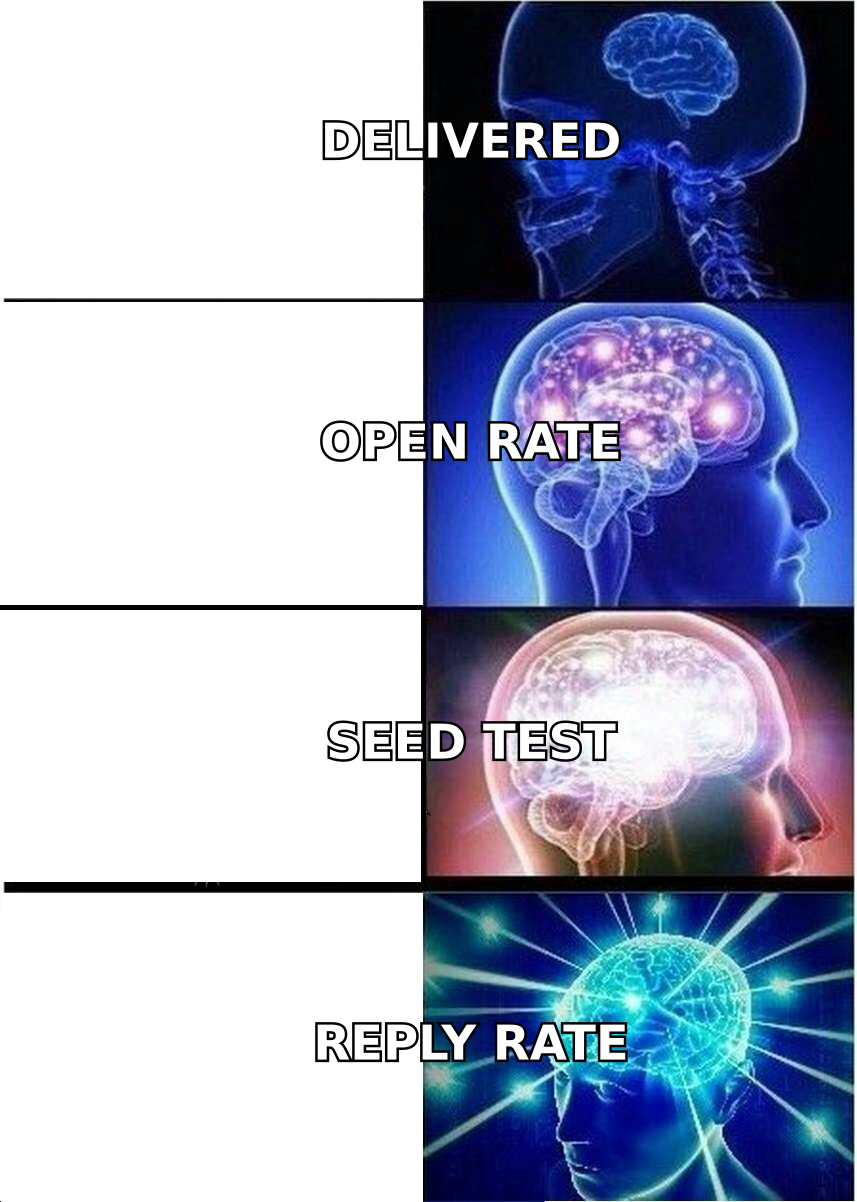
Because acceptance and filtering are separate decisions, made at different times, by different systems.
When Gmail's edge server returns 250 2.0.0 OK, it has agreed to take custody of the message. Filtering happens after — sometimes milliseconds later, sometimes after a content scan, sometimes after aggregating your sending behavior across the last hour. A message can be accepted with a 250 and routed straight to Junk. Your ESP will report it as delivered. Every dashboard you own will show green.
This is the single most expensive misunderstanding in outbound. Teams read a 98.4% delivery rate and conclude their setup is healthy, when their actual inbox placement might be 61%.
The gap has real math behind it. Independent placement studies from vendors like Validity and Everest have consistently put average global inbox placement in the low-to-mid 80s for permission-based marketing mail, and materially lower for cold outbound. If your delivery rate is 98% and your placement is 78%, one in five contacts you "reached" never saw the message.
Practical implication: stop reporting delivery rate as a success metric to leadership. Report reply rate per 1,000 contacts sent, segmented by recipient domain. That one number quietly captures placement, relevance, and list quality all at once.
What did Apple MPP and the 2024 sender rules change?#
Two shifts reset the tracking playbook, and both are now fully baked in.
Apple Mail Privacy Protection (2021, still expanding). When an Apple Mail user has MPP on, Apple pre-fetches every remote image through its proxy the moment the message arrives — before the human touches it. Your tracking pixel fires regardless. Apple Mail accounts for roughly a quarter to a third of B2B opens depending on your ICP, so a meaningful slice of your open rate is now a machine. Gmail's image caching creates a smaller but similar distortion.
The practical fix is not to abandon opens — it's to stop making decisions with them. Use opens for relative week-over-week movement on a stable audience. Never use them for A/B subject-line significance testing, never for lead scoring, and never as a KPI in a board deck.
Google and Yahoo bulk-sender requirements (Feb 2024, enforced since). For senders above 5,000 messages/day to their users:
- SPF and DKIM, with DMARC alignment on the visible From domain
- Spam complaint rate kept under 0.3%, with 0.1% as the "stay well clear" target
- One-click list-unsubscribe (RFC 8058) honored within two days
- Valid forward and reverse DNS on sending IPs
- TLS on the connection
These converted deliverability from a soft art into a compliance checklist with a hard failure mode. Microsoft followed with comparable requirements for Outlook.com. If you have not audited your SPF record and DMARC alignment since 2024, that audit is the highest-ROI hour on this list.
Which email delivery tracking metrics actually matter in 2026?#
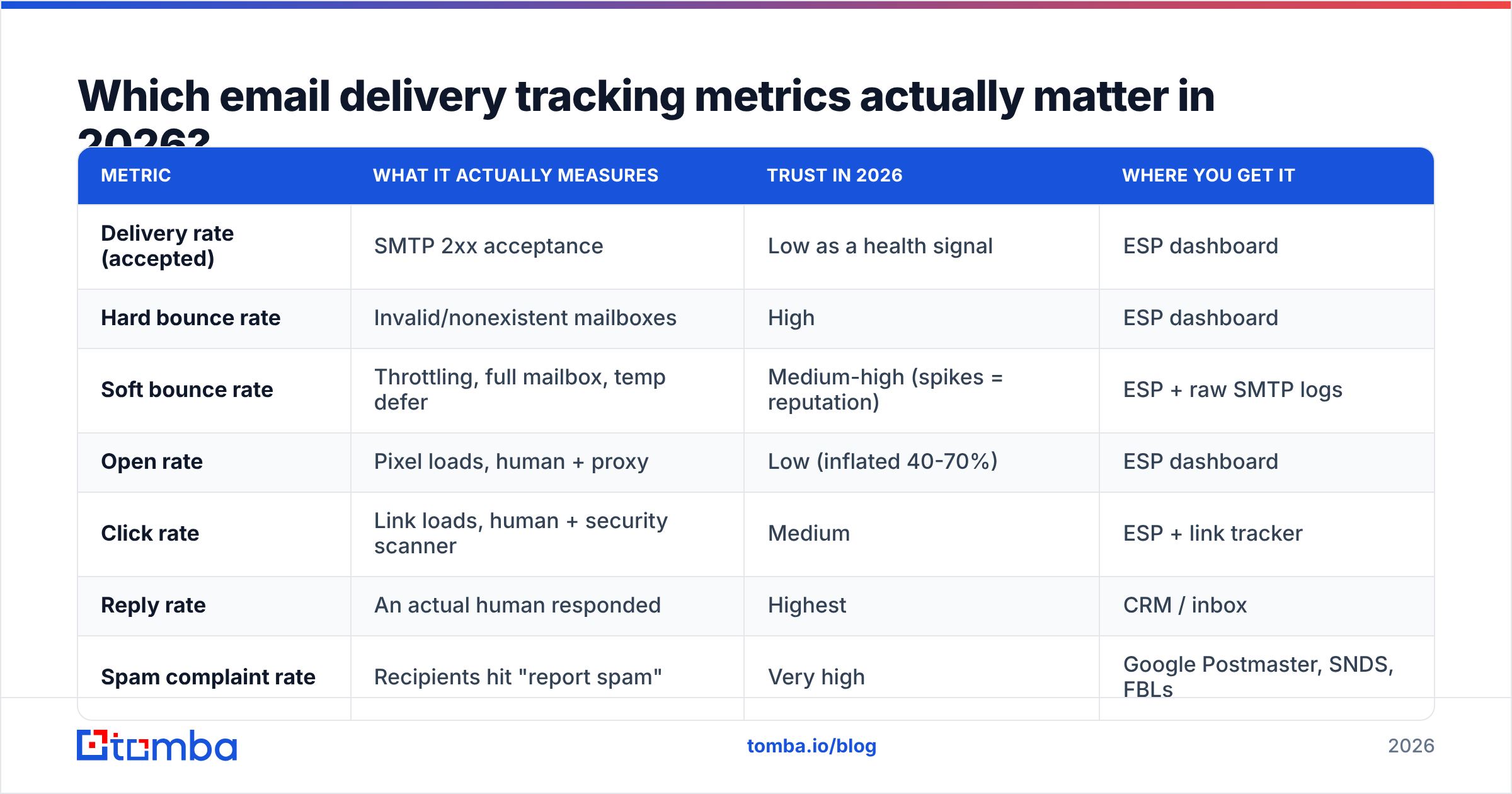
Here's the honest scorecard. Trust column reflects how much weight the signal deserves when you're diagnosing a real problem.
| Metric | What it actually measures | Trust in 2026 | Where you get it |
|---|---|---|---|
| Delivery rate (accepted) | SMTP 2xx acceptance | Low as a health signal | ESP dashboard |
| Hard bounce rate | Invalid/nonexistent mailboxes | High | ESP dashboard |
| Soft bounce rate | Throttling, full mailbox, temp defer | Medium-high (spikes = reputation) | ESP + raw SMTP logs |
| Open rate | Pixel loads, human + proxy | Low (inflated 40-70%) | ESP dashboard |
| Click rate | Link loads, human + security scanner | Medium | ESP + link tracker |
| Reply rate | An actual human responded | Highest | CRM / inbox |
| Spam complaint rate | Recipients hit "report spam" | Very high | Google Postmaster, SNDS, FBLs |
| Inbox placement rate | Inbox vs. spam vs. tabs | High (sampled) | Seed tests, panel vendors |
| Domain reputation | Rolling provider verdict | Very high | Google Postmaster Tools |
| Authentication pass rate | SPF/DKIM/DMARC alignment | Very high | Postmaster, DMARC reports |
Two rules of thumb for reading this table. First, any metric a mailbox provider gives you directly outranks any metric your ESP infers. Google Postmaster Tools telling you your domain reputation dropped to "Low" is a fact; your ESP's 99% delivery rate is a hopeful inference. Second, watch derivatives, not levels. A 4% soft-bounce rate is unremarkable; a jump from 0.8% to 4% over three days is a reputation event in progress.
How do you actually build a delivery tracking stack?#
Layer these in order. Each one covers a blind spot the previous one leaves open.
- Raw SMTP event logs. Your ESP's webhook feed —
delivered,bounced,deferred,complained,unsubscribed, with the full response string. Pipe it into your warehouse, not just the vendor UI. The response text (550 5.7.1 Message rejected due to contentvs.550 5.1.1 User unknown) is where diagnosis actually happens, and most dashboards throw it away. - Google Postmaster Tools. Free, and the only direct window into Gmail's opinion of you. Track domain reputation, IP reputation, spam rate, authentication pass rate, and encryption. Set up the DNS TXT verification for every sending domain, including your cold-outbound aliases. Gmail is 30-50% of most B2B lists, so this is not optional.
- Microsoft SNDS + JMRP. The Outlook/Hotmail equivalent. SNDS gives IP-level data, JMRP is the feedback loop that tells you who complained. Microsoft filtering is stricter and less forgiving than Gmail's for cold traffic, and enterprise B2B lists skew Microsoft-heavy.
- Seed-list placement testing. Send to a controlled set of real accounts across Gmail, Outlook, Yahoo, and a few corporate-filter domains before or during each campaign. Gives you an actual inbox/spam/tabs split. Sample bias is real — a seed list isn't your audience — but a 40-point placement drop shows up clearly regardless.
- Blacklist monitoring. Automated daily checks against Spamhaus, SpamCop, Barracuda, and SORBS for your sending IPs and domains. Use a blacklist checker on a schedule, not reactively.
- Reply-rate reporting by recipient domain. Your own data, and the highest-signal thing you own. If reply rate holds at 4% on Gmail recipients but collapses to 0.3% on Outlook recipients, you have a Microsoft placement problem — no seed test required to know that.
How do the monitoring tools compare?#
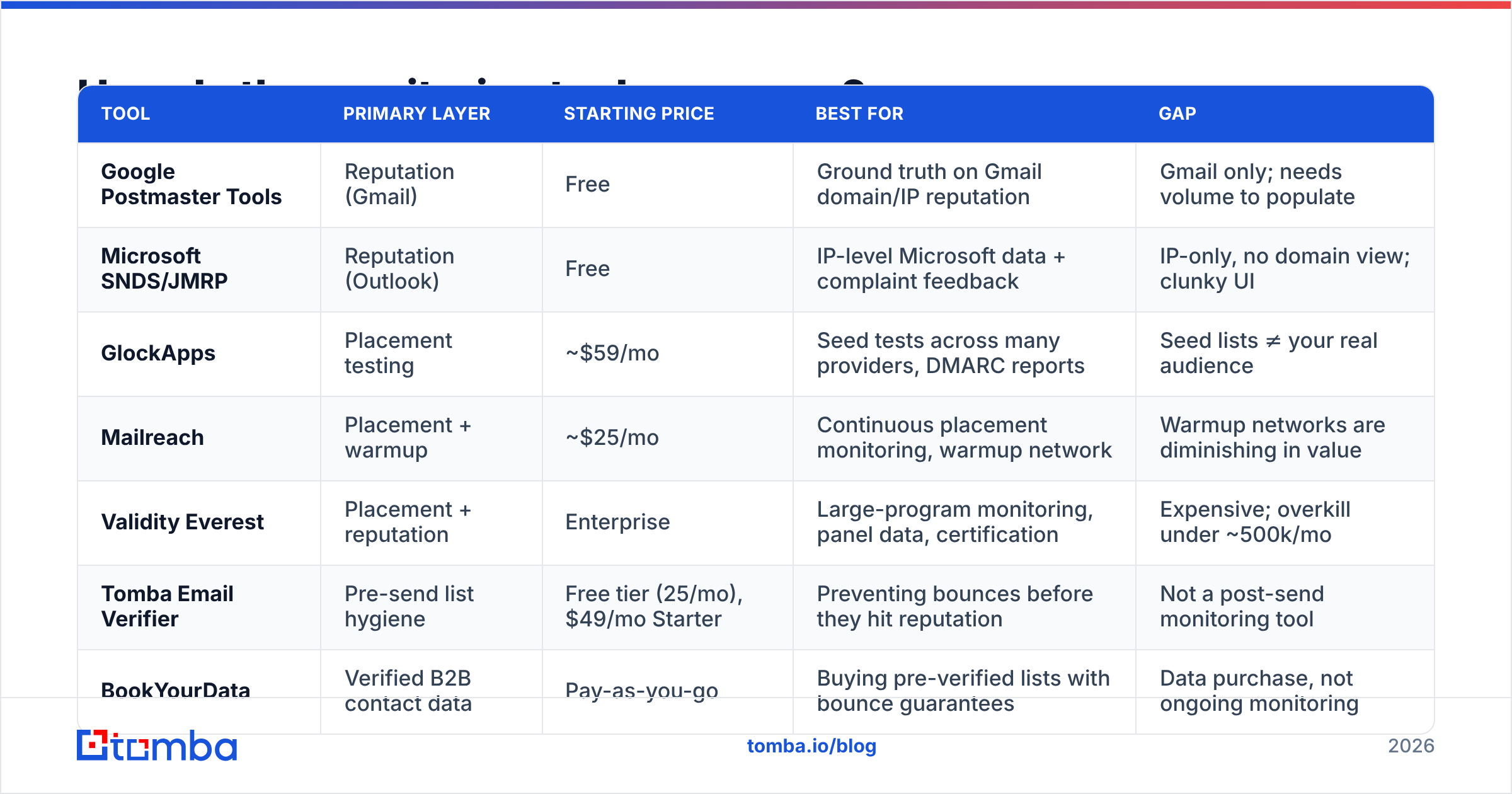
Different tools solve different layers. Most teams need two or three, not one.
| Tool | Primary layer | Starting price | Best for | Gap |
|---|---|---|---|---|
| Google Postmaster Tools | Reputation (Gmail) | Free | Ground truth on Gmail domain/IP reputation | Gmail only; needs volume to populate |
| Microsoft SNDS/JMRP | Reputation (Outlook) | Free | IP-level Microsoft data + complaint feedback | IP-only, no domain view; clunky UI |
| GlockApps | Placement testing | ~$59/mo | Seed tests across many providers, DMARC reports | Seed lists ≠ your real audience |
| Mailreach | Placement + warmup | ~$25/mo | Continuous placement monitoring, warmup network | Warmup networks are diminishing in value |
| Validity Everest | Placement + reputation | Enterprise | Large-program monitoring, panel data, certification | Expensive; overkill under ~500k/mo |
| Tomba Email Verifier | Pre-send list hygiene | Free tier (25/mo), $49/mo Starter | Preventing bounces before they hit reputation | Not a post-send monitoring tool |
| BookYourData | Verified B2B contact data | Pay-as-you-go | Buying pre-verified lists with bounce guarantees | Data purchase, not ongoing monitoring |
Notice the split: the first five tools tell you what already went wrong. The last two prevent the most common cause of it. A monitoring stack without a hygiene step is a smoke detector in a house you keep pouring gasoline into.

Why does list hygiene beat every monitoring tool?#
Because the dominant cause of reputation damage in B2B outbound is sending to addresses that don't exist.
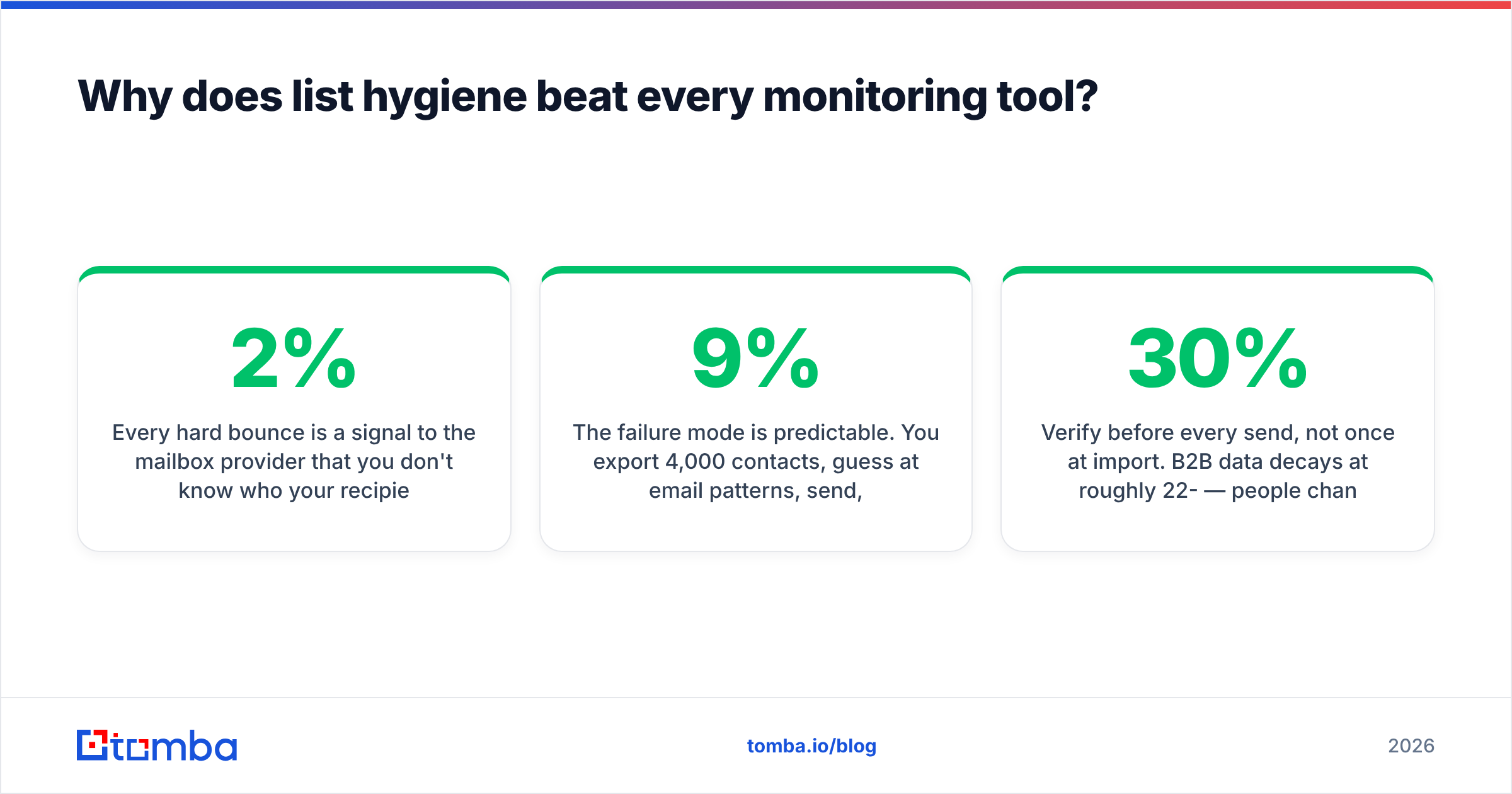
Every hard bounce is a signal to the mailbox provider that you don't know who your recipients are — the exact behavior profile of a purchased list or a scraper. Providers weight this heavily. Industry guidance across ESPs converges on the same threshold: keep hard bounces under 2%, and treat anything above 5% as an active emergency. On a brand-new domain with no positive history to offset it, even 3% is enough to stall you.
The failure mode is predictable. You export 4,000 contacts, guess at email patterns, send, take a 9% bounce rate, and burn a domain that took six weeks to warm. Then you spend three months on monitoring tools trying to diagnose a problem you created in the export step.
The fix is boring and it works:
- Verify before every send, not once at import. B2B data decays at roughly 22-30% per year — people change jobs constantly. A list verified in January is measurably worse by June. Run it through an email verifier again before each campaign.
- Handle catch-all domains explicitly. Catch-all servers accept everything, so standard verification returns "unknown." A dedicated catch-all verifier applies pattern and source-based confidence scoring instead of forcing you to gamble. Segment catch-alls into their own low-volume send.
- Find addresses from a source, don't permutate them. Guessed permutations produce bounces by design. Sourcing from a real B2B database or verified domain search starts you at a far lower invalid rate.
- Suppress aggressively. Hard bounces, complainers, and unsubscribes go on a permanent global suppression list that survives tool migrations. Re-mailing a complainer is the fastest way to a spam-folder verdict.
- Cap daily volume per mailbox. 30-50 cold sends per mailbox per day is the sustainable range in 2026. Volume spikes read as compromise or list-buying to filters.
What does a healthy tracking dashboard look like?#
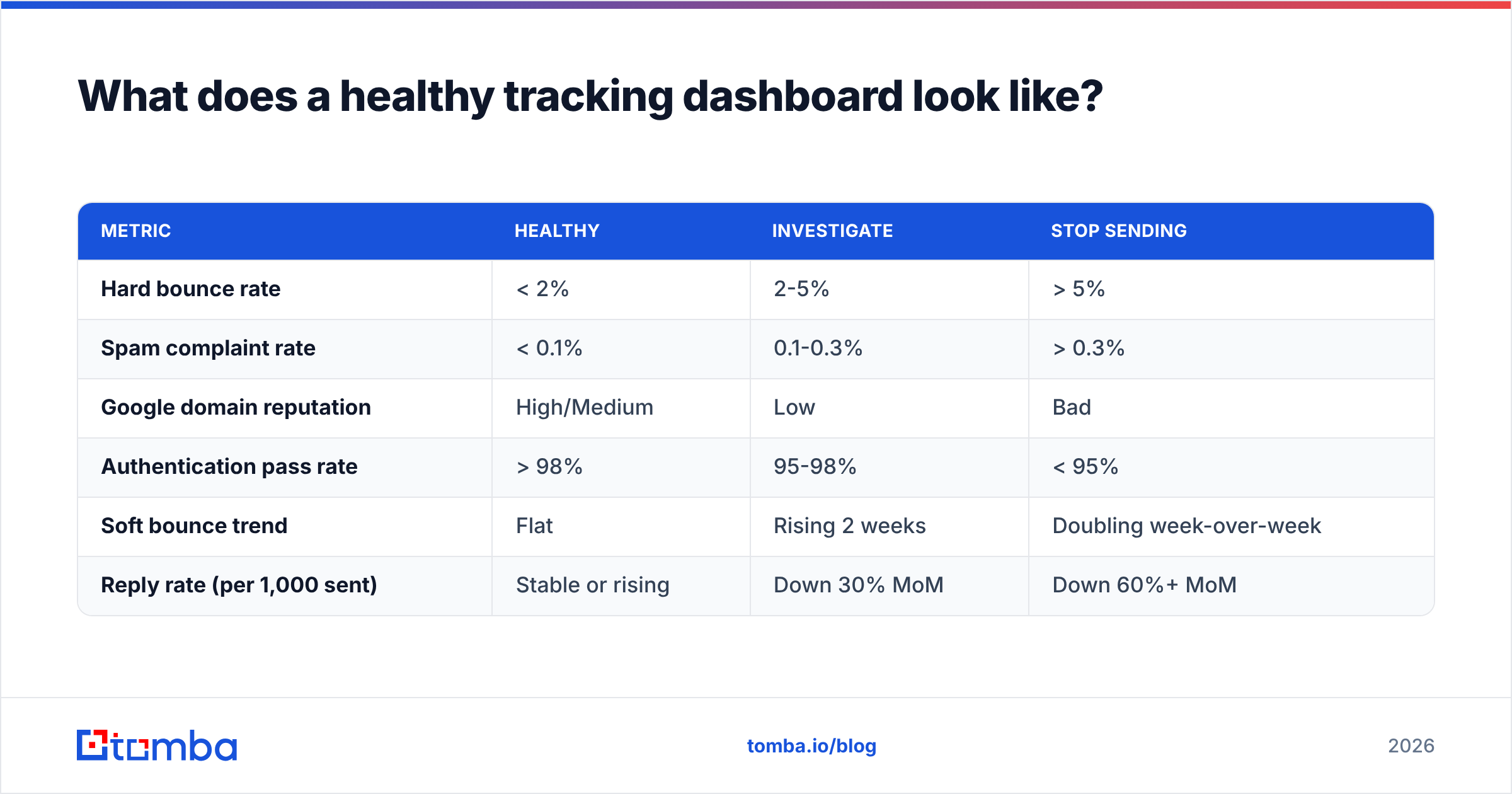
Six numbers, reviewed weekly, per sending domain:
| Metric | Healthy | Investigate | Stop sending |
|---|---|---|---|
| Hard bounce rate | < 2% | 2-5% | > 5% |
| Spam complaint rate | < 0.1% | 0.1-0.3% | > 0.3% |
| Google domain reputation | High/Medium | Low | Bad |
| Authentication pass rate | > 98% | 95-98% | < 95% |
| Soft bounce trend | Flat | Rising 2 weeks | Doubling week-over-week |
| Reply rate (per 1,000 sent) | Stable or rising | Down 30% MoM | Down 60%+ MoM |
The last row is the one to argue about in meetings. Reply rate collapsing while delivery rate stays at 98% is the classic signature of a placement problem — messages are being accepted and filed in spam. If reply rate holds steady, your delivery tracking is fine no matter what any dashboard says.
For teams running this at scale, wire the checks into your pipeline rather than a weekly ritual. The Tomba API lets you verify addresses at the point of CRM entry, so bad data never reaches a sending queue. Pair it with your ESP webhooks landing in the same warehouse and you get one table joining list quality to send outcome — which is the only way to prove that hygiene spend pays for itself.
How often should you audit deliverability?#
- Daily (automated): bounce rate, complaint rate, blacklist status. Alert on threshold breach.
- Weekly (5 minutes): Google Postmaster domain reputation, authentication pass rate, reply rate by recipient domain.
- Monthly (30 minutes): seed-list placement test per sending domain, suppression-list hygiene, DMARC aggregate report review.
- Quarterly: re-verify the entire active list, audit SPF/DKIM/DMARC records against current infrastructure, review sending volume ramp against mailbox count.
Anything more frequent is theater. Anything less and you find out about problems from a sales rep asking why nobody's replying.
Start where the leverage actually is#
Delivery tracking is a diagnostic discipline, not a growth lever. Monitoring tells you the house is on fire; it doesn't stop the fire. The controllable inputs are list quality, authentication, volume discipline, and relevance — in that order.
If you're starting from zero, do these three things this week: verify your DNS records, connect Google Postmaster Tools to every sending domain, and re-verify your active list. That sequence fixes more deliverability problems than any dashboard subscription.
For the list piece, the Tomba Email Finder sources verified professional addresses directly from company domains instead of guessing patterns — which means fewer bounces reaching your sending reputation in the first place. The free tier covers 25 searches a month if you want to test accuracy against a list you already trust; paid plans start at $49/mo for Starter and scale to $99/mo on Growth. Fix the input, and most of your delivery tracking turns into a formality.
Further reading: Google's sender guidelines and HubSpot's email deliverability resources are both worth bookmarking. For tool-by-tool user reviews, G2's email deliverability category is more current than most vendor comparison pages.
Related guides#
Ready to find emails that actually work?
Join 150,000+ professionals who stopped guessing and started sending. Free credits on signup — no credit card required.
Get the Tomba newsletter
Practical outbound tactics and product updates — once every two weeks.
About the author