Email Domain Health Check: The Complete 2026 Guide
Your open rates dropped and nobody can tell you why. A structured email domain health check finds the actual cause — auth records, blocklists, reputation, list hygiene — in about 30 minutes.
TL;DR
- An email domain health check is a structured audit of nine signals — SPF, DKIM, DMARC, MX, blocklists, sending reputation, TLS, list quality, and engagement — that together decide whether your mail hits the inbox or the spam folder.
- Most "sudden deliverability drops" are not sudden. They're the compound result of a misaligned DMARC record, a domain that's been on a blocklist for weeks, and a list with 8% invalid addresses.
- Authentication is table stakes since the 2024 Google/Yahoo bulk sender rules. If you send over 5,000 messages a day to Gmail and lack DMARC, you're already being throttled.
- List hygiene is the single biggest lever you actually control. Bounces above 2% degrade domain reputation faster than any other input, and every invalid address you remove before sending is damage you never take.
- Run the full check quarterly, and after any change to your DNS, ESP, or sending volume.
What Is an Email Domain Health Check?#
An email domain health check is a diagnostic pass over everything that mailbox providers evaluate when they decide where to file your message. Think of it like a pre-flight inspection: the plane may look fine on the tarmac, but you still walk the checklist, because the failure you don't check for is the one that grounds you at 30,000 feet.
Mailbox providers — Gmail, Outlook, Yahoo, corporate Microsoft 365 tenants — don't publish their scoring. But the inputs are well documented across vendor guidance, and they cluster into four layers:
- Identity layer — Can the receiver cryptographically confirm you are who your envelope claims? This is SPF, DKIM, DMARC, and the alignment between them.
- Infrastructure layer — Are your MX records, reverse DNS, and TLS configuration sane? Is your sending IP or domain listed on a blocklist?
- Reputation layer — What is the historical complaint rate, bounce rate, and spam-trap hit rate associated with your domain? Google Postmaster Tools and Microsoft SNDS expose slices of this.
- Behavior layer — Do recipients open, reply, and move your mail out of spam? Or do they delete without reading? Engagement is now the heaviest weight in the model for most providers.
A health check that stops at layer one is the most common mistake. Passing SPF, DKIM, and DMARC gets you permission to be evaluated. It doesn't get you the inbox.
Why Does Domain Health Suddenly Collapse?#
It usually doesn't. What looks like a cliff is almost always a slope you weren't measuring.
Here's the typical sequence in a B2B outbound team. Month one: someone imports a 12,000-row list scraped from a conference attendee PDF. Bounce rate goes to 9%. Month two: reply rates drop, so the team increases volume to compensate. Complaint rate ticks past 0.3%. Month three: the domain lands on a URIBL listing because a recycled spam trap in that conference list fired. Month four: someone finally notices open rates went from 41% to 6%, and the postmortem blames "the algorithm."
Four things make this pattern hard to catch:
- Reputation is domain-scoped and lags. Damage accumulates over weeks. Recovery takes weeks too. There is no reset button.
- Bounces are a leading indicator, opens are a lagging one. By the time opens fall, the reputation hit happened 3–6 weeks earlier.
- Subdomain separation is rarely configured. If transactional mail, marketing mail, and cold outbound all leave from
yourcompany.com, one bad campaign poisons your password resets. - Nobody owns the check. Deliverability sits between marketing, sales ops, and IT, which in practice means it sits nowhere.
The fix is unglamorous: put the audit on a calendar and make one person accountable for the numbers.
What Are the Nine Signals to Check?#
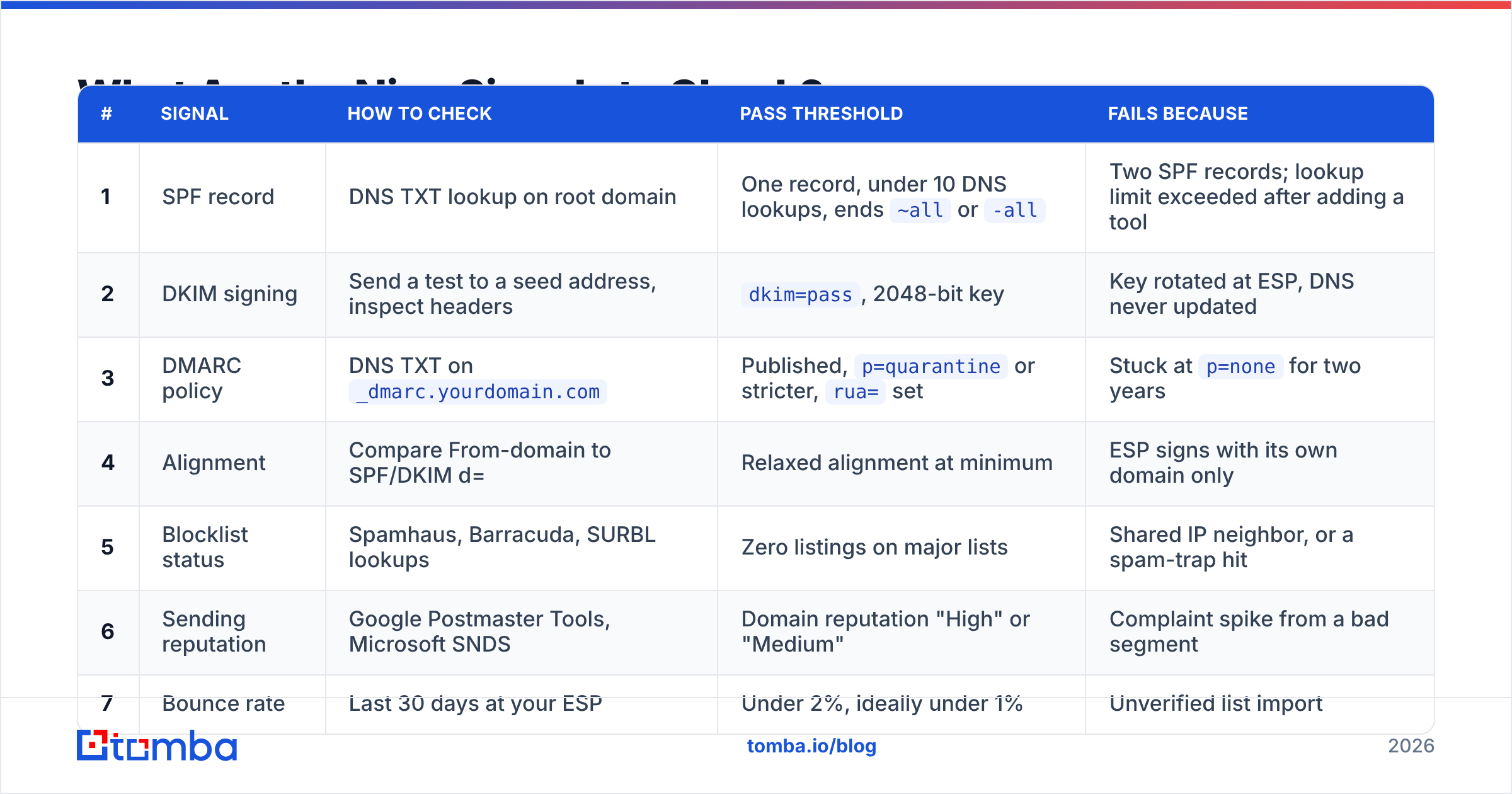
Work through these in order. Each takes a few minutes and each has a clear pass/fail.
| # | Signal | How to check | Pass threshold | Fails because |
|---|---|---|---|---|
| 1 | SPF record | DNS TXT lookup on root domain | One record, under 10 DNS lookups, ends ~all or -all |
Two SPF records; lookup limit exceeded after adding a tool |
| 2 | DKIM signing | Send a test to a seed address, inspect headers | dkim=pass, 2048-bit key |
Key rotated at ESP, DNS never updated |
| 3 | DMARC policy | DNS TXT on _dmarc.yourdomain.com |
Published, p=quarantine or stricter, rua= set |
Stuck at p=none for two years |
| 4 | Alignment | Compare From-domain to SPF/DKIM d= | Relaxed alignment at minimum | ESP signs with its own domain only |
| 5 | Blocklist status | Spamhaus, Barracuda, SURBL lookups | Zero listings on major lists | Shared IP neighbor, or a spam-trap hit |
| 6 | Sending reputation | Google Postmaster Tools, Microsoft SNDS | Domain reputation "High" or "Medium" | Complaint spike from a bad segment |
| 7 | Bounce rate | Last 30 days at your ESP | Under 2%, ideally under 1% | Unverified list import |
| 8 | Complaint rate | Postmaster Tools user-reported spam | Under 0.10%, hard ceiling 0.30% | No clear unsubscribe, wrong audience |
| 9 | TLS + reverse DNS | dig -x on sending IP, check STARTTLS |
PTR matches HELO, TLS 1.2+ | Self-hosted relay never configured |
Google's own sender guidelines are the authoritative reference for thresholds 6 through 8, and they've been enforced rather than suggested since February 2024.
How Do You Fix Authentication Records?#
Start with SPF, because it's the one most likely to be quietly broken.
SPF. You get exactly one SPF record per domain and ten DNS lookups inside it. Every tool you add — an ESP, a helpdesk, a CRM, a webinar platform — eats a lookup via its include: mechanism. Teams routinely blow past ten and don't know, because the failure is a permerror that most tools report as a soft warning. Flatten aggressively: drop include: entries for tools you stopped using in 2023.
DKIM. Use 2048-bit keys. Rotate them, but rotate the DNS record at the same time — the classic failure is rotating at the ESP and forgetting the CNAME. Verify by sending to a seed inbox and reading the Authentication-Results header directly; don't trust an ESP dashboard that says "configured."
DMARC. Publish it, then actually move off p=none. A p=none policy is a monitoring mode, not a policy, and receivers know it. The progression that works:
- Week 1 — Publish
v=DMARC1; p=none; rua=mailto:reports@yourdomain.comand start collecting aggregate reports. - Weeks 2–4 — Read the reports. Find every legitimate sender failing alignment (usually a forgotten invoicing tool or a marketing platform).
- Weeks 5–6 — Fix alignment for each one. Add the include, set up the CNAME, or move the sender to a subdomain.
- Week 7 — Move to
p=quarantine; pct=25, then ramp the percentage weekly. - Week 10+ — Land on
p=rejectonce aggregate reports show zero legitimate failures.
You can verify the record itself with a SPF checker before you push anything live, and confirm you're not on a public blocklist with a blacklist checker.
Does List Quality Actually Affect Domain Health?#
Yes, and it's the input with the highest leverage because it's fully under your control.
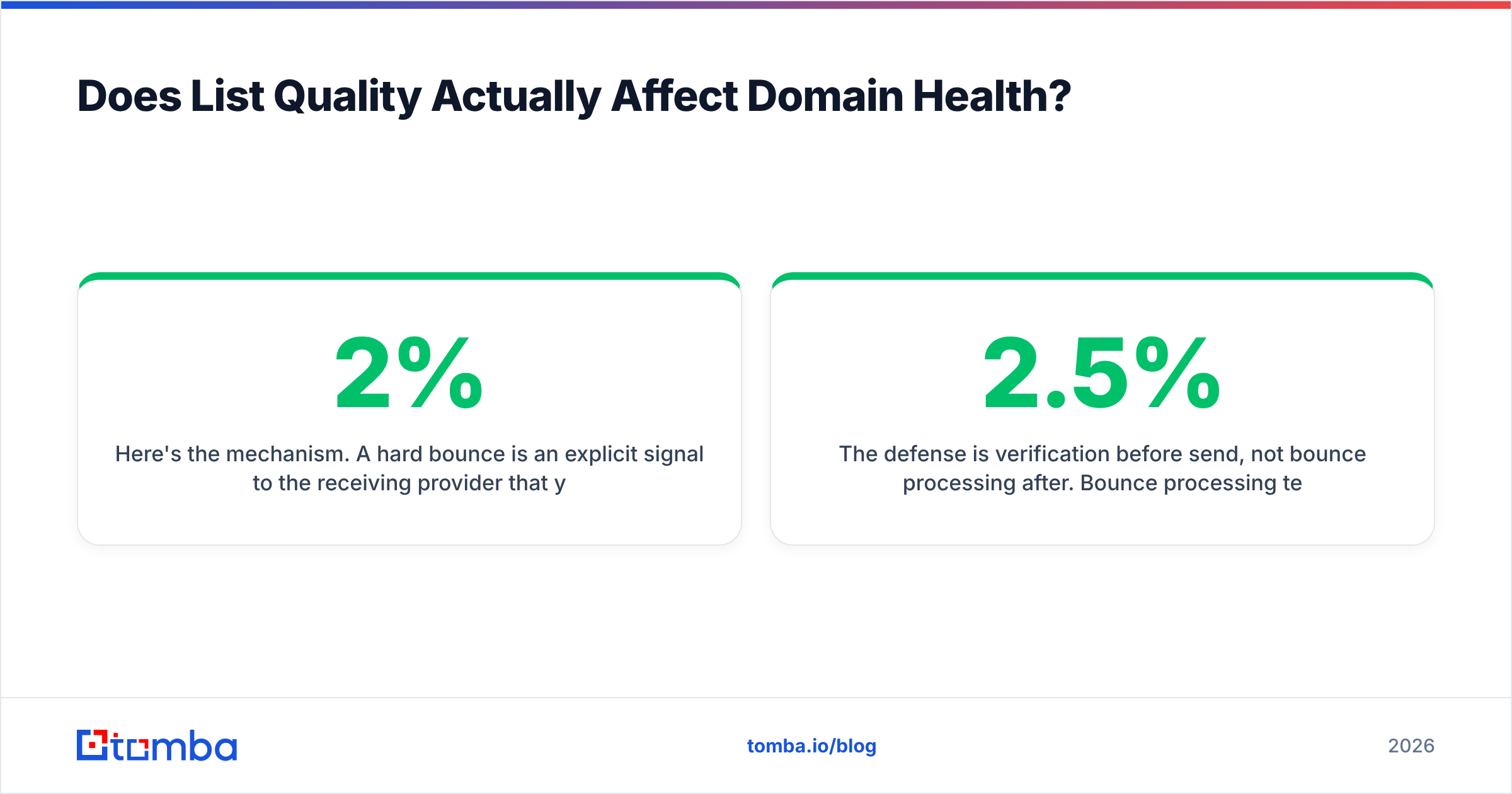
Here's the mechanism. A hard bounce is an explicit signal to the receiving provider that you sent mail to an address that doesn't exist. Providers read that as "this sender does not know who their recipients are," which is exactly what a spammer looks like. Above roughly 2% bounce rate, most providers begin throttling. Above 5%, some ESPs will suspend your account before the provider even reacts.
Worse, dead addresses at large domains often get recycled into spam traps. A recycled trap is an address that was real, went dormant, and was reactivated by the provider specifically to catch senders who never clean their lists. Hitting one is a direct blocklist trigger — no warning, no gradual decline.
The defense is verification before send, not bounce processing after. Bounce processing tells you about the damage; verification prevents it. Run every imported list through an email verifier before it touches your sending domain, and re-verify anything older than 90 days — B2B data decays at roughly 2–2.5% per month as people change jobs.
Catch-all domains deserve their own handling. A catch-all accepts everything at SMTP time, so a standard verification returns "unknown" rather than valid or invalid. Sending blind into a catch-all is how you find traps. A dedicated catch-all verifier applies pattern analysis and secondary signals to separate the real mailboxes from the void.

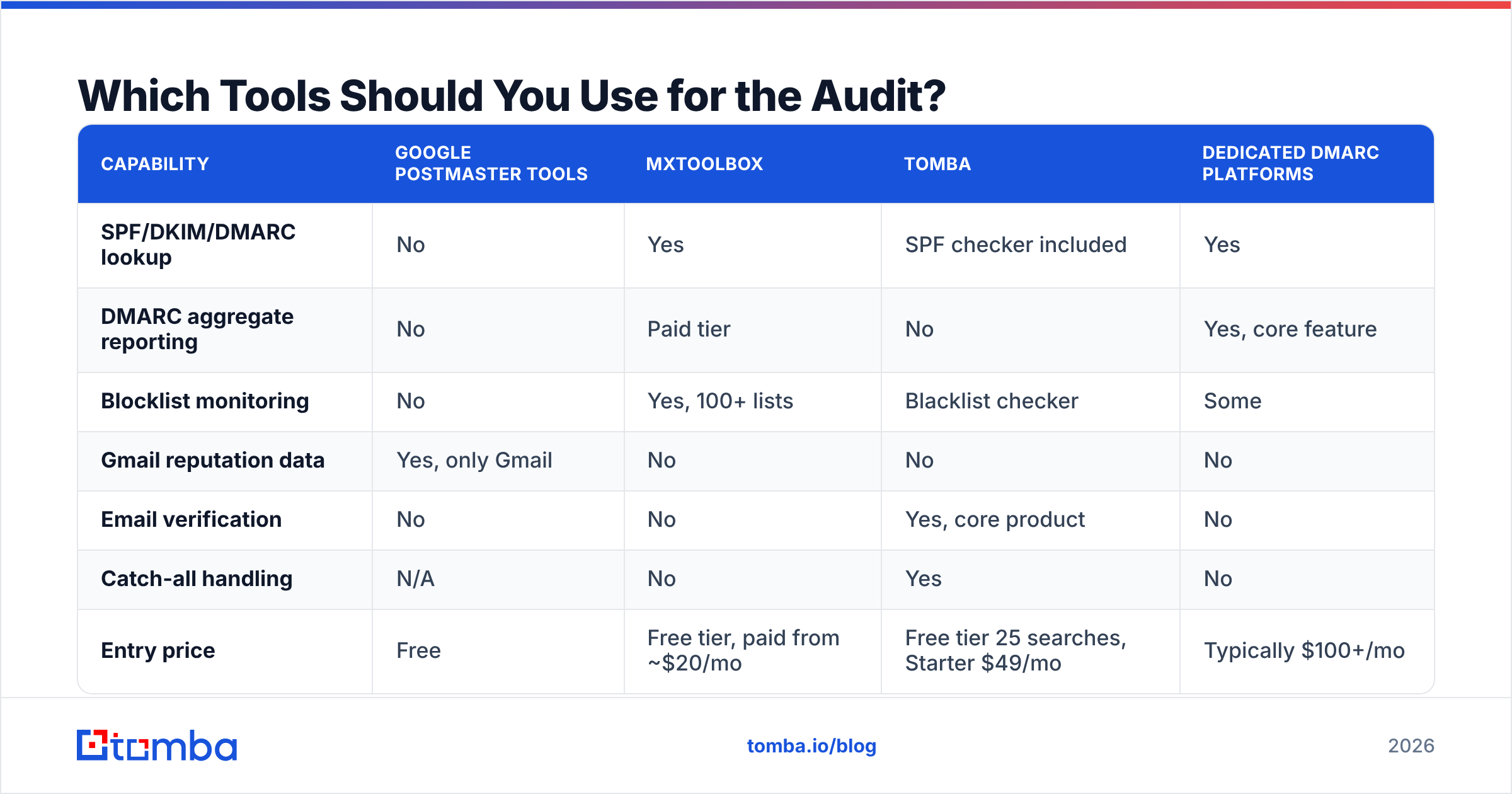
Which Tools Should You Use for the Audit?#
You'll need three categories: DNS/auth diagnostics, reputation monitoring, and list verification. Very few products cover all three well, so most teams assemble a small stack.
| Capability | Google Postmaster Tools | MXToolbox | Tomba | Dedicated DMARC platforms |
|---|---|---|---|---|
| SPF/DKIM/DMARC lookup | No | Yes | SPF checker included | Yes |
| DMARC aggregate reporting | No | Paid tier | No | Yes, core feature |
| Blocklist monitoring | No | Yes, 100+ lists | Blacklist checker | Some |
| Gmail reputation data | Yes, only Gmail | No | No | No |
| Email verification | No | No | Yes, core product | No |
| Catch-all handling | N/A | No | Yes | No |
| Entry price | Free | Free tier, paid from ~$20/mo | Free tier 25 searches, Starter $49/mo | Typically $100+/mo |
| Best for | Gmail-heavy audiences | One-off DNS diagnosis | Preventing bounces at the source | Enterprises enforcing p=reject |
The honest read: Postmaster Tools is free and non-negotiable if you send meaningful volume to Gmail — set it up today. MXToolbox handles the ad-hoc "am I listed?" question. A DMARC platform is worth the money only once you're actively moving toward p=reject across multiple sending domains.
Where Tomba fits is the input side rather than the diagnostic side. It won't tell you your Gmail domain reputation. What it does is stop the bad addresses from ever entering your sending stream, which is the upstream fix for the metric that actually causes most reputation damage. For teams building lists from scratch, the domain search and verification flow means the addresses you collect arrive pre-checked rather than getting cleaned after they've already bounced.
For a broader vendor comparison, G2's email deliverability category has current user reviews across the diagnostic tools, and BookYourData is a solid option if you'd rather buy pre-verified contact data than build it — their verification guarantee removes a large chunk of the bounce risk on day one.
How Often Should You Run This Check?#
Quarterly as a baseline, plus event-triggered runs. The events that should always trigger a full pass:
- You changed ESPs or added a new sending tool. New
include:in SPF, new DKIM keys, new IP reputation. Re-run everything. - You increased volume more than 2x. Reputation is partly volume-normalized; a sudden ramp on a cold domain reads as suspicious.
- Open rates moved more than 15% in either direction. Down means a problem; up sometimes means your tracking broke, which is its own problem.
- You imported a list you didn't build. Verify first, then check blocklists 72 hours after the first send.
- A DNS change happened for any reason. Someone updating a website A record has broken a TXT record more than once in the history of the internet.
Between full audits, watch three numbers weekly: bounce rate, complaint rate, and Gmail domain reputation. Those three catch about 80% of problems while they're still cheap to fix.
What Does a Healthy Domain Actually Look Like?#
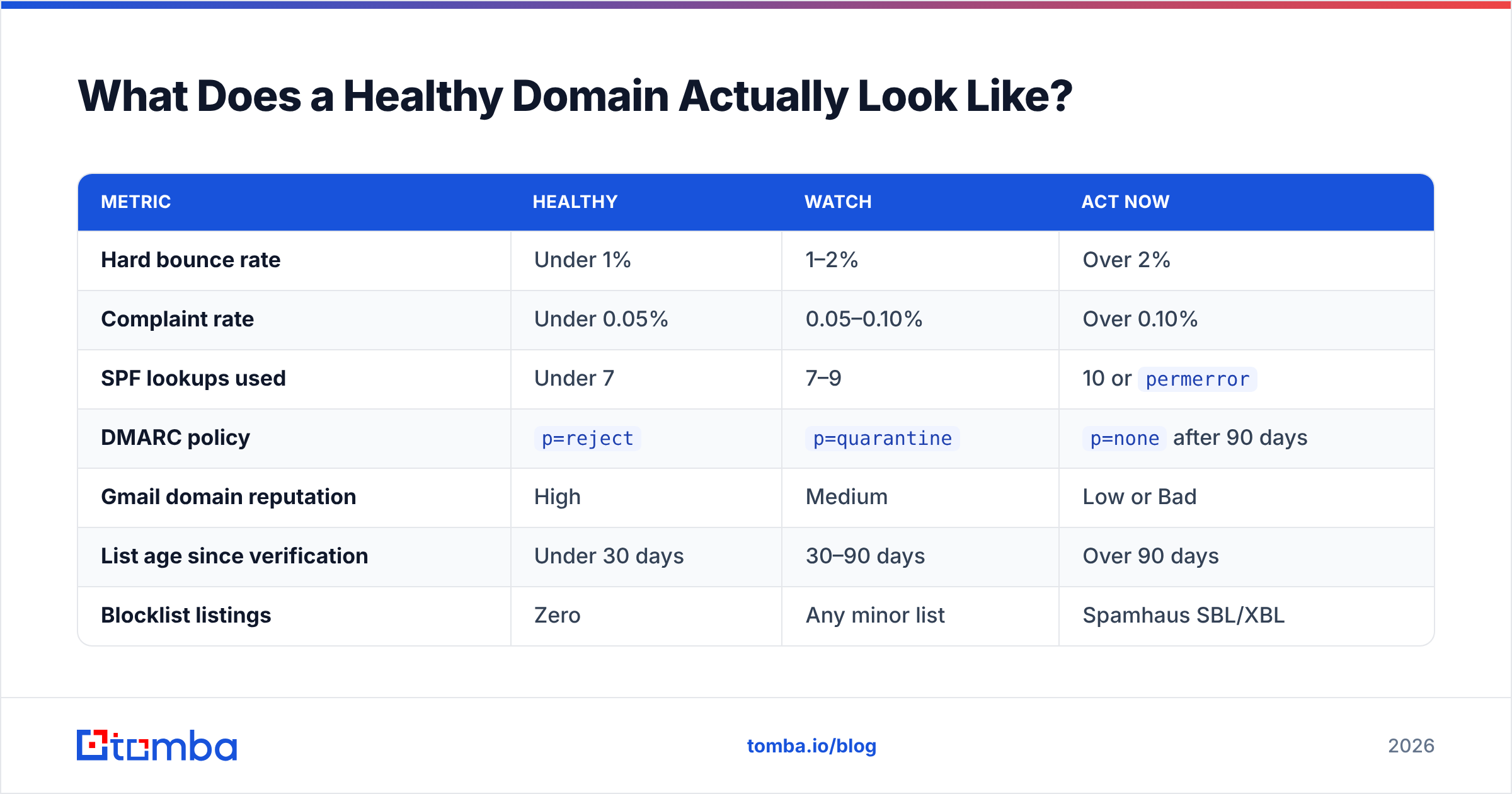
Concrete targets, so you know when you're done:
| Metric | Healthy | Watch | Act now |
|---|---|---|---|
| Hard bounce rate | Under 1% | 1–2% | Over 2% |
| Complaint rate | Under 0.05% | 0.05–0.10% | Over 0.10% |
| SPF lookups used | Under 7 | 7–9 | 10 or permerror |
| DMARC policy | p=reject |
p=quarantine |
p=none after 90 days |
| Gmail domain reputation | High | Medium | Low or Bad |
| List age since verification | Under 30 days | 30–90 days | Over 90 days |
| Blocklist listings | Zero | Any minor list | Spamhaus SBL/XBL |
If you're in the "act now" column on more than two rows, stop sending campaigns for a week. Fix the records, clean the list, then restart at 20% of your prior volume and ramp back over 14 days. Sending through a reputation problem makes it worse — you're adding more negative signal to a model that's already scoring you down.
One structural change worth making while you're in there: split your sending by subdomain. Transactional mail on mail.yourdomain.com, marketing on news.yourdomain.com, outbound prospecting on outreach.yourdomain.com. Each builds its own reputation, and a bad cold campaign stops being able to take down your password reset emails. It's an afternoon of DNS work that buys you permanent blast-radius containment. Microsoft's own deliverability guidance covers how their filters treat subdomain reputation if you want the technical detail.
Where Should You Start Tomorrow Morning?#
Do these four things in this order, and you'll have covered most of the risk in about 30 minutes:
- Pull your last 30 days of bounce rate. If it's over 2%, that's your entire problem and everything else is secondary.
- Check
_dmarc.yourdomain.comin DNS. If there's no record, or it saysp=none, you have a known gap that Gmail and Yahoo are already penalizing. - Run one blocklist lookup. Takes 60 seconds and rules out the scariest failure mode.
- Verify your next campaign list before you send it. Not after. Every invalid address you catch here is reputation damage that never happens.
Steps 1 and 4 are the same problem viewed from two ends. You can keep processing bounces forever, or you can stop generating them.
That's the case for putting verification upstream of your sending stack. Tomba's Email Finder returns addresses with a confidence score and verification status attached, so the contacts entering your CRM are already checked rather than checked-after-they-bounce. The free tier covers 25 searches a month if you want to test the accuracy against a list you already know the answers for, and the Tomba API handles it at volume when you're ready to wire verification into the point where leads are created. Start with the list you were about to send tomorrow — verify it first, and see what percentage you were about to burn your domain on.
Related guides#
Ready to find emails that actually work?
Join 150,000+ professionals who stopped guessing and started sending. Free credits on signup — no credit card required.
Get the Tomba newsletter
Practical outbound tactics and product updates — once every two weeks.
About the author