Email Domain Reputation Lookup: The Complete 2026 Guide
Your domain reputation decides whether cold email lands in the inbox or the spam folder. Here's how to run a real lookup, read the signals, and fix what's broken.
TL;DR
- An email domain reputation lookup is a diagnostic, not a score you can "fix" directly — it aggregates blacklist status, authentication records, engagement history, and spam-trap hits into a picture of how mailbox providers treat your domain.
- No single tool sees the whole picture. Google Postmaster Tools shows Gmail's view, Microsoft SNDS shows Outlook's, and third-party checkers show public blocklist data. You need at least two.
- Domain reputation is stickier than IP reputation. A burned IP can be swapped in a day; a burned domain takes 4–8 weeks of disciplined sending to recover, if it recovers at all.
- The single largest controllable input is bounce rate. Sending to unverified lists is the fastest way to torch a domain that took a year to build.
- Run a lookup before you launch a campaign, not after replies dry up. By the time open rates collapse, the damage is already 3–4 weeks old.
What Is an Email Domain Reputation Lookup?#
An email domain reputation lookup is the process of querying multiple public and provider-specific data sources to determine how mailbox providers currently score your sending domain. Think of it like pulling a credit report before applying for a mortgage: the score itself is calculated privately by each lender, but you can inspect the underlying records — late payments, defaults, credit utilization — that drive it.
There is no universal "domain reputation score." Gmail, Outlook, Yahoo, and every corporate spam filter each maintain their own internal reputation model. What a lookup gives you is the set of observable inputs those models consume:
- Blocklist presence — whether your domain appears on Spamhaus DBL, SURBL, URIBL, or SORBS. A DBL listing is close to a death sentence for inbox placement.
- Authentication alignment — whether SPF, DKIM, and DMARC are published, valid, and aligned. Since the 2024 Google/Yahoo bulk-sender rules, missing DMARC is a hard filter trigger at volume.
- Domain age and history — a domain registered three weeks ago sending 2,000 emails a day looks exactly like a throwaway spam domain, because statistically it usually is.
- Engagement telemetry — opens, replies, "not spam" rescues, deletions without reading, and manual spam complaints, weighted per provider.
- Infrastructure hygiene — reverse DNS, MX configuration, TLS support, and whether your sending IP pool matches your domain's stated policy.
The reason people conflate domain and IP reputation is that they used to move together. When most senders had dedicated IPs, the IP was the identity. Now that shared pools dominate — Google Workspace, Microsoft 365, SendGrid, Instantly, Smartlead — providers lean much harder on the domain, because the domain is the thing an individual spammer actually controls.

Why Does Domain Reputation Matter More Than IP Reputation in 2026?#
Because you can't outrun a bad domain. Here's the practical asymmetry:
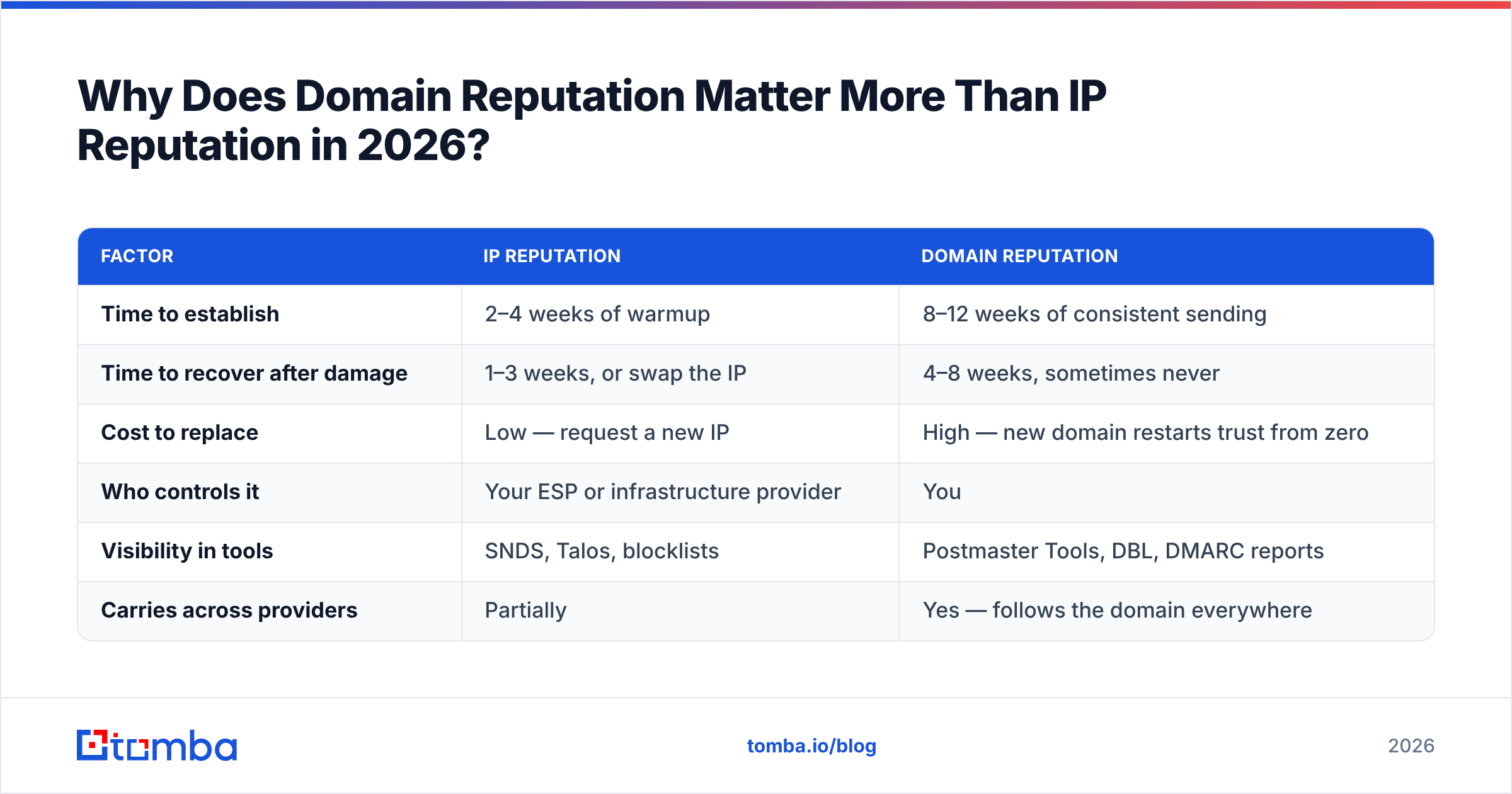
| Factor | IP Reputation | Domain Reputation |
|---|---|---|
| Time to establish | 2–4 weeks of warmup | 8–12 weeks of consistent sending |
| Time to recover after damage | 1–3 weeks, or swap the IP | 4–8 weeks, sometimes never |
| Cost to replace | Low — request a new IP | High — new domain restarts trust from zero |
| Who controls it | Your ESP or infrastructure provider | You |
| Visibility in tools | SNDS, Talos, blocklists | Postmaster Tools, DBL, DMARC reports |
| Carries across providers | Partially | Yes — follows the domain everywhere |
When you send from a shared pool, a hundred other senders influence the IP score. Your domain is yours alone. That cuts both ways: nobody else can ruin it, and nobody else can dilute your mistakes.
There's a second reason domain reputation dominates now. Subdomain strategies became standard practice — mail.yourcompany.com for marketing, outreach.yourcompany.com for sales, root domain for transactional. Mailbox providers track these separately but not independently. A catastrophic subdomain failure bleeds into root-domain trust, which is why sales teams that burn go.company.com frequently discover their invoices start landing in spam two months later.
How Do You Actually Run an Email Domain Reputation Lookup?#
Run these five checks in order. The first three take under ten minutes combined.
Step 1 — Check authentication records. Query your SPF, DKIM, and DMARC records directly. An SPF record with more than 10 DNS lookups silently fails, and that failure is invisible until you look. Use an SPF checker to confirm the record resolves and the lookup count is under the limit. DMARC should be at minimum p=none with an rua= address so you actually receive aggregate reports.
Step 2 — Check blocklists. Query your domain against the major DNSBLs and URIBLs. A blacklist checker covers the ones that matter for inbox placement. Note the distinction: an IP listing on a minor blocklist is often noise, but a domain listing on Spamhaus DBL or SURBL will kill delivery immediately and needs a delisting request the same day.
Step 3 — Read the provider dashboards. Google Postmaster Tools gives you Gmail's actual domain reputation rating — High, Medium, Low, or Bad — plus spam complaint rate, authentication pass rates, and delivery errors. It requires DNS verification and roughly 100+ daily messages to Gmail before data populates. Microsoft's SNDS covers Outlook and Hotmail but is IP-based, so pair it with the SNDS Junk Mail Reporting Program.
Step 4 — Audit your recent send behavior. Pull the last 90 days: total volume, bounce rate, complaint rate, reply rate, and volume variance. Reputation models are heavily behavioral. A domain that sends 200/day every weekday for six months is trusted far more than one that sends 3,000 on Tuesday and zero for nine days.
Step 5 — Test actual placement. Seed-list testing sends to real mailboxes across providers and reports which folder each message lands in. This is the only check that measures outcome rather than input. Everything upstream is a proxy.
What Do the Reputation Signals Actually Mean?#
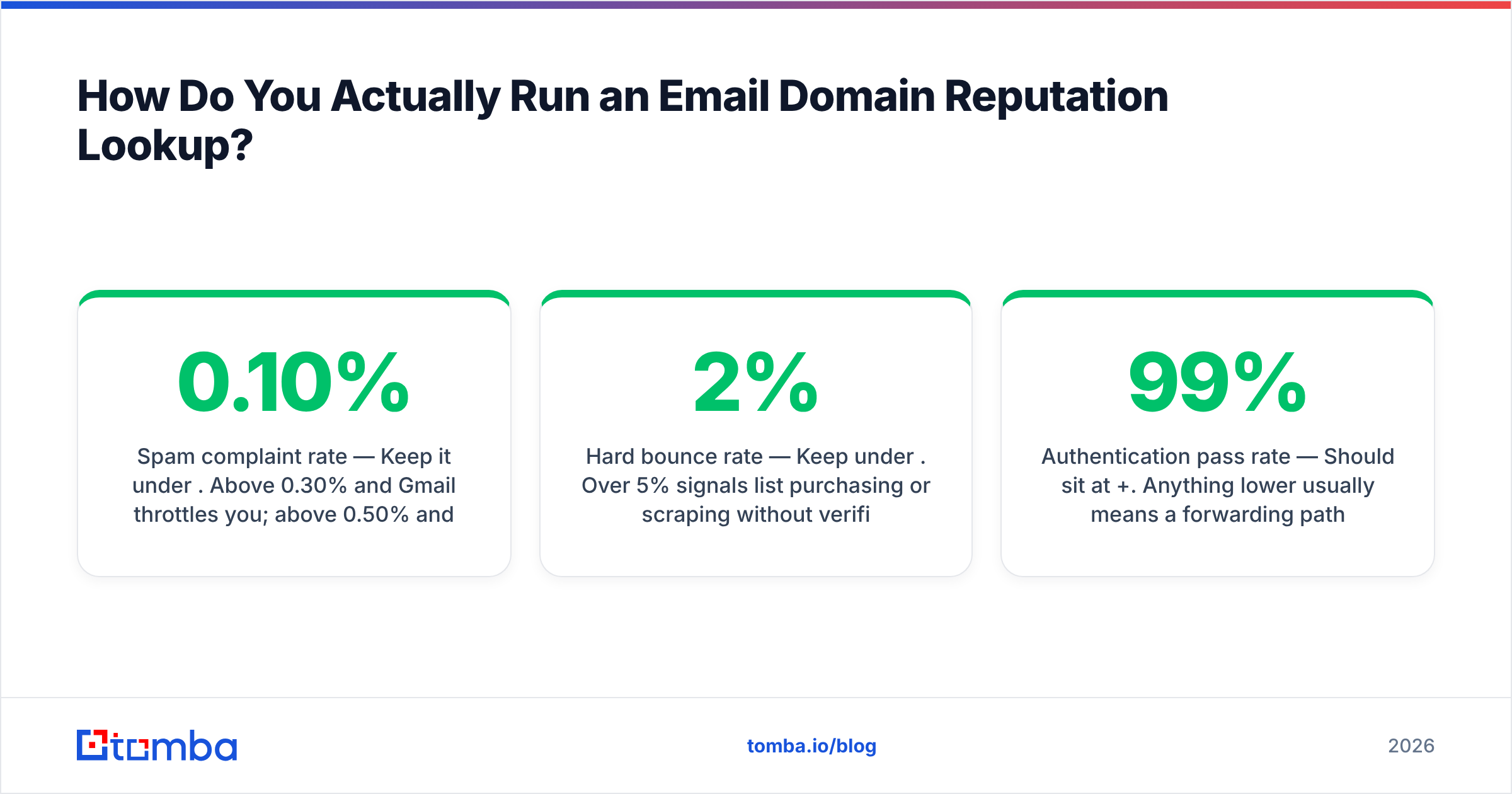
- Spam complaint rate — Keep it under 0.10%. Above 0.30% and Gmail throttles you; above 0.50% and you're effectively blocked. This is the hardest ceiling in email.
- Hard bounce rate — Keep under 2%. Over 5% signals list purchasing or scraping without verification, and providers treat it as an intent signal, not an accuracy problem.
- Spam trap hits — Pristine traps (never-used addresses) suggest scraped data. Recycled traps (abandoned addresses) suggest stale lists. Both are severe; pristine traps are worse.
- Authentication pass rate — Should sit at 99%+. Anything lower usually means a forwarding path or a third-party sender you forgot about.
- Engagement ratio — Replies and "not spam" actions are the strongest positive signals available. Opens are increasingly discounted due to privacy proxies.
- Volume consistency — Measured as day-over-day variance. Sharp spikes look like acquired-list blasts, because that's usually what they are.
Which Email Domain Reputation Lookup Tools Should You Use?#
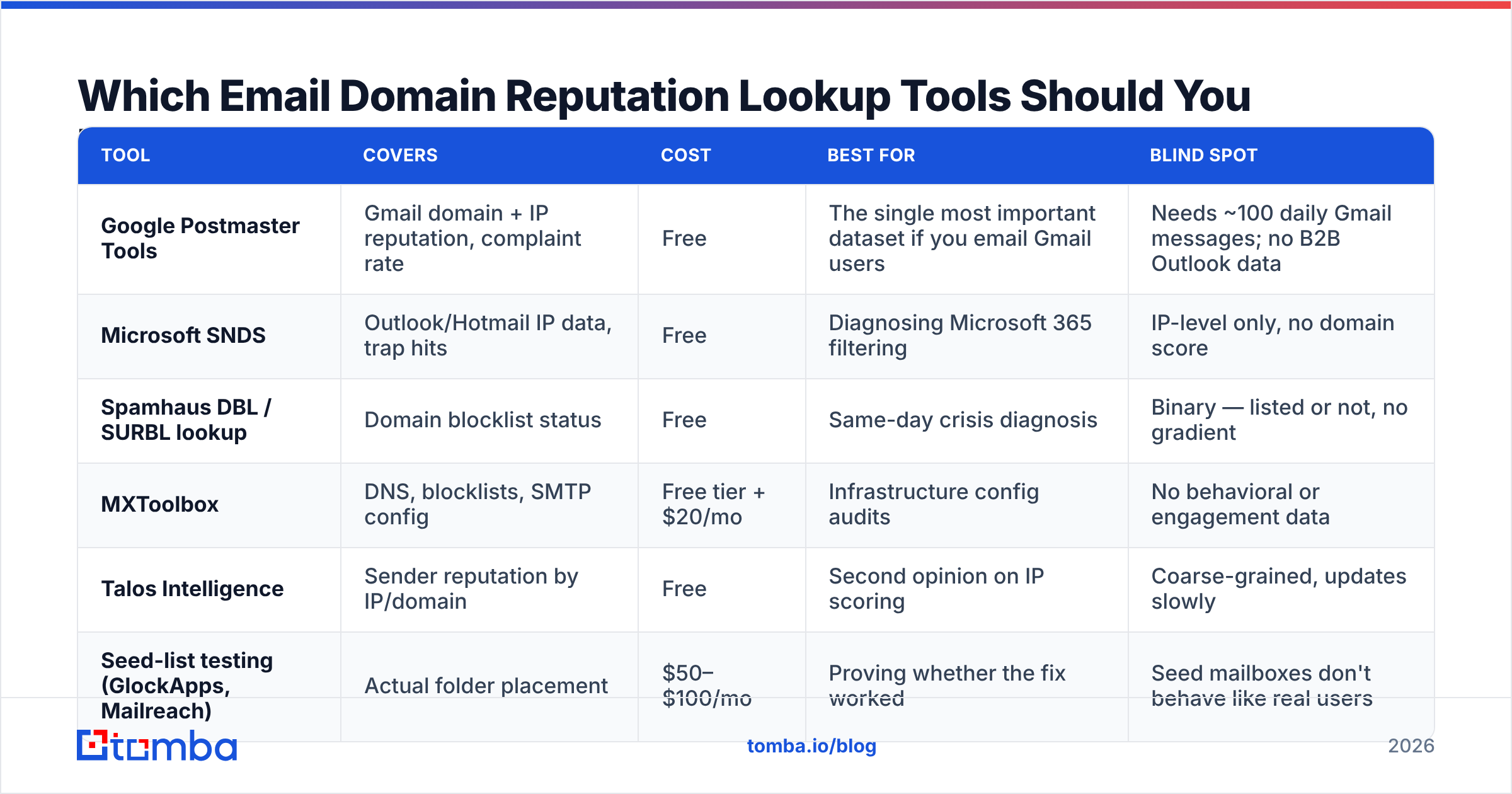
No tool covers everything. Here's how the main options compare on what they actually see:
| Tool | Covers | Cost | Best for | Blind spot |
|---|---|---|---|---|
| Google Postmaster Tools | Gmail domain + IP reputation, complaint rate | Free | The single most important dataset if you email Gmail users | Needs ~100 daily Gmail messages; no B2B Outlook data |
| Microsoft SNDS | Outlook/Hotmail IP data, trap hits | Free | Diagnosing Microsoft 365 filtering | IP-level only, no domain score |
| Spamhaus DBL / SURBL lookup | Domain blocklist status | Free | Same-day crisis diagnosis | Binary — listed or not, no gradient |
| MXToolbox | DNS, blocklists, SMTP config | Free tier + $20/mo | Infrastructure config audits | No behavioral or engagement data |
| Talos Intelligence | Sender reputation by IP/domain | Free | Second opinion on IP scoring | Coarse-grained, updates slowly |
| Seed-list testing (GlockApps, Mailreach) | Actual folder placement | $50–$100/mo | Proving whether the fix worked | Seed mailboxes don't behave like real users |
Notice what's missing from every row: none of these prevent the problem. They diagnose it. The inputs that determine your reputation — list quality, message content, sending cadence — are decided before you ever open a lookup tool.
That's why deliverability work splits cleanly into two jobs. Monitoring tools tell you where you stand. Data quality tools determine where you'll stand next quarter. If your bounce rate is the dominant negative signal — and for cold outreach teams it almost always is — then the fix lives upstream in list building, not in a dashboard.
How Do You Fix a Damaged Sending Domain?#
Assume 4–8 weeks. There is no shortcut, and anyone selling one is selling a domain swap dressed up as a repair.
Week 1 — Stop the bleeding. Pause all cold campaigns from the affected domain. Not reduce — pause. Every additional bad send extends the recovery window. Fix authentication first: valid SPF under the lookup limit, DKIM signing with a 2048-bit key, DMARC published with reporting enabled.
Week 1 — Request delisting where applicable. Spamhaus and SURBL both accept removal requests. They will relist you within days if the underlying behavior hasn't changed, so fix the cause before you file.
Weeks 2–3 — Clean the list ruthlessly. Remove every address that hard-bounced, every role account (info@, sales@, admin@), every address older than 12 months without engagement, and every catch-all you can't confirm. Run the survivors through an email verifier before they touch a mailbox again. For catch-all domains — which are common in enterprise B2B and where most verification tools quietly return "unknown" — a dedicated catch-all verifier is the difference between a 2% bounce rate and a 15% one.
Weeks 3–6 — Rewarm deliberately. Restart at 10–20 messages per day to your highest-engagement segment — existing customers, past repliers, opted-in subscribers. Double roughly every four days only if bounce rate stays under 2% and complaints stay near zero. An email warmup calculator gives you a defensible ramp schedule instead of guessing.
Weeks 6–8 — Reintroduce cold volume. Return to prospecting at 50% of your previous peak. Monitor Postmaster Tools daily. If domain reputation moves from Low to Medium, hold volume steady for a full week before increasing again.
Throughout, keep an eye on message content. Your sender reputation is partly content-derived — link shorteners, tracking pixels on every image, mismatched display names, and single-link HTML emails all correlate with spam classification. A quick pass through a spam checker catches the obvious offenders before you send.
What Prevents Reputation Damage in the First Place?#
Three things, in descending order of impact.
Verified data at the source. The overwhelming majority of cold-email reputation failures trace back to a list that was never verified. Scraped LinkedIn exports, purchased CSVs, and pattern-guessed addresses (firstname.lastname@company.com applied blindly) produce bounce rates of 15–30%. At that level, no warmup schedule saves you. Finding addresses through a verified email finder that confirms deliverability at discovery time removes the problem before it enters your sequence. When you're building a list at scale, bulk verification on the entire file before the first send costs a fraction of what a burned domain costs.
Segmentation by engagement. Send your highest-volume campaigns to your most engaged segments. Providers weight recent positive engagement heavily, and front-loading good signals gives you headroom for the colder tail of your list later in the week.
Separate domains for separate jobs. Never run cold outreach from your root domain. Register dedicated sending domains, authenticate them properly, warm them independently, and treat them as consumable. If one burns, your invoices and password resets keep working.
There's a fourth item worth naming: honest volume expectations. Teams routinely try to push 3,000 cold emails a day through infrastructure built for 300. The reputation system is specifically designed to catch that. If your target volume requires more capacity, add mailboxes and domains — don't overload what you have.
For teams comparing data providers on accuracy rather than price alone, it's worth evaluating verification rates directly against your own test list. Vendors like BookYourData publish accuracy guarantees on their B2B contact data, and running a head-to-head sample against your ICP is more informative than any published benchmark. Independent review platforms like G2 are useful for surfacing recurring complaints about bounce rates that vendors don't advertise.
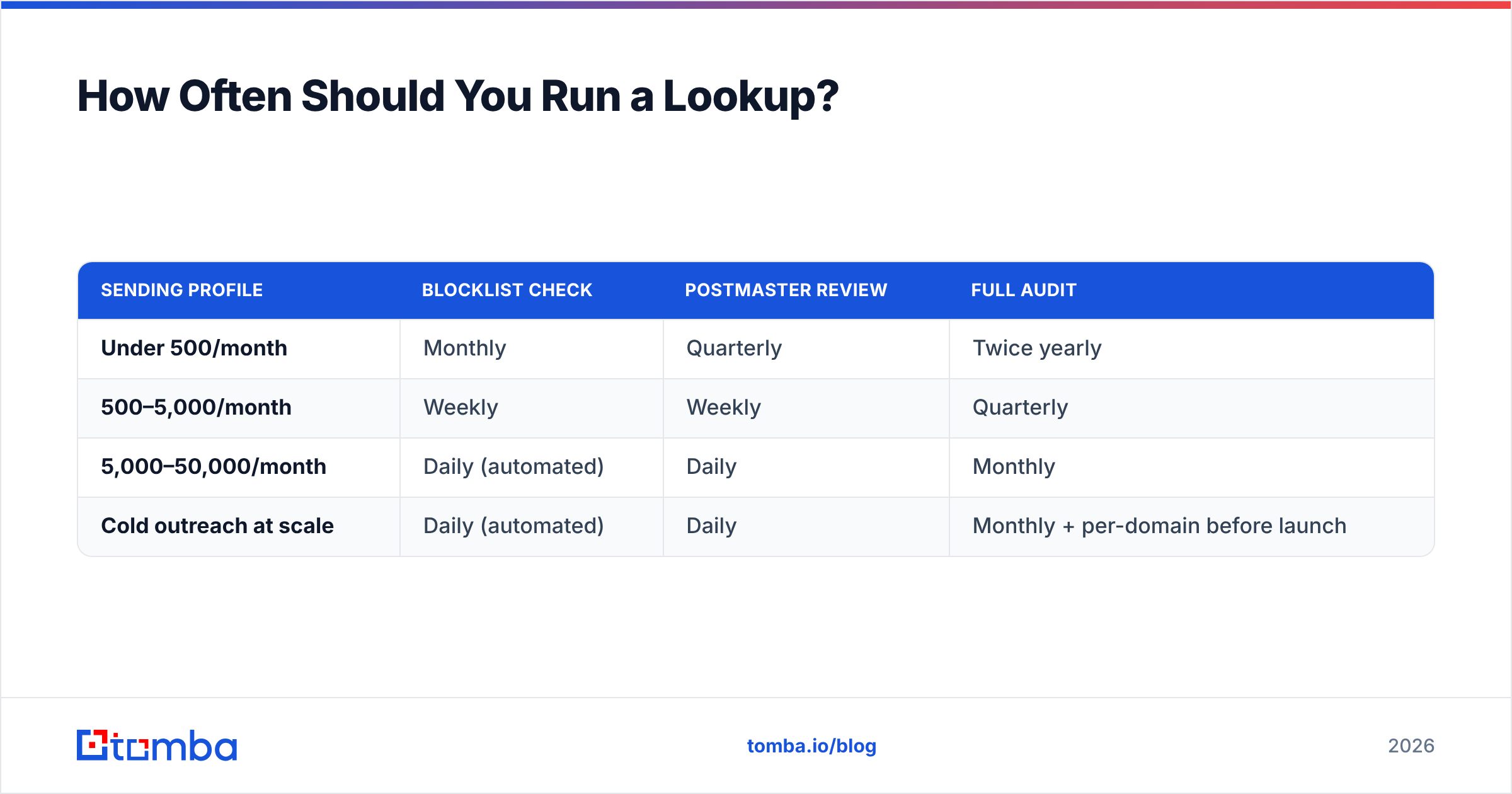
How Often Should You Run a Lookup?#
| Sending profile | Blocklist check | Postmaster review | Full audit |
|---|---|---|---|
| Under 500/month | Monthly | Quarterly | Twice yearly |
| 500–5,000/month | Weekly | Weekly | Quarterly |
| 5,000–50,000/month | Daily (automated) | Daily | Monthly |
| Cold outreach at scale | Daily (automated) | Daily | Monthly + per-domain before launch |
The pattern that separates teams who never have deliverability crises from teams who have them constantly isn't tooling sophistication. It's that the first group checks before launching and the second checks after reply rates collapse. Reputation damage compounds silently for 2–3 weeks before it becomes visible in your campaign metrics — by which point you're diagnosing a problem that started long before you noticed it.
Set a recurring calendar block. Pull Postmaster Tools, check blocklists, review bounce and complaint rates from the last 30 days, and spot-check a sample of your next campaign's list through verification. Fifteen minutes a week is cheaper than eight weeks of rehabilitation.
Start With Clean Data#
An email domain reputation lookup will tell you what's wrong. It won't tell you what to do about it, and in almost every case the answer is the same: the list quality upstream determines the reputation downstream. Bounce rate is the input you control most directly and the one providers punish most aggressively.
Tomba's Email Finder verifies deliverability at the point of discovery, so addresses enter your sequences already validated instead of bouncing their way through your domain's reputation. The free tier covers 25 searches a month if you want to test accuracy against a sample of your own list first; paid plans start at $49/month. Run your next list through it before you send, and you'll spend a lot less time reading reputation dashboards.
Related guides#
Ready to find emails that actually work?
Join 150,000+ professionals who stopped guessing and started sending. Free credits on signup — no credit card required.
Get the Tomba newsletter
Practical outbound tactics and product updates — once every two weeks.
About the author