Email Domain Validator: How to Check Any Domain in 2026
MX records, SPF, catch-all behavior, disposable lists — an email domain validator runs a stack of checks that each prove something different. Here's what each one actually tells you, and where every one of them lies.
TL;DR
- An email domain validator checks the domain half of an address — does it resolve, does it have MX records, does it accept mail, is it disposable, is it a catch-all. It does not tell you whether
sarah@exists at that domain. - Domain-level checks are cheap and fast (DNS lookups, milliseconds, no SMTP handshake). Mailbox-level verification is slower and costs credits. You want both, in that order.
- The single biggest false-confidence trap: a domain with valid MX records and a clean SPF record can still bounce 100% of your sends if the mailbox doesn't exist.
- Catch-all domains — roughly 15–20% of B2B domains, and far more in enterprise — accept everything at the SMTP layer, which means "valid" from a validator means almost nothing without pattern evidence behind it.
- The practical stack: DNS/MX filter first, disposable + role-based flagging second, mailbox verification third, catch-all-specific handling fourth. Skipping step one wastes credits; skipping step three wastes your sender reputation.
What is an email domain validator?#
An email domain validator is a tool that inspects everything to the right of the @ sign and reports whether that domain can plausibly receive email.
Think of it like checking whether a street exists before you check whether house number 47 is on it. If the street doesn't exist, you don't need to knock on any doors. If it does exist, you still have no idea who lives at number 47.
That distinction matters more than most teams realize. A large share of bounces on cold lists come from domains that are dead, parked, misspelled, or disposable — problems you can catch with a DNS lookup that costs you nothing. The rest come from mailboxes that don't exist at perfectly healthy domains, which no domain-level check will ever catch.
Concretely, a domain validator answers questions like:
- Does
acmecorp.ioresolve at all, or did the company rebrand and let the domain lapse? - Does it publish MX records, or is it a web-only domain with no mail service?
- Is it a free provider (gmail.com), a disposable provider (mailinator.com), or a corporate domain?
- Is it configured as catch-all, meaning the server accepts any local part?
- Does it have an SPF record, a DMARC policy, and a normal-looking mail stack?
What does an email domain validator actually check?#
Six checks do almost all the work. Each proves something different, and each fails in a different way.
- DNS resolution (A/AAAA records) — Confirms the domain exists in the global DNS. A domain with no records at all is dead: typos, defunct companies, and scraped garbage die here. Cheapest possible filter.
- MX record lookup — Confirms the domain has designated mail servers. No MX record usually means no email, though a small number of domains fall back to the A record per legacy SMTP behavior. MX data also reveals the provider (Google Workspace, Microsoft 365, Proofpoint, Zoho), which tells you how the domain will behave under verification.
- SPF / DMARC presence — Confirms the domain owner has configured sender authentication. This says nothing about whether your target mailbox exists, but a domain with no SPF and no DMARC is often abandoned or extremely small. You can spot-check any domain with a free SPF checker.
- Disposable domain matching — Flags addresses on throwaway providers (10minutemail, guerrillamail, and thousands of rotating clones). These are signup-form pollution, not prospects. This check is only as good as the provider's list refresh rate.
- Free vs. corporate classification — Separates gmail.com/outlook.com/yahoo.com from company domains. Not a validity signal, but a critical segmentation signal for B2B: a free-provider address usually means a solo operator, a personal signup, or a bad-fit lead.
- Catch-all detection — Probes whether the mail server accepts mail to a random, certainly-nonexistent local part. If
x7q2zzk@domain.comis accepted, the domain is catch-all and per-mailbox SMTP verification stops being conclusive.

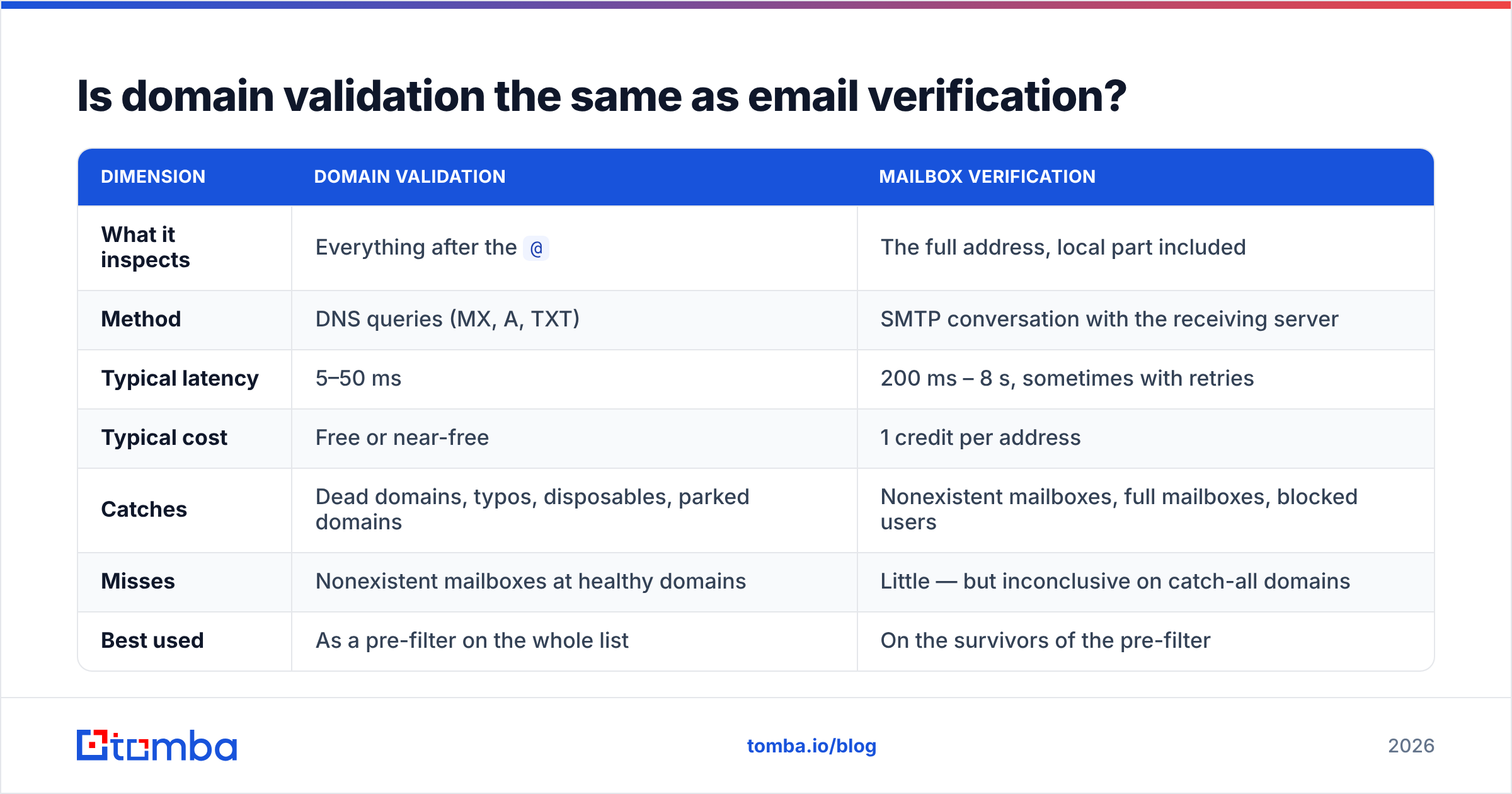
Is domain validation the same as email verification?#
No — and conflating them is the most expensive mistake in list hygiene.
| Dimension | Domain validation | Mailbox verification |
|---|---|---|
| What it inspects | Everything after the @ |
The full address, local part included |
| Method | DNS queries (MX, A, TXT) | SMTP conversation with the receiving server |
| Typical latency | 5–50 ms | 200 ms – 8 s, sometimes with retries |
| Typical cost | Free or near-free | 1 credit per address |
| Catches | Dead domains, typos, disposables, parked domains | Nonexistent mailboxes, full mailboxes, blocked users |
| Misses | Nonexistent mailboxes at healthy domains | Little — but inconclusive on catch-all domains |
| Best used | As a pre-filter on the whole list | On the survivors of the pre-filter |
The workflow implication is straightforward: run domain validation across 100% of your list because it's cheap, then spend verification credits only on the addresses whose domains survived. On a scraped list, that pre-filter routinely removes 10–25% of records before you pay for a single verification. On a well-sourced list it removes far less — which is itself a useful quality signal about your data source.
For the second stage, a dedicated email verifier does the SMTP-level work and returns a per-address status rather than a per-domain one.
Why do catch-all domains break domain validation?#
Because a catch-all server says yes to everything, and "yes to everything" is indistinguishable from "yes to this specific person."
A catch-all (or accept-all) configuration tells the mail server to accept any message addressed to the domain and sort it out later — usually so that typos like slaes@company.com still reach someone. Large enterprises and anything behind a security gateway like Proofpoint or Mimecast frequently behave this way, either deliberately or as a side effect of the gateway not exposing recipient validation at the edge.
What this does to your validator:
- SMTP verification returns "accepted" for every address you test, including ones you invented.
- Bounce risk moves downstream. The gateway accepts the message, then the internal server rejects it and generates a bounce — or silently drops it, which is worse, because you learn nothing.
- Your validity rate looks fantastic right up until your bounce rate does not.
The only honest way through is evidence beyond the SMTP layer: known email patterns for that domain, historical deliverability data, and corroborating sources for the specific person. That's the job of a catch-all verifier, which combines pattern confidence with observed delivery behavior rather than trusting the handshake alone.
Rule of thumb for catch-all domains: if you have pattern evidence (you know the company uses first.last@) plus a confirmed name and title, send. If all you have is a guessed local part on a catch-all domain, either enrich further or drop it. Do not let it inflate your "verified" count.
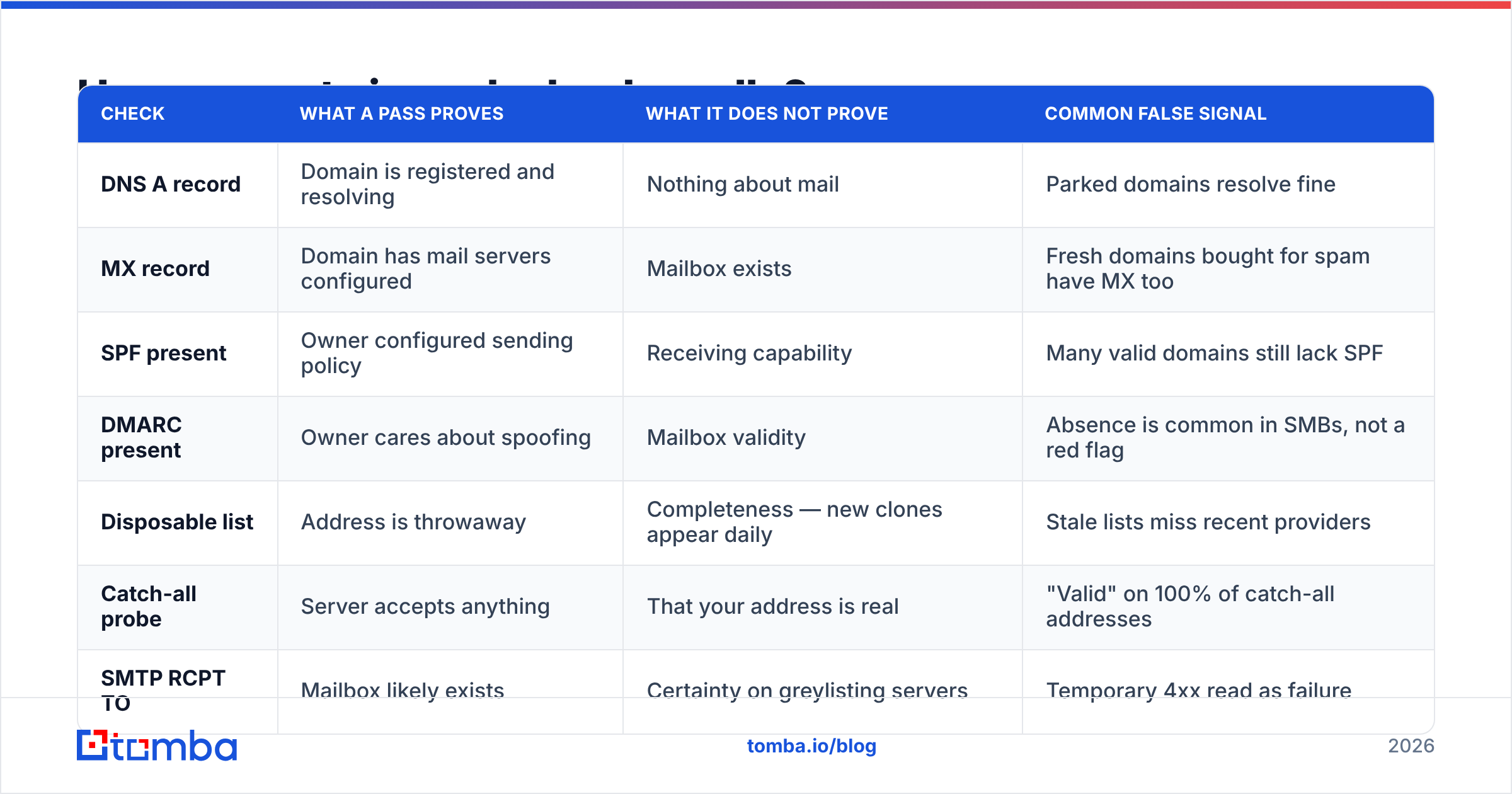
How accurate is each check, really?#
Every check has a specific failure mode. Knowing them stops you from over-trusting a green result.
| Check | What a pass proves | What it does not prove | Common false signal |
|---|---|---|---|
| DNS A record | Domain is registered and resolving | Nothing about mail | Parked domains resolve fine |
| MX record | Domain has mail servers configured | Mailbox exists | Fresh domains bought for spam have MX too |
| SPF present | Owner configured sending policy | Receiving capability | Many valid domains still lack SPF |
| DMARC present | Owner cares about spoofing | Mailbox validity | Absence is common in SMBs, not a red flag |
| Disposable list | Address is throwaway | Completeness — new clones appear daily | Stale lists miss recent providers |
| Catch-all probe | Server accepts anything | That your address is real | "Valid" on 100% of catch-all addresses |
| SMTP RCPT TO | Mailbox likely exists | Certainty on greylisting servers | Temporary 4xx read as failure |
Two practical consequences. First, never report a single boolean. A validator that returns only valid: true is throwing away the information you need to make a send decision. You want status plus reason plus confidence. Second, treat "unknown" as a real state, not a rounding error. Greylisting, rate limits, and gateway timeouts produce genuine unknowns; forcing them into valid/invalid is how teams end up with a bounce rate that doesn't match their vendor's advertised accuracy.
Industry guidance on bounce thresholds is fairly consistent: keep hard bounces under roughly 2%, and treat anything above 5% as an active reputation problem. HubSpot's own email benchmarks and most ESP acceptable-use policies land in the same range.
How do email domain validator tools compare?#
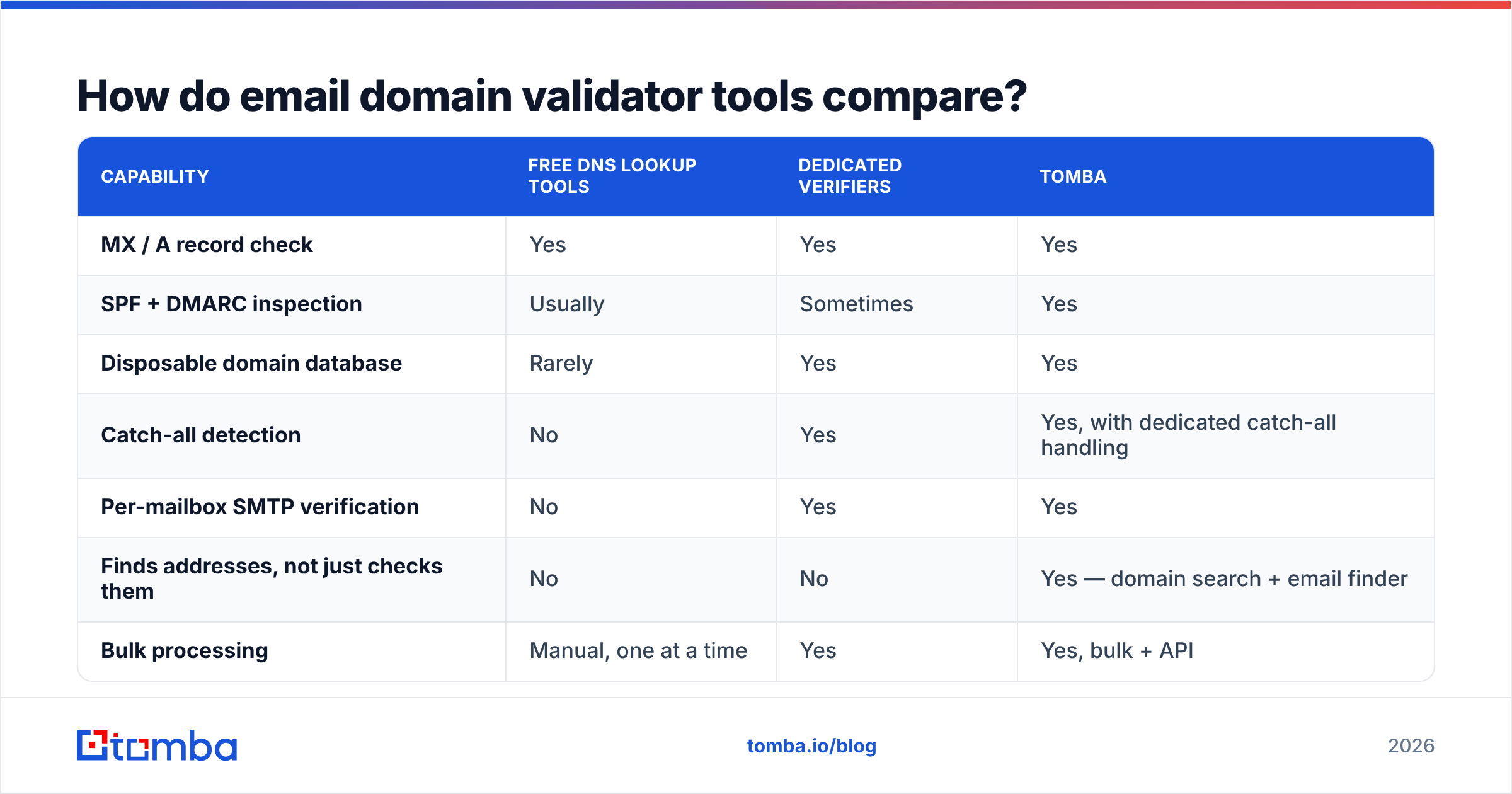
Most tools sit in one of three buckets: free DNS lookup utilities, dedicated verification platforms, and finder-plus-verifier platforms that do domain validation as part of a larger data workflow.
| Capability | Free DNS lookup tools | Dedicated verifiers | Tomba |
|---|---|---|---|
| MX / A record check | Yes | Yes | Yes |
| SPF + DMARC inspection | Usually | Sometimes | Yes |
| Disposable domain database | Rarely | Yes | Yes |
| Catch-all detection | No | Yes | Yes, with dedicated catch-all handling |
| Per-mailbox SMTP verification | No | Yes | Yes |
| Finds addresses, not just checks them | No | No | Yes — domain search + email finder |
| Bulk processing | Manual, one at a time | Yes | Yes, bulk + API |
| API access | Rare | Yes | Yes, REST + CLI + MCP |
| Free tier | Unlimited but manual | Varies | 25 searches/mo |
| Entry paid plan | n/a | Varies by vendor | $49/mo Starter |
| Mid tier | n/a | Varies by vendor | $99/mo Growth |
| Team tier | n/a | Varies by vendor | $249/mo Pro |
A few honest notes on this landscape:
- Free DNS tools are genuinely fine for one-off checks. If you need to know whether a single domain has MX records before sending one important email, you don't need a subscription. They fall apart at list scale and offer no mailbox-level answer.
- Dedicated verifiers are the right call if your only job is cleaning inbound lists — form signups, CRM imports, newsletter databases — and you never need to find an address.
- Prebuilt list providers like BookYourData solve an adjacent problem well: rather than validating a list you already have, you buy one that's already been through verification. If your bottleneck is sourcing rather than hygiene, that's a legitimate shortcut, and it pairs fine with your own pre-send validation pass.
- Finder-plus-verifier platforms make sense when domain validation is step one of a longer chain: find the company, find the people, get the addresses, validate them, push to CRM. Running that chain through four vendors is how you end up with reconciliation problems.
Independent review aggregation on G2's email verification category is a reasonable sanity check on any vendor's accuracy claims — vendor-published accuracy figures are measured on vendor-chosen datasets, and they are not comparable across vendors.
How do you build domain validation into your own stack?#
If you're validating more than a few hundred domains a month, do it in code. The pattern is the same regardless of language.
- Normalize first. Lowercase, strip whitespace, strip the
mailto:prefix, handle plus-addressing, and reject anything that fails basic RFC 5322 syntax. This is the only place regex belongs — as a syntax gate, not a validity test. Wikipedia's email address specification summary is a decent reference for what's legal versus what's practical. - Deduplicate by domain, not by address. If you have 400 contacts at 30 companies, you have 30 domain lookups, not 400. Cache MX results for at least 24 hours — MX records change rarely, and this alone cuts lookup volume by an order of magnitude on B2B lists.
- Run DNS checks in parallel with a hard timeout. MX lookups are I/O-bound and independent. A 3-second timeout with two retries is generous; anything slower is a dead domain in practice.
- Classify, don't binary-gate. Tag each domain:
corporate,free,disposable,catch_all,no_mx,unresolvable. Downstream logic decides what each tag means for your campaign — a free-provider address might be a hard drop for enterprise outbound and a perfectly good lead for a self-serve product. - Only then spend verification credits, and only on domains that passed. Route catch-all domains into a separate pipeline with pattern-confidence scoring instead of treating them like normal domains.
- Re-validate on a schedule. B2B data decays at roughly 2–3% per month from job changes and company churn. A list validated in January is measurably worse by June. Quarterly re-validation on active segments is a reasonable floor.
The Tomba API exposes each of these stages as separate endpoints, so you can wire domain checks into a signup form, a CRM sync job, or a nightly enrichment cron without pulling the whole platform into your stack. There's also a CLI and an MCP server if you'd rather script it than call it.
What does a good validation workflow look like end to end?#
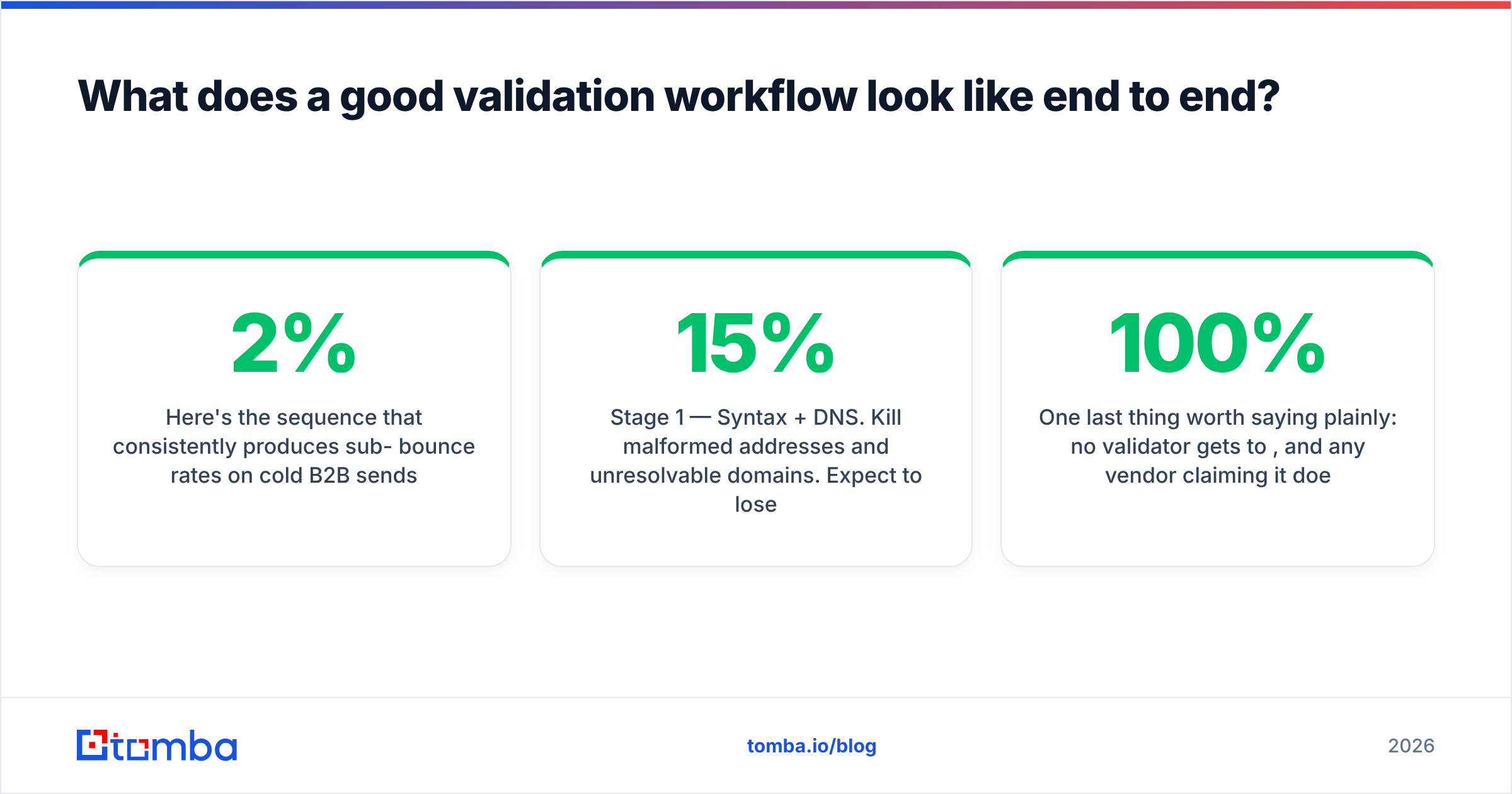
Here's the sequence that consistently produces sub-2% bounce rates on cold B2B sends:
- Stage 0 — Source quality. Bad sourcing cannot be fixed downstream. A list scraped from a 2021 conference PDF will fail validation en masse, and validation will correctly tell you so.
- Stage 1 — Syntax + DNS. Kill malformed addresses and unresolvable domains. Expect to lose 3–15% here on scraped data, near zero on well-sourced data.
- Stage 2 — Classification. Split into corporate / free / disposable / role-based (
info@,sales@,support@). Role addresses aren't invalid, but they convert poorly and often sit behind shared inboxes with aggressive filtering. - Stage 3 — Mailbox verification. SMTP-level checks on the survivors. Accept three outcomes: valid, invalid, unknown.
- Stage 4 — Catch-all resolution. Pattern-match and score. Send to high-confidence pattern matches; quarantine the rest.
- Stage 5 — Warm the send. Even a perfectly clean list will damage a cold domain if you ramp too fast. Domain validation protects you from bounce-driven reputation damage; it does nothing about volume-driven reputation damage. The two failure modes are independent — see the broader email deliverability picture for how they interact.
One last thing worth saying plainly: no validator gets to 100%, and any vendor claiming it does is measuring something narrower than what you care about. Between greylisting, gateway obfuscation, catch-all domains, and mailboxes that were deleted an hour ago, a realistic ceiling on cold B2B lists is high-90s accuracy on the addresses a good tool is willing to call valid — plus an honest "unknown" bucket it refuses to guess on. A tool with a smaller unknown bucket is not necessarily more accurate. It might just be guessing more.
Ready to validate domains and find the addresses behind them?#
If your job stops at cleaning an existing list, a standalone verifier will do. If it starts earlier — you have a company, you need the right people and their real addresses, validated before you send — you want the finding and the validating in one place.
Tomba's Email Finder does both: domain-level checks, pattern detection, mailbox verification, and catch-all-specific scoring in a single pass, with a free tier of 25 searches per month to test it against domains you already know the answers for. That last part is the only benchmark that matters — run 50 addresses you've personally emailed through any validator and compare what it says to what you know. Full plan details are on Tomba pricing, starting at $49/mo when you outgrow the free tier.
Related guides#
Ready to find emails that actually work?
Join 150,000+ professionals who stopped guessing and started sending. Free credits on signup — no credit card required.
Get the Tomba newsletter
Practical outbound tactics and product updates — once every two weeks.
About the author