Email Engagement in 2026: Metrics That Actually Predict Revenue
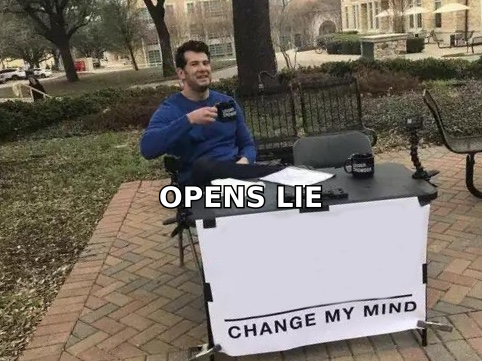
Open rates lie. Apple MPP inflates them, and Gmail's 2026 spam thresholds punish you for chasing them. Here's which email engagement signals mailbox providers actually score — and how to fix the ones you're failing.
TL;DR
- Open rate is no longer a usable engagement metric. Apple Mail Privacy Protection pre-fetches images for roughly a third of consumer opens, and Gmail's image proxy adds its own noise. Your 62% open rate is partly bots.
- Mailbox providers score engagement on signals you can't see directly: replies, "not spam" rescues, stars/folder moves, read-time, and deletes-without-open. Optimize for the ones that correlate.
- The 0.10% complaint threshold Google set in its bulk-sender rules is a hard ceiling, not a guideline. One bad list purchase can put a domain into filtered purgatory for months.
- Reply rate, meeting rate, and positive-sentiment reply rate are the only three engagement metrics that survived MPP intact. Build reporting around them.
- Half of what looks like an engagement problem is a data problem. Sending to stale, unverified, or role-based addresses depresses every downstream number before your copy ever gets a vote.
Most teams still report email engagement the way they did in 2018: opens, clicks, unsubscribes, done. That reporting stack broke in September 2021 when Apple shipped Mail Privacy Protection, and it has been getting less reliable every year since. In 2026, if your quarterly deck leads with open rate, you are presenting a number that mailbox providers themselves don't use to decide whether your mail reaches the inbox.
This guide covers what email engagement actually means to Gmail, Outlook, and Yahoo in 2026, which metrics to track instead, and the specific fixes that move the ones that matter.
What is email engagement, really?#
Email engagement is the set of recipient behaviors a mailbox provider observes and uses to decide where your future mail lands. That's the working definition — not "opens and clicks," which is the marketing definition.
The distinction matters because you optimize different things depending on which definition you use. Under the marketing definition, a punchy subject line that gets a 70% open rate is a win. Under the provider definition, that same subject line is neutral at best, and actively harmful if the body under-delivers and people delete it in two seconds.
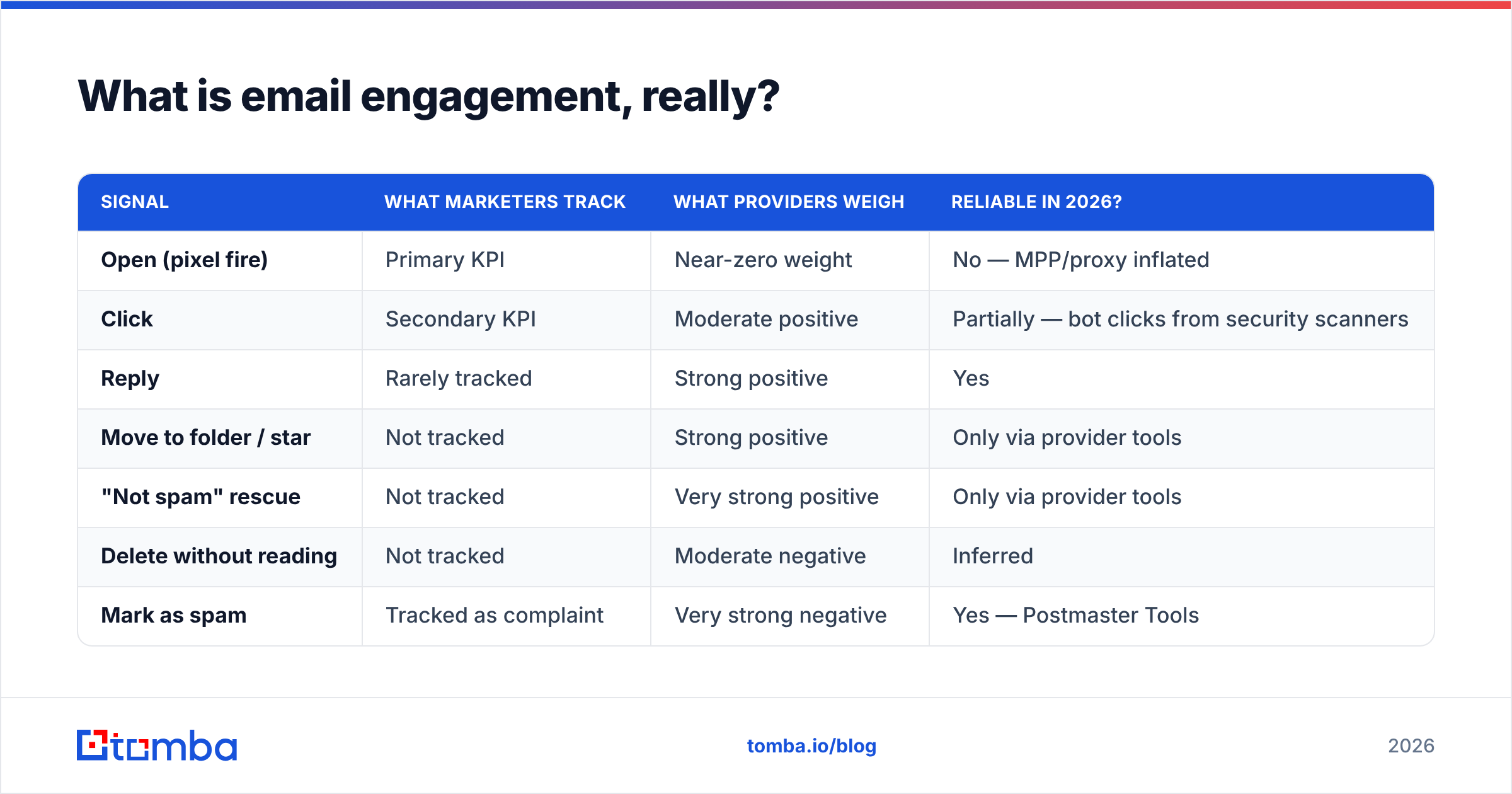
Here's roughly how the two views diverge:
| Signal | What marketers track | What providers weigh | Reliable in 2026? |
|---|---|---|---|
| Open (pixel fire) | Primary KPI | Near-zero weight | No — MPP/proxy inflated |
| Click | Secondary KPI | Moderate positive | Partially — bot clicks from security scanners |
| Reply | Rarely tracked | Strong positive | Yes |
| Move to folder / star | Not tracked | Strong positive | Only via provider tools |
| "Not spam" rescue | Not tracked | Very strong positive | Only via provider tools |
| Delete without reading | Not tracked | Moderate negative | Inferred |
| Mark as spam | Tracked as complaint | Very strong negative | Yes — Postmaster Tools |
| Unsubscribe | Tracked | Mildly negative, better than a complaint | Yes |
The takeaway: the four highest-weighted provider signals are ones most B2B teams have zero visibility into. You infer them from proxies — reply volume, complaint rate, and inbox placement drift.
Why did open rate stop working?#
Three things happened, in order.
- Apple Mail Privacy Protection (2021). Mail.app pre-loads remote images through Apple's proxy for users who opt in, regardless of whether the message was ever displayed. Every one of those becomes a phantom open. Apple's own Mail Privacy Protection documentation describes the behavior plainly. Adoption is now the default path in Apple's setup flow, so the share is not shrinking.
- Security scanners. Corporate gateways from Proofpoint, Mimecast, and Microsoft Defender open and click every link in an inbound message to sandbox it. In heavily-regulated verticals this produces click rates that look phenomenal and convert at zero.
- Provider proxying. Gmail has cached images through its own proxy since 2013, which strips the geo and device data that once made open tracking useful for anything beyond a raw count.
Net effect: open rate went from a noisy-but-directional metric to a number with a fabricated floor. If you're comparing this quarter's 58% to last quarter's 51%, you may just be measuring how many more Apple Mail users you added to the list.
Clicks degraded less but degraded. Deduplicate clicks by unique recipient, drop clicks that fire within two seconds of delivery, and drop clicks from datacenter IP ranges — most modern sending platforms expose at least the first two.
Which email engagement metrics should you track in 2026?#
Track five. Report on three.
- Reply rate. The single most honest engagement metric in B2B email. A human wrote back. No proxy fires a reply. For cold outreach, 3–8% is healthy on a well-targeted list; below 1% means targeting or offer, not copy.
- Positive reply rate. Split replies into interested / not-now / not-me / hostile. A 9% reply rate that's 80% "unsubscribe me" is a warning, not a win. Most sequencers now classify sentiment automatically; if yours doesn't, tag manually for two weeks and you'll learn more than a year of open-rate charts taught you.
- Meeting-booked rate per 100 contacted. The metric your CFO actually cares about. It normalizes across list size and sequence length.
- Complaint rate (spam rate). Watch it in Google Postmaster Tools daily. Google's Email sender guidelines put the hard ceiling at 0.30% and the target below 0.10%. Treat 0.08% as your internal alarm.
- Bounce rate, split hard vs soft. Above 2% hard bounces and you have a list hygiene problem that will corrupt every other number on this list.
Report reply rate, positive reply rate, and meetings booked. Track complaints and bounces as health metrics, not performance metrics — they're the smoke alarm, not the scoreboard.
How do mailbox providers actually score engagement?#
Nobody outside Mountain View or Redmond has the exact model, but the observable behavior is consistent across thousands of domains.
Providers build a per-sender, per-recipient reputation. That second half gets overlooked. Gmail doesn't just ask "is tomba.io a good sender?" — it asks "does this specific user want mail from tomba.io?" Which is why a domain can have great aggregate reputation and still land in Promotions for a subset of recipients who've ignored six messages in a row.
The scoring inputs, ranked by observed impact:
- Complaints. Nonlinear. Going from 0.05% to 0.15% doesn't cost you 3x — it can cost you the inbox entirely for weeks.
- Recipient-initiated positive actions. Replies, stars, moves out of spam, adds to contacts. These are hard to fake, which is exactly why they're weighted heavily.
- Deletes without open. A soft negative that accumulates. Sending weekly to a list where 70% delete on sight is worse than sending monthly to the same list.
- Authentication and infrastructure consistency. SPF, DKIM, DMARC alignment, stable sending IP and volume curve. Not engagement per se, but it gates whether your engagement even gets counted. Run your domain through an SPF checker before you debug anything else, and read up on sender reputation if the term is fuzzy.
- Volume smoothness. A domain that sends 200/day for a month then blasts 8,000 gets throttled regardless of content quality.
Notice that content quality isn't on that list. Filters do run content heuristics, but for established senders the behavioral signals dominate. Your copy matters because it produces replies — not because a filter grades your prose.
Is engagement a copy problem or a data problem?#
Usually data. Teams reach for a copy rewrite because it feels actionable, but the sequence that goes to the wrong 800 people cannot be saved by a better first line.
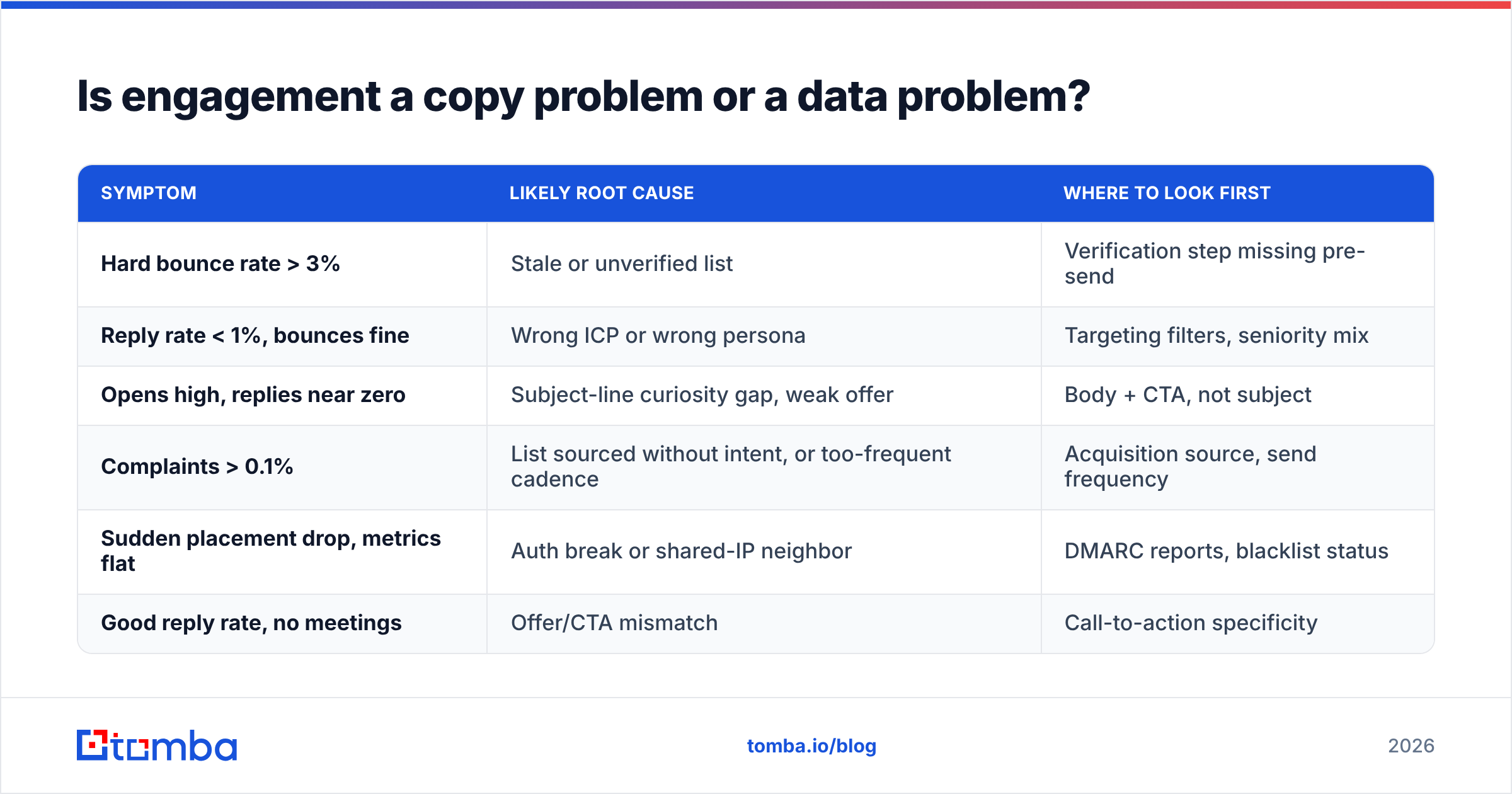
Run this diagnostic before you touch the copy:
| Symptom | Likely root cause | Where to look first |
|---|---|---|
| Hard bounce rate > 3% | Stale or unverified list | Verification step missing pre-send |
| Reply rate < 1%, bounces fine | Wrong ICP or wrong persona | Targeting filters, seniority mix |
| Opens high, replies near zero | Subject-line curiosity gap, weak offer | Body + CTA, not subject |
| Complaints > 0.1% | List sourced without intent, or too-frequent cadence | Acquisition source, send frequency |
| Sudden placement drop, metrics flat | Auth break or shared-IP neighbor | DMARC reports, blacklist status |
| Good reply rate, no meetings | Offer/CTA mismatch | Call-to-action specificity |
Two of those six rows are copy. Four are data and infrastructure.
The list-quality piece is the one most teams under-invest in. Every invalid address you send to does triple damage: it bounces (reputation hit), it dilutes your denominators (every rate metric looks worse), and on some providers it can hit a recycled spam trap (reputation catastrophe). Running contacts through an email verifier before send is a five-minute step that protects everything downstream. For domains that accept everything at the SMTP layer, a dedicated catch-all verifier gets you further than a standard syntax-and-MX check.
How do you fix low email engagement, step by step?#
In this order. Don't skip ahead — later steps are wasted if earlier ones are broken.
Step 1 — Fix authentication. SPF, DKIM, and a DMARC policy at least at p=none with reporting on. If DMARC alignment is failing, nothing else you do this quarter will matter. Check it, don't assume it.
Step 2 — Clean the list. Remove hard bounces from the last 12 months, role addresses (info@, sales@, support@) unless they're genuinely your buyer, and anyone who hasn't engaged in 180 days. Suppressing dead weight raises every rate metric mechanically and protects reputation structurally.
Step 3 — Re-source the top of the funnel. If your contacts came from a scraped CSV of unknown age, the cleanest fix is re-finding them at their current company. Job changes run roughly 20% annually in tech sales; a two-year-old list is a quarter wrong before you send a byte. Building from a verified email finder rather than a bulk list dump changes the baseline you're optimizing from.
Step 4 — Cut frequency before you cut copy. Most B2B sequences over-send. Going from 6 touches in 12 days to 4 touches in 21 days typically improves reply rate and always improves complaint rate.
Step 5 — Segment by engagement tier. Split into engaged (replied or clicked in 90 days), passive (opened but nothing else — yes, still directionally useful in aggregate), and cold (nothing in 180 days). Send your best offers to engaged, a re-permission message to cold, and then suppress cold entirely. Providers reward senders whose mail consistently gets a positive response.
Step 6 — Now rewrite the copy. One idea per email, a specific ask, no more than 90 words for a first touch. Test the ask, not the subject line.
Which tools help you measure and improve email engagement?#
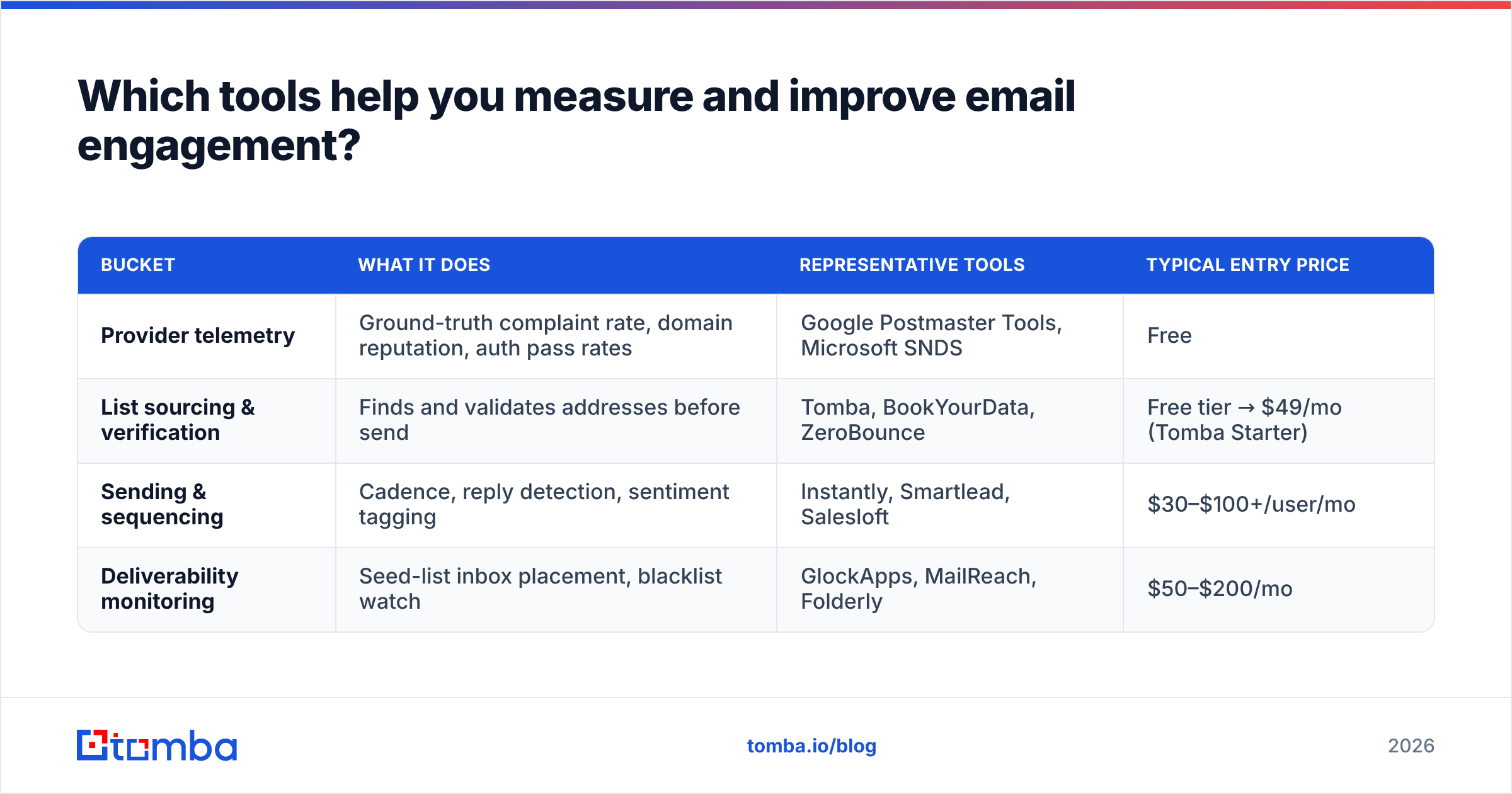
The category splits into four buckets, and most teams need one from each rather than a single suite.
| Bucket | What it does | Representative tools | Typical entry price |
|---|---|---|---|
| Provider telemetry | Ground-truth complaint rate, domain reputation, auth pass rates | Google Postmaster Tools, Microsoft SNDS | Free |
| List sourcing & verification | Finds and validates addresses before send | Tomba, BookYourData, ZeroBounce | Free tier → $49/mo (Tomba Starter) |
| Sending & sequencing | Cadence, reply detection, sentiment tagging | Instantly, Smartlead, Salesloft | $30–$100+/user/mo |
| Deliverability monitoring | Seed-list inbox placement, blacklist watch | GlockApps, MailReach, Folderly | $50–$200/mo |
A note on the second bucket, since it's the one that quietly determines your ceiling. Tomba pricing starts with a free tier at 25 searches/month, then Starter at $49/mo, Growth at $99/mo, and Pro at $249/mo — with the email finder, verifier, and domain search available on the same credits, so you're not paying two vendors to find and then validate the same contact. BookYourData takes a different approach, selling pre-built verified contact lists with a pay-as-you-go model, which suits teams that want volume upfront rather than targeted lookups; both are legitimate answers depending on whether your motion is precision or coverage.
Whatever you use, the discipline is the same: verify before send, not after bounce.
What does good look like by channel?#
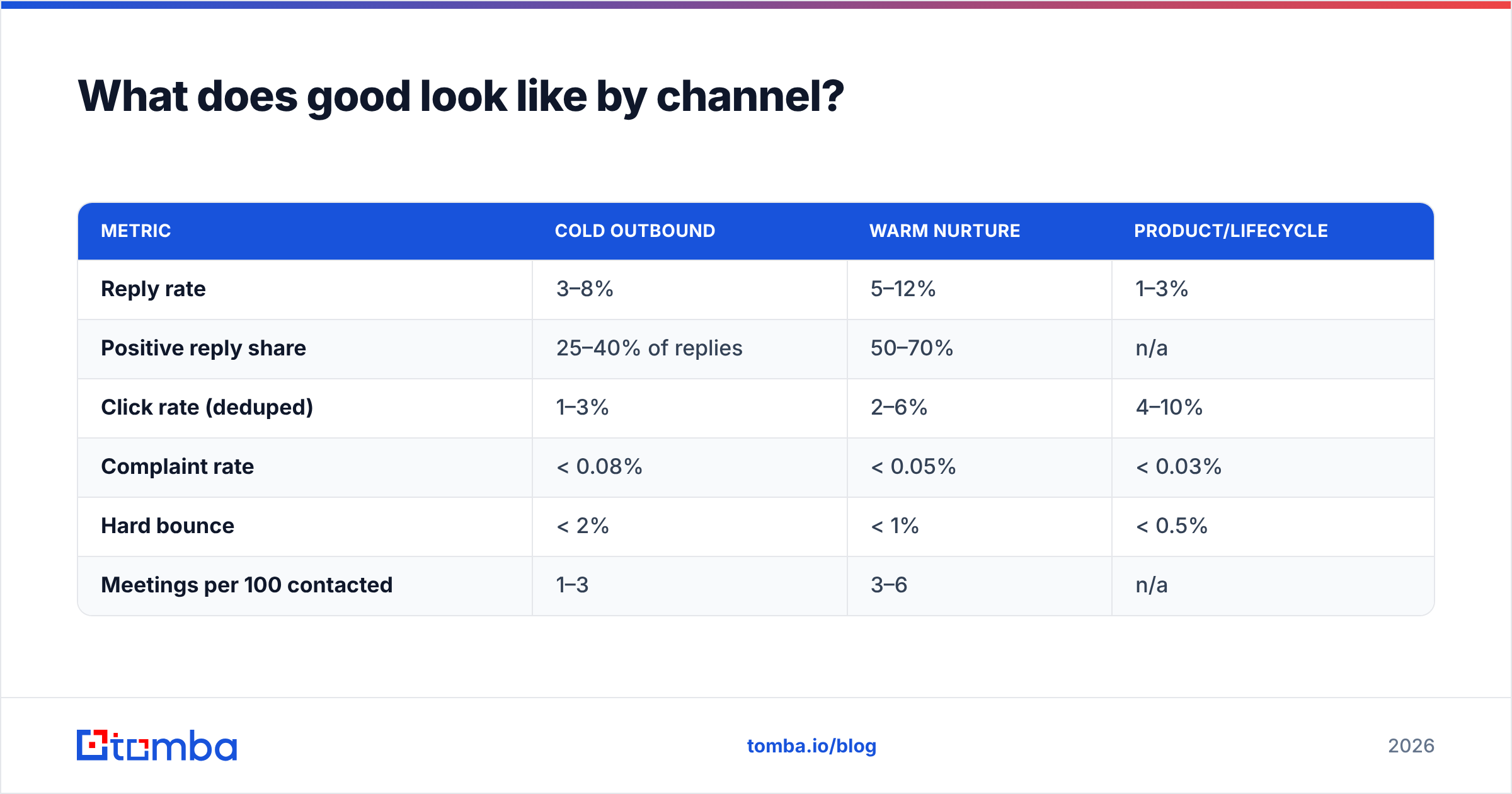
Benchmarks vary wildly by industry and list source, so treat these as sanity ranges rather than targets. G2 and similar review aggregators publish vendor-reported numbers that skew optimistic; the ranges below reflect what holds up across mid-market B2B when you strip proxy noise.
| Metric | Cold outbound | Warm nurture | Product/lifecycle |
|---|---|---|---|
| Reply rate | 3–8% | 5–12% | 1–3% |
| Positive reply share | 25–40% of replies | 50–70% | n/a |
| Click rate (deduped) | 1–3% | 2–6% | 4–10% |
| Complaint rate | < 0.08% | < 0.05% | < 0.03% |
| Hard bounce | < 2% | < 1% | < 0.5% |
| Meetings per 100 contacted | 1–3 | 3–6 | n/a |
If you're materially below the cold-outbound column, the problem is almost never the email. It's who's receiving it.
Common mistakes that quietly kill engagement#
- Reporting a blended open rate across Apple and non-Apple recipients. If you must keep open rate, segment it by mail client or the number is meaningless.
- Chasing subject-line A/B wins. You're optimizing the one metric providers ignore, using data MPP corrupted.
- Sending to role addresses. info@ and sales@ inboxes generate complaints and rarely reply. Filter them at the list-building stage.
- Adding volume to fix a rate problem. Doubling sends on a list with a 0.12% complaint rate doubles your path to a filtering penalty.
- Ignoring the unsubscribe link. A one-click unsubscribe is a gift — it's the recipient choosing the mild negative signal over the severe one. Make it obvious. Google's bulk-sender requirements mandate one-click for a reason.
- Treating deliverability as a one-time setup. Reputation decays. A domain that was fine in January can be throttled by June on the same infrastructure if engagement drifted.
Frequently asked questions#
Does high open rate ever mean anything now? Only as a relative signal within a single, stable segment over time. A sudden 30-point drop still tells you something broke. The absolute number tells you nothing.
Should I stop tracking opens entirely? No — keep collecting, stop reporting. It's useful as a diagnostic input and for detecting sudden placement changes, just not as a KPI on a dashboard anyone makes decisions from.
How long does it take to recover engagement after a bad send? Typically 3–6 weeks of clean, low-volume, high-engagement sending. There's no reset button. Cut volume hard, send only to your most engaged tier, and let the rolling window age out the damage.
Is a re-permission campaign worth it? For lists over ~5,000 with significant cold segments, yes. Expect 2–5% to re-confirm. That feels brutal until you realize the other 95% were dragging your reputation down for free.
Where to start#
Pick the diagnostic table above, find your symptom row, and work the fix. If the row points at data — bounces, wrong-persona replies, complaints from a purchased list — start upstream of the sequence entirely.
The Tomba Email Finder is built for exactly that upstream step: find current, verified professional addresses by domain, name, or company, so the list you're measuring engagement against is one worth measuring. The free tier gives you 25 searches a month to test the difference on a real segment before committing to anything. Fix the input, and most of your engagement metrics fix themselves.
Related guides#
Ready to find emails that actually work?
Join 150,000+ professionals who stopped guessing and started sending. Free credits on signup — no credit card required.
Get the Tomba newsletter
Practical outbound tactics and product updates — once every two weeks.
About the author