Email Existence Checker: How to Verify Any Address in 2026
An email existence checker tells you whether an inbox is real before you send. Here is how the SMTP handshake actually works, where it silently fails, and which tools survive a catch-all domain.
TL;DR
- An email existence checker asks a mail server whether a specific mailbox exists — usually through an SMTP handshake that stops just short of sending a message.
- The handshake is honest maybe 80% of the time. Catch-all domains, greylisting, and anti-harvesting filters return "yes" or "unknown" regardless of reality.
- The tools worth paying for are the ones that layer pattern data, historical bounce records, and catch-all-specific logic on top of the raw SMTP result.
- Free checkers are fine for one-off lookups. They fall apart on Microsoft 365 domains, catch-alls, and anything over a few hundred rows.
- Target a bounce rate under 2%. If your verifier can't hold that on your list, the problem is the verifier, not your list.
You paid for a list. You uploaded it. Twelve percent bounced, your domain reputation dropped, and the next campaign landed in spam for everyone — including the contacts who were valid. That sequence is why email existence checkers exist, and it's also why so many of them oversell what they can actually prove.
This guide covers what the check really does, where it breaks, and how to choose a tool that survives the domains that matter.
What is an email existence checker?#
An email existence checker is a tool that determines whether a mailbox is real and able to receive mail — without sending anything to it.
It's the difference between knocking on a door and mailing a letter. The knock tells you someone's home; the letter costs you postage and tells you nothing until it comes back stamped "return to sender." A bounce is that returned letter, and mailbox providers count every one against your sender reputation.
People use several names for roughly the same thing:
- Email existence checker — does this specific mailbox exist?
- Email verifier — does it exist and is it safe to send to (not a spam trap, not disposable, not a role account)?
- Email validator — is the syntax and domain configuration correct?
Validation is the cheapest and least useful. Verification is what you actually want. Most commercial email verifier products bundle all three and call it verification.
How does an email existence checker actually work?#
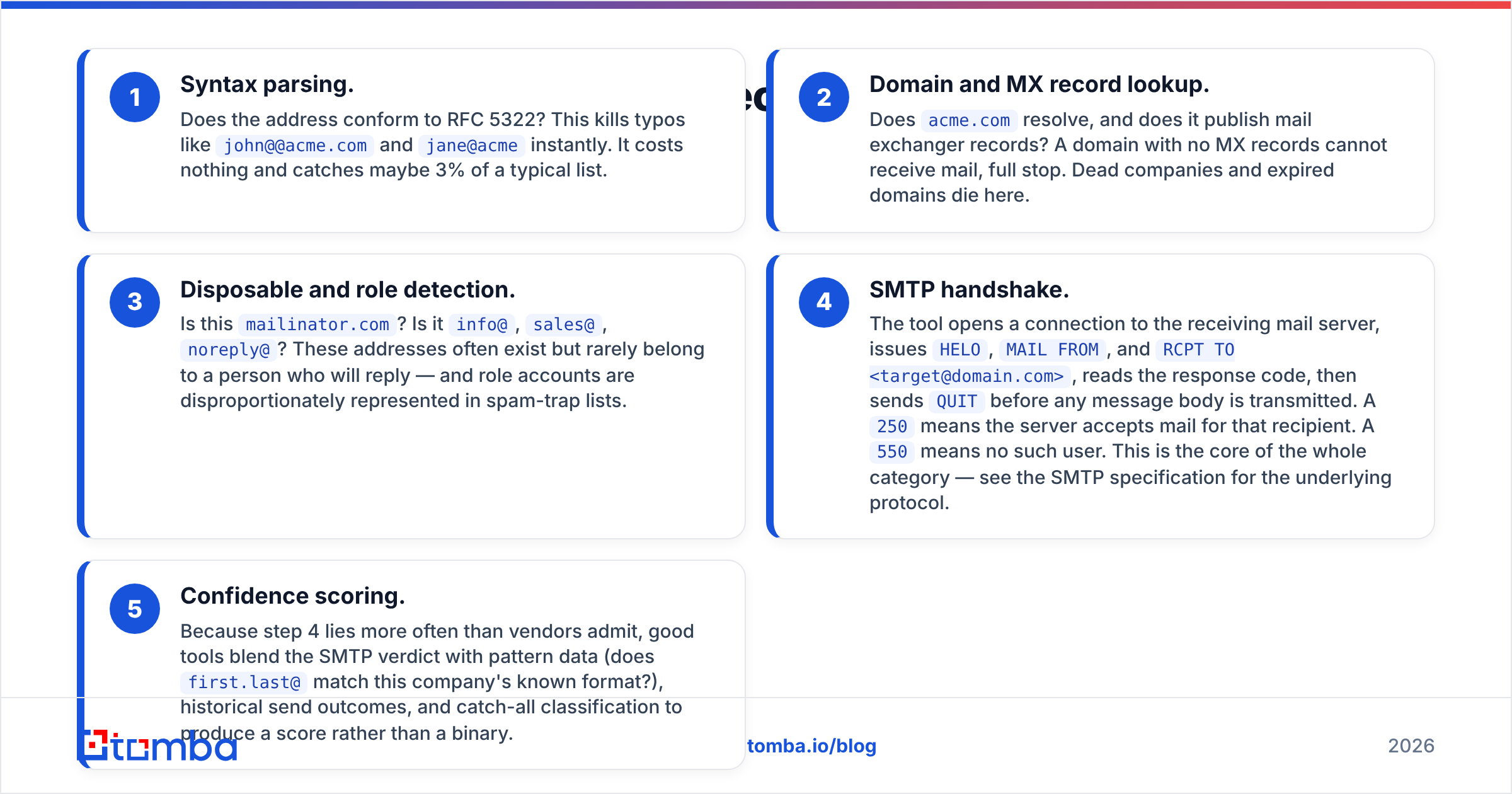
Every real checker runs the same five-stage funnel. Each stage is cheaper than the one after it, so the tool bails out early whenever it can.
- Syntax parsing. Does the address conform to RFC 5322? This kills typos like
john@@acme.comandjane@acmeinstantly. It costs nothing and catches maybe 3% of a typical list. - Domain and MX record lookup. Does
acme.comresolve, and does it publish mail exchanger records? A domain with no MX records cannot receive mail, full stop. Dead companies and expired domains die here. - Disposable and role detection. Is this
mailinator.com? Is itinfo@,sales@,noreply@? These addresses often exist but rarely belong to a person who will reply — and role accounts are disproportionately represented in spam-trap lists. - SMTP handshake. The tool opens a connection to the receiving mail server, issues
HELO,MAIL FROM, andRCPT TO <target@domain.com>, reads the response code, then sendsQUITbefore any message body is transmitted. A250means the server accepts mail for that recipient. A550means no such user. This is the core of the whole category — see the SMTP specification for the underlying protocol. - Confidence scoring. Because step 4 lies more often than vendors admit, good tools blend the SMTP verdict with pattern data (does
first.last@match this company's known format?), historical send outcomes, and catch-all classification to produce a score rather than a binary.
Skip stage 5 and you have a ping tool. Include it and you have a verifier.

What can't an email existence checker tell you?#
This is the part vendors bury in the FAQ. Four failure modes account for nearly all verification errors.
Catch-all domains. A catch-all server accepts mail for every address at the domain, then sorts it internally. RCPT TO returns 250 for ceo@acme.com and also for asdfgh@acme.com. The SMTP handshake is structurally incapable of distinguishing them. Roughly a fifth of B2B domains are configured this way, and they skew heavily toward mid-market and enterprise — exactly the accounts you care about. A dedicated catch-all verifier attacks this with a different method: pattern matching against known-good addresses at the same domain, plus historical delivery data.
Greylisting and rate limits. Many servers deliberately return a soft failure to unknown senders on first contact, expecting a legitimate mail server to retry minutes later. A verifier that treats the first 4xx as "invalid" throws away good contacts. A verifier that treats it as "valid" invents them.
Anti-harvesting responses. Microsoft 365 in particular has grown hostile to RCPT TO probing. Some tenants return uniform acceptance; others return uniform rejection; others throttle the probing IP after a handful of requests. Any tool whose accuracy claim was measured in 2021 is quoting a number that no longer describes the current internet.
Whether the person still works there. An address can be live, deliverable, and monitored by an assistant six months after your prospect left. Existence is not employment. That's a job for contact enrichment or a fresh source, not a verifier.
How accurate are email existence checkers really?#
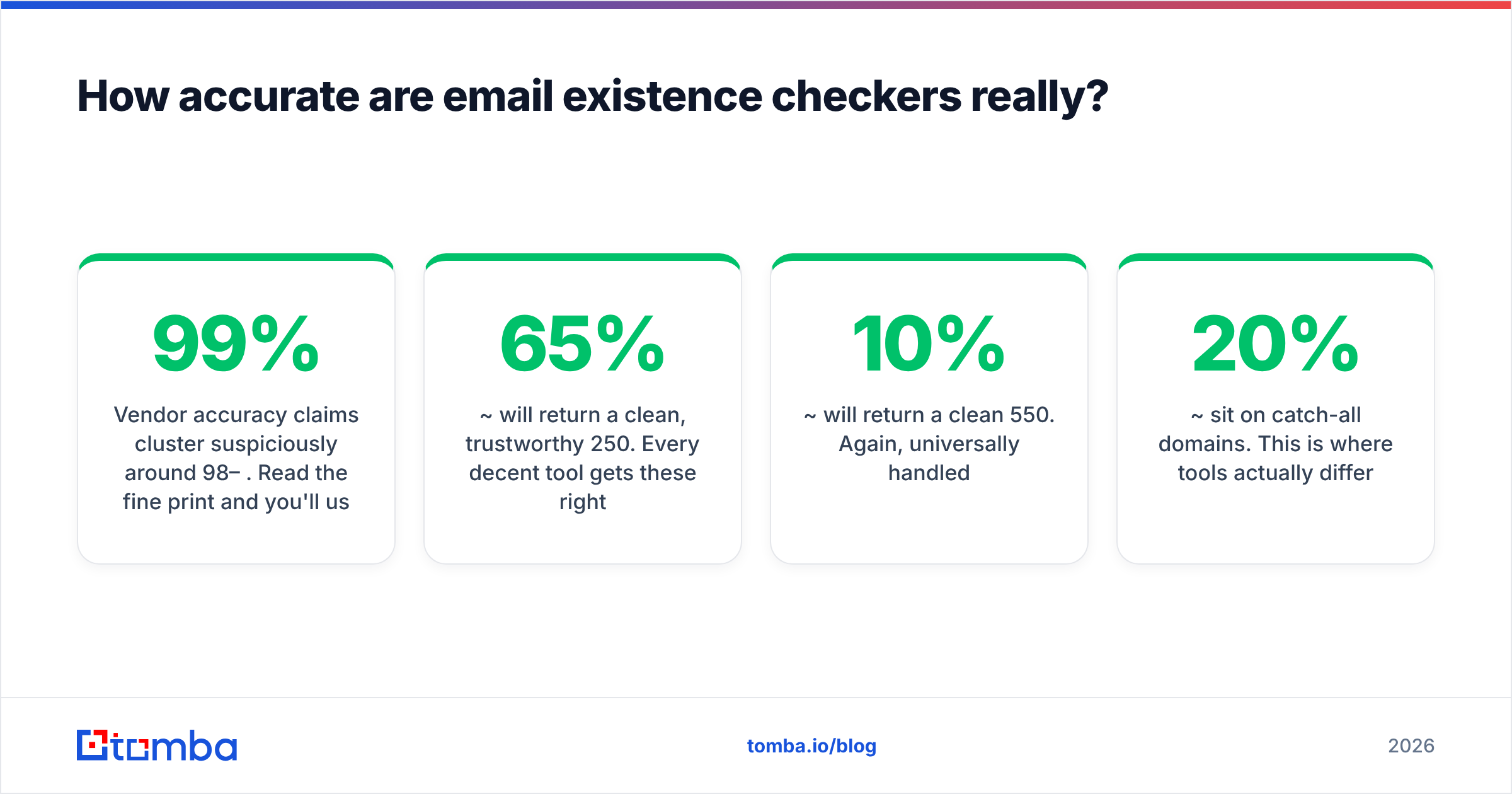
Vendor accuracy claims cluster suspiciously around 98–99%. Read the fine print and you'll usually find that the number excludes catch-alls, excludes "unknown" results, or is measured against a curated test list rather than a real prospecting export.
Here's the honest framing. Take a typical B2B list of 10,000 addresses:
- ~65% will return a clean, trustworthy
250. Every decent tool gets these right. - ~10% will return a clean
550. Again, universally handled. - ~20% sit on catch-all domains. This is where tools actually differ.
- ~5% are ambiguous — greylisted, throttled, or timing out.
A tool that reports "99% accuracy" while marking that 20% as "unknown" and dropping it from the denominator hasn't solved anything. It's handed your problem back to you with a decimal point on it.

The metric that matters is your realized bounce rate on the addresses the tool marked deliverable. Run 500 contacts, send, and count. Under 2% is healthy. Over 5% means the verifier is passing guesses as facts — and mailbox providers will notice before you do.
Which email existence checker should you use in 2026?#
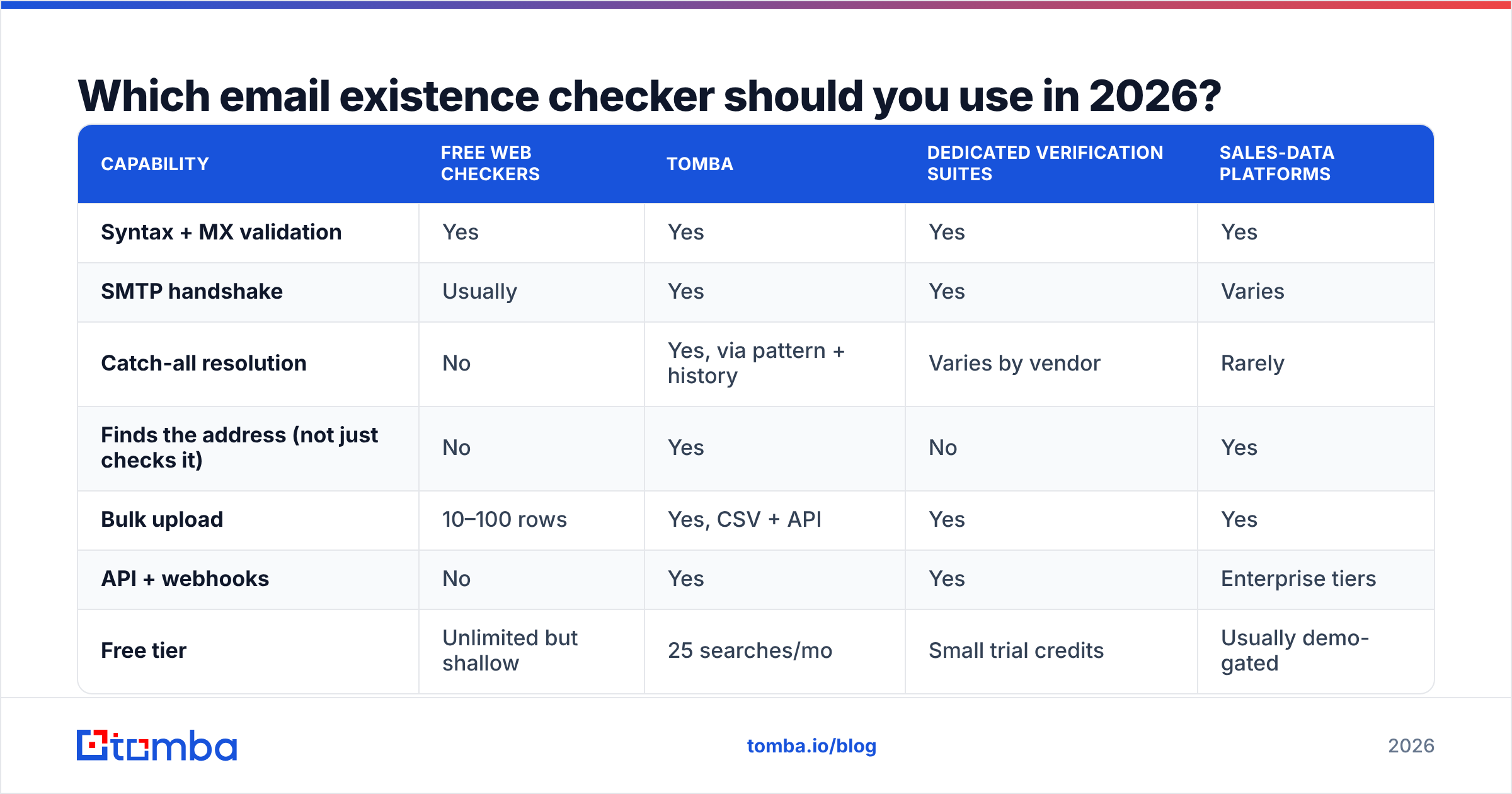
Compare on method, not marketing. The table below focuses on what each type of tool does with the hard 20%, since that's the only segment where the choice changes your outcome.
| Capability | Free web checkers | Tomba | Dedicated verification suites | Sales-data platforms |
|---|---|---|---|---|
| Syntax + MX validation | Yes | Yes | Yes | Yes |
| SMTP handshake | Usually | Yes | Yes | Varies |
| Catch-all resolution | No | Yes, via pattern + history | Varies by vendor | Rarely |
| Finds the address (not just checks it) | No | Yes | No | Yes |
| Bulk upload | 10–100 rows | Yes, CSV + API | Yes | Yes |
| API + webhooks | No | Yes | Yes | Enterprise tiers |
| Free tier | Unlimited but shallow | 25 searches/mo | Small trial credits | Usually demo-gated |
| Entry paid price | — | $49/mo Starter | Credit packs | Often $500+/mo |
| Best for | One-off checks | Find + verify in one pass | High-volume list hygiene | Full GTM stack |
Three practical notes on that table.
Verification-only vendors are good at exactly one thing. ZeroBounce, NeverBounce, and Bouncer are built for cleaning lists you already own. If you have a 400,000-row database and a deliverability problem, that specialization is worth it. If you're building the list from scratch, you'll still need a finder — and you'll pay two vendors.
Bundled find-and-verify saves a step and a bill. Tomba's email finder verifies on the way out, so an address never enters your CRM unverified. The pricing runs Free (25 searches/mo), Starter $49/mo, Growth $99/mo, Pro $249/mo, and Enterprise custom — one meter for both jobs.
Prebuilt databases sidestep the question. BookYourData sells pre-verified B2B contacts with a bounce guarantee attached, which is a genuinely different model: instead of verifying addresses you sourced, you buy addresses someone else already verified. If your bottleneck is list-building speed rather than list hygiene, that's a reasonable path — and it pairs fine with a verifier for the records that age out.

Check current user reviews on G2's email verification category before committing — accuracy in this space degrades quietly as mail providers change their behavior, and reviews surface that faster than vendor changelogs.
Is a free email existence checker enough?#
For a handful of addresses, yes. A free email checker will confirm syntax, MX records, and a basic SMTP response in a couple of seconds, and that's genuinely all you need before emailing a single warm introduction.
Free breaks down at three specific points:
- Volume. Most free tools cap at 10–100 lookups, and the ones that don't are usually rate-limited from a shared IP that receiving servers have already learned to distrust.
- Catch-alls. Free checkers report catch-all domains as "valid" or "unknown" and move on. No pattern layer, no historical data, no resolution.
- No audit trail. When your bounce rate spikes, you need to know which tool cleared which address on which date. Free tools give you a green checkmark and no record.
The rough threshold: if you're sending fewer than 50 cold emails a month, free is fine. Past that, one blocklisting costs more in lost pipeline than a year of a paid plan.

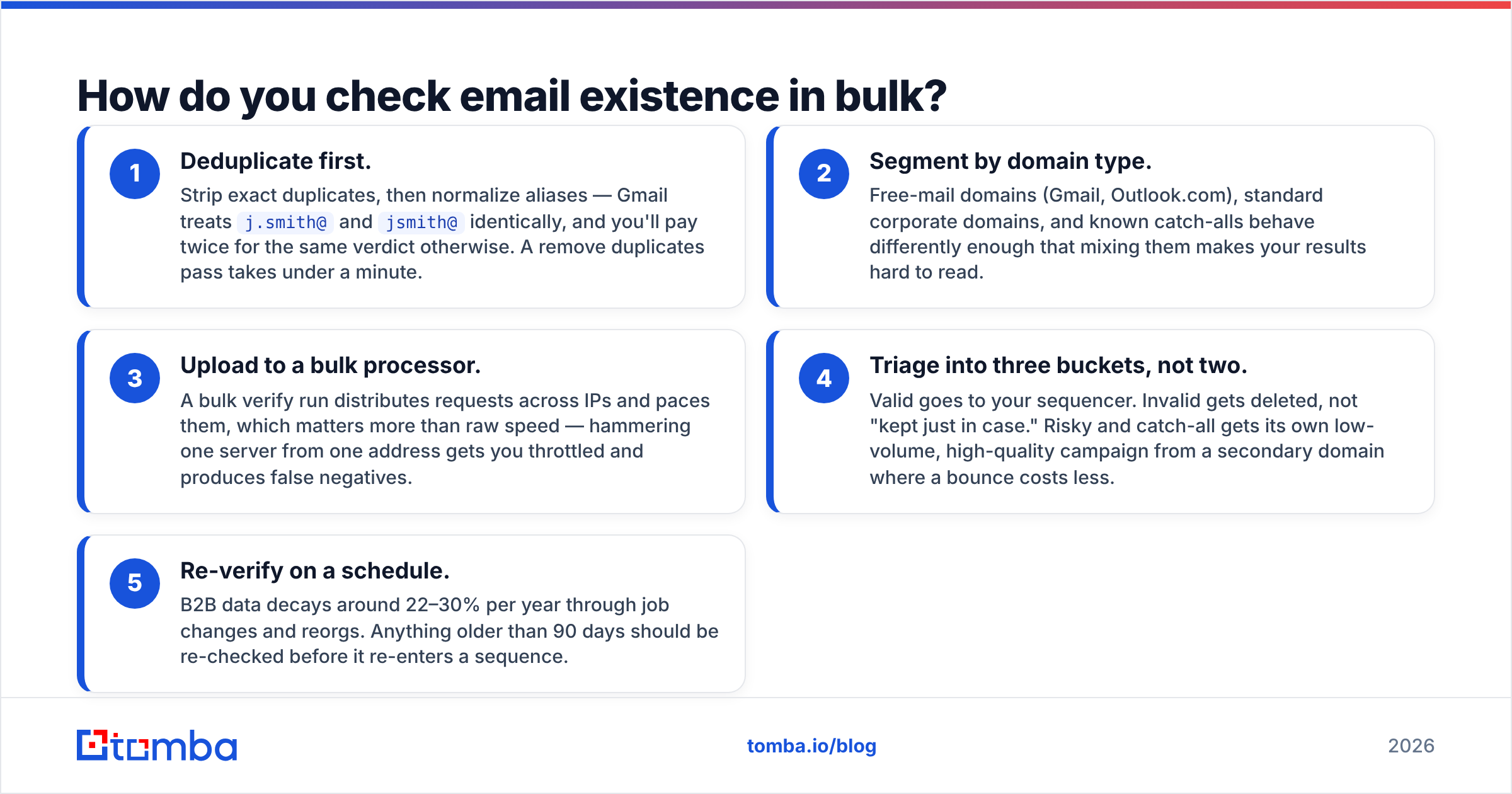
How do you check email existence in bulk?#
Bulk changes the mechanics, because now you're a source of traffic that receiving servers evaluate as a pattern rather than a single request.
- Deduplicate first. Strip exact duplicates, then normalize aliases — Gmail treats
j.smith@andjsmith@identically, and you'll pay twice for the same verdict otherwise. A remove duplicates pass takes under a minute. - Segment by domain type. Free-mail domains (Gmail, Outlook.com), standard corporate domains, and known catch-alls behave differently enough that mixing them makes your results hard to read.
- Upload to a bulk processor. A bulk verify run distributes requests across IPs and paces them, which matters more than raw speed — hammering one server from one address gets you throttled and produces false negatives.
- Triage into three buckets, not two. Valid goes to your sequencer. Invalid gets deleted, not "kept just in case." Risky and catch-all gets its own low-volume, high-quality campaign from a secondary domain where a bounce costs less.
- Re-verify on a schedule. B2B data decays around 22–30% per year through job changes and reorgs. Anything older than 90 days should be re-checked before it re-enters a sequence.
For engineering teams, the email verification API makes this a single call at the point of capture — verify the address in your signup form or lead-routing webhook and the list never gets dirty in the first place.
How do you use the results without hurting deliverability?#
Verification is necessary, not sufficient. A perfectly clean list still burns a domain if you send badly.
- Don't send to every "risky" address just because you paid for it. Sunk cost is not a sending strategy.
- Warm the domain before volume. New sending domains need weeks of gradual ramp, regardless of list quality.
- Watch complaint rate alongside bounce rate. Under 0.1% complaints is the working ceiling; a clean list with terrible copy will still get you flagged.
- Keep authentication current. SPF, DKIM, and DMARC alignment matters as much as list hygiene — HubSpot's guide to email deliverability covers the setup well.
- Suppress hard bounces permanently. One bounce is data. The same bounce twice is a signal to the receiving server that you're not paying attention.
Where should you start?#
If your problem is a dirty list you already own, run it through a dedicated verifier and measure the realized bounce rate before you trust the score. If your problem is that you don't have the addresses yet — the more common case — verify at the point of discovery instead of cleaning up afterward.
That's what Tomba's Email Finder is built for: search by domain, name, or company, and every address comes back with a verification status attached, so an unverified contact never reaches your CRM. Start on the free tier with 25 searches a month, check the results against your own bounce data, and upgrade only once the numbers hold up. That's the same test you should apply to every tool in this category.
Related guides#
Ready to find emails that actually work?
Join 150,000+ professionals who stopped guessing and started sending. Free credits on signup — no credit card required.
Get the Tomba newsletter
Practical outbound tactics and product updates — once every two weeks.
About the author