Email Extractor and Verifier: The 2026 Buyer's Guide
Extracting emails is easy. Keeping your domain alive after you send to them is the hard part. Here's how extractors and verifiers actually work, where each one fails, and which combined tools are worth paying for in 2026.
TL;DR
- An email extractor pulls addresses out of sources you already have — websites, LinkedIn pages, PDFs, text dumps. A verifier checks whether those addresses will actually accept mail. You need both; neither is optional.
- Raw extracted lists typically test at 55–75% deliverable. Send to that unverified and you will burn a sending domain in under two weeks.
- Extractors that scrape public text are cheap but noisy. Extractors that resolve a name + domain against a maintained dataset (like an email finder) are more expensive per lead and far cleaner.
- Bundled extract-and-verify platforms cost less than stitching two vendors together, mostly because you stop paying to verify addresses that were never real.
- The number that matters is not "accuracy claimed" — it's cost per verified, deliverable contact after bounces. Calculate it before you commit to an annual plan.
What is an email extractor and verifier?#
They are two different jobs that got bundled into one product category, and confusing them is the most common reason cold outreach fails before the first send.
Think of it like sourcing produce. The extractor is the forager — it goes out and gathers everything that looks edible from the field. The verifier is the inspector — it checks each item for rot before it reaches the kitchen. A forager with no inspector fills your kitchen with things that look fine and aren't. An inspector with nothing to inspect is idle.
Technically:
- Extraction parses a source and returns strings matching an email pattern, or constructs likely addresses from a name plus a known company email format. Sources include website pages, LinkedIn profiles, uploaded files, pasted text, and CRM exports.
- Verification tests each address against reality: syntax, domain existence, MX records, SMTP handshake, disposable-domain lists, role-account detection, and catch-all classification.
- Enrichment (optional, but usually bundled) attaches job title, company, seniority, and sometimes a phone number so the address becomes a usable lead rather than a string.
- Deduplication and list hygiene removes duplicates, suppression-list matches, and known complainers before export.
Skipping step 2 is where teams get hurt. Google and Microsoft both treat high bounce rates as a spam signal, and Google's bulk sender guidelines put the practical ceiling well below 3%. A 30% bounce rate on your first campaign doesn't just lose you those prospects — it damages every future send from that domain.
Why do raw extracted emails bounce so often?#
Because the web is a snapshot of the past and your prospect list needs to be a snapshot of right now.
Four failure modes account for almost all of it:
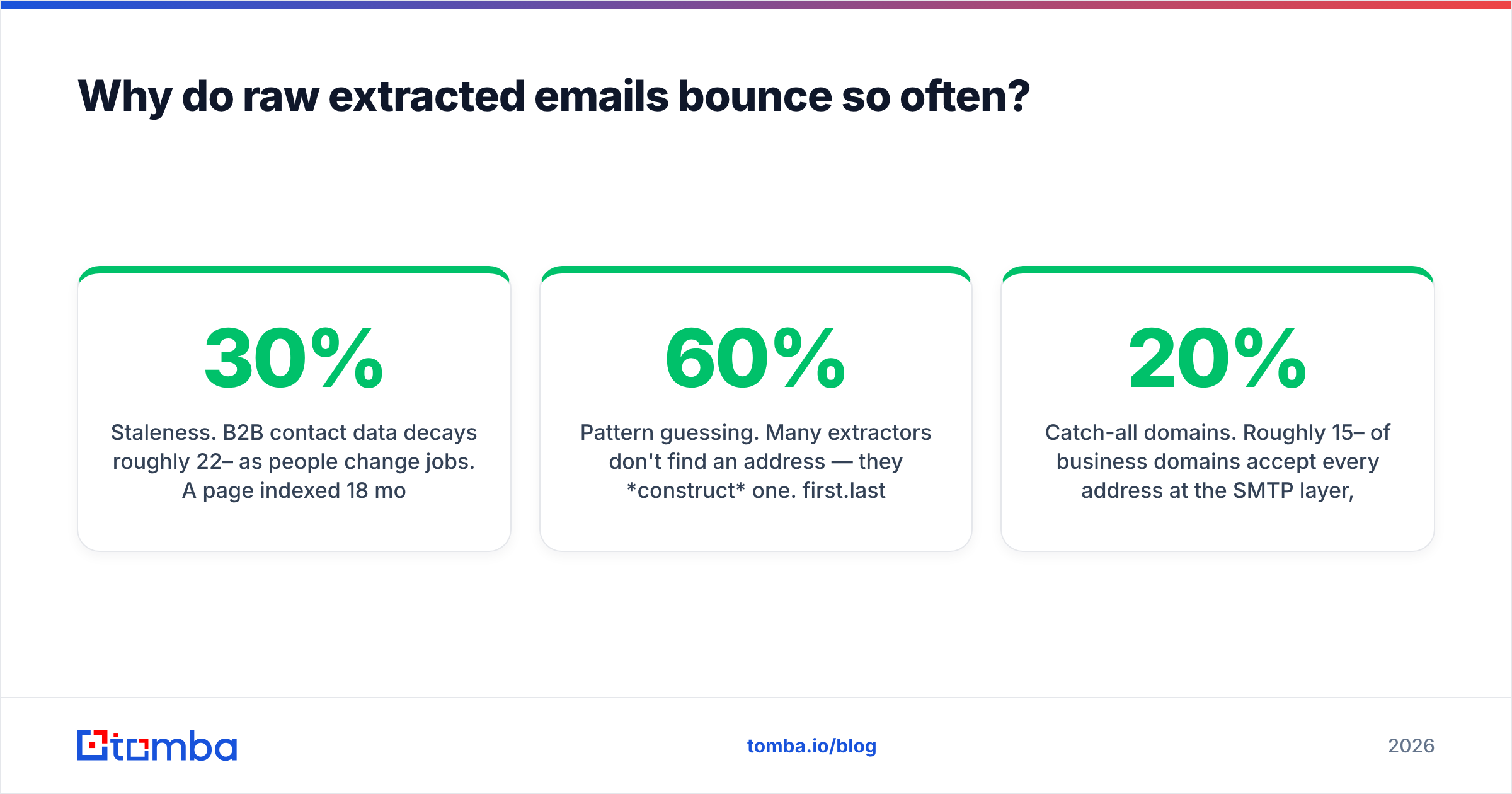
- Staleness. B2B contact data decays roughly 22–30% per year as people change jobs. A page indexed 18 months ago may list someone who left a year ago.
- Pattern guessing. Many extractors don't find an address — they construct one.
first.last@domain.comis right maybe 60% of the time across a random sample of companies, and wrong in a way that looks completely plausible. - Catch-all domains. Roughly 15–20% of business domains accept every address at the SMTP layer, so a naive verifier marks them "valid." They aren't valid; they're unknown. Then a human or a filter silently discards them.
- Role and trap addresses.
info@,sales@,admin@inflate your list count and depress your reply rate. Spam traps — recycled addresses monitored by blocklist operators — are worse: hitting one can get your IP listed.

Catch-alls deserve extra attention because they're where most verification tools quietly give up. A tool that returns "accept-all — proceed at your own risk" has handed the risk back to you. A catch-all verifier that applies pattern confidence scoring and historical engagement data will at least tell you whether the address is likely real, which is a materially different decision input.
How do extraction methods compare?#
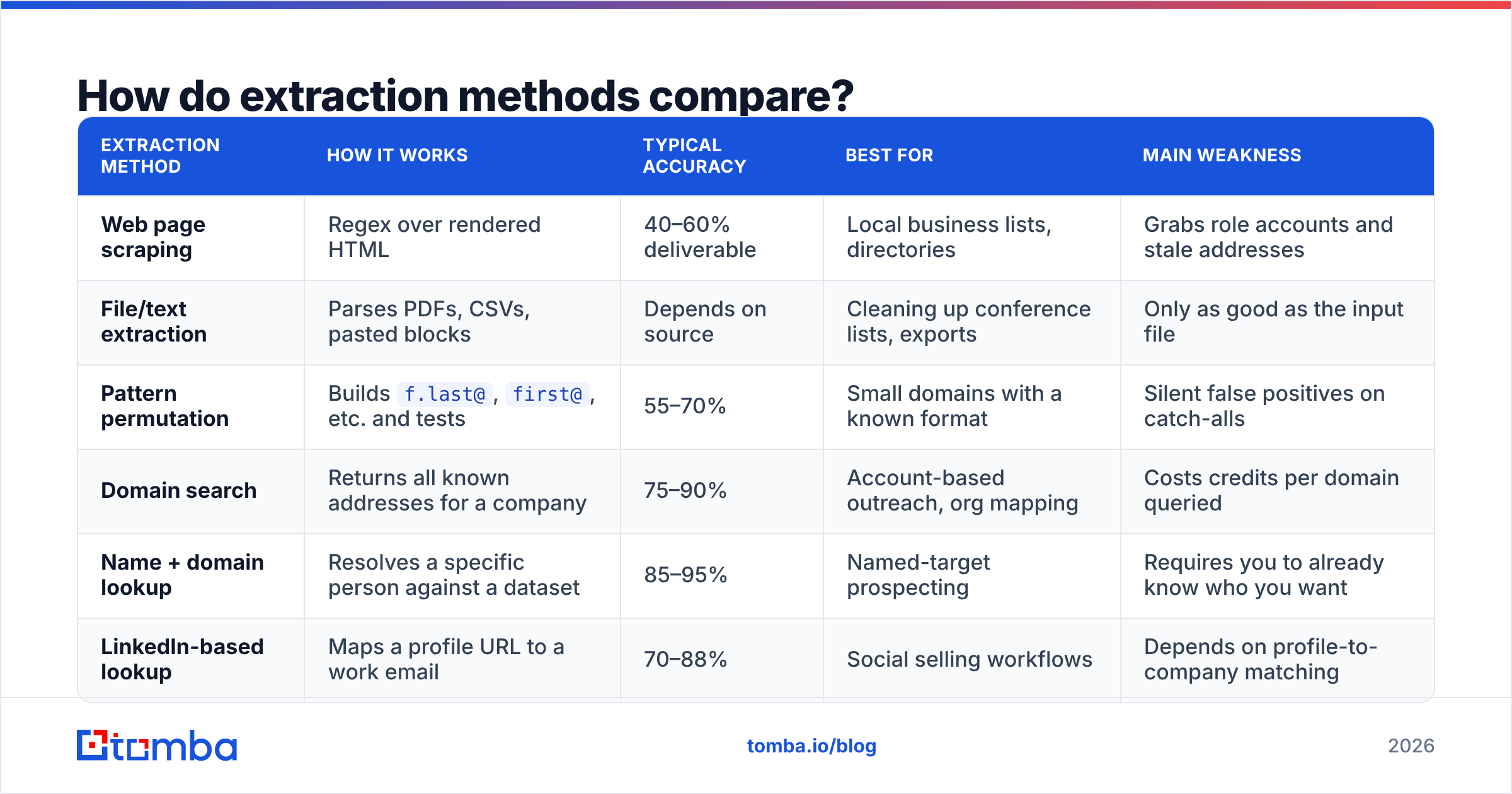
Not all extraction is the same operation, and the method determines both your cost and your bounce rate.
| Extraction method | How it works | Typical accuracy | Best for | Main weakness |
|---|---|---|---|---|
| Web page scraping | Regex over rendered HTML | 40–60% deliverable | Local business lists, directories | Grabs role accounts and stale addresses |
| File/text extraction | Parses PDFs, CSVs, pasted blocks | Depends on source | Cleaning up conference lists, exports | Only as good as the input file |
| Pattern permutation | Builds f.last@, first@, etc. and tests |
55–70% | Small domains with a known format | Silent false positives on catch-alls |
| Domain search | Returns all known addresses for a company | 75–90% | Account-based outreach, org mapping | Costs credits per domain queried |
| Name + domain lookup | Resolves a specific person against a dataset | 85–95% | Named-target prospecting | Requires you to already know who you want |
| LinkedIn-based lookup | Maps a profile URL to a work email | 70–88% | Social selling workflows | Depends on profile-to-company matching |
If you're building an account-based list, domain search is the efficient entry point — one query returns the org's addresses plus the dominant email pattern, which then makes every subsequent name lookup at that company cheaper and more accurate. If you're working from a target list of named people, a direct lookup beats scraping every time.
For pure text-cleanup work — a conference attendee PDF, a scraped page you already saved — a free email extractor handles the parsing step without spending credits, and you spend your paid credits only on verification.
Which email extractor and verifier tools are worth it in 2026?#
Here's the honest landscape. Prices are list prices as of mid-2026 and change often — check the vendor before you buy.
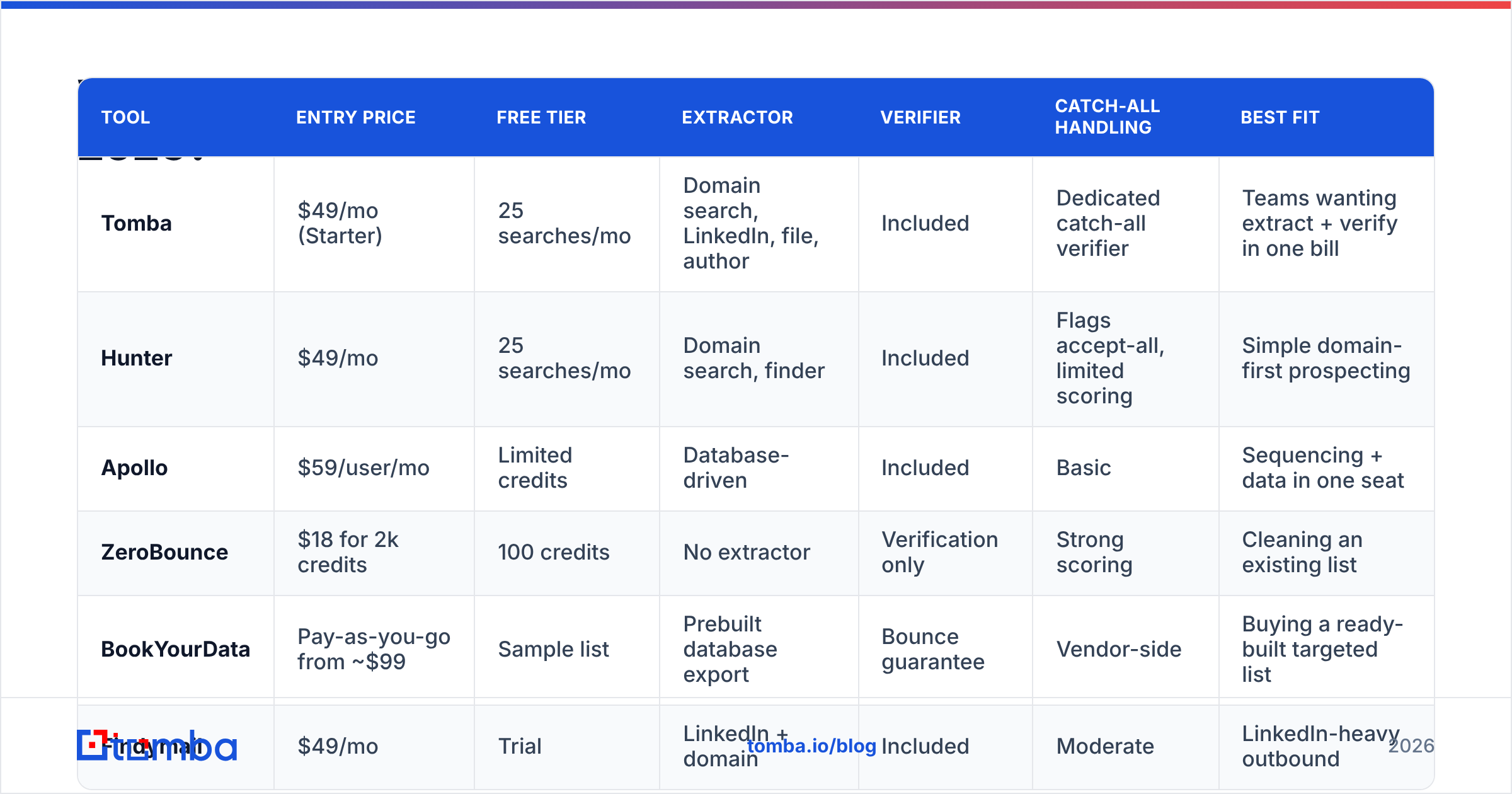
| Tool | Entry price | Free tier | Extractor | Verifier | Catch-all handling | Best fit |
|---|---|---|---|---|---|---|
| Tomba | $49/mo (Starter) | 25 searches/mo | Domain search, LinkedIn, file, author | Included | Dedicated catch-all verifier | Teams wanting extract + verify in one bill |
| Hunter | $49/mo | 25 searches/mo | Domain search, finder | Included | Flags accept-all, limited scoring | Simple domain-first prospecting |
| Apollo | $59/user/mo | Limited credits | Database-driven | Included | Basic | Sequencing + data in one seat |
| ZeroBounce | $18 for 2k credits | 100 credits | No extractor | Verification only | Strong scoring | Cleaning an existing list |
| BookYourData | Pay-as-you-go from ~$99 | Sample list | Prebuilt database export | Bounce guarantee | Vendor-side | Buying a ready-built targeted list |
| Findymail | $49/mo | Trial | LinkedIn + domain | Included | Moderate | LinkedIn-heavy outbound |
A few notes that don't fit in a table:
- Verification-only tools like ZeroBounce are excellent at their one job and make sense if your extraction happens elsewhere — a scraper, a partner list, an old CRM export. They just don't source anything.
- BookYourData takes a different route: rather than extract-then-verify, you buy a pre-verified list built to your filters, usually with a bounce guarantee attached. If you'd rather buy the finished output than run the pipeline, that's a legitimate model — and for teams without an ops person, often the faster path to a clean list.
- Bundled platforms win on total cost mostly through waste elimination. When your extractor and verifier share the same dataset, the extractor stops returning addresses the verifier will immediately reject.

How should you evaluate accuracy claims?#
Ignore the headline percentage. Every vendor's marketing page claims 95%+ and they are all measuring different things.
Run this instead, and it takes about an hour:
- Build a 100-row control set of contacts you can independently confirm — your own customers, colleagues at partner companies, people whose addresses you already have in your CRM.
- Strip the emails and feed only names + domains into each tool's free tier.
- Score three buckets: exact match, plausible-but-wrong, and no-result. Plausible-but-wrong is the dangerous bucket — it's what bounces.
- Check coverage separately from accuracy. A tool that returns nothing for 40% of your rows may score 98% "accurate" on the 60% it answers. That's a coverage problem dressed as an accuracy win.
- Measure cost per verified contact, not cost per credit. Credits spent on no-results and bad guesses still cost money.
- Send a small warm test — 50 addresses through your actual sending infrastructure — and record the real bounce rate. That number is the only one that matters.
Vendors publish accuracy against their own benchmark sets; independent user reviews on G2 give you a better read on coverage complaints, billing surprises, and support responsiveness than any vendor page will.
What does a clean extract-verify-send pipeline look like?#
Six steps, in order. Reordering them is how lists get burned.
- Define the ICP before you extract anything. Industry, headcount, geography, role. Extracting broadly and filtering later wastes credits on people you'd never contact.
- Extract by account, not by individual, when you can. Pull the org's addresses and email pattern once, then resolve individuals against that known pattern — it's cheaper and more accurate than guessing per person.
- Verify everything, including addresses the extractor labeled high-confidence. Use a proper email verifier rather than trusting the finder's own confidence score, which is an estimate, not a test.
- Segment by verification result. Valid addresses go into the main campaign. Catch-alls go into a separate, smaller, slower sequence sent from a secondary domain. Invalid and role accounts get dropped, not "tried anyway."
- Warm the sending domain before volume. Verified lists don't help if the domain sending them has no history. Check your sender reputation and ramp gradually.
- Re-verify on a 90-day cycle. Data decay is continuous. A list verified in January is meaningfully worse by April.
For teams processing thousands of rows, doing this by hand doesn't scale — a bulk email finder run or an API call inside your enrichment job handles steps 2 and 3 in one pass. If your workflow lives in a spreadsheet, the Google Sheets add-on keeps the same pipeline without an export-import round trip.
What about free email extractors and verifiers?#
Free tiers are genuinely useful for two things: evaluating a vendor, and handling small one-off jobs. They are not a strategy.
The realistic boundaries:
- Free tiers run 25–100 lookups per month. Enough to test accuracy on a control set, not enough to build a pipeline.
- Free text extractors are unlimited but do no verification. Pulling addresses out of a document costs nothing; confirming they work costs money because it requires live SMTP infrastructure.
- "Unlimited free" scrapers are usually the product being sold. If a browser extension offers unlimited extraction at no cost, examine what it does with the data it sees. Chrome extension permissions are worth reading.
- Free verifiers often skip the expensive checks. Syntax and MX lookups are cheap. Catch-all resolution and trap detection are not, which is why they're paywalled.
A reasonable free-tier workflow: use a free extractor for parsing, a free email checker for spot checks, and reserve paid credits for the bulk verification pass right before you send.
Is a combined tool better than separate extractor and verifier?#
For most teams under 50 people, yes — and the reason is operational, not technical.
Arguments for combining:
- One bill, one API key, one support contact.
- The extractor and verifier share a dataset, so the extractor can suppress addresses it already knows are dead before charging you a credit.
- Fewer CSV round trips means fewer places for a stale list to leak into a live campaign.
Arguments for keeping them separate:
- Best-of-breed verification vendors invest their entire roadmap in verification and tend to lead on catch-all and trap detection.
- If your extraction comes from a source the bundled vendor doesn't support — a proprietary scraper, a partner data feed, an events list — you only need the verifier half anyway.
- Negotiating leverage. Two annual contracts are easier to renegotiate than one.
The deciding question is where your data originates. If most of your leads come from company domains and LinkedIn profiles, a bundled tool covers you end to end. If your leads arrive as files from elsewhere, buy verification alone and stop paying for an extractor you won't use.
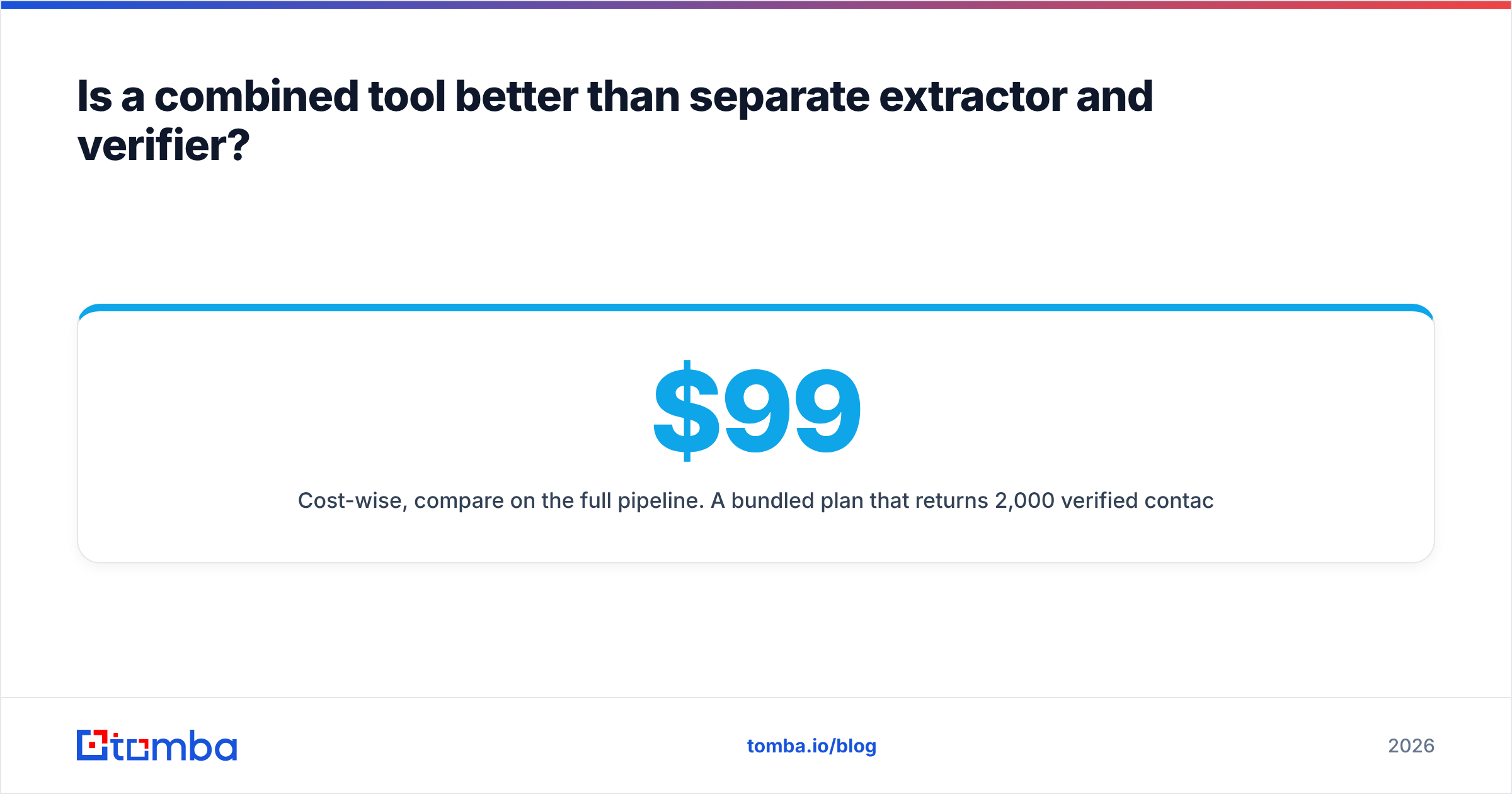
Cost-wise, compare on the full pipeline. A $99/mo bundled plan that returns 2,000 verified contacts beats a $49 finder plus a $40 verifier that together return 1,200, even though the line items look cheaper. Review Tomba pricing and each competitor's tier against your actual monthly contact volume, not against a hypothetical one.
What mistakes should you avoid?#
- Sending to an unverified list "just this once." Sender reputation has memory. One bad send costs you weeks of recovery.
- Treating catch-all as valid. It's a coin flip, and it belongs in its own segment on its own domain.
- Extracting role accounts and calling them leads.
info@addresses inflate your list and depress every metric that matters. - Ignoring regional data rules. GDPR and similar frameworks apply to B2B contact data in the EU. Know your legal basis before you extract, not after.
- Buying annual on a demo. Run the 100-row control test on free tiers first. It costs an hour and saves a year of regret.
- Verifying once and never again. Set a recurring re-verification job. Decay doesn't pause.
Start with a clean list#
If you're building outbound from scratch, the sequence is: find the right people, confirm the addresses are real, then send. Tomba's Email Finder covers the first two steps in one workflow — domain search to map an account, name lookup to resolve individuals, and built-in verification including catch-all handling before anything reaches your sequencer. The free tier gives you 25 searches a month, which is exactly enough to run the control-set test above against whatever you're using today. Start there, compare the real numbers, and buy based on what your own bounce report says.
Related guides#
Ready to find emails that actually work?
Join 150,000+ professionals who stopped guessing and started sending. Free credits on signup — no credit card required.
Get the Tomba newsletter
Practical outbound tactics and product updates — once every two weeks.
About the author