Email Extractor Chrome Extension: The 2026 Buyer's Guide
Most email extractor Chrome extensions scrape whatever text looks like an email and call it a lead. Here's how the 2026 crop actually differs on accuracy, credits, and compliance — and how to pick one.
TL;DR
- An email extractor Chrome extension pulls addresses off the page you're viewing. The good ones verify before they hand you the address; the cheap ones just pattern-match
something@something.comand let you find out on send. - Two categories exist and people confuse them constantly: page scrapers (regex over visible DOM text) and provider-backed finders (extension is a front-end for a real data API).
- Scraper-only extensions produce 15–40% invalid addresses on a typical page. Provider-backed finders land 92–97% deliverable because they run SMTP + pattern checks before returning.
- Credits are the hidden cost. "Unlimited" almost always means unlimited extractions, not unlimited verified results — verification is billed separately.
- Pick by workflow: LinkedIn prospecting, company-site sweeps, and bulk list building each reward a different tool.
What is an email extractor Chrome extension?#
It's a browser add-on that reads the page you're on and gives you back the email addresses associated with it, without you copying anything by hand.
Think of it like a metal detector at the beach. The cheap detector beeps at every piece of foil. The good one tells you whether it's a bottle cap or a coin before you dig. Both "find metal." Only one saves you the shovel work.
Mechanically, there are three architectures shipping in the Chrome Web Store today:
- Regex-over-DOM scrapers. The extension runs a pattern match on rendered page text and returns every string shaped like an email. Zero network calls, zero verification, zero cost. Also zero guarantee the mailbox exists.
- Provider-backed finders. The extension reads context off the page (company domain, person's name, LinkedIn profile) and queries a backend API that holds a crawled index plus a verification engine. It returns a small number of addresses with confidence scores.
- Hybrid enrichers. Scrape first, then push the harvested strings through a verification endpoint before display. Slower, but a good middle ground for company-site sweeps where the address is genuinely on-page.
The distinction matters because it determines what you're actually paying for. With a scraper, you pay in bounce rate. With a provider-backed tool, you pay in credits — but the credits buy you a real answer.
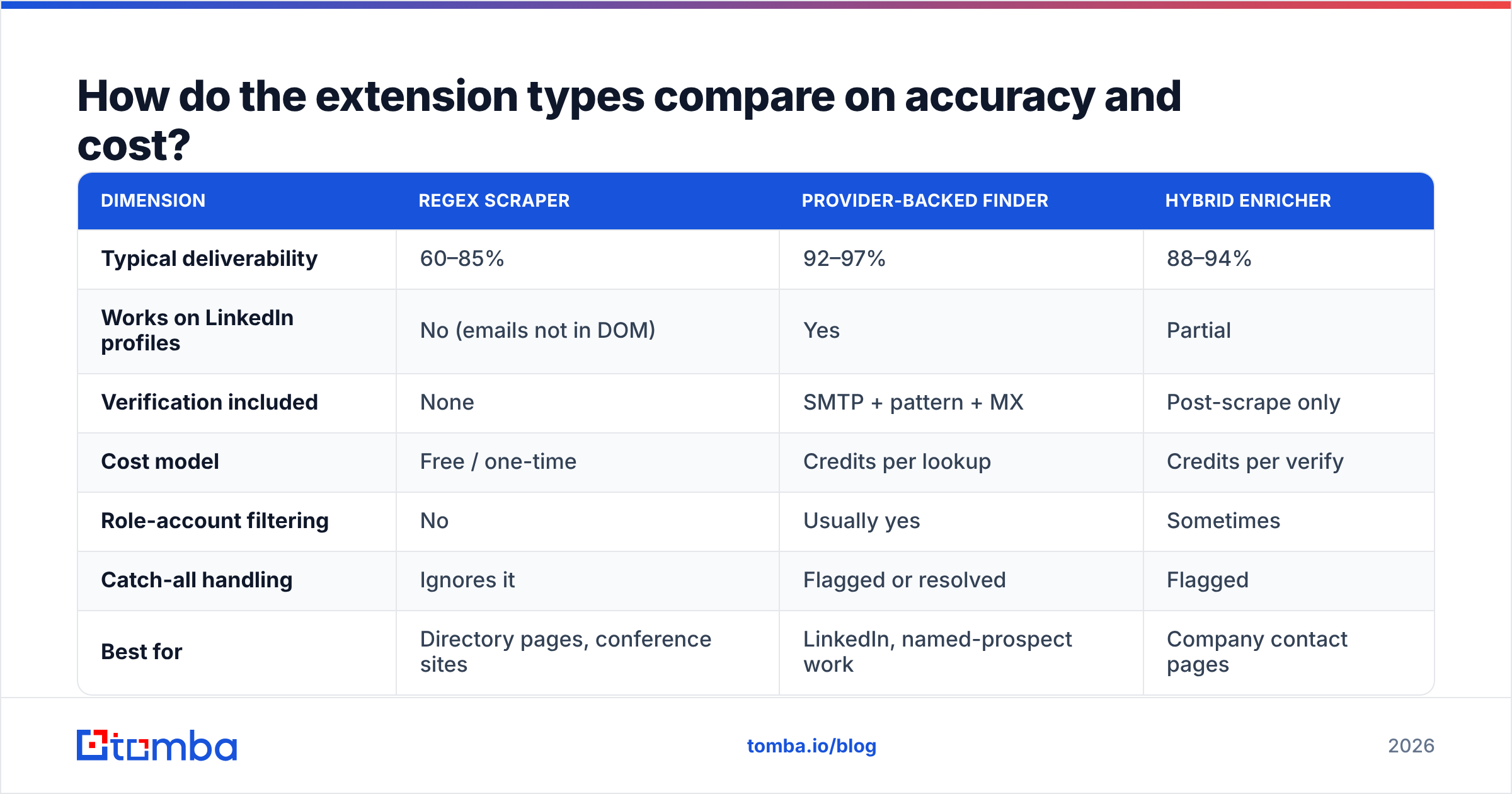
How do the extension types compare on accuracy and cost?#
| Dimension | Regex scraper | Provider-backed finder | Hybrid enricher |
|---|---|---|---|
| Typical deliverability | 60–85% | 92–97% | 88–94% |
| Works on LinkedIn profiles | No (emails not in DOM) | Yes | Partial |
| Verification included | None | SMTP + pattern + MX | Post-scrape only |
| Cost model | Free / one-time | Credits per lookup | Credits per verify |
| Role-account filtering | No | Usually yes | Sometimes |
| Catch-all handling | Ignores it | Flagged or resolved | Flagged |
| Best for | Directory pages, conference sites | LinkedIn, named-prospect work | Company contact pages |
| Failure mode | Silent bounces | Credit burn on misses | Slow batches |
The row that costs people the most money is "works on LinkedIn." LinkedIn does not put business emails in the page DOM. Any extension claiming to "extract" emails from a LinkedIn profile is not extracting — it's querying a backend index keyed to that profile. If the vendor doesn't disclose a data source, you're buying a black box. Tomba publishes its data sources, and so do most credible vendors; if you can't find that page, treat the vendor's accuracy claim as marketing.

Why do scraped emails bounce so often?#
Because "syntactically valid" and "someone reads this mailbox" are unrelated properties.
A regex extractor on a mid-size company site typically returns a mix like this:
- Stale addresses — the person left in 2023, the page never got updated. Still perfectly formatted.
- Role accounts —
info@,support@,careers@,noreply@. Deliverable, but they route to a shared inbox or a ticketing system, not a buyer. - Obfuscated decoys — spam traps deliberately seeded in page markup to catch scrapers. Sending to one damages your sender reputation immediately.
- Image-rendered addresses — the real contact is a PNG; the scraper grabs a footer address instead.
- Encoded variants —
name [at] company [dot] comgets missed entirely, so you lose the one address that was worth having.

That last bullet is the quiet one. Scrapers have a recall problem and a precision problem at the same time: they miss the obfuscated real contact and return five useless role accounts. You end up with a list that looks productive and performs terribly.
Verification is the fix, and it isn't optional in 2026. Google and Microsoft both tightened bulk-sender enforcement — Google's published sender guidelines put a hard spam-complaint ceiling on anyone sending meaningful volume. A list padded with dead addresses pushes your bounce rate past the threshold before your copy ever gets a fair test. Run anything you harvest through an email verifier before it touches a sequence.
What should you actually look for in 2026?#
Six criteria, ranked by how much money they save you:
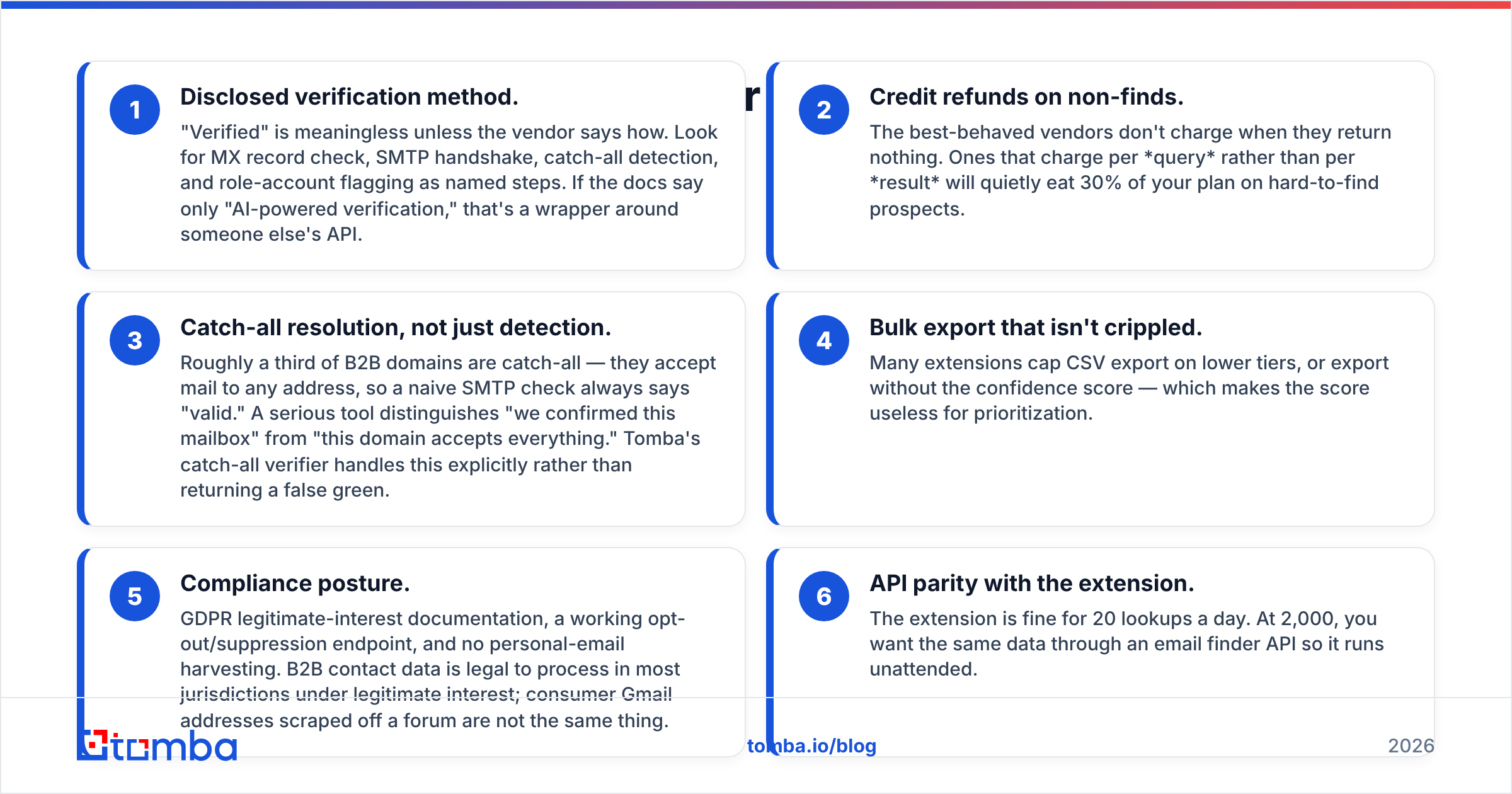
- Disclosed verification method. "Verified" is meaningless unless the vendor says how. Look for MX record check, SMTP handshake, catch-all detection, and role-account flagging as named steps. If the docs say only "AI-powered verification," that's a wrapper around someone else's API.
- Credit refunds on non-finds. The best-behaved vendors don't charge when they return nothing. Ones that charge per query rather than per result will quietly eat 30% of your plan on hard-to-find prospects.
- Catch-all resolution, not just detection. Roughly a third of B2B domains are catch-all — they accept mail to any address, so a naive SMTP check always says "valid." A serious tool distinguishes "we confirmed this mailbox" from "this domain accepts everything." Tomba's catch-all verifier handles this explicitly rather than returning a false green.
- Bulk export that isn't crippled. Many extensions cap CSV export on lower tiers, or export without the confidence score — which makes the score useless for prioritization.
- Compliance posture. GDPR legitimate-interest documentation, a working opt-out/suppression endpoint, and no personal-email harvesting. B2B contact data is legal to process in most jurisdictions under legitimate interest; consumer Gmail addresses scraped off a forum are not the same thing.
- API parity with the extension. The extension is fine for 20 lookups a day. At 2,000, you want the same data through an email finder API so it runs unattended.
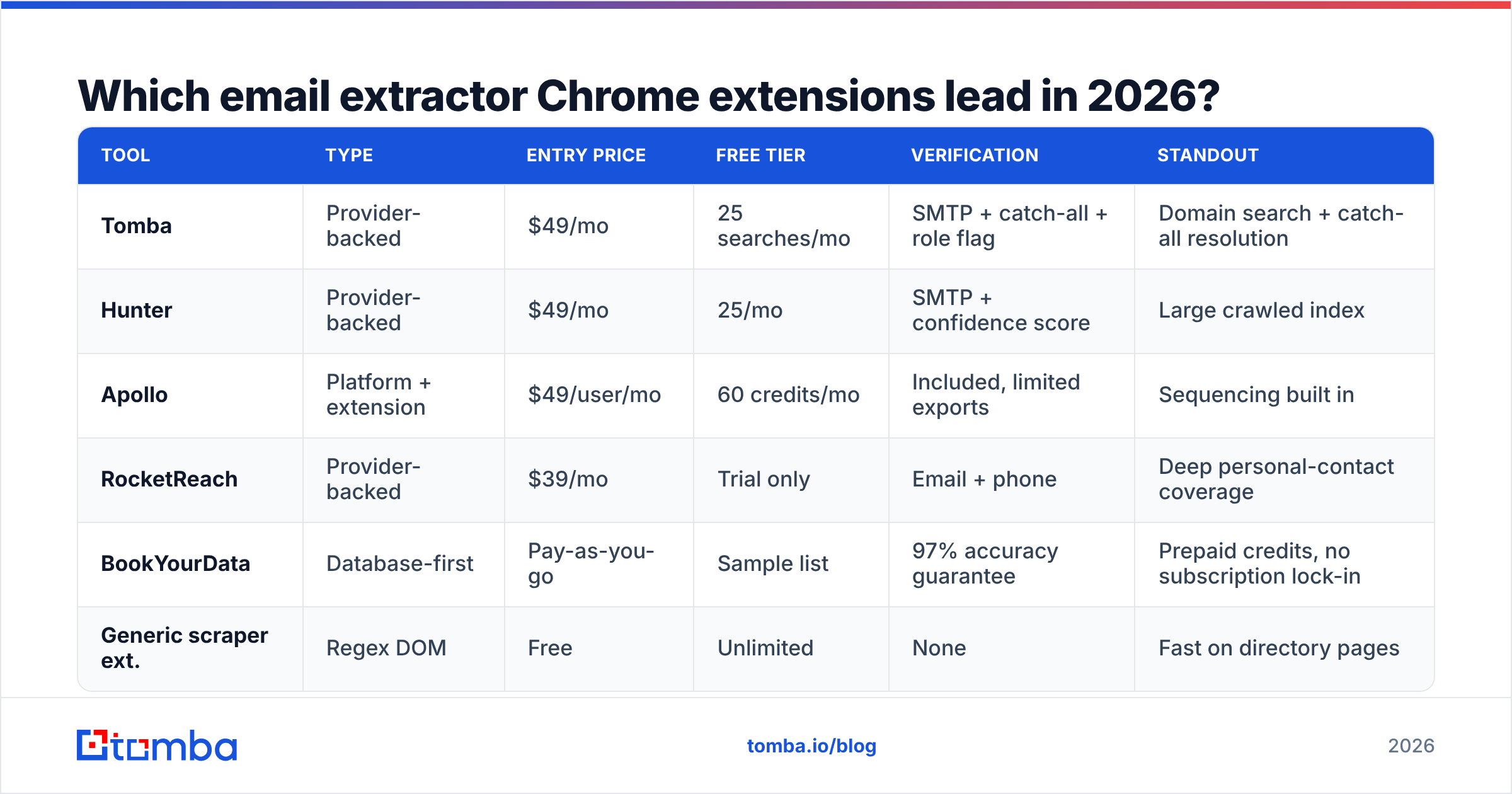
Which email extractor Chrome extensions lead in 2026?#
| Tool | Type | Entry price | Free tier | Verification | Standout |
|---|---|---|---|---|---|
| Tomba | Provider-backed | $49/mo | 25 searches/mo | SMTP + catch-all + role flag | Domain search + catch-all resolution |
| Hunter | Provider-backed | $49/mo | 25/mo | SMTP + confidence score | Large crawled index |
| Apollo | Platform + extension | $49/user/mo | 60 credits/mo | Included, limited exports | Sequencing built in |
| RocketReach | Provider-backed | $39/mo | Trial only | Email + phone | Deep personal-contact coverage |
| BookYourData | Database-first | Pay-as-you-go | Sample list | 97% accuracy guarantee | Prepaid credits, no subscription lock-in |
| Generic scraper ext. | Regex DOM | Free | Unlimited | None | Fast on directory pages |
A few honest notes on that table.
Tomba is the tool this blog is published by, so weigh accordingly — but the reason it fits extension workflows well is the spread of endpoints behind one credit pool: domain search for sweeping a company, LinkedIn finder for profile-based lookups, and verification on the same balance. Tomba pricing runs Free (25 searches/mo), Starter $49/mo, Growth $99/mo, Pro $249/mo, Enterprise custom.
Apollo bundles the extension into a full sales platform. If you want sequences and dialer in the same seat, that bundling is the point. If you only want clean addresses, you're paying for surface area you won't use — and its export limits on lower tiers frustrate list builders. There's a fuller breakdown on the Apollo alternative page.
BookYourData takes a different route entirely: prepaid credits against a curated database with an accuracy guarantee, rather than a subscription. For teams that buy contact data in bursts — a quarterly campaign, a conference list — that model is genuinely cleaner than paying monthly for capacity you idle. It's a database play more than an extension play, and it's strong at what it does.
Generic free scrapers have a real use case, and it's narrower than their install counts suggest: public directory pages, association member lists, conference speaker rosters — places where the address is genuinely printed on the page and mostly current. Use them there. Don't use them as your prospecting engine.


How do you build a workflow that doesn't burn credits?#
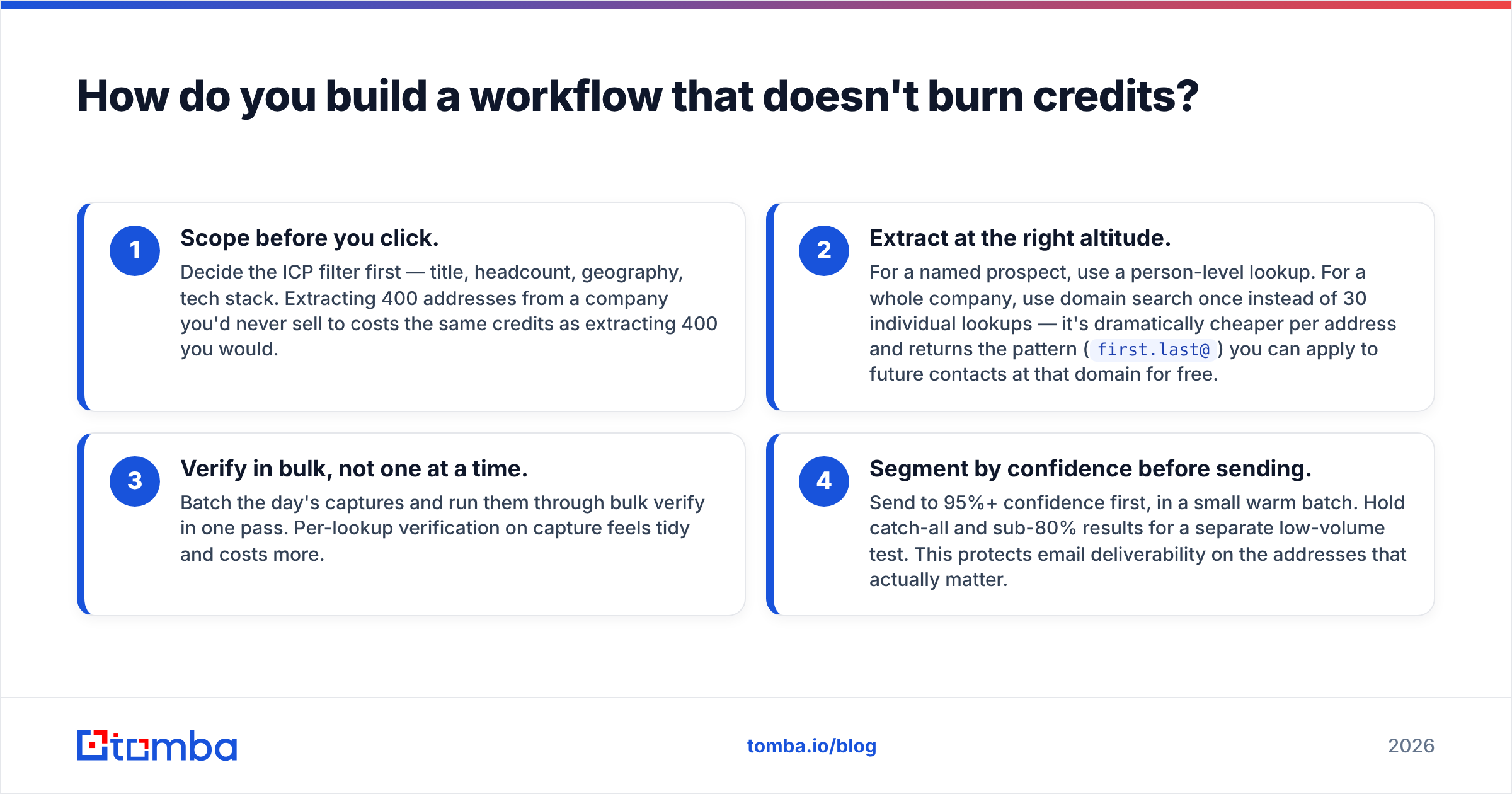
The mistake is treating the extension as the whole process. It's the capture step. Four stages, in order:
- Scope before you click. Decide the ICP filter first — title, headcount, geography, tech stack. Extracting 400 addresses from a company you'd never sell to costs the same credits as extracting 400 you would.
- Extract at the right altitude. For a named prospect, use a person-level lookup. For a whole company, use domain search once instead of 30 individual lookups — it's dramatically cheaper per address and returns the pattern (
first.last@) you can apply to future contacts at that domain for free. - Verify in bulk, not one at a time. Batch the day's captures and run them through bulk verify in one pass. Per-lookup verification on capture feels tidy and costs more.
- Segment by confidence before sending. Send to 95%+ confidence first, in a small warm batch. Hold catch-all and sub-80% results for a separate low-volume test. This protects email deliverability on the addresses that actually matter.
One more thing most guides skip: track your own bounce rate per source. Every vendor quotes accuracy on their own benchmark. Your ICP is not their benchmark. Tag leads with the tool that produced them, then compare 30-day bounce rates. After two months you'll know which extension deserves your budget better than any comparison table — including this one. G2's lead intelligence category is useful for shortlisting candidates, but reviewer scores won't tell you how a tool performs on your segment.
Are email extractor extensions legal?#
Short answer: extracting business contact data is generally lawful in the US and, under legitimate interest, in the EU — but how you extract and what you do next both matter.
- CAN-SPAM (US) doesn't ban harvesting. It bans deception, missing physical addresses, and ignoring opt-outs. It does, however, raise penalties for messages sent to addresses gathered by automated harvesting from websites — a distinction that cuts directly against blind regex scrapers.
- GDPR (EU/UK) requires a lawful basis. Legitimate interest generally covers B2B outreach to a business role address when the message is relevant to that role, you document the balancing test, and you honor objections immediately. Personal addresses are a different risk tier.
- Platform terms. LinkedIn's user agreement prohibits automated scraping of the platform. Extensions that query a separately-built index keyed to a public profile operate differently from ones that scrape the page under your session — worth knowing which one you've installed.
Practical guardrails: stick to business role addresses, keep a suppression list and honor it across every tool, include a real unsubscribe path, and don't send to anything you couldn't justify to the recipient's legal team in one sentence.
Which one should you pick?#
- Prospecting named people on LinkedIn → provider-backed finder. Scrapers physically cannot do this job.
- Sweeping a target account's whole domain → domain search, once, then reuse the discovered pattern.
- Harvesting a public directory or speaker list → a free regex scraper is fine, followed by a bulk verify pass.
- Buying a list in quarterly bursts → a prepaid database like BookYourData beats a monthly subscription you idle.
- Running 1,000+ lookups a month → skip the extension and go to the API.
If you want one tool that covers the first three without switching tabs, start with the Tomba Email Finder. The free tier gives you 25 searches a month with full verification included — enough to test it against whatever you're using now and compare bounce rates on your own list before you pay anyone. Install it, run 25 lookups on your real ICP, and let the bounce data decide.
Related guides#
Ready to find emails that actually work?
Join 150,000+ professionals who stopped guessing and started sending. Free credits on signup — no credit card required.
Get the Tomba newsletter
Practical outbound tactics and product updates — once every two weeks.
About the author