Email Extractor Extension: How to Pick One That Works in 2026
Most browser email extractors scrape whatever text looks like an email and call it a lead. Here's how the real ones work, which permissions to refuse, and what bounce rates you should actually expect.

TL;DR
- An email extractor extension is a browser add-on that pulls email addresses off the page you're looking at. The good ones query a verified database and return a confidence score; the bad ones regex-match visible text and hand you
noreply@,info@, and a typo'd support alias. - The single biggest quality signal is whether the extension verifies before it exports. Unverified scrape output typically bounces at 25-45%. Verified extractor output lands at 2-5%.
- Permissions matter more than features. Any extension requesting
<all_urls>plus "read and change all your data on all websites" is reading your Gmail, your CRM, and your banking tab. Check the manifest before you install. - Free extractors aren't free — you pay in bounces, domain reputation, and the six hours you spend cleaning a 2,000-row CSV.
- Pick by workflow: LinkedIn-heavy prospecting, company-site sweeps, and bulk list building each reward a different tool.
What is an email extractor extension?#
An email extractor extension is a Chrome, Edge, or Firefox add-on that reads the page in your active tab and returns email addresses associated with it. You click the toolbar icon, it works the page, you get a list you can copy or push to a CRM.
That's the shared definition. Under the hood there are three very different machines wearing the same coat.
- Pure DOM scrapers. They run a regex over rendered page text and grab anything shaped like
x@y.z. Zero network calls, zero database, zero verification. Fast and free, and roughly as accurate as reading tea leaves — you'll collect image alt text, JavaScript variables, and everyprivacy@address on the footer. - Pattern generators. They read a name and a domain, then guess:
first.last@,flast@,first@. Some run an SMTP check on the guess. Accuracy depends entirely on whether the check is real or cosmetic. A tool like an email permutator makes the same guesses transparently, which is honestly more useful than a black box doing it silently. - Database-backed finders. They send the person/company identity to an API, match it against an indexed corpus of verified addresses, and return a result with a confidence score and source attribution. This is the category that actually produces sendable lists.
The distinction is invisible in the Chrome Web Store listing. Every one of them says "find any email in one click." You find out which type you installed when your first campaign bounces.
Why do most extracted emails bounce?#
Because scraping and finding are different problems, and most extensions only solve the easy one.
A DOM scraper finds addresses that are published on a page. Published addresses skew heavily toward role accounts — sales@, hello@, careers@, press@. Those go to shared inboxes staffed by people whose job is to not forward your pitch. They also skew stale: a company site that hasn't been redesigned since 2021 still lists an employee who left in 2022.
Then there's the mechanical decay. Contact data degrades at roughly 22-30% per year through job changes alone, and 2024-2026 saw an unusual amount of B2B churn. An address scraped and stored six months ago is meaningfully worse than one resolved today.

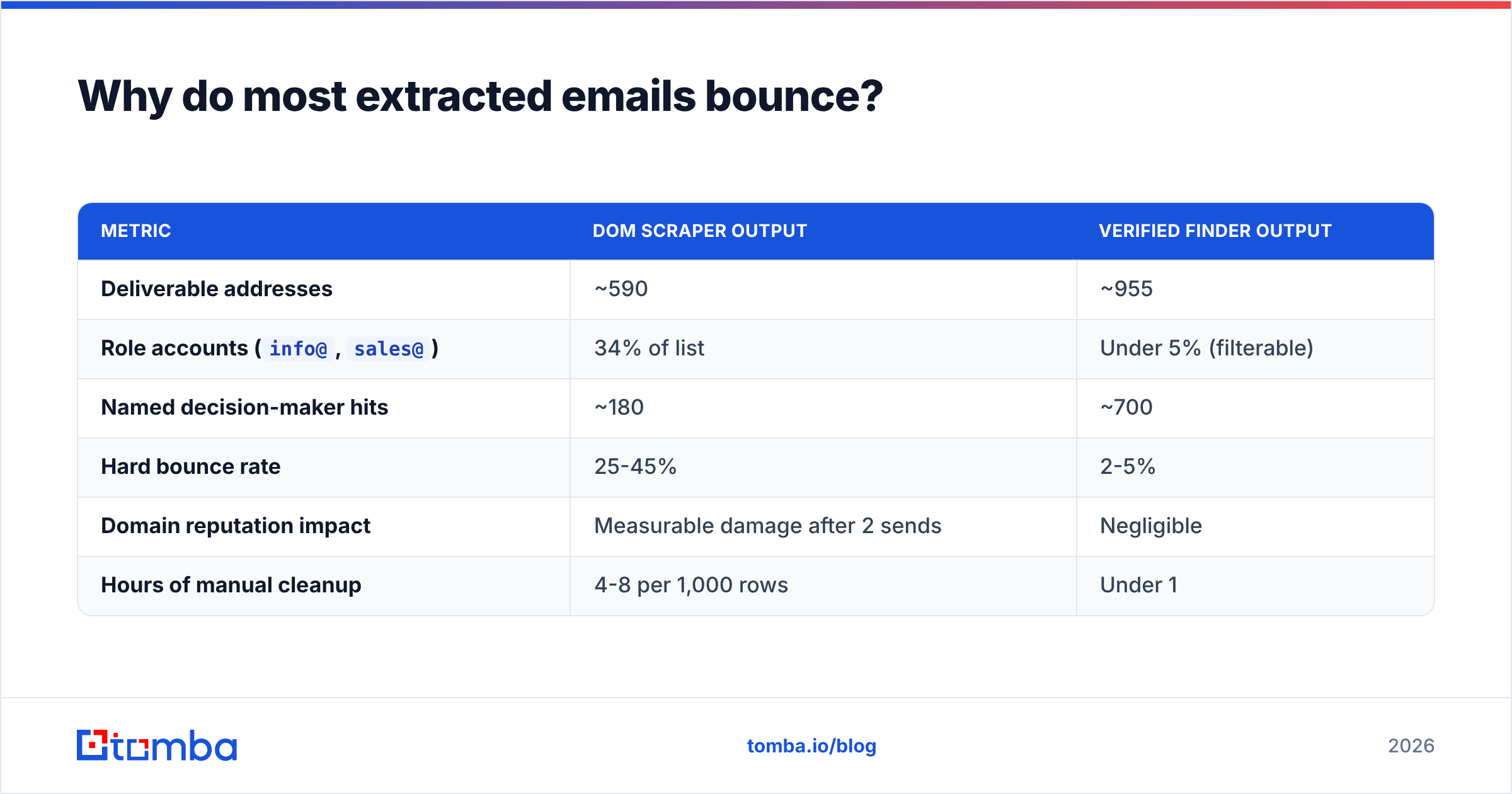
Here's what the difference looks like in practice on a 1,000-contact send:
| Metric | DOM scraper output | Verified finder output |
|---|---|---|
| Deliverable addresses | ~590 | ~955 |
Role accounts (info@, sales@) |
34% of list | Under 5% (filterable) |
| Named decision-maker hits | ~180 | ~700 |
| Hard bounce rate | 25-45% | 2-5% |
| Domain reputation impact | Measurable damage after 2 sends | Negligible |
| Hours of manual cleanup | 4-8 per 1,000 rows | Under 1 |
Bounce rate isn't just a wasted-send problem. Google and Microsoft both treat sustained bounce rates above 2% as a spam signal. Push past 5% and your sender reputation starts absorbing damage that takes weeks of careful sending to repair. A free extractor that hands you a 40%-bad list has cost you far more than a $49/mo subscription would have.
Which permissions should make you close the tab?#
Read the permission prompt. Genuinely read it — this is the step almost everyone skips, and it's the one with the largest downside.
An extension that needs to read the page you're on requires activeTab at minimum. That's reasonable. What isn't reasonable is the pattern you'll find in a large share of free extractors:
<all_urls>host permission — the extension can read and modify every site you visit, not just the ones where you click it. That includes your webmail, your bank, your internal admin panels.- Unrestricted background network access — the extension can send what it reads anywhere, at any time, without you clicking anything.
- No named company or postal address in the listing — if you can't identify who operates it, you can't hold them to a privacy policy.
- Recent ownership transfer — extensions get bought. A clean tool with 200,000 users is a valuable acquisition target for an adware operator, and the update ships silently.
- A privacy policy that permits "sharing with partners" — that's the sentence that turns your browsing history into a data product.
The safe shape is narrow: activeTab or a specific host list, an API call to a named vendor domain, a real company behind it, and a policy that says what's retained and for how long. If you're operating under GDPR or CCPA, the vendor also needs to be able to tell you where its data came from — which is why serious providers publish their data sources rather than being cagey about it.
If your organization has a security review process, an email extractor is exactly the kind of tool that should go through it. It sits in the browser, sees everything, and is usually installed by a salesperson at 4pm on a Thursday.
How do the main options compare?#
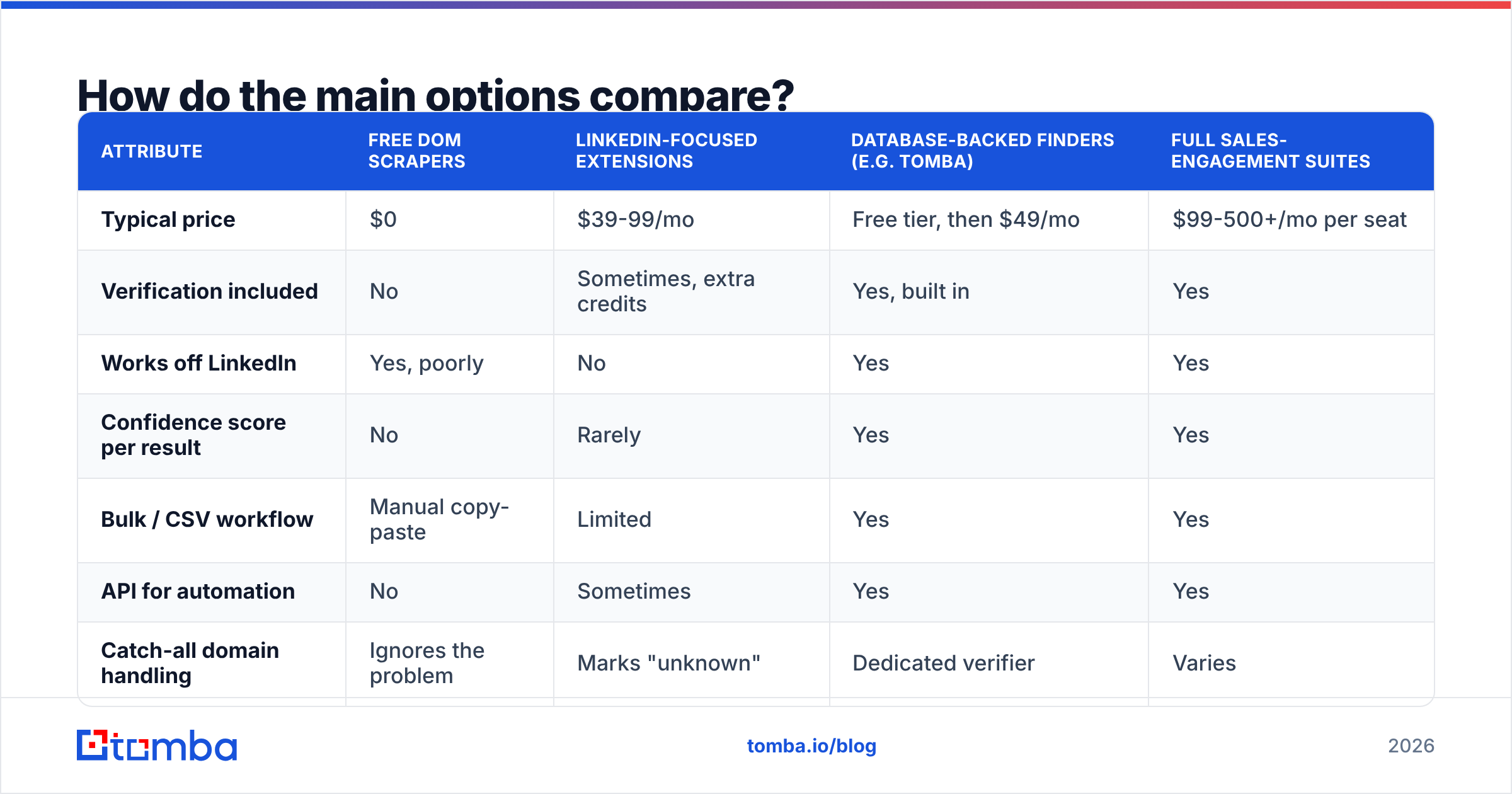
Here's how the categories stack up on the attributes that actually decide whether a tool survives past week two.
| Attribute | Free DOM scrapers | LinkedIn-focused extensions | Database-backed finders (e.g. Tomba) | Full sales-engagement suites |
|---|---|---|---|---|
| Typical price | $0 | $39-99/mo | Free tier, then $49/mo | $99-500+/mo per seat |
| Verification included | No | Sometimes, extra credits | Yes, built in | Yes |
| Works off LinkedIn | Yes, poorly | No | Yes | Yes |
| Confidence score per result | No | Rarely | Yes | Yes |
| Bulk / CSV workflow | Manual copy-paste | Limited | Yes | Yes |
| API for automation | No | Sometimes | Yes | Yes |
| Catch-all domain handling | Ignores the problem | Marks "unknown" | Dedicated verifier | Varies |
| Best for | One-off lookups | LinkedIn-only SDRs | Mixed prospecting at volume | Full outbound teams |
A few honest notes on that table.
Free scrapers have a legitimate use. If you need one address off one company site, right now, a free extractor is fine. The failure mode only appears at volume. Don't build a pipeline on one.
LinkedIn-focused tools are excellent inside their lane and useless outside it. If 90% of your prospecting starts on a LinkedIn profile or Sales Navigator list, a purpose-built LinkedIn finder beats a generalist. If you also work from conference attendee pages, podcast guest lists, or company team pages, you'll be installing a second tool anyway.
Sales-engagement suites bundle extraction into sequencing. Apollo, Outreach, and similar platforms include a browser extension. The extension is rarely the best-in-class piece — it's a feature that keeps you inside the suite. If the suite is already your system of record, the convenience is real. If it isn't, you're paying seat pricing for a lookup tool.
Bookyourdata is worth mentioning here as a different shape entirely — it's a pay-as-you-go verified database with a strong accuracy guarantee, which suits teams that want to buy a defined list rather than extract continuously. Different job, done well.

What separates a good extraction workflow from a bad one?#
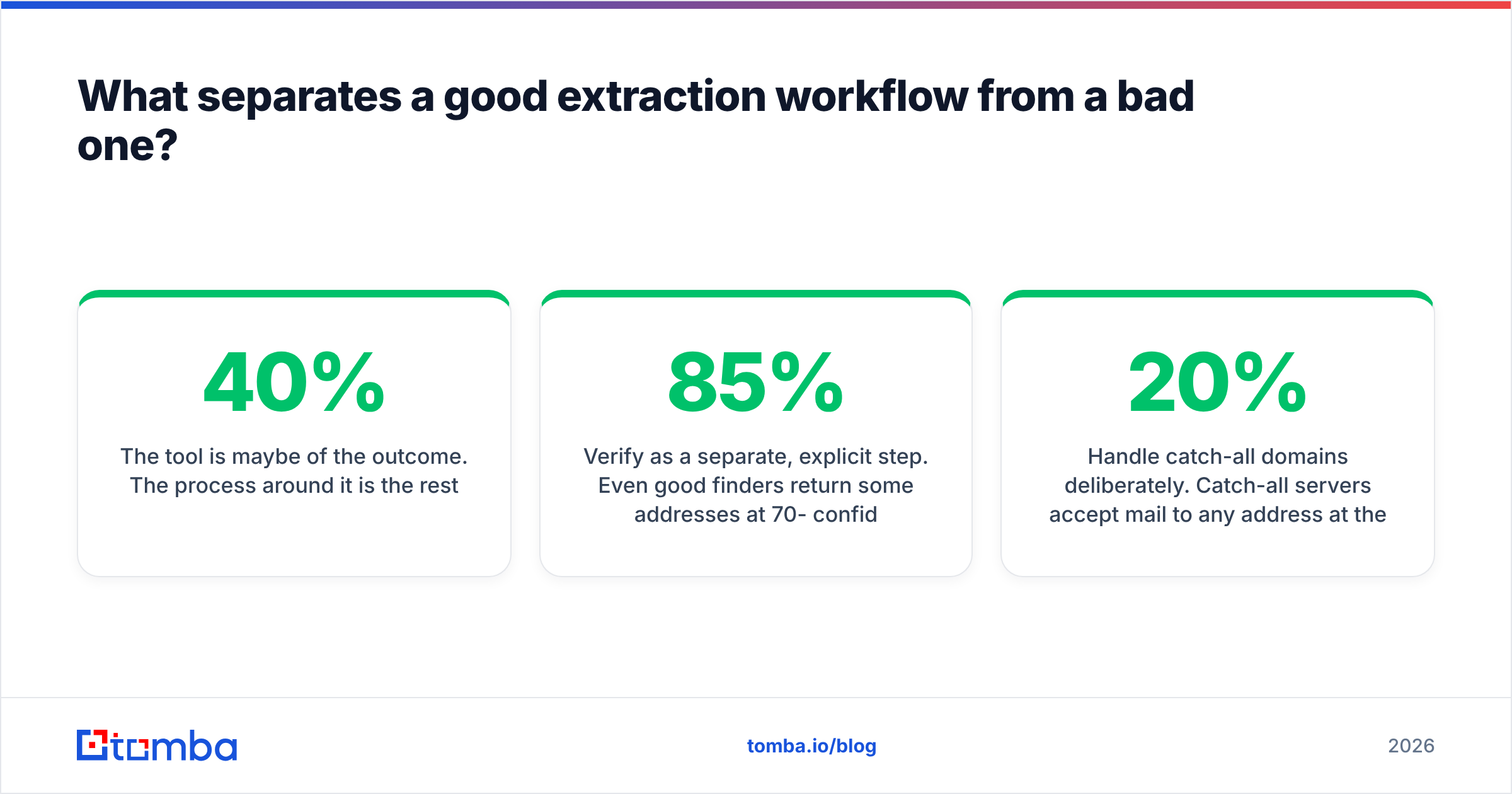
The tool is maybe 40% of the outcome. The process around it is the rest.
Extract at the domain level, not the page level. Instead of visiting six team pages, run a domain search once and get every indexed address at the company with roles and confidence scores attached. Fewer clicks, better coverage, no risk of missing the VP who isn't on the public team page.
Verify as a separate, explicit step. Even good finders return some addresses at 70-85% confidence. Run those through an email verifier before they enter a sequence. Treat verification as a gate, not an option.
Handle catch-all domains deliberately. Catch-all servers accept mail to any address at the domain, which makes standard SMTP verification useless — everything comes back "valid." Roughly 15-20% of B2B domains are configured this way, and it's the single most common reason a "verified" list still bounces. You need a catch-all verifier that uses secondary signals, or a policy of routing catch-all contacts to a lower-risk sending domain.
Deduplicate before export, not after. Extract the same company twice across a week and you'll double-send. Run the list through a duplicate remover as a standing step.
Batch instead of clicking. Once you're doing this more than a few times a week, the extension is the bottleneck. Move to a bulk email finder with a CSV in, CSV out flow, or wire the email finder API into whatever already holds your accounts. The extension is for discovery; the API is for scale.

That last shift is the one teams delay too long. A good extension makes one lookup pleasant. It does not make two thousand lookups pleasant. The moment your list-building shows up as a recurring calendar block, it should be a script.
Is a browser extension even the right tool for you?#
Sometimes no, and it's worth being blunt about when.
Use an extension when: you prospect visually, you decide who to contact based on what you're reading, your volume is under a few hundred contacts a month, and speed of a single lookup matters more than throughput.
Skip the extension when: you already have a list of companies or names, your volume is in the thousands, you need results inside a CRM or warehouse rather than a clipboard, or compliance rules out installing third-party browser add-ons on company machines. In all four cases, a spreadsheet integration or the API is the better shape. Tomba's Google Sheets add-on and Excel add-in cover the middle ground — list-based work without writing code.
Use both when: you research in the browser and execute in bulk, which describes most functioning outbound teams. Extension for discovery and spot-checks, API or bulk upload for the actual list build, verifier gate on everything before it sends.
One more thing worth checking, whatever you pick: whether the vendor publishes real accuracy methodology. G2 reviews are useful for support quality and billing complaints, less useful for accuracy claims, since almost nobody measures bounce rate rigorously enough to review it. Vendor documentation that explains how a result is scored tells you more than a star rating does. HubSpot's research on email deliverability is a reasonable neutral baseline for the bounce thresholds your provider should be helping you stay under.
What should you actually do next?#
Pick based on volume, then on where your prospecting starts.
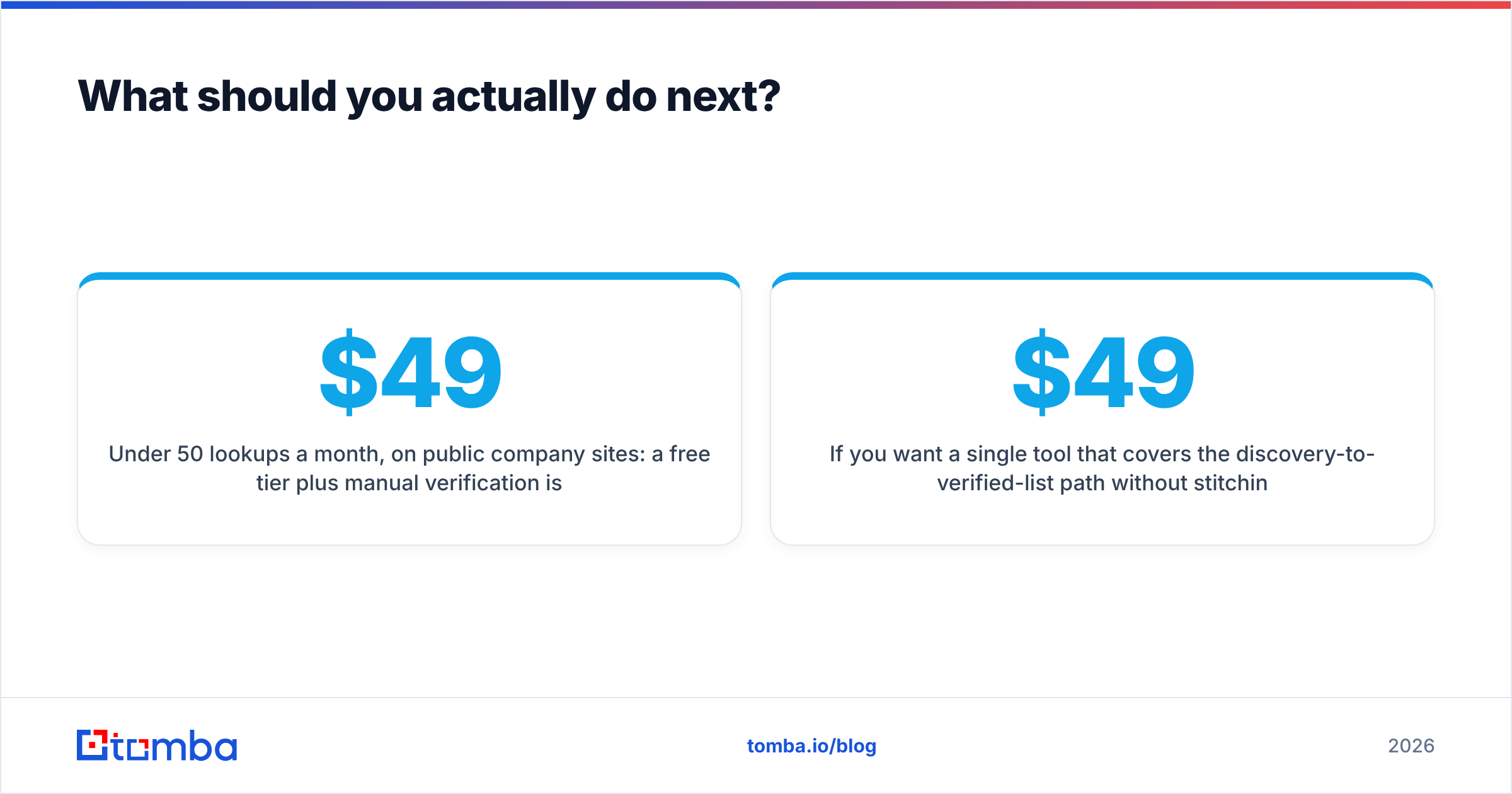
Under 50 lookups a month, on public company sites: a free tier plus manual verification is genuinely fine. Between 50 and 1,000, you want a database-backed extension with verification built in — that's the range where a $49/mo plan pays for itself in the first avoided bounce spike. Above 1,000, stop clicking entirely and move to bulk or API.
Whatever tier you land in, check the permission manifest before you install, verify before you send, and treat catch-all domains as a distinct problem rather than an edge case.
If you want a single tool that covers the discovery-to-verified-list path without stitching four subscriptions together, start with the Tomba Email Finder. The free tier gives you 25 searches a month to test accuracy on domains you already know the answers for — which is exactly how you should evaluate any extractor. If it holds up, Tomba pricing starts at $49/mo for Starter, $99/mo for Growth, and $249/mo for Pro, with the verifier, domain search, catch-all verification, and API included rather than sold as add-on credits. Test it against whatever you're using now on the same 20 contacts and compare bounce rates. That's the only benchmark that matters.
Related guides#
Ready to find emails that actually work?
Join 150,000+ professionals who stopped guessing and started sending. Free credits on signup — no credit card required.
Get the Tomba newsletter
Practical outbound tactics and product updates — once every two weeks.
About the author