Email Extractor From Website: The 2026 Working Guide
Scraping emails off a website is easy. Getting emails that actually deliver and don't get you sued is the hard part. Here's what works in 2026, what breaks, and what it costs.
TL;DR
- An email extractor from website pages pulls any string matching an email pattern out of HTML, then hands you a list. That list is raw material, not a prospect list.
- Roughly 20–35% of scraped addresses on a typical B2B site are role accounts (
info@,sales@,support@) that route to a shared inbox nobody owns. - Browser-extension scrapers are fine for one-off research. Pattern-based finders backed by a verification layer are what you need past 50 contacts.
- Always verify before you send. A 3% hard-bounce rate is the line where Google and Microsoft start throttling your domain.
- Extraction is legal in most jurisdictions; sending to what you extracted is governed by GDPR, CAN-SPAM, and CASL — and those rules differ sharply.
What is an email extractor from website pages?#
An email extractor from website content is a tool that fetches a page's HTML and pulls out every string matching an email address pattern. That's the whole mechanic. Some run as a Chrome extension on the page you're viewing, some crawl a whole domain, some accept a URL list and return a CSV.
Think of it like a metal detector on a beach. It beeps at anything metallic — coins, bottle caps, foil. The detector isn't wrong; it just can't tell you which finds are worth keeping. A raw extractor is the same: it will happily hand you noreply@, webmaster@, an image-alt-text false positive, and a genuine head-of-marketing address in the same column.
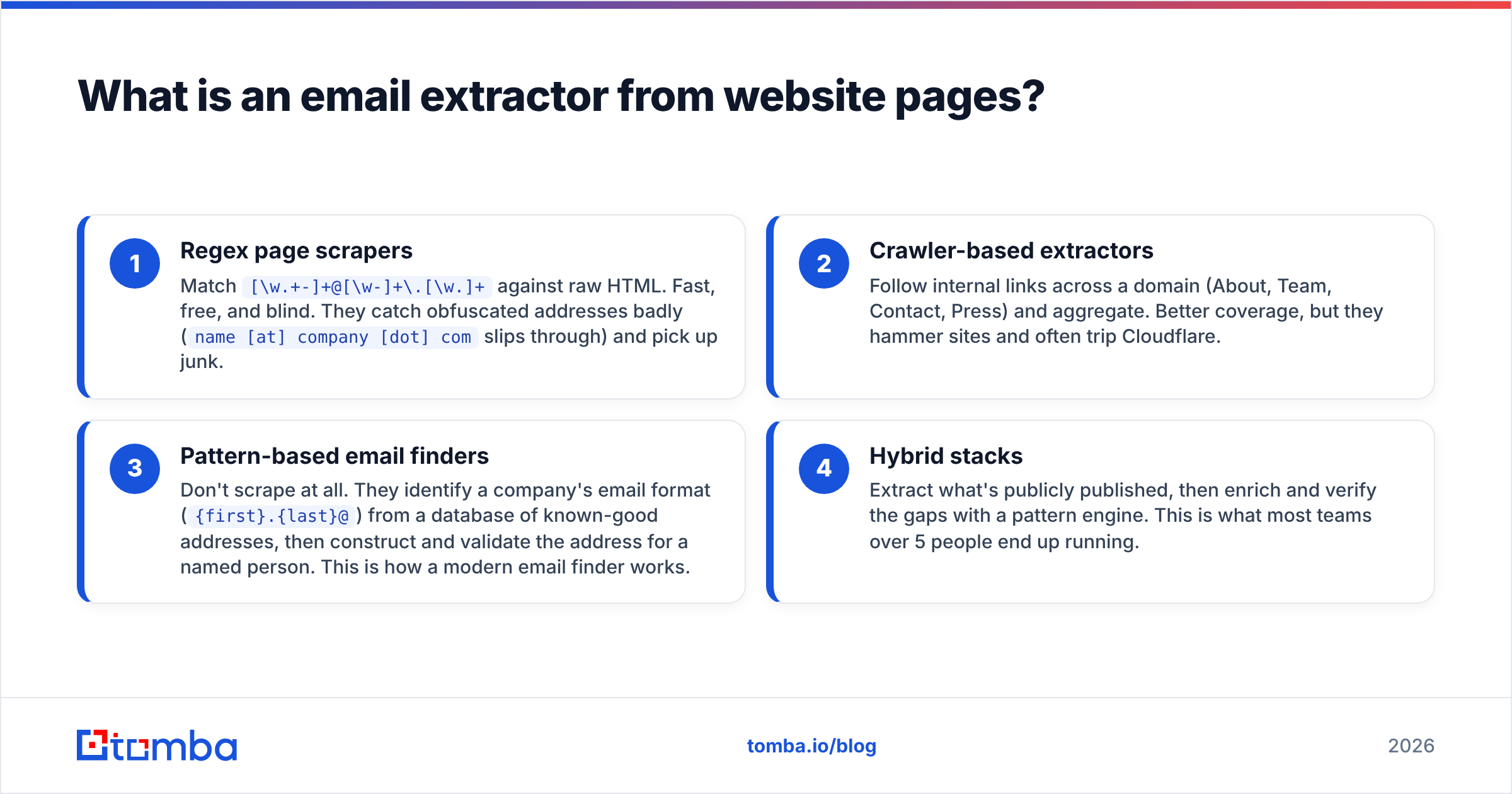
Here's what separates the four approaches you'll actually encounter:
- Regex page scrapers — Match
[\w.+-]+@[\w-]+\.[\w.]+against raw HTML. Fast, free, and blind. They catch obfuscated addresses badly (name [at] company [dot] comslips through) and pick up junk. - Crawler-based extractors — Follow internal links across a domain (About, Team, Contact, Press) and aggregate. Better coverage, but they hammer sites and often trip Cloudflare.
- Pattern-based email finders — Don't scrape at all. They identify a company's email format (
{first}.{last}@) from a database of known-good addresses, then construct and validate the address for a named person. This is how a modern email finder works. - Hybrid stacks — Extract what's publicly published, then enrich and verify the gaps with a pattern engine. This is what most teams over 5 people end up running.
Approach 3 and 4 exist because approach 1 has a ceiling you hit fast: the people worth emailing rarely publish their address on the website.
Why do most scraped email lists fail?#
Because the addresses that are easy to scrape are the ones designed to absorb noise.
A company's public footer email is a filter, not a door. info@acme.com typically routes to a shared inbox monitored by whoever drew the short straw, and cold pitches sent there are deleted without a read. Meanwhile the VP of Ops you actually want is at first.last@acme.com, which appears nowhere in the HTML.
Three failure modes account for most of the damage:
- Role-account dilution. Shared mailboxes reply at a fraction of the rate of a named human. They also skew your reply-rate metrics so badly you can't tell whether your copy is working.
- Stale addresses. B2B contact data decays around 22–30% per year through job changes alone. A team page last updated in 2023 is a bounce factory.
- Spam traps. Some scraped addresses are recycled or pristine traps planted specifically to catch scrapers. Hit one and you're on a blocklist, not just throttled.

The fix isn't to stop extracting. It's to treat extraction as step one of three: extract → verify → enrich. Skipping the middle step is what puts domains in the penalty box. Run every list through an email verifier before it touches a sending tool, and check what your sender reputation looks like before you scale volume.
How do the main extraction methods compare?#
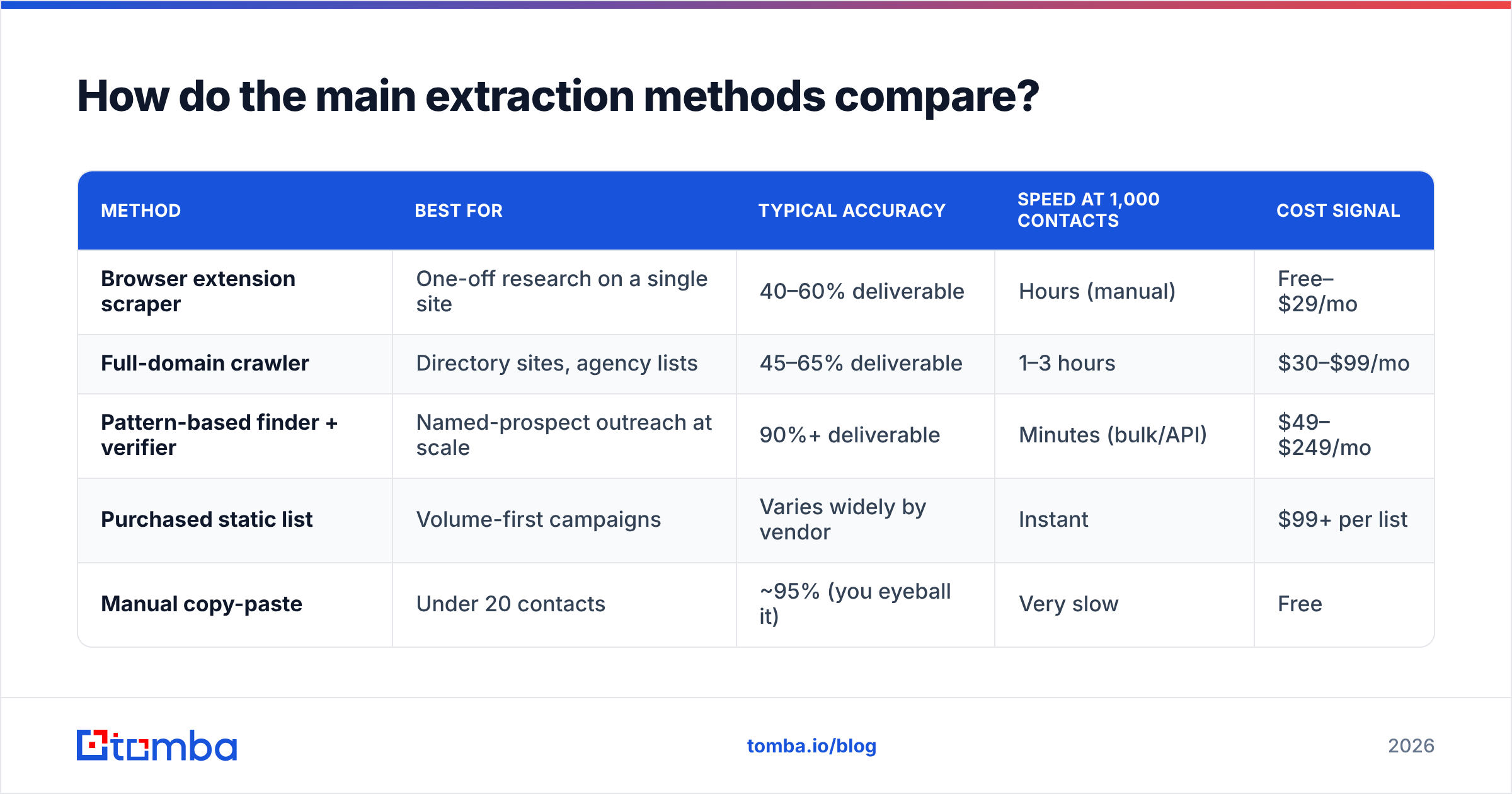
| Method | Best for | Typical accuracy | Speed at 1,000 contacts | Cost signal |
|---|---|---|---|---|
| Browser extension scraper | One-off research on a single site | 40–60% deliverable | Hours (manual) | Free–$29/mo |
| Full-domain crawler | Directory sites, agency lists | 45–65% deliverable | 1–3 hours | $30–$99/mo |
| Pattern-based finder + verifier | Named-prospect outreach at scale | 90%+ deliverable | Minutes (bulk/API) | $49–$249/mo |
| Purchased static list | Volume-first campaigns | Varies widely by vendor | Instant | $99+ per list |
| Manual copy-paste | Under 20 contacts | ~95% (you eyeball it) | Very slow | Free |
The trade-off is coverage versus signal. Crawlers give you the most rows; pattern finders give you the most usable rows. If your campaign is a named-account play — 200 specific companies, one to three roles each — the crawler is the wrong tool, because the people you want aren't published. If you're building a list of local businesses where the owner's address genuinely is in the footer, a crawler is the right call.
Vendors like BookYourData take a different route again, offering pre-built B2B records with a verification guarantee attached — useful when you'd rather buy coverage than build it, particularly for geographies where public web data is thin.
Which tools should you actually consider in 2026?#
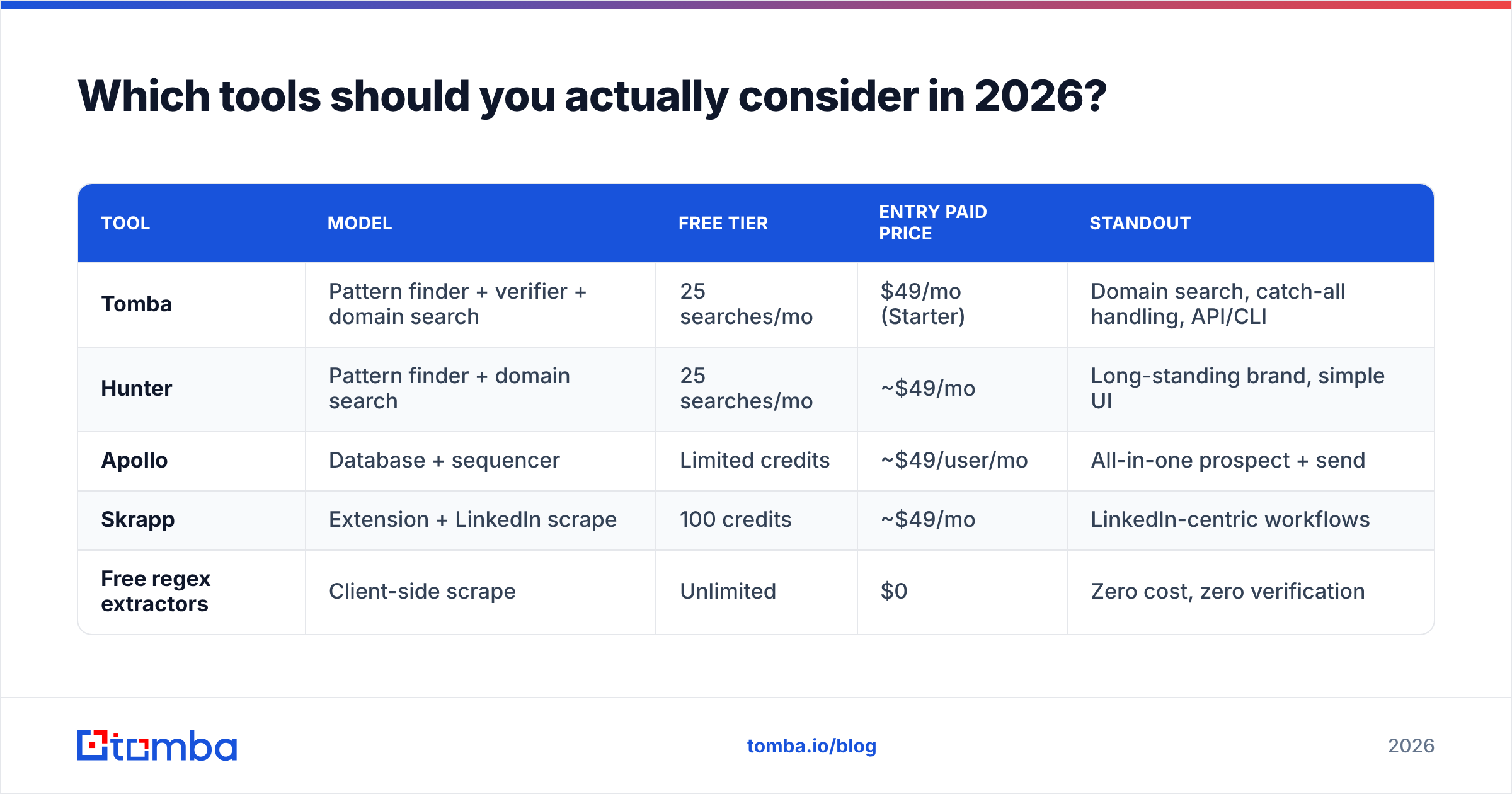
| Tool | Model | Free tier | Entry paid price | Standout |
|---|---|---|---|---|
| Tomba | Pattern finder + verifier + domain search | 25 searches/mo | $49/mo (Starter) | Domain search, catch-all handling, API/CLI |
| Hunter | Pattern finder + domain search | 25 searches/mo | ~$49/mo | Long-standing brand, simple UI |
| Apollo | Database + sequencer | Limited credits | ~$49/user/mo | All-in-one prospect + send |
| Skrapp | Extension + LinkedIn scrape | 100 credits | ~$49/mo | LinkedIn-centric workflows |
| Free regex extractors | Client-side scrape | Unlimited | $0 | Zero cost, zero verification |

Accuracy claims in this category are self-reported and should be treated as marketing until you test them on your own ICP. The honest way to evaluate is to take 100 known-good contacts from your CRM, blind them, and run each tool against the list. Whatever tool returns the most correct addresses on your market wins, regardless of the number on the pricing page.

A practical note on pricing: per-search costs matter less than per-valid-search costs. A tool at $29/mo that returns 55% deliverable addresses is more expensive than one at $49/mo returning 92%, once you count the bounces, the burned domain reputation, and the rep hours spent on dead rows. Tomba pricing runs Free (25 searches/mo), Starter $49/mo, Growth $99/mo, Pro $249/mo, and custom Enterprise — evaluate it against valid-address yield, not raw credit count.
How do you extract emails from a website step by step?#
Here's the workflow that survives contact with a real campaign:
- Define the target list first. Companies and roles, not "everyone on the site." Writing this down before you scrape prevents the classic 4,000-row list nobody ever emails.
- Pull published addresses. Use a domain search to return every known address on a company domain with the source page and confidence score attached. This beats a blind crawl because you get provenance, not just strings.
- Fill the gaps by name. For roles with no published address, feed first name + last name + domain into a finder. This is where pattern inference earns its keep.
- Verify everything. SMTP-level checks, MX record validation, catch-all detection. Anything scoring below your threshold gets dropped, not "tried anyway."
- Handle catch-all domains separately. A domain that accepts all mail returns "valid" for every address, which is useless. Route these through a catch-all verifier and treat the results as a lower-confidence tier.
- Enrich and segment. Job title, company size, tech stack. An unsegmented list forces generic copy, and generic copy is why reply rates sit at 1%.
For anything over a few hundred rows, do this through bulk verify or the Tomba API rather than clicking through a UI. If your list lives in a spreadsheet, the Google Sheets add-on keeps the whole loop in one place.

Is extracting emails from websites legal?#
Extraction and sending are two separate legal questions, and conflating them is where teams get into trouble.
Extraction. Collecting publicly posted data has generally survived legal challenge in the US — the hiQ v. LinkedIn line of cases limited how aggressively the Computer Fraud and Abuse Act applies to public pages. That said, terms of service, rate limits, and technical countermeasures are separate matters, and platform ToS violations can still get your accounts terminated.
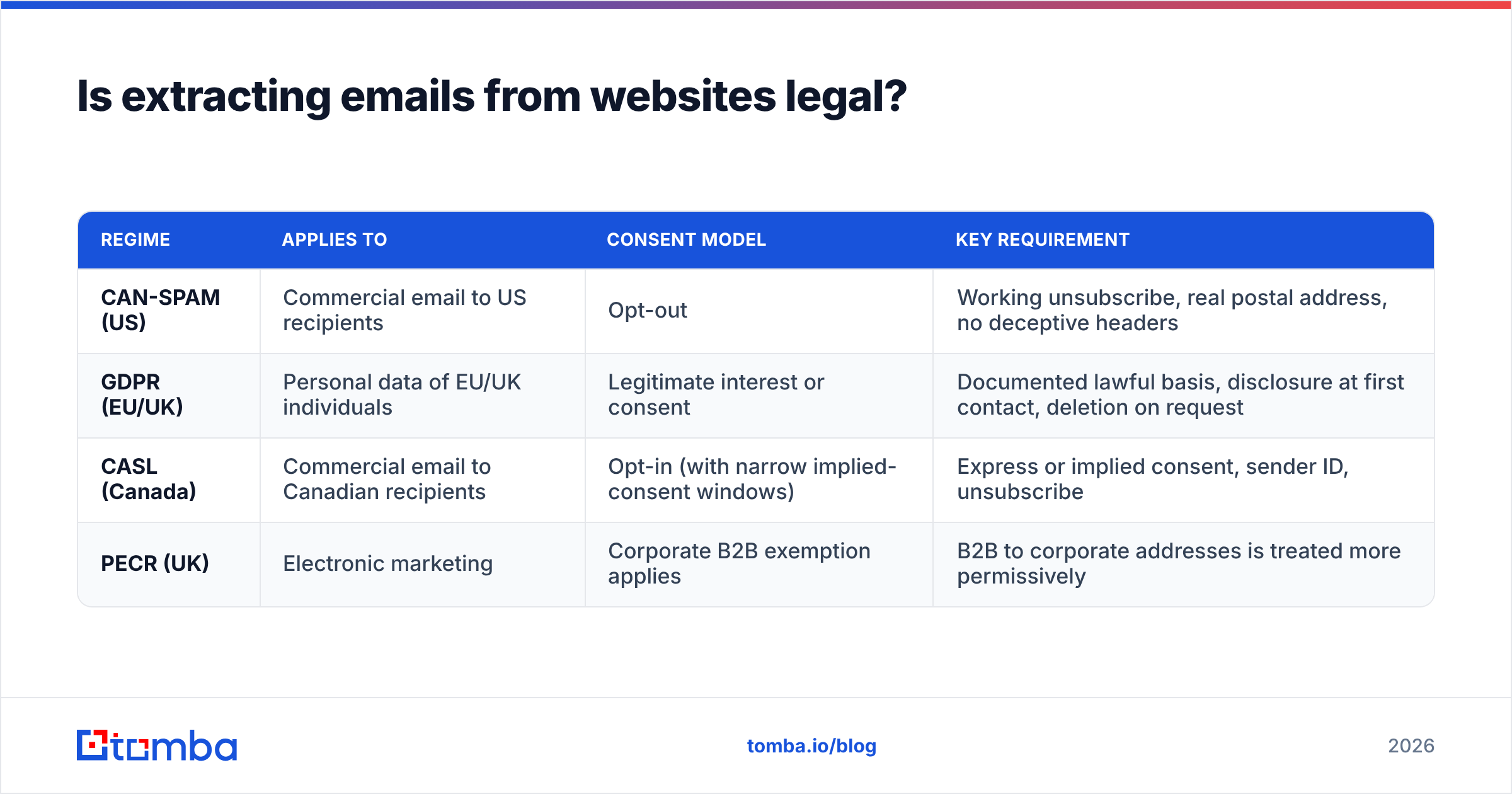
Sending. This is where the rules bite, and they're jurisdictional:
| Regime | Applies to | Consent model | Key requirement |
|---|---|---|---|
| CAN-SPAM (US) | Commercial email to US recipients | Opt-out | Working unsubscribe, real postal address, no deceptive headers |
| GDPR (EU/UK) | Personal data of EU/UK individuals | Legitimate interest or consent | Documented lawful basis, disclosure at first contact, deletion on request |
| CASL (Canada) | Commercial email to Canadian recipients | Opt-in (with narrow implied-consent windows) | Express or implied consent, sender ID, unsubscribe |
| PECR (UK) | Electronic marketing | Corporate B2B exemption applies | B2B to corporate addresses is treated more permissively |
Two practical rules cover most cases. First, B2B cold email to a business role at a business domain is defensible in most markets when you have a genuine, documented reason to believe the person's job makes your message relevant. Second, personal addresses (@gmail.com, @outlook.com) belonging to individuals carry materially more risk under GDPR — treat them as a different category, not the same list.
Consult counsel for your specific situation. The ICO's direct marketing guidance and the FTC's CAN-SPAM compliance guide are the primary sources worth reading directly rather than through a vendor blog summary.
What should you do after extraction?#
Three things, in order, before a single email sends.
Verify and score. Split your list into confident (send now), catch-all (send at low volume, watch bounces), and unknown (discard or research manually). Anything that fails syntax, MX, or SMTP checks is deleted — not "tested with a small batch."
Warm the sending infrastructure. If you're adding a new domain or mailbox, ramp volume over 3–4 weeks. Send from a domain with SPF, DKIM, and DMARC correctly published — Google and Yahoo have required authentication for bulk senders since 2024, and enforcement has only tightened. Check your records with an SPF checker before your first send, not after your first bounce spike.
Write for the segment, not the list. The single biggest predictor of reply rate is whether the recipient believes the email was written for their situation. A verified address with generic copy still fails; it just fails without hurting your domain.
One more discipline worth building: track bounce rate per source. If your crawler-sourced rows bounce at 9% and your finder-sourced rows bounce at 1.5%, you now have a data-driven reason to change your process rather than an argument about tooling preferences.
The bottom line#
An email extractor from website pages solves the easy half of the problem. It finds what's published. What's published is mostly role accounts, and role accounts don't reply.
The teams that get results treat extraction as one input into a pipeline that also includes pattern-based finding for named prospects, verification before every send, and enrichment for segmentation. That's a three-step process, not a one-click one — and it's the difference between a list that generates meetings and a list that generates blocklist entries.
If you're building that pipeline now, start with the Tomba Email Finder. It combines domain-level extraction, pattern-based lookup for people who never publish an address, and built-in verification so you're not stitching three vendors together. The free tier gives you 25 searches a month to test it against your own known-good contacts — which is exactly how you should evaluate any tool in this category before you pay for it.
Related guides#
Ready to find emails that actually work?
Join 150,000+ professionals who stopped guessing and started sending. Free credits on signup — no credit card required.
Get the Tomba newsletter
Practical outbound tactics and product updates — once every two weeks.
About the author