Email Finder and Verifier: How to Build a Clean B2B List
A finder gets you the address. A verifier decides whether sending to it costs you your domain. Here's how the two halves work, what accuracy claims really mean, and what the combined stack costs in 2026.
TL;DR
- An email finder discovers an address from a name and domain. An email verifier decides whether sending to that address is safe. They solve different problems and you need both.
- Finders are judged on hit rate (how often they return anything) and accuracy (how often that thing is real). Vendors love quoting the first and hiding the second.
- Verification is a chain — syntax, MX, disposable/role check, SMTP handshake, catch-all handling. Any tool that skips the last two is a spellchecker, not a verifier.
- A combined finder + verifier stack costs roughly $49–$99/month at SMB volume. Buying two separate vendors usually costs more and adds a CSV round-trip between them.
- The target is a bounce rate under 2%. Above 5% and Google and Microsoft start throttling your domain regardless of how good your copy is.
What is an email finder and verifier?#
An email finder and verifier is a two-stage pipeline: one half produces candidate addresses, the other half proves them before you send.
Think of it like a locksmith and a security guard. The locksmith figures out which key opens the door — that's the finder, reconstructing first.last@company.com from public signals. The guard checks the key actually turns before you walk in with a delivery — that's the verifier, testing the mailbox against the receiving server.
Most teams buy only the locksmith, discover a 30% bounce rate three weeks into a campaign, and then buy the guard in a panic. The order matters less than the fact that both exist in your workflow.
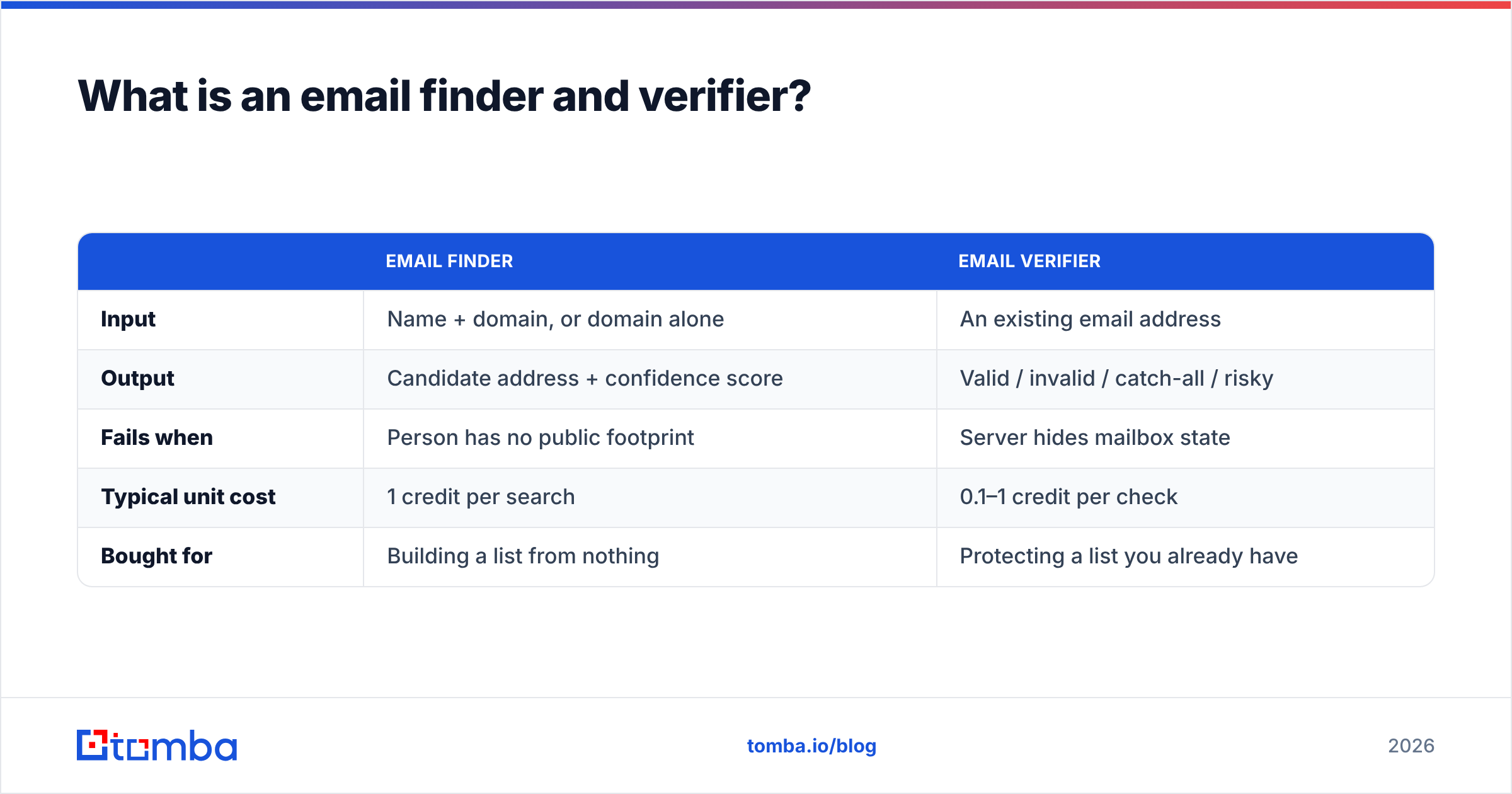
The distinction shows up in what each tool returns:
| Email finder | Email verifier | |
|---|---|---|
| Input | Name + domain, or domain alone | An existing email address |
| Output | Candidate address + confidence score | Valid / invalid / catch-all / risky |
| Fails when | Person has no public footprint | Server hides mailbox state |
| Typical unit cost | 1 credit per search | 0.1–1 credit per check |
| Bought for | Building a list from nothing | Protecting a list you already have |
How does an email finder actually find an address?#
Nobody has a master list of every work email on earth. Finders assemble the answer from four overlapping methods, in rough order of reliability:
- Verified index lookup. The address has already been observed publicly — in a git commit, a press release, a conference speaker page, a WHOIS record, a company team page. This is the highest-confidence path and the reason data sources matter more than algorithms.
- Pattern inference. The tool knows the company uses
first.last@, so it constructs the candidate from a known naming convention. A company email pattern derived from 40 known addresses at that domain is reliable; one derived from two is a coin flip. - Permutation plus validation. When no pattern is known, the tool generates the 15–20 plausible variants (
j.smith@,jsmith@,john@) and validates each against the mail server, returning only the one that responds. - Crawl-on-demand. For long-tail domains with no index coverage, the tool crawls the site and adjacent public sources in real time. Slower, lower hit rate, but it's what separates a database vendor from a true finder.
- Enrichment fallback. Failing all of the above, some platforms reverse-match from a LinkedIn URL or a company record — see LinkedIn finder style workflows.
Methods 1 and 3 produce addresses you can trust. Methods 2 and 4 produce candidates that must go through verification before they touch a sending mailbox. This is exactly why "finder only" stacks blow up.
How does email verification work, step by step?#
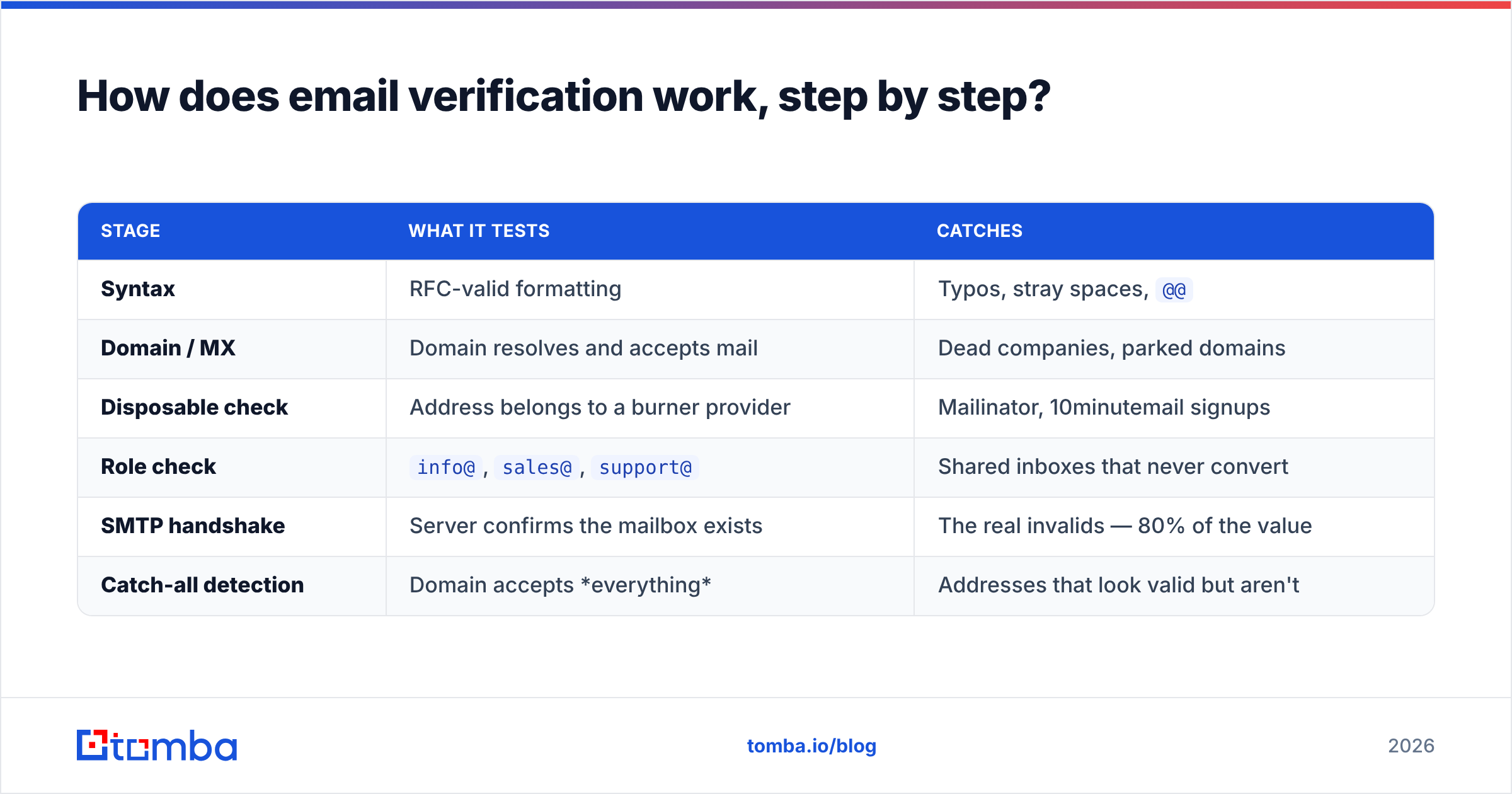
Verification is a chain of increasingly expensive checks. Cheap ones run first and disqualify most of the garbage.
| Stage | What it tests | Catches |
|---|---|---|
| Syntax | RFC-valid formatting | Typos, stray spaces, @@ |
| Domain / MX | Domain resolves and accepts mail | Dead companies, parked domains |
| Disposable check | Address belongs to a burner provider | Mailinator, 10minutemail signups |
| Role check | info@, sales@, support@ |
Shared inboxes that never convert |
| SMTP handshake | Server confirms the mailbox exists | The real invalids — 80% of the value |
| Catch-all detection | Domain accepts everything | Addresses that look valid but aren't |
The SMTP handshake is where cheap tools cut corners. It requires connecting to the receiving server, opening a conversation, and reading the response code without ever delivering a message. It's rate-limited, IP-reputation-sensitive, and expensive to run at scale. Any verifier priced at a fraction of a cent per check that returns instant results is very likely skipping it.
Catch-all domains are the other honest-vendor test. Roughly 15–20% of B2B domains accept mail to every address, so the SMTP layer can't distinguish real from fake. A serious tool tells you "catch-all, treat as risky" rather than laundering it into "valid." If you send heavily into catch-all territory, a dedicated catch-all verifier uses secondary signals to resolve a chunk of those — but never claim 100%, and be suspicious of anyone who does.
Why not just use one or the other?#
Because each half fails in a way the other one covers.
Finder without verifier. Your finder returns an address with 92% confidence. That confidence is a statistical claim about a population, not about this contact. The person left the company in March. The domain migrated to a new suffix. The address was a pattern guess that never got tested. You send 2,000 emails, 380 bounce, and your domain reputation takes a hit that costs you three weeks of warm-up to recover.
Verifier without finder. You can only verify addresses you already have. That's fine for cleaning a webinar list or a lapsed CRM segment, but it does nothing for net-new pipeline. Verification is defense; finding is offense.
The combined workflow also removes a step people underestimate: the CSV round-trip. Export from finder, upload to verifier, wait, download, re-merge, dedupe, import to sequencer. Every hop is where a column shifts and 400 rows quietly get the wrong company name. A platform that runs both — or an email finder API that returns a verification status inside the same response — eliminates that entirely.
What do the accuracy benchmarks actually show?#

Read any accuracy claim with three questions:
Which metric is it? Hit rate = how often the tool returns something. Accuracy = how often the returned thing is deliverable. A tool with a 90% hit rate and 70% accuracy is worse than one with 60% hit rate and 97% accuracy, because the first one is handing you 27 bad addresses per 100 searches and charging you for them.
On what list? Accuracy on US SaaS companies with 200+ employees is a different universe from accuracy on European manufacturing SMBs or agencies with 8 people. Vendor benchmarks are usually run on the former. Your ICP may be the latter.
Are catch-alls counted as hits? This single accounting choice can swing a reported number by 15 points. Ask.
The practical move is to run your own test. Take 100 contacts you already have confirmed addresses for, strip the emails, and run the names and domains through each tool's free tier. You'll learn more in 20 minutes than from any published chart — including this one.
How do the leading email finder and verifier tools compare?#

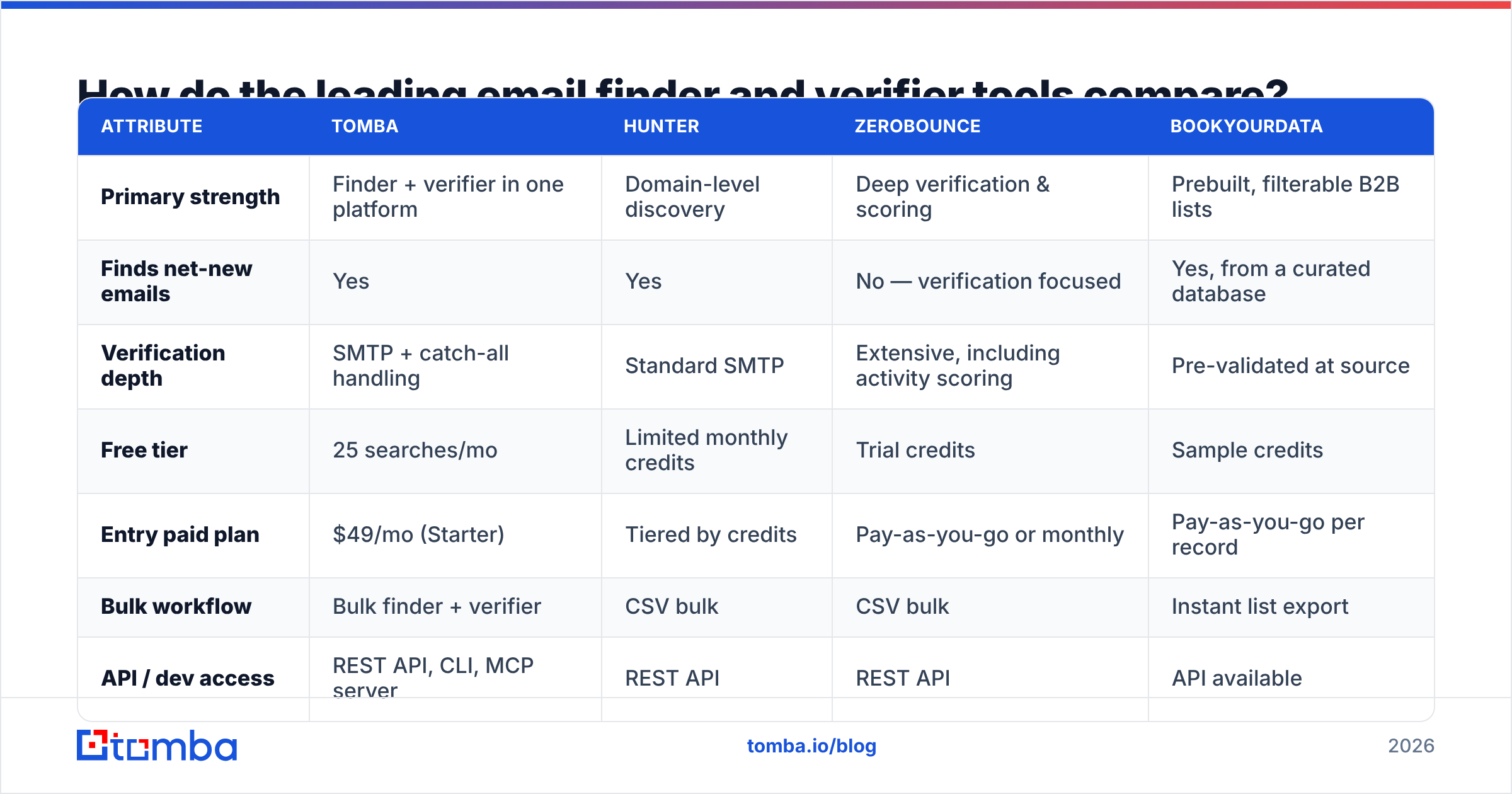
| Attribute | Tomba | Hunter | ZeroBounce | BookYourData |
|---|---|---|---|---|
| Primary strength | Finder + verifier in one platform | Domain-level discovery | Deep verification & scoring | Prebuilt, filterable B2B lists |
| Finds net-new emails | Yes | Yes | No — verification focused | Yes, from a curated database |
| Verification depth | SMTP + catch-all handling | Standard SMTP | Extensive, including activity scoring | Pre-validated at source |
| Free tier | 25 searches/mo | Limited monthly credits | Trial credits | Sample credits |
| Entry paid plan | $49/mo (Starter) | Tiered by credits | Pay-as-you-go or monthly | Pay-as-you-go per record |
| Bulk workflow | Bulk finder + verifier | CSV bulk | CSV bulk | Instant list export |
| API / dev access | REST API, CLI, MCP server | REST API | REST API | API available |
| Best for | Teams wanting one stack end to end | Domain-first prospecting | Cleaning large existing lists | Buying a list instead of building one |
A few honest notes on that table. Hunter remains excellent at domain-level discovery and has the cleanest mental model of any tool in the category. ZeroBounce is a verification specialist first — if your problem is a 400,000-row legacy database rather than net-new prospecting, a specialist verifier is a legitimate choice. BookYourData solves a genuinely different problem: it sells pre-built, pre-validated lists filtered by title, industry, and geography, which is faster than building when your ICP is broad and well-defined. Tomba's argument isn't that those tools are bad — it's that most teams don't want to operate three of them.

What does an email finder and verifier cost in 2026?#
Category pricing has converged on credit-based tiers. The number that matters is cost per usable contact, not cost per credit.
Work it out: if a tool charges 1 credit per search at $0.02 and returns a usable, verified address 60% of the time, your real cost is $0.033 per usable contact — plus whatever you spend verifying separately.
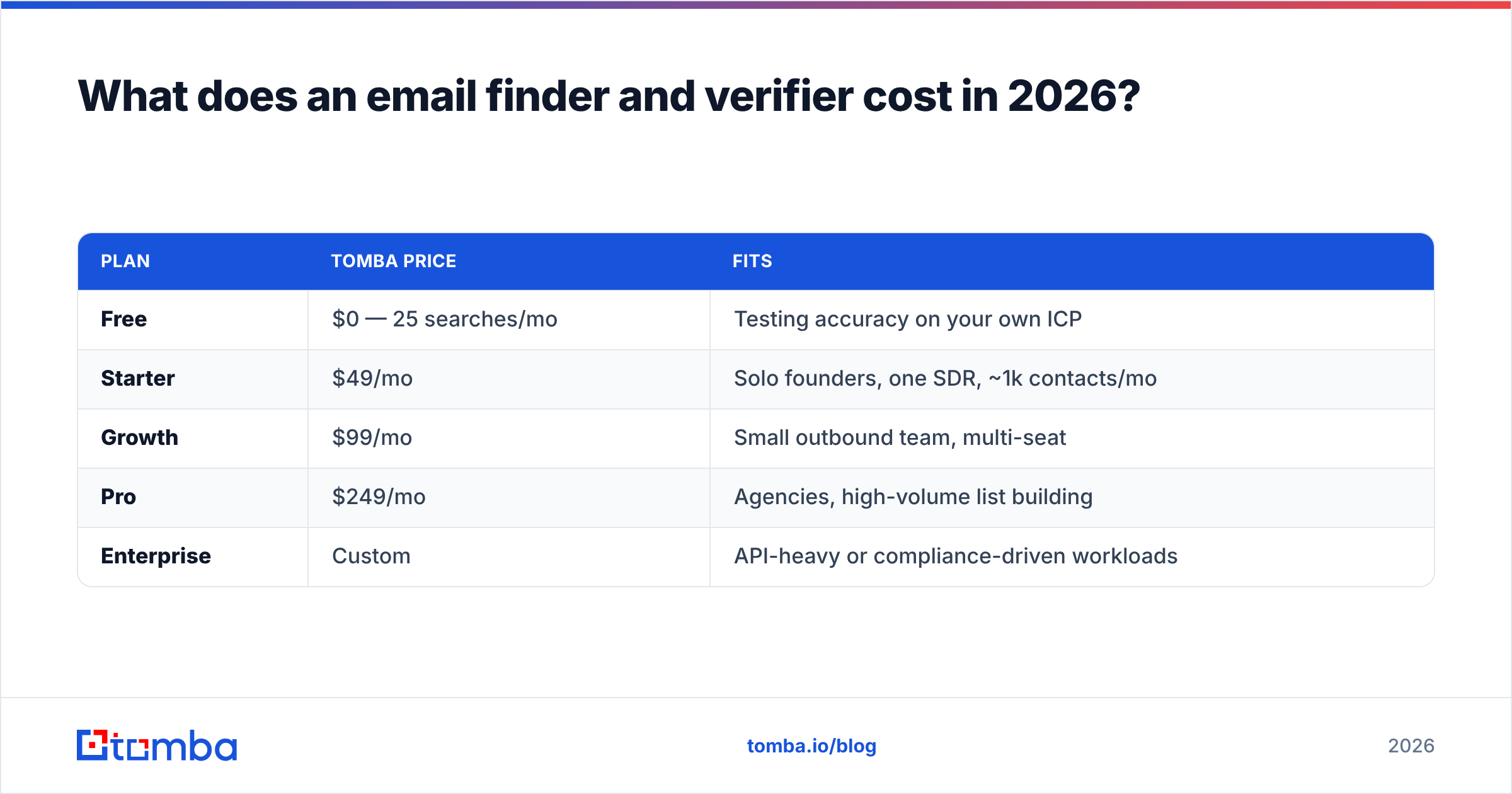
| Plan | Tomba price | Fits |
|---|---|---|
| Free | $0 — 25 searches/mo | Testing accuracy on your own ICP |
| Starter | $49/mo | Solo founders, one SDR, ~1k contacts/mo |
| Growth | $99/mo | Small outbound team, multi-seat |
| Pro | $249/mo | Agencies, high-volume list building |
| Enterprise | Custom | API-heavy or compliance-driven workloads |
Full Tomba pricing is public, which is itself a filter worth applying to any vendor: if you can't see the price without a demo call, assume the price is high and negotiable.
Two cost traps to watch for across the whole category:
- Charging for misses. Some tools deduct a credit even when they return nothing. Over a 5,000-search month with a 60% hit rate, that's 2,000 credits of pure waste.
- Separate verification billing. A finder that quotes $0.02/search but bills verification separately at $0.008/check is really $0.028, and you'll only notice on the second invoice.
How do you build a workflow that keeps bounce rate under 2%?#
Six steps, in order. This is the part that actually protects your sending domain.
- Define the account list first. Domains, not people. Use domain search to see who's actually reachable at each company before you commit to it — an account with two findable contacts isn't worth a sequence slot.
- Find, don't guess. Never bulk-generate
first.last@across a list and call it prospecting. Permutation without validation is how you get on a blocklist. - Verify everything, including "high confidence" results. Confidence scores are priors. Verification is evidence.
- Segment by verification status. Valid → main sequence. Catch-all → low-volume, high-personalization sequence from a secondary domain. Invalid and role-based → drop, don't "try anyway."
- Suppress before import. Deduplicate against your CRM, unsubscribes, and current opportunities. This is boring and it prevents the single most expensive mistake in outbound: emailing an active customer as a cold lead.
- Re-verify on a 90-day cycle. B2B email data decays at roughly 2–2.5% per month as people change jobs. A list you verified in January is measurably worse by April. Analyst coverage on G2's lead intelligence category tracks this decay problem across vendors, and it's the reason "verified once" is not a durable state.
Google and Microsoft's bulk sender requirements have made this arithmetic unforgiving. Sustained hard-bounce rates above 5% get you throttled or foldered; under 2% keeps you in good standing. There is no copywriting trick that compensates for a dirty list, and sender reputation recovers far more slowly than it degrades.
What mistakes kill list quality fastest?#
- Trusting a 95% confidence score as a verification result. It isn't one. It's a prediction the tool makes before testing anything.
- Treating catch-all as valid. You'll send, get no bounce, get no reply, and never learn whether the mailbox exists.
- Keeping role addresses.
info@andsales@inflate your list size and depress every downstream metric. - Scraping without verification. An email extractor is a great front end for a verification pipeline and a terrible front end for a send button.
- Verifying once and never again. See the 90-day rule above.
- Optimizing for volume. 500 verified, well-targeted contacts outperform 5,000 unverified ones on every metric that matters, including the one your deliverability depends on.
Where should you start?#
Start with the test, not the purchase. Pull 50–100 contacts from your actual ICP, run them through a free tier, and compare returned addresses against what you can confirm manually. Whatever wins on your segment is the right tool, regardless of what any comparison table says.
If you want the find-and-verify loop in one place rather than stitched across three vendors, start with the Tomba Email Finder — 25 free searches a month, verification built into the same result, and an API, CLI, and spreadsheet add-ons if you'd rather never open a CSV again. Run it against your own list first. Then decide.
Related guides#
Ready to find emails that actually work?
Join 150,000+ professionals who stopped guessing and started sending. Free credits on signup — no credit card required.
Get the Tomba newsletter
Practical outbound tactics and product updates — once every two weeks.
About the author