Email Finder Extensions in 2026: Which Chrome Tools Win
Browser-based email finders promise a verified address in one click. Most deliver something less. Here is how the major email finder extensions compare on accuracy, credits, CRM push, and the limits nobody lists on the pricing page.
TL;DR
- Email finder extensions are thin clients on top of a database and an SMTP verifier. The toolbar UI barely matters; the data layer decides whether your sequence lands or bounces.
- Accuracy spreads are wide on hard segments: most tools clear 90%+ on large US tech companies and fall to 45–70% on sub-50-person European firms.
- Credit accounting is where budgets leak. Some vendors charge for every lookup, including the ones that return nothing.
- Pick by workflow: LinkedIn-heavy prospecting, on-site company research, and bulk list building are three different jobs, and no single extension is best at all three.
- If you want one extension plus a real API behind it, Tomba's Free tier (25 searches/mo) and $49/mo Starter give you the same data in the browser, in Sheets, and in code.
What are email finder extensions, and why do they matter?#
An email finder extension is a browser add-on that reads the page you are on — a LinkedIn profile, a company site, a conference speaker list — and returns a business email address for the person or domain in view. It is the difference between "I found the prospect" and "I can contact the prospect," compressed into one click.
Think of it like a translator standing next to you at a trade show. You can read the badge (name, company, title) but not the phone number. The extension whispers the missing piece so the conversation can start.
Here is what separates a good one from a browser toy:
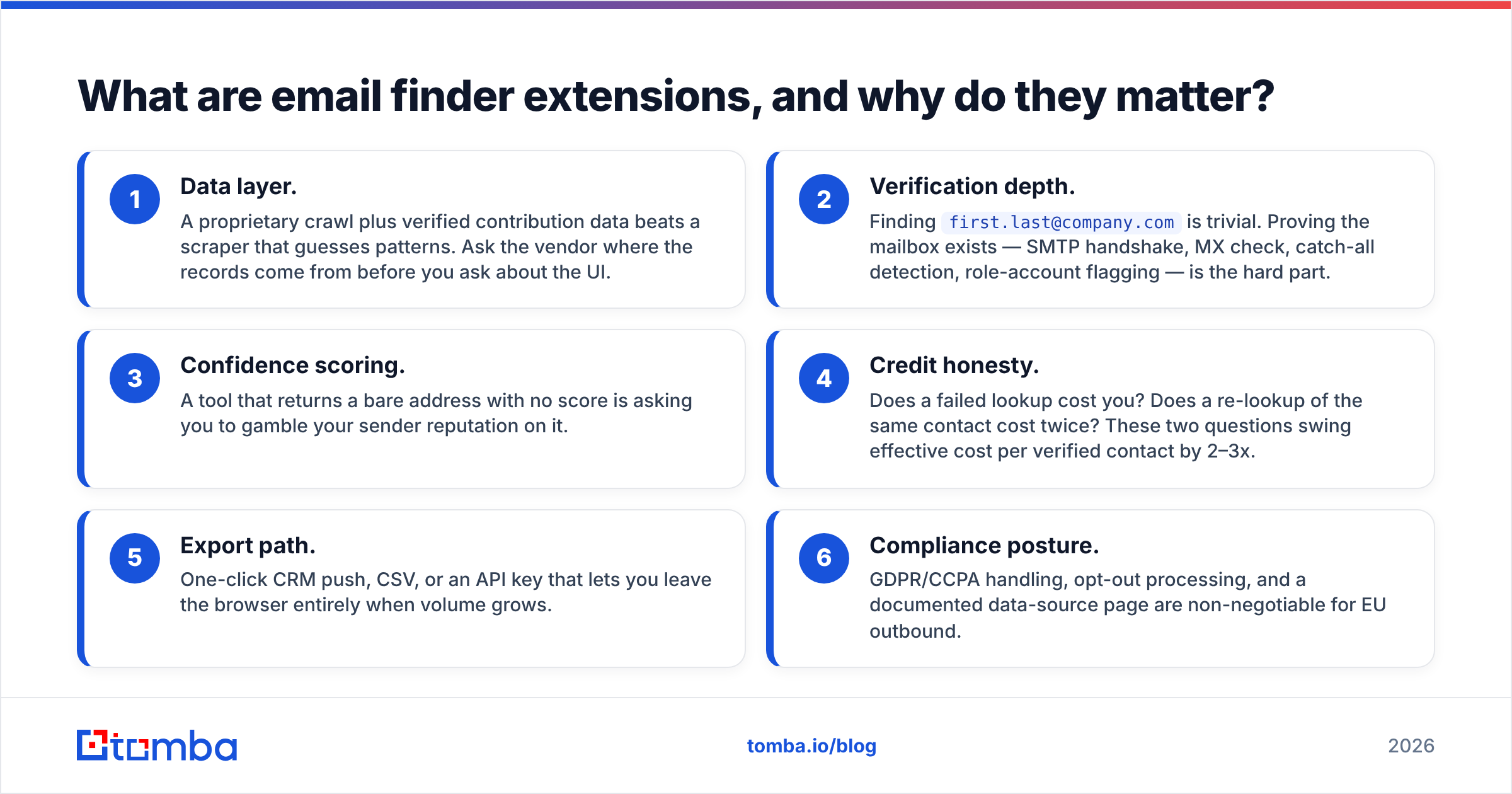
- Data layer. A proprietary crawl plus verified contribution data beats a scraper that guesses patterns. Ask the vendor where the records come from before you ask about the UI.
- Verification depth. Finding
first.last@company.comis trivial. Proving the mailbox exists — SMTP handshake, MX check, catch-all detection, role-account flagging — is the hard part. - Confidence scoring. A tool that returns a bare address with no score is asking you to gamble your sender reputation on it.
- Credit honesty. Does a failed lookup cost you? Does a re-lookup of the same contact cost twice? These two questions swing effective cost per verified contact by 2–3x.
- Export path. One-click CRM push, CSV, or an API key that lets you leave the browser entirely when volume grows.
- Compliance posture. GDPR/CCPA handling, opt-out processing, and a documented data-source page are non-negotiable for EU outbound.
Miss any of the first four and you have installed a very fast way to build a bounce list.
How do email finder extensions actually find an address?#
Three mechanisms, usually stacked:
Database lookup. The vendor has already crawled the public web and indexed name → email → company. Your click is a key-value read. Fast, high confidence, but only as fresh as the last crawl. Contacts who changed jobs six months ago are the classic failure mode.
Pattern inference. The tool knows that acme.com uses {first}.{last}@, applies it to the name on screen, then tests the result. This is what a company email pattern checker does behind the scenes. Cheap, and surprisingly strong for mid-market companies with consistent naming.
Real-time verification. An SMTP conversation with the receiving mail server, without sending mail, to check whether the mailbox accepts. This is where the email verifier layer lives, and where catch-all domains wreck naive tooling — a catch-all accepts everything, so "valid" means nothing without a dedicated catch-all verifier.
The good extensions run all three and report which one produced the result. The weak ones run pattern inference, skip verification, and hand you a 92% "confidence score" that is really just a guess about naming conventions.

Which email finder extensions are worth installing in 2026?#
The honest answer depends on where you prospect. Here is the comparison that matters, based on published vendor specs, public plan pages, and reviewer consensus on G2:
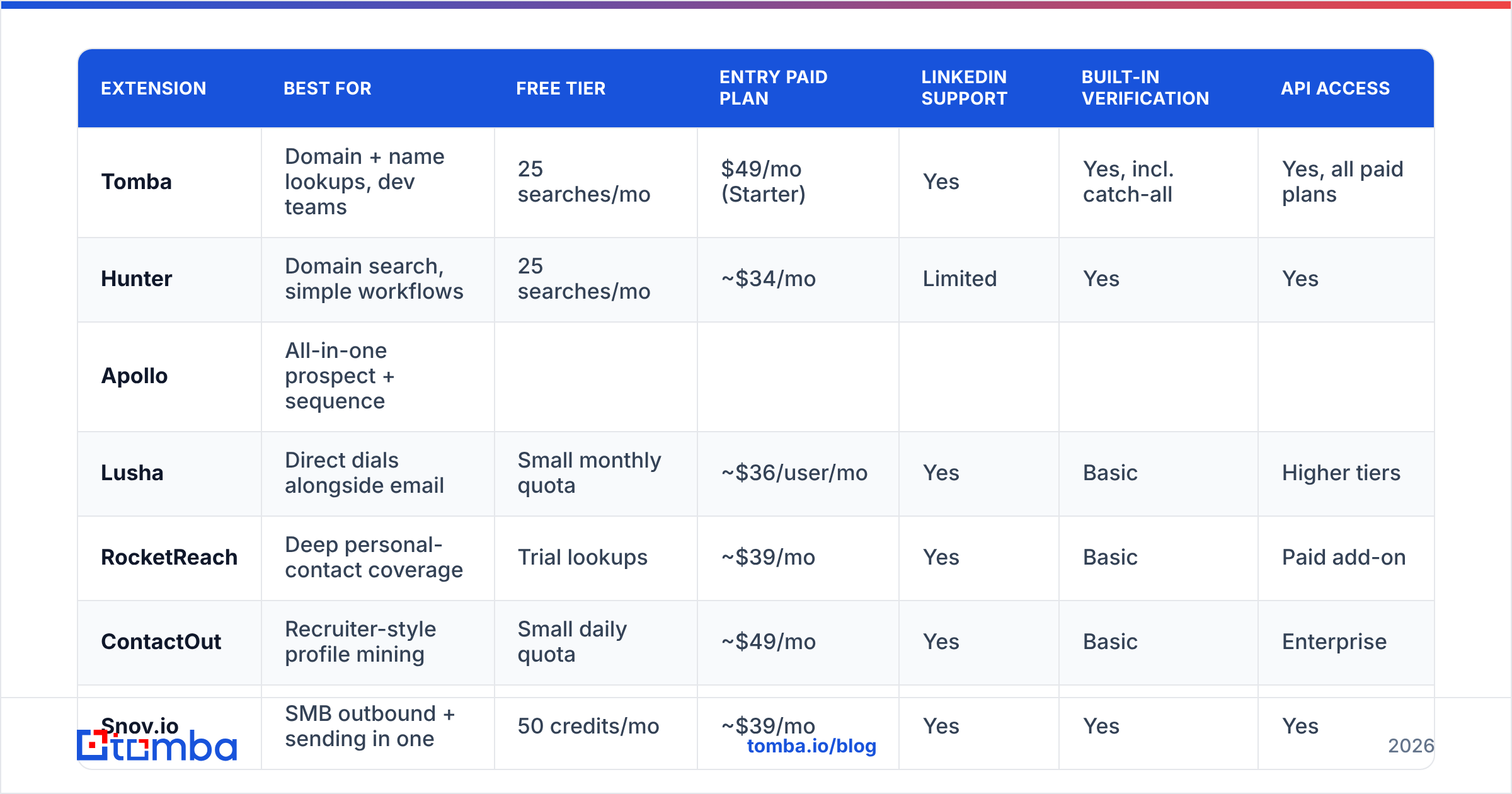
| Extension | Best for | Free tier | Entry paid plan | LinkedIn support | Built-in verification | API access |
|---|---|---|---|---|---|---|
| Tomba | Domain + name lookups, dev teams | 25 searches/mo | $49/mo (Starter) | Yes | Yes, incl. catch-all | Yes, all paid plans |
| Hunter | Domain search, simple workflows | 25 searches/mo | ~$34/mo | Limited | Yes | Yes |
| Apollo | All-in-one prospect + sequence | |||||
| Limited monthly credits | ~$49/user/mo | Yes | Basic | Paid tiers | ||
| Lusha | Direct dials alongside email | Small monthly quota | ~$36/user/mo | Yes | Basic | Higher tiers |
| --- | --- | --- | --- | --- | --- | --- |
| RocketReach | Deep personal-contact coverage | Trial lookups | ~$39/mo | Yes | Basic | Paid add-on |
| ContactOut | Recruiter-style profile mining | Small daily quota | ~$49/mo | Yes | Basic | Enterprise |
| Snov.io | SMB outbound + sending in one | 50 credits/mo | ~$39/mo | Yes | Yes | Yes |
| BookYourData | Prebuilt verified list purchase | Sample records | Pay-as-you-go | N/A | Yes, guaranteed accuracy | Yes |

A few notes that the table cannot carry:
Apollo is not really an extension company; it is a sequencer with an extension attached. If you already run sequences elsewhere, you are paying for a platform to use a toolbar. Teams evaluating that trade-off usually end up reading an Apollo alternative breakdown before renewal.
Lusha and RocketReach skew toward personal contact data — mobile numbers, personal emails. Useful for recruiting and founder-level outreach, less useful when your ICP is a procurement manager at a 400-person manufacturer.
ContactOut is built around recruiter workflows. It is excellent inside LinkedIn and weaker the moment you leave it.
BookYourData solves a genuinely different problem: instead of finding contacts one at a time, you buy a pre-verified, filtered list with an accuracy guarantee attached. If your motion is "load 5,000 verified contacts into the sequencer on Monday," that is a cleaner path than clicking a toolbar 5,000 times. Many teams run both — a list provider for volume, an extension for the ad-hoc find.
Tomba sits in the "find + verify + ship to code" lane. The Tomba Chrome extension shares one credit pool with the Tomba API, the Sheets add-on, and the CLI, so a prototype built in the browser moves into automation without a second contract.
How accurate are email finder extensions really?#
Accuracy claims of "98%" are almost always measured on the easy half of the market. Interpret them the way you would interpret a car's advertised fuel economy: real, measured, and achieved under conditions that do not resemble your commute.

What actually drives your hit rate:
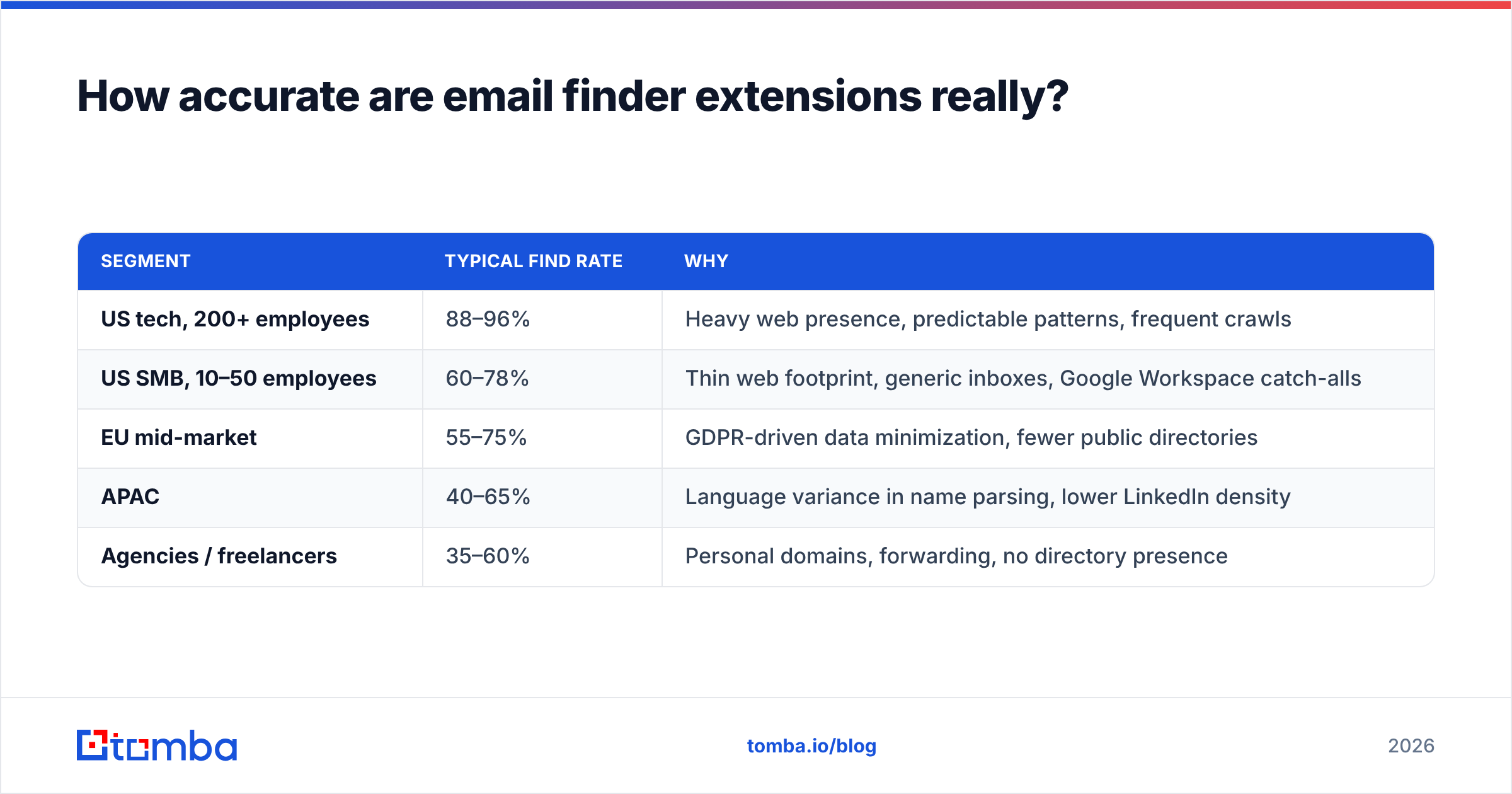
| Segment | Typical find rate | Why |
|---|---|---|
| US tech, 200+ employees | 88–96% | Heavy web presence, predictable patterns, frequent crawls |
| US SMB, 10–50 employees | 60–78% | Thin web footprint, generic inboxes, Google Workspace catch-alls |
| EU mid-market | 55–75% | GDPR-driven data minimization, fewer public directories |
| APAC | 40–65% | Language variance in name parsing, lower LinkedIn density |
| Agencies / freelancers | 35–60% | Personal domains, forwarding, no directory presence |
Two practical rules follow from this table.
First, benchmark on your own ICP, not on the vendor's demo list. Take 100 real target accounts, run them through each free tier, and count verified hits. A 15-point difference on your segment is worth more than any review score.
Second, treat "found" and "safe to send" as separate states. Run every discovered address through verification before it enters a sequence. Even a 95%-accurate finder pushes a 5% bounce rate into your sender reputation if you skip that step, and modern inbox providers punish bounce spikes hard. If you want the underlying mechanics, the email deliverability primer covers why a 3% bounce threshold is the practical ceiling.

What do email finder extensions cost per month?#
Sticker price is the least useful number on a pricing page. The number you want is cost per verified, deliverable contact.
Work it out like this:
cost per verified contact = monthly price ÷ (credits × find rate × verify pass rate)A $49 plan with 1,000 credits, a 70% find rate on your ICP, and a 90% verify pass rate gives you 630 usable contacts, or about $0.078 each. A $36 plan with 300 credits and identical rates gives you 189 contacts at $0.19 each — more than double, despite the lower headline.
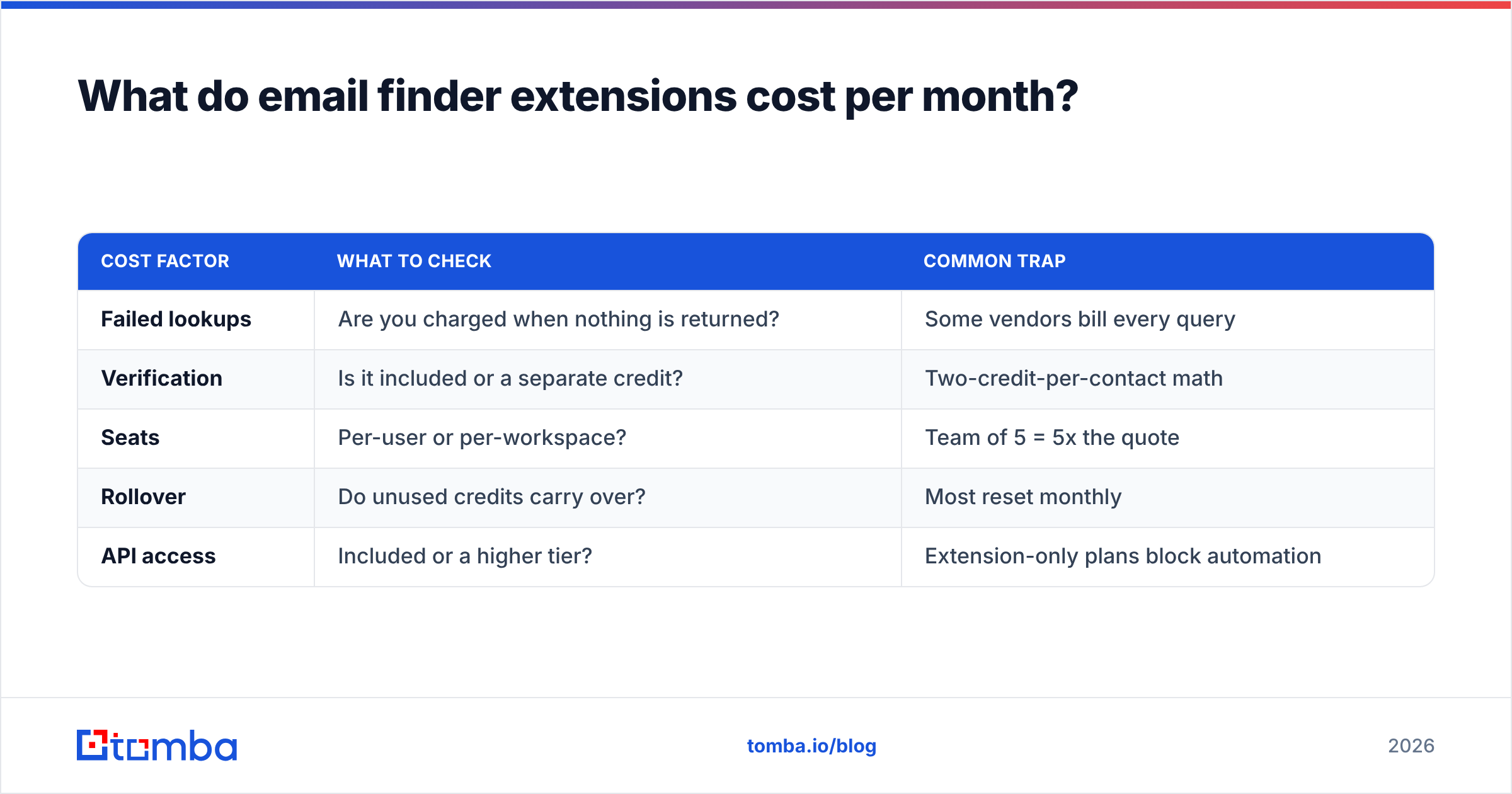
| Cost factor | What to check | Common trap |
|---|---|---|
| Failed lookups | Are you charged when nothing is returned? | Some vendors bill every query |
| Verification | Is it included or a separate credit? | Two-credit-per-contact math |
| Seats | Per-user or per-workspace? | Team of 5 = 5x the quote |
| Rollover | Do unused credits carry over? | Most reset monthly |
| API access | Included or a higher tier? | Extension-only plans block automation |
For reference, Tomba pricing runs Free (25 searches/mo), Starter $49/mo, Growth $99/mo, Pro $249/mo, and Enterprise custom, with API access on every paid tier — which matters because the moment you want to enrich a CRM in bulk, an extension-only plan becomes a wall.
Where do email finder extensions break down?#
Even the best toolbar tool has structural limits. Know them before you build a process on top:
- Volume. Clicking is linear. Past roughly 50 contacts a day, a bulk email finder or API call is faster and cheaper than any human with a mouse.
- Page dependence. Extensions read the DOM. When LinkedIn or a target site ships a layout change, extensions break, sometimes for days. Vendors with an API give you a fallback; vendors without one give you a support ticket.
- Catch-all domains. Roughly a fifth of business domains accept all mail. Standard verification returns "accepted" for every address, valid or not. Only tools with dedicated catch-all logic distinguish a real mailbox from a black hole.
- Job change decay. B2B contact data decays around 2–3% per month. An address found in January is materially less reliable in July. Re-verify before any campaign, not once at import.
- Privacy exposure. Under GDPR you need a lawful basis for processing. Check whether the vendor publishes its data sources and honors deletion requests. "We scrape the public web" is not a compliance position.
- Browser permission creep. Some extensions request read access to every site you visit. Read the permission list before installing on a work machine; your security team eventually will.
How should you build a stack around an extension?#
The extension is the front door, not the house. A stack that survives contact with a real quota looks like this:
- Discover in the browser. Use the extension for ad-hoc research, live account planning, and the "who is this person" moment during a call.
- Expand by domain. Once an account is qualified, switch to domain search to pull the whole buying committee in one query instead of clicking six profiles.
- Verify everything. Route every address through verification before it touches the sequencer. Treat catch-all results as a separate bucket with its own, more cautious sending policy.
- Enrich, then route. Push verified contacts into the CRM with title, company size, and source attached. HubSpot's own data quality guidance is a decent baseline for what "clean" means before a record enters a sequence.
- Automate the repeat. Anything you do more than twice a week belongs in the API or a Sheets/Airtable workflow, not in a toolbar.
The teams that get the most out of email finder extensions are the ones that use them the least — because they graduated the repeatable half of the work to automation and kept the browser for judgment calls.
Which extension should you pick?#
Short version, by situation:
| Your situation | Pick |
|---|---|
| Prospecting mostly inside LinkedIn | ContactOut or Lusha for coverage; add verification separately |
| One platform for finding and sending | Apollo or Snov.io |
| Highest verified accuracy per dollar, plus API | Tomba |
| Buying a filtered, pre-verified list in bulk | BookYourData |
| Occasional lookups, tiny volume | Any free tier — Hunter or Tomba's 25/mo |
Run the two-week test before you commit annually. Install two free tiers, pull the same 100-contact ICP sample through both, verify the output independently, and compare cost per deliverable address. That single exercise beats every listicle, including this one.
Ready to stop guessing at addresses?#
If your bottleneck is finding the right person's email fast — in the browser today, in your pipeline tomorrow — start with the Tomba Email Finder. The free tier gives you 25 searches a month with no card, the Chrome extension puts it one click from any company page, and every paid plan from $49/mo includes the API, so the workflow you prototype by hand is the same one you automate next quarter. Test it against your own ICP list, not a demo, and let the hit rate decide.
Related guides#
Ready to find emails that actually work?
Join 150,000+ professionals who stopped guessing and started sending. Free credits on signup — no credit card required.
Get the Tomba newsletter
Practical outbound tactics and product updates — once every two weeks.
About the author