Email Finder Free Online: What You Actually Get in 2026
Free email finders are real, but the free tier is where vendors decide what to hide. Here's what each one actually gives you, where the limits bite, and when paying starts to make sense.
TL;DR
- "Free" email finders split into three types: real free tiers with monthly credits (Tomba, Hunter, Snov.io), free trials that expire, and pattern-guessing tools that never verify anything.
- A free tier is useful for 10-40 lookups a month. Past that, every provider throttles you — usually right when your list gets interesting.
- Accuracy matters more than credit count. Twenty verified emails beat 200 guessed ones, because bounces damage your sending domain permanently.
- Pattern generators (first.last@domain) are free forever and worthless alone — they produce plausible strings, not confirmed mailboxes.
- Test free tiers on a domain where you already know the answer. If a tool returns confident results for a fake person, its confidence score is decoration.
What does "email finder free online" actually mean?#
Three very different products hide behind that phrase, and mixing them up is why people conclude "free email finders don't work."
Type 1 — Free tiers with real infrastructure. A paid platform gives you a small monthly credit allowance on the same index and verification stack its customers pay for. Tomba's free plan (25 searches/month), Hunter's (25 searches + 50 verifications), and Snov.io's (50 credits) fall here. The data is the real product. The quantity is the constraint.
Type 2 — Free trials. Seven or fourteen days, sometimes a fixed credit block, then a paywall. Apollo, RocketReach, and most enrichment suites operate this way. Useful for evaluation, useless as an ongoing workflow.
Type 3 — Pattern generators and scrapers. These take a name and a domain and output permutations: jane@, j.doe@, jane.doe@, jdoe@. No index, no SMTP check, no confidence score. Free forever because they cost nothing to run. An email permutator is genuinely handy as a starting point — it just isn't a finder.
The practical test: does the tool tell you why it believes an address is real? If the answer is a source, a pattern confidence score, or an SMTP result, you're using a finder. If the answer is silence, you're using a guesser.

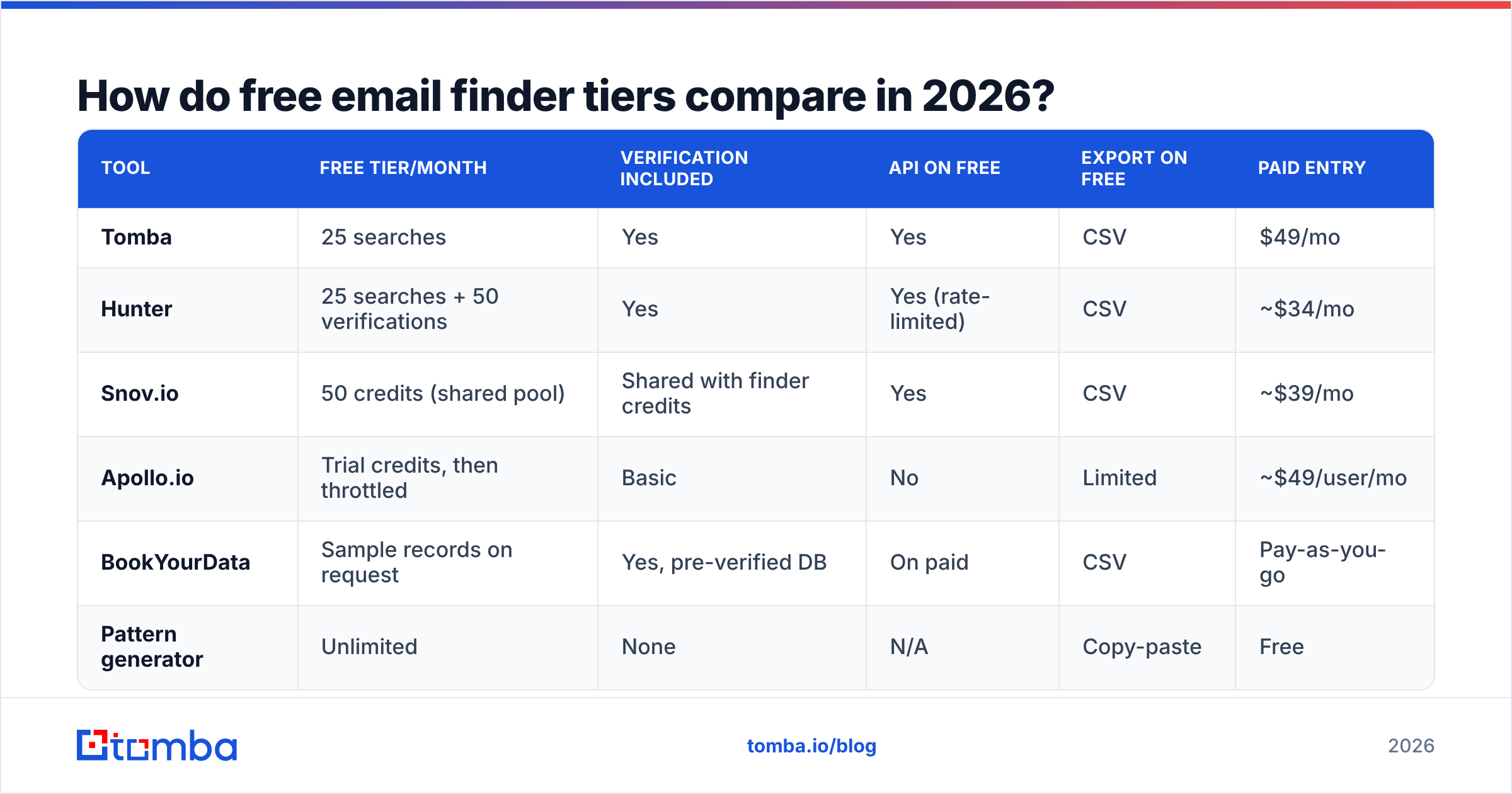
How do free email finder tiers compare in 2026?#
Credit counts are the headline number vendors advertise, and the least important one. What actually determines whether a free tier is usable is: does verification come bundled, is the API included, and does the free plan let you export.
| Tool | Free tier/month | Verification included | API on free | Export on free | Paid entry |
|---|---|---|---|---|---|
| Tomba | 25 searches | Yes | Yes | CSV | $49/mo |
| Hunter | 25 searches + 50 verifications | Yes | Yes (rate-limited) | CSV | ~$34/mo |
| Snov.io | 50 credits (shared pool) | Shared with finder credits | Yes | CSV | ~$39/mo |
| Apollo.io | Trial credits, then throttled | Basic | No | Limited | ~$49/user/mo |
| BookYourData | Sample records on request | Yes, pre-verified DB | On paid | CSV | Pay-as-you-go |
| Pattern generator | Unlimited | None | N/A | Copy-paste | Free |
Two things jump out of that table.
First, shared credit pools are a trap. When finding and verifying draw from the same bucket, 50 credits means 25 finds if you verify each one — which you should. Separate pools (Tomba, Hunter) are worth more than their headline number suggests.
Second, API access on a free tier is unusually valuable. It means you can wire the tool into a script, a Google Sheet, or an internal workflow and test whether the data survives contact with your actual process before spending anything. Tools that gate the API behind payment force you to evaluate through a UI, which tells you nothing about batch behavior.

How accurate are free email finders?#
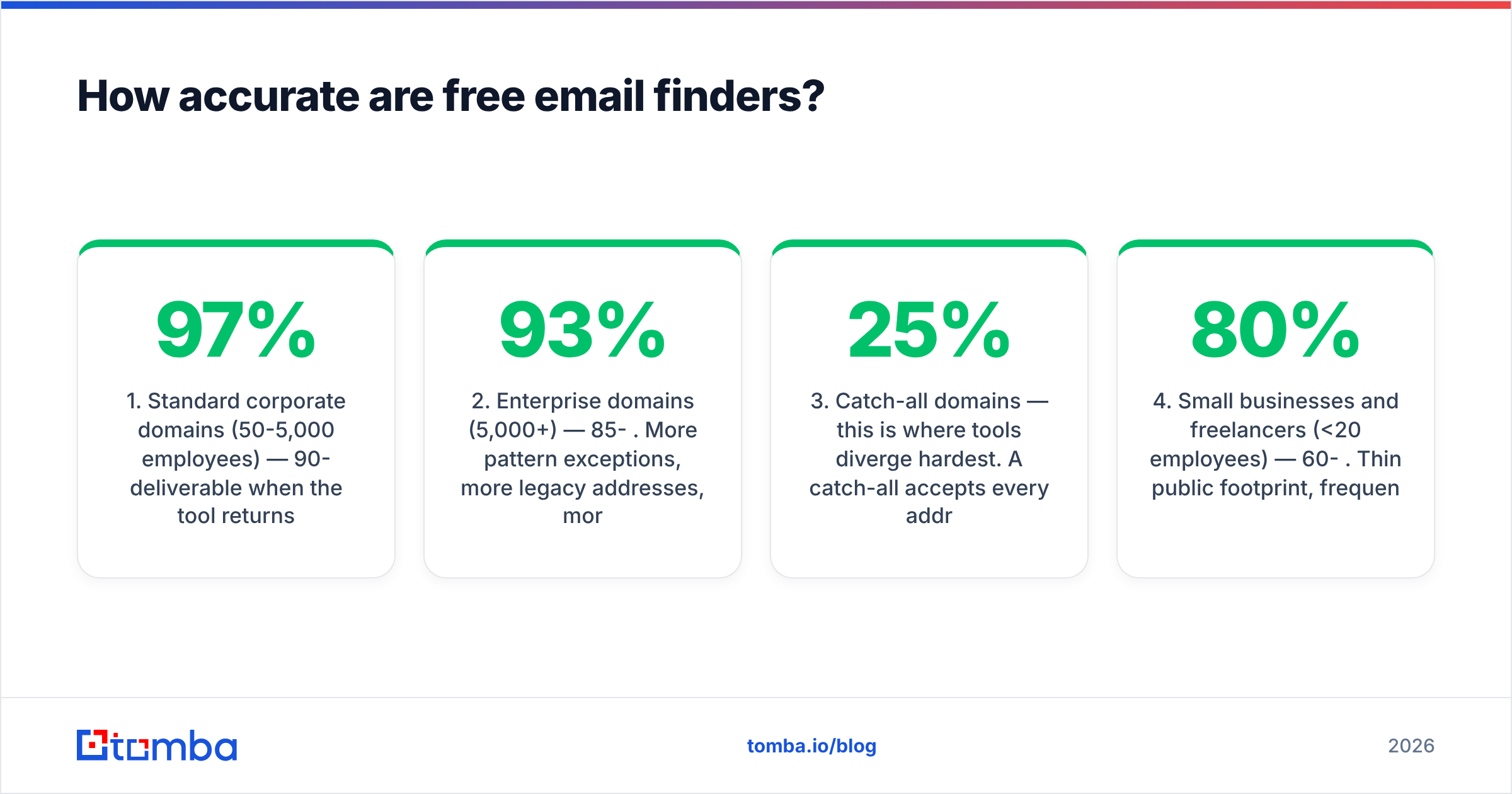
Accuracy on free tiers is generally identical to paid tiers from the same vendor — the index doesn't change based on your plan. What changes is volume and, occasionally, whether catch-all handling is enabled.
Realistic accuracy bands, based on how these systems work:
- Standard corporate domains (50-5,000 employees) — 90-97% deliverable when the tool returns a high-confidence result. These domains have consistent patterns and enough public footprint to index.
- Enterprise domains (5,000+) — 85-93%. More pattern exceptions, more legacy addresses, more acquisitions carrying old domains.
- Catch-all domains — this is where tools diverge hardest. A catch-all accepts every address at SMTP, so naive verifiers mark everything "valid." Roughly 20-25% of B2B domains are catch-all. A dedicated catch-all verifier resolves these with pattern inference plus secondary signals; a tool without one is lying to you at scale.
- Small businesses and freelancers (<20 employees) — 60-80%. Thin public footprint, frequent generic inboxes, personal-domain email.
- Role addresses (info@, sales@, support@) — technically deliverable, practically useless. Count them separately from your hit rate.
The number that matters is not "found rate" but deliverable rate on found addresses. A tool that returns 40% of your list with 95% deliverability is better than one returning 80% at 60% deliverability, because the second one costs you domain reputation. Bounces above roughly 3% start triggering filtering at the major mailbox providers, and sender reputation recovers slowly.
Test protocol that takes fifteen minutes: pick a domain where you personally know five email addresses. Run all five through each free tier. Then run three invented names at the same domain. A good tool finds most of the real ones and returns "not found" or low confidence on the fakes. A bad tool confidently invents addresses for people who don't exist — and you now know its confidence score is noise.
When is a free email finder enough — and when is it not?#
Free tiers are legitimately sufficient in more cases than vendors would like you to believe.
Free is enough when:
- You're doing founder-led sales with 20-30 targeted prospects a month. Twenty-five credits covers it, and manual research covers the gaps.
- You're validating a market before building a list. Find ten contacts, send ten emails, see if anyone cares. That's a $0 experiment.
- You need occasional one-off lookups — a hiring manager, a journalist, a partner contact. Combine a free tier with an author finder for content-based prospecting.
- You're testing a vendor before committing. Run the same 25 names through three free tiers and compare.
Free stops working when:
- You're building lists of 200+ contacts per campaign. Rationing 25 credits across that is a worse use of your time than $49.
- You need bulk processing. Free tiers almost universally exclude bulk upload, and doing 300 lookups one at a time in a browser tab is a genuinely bad way to spend a Tuesday.
- You need enrichment beyond email — job title, company size, LinkedIn URL, phone. Data enrichment is where free tiers cut off first.
- You need verification at volume before a send. Verifying 1,000 addresses is not a free-tier activity anywhere.
- Multiple people need access. Free tiers are single-seat.
The honest math: if one extra closed deal is worth more than $588/year, and you send more than 50 cold emails a month, the free tier is costing you more in ceiling than it saves in cash. Below that threshold, stay free and stop reading vendor blogs about it.

What free tools should you combine for the best results?#
The strongest free workflow isn't one tool — it's four free tools chained, each doing the part it's actually good at.
Step 1 — Establish the domain's email pattern. Before burning finder credits on individuals, determine whether the company uses first.last@, first@, or flast@. A company email pattern check costs nothing and makes every subsequent lookup cheaper. One pattern unlocks an entire org chart.
Step 2 — Use finder credits on high-value targets only. Your 25 monthly credits should go to decision-makers, not to everyone whose name you scraped. For the rest, apply the pattern from step 1 and verify.
Step 3 — Verify everything before it touches your sending domain. This is the step people skip and regret. A free email checker catches syntax errors, disposable domains, and dead mailboxes before they become bounces. Pattern-derived addresses in particular must be verified — they're hypotheses until an SMTP handshake says otherwise.
Step 4 — Deduplicate and clean. Multi-source lists carry duplicates, and sending the same person two cold emails from the same domain is a fast route to a spam complaint. A remove duplicates pass takes seconds.
Optional step 5 — check your own house. Before any send, confirm your SPF record is valid and your domain isn't on a blocklist. The best contact data in the world does nothing if your mail lands in spam. Google's own sender guidelines spell out the authentication baseline, and they've only gotten stricter since the 2024 bulk-sender rules.
This chain gets a solo founder to roughly 60-80 verified contacts a month at zero cost — 25 from direct lookup, the rest from pattern inference plus verification. It's tedious. It also works.
What are the hidden limits vendors don't advertise?#
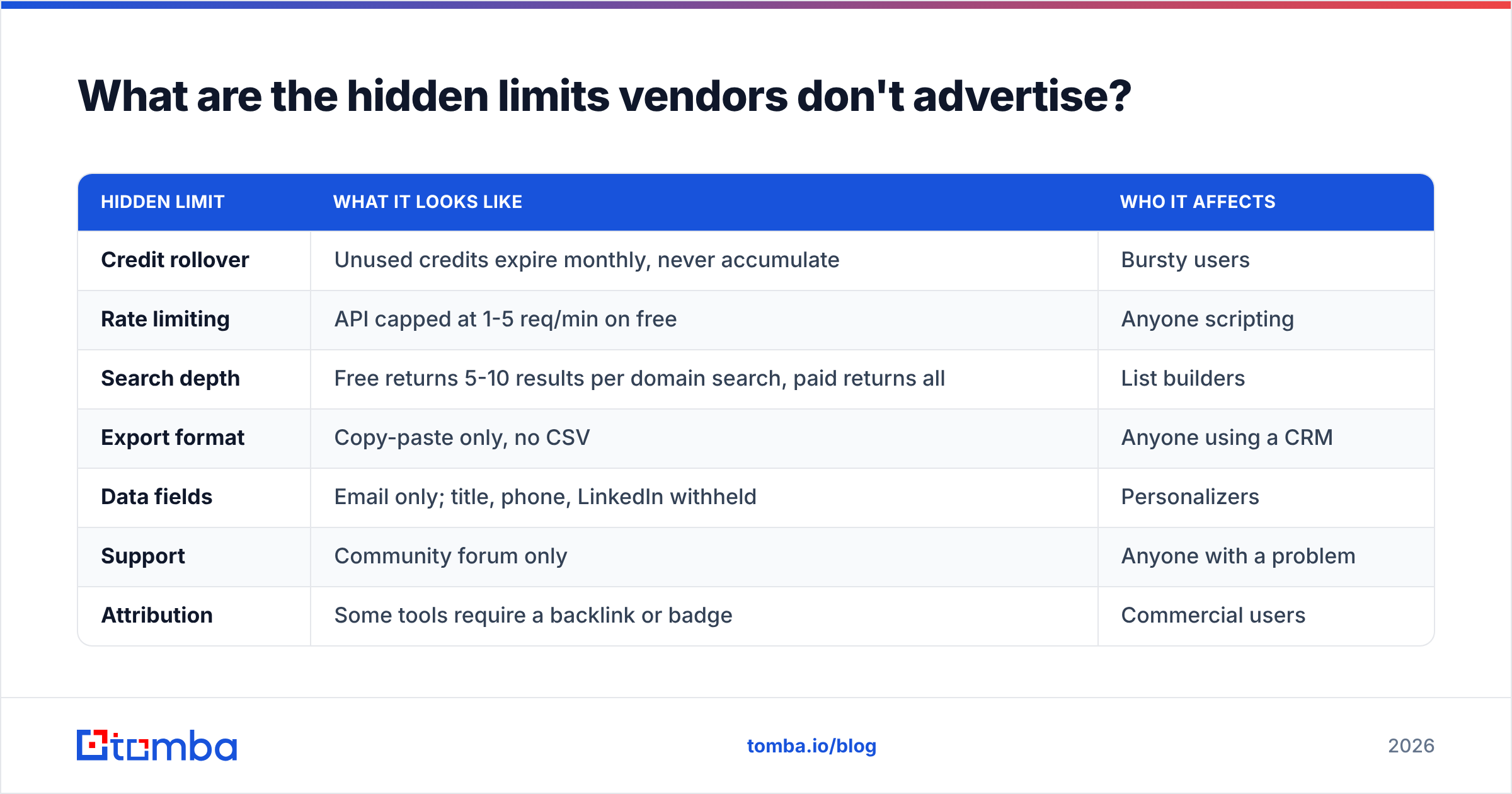
Every free tier has a catch that isn't on the pricing page. The common ones:
| Hidden limit | What it looks like | Who it affects |
|---|---|---|
| Credit rollover | Unused credits expire monthly, never accumulate | Bursty users |
| Rate limiting | API capped at 1-5 req/min on free | Anyone scripting |
| Search depth | Free returns 5-10 results per domain search, paid returns all | List builders |
| Export format | Copy-paste only, no CSV | Anyone using a CRM |
| Data fields | Email only; title, phone, LinkedIn withheld | Personalizers |
| Support | Community forum only | Anyone with a problem |
| Attribution | Some tools require a backlink or badge | Commercial users |
The search-depth one catches people out most often. You run a domain search on a 400-person company, see eight contacts, and conclude the database is thin. It isn't — you're seeing a preview. Check whether the tool reports a total count alongside the visible results; that gap is the real gate.
Rate limiting is the second sleeper. A free API key that allows one request per minute is fine for a webhook and useless for enriching a spreadsheet. Read the docs, not the pricing table.
Also worth knowing: pay-as-you-go and database-download models (BookYourData among them) skip the credit-tier game entirely — you buy a defined set of pre-verified records rather than renting monthly lookups. If your need is one large clean list rather than a continuous trickle, that structure can beat any subscription free tier, and it's worth pricing alongside them rather than assuming subscription is the only shape.
How do you choose between free email finder tools?#
Run this decision sequence rather than reading more comparison posts.
- Define your monthly volume honestly. Not aspirational volume — what you actually sent last month. Under 30 lookups, free tiers are fine. Over 150, price the paid plans now and skip the evaluation theater.
- Test on your real target market. A tool great at US SaaS may be weak on European manufacturing or APAC logistics. Run 20 names from your actual ICP through each candidate. Vendor-published accuracy averages don't describe your segment.
- Check catch-all handling explicitly. Take a known catch-all domain and see what the tool reports. "Valid" with no caveat means the tool can't tell — treat every result from that vendor with suspicion.
- Verify export and integration before committing. If it can't get into your CRM or sequencer without manual copy-paste, the credit count is irrelevant. Check the integrations list for the tools you actually use.
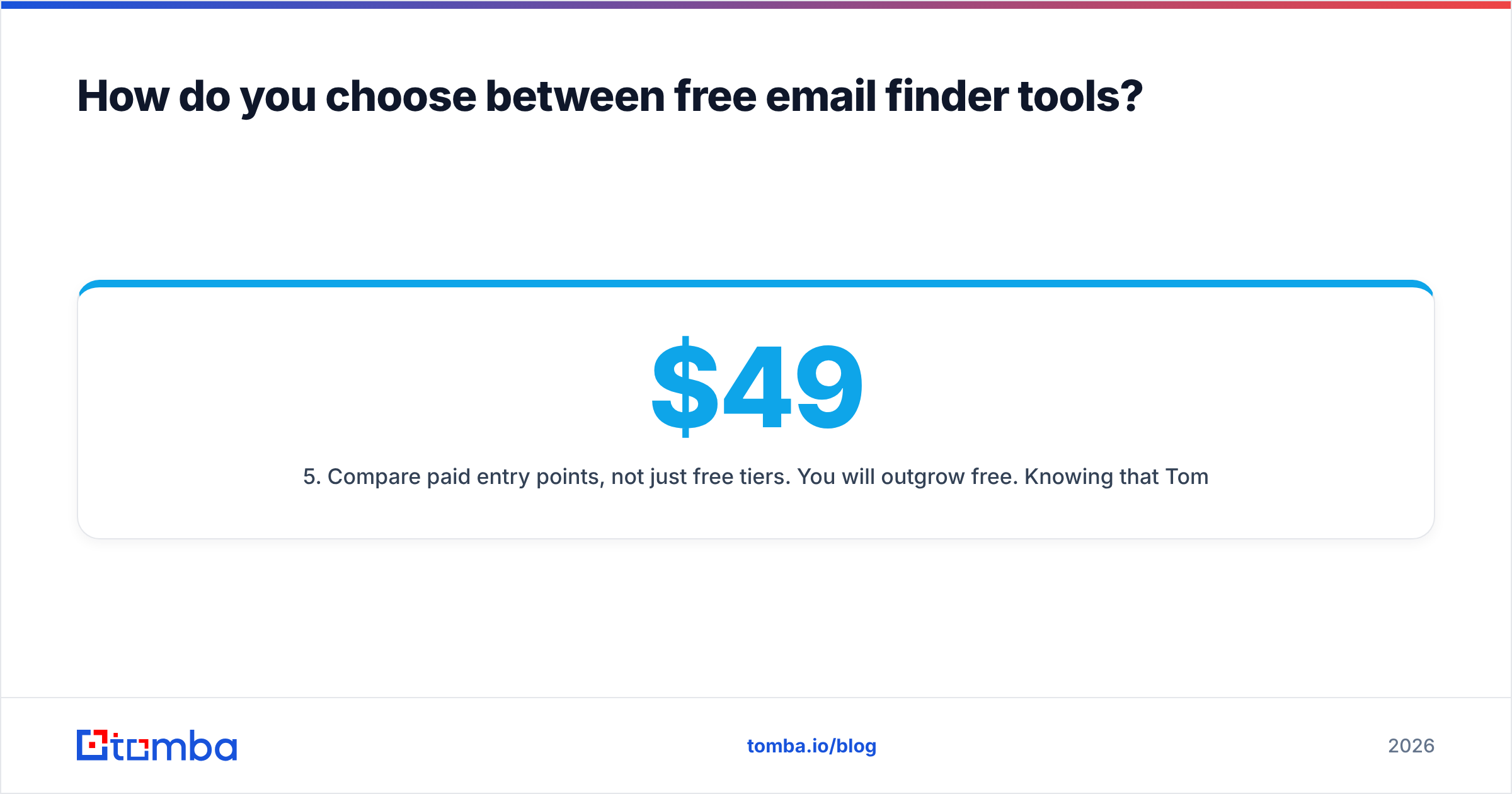
- Compare paid entry points, not just free tiers. You will outgrow free. Knowing that Tomba's Starter runs $49/mo for a substantially larger allowance — with Growth at $99/mo and Pro at $249/mo above it — tells you what upgrading costs before you're locked into a workflow. Full Tomba pricing is public, as is most of the market's, and G2's lead intelligence category is a reasonable place to sanity-check vendor claims against reviews.
One more filter: prefer vendors that publish where their data comes from. Providers that document data sources and refresh cadence are making a claim you can hold them to. Providers that say "proprietary AI" and stop are asking you to trust a black box with your domain reputation.

Are free email finders legal and compliant?#
Using them is legal in most jurisdictions. How you use the output is where compliance lives.
Under GDPR, a business email address tied to an identifiable person is personal data. Finding it is permissible under legitimate interest for B2B outreach, but you owe the recipient transparency about where you got it, a working opt-out, and deletion on request. The ICO's guidance on direct marketing is the clearest official reading of this.
Under CAN-SPAM in the US, cold B2B email is legal with accurate headers, a physical postal address, and a functioning unsubscribe honored within ten business days. There is no opt-in requirement for B2B.
Practical rules that keep you out of trouble regardless of jurisdiction:
- Only contact people whose role plausibly relates to what you're selling. Random blasts fail the legitimate-interest test and also don't work.
- Honor opt-outs immediately and permanently, across every tool you use.
- Don't scrape personal emails (gmail.com, outlook.com) for B2B outreach. Different legal footing, worse results.
- Keep a record of where each contact came from. If someone asks, "a data provider" is not an answer; "found via public company directory on 2026-03-14" is.
Free tiers don't change any of this. The compliance obligation attaches to sending, not to sourcing.
Where should you start?#
Start free, test properly, and upgrade on evidence rather than on a vendor's urgency banner.
Take the 25 free searches, run them against people you can independently verify, and check whether the tool admits uncertainty when it should. Chain the pattern checker and verifier around it so nothing unverified reaches your sending domain. If you hit the ceiling in the first week, that's your answer about whether to pay — and you'll be upgrading with real data about accuracy in your market, not someone else's benchmark.
When you're ready to test, the Tomba Email Finder gives you 25 searches a month free with verification and API access included on the free plan — enough to run the accuracy test above properly and decide for yourself before anyone asks for a card.
Related guides#
Ready to find emails that actually work?
Join 150,000+ professionals who stopped guessing and started sending. Free credits on signup — no credit card required.
Get the Tomba newsletter
Practical outbound tactics and product updates — once every two weeks.
About the author