Email Finding Tool: How to Pick the Right One in 2026
Most email finding tools quote a 95%+ accuracy number they can't back up on your actual list. Here's how the categories differ, what the pricing really costs per verified contact, and how to test before you commit.
TL;DR
- An email finding tool turns a name plus a domain into a deliverable inbox address. The good ones do it with sourced data and live verification; the weak ones do it with pattern guessing dressed up as "AI".
- Vendor accuracy claims (95%, 98%, 99%) are almost never measured on lists like yours. Measure your own hit rate and bounce rate on 200 real contacts before you sign anything.
- Cost per verified contact matters more than cost per credit. A $99 plan that charges you for unverified guesses is more expensive than a $249 plan that doesn't.
- Categories differ more than brands do: pure finders, database platforms, browser scrapers, and all-in-one sequencers each fail in different ways.
- Run the 30-minute bake-off in the last section. It takes less time than a sales demo and tells you more.
What is an email finding tool, and how does it actually work?#
An email finding tool takes what you already know — a person's name, their company, sometimes a LinkedIn URL — and returns the professional email address that reaches them. That's the whole promise. Everything else is implementation detail.
The implementation detail is where the money goes, though. Think of it like finding someone's apartment number. You can guess ("probably 4B, most buildings put the corner unit there"), you can ask the doorman (someone with actual records), or you can knock and see who answers (live verification). Every email finding tool is doing some blend of those three, and the blend determines whether your campaign lands or bounces.
Four mechanisms are in play:
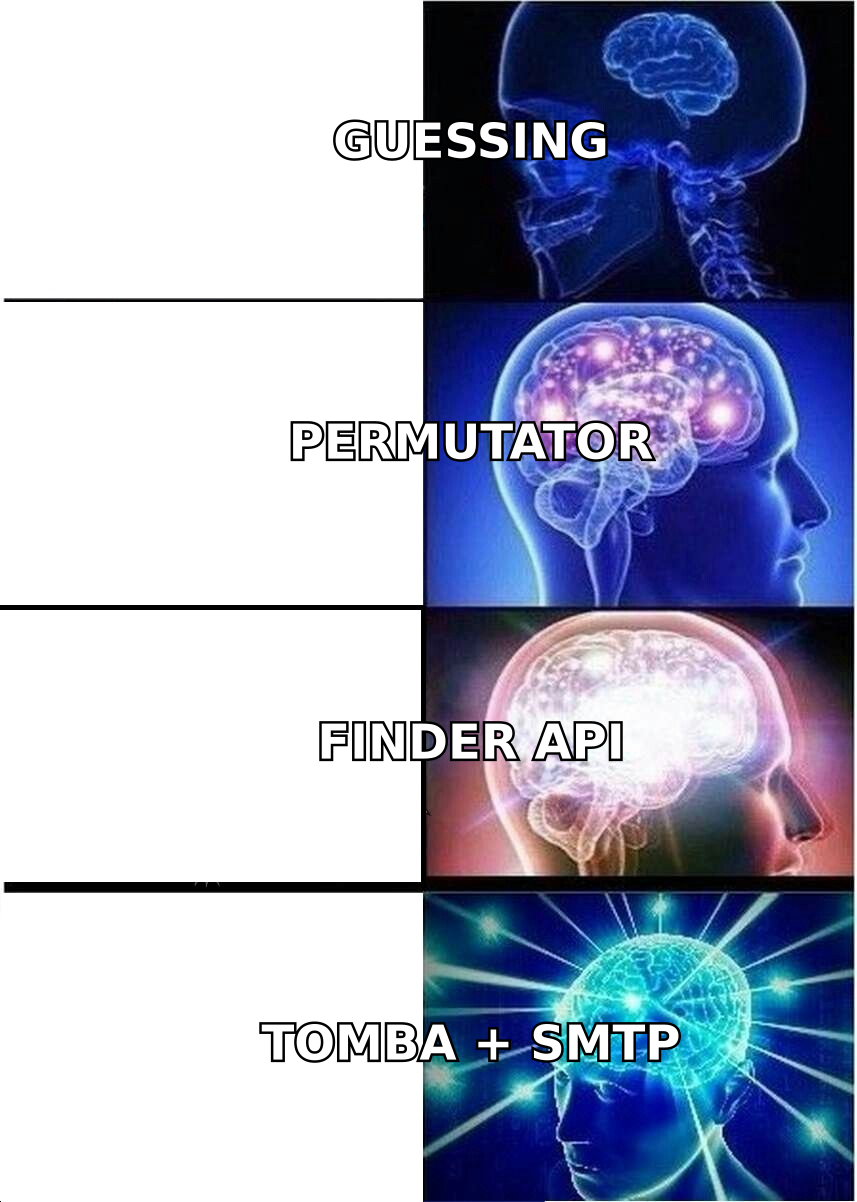
- Pattern inference — the tool knows
acme.comusesfirst.last@, so it constructsjane.doe@acme.com. Cheap, fast, and wrong whenever a company runs multiple patterns or the person predates a rebrand. On its own, this is the email permutator approach — useful as a fallback, dangerous as a primary source. - Crawled and sourced records — the tool has actually observed the address in a public source: a company site, a press release, a git commit, an author byline, a filing. This is real evidence, not inference. Coverage depends entirely on how much the vendor has crawled and how recently.
- SMTP and MX validation — the tool opens a conversation with the receiving mail server and asks whether the mailbox exists, without sending anything. This is what separates a plausible address from a deliverable one.
- Enrichment joins — matching across job title, LinkedIn profile, phone, and company firmographics so you get a contact record rather than a bare string.
A tool that only does #1 is a guess generator. A tool that does #2 and #3 together is what you actually want. Most vendors do all four to some degree and market themselves on whichever they do best.
What are the main categories of email finding tools?#
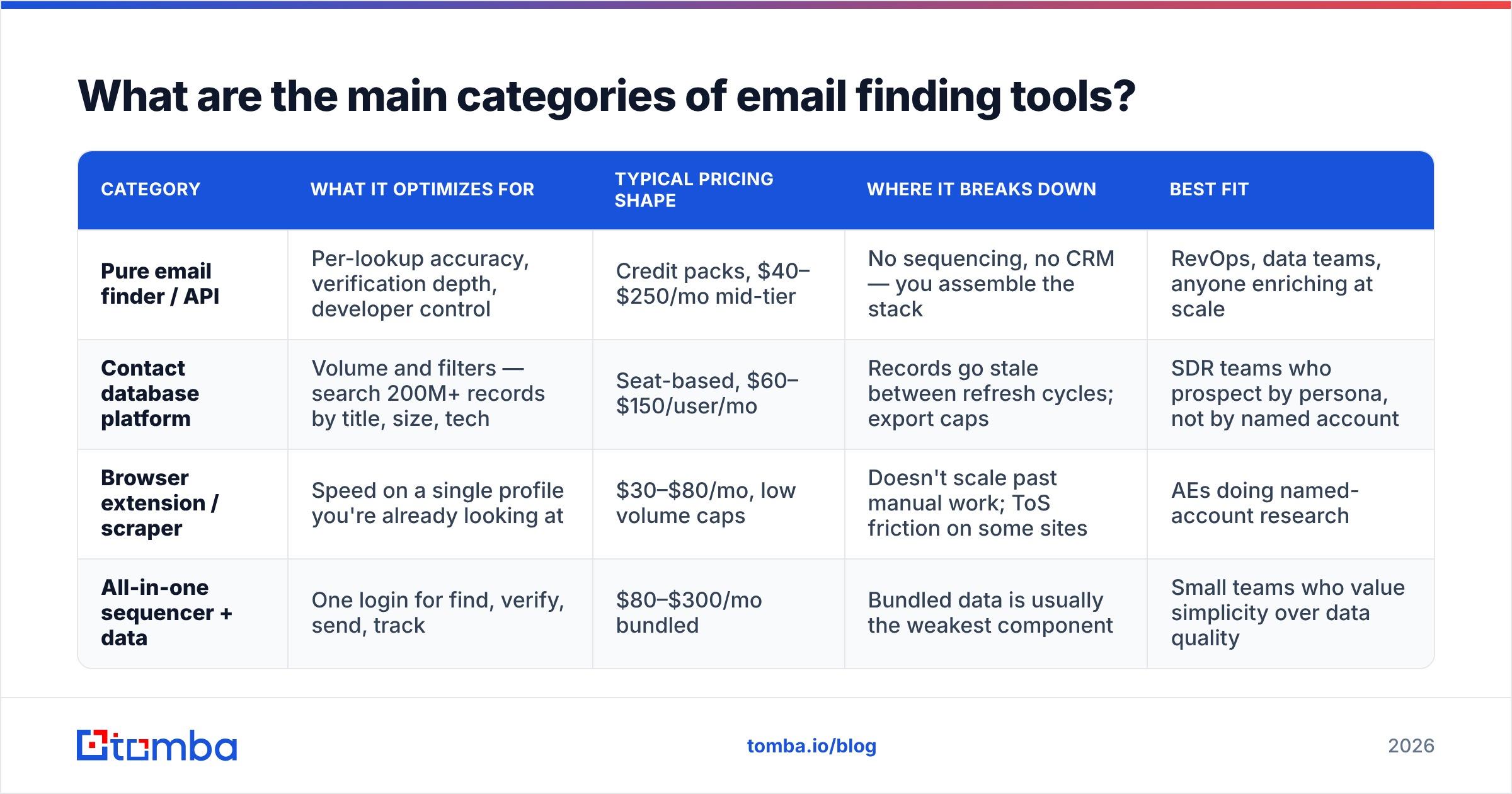
Brand comparisons get stale fast. Category differences don't. Before you compare vendor A to vendor B, work out which of these four buckets you actually need — most buying mistakes happen when someone picks the right tool from the wrong category.
| Category | What it optimizes for | Typical pricing shape | Where it breaks down | Best fit |
|---|---|---|---|---|
| Pure email finder / API | Per-lookup accuracy, verification depth, developer control | Credit packs, $40–$250/mo mid-tier | No sequencing, no CRM — you assemble the stack | RevOps, data teams, anyone enriching at scale |
| Contact database platform | Volume and filters — search 200M+ records by title, size, tech | Seat-based, $60–$150/user/mo | Records go stale between refresh cycles; export caps | SDR teams who prospect by persona, not by named account |
| Browser extension / scraper | Speed on a single profile you're already looking at | $30–$80/mo, low volume caps | Doesn't scale past manual work; ToS friction on some sites | AEs doing named-account research |
| All-in-one sequencer + data | One login for find, verify, send, track | $80–$300/mo bundled | Bundled data is usually the weakest component | Small teams who value simplicity over data quality |
The honest read: bundled data inside a sequencing platform is convenient and rarely best-in-class. That's not a knock on sequencers — they're solving a different problem. It's an argument for checking whether your sending platform's bundled finder is actually good enough, or whether you're paying twice for mediocrity. BookYourData takes a different route again, selling pre-verified list downloads rather than per-lookup credits, which suits teams who want a defined dataset up front rather than an API to call. Different shape, legitimately different use case.
How accurate is an email finding tool, really?#
Here's the uncomfortable part: nobody's accuracy claim means what you think it means.
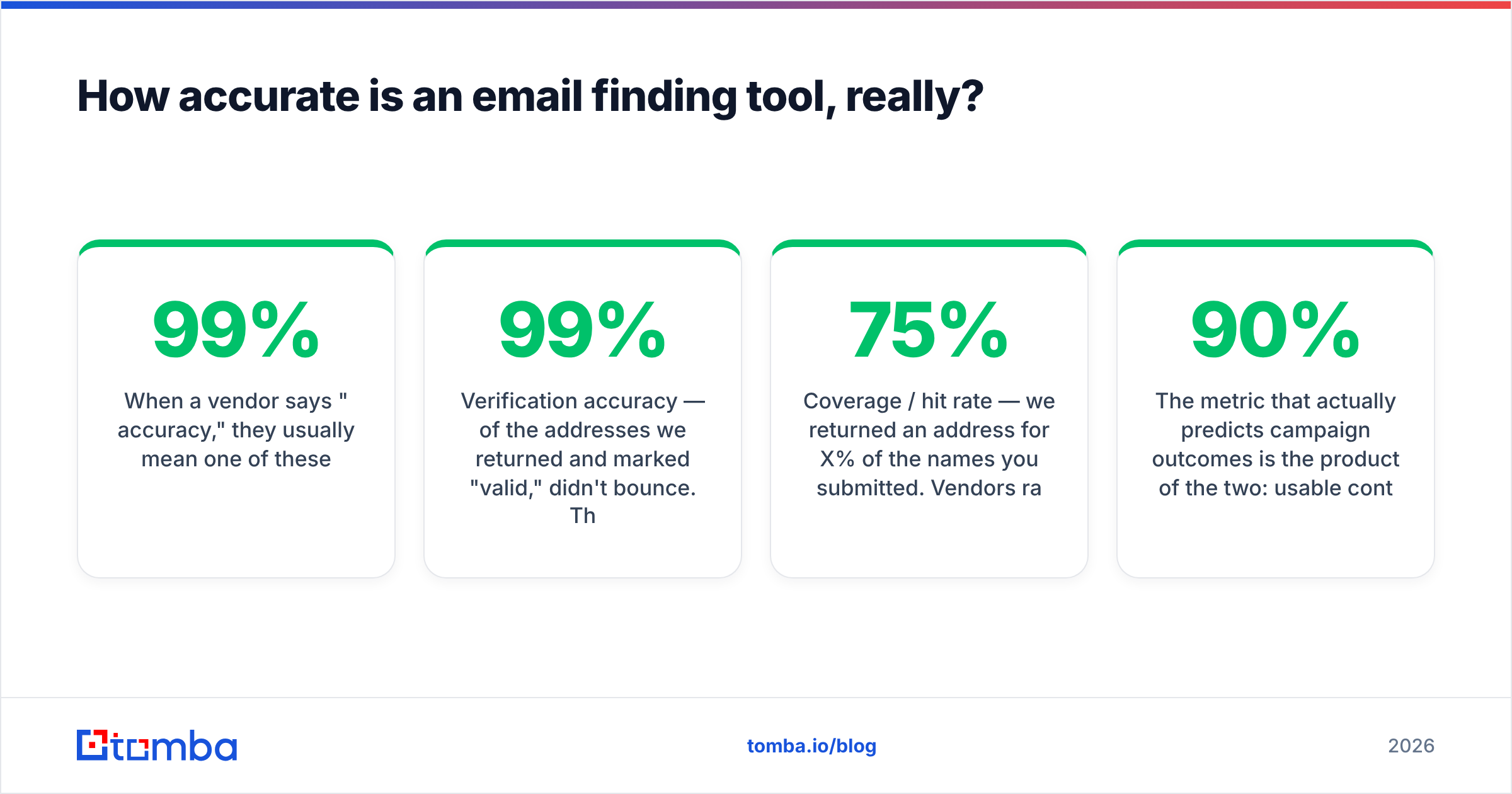
When a vendor says "99% accuracy," they usually mean one of these:
- Verification accuracy — of the addresses we returned and marked "valid," 99% didn't bounce. This is the most defensible claim and also the least useful, because it says nothing about how many contacts they found.
- Coverage / hit rate — we returned an address for X% of the names you submitted. Vendors rarely lead with this number because it's much lower, typically 50–75% on real B2B lists.
- Marketing arithmetic — a number derived from a curated internal test set that resembles nothing in your CRM.
The metric that actually predicts campaign outcomes is the product of the two: usable contacts = hit rate × verified accuracy. A tool with 90% hit rate and 85% accuracy gives you 76 usable contacts per 100 names. A tool with 65% hit rate and 98% accuracy gives you 64. The first tool is better for volume, the second for reputation-sensitive sending. Neither vendor will frame it that way for you.

Two structural factors move accuracy more than vendor choice does:
Catch-all domains. Roughly a fifth to a third of B2B domains accept mail to any address at the SMTP layer, which means standard verification returns "accept" for asdfasdf@company.com. Any tool that reports catch-all results as "valid" is inflating its own accuracy score. Tools that flag them honestly — and offer a dedicated catch-all verifier that scores confidence rather than pretending certainty — give you a lower headline number and a better bounce rate. Prefer the honest one.
Data decay. B2B contact data degrades at roughly 25–30% per year through job changes alone, a figure HubSpot and most CRM vendors have published on for years. A database that was 95% accurate at the last refresh is well under 80% eighteen months later. This is the single strongest argument for tools that verify at query time rather than serving from a static snapshot.
What should you actually compare between tools?#
Pricing pages are designed to be hard to compare. Normalize everything to one number: cost per verified, deliverable contact.
Work it out like this:
- Start with monthly plan cost, not the annual-discount number the pricing page shows by default.
- Divide by credits included, giving cost per credit.
- Ask what consumes a credit. Failed searches? Verifications? Enrichment fields? Some vendors charge for a lookup that returns nothing — that's a 30% surcharge hiding in plain sight.
- Multiply by your measured hit rate, not the vendor's claimed one.
- Divide by your verified-accuracy rate to get true cost per usable contact.
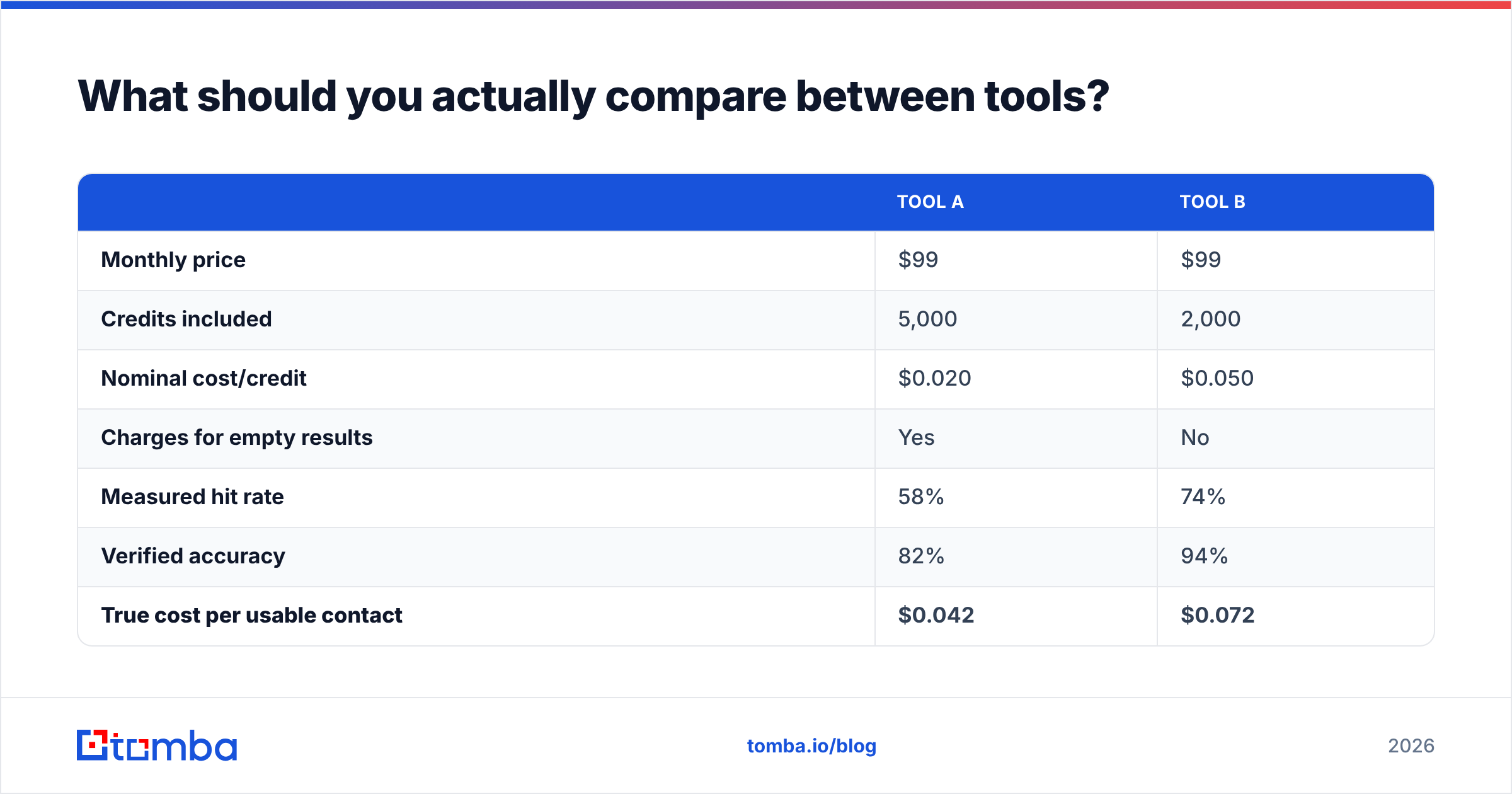
A concrete example. Two plans, both nominally $99/mo:
| Tool A | Tool B | |
|---|---|---|
| Monthly price | $99 | $99 |
| Credits included | 5,000 | 2,000 |
| Nominal cost/credit | $0.020 | $0.050 |
| Charges for empty results | Yes | No |
| Measured hit rate | 58% | 74% |
| Verified accuracy | 82% | 94% |
| True cost per usable contact | $0.042 | $0.072 |
Tool A is cheaper per usable contact — but Tool B produces 30% fewer bounces per thousand sends, which protects sender reputation and is worth real money once you're sending volume. The right answer depends on whether your bottleneck is budget or domain health. The point isn't which column wins; it's that you cannot know without running the numbers on your own data.
Beyond price, five things belong on your evaluation checklist:
- Verification transparency — does the tool return a confidence score and a status (valid / catch-all / risky / invalid), or just a bare address? Bare addresses are a red flag.
- Source attribution — can you see where an address came from? Vendors who publish their data sources are making a falsifiable claim; vendors who don't are asking for faith.
- API quality — rate limits, bulk endpoints, webhook support, and whether the docs include real error codes. If you'll ever automate this, a good email finder API saves more engineering time than any UI feature.
- Compliance posture — GDPR/CCPA handling, opt-out processing, and whether the vendor will name its lawful basis for processing. G2's category reviews are a reasonable place to see how existing customers rate this in practice.
- Workflow fit — Chrome extension, Google Sheets, CRM sync, or CSV. The best data is useless if getting it into your sequence takes four manual steps.
How do the leading email finding tools compare?#
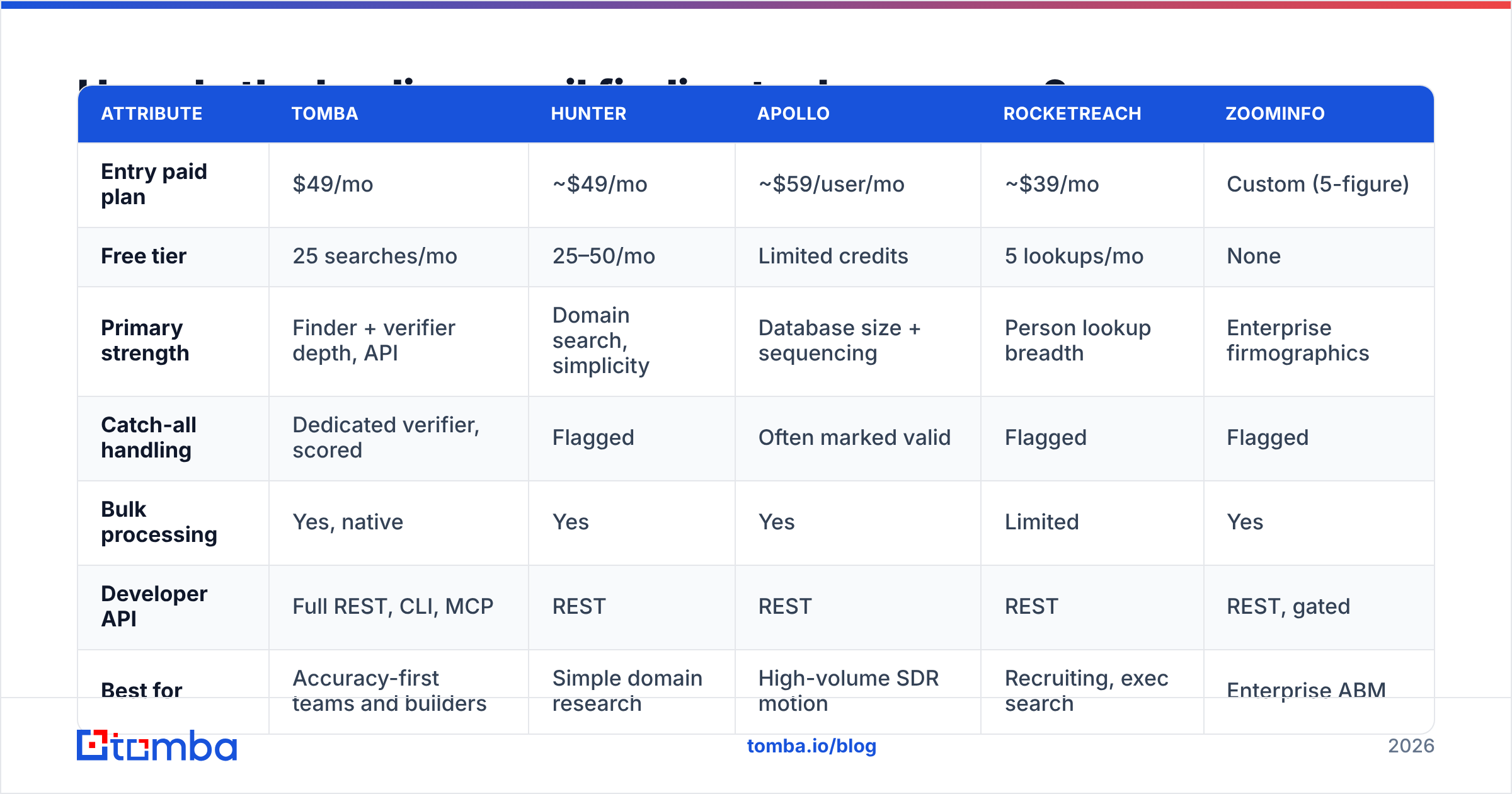
Here's how the major options line up on the attributes that change buying decisions. Prices are list rates as of early 2026 and move often — verify before you commit.
| Attribute | Tomba | Hunter | Apollo | RocketReach | ZoomInfo |
|---|---|---|---|---|---|
| Entry paid plan | $49/mo | ~$49/mo | ~$59/user/mo | ~$39/mo | Custom (5-figure) |
| Free tier | 25 searches/mo | 25–50/mo | Limited credits | 5 lookups/mo | None |
| Primary strength | Finder + verifier depth, API | Domain search, simplicity | Database size + sequencing | Person lookup breadth | Enterprise firmographics |
| Catch-all handling | Dedicated verifier, scored | Flagged | Often marked valid | Flagged | Flagged |
| Bulk processing | Yes, native | Yes | Yes | Limited | Yes |
| Developer API | Full REST, CLI, MCP | REST | REST | REST | REST, gated |
| Best for | Accuracy-first teams and builders | Simple domain research | High-volume SDR motion | Recruiting, exec search | Enterprise ABM |

Reading this table honestly: if your motion is "spray a persona list and sequence it," a database platform like Apollo gives you volume and sending in one place, and the data quality trade-off may be acceptable. If your motion is "reach 40 named accounts and every bounce costs credibility," you want a finder that leads with verification, and you'll assemble sending separately. If you're an enterprise with an ABM budget, ZoomInfo's firmographic depth is genuinely hard to replicate — at a price that rules it out for most teams.
Tomba sits deliberately in the accuracy-first lane: a Tomba Email Finder backed by a real email verifier, domain search for mapping a company's whole contact surface, and a documented API with CLI and MCP access for teams who'd rather script it than click it. Starter is $49/mo, Growth $99/mo, Pro $249/mo, with a free tier at 25 searches so you can test before paying — full Tomba pricing is public rather than demo-gated.
When do you not need an email finding tool?#
Three situations where buying one is the wrong move:
- Your list is under 50 contacts a month. Manual research plus a free email checker covers you. Don't buy a platform for a problem a browser tab solves.
- Your bounce problem is actually a deliverability problem. If you're finding good addresses and still landing in spam, the issue is authentication, warmup, or content — not data. Fix SPF and DKIM before you switch data vendors.
- You're targeting a market with weak digital footprint. Some regions and industries simply aren't well covered by any Western data vendor. No amount of tool-switching fixes coverage that doesn't exist; partner data or manual research is the honest answer.
How do you test an email finding tool in 30 minutes?#
Skip the demo. Run this instead — it's the only evaluation that uses your data.
- Build a 200-row control set. Pull real names and domains from your ICP, ideally including 30–40 contacts whose addresses you already know are correct. Those are your ground truth.
- Run the same file through 2–3 tools on their free tiers or trials. Same file, same day, no cherry-picking.
- Measure hit rate — how many rows came back with an address. Record it per tool.
- Measure precision against ground truth — of the contacts you already knew, how many did each tool get exactly right? This catches pattern-guessers immediately; they'll return a plausible-but-wrong format for the people whose real address is an exception.
- Send a low-volume seed test to 50 addresses from each tool via a warmed domain and record the bounce rate. Under 2% is healthy. Over 5% means the tool marked guesses as valid.
- Compute true cost per usable contact using the formula above and pick on that number, not on the pricing page.
Two hours of setup, and you'll know more than any analyst report will tell you. Keep the control file — rerun it every six months, because vendor quality genuinely drifts as data sources and crawl budgets change.
If you want to run step 2 at volume, a bulk email finder that accepts a CSV and returns statuses per row makes the whole test a single upload rather than 200 manual lookups.
What's changing in email finding for 2026?#
Three shifts worth planning around:
- Verification is getting harder, not easier. More providers are rate-limiting or silently accepting SMTP probes, which pushes tools toward inference and confidence scoring instead of binary answers. Expect "valid/invalid" to be replaced by graded confidence across the category — and treat any vendor still claiming binary certainty on catch-all domains with suspicion.
- Bulk-send tolerance keeps tightening. Google and Yahoo's bulk-sender requirements set a 0.3% spam-complaint threshold, and both have kept enforcement pressure on since. That makes list hygiene a deliverability control, not a data-quality nicety — bad addresses now cost you sending capacity, not just wasted credits.
- Agent-driven prospecting is arriving. Finder APIs exposed through MCP and CLI mean an agent can research an account, find contacts, verify them, and draft outreach in one pass. Tools without a clean programmatic surface will get squeezed out of these workflows regardless of how good their UI is.
Getting started#
Pick your category first, then your vendor, then prove it on your own 200 rows. That order saves more money than any discount code.
If accuracy and verification depth are what you're optimizing for — and you want an API you can automate against rather than a seat-based UI — start with the Tomba Email Finder. The free tier gives you 25 searches a month, which is enough to run a meaningful slice of the bake-off above before you spend anything. Load your control file, check the hit rate against contacts you already know, and let the numbers decide.
Related guides#
Ready to find emails that actually work?
Join 150,000+ professionals who stopped guessing and started sending. Free credits on signup — no credit card required.
Get the Tomba newsletter
Practical outbound tactics and product updates — once every two weeks.
About the author