Email Follow Up App: How to Pick the Right One in 2026
Most reply-rate problems are follow-up problems. Here's how email follow-up apps actually differ on sequencing, deliverability, data quality and price — and which one fits your team size.
TL;DR
- An email follow up app automates the second, third and fourth touch of a sequence — the touches that produce most of your replies. First emails rarely close anything.
- The feature that separates good apps from bad ones is not the sequence builder. It's inbox rotation, sending limits, reply detection, and how gracefully the tool stops when someone responds.
- Price ranges from about $30/mo (Saleshandy, Mailshake) to $100+/seat/mo (Salesloft, Outreach). Paying more buys reporting and CRM depth, not better deliverability.
- No follow-up app fixes bad data. If 8% of your list bounces, sequencing that list just multiplies the damage across four sends instead of one.
- Verify first, sequence second. Clean the list with an email verifier, then let the follow-up app do what it's good at.
What is an email follow up app?#
An email follow up app is software that sends the next email in a sequence automatically, on a schedule, unless something stops it — a reply, a bounce, a meeting booked, or a manual pause.
Think of it like a dishwasher with a delay timer. You load it once (write the sequence), set when each cycle runs, and it works through the queue without you standing there. The value isn't that it washes better than you do. It's that it never forgets cycle three at 4pm on a Thursday when you're on a call.
That's the whole job. Every other feature — analytics, A/B testing, AI rewriting, CRM sync — sits on top of that core loop:
- Enroll a contact into a sequence, manually or via a trigger.
- Send step 1 at a chosen time in the recipient's timezone.
- Wait a defined number of business days.
- Check for a stop condition — reply, bounce, unsubscribe, deal-stage change.
- Send step 2 if nothing stopped it, and repeat until the sequence ends.
- Report on opens, replies, and (if wired to a CRM) pipeline created.
Where tools genuinely diverge is step 4. A sloppy reply-detection engine that keeps emailing someone who already said "not interested" costs you more reputation than any subject-line test will ever win back.
Why do follow-ups matter more than the first email?#
Because the first email is the one that gets ignored by default, not by decision.
Sales data from vendors and independent surveys has converged on the same rough shape for years: a meaningful share of replies to cold outbound arrive after the first message. Depending on whose data you read, follow-ups two through four account for somewhere between 40% and 70% of total replies in a well-built sequence. Even conservative reads put the majority of positive responses outside message one.
The mechanism is boring. Your prospect saw email one during a fire drill, mentally filed it under "maybe later," and never came back. Email three arrives on a calmer Tuesday. Nothing about your value proposition changed — only the timing did.
This is also why "just write a better first email" is bad advice in isolation. Copy quality has a ceiling. Persistence, sent politely and stopped promptly, has a higher one. If you want the numbers behind that behavior, the mechanics of response rate are worth understanding before you buy any tool.
What features actually matter in an email follow up app?#
Ignore the feature grid on the pricing page. These six things determine whether the tool helps or hurts.
- Reply detection that actually stops the sequence. Test it before you buy. Send yourself a sequence, reply from a different inbox with a one-word answer, and confirm step 2 never fires. Tools that only detect replies on the exact thread miss forwarded responses and out-of-office chains.
- Inbox rotation and per-inbox caps. Sending 400 emails/day from one mailbox is a reputation problem regardless of copy quality. Good apps spread volume across connected mailboxes and enforce a hard daily cap per inbox — typically 30–50 for a warmed domain.
- Native warmup or a clean warmup integration. Cold domains need weeks of ramp. Run the math with a warmup calculator before you promise your manager a launch date.
- Business-day and timezone logic. A three-day delay that lands on Saturday morning is a wasted touch. The app should skip weekends, respect local send windows, and let you exclude holidays.
- Bounce handling with automatic list suppression. When an address hard-bounces, the app must remove it everywhere — not just from the current sequence — and never re-enroll it.
- Bidirectional CRM sync. One-way push is a data-hygiene bomb. If a rep marks a contact "do not contact" in the CRM, the sequence needs to know within minutes, not on the next nightly job.
Everything else — AI subject lines, spintax, GIF support — is a nice-to-have. These six are the difference between a tool that compounds and one that quietly burns your domain.
Which email follow up app should you choose in 2026?#
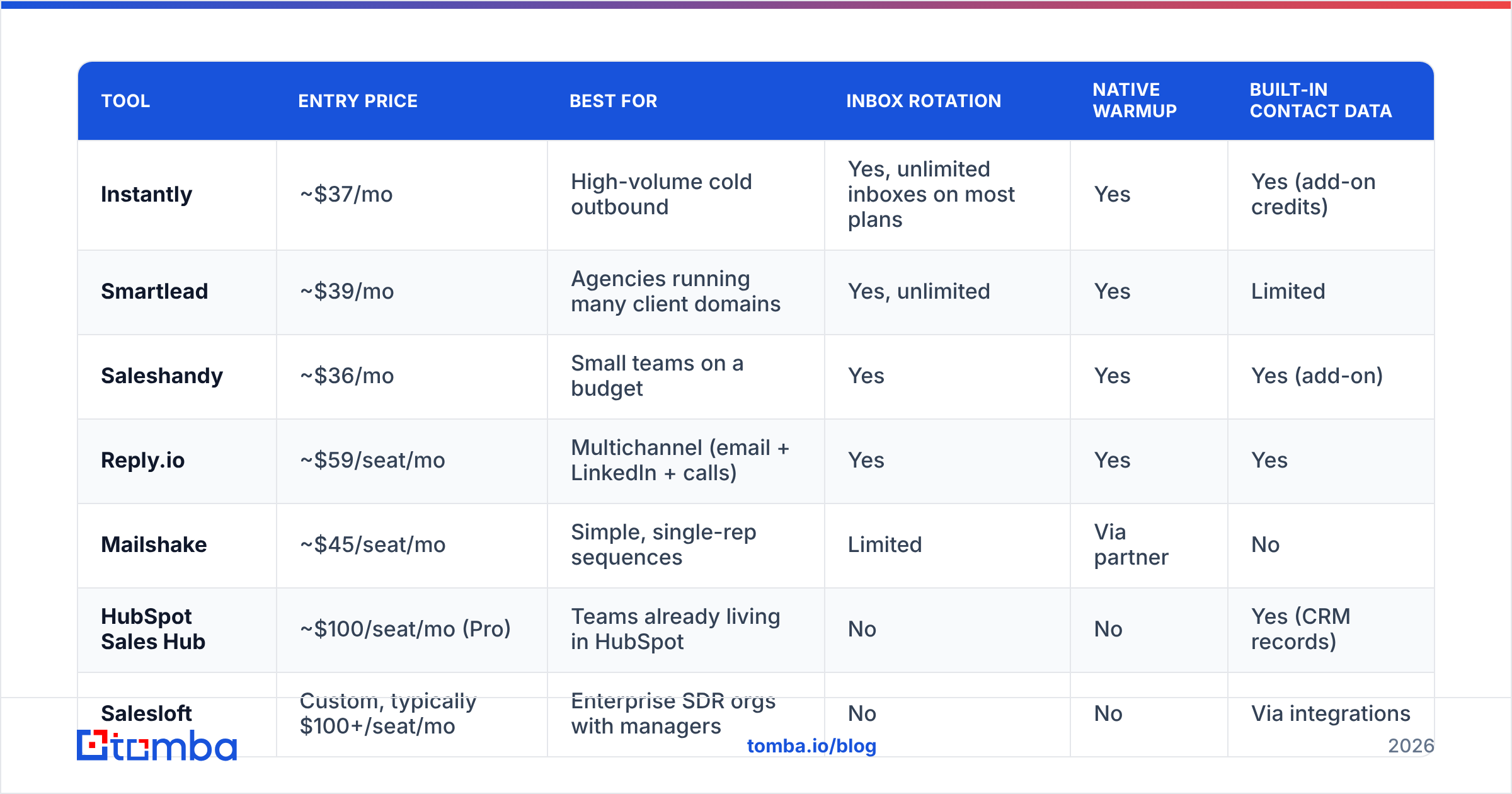
Here's the honest split. Prices are list prices at time of writing and change often; check each vendor before you commit.
| Tool | Entry price | Best for | Inbox rotation | Native warmup | Built-in contact data |
|---|---|---|---|---|---|
| Instantly | ~$37/mo | High-volume cold outbound | Yes, unlimited inboxes on most plans | Yes | Yes (add-on credits) |
| Smartlead | ~$39/mo | Agencies running many client domains | Yes, unlimited | Yes | Limited |
| Saleshandy | ~$36/mo | Small teams on a budget | Yes | Yes | Yes (add-on) |
| Reply.io | ~$59/seat/mo | Multichannel (email + LinkedIn + calls) | Yes | Yes | Yes |
| Mailshake | ~$45/seat/mo | Simple, single-rep sequences | Limited | Via partner | No |
| HubSpot Sales Hub | ~$100/seat/mo (Pro) | Teams already living in HubSpot | No | No | Yes (CRM records) |
| Salesloft | Custom, typically $100+/seat/mo | Enterprise SDR orgs with managers | No | No | Via integrations |
Read that table as two clusters, not seven options.
Cluster one — cold outbound engines (Instantly, Smartlead, Saleshandy). Built for sending a lot of email from a lot of mailboxes to people who don't know you. Cheap per seat, strong on rotation and warmup, weak on pipeline reporting and manager visibility.
Cluster two — sales engagement platforms (Reply.io, HubSpot, Salesloft, Outreach). Built for reps working warm-ish lists inside a CRM. Expensive per seat, strong on activity reporting, call logging and forecasting — but with conservative sending architecture that assumes you're emailing 40 people a day from one mailbox, not 400 from ten.
Buying cluster two for cold outbound is the most common and most expensive mistake teams make. You pay $100/seat for reporting you don't need, then hit sending limits that force you into a second tool anyway. If you're currently on one and feeling the squeeze, the Salesloft alternative and Instantly alternative breakdowns cover the migration trade-offs in more detail.
How much does an email follow up app really cost?#
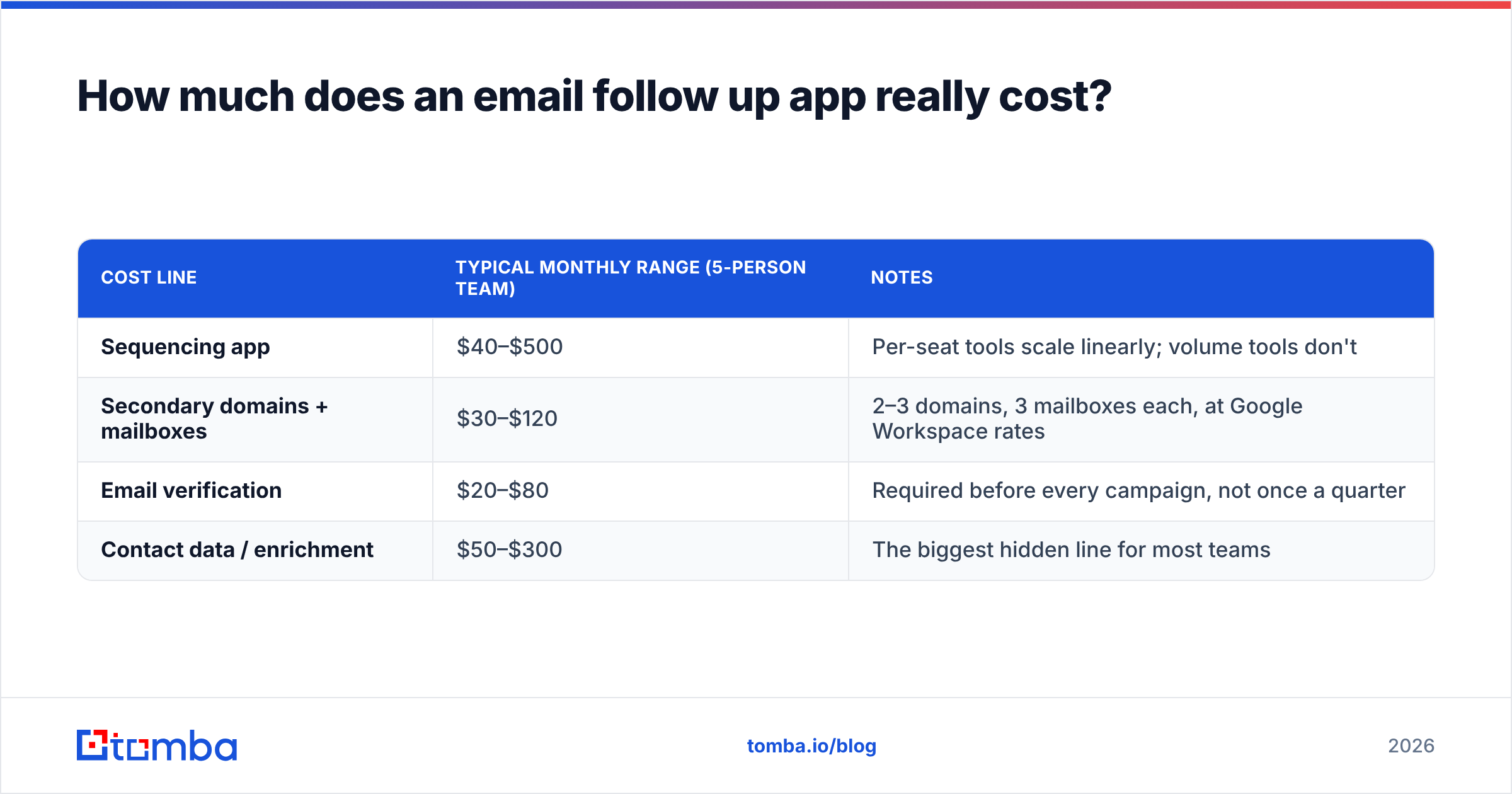
The sticker price is roughly a third of the total. Budget for all four lines:
| Cost line | Typical monthly range (5-person team) | Notes |
|---|---|---|
| Sequencing app | $40–$500 | Per-seat tools scale linearly; volume tools don't |
| Secondary domains + mailboxes | $30–$120 | 2–3 domains, 3 mailboxes each, at Google Workspace rates |
| Email verification | $20–$80 | Required before every campaign, not once a quarter |
| Contact data / enrichment | $50–$300 | The biggest hidden line for most teams |
A team spending $39/mo on Smartlead and $0 on data quality is not saving money. They're deferring the cost into bounce rate, and bounces are paid in domain reputation, which you cannot buy back with a credit card.
Compare that to a stack where the data layer is explicit. Tomba pricing starts free at 25 searches/mo, then $49/mo (Starter), $99/mo (Growth), and $249/mo (Pro) — so a five-person team running steady outbound lands around $99/mo for finding and verifying, plus whatever the sequencer costs. That's the honest shape of the budget.
If you buy prebuilt lists instead of building them, providers like BookYourData sell verified B2B contacts on a per-record basis, which suits teams that need a specific ICP slice fast rather than a continuous research motion. Both approaches work; they just fail differently. Prebuilt lists go stale on a clock, self-built lists cost you research time.
Does your follow-up app protect deliverability — or quietly wreck it?#
It can do either, and the difference comes down to what you feed it.
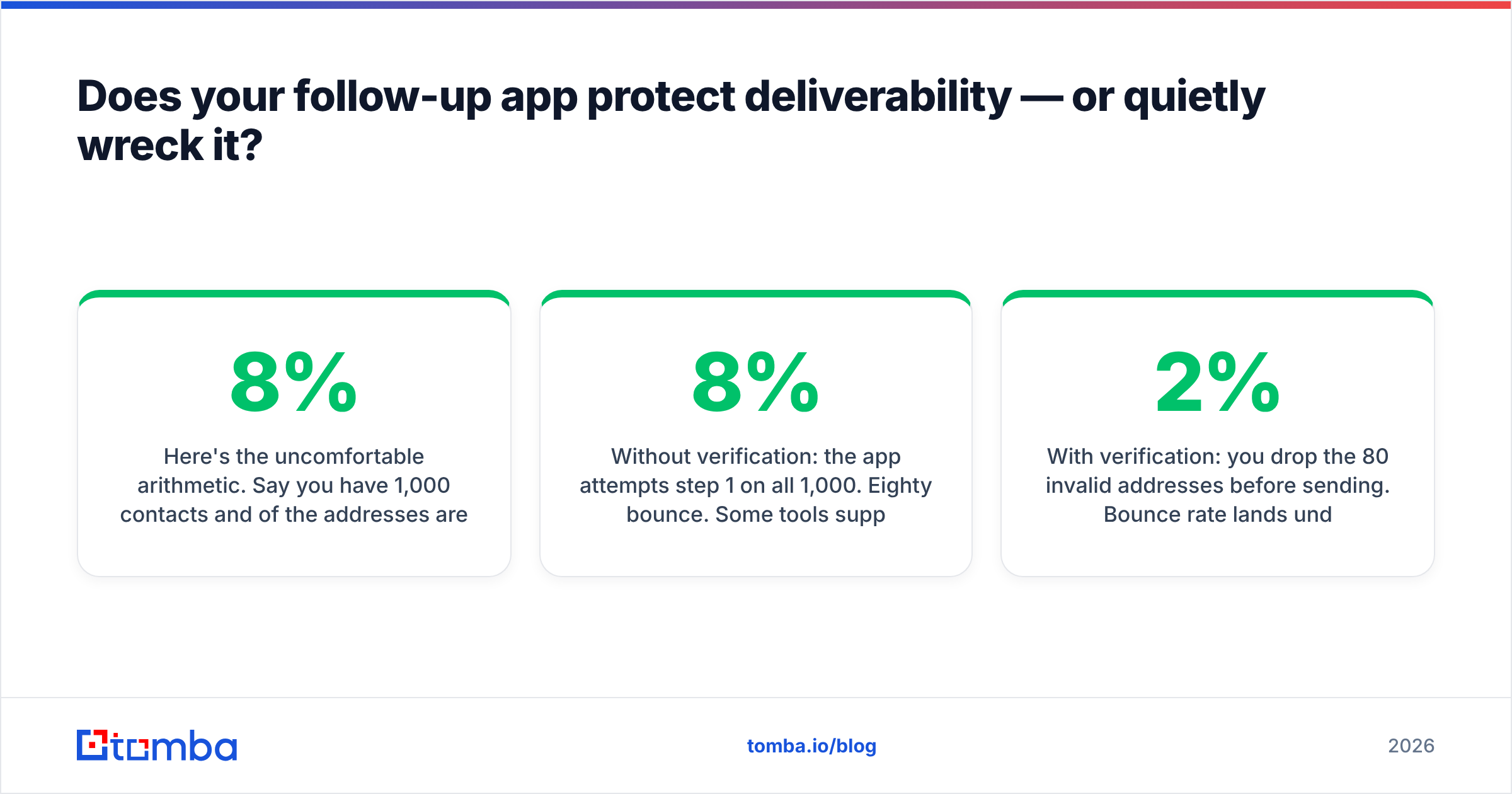
Here's the uncomfortable arithmetic. Say you have 1,000 contacts and 8% of the addresses are invalid — a normal rate for a scraped or 12-month-old list. You run a four-step sequence.
- Without verification: the app attempts step 1 on all 1,000. Eighty bounce. Some tools suppress those contacts, some retry across steps. Your bounce rate for that campaign sits near 8%, which is well above the ~2% threshold most mailbox providers treat as a spam signal.
- With verification: you drop the 80 invalid addresses before sending. Bounce rate lands under 2%. Same copy, same sequence, same app — and the mailbox provider now reads your domain as legitimate rather than as a list scraper.
The follow-up app didn't change. The input did. This is why "which sequencer has the best deliverability?" is close to the wrong question. Sequencers differ on rotation and throttling, which matters at the margin. They do not differ on whether the address exists.
Practical order of operations:
- Find or import contacts.
- Verify every address — including catch-all domains, which most cheap verifiers mark "unknown" and skip.
- Warm the sending domains for 2–4 weeks before real volume.
- Load the clean list into the follow-up app.
- Cap volume per inbox and rotate.
Skipping step 2 is the single most common reason a team concludes "cold email doesn't work anymore." For the underlying concepts, the email deliverability primer is a reasonable 10-minute read.
How many follow-ups should a sequence have?#
Four to six touches over two to three weeks, then stop.
That range holds up across most B2B contexts for one reason: touches one through four capture nearly all the "I was busy" replies, and touches seven through twelve mostly capture spam complaints. Every additional touch past six has a worse ratio of positive replies to unsubscribes than the one before it.
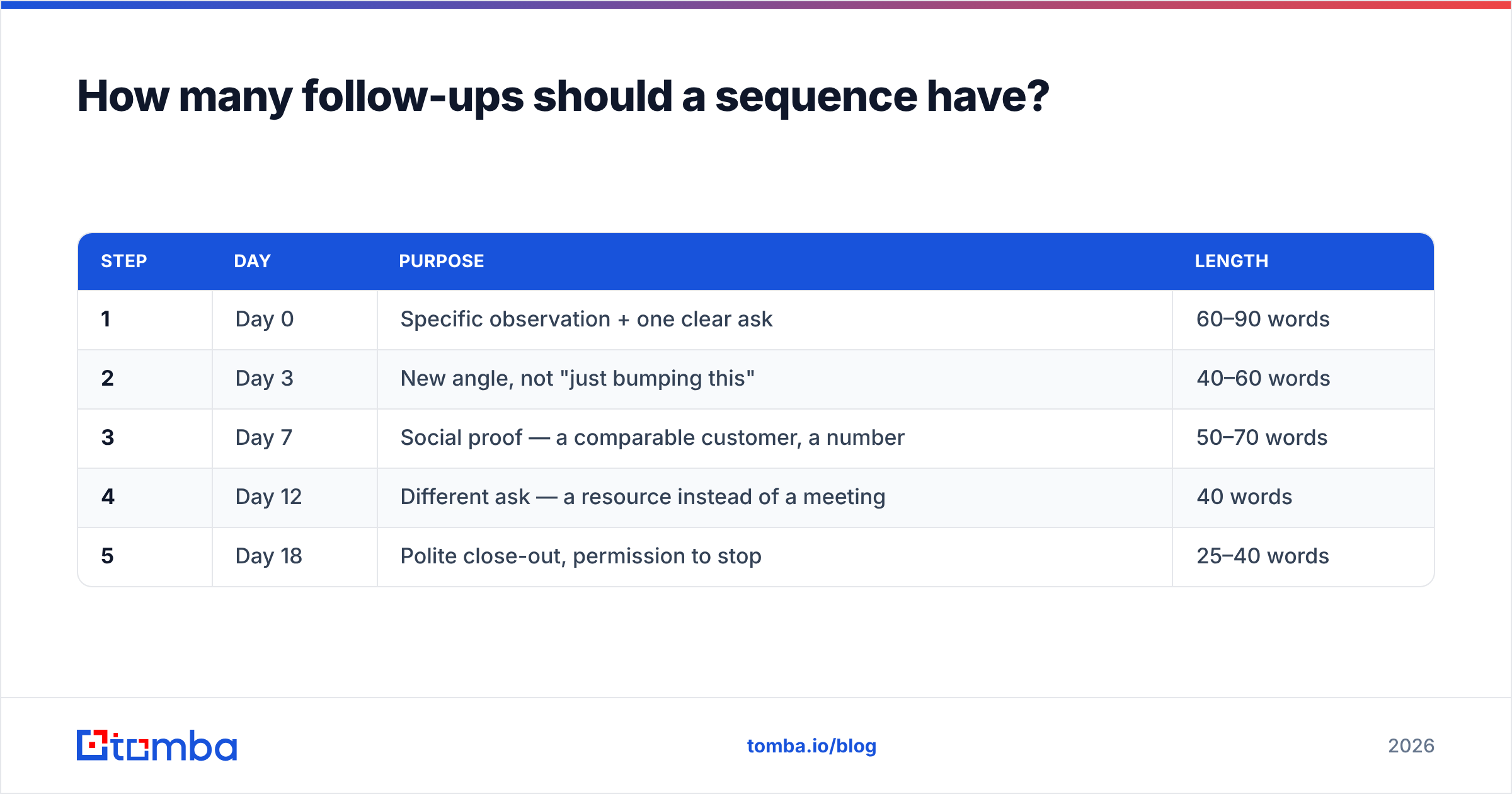
A workable default spacing:
| Step | Day | Purpose | Length |
|---|---|---|---|
| 1 | Day 0 | Specific observation + one clear ask | 60–90 words |
| 2 | Day 3 | New angle, not "just bumping this" | 40–60 words |
| 3 | Day 7 | Social proof — a comparable customer, a number | 50–70 words |
| 4 | Day 12 | Different ask — a resource instead of a meeting | 40 words |
| 5 | Day 18 | Polite close-out, permission to stop | 25–40 words |
Two rules that matter more than the spacing:
Never send a content-free bump. "Following up on my last email" adds nothing and signals automation. Each step should carry one new piece of information — a customer example, a relevant trigger event, a specific number.
Make the last email a real close-out. "I'll assume the timing isn't right and stop here — happy to reconnect if that changes." It reads as respectful, and in practice it pulls a surprising number of replies from people who felt vaguely guilty about ignoring you.
If you want starting points rather than blank pages, the cold email templates library covers the standard sequence shapes.
How do you make an automated sequence not read as automated?#
Three levers, in order of impact.
Personalize the first line with something verifiable. Not "I loved your post" — a specific claim you could defend if challenged. A recent funding round, a job posting for a role your product supports, a change to their pricing page. Follow-up apps let you merge custom fields; the field is only as good as the research behind it.
Vary structure, not just words. Spintax that swaps "Hi" for "Hey" fools no one. What actually breaks the pattern is sending step 3 as a two-sentence question with no signature block, when steps 1 and 2 were formatted paragraphs.
Send from a real person with a real signature. No tracking pixels on every step (they inflate perceived formality and can hurt deliverability), no unsubscribe footer that looks like a newsletter on a one-to-one sales email, no images. Plain text performs better and looks like what it claims to be.
The counterintuitive part: heavy AI personalization often reads worse than light manual personalization, because the AI reaches for detail that's technically true but obviously scraped. A human writing "saw you're hiring three AEs in EMEA" beats a model writing four sentences about the company's mission statement.
What mistakes should you avoid when you switch tools?#
- Migrating a dirty list. A tool change is the best possible moment to re-verify everything. Addresses decay at roughly 2–3% per month as people change jobs.
- Turning on all sequences at full volume on day one. New app, new sending infrastructure, same domain — ramp over two weeks.
- Leaving the old tool connected to the same mailboxes. Two schedulers on one inbox means duplicate sends, and duplicate sends to the same prospect are unrecoverable.
- Not testing stop conditions in production. Run one real sequence with three internal addresses before you enroll 500 prospects.
- Buying on the demo instead of the trial. Every sequence builder demos beautifully. The differences show up in reply detection and bounce handling, which you can only see with live traffic.
For a broader view of how the category is priced and rated by actual buyers rather than vendors, the G2 sales engagement category and HubSpot's sales tools documentation are both useful sanity checks against marketing copy. If you're leaning toward the high-volume cluster, Instantly's own docs spell out their sending caps clearly enough to compare against competitors.
Which setup makes sense for your team?#
- Solo founder, under 500 contacts/month: Saleshandy or Mailshake, one domain, manual research. Total cost under $100/mo.
- 2–5 person outbound team: Instantly or Smartlead, 2–3 secondary domains, a dedicated data and verification layer. $200–$400/mo all-in.
- SDR team inside a CRM-heavy org: Reply.io if you need multichannel, HubSpot Sales Hub if the CRM is already HubSpot. Accept the lower sending ceiling and compensate with better targeting.
- Agency running client campaigns: Smartlead, for the client-workspace model and unlimited mailboxes.
In all four cases, the sequencer is the cheap part and the interchangeable part. The list is neither.
Start with the data layer, not the sequencer#
Pick whichever follow-up app matches your volume and budget — the differences between the good ones are real but modest. Then spend your attention where the leverage actually is: on whether the addresses in the sequence belong to real people at real companies who match your ICP.
That's what the Tomba Email Finder is for. Find verified professional addresses by domain, name, or company, confirm them before a single follow-up fires, and push a clean list into whichever sequencer you chose. Start free with 25 searches a month, or run it at scale through the Tomba API if your enrichment is automated. Your follow-up app will look a lot smarter when it stops emailing addresses that were never going to receive anything.
Related guides#
Ready to find emails that actually work?
Join 150,000+ professionals who stopped guessing and started sending. Free credits on signup — no credit card required.
Get the Tomba newsletter
Practical outbound tactics and product updates — once every two weeks.
About the author