Email Gen in 2026: How Email Address Generators Work
An email gen turns a name and a domain into every plausible address in under a second. The catch: most of those addresses do not exist. Here is how to use one without wrecking your sender reputation.
TL;DR
- An email gen (email generator or permutator) takes a first name, last name, and domain, then outputs every plausible address combination —
john.doe@acme.com,jdoe@acme.com,john@acme.com, and roughly 20 more. - Generation is a guess, not a lookup. Typical hit rates land between 5% and 15% per permutation on mid-size company domains unless you already know the company's format.
- Never send to a raw generated list. Every unverified permutation you mail is a coin flip against your sender reputation.
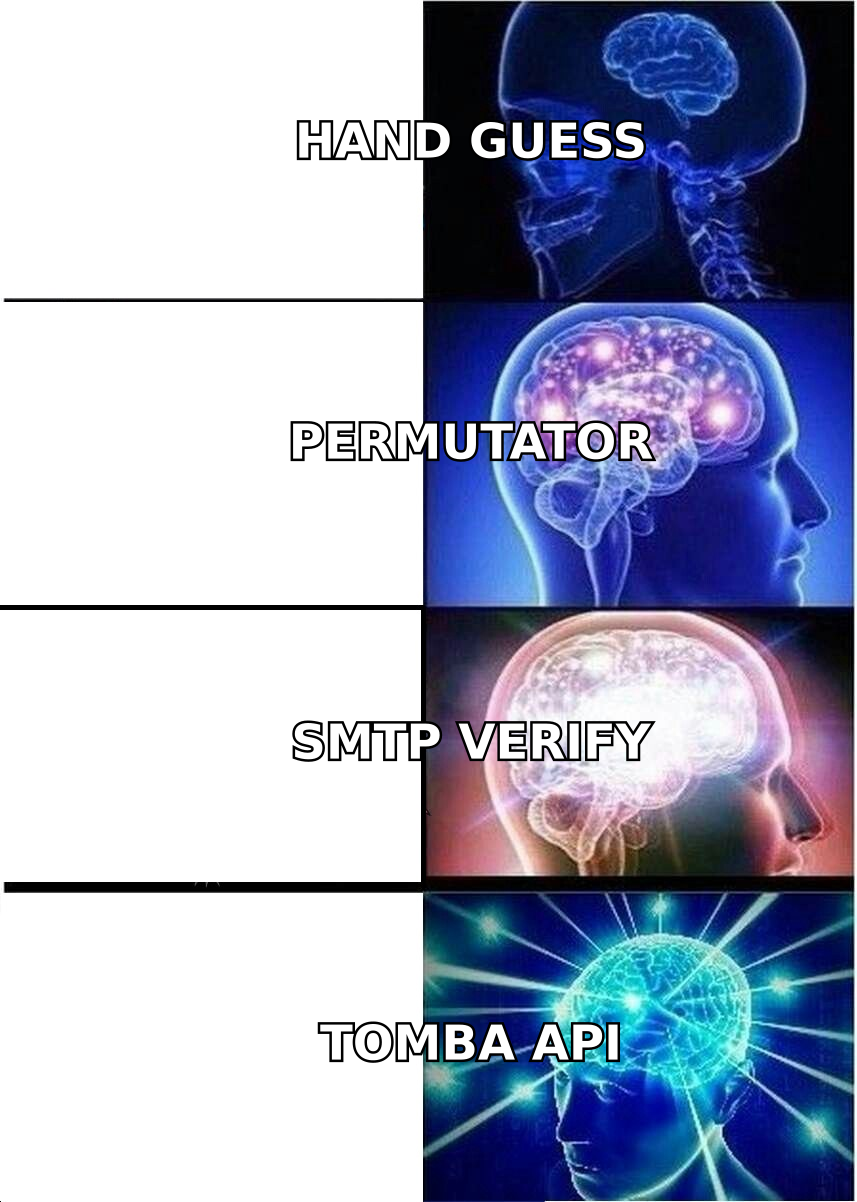
- The correct workflow is generate → detect pattern → verify → send, and most teams can skip the first two steps entirely by starting with a finder that already knows the pattern.
- Use an email gen for one-off manual research and edge-case domains. Use a finder plus verifier for anything at volume.
What is an email gen, exactly?#
An email gen is a tool that constructs email addresses from parts you already have — usually a person's name and their company domain — using known naming conventions.
Think of it like guessing a friend's apartment buzzer number when you know the street and their floor. You can narrow it to a handful of options fast, and one of them is probably right. But you still have to press buttons to find out, and pressing the wrong buzzer enough times gets you noticed by the building manager.
Technically, an email gen does string permutation. Feed it Sarah Chen and acme.com, and it emits:
sarah.chen@acme.com
sarahchen@acme.com
schen@acme.com
sarah.c@acme.com
sarah@acme.com
chen.sarah@acme.com
s.chen@acme.com
csarah@acme.com
That is the whole trick. No database, no crawl, no verification — just combinatorics against the local-part rules defined in the email address spec. A free email generator does this instantly and costs nothing, which is exactly why so many prospectors reach for one first.
The problem shows up at step two: you now have eight addresses and no idea which one is real.
How does an email gen actually build addresses?#
Under the hood, generators run a fixed set of transformation rules. Understanding them tells you which outputs to prioritize and which to discard.
- Full-name joins —
first.last,firstlast,first_last,first-last. Thefirst.lastpattern is the single most common corporate convention in North America and Western Europe, and it should always be your first test. - Initial compression —
flast,f.last,firstl,first.l. Heavily used by enterprises with 5,000+ employees where namespace collisions force shorter, more unique handles. - First-name only —
first@domain. Dominant at startups under roughly 50 people, and almost extinct above 500 because two Sarahs break it. - Reversed order —
last.first,lastf. Common in German, Nordic, and Japanese corporate mail systems. - Numeric disambiguation —
jsmith2,john.smith1. Rare in outbound-usable data, but real inside large orgs and university domains. - Locale-specific handling — accent stripping (
josé→jose), compound surname collapsing (van der Berg→vandenbergorvdberg), and hyphen removal. This is where most naive generators fail and produce addresses that were never possible.
The practical takeaway: a generator giving you 25 permutations is not being thorough, it is being lazy. Twenty of those are noise. An email permutator that ranks outputs by real-world frequency is worth more than one that dumps every mathematical combination.

Which email formats are actually worth generating?#
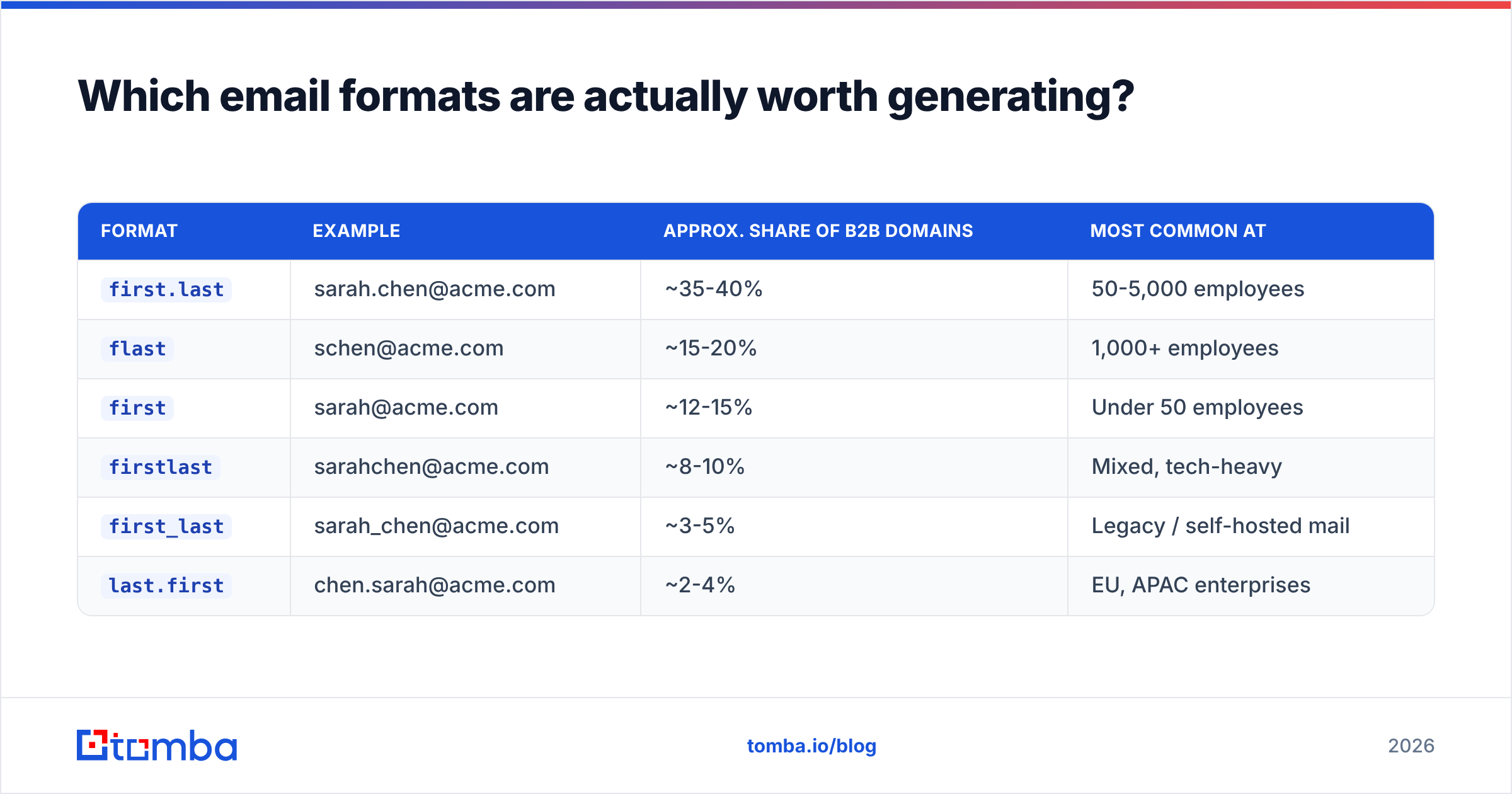
Not all permutations deserve equal treatment. Here is how the common formats break down by realistic frequency and by the company size where they show up most.
| Format | Example | Approx. share of B2B domains | Most common at |
|---|---|---|---|
first.last |
sarah.chen@acme.com | ~35-40% | 50-5,000 employees |
flast |
schen@acme.com | ~15-20% | 1,000+ employees |
first |
sarah@acme.com | ~12-15% | Under 50 employees |
firstlast |
sarahchen@acme.com | ~8-10% | Mixed, tech-heavy |
first_last |
sarah_chen@acme.com | ~3-5% | Legacy / self-hosted mail |
last.first |
chen.sarah@acme.com | ~2-4% | EU, APAC enterprises |
Treat those shares as directional, not gospel — they shift by region, industry, and mail provider. But the shape holds: three formats cover roughly two-thirds of B2B domains. If you are hand-testing generated addresses, test those three and stop.
Better still, resolve the format once per company instead of per person. A company email pattern check tells you that Acme uses first.last, and suddenly your email gen goes from 8 guesses to 1 confident address for every person at that company.
Is an email gen the same as an email finder?#
No, and confusing the two is the most expensive mistake in this workflow.
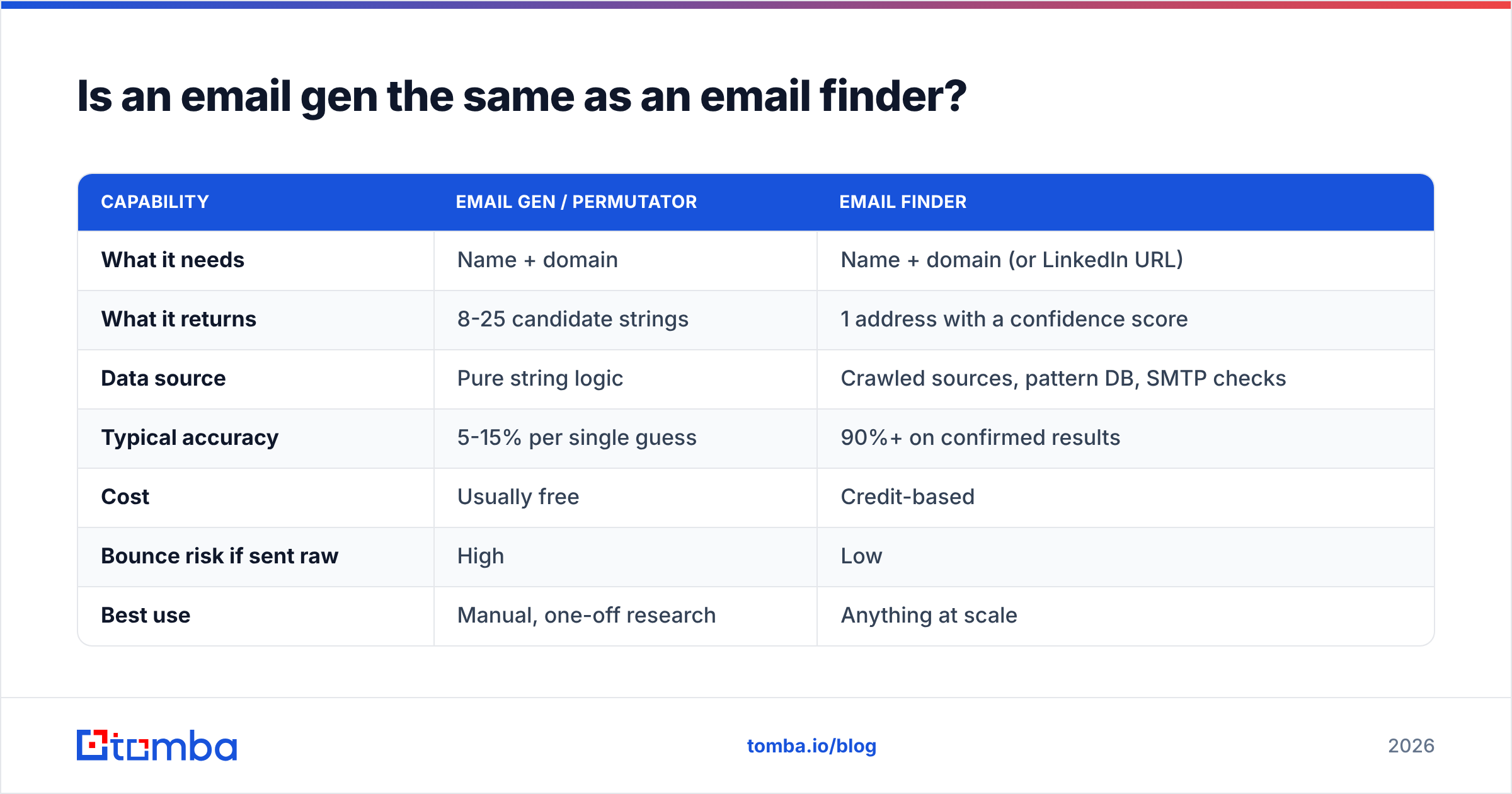
An email gen produces candidates. An email finder returns an address that has been observed, sourced, or pattern-confirmed against a real domain. One is a hypothesis, the other is evidence.
| Capability | Email gen / permutator | Email finder |
|---|---|---|
| What it needs | Name + domain | Name + domain (or LinkedIn URL) |
| What it returns | 8-25 candidate strings | 1 address with a confidence score |
| Data source | Pure string logic | Crawled sources, pattern DB, SMTP checks |
| Typical accuracy | 5-15% per single guess | 90%+ on confirmed results |
| Cost | Usually free | Credit-based |
| Bounce risk if sent raw | High | Low |
| Best use | Manual, one-off research | Anything at scale |
| Handles catch-all domains | No signal at all | Flags them explicitly |
The gap in the "bounce risk" row is the one that costs money. Sending to raw permutations means a large share of your volume hits addresses that never existed, and mailbox providers read that as a spam signal — not as a research process.
If you want the direct comparison of source-backed lookups against guesswork, an email finder query and a permutation list applied to the same 100 prospects will show the difference inside an hour.
What does a wrong generated address actually cost you?#
More than the credit you saved by not verifying it.
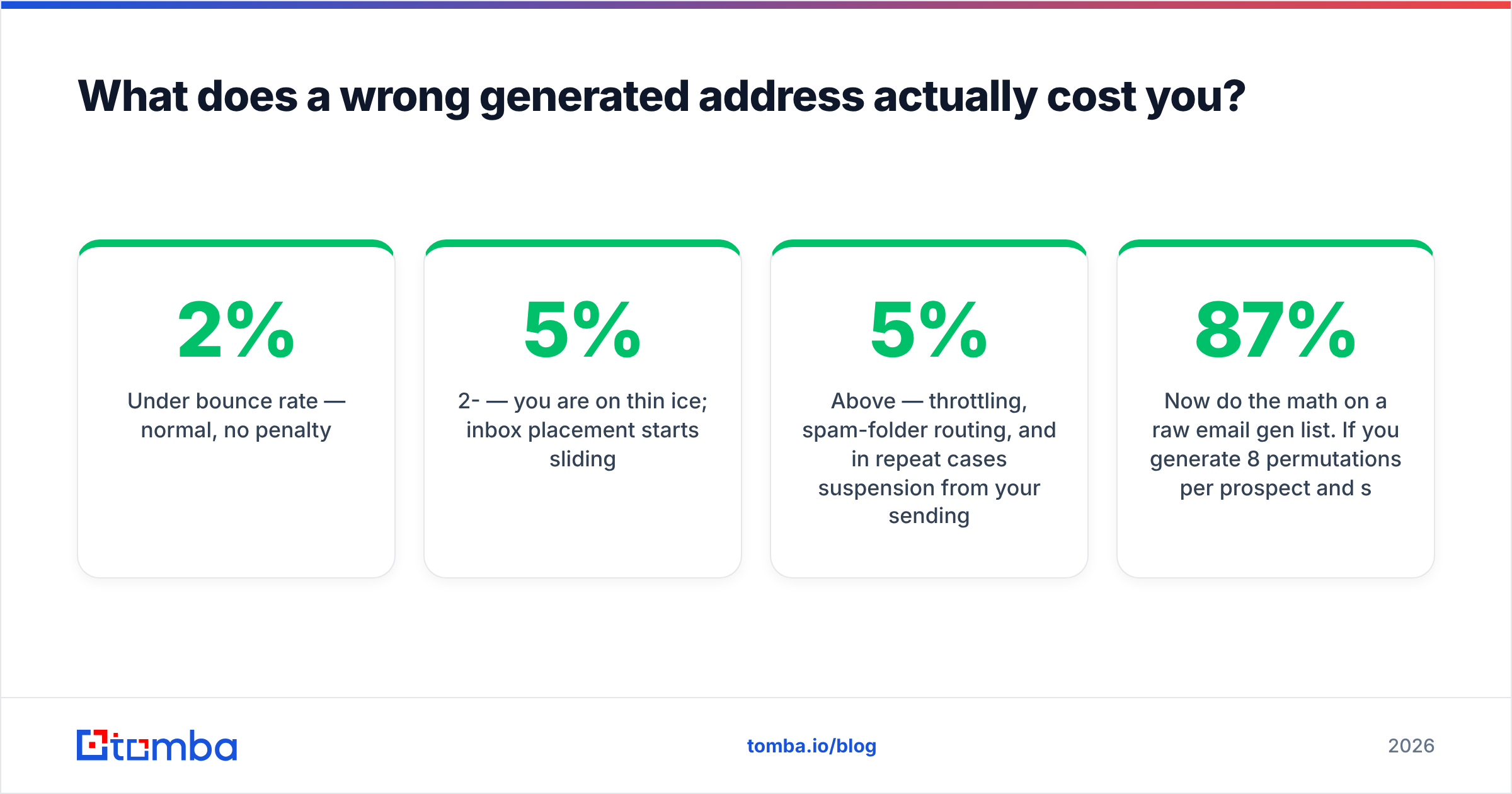
Mailbox providers track your hard-bounce rate as a proxy for list quality. The widely-cited operational thresholds:
- Under 2% bounce rate — normal, no penalty.
- 2-5% — you are on thin ice; inbox placement starts sliding.
- Above 5% — throttling, spam-folder routing, and in repeat cases suspension from your sending platform.
Now do the math on a raw email gen list. If you generate 8 permutations per prospect and send to all of them, 7 are wrong by construction — that is an 87% bounce rate. Even if you send to just your single best guess, a 12% hit rate on an unknown domain means you are bouncing 88% of that batch.
There is no version of "just send them all and see what sticks" that survives contact with modern filtering. Google and Microsoft both weight bounce history heavily in reputation scoring, and the damage compounds across every campaign on that domain. Sales teams that rebuild reputation after a bad send typically lose two to four weeks of pipeline — a point HubSpot's sales blog has hammered repeatedly in its outbound guidance.
The generator is not the problem. Sending unverified generator output is.
Email gen vs finder vs verifier: which tool for which job?#
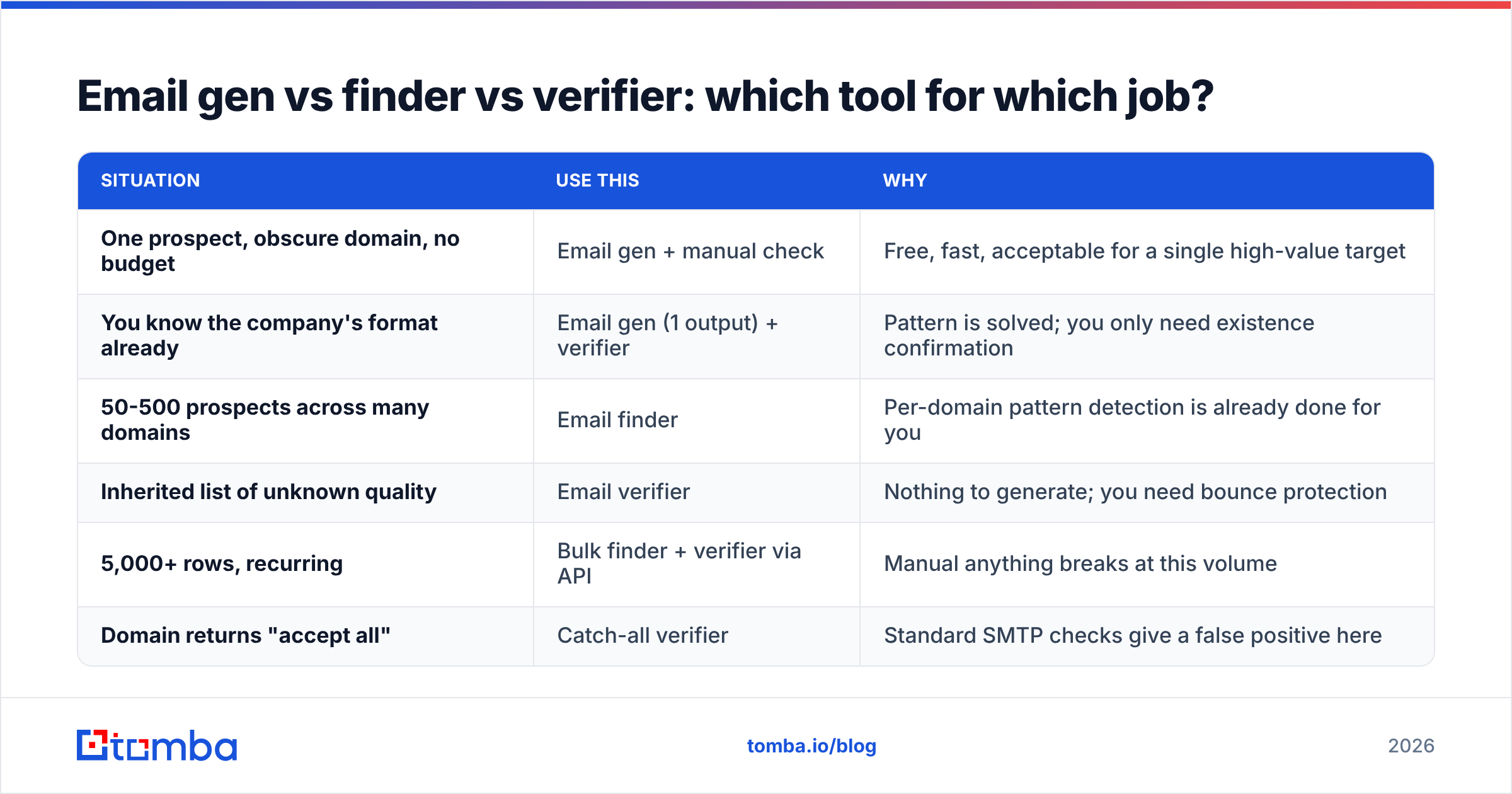
Each of these solves a different part of one pipeline. Running the wrong one for your situation is where budget leaks.
| Situation | Use this | Why |
|---|---|---|
| One prospect, obscure domain, no budget | Email gen + manual check | Free, fast, acceptable for a single high-value target |
| You know the company's format already | Email gen (1 output) + verifier | Pattern is solved; you only need existence confirmation |
| 50-500 prospects across many domains | Email finder | Per-domain pattern detection is already done for you |
| Inherited list of unknown quality | Email verifier | Nothing to generate; you need bounce protection |
| 5,000+ rows, recurring | Bulk finder + verifier via API | Manual anything breaks at this volume |
| Domain returns "accept all" | Catch-all verifier | Standard SMTP checks give a false positive here |
The catch-all row deserves a flag. Roughly one in five business domains accepts mail to any address, so a naive verifier returns "valid" for asdfghjkl@thatdomain.com. If your generated list is full of catch-all domains, your verification step is quietly lying to you. A dedicated catch-all verifier resolves those separately instead of marking them all deliverable.
How do you verify generated addresses without burning your domain?#
Verify at the protocol level, not with a live campaign. The sequence that keeps you safe:
- Deduplicate first. Strip identical outputs and addresses you already own. Free tools like a duplicate remover do this before you spend a single credit.
- Syntax and MX check. Kill malformed strings and domains with no mail exchanger. This is free and removes a surprising share of the list.
- Resolve the company pattern. One pattern lookup per domain collapses 8 candidates to 1. This is the highest-leverage step in the entire workflow.
- SMTP-level verification. An email verifier opens a handshake with the receiving server and asks whether the mailbox exists, without delivering a message. No inbox impact, no bounce recorded against you.
- Segment the greys. Catch-all and "unknown" results go into a separate, slower-drip segment — not into your main sequence.
- Send in warmed batches. Even a clean list should not go out at 500/day from a cold domain.
Steps 3 and 4 are where an email gen stops being a liability and becomes a legitimate research tool. Generation gives you the hypothesis space; verification collapses it to one answer.
When should you skip the email gen entirely?#
Skip it whenever the address already exists in a source you can query. Specifically:
- The prospect writes publicly. Bylines, changelogs, and documentation pages carry contact data. An author finder pulls it directly rather than guessing.
- You have a LinkedIn URL. Profile-based lookups resolve identity before format, which is more reliable than starting from a name string that may not match their work identity (nicknames, married names, transliterations).
- You need the whole company, not one person. A domain search returns the roster and the pattern in one call. Generating 8 permutations for each of 40 employees is 320 guesses to answer a question one query settles.
- The name is ambiguous. Compound surnames, non-Latin scripts, and shortened first names ("Bob" for "Robert") break permutation logic in ways no ruleset fully fixes.
- You are working at volume. Above a few hundred rows, the labor of triaging generator output costs more than the credits you were avoiding.
The honest framing: an email gen is a fallback, not a strategy. Vendors in the lead-intelligence space — reviewed side by side on G2's lead intelligence category — largely compete on how rarely you have to fall back to guessing.
What does a sane email gen workflow look like in 2026?#
Put together, the workflow that produces clean, sendable data:
- Start with identity, not name strings. A domain, LinkedIn profile, or company record beats a raw name every time.
- Resolve the pattern once per company. Cache it. You will hit the same domains repeatedly.
- Generate only for gaps. When the finder returns nothing, then permute — and only the top three formats.
- Verify everything before it enters a sequence. No exceptions, including addresses a finder returned with high confidence but that have aged in your CRM for six months.
- Route catch-alls separately. They are neither valid nor invalid; treat them as a distinct risk tier.
- Re-verify quarterly. B2B contact data decays somewhere between 20% and 30% a year through job changes alone.
Tool cost usually turns out to be the smallest variable here. Verification and lookup credits across the market run in the tens of dollars per month for individual reps — Tomba's plans, for reference, start with a free tier at 25 searches per month, then $49/mo Starter, $99/mo Growth, and $249/mo Pro. Set that against a two-week reputation recovery after a bad send and the arithmetic is not close.
Start with the address, not the guess#
If you are reaching for an email gen because you do not know the format, you are solving the problem one step too late. Run the name and domain through Tomba Email Finder first — it returns a single source-backed address with a confidence score instead of eight candidates you have to triage yourself, and it flags catch-all domains before they poison your verification results. Keep the permutator in your back pocket for the handful of obscure domains where nothing else works, verify whatever it produces, and send only what survives. Your bounce rate, and your domain, will be measurably better for it.
Related guides#
Ready to find emails that actually work?
Join 150,000+ professionals who stopped guessing and started sending. Free credits on signup — no credit card required.
Get the Tomba newsletter
Practical outbound tactics and product updates — once every two weeks.
About the author