Email Harvester: How It Works, Risks, and Legal Limits
An email harvester scrapes addresses off the open web in bulk. Here is exactly how the tools work, where they break the law, why the lists bounce, and what to use instead in 2026.
TL;DR
- An email harvester is any script, bot, or browser extension that scrapes email addresses from web pages, directories, and social profiles in bulk — no permission, no verification, no context.
- Harvesting is not automatically illegal, but using harvested addresses for unsolicited email almost always violates GDPR, and selling or using harvested lists carries aggravated penalties under CAN-SPAM.
- Harvested lists typically bounce at 15–40% because scraped pages are stale, role-based, or contain honeypot traps planted specifically to catch scrapers.
- A verified email finder solves the same job — getting a decision-maker's work address — with pattern inference plus SMTP validation, which is why bounce rates drop to the 1–3% range.
- If you already have a harvested list, do not import it into your sending tool. Deduplicate, verify, strip role accounts and catch-alls, then send only to what survives.
What Is an Email Harvester?#
An email harvester is a tool that automatically extracts email addresses from public sources at scale. Think of it like a metal detector on a public beach: it sweeps everything, keeps whatever beeps, and has no idea whether the object it found is a coin, a bottle cap, or someone's wedding ring.
The category covers a wide range of software with very different levels of sophistication:
- Regex crawlers — the oldest form. A bot fetches HTML and matches anything shaped like
name@domain.tld. Cheap, fast, and completely blind to whether the address is a real person, anoreply@, or a trap. - Browser extensions — sit on top of a page you are viewing (a directory, a member list, a social profile) and pull visible addresses into a CSV. Popular because they feel manual, but they are still harvesting.
- Directory and marketplace scrapers — target structured sources like business listings, conference attendee pages, association member directories, or app store developer pages.
- Social and profile scrapers — pull contact details from public profiles. These break most platform terms of service outright, which is a contractual risk on top of the privacy one.
- Bulk list compilers — vendors who harvest at industrial scale, merge sources, and resell the output as a "B2B database." The data is often years old and rarely re-permissioned.
The common thread is that harvesting collects addresses without any relationship to how the address is used. That distinction — collection method versus lawful basis for contact — is where most teams get into trouble. Wikipedia's overview of email address harvesting is a useful primer on the technique's spam-era origins, which is exactly the reputation problem it still carries.

How Does an Email Harvester Actually Work?#
Most harvesters follow the same four steps, and understanding them tells you exactly where the data quality collapses.
Step 1 — Seed and crawl. The tool takes a seed list of URLs or a search query, then follows links outward. Depth is usually capped at 2–3 levels because crawl cost explodes after that.
Step 2 — Pattern match. Every fetched page is scanned for email-shaped strings, mailto: links, and obfuscated variants like name [at] domain [dot] com. Better harvesters also de-obfuscate JavaScript-rendered addresses.
Step 3 — Deduplicate. Addresses are normalized (lowercase, strip plus-aliases) and deduped against what has already been collected in the run.
Step 4 — Export. Straight to CSV. This is the critical failure: there is no validation step. The tool has no idea whether the mailbox still exists, whether it belongs to the person you want, or whether it was ever a real mailbox at all.
That missing fourth step is the entire difference between a harvester and a professional data workflow. A modern email finder inverts the process — it starts from a known person and company, infers the address pattern for that domain, then confirms deliverability at the SMTP layer before returning a result with a confidence score.
Is Email Harvesting Legal in 2026?#
Short answer: collecting is a gray area, contacting is where you get fined.
Under GDPR, an email address tied to an identifiable person is personal data, whether or not it was published publicly. Scraping it is processing, and processing requires a lawful basis. "It was on their website" is not one. Legitimate interest can sometimes cover B2B outreach, but it requires a documented balancing test, a clear opt-out, and a privacy notice — none of which a scraping run produces on its own.
Under the US CAN-SPAM Act, harvesting is called out by name. The FTC's CAN-SPAM compliance guide confirms that penalties can be increased when the message was sent to an address obtained through automated harvesting or dictionary attacks. The base rules — accurate headers, honest subject lines, a working unsubscribe honored within 10 business days, a physical postal address — apply regardless.
Then there are the rules nobody sues over but everyone feels:
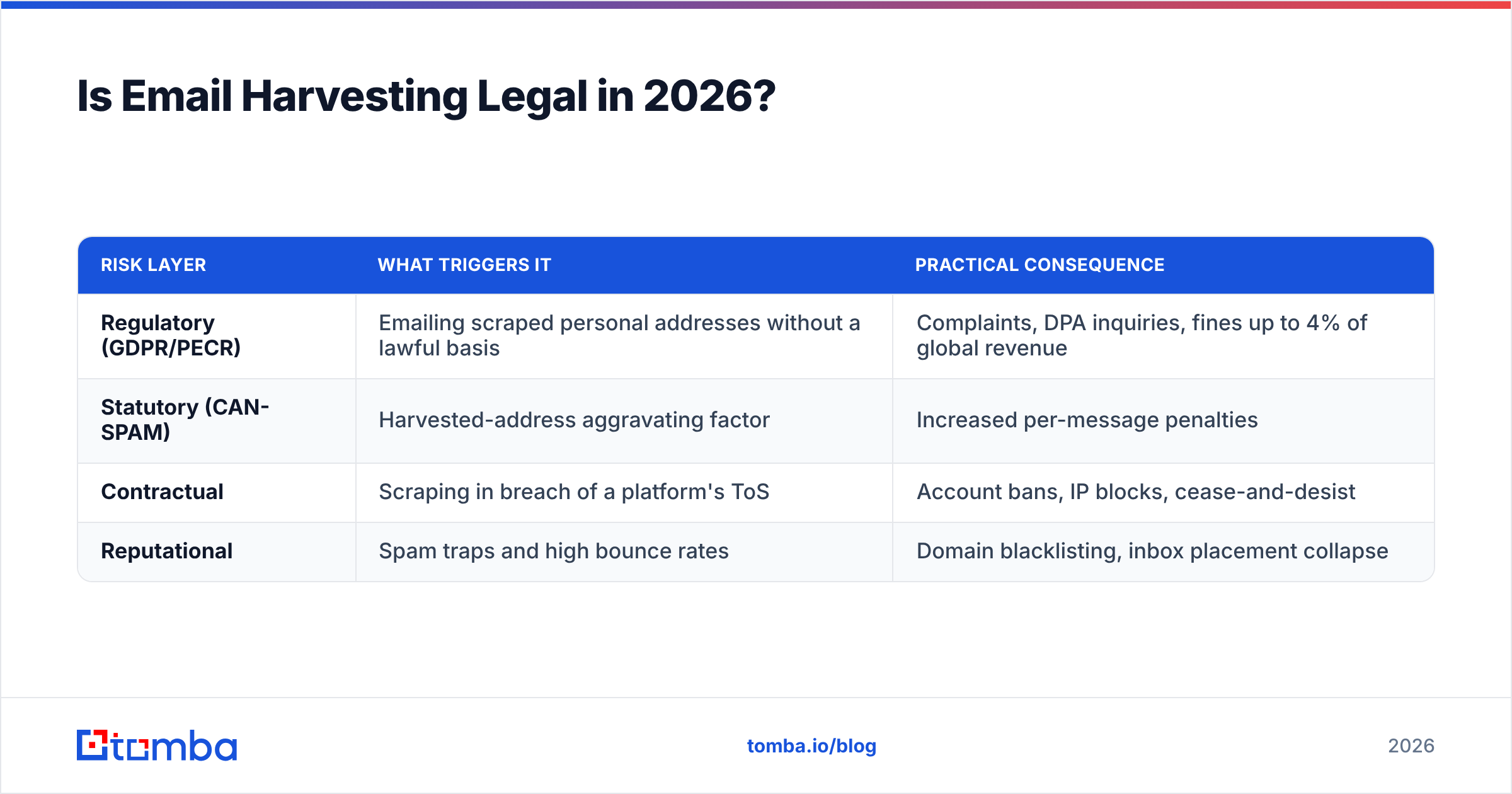
| Risk layer | What triggers it | Practical consequence |
|---|---|---|
| Regulatory (GDPR/PECR) | Emailing scraped personal addresses without a lawful basis | Complaints, DPA inquiries, fines up to 4% of global revenue |
| Statutory (CAN-SPAM) | Harvested-address aggravating factor | Increased per-message penalties |
| Contractual | Scraping in breach of a platform's ToS | Account bans, IP blocks, cease-and-desist |
| Reputational | Spam traps and high bounce rates | Domain blacklisting, inbox placement collapse |
The reputational layer is the one that kills pipelines fastest. Regulators are slow. Mailbox providers are not.
Why Do Harvested Lists Perform So Badly?#
Because the web is a graveyard of dead addresses, and a harvester cannot tell the difference between a living mailbox and a headstone.
Four failure modes dominate:
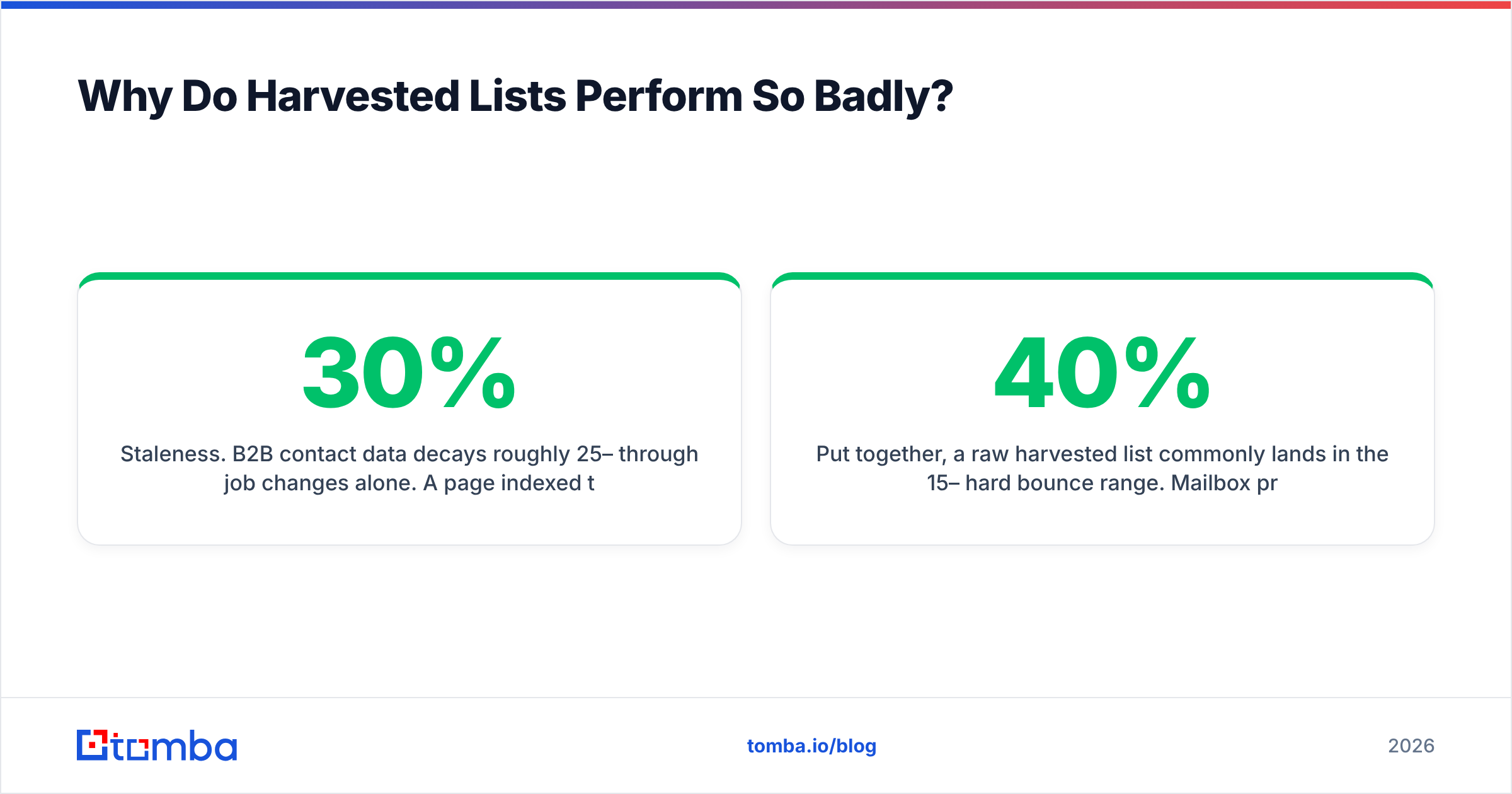
- Staleness. B2B contact data decays roughly 25–30% per year through job changes alone. A page indexed three years ago is mostly fiction today.
- Role accounts.
info@,sales@,support@,careers@dominate scraped output because they are the addresses companies publish. They route to shared inboxes with the lowest reply rates in outbound. - Spam traps. Blocklist operators plant addresses on pages specifically to catch crawlers. Hitting even a handful can get your sending domain listed. Run a blacklist checker before and after any risky campaign.
- Catch-all domains. Some servers accept every address at a domain, so a naive checker marks them all valid. They are not. This is why a dedicated catch-all verifier exists as a separate step.
Put together, a raw harvested list commonly lands in the 15–40% hard bounce range. Mailbox providers start throttling above roughly 2% and treat sustained 5%+ as a spam signal. You do not get a warning email; you get quiet deferral and a slow slide into the spam folder that also damages your legitimate campaigns.

Accuracy is not a vanity metric here. Every point of bounce rate compounds into sender reputation damage that takes weeks of careful warmup to reverse.
Email Harvester vs Email Finder: What's the Real Difference?#
They sound like synonyms. Operationally they are opposites: a harvester collects addresses and hopes; a finder targets a person and proves the address works.
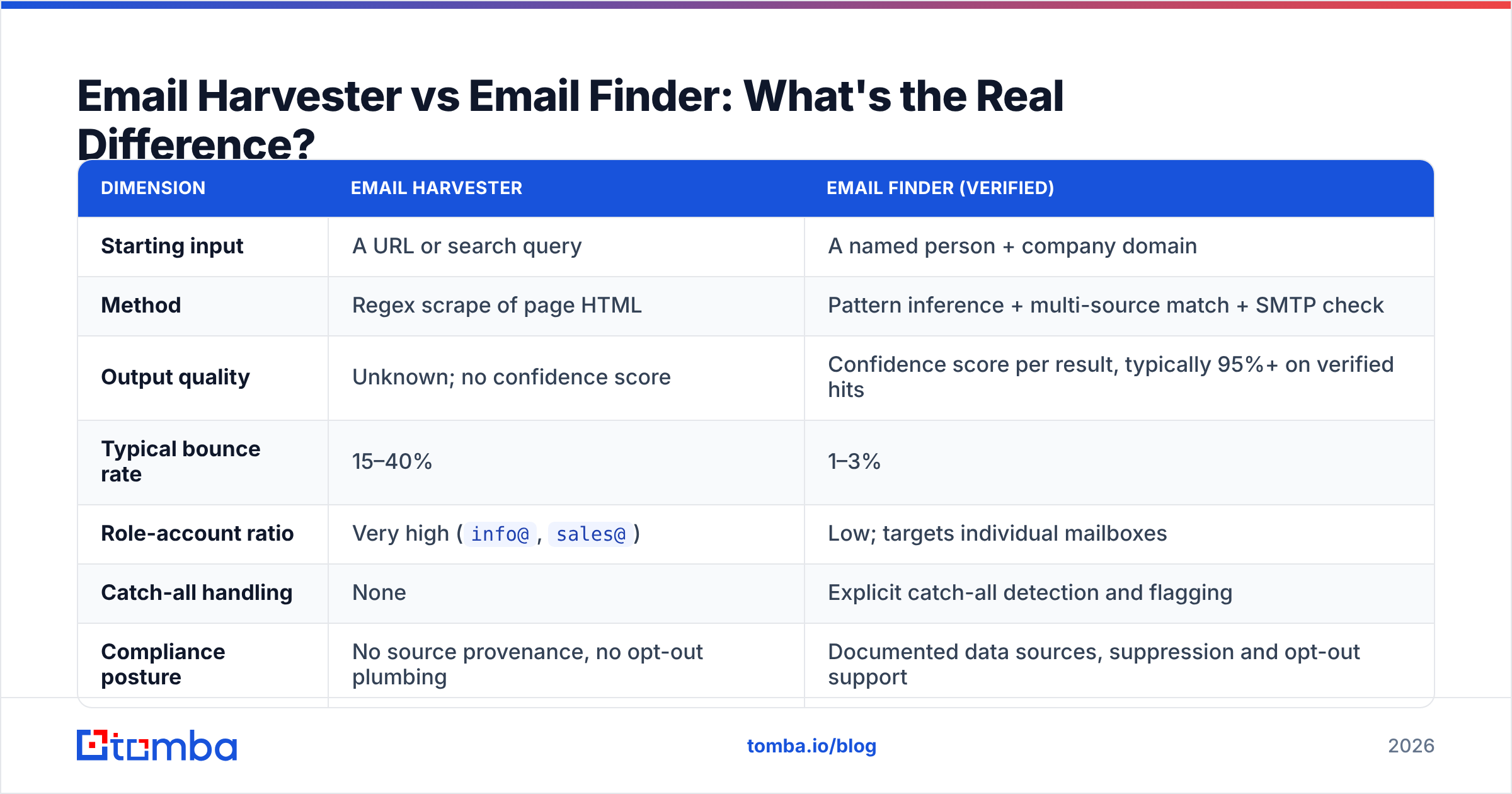
| Dimension | Email harvester | Email finder (verified) |
|---|---|---|
| Starting input | A URL or search query | A named person + company domain |
| Method | Regex scrape of page HTML | Pattern inference + multi-source match + SMTP check |
| Output quality | Unknown; no confidence score | Confidence score per result, typically 95%+ on verified hits |
| Typical bounce rate | 15–40% | 1–3% |
| Role-account ratio | Very high (info@, sales@) |
Low; targets individual mailboxes |
| Catch-all handling | None | Explicit catch-all detection and flagging |
| Compliance posture | No source provenance, no opt-out plumbing | Documented data sources, suppression and opt-out support |
| Cost model | Cheap or free upfront, expensive in deliverability | Credit-based; you pay per verified result |

The economics matter more than the ethics for most teams. A "free" harvester that produces 5,000 addresses at a 30% bounce rate costs you 1,500 hard bounces — enough to burn a sending domain you spent two months warming. A verified finder that returns 800 confirmed addresses out of the same target list will outperform it on replies while leaving your infrastructure intact.
Which Tools Should You Use Instead of a Harvester?#
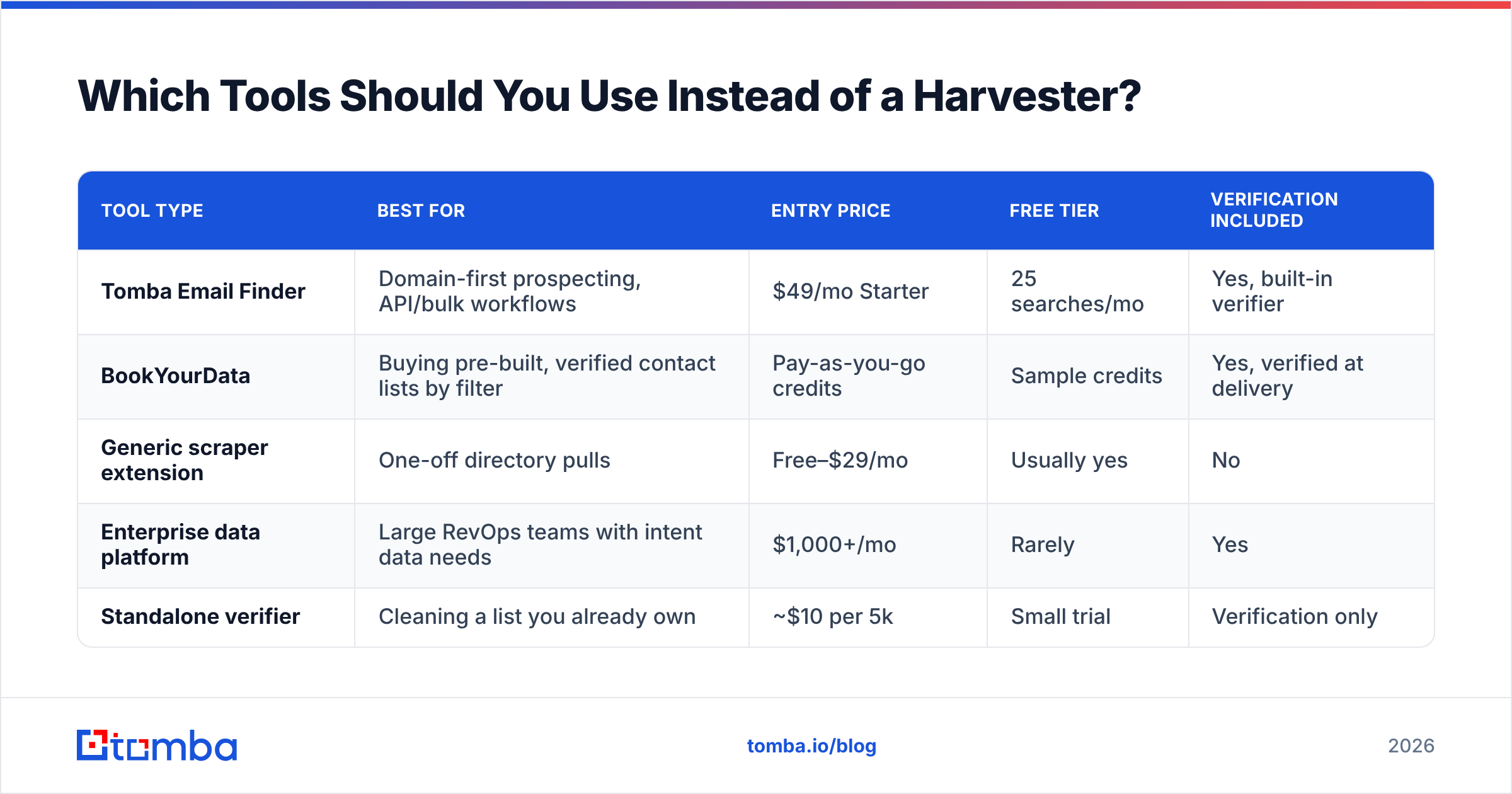
The replacement depends on where your target list comes from. Here is how the main options compare on the attributes that actually decide the purchase.

| Tool type | Best for | Entry price | Free tier | Verification included |
|---|---|---|---|---|
| Tomba Email Finder | Domain-first prospecting, API/bulk workflows | $49/mo Starter | 25 searches/mo | Yes, built-in verifier |
| BookYourData | Buying pre-built, verified contact lists by filter | Pay-as-you-go credits | Sample credits | Yes, verified at delivery |
| Generic scraper extension | One-off directory pulls | Free–$29/mo | Usually yes | No |
| Enterprise data platform | Large RevOps teams with intent data needs | $1,000+/mo | Rarely | Yes |
| Standalone verifier | Cleaning a list you already own | ~$10 per 5k | Small trial | Verification only |
A few notes on picking:
- If you know the company but not the person, use domain search to pull every discoverable mailbox on a domain with its pattern and confidence, rather than crawling the site yourself.
- If you need volume, a bulk email finder processes a CSV of names and domains in one pass and returns statuses per row — the same job a harvester pretends to do, with provenance attached.
- If you want lists rather than lookups, a verified list vendor like BookYourData is a legitimate path; you are buying data that has already been validated instead of scraping raw HTML yourself.
- If you are engineering the workflow, the Tomba API drops finding and verification directly into your enrichment pipeline so nothing enters your CRM unverified.
Tomba's tiers run Free (25 searches/mo), Starter $49/mo, Growth $99/mo, Pro $249/mo, and Enterprise custom — full Tomba pricing is public if you want to model cost per verified contact against your current bounce losses. Comparing vendor claims side by side on G2 is worth 20 minutes before you commit to any of them.
How Do You Clean a List You Already Harvested?#
If a scraped file is already sitting on your desktop, do not import it into your sending tool. Run it through this sequence first.
- Deduplicate and normalize. Lowercase everything, strip plus-aliases and whitespace. Use a remove duplicates pass before you spend a single verification credit.
- Strip obvious role accounts. Filter
info@,admin@,noreply@,webmaster@,abuse@,postmaster@. The last two are frequently monitored and complaining to them is a fast route to a blocklist. - Verify every remaining address. Run the file through an email verifier and keep only
valid. Discardinvalidandunknown— "unknown" is not a maybe, it is an untested risk. - Handle catch-alls separately. Flag them, and either drop them or send to them in a small, isolated batch on a secondary domain.
- Check your own domain health. Confirm your SPF record, DKIM, and DMARC are correct before the first send. A clean list on a misconfigured domain still lands in spam.
- Ramp slowly. Even a verified list should go out in increasing daily volumes, not in one 5,000-message blast.
Expect to lose 40–60% of a harvested file to this process. That is the point. The addresses you lose were going to bounce anyway; the only question was whether you found out before or after your domain took the damage.
What Should You Do Differently in 2026?#
Stop treating contact acquisition as a collection problem and start treating it as a verification problem.
The teams still using harvesters are optimizing for the wrong number — total addresses. The number that predicts pipeline is verified, individually-addressed contacts who match your ICP. Five hundred of those outperform fifty thousand scraped rows every single quarter, and they do it without putting your sending domain on a blocklist or your company in front of a data protection authority.
The practical shift is small: replace the crawl step with a targeted lookup, and add a verification gate that nothing bypasses. Everything downstream — deliverability, response rate, CRM hygiene, forecast accuracy — improves as a side effect.
Ready to swap the scraper for something that actually holds up? Start with the Tomba Email Finder. Give it a name and a domain, or just a domain, and get back verified work addresses with a confidence score on each one — 25 free searches a month, no scraping, no spam traps, no bounce cleanup afterward. Run your next 50 target accounts through it and compare the bounce rate to your last harvested campaign. The difference will make the decision for you.
Related guides#
Ready to find emails that actually work?
Join 150,000+ professionals who stopped guessing and started sending. Free credits on signup — no credit card required.
Get the Tomba newsletter
Practical outbound tactics and product updates — once every two weeks.
About the author