Email ID Finder: How to Find Anyone's Email Address in 2026
An email id finder can hand you a verified inbox in two seconds or a bounce that costs you a domain. Here's how the technology actually works, what accuracy to expect in 2026, and how the major tools compare on price and coverage.
TL;DR
- An email id finder resolves a person's name plus a company domain into their work email address. It is pattern inference plus source data plus verification — not a magic directory.
- Realistic accuracy in 2026 is 85–95% on well-indexed domains and much lower on small companies, catch-all domains, and personal addresses.
- The finder is only half the job. Every result needs verification before it enters a sending tool, or your bounce rate does the damage instead.
- Pricing clusters into three bands: free-with-credits (25–50 lookups), self-serve ($39–$99/mo), and sales-org platforms ($200+/mo per seat).
- Pick based on your actual workflow — bulk CSV, CRM sync, Chrome extension, or API — not on the headline accuracy number, which every vendor measures differently.
What is an email id finder?#
An email id finder is a tool that takes what you already know about a person — usually a full name and a company domain — and returns their professional email address. "Email ID" is how the search is phrased in India, the Gulf, and much of Southeast Asia; in North America and Europe the same tool is marketed as an email finder or email lookup. Same product, different search habit.
The input can vary. Most finders accept:
- Name + domain — "Priya Sharma" + "stripe.com" is the canonical query and the highest-accuracy path.
- Domain only — returns every address the tool has indexed at that company, which is what a domain search does.
- LinkedIn profile URL — the tool scrapes name and employer, then runs the standard lookup.
- Article byline or author page — an author finder resolves the writer of a blog post to a reachable inbox.
- Existing email — a reverse lookup that returns the person and company behind an address you already have.
What it is not: a scraped list you can download once and reuse forever. Work emails decay fast. Between job changes, restructures, and domain migrations, roughly 22–30% of B2B contact records go stale every year. A finder queries fresh; a static list rots.
How does an email id finder actually work?#
Three layers stack on top of each other, and the quality of a tool comes down to how well it does all three rather than any one.
Layer 1 — Pattern inference. Companies use a small set of email formats. first.last@, flast@, first@, firstl@, and f.last@ cover the overwhelming majority of business domains. A finder learns the dominant pattern for a domain from addresses it has already confirmed there, then applies that pattern to your target name. If a tool knows that sarah.chen@acme.com is valid, it can confidently generate david.kim@acme.com. You can check a domain's dominant format yourself with a company email pattern tool before you commit credits.
Layer 2 — Source data. Pattern inference alone produces guesses. Good finders cross-reference those guesses against addresses observed in public sources: company websites, press releases, GitHub commits, conference speaker pages, published PDFs, WHOIS records, open datasets. When a generated address matches an observed one, confidence jumps. Vendors differ enormously here, and it's why two tools querying the same name at the same company return different answers. If you care about provenance, read the vendor's data sources page before you buy — the ones that won't explain where data comes from usually have a reason.
Layer 3 — Verification. The candidate address gets checked: does the domain have valid MX records, does the SMTP server acknowledge the mailbox, is the address on a known disposable or role-based list (Wikipedia's overview of email address structure is a decent primer on why the syntax rules matter here). This is where a confidence score comes from. A finder that skips verification and hands you a raw pattern guess is doing about a third of the work.

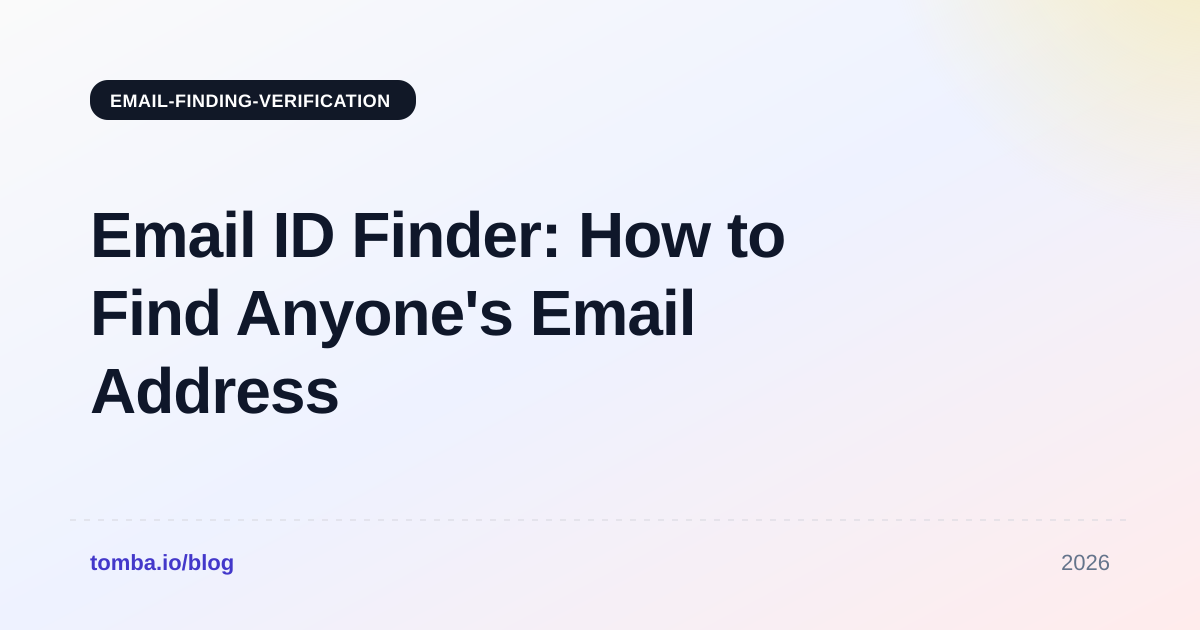
The reason this matters practically: when a tool says "95% accurate," it usually means "95% of the addresses we returned passed our own SMTP check." It does not mean 95% of the people you searched for were found. Those are wildly different numbers, and the second one — hit rate — is the one that determines whether your prospecting list is usable.
What accuracy should you expect from an email id finder in 2026?#
Split the question in two, because vendors deliberately blur it.
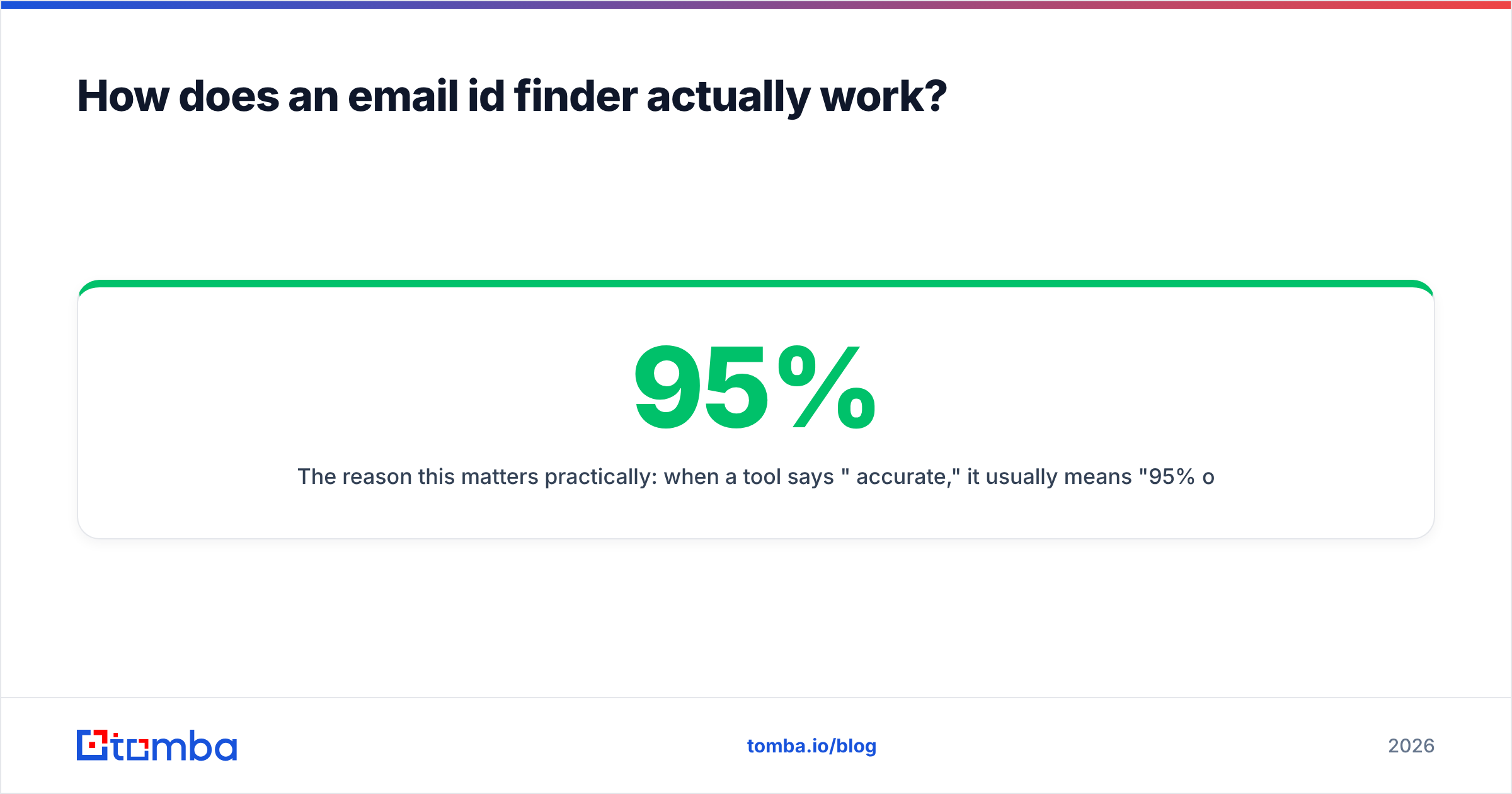
Hit rate is the percentage of your searches that return any address at all. Accuracy (or deliverability) is the percentage of returned addresses that actually reach an inbox. A tool with a 40% hit rate and 99% accuracy is being conservative. A tool with a 90% hit rate and 70% accuracy is guessing and passing the cost to your sender reputation.

Real-world expectations by segment:
- Large tech and enterprise domains (1,000+ employees): 90–96% hit rate, 92–97% accuracy. These companies have huge public footprints and consistent patterns.
- Mid-market (50–1,000 employees): 75–88% hit rate. Patterns are consistent but public data is thinner.
- Small business and agencies (under 50): 45–70% hit rate. Many use Gmail-hosted domains with irregular formats, or a single
hello@inbox. - Catch-all domains: the finder returns something, but SMTP verification can't confirm it because the server accepts every address. This is where accuracy claims quietly collapse — you need a dedicated catch-all verifier to score these with any confidence.
- Personal addresses (Gmail, Outlook, Yahoo): effectively unfindable by legitimate B2B tools, and mostly out of scope under GDPR anyway.
If a vendor advertises 99% accuracy with no segment breakdown, treat it as a marketing number. The honest ones publish their confidence tiers and let you filter exports by score.
Which email id finder tools compare best?#
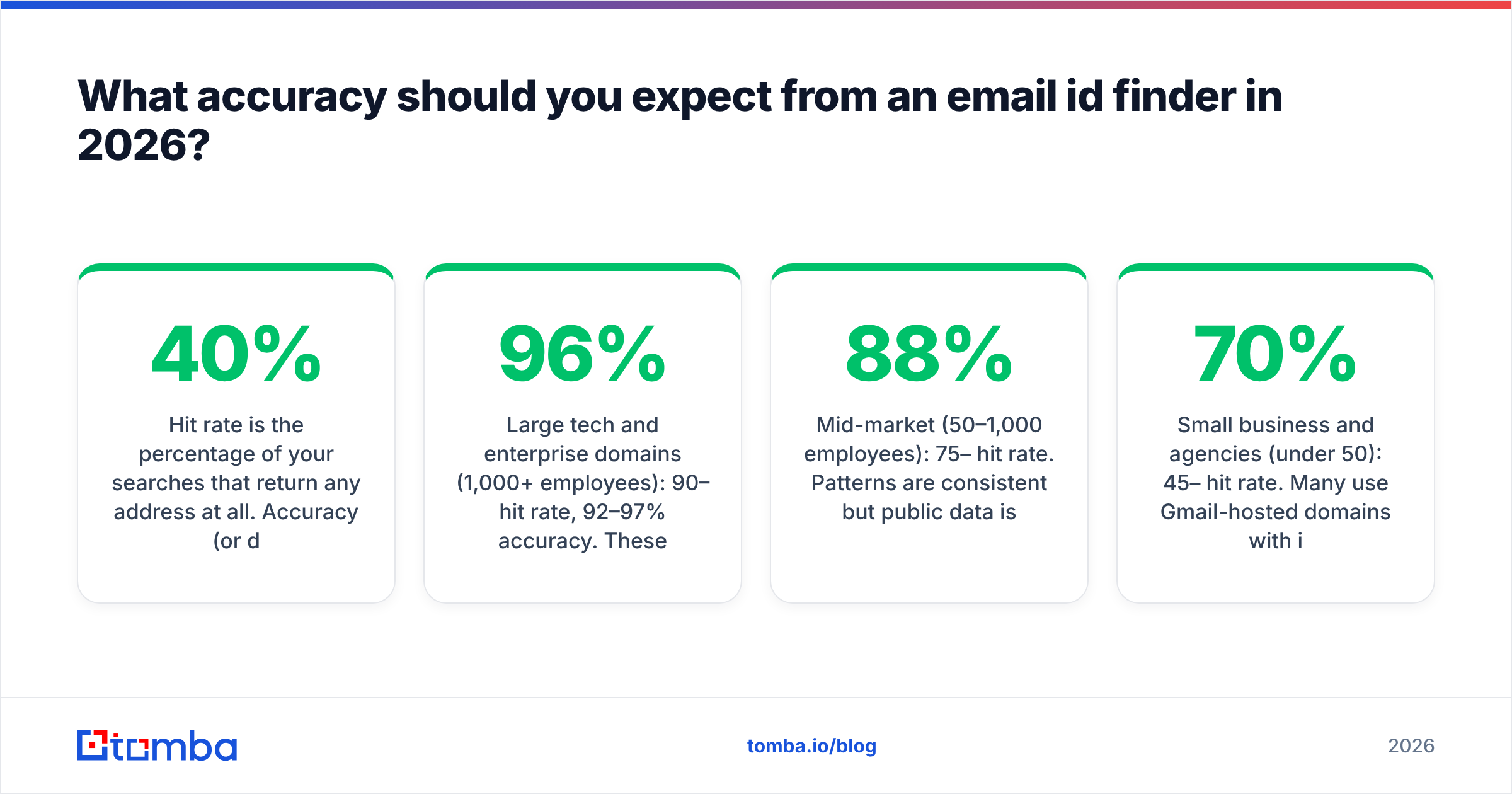
The market splits into three categories that solve genuinely different problems: dedicated finders (find + verify, nothing else), sales intelligence platforms (finder bundled with sequencing, intent, dialers), and prebuilt list vendors (you buy records rather than search for them).

| Tool | Category | Free tier | Entry paid plan | Built-in verification | Best for |
|---|---|---|---|---|---|
| Tomba | Dedicated finder | 25 searches/mo | $49/mo (Starter) | Yes, incl. catch-all scoring | Teams that want finding + verifying in one bill |
| Hunter | Dedicated finder | 25–50 searches/mo | ~$49/mo | Yes | Simple domain-level prospecting |
| Apollo | Sales platform | Limited credits | ~$49/user/mo | Yes | Reps who want sequencing in the same tab |
| RocketReach | Contact database | Trial lookups | ~$70/mo | Partial | Phone + email combined lookups |
| BookYourData | Prebuilt B2B lists | Free sample | Pay-as-you-go credits | Yes, 97%+ guarantee | Buying a targeted list without running searches |
| ZeroBounce | Verifier only | 100 credits | ~$16 per 2k | Verification is the product | Cleaning a list you already own |
A few honest observations about that table:
Bundled platforms cost more per contact than they look. A $49/user/month sales platform with 1,000 credits sounds comparable to a $49/month dedicated finder with 5,000 searches — until you have four reps and the bundled option is $196/month for the same volume. Per-seat pricing is the hidden multiplier.
Verifier-only tools are not substitutes. ZeroBounce, Bouncer, and DeBounce clean lists; they don't build them. If you're comparing them against finders you're comparing a dishwasher to a fridge. Most teams end up needing both functions, which is the argument for a platform that includes an email verifier alongside the finder rather than paying two vendors.
Prebuilt list vendors are a legitimate shortcut. BookYourData and similar providers make sense when you know your ICF precisely — "HR directors at US manufacturers, 200–1,000 employees" — and don't want to run thousands of individual lookups. The trade-off is freshness: a list is a snapshot, a finder is a live query. Many teams use both, buying a list for breadth and running a finder for the named accounts that matter.
Check the review sites, but read the low-star reviews. The aggregate score on G2's lead intelligence category tells you less than the two-star reviews, which are where you find out about credit expiry policies, export limits, and how support handles refunds.
What does an email id finder actually cost?#
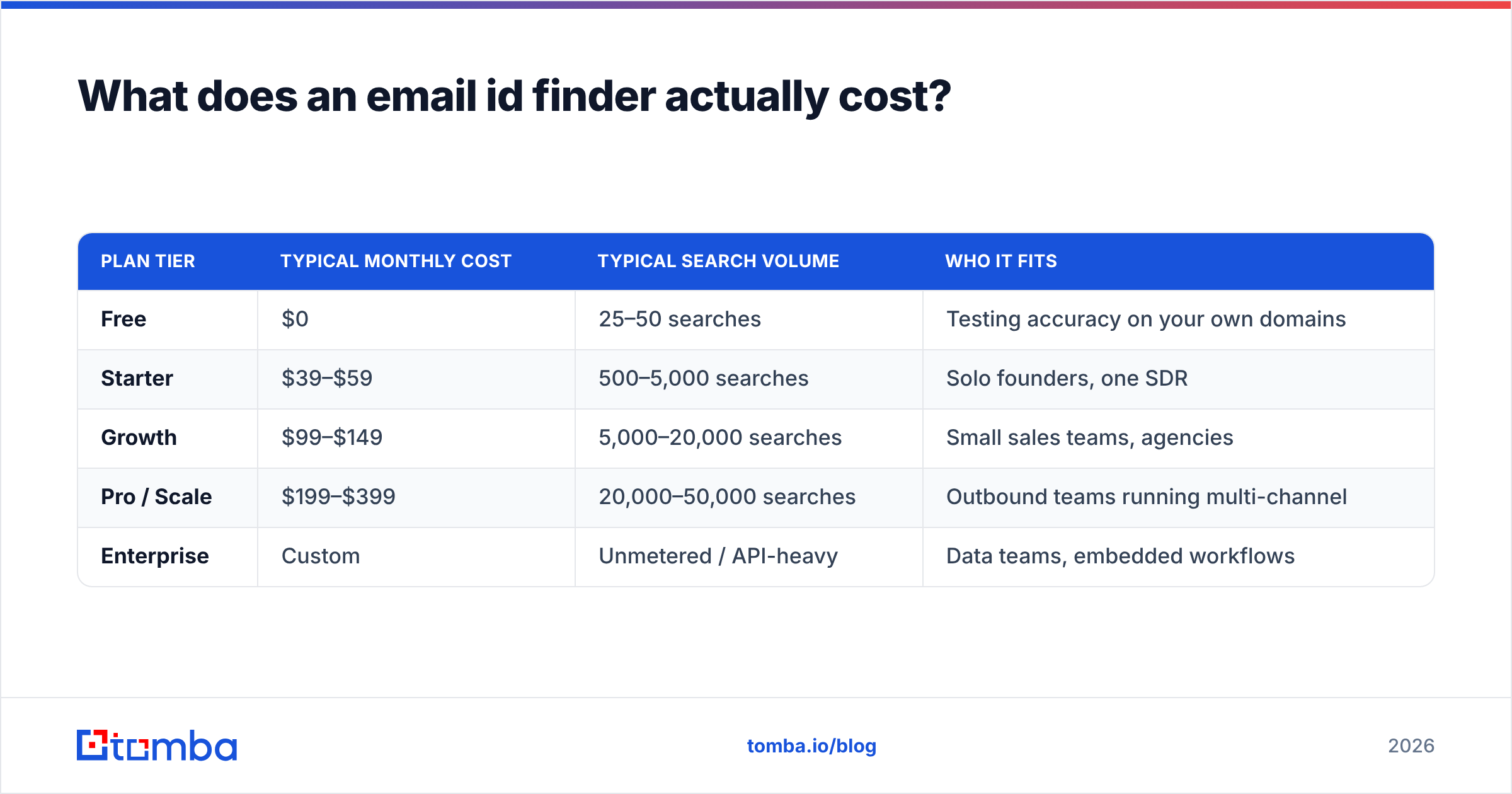
Published pricing across the category in 2026 lands roughly like this:
| Plan tier | Typical monthly cost | Typical search volume | Who it fits |
|---|---|---|---|
| Free | $0 | 25–50 searches | Testing accuracy on your own domains |
| Starter | $39–$59 | 500–5,000 searches | Solo founders, one SDR |
| Growth | $99–$149 | 5,000–20,000 searches | Small sales teams, agencies |
| Pro / Scale | $199–$399 | 20,000–50,000 searches | Outbound teams running multi-channel |
| Enterprise | Custom | Unmetered / API-heavy | Data teams, embedded workflows |
Tomba's own pricing sits in that shape — free at 25 searches/month, $49 Starter, $99 Growth, $249 Pro, custom Enterprise — which is useful mainly as a reference point for judging whether a competitor's quote is in the normal band or not.
Three cost traps to check before you sign anything:
- Do credits roll over? Most don't. If your prospecting is seasonal, unused credits are pure waste.
- Does a verification consume a separate credit? Some tools charge you once to find and again to verify the same address. That doubles your effective cost per contact.
- Does a failed search cost a credit? The fair standard is no charge for a no-result. Not every vendor follows it.
- Is the API a separate SKU? If you plan to automate, confirm that the email finder API is included in your plan rather than gated behind an enterprise upgrade.

How do you use an email id finder without wrecking your deliverability?#
This is where most teams lose money, and it has nothing to do with which finder they picked.
An email id finder produces raw material. Between the finder and your sending tool there should be a filter, and the filter has four steps:
Step 1 — Drop everything below your confidence threshold. Most tools return a score. Set a floor — 90+ is a reasonable starting point for cold outreach — and discard the rest rather than sending to them "just in case." Those are the addresses that generate bounces.
Step 2 — Handle catch-all domains separately. Catch-all servers accept mail to any address, so standard verification returns "unknown," not "valid." Either route these through a dedicated catch-all check or put them in a low-volume, high-personalization segment where a bounce won't hurt a warm domain.
Step 3 — Strip role accounts. info@, sales@, support@, admin@ addresses are valid but they land in shared inboxes, get marked as spam more often, and rarely convert. Remove them unless your offer genuinely targets a department.
Step 4 — Re-verify anything older than 60 days. A verified address from March is an unverified address in June. If you're running a list you built last quarter, push it through a bulk verify pass before it touches a sequence.
Bounce rate is the single metric that governs whether your outbound program survives. Google and Microsoft both tightened bulk-sender enforcement through 2024–2025, and sustained bounce rates above 2–3% now trigger throttling well before you notice a drop in replies. A finder that hands you 5,000 addresses with a 12% invalid rate hasn't saved you time — it's handed you a deliverability incident with extra steps.
Are free email id finders worth using?#
Yes, for one specific purpose: evaluation.
Every serious vendor offers 25–50 free lookups. Use them on domains where you already know the answer. Pick ten colleagues, ten customers, and ten people whose addresses you can independently confirm, run them through three or four tools, and score the results yourself. That thirty-search test tells you more than every accuracy claim on every pricing page combined.
What free tiers are not good for is actual prospecting volume. Twenty-five searches at a 70% hit rate is seventeen contacts, which is not a pipeline. And the genuinely free, no-signup "email finder" sites that promise unlimited lookups are almost always doing pure pattern generation with no verification layer — they'll return john.smith@company.com whether or not John Smith works there. Those are the results that produce the bounce spike.
A middle path that works: use free email extractor and permutator utilities for one-off manual research, and reserve paid credits for the accounts you're actually going to sequence.
What are the legal and ethical boundaries?#
Short version: finding a business email address is legal in most jurisdictions; what you do with it is regulated.
- GDPR (EU/UK): Business contact data can be processed under legitimate interest, but you must be able to justify relevance, disclose where you got the data, and honor deletion requests immediately. Personal Gmail addresses are a different risk category — avoid them.
- CAN-SPAM (US): Permits cold email. Requires accurate headers, a physical address, and a working unsubscribe.
- CASL (Canada): Stricter — generally requires express or implied consent. Implied consent covers published business addresses relevant to the recipient's role, which is narrower than most people assume.
- Platform terms: Scraping LinkedIn directly violates their user agreement. Tools that query indexed public data rather than automating logged-in sessions sit on much safer ground; if a vendor's product depends on your LinkedIn cookie, understand what you're risking.
Practically: keep records of where each contact came from, process opt-outs within 48 hours, and don't email personal addresses. Vendors that can't tell you their compliance posture are a liability regardless of their accuracy.
Which email id finder should you pick?#
Match the tool to the shape of your workflow, not to a leaderboard:
- You research accounts one at a time in the browser: a Chrome extension with good LinkedIn coverage matters more than bulk throughput.
- You build lists in spreadsheets: prioritize CSV enrichment and a Google Sheets add-on so you're not exporting and re-importing.
- You're an agency running client campaigns: sub-accounts, credit allocation, and per-client reporting beat raw accuracy by a point or two.
- You're building a product or internal tool: API rate limits, response latency, and webhook support are the only specs that matter.
- You need volume immediately with no search overhead: a prebuilt list vendor gets you there faster than any finder will.
Run the thirty-search test against your two shortlisted tools using your own real accounts. Whichever one wins on your domain mix is the right answer, regardless of what any comparison table — including this one — says.
Ready to test this yourself? Start with the Tomba Email Finder free tier — 25 searches a month, no card — and run it against domains where you already know the answer. Every result comes back with a confidence score and a verification status, so you can see exactly which addresses are safe to send to and which need a second check before they go anywhere near your sequence. If it holds up on your accounts, the Starter plan at $49/month scales it; if it doesn't, you've lost nothing but ten minutes.
Related guides#
Ready to find emails that actually work?
Join 150,000+ professionals who stopped guessing and started sending. Free credits on signup — no credit card required.
Get the Tomba newsletter
Practical outbound tactics and product updates — once every two weeks.
About the author