Email Lead Scraping Tool: How to Pick One in 2026
Most email lead scraping tools fail on the same thing: the emails bounce. Here's how scrapers, finders, and enrichment APIs actually differ — and which one fits your list-building workflow.
TL;DR
- An "email lead scraping tool" is really three different product categories wearing one label: page scrapers, pattern-based email finders, and database lookups. They fail in different ways.
- Raw scraping gets you volume fast and bounce rates of 20-40%. Verified finders trade volume for deliverability, which is the metric that actually decides whether your campaign lands.
- Legal exposure is real. GDPR Article 6(1)(f) legitimate interest can cover B2B scraping, but only with role-based targeting, disclosure, and a working opt-out.
- Cost per usable lead matters more than cost per credit. A $29 scraper at 65% valid beats nothing, but loses to a $49 verified finder at 95%+ once you price in domain reputation damage.
- Best setup for most teams: scrape or source the company list, then run it through a verified finder API before any of it touches your sending domain.
What is an email lead scraping tool?#
An email lead scraping tool extracts business contact data — usually work email addresses, sometimes names, titles, phone numbers, and LinkedIn URLs — from public sources and hands it back as a structured list you can import into a CRM or sequencer.
That definition covers wildly different machinery underneath. Understanding which one you're buying explains most of the frustration people have with this category.
- Page scrapers crawl a website, a directory, a Google Maps result set, or a LinkedIn search and regex out anything shaped like
something@domain.com. Cheap, fast, indiscriminate. You getinfo@,noreply@,careers@, and the occasional real person. - Pattern-based finders take a name and a domain, infer the company's email format (
first.last@,flast@,f.last@), generate candidates, then SMTP-verify them before returning a result. Slower per lookup, dramatically more accurate. - Database lookups query a pre-built contact index. Instant, but only as fresh as the last crawl — and B2B contact data decays roughly 2-3% per month as people change jobs.
- Enrichment APIs accept a partial record (a domain, a LinkedIn URL, a company name) and fill in the gaps. This is what most modern GTM stacks actually run in production, because it plugs into a workflow instead of producing a CSV.
- Browser extensions sit on top of any of the above and surface data on the page you're viewing — a UX layer, not a data source.
Most vendors blend two or three of these. The important question when evaluating any tool is: when you don't have a confident answer, what does it return? Scrapers return a guess. Good finders return nothing and don't charge you.

How does email scraping actually work under the hood?#
The mechanics are worth knowing because they predict where each tool breaks.
A page scraper issues HTTP requests, parses the DOM, and pattern-matches. Its ceiling is whatever is publicly rendered. Companies stopped putting employee emails on team pages years ago, which is why raw web scraping yields mostly generic inboxes now. Anti-bot layers — Cloudflare, rate limits, dynamic rendering — cut the yield further.
A pattern-based finder does something different. It builds a model of how a given domain formats addresses, drawing on every address it has previously confirmed at that domain and at similar ones. Give it Sarah Chen at stripe.com and it knows Stripe's dominant pattern, generates the candidate, and validates it.
Validation is the step that separates usable from unusable data:
- Syntax check — RFC-compliant format. Catches typos, catches nothing else.
- Domain and MX check — does the domain exist and accept mail at all? Kills dead companies instantly.
- SMTP handshake — connect to the receiving server, issue
RCPT TO, read the response without sending. A250means the mailbox exists. - Catch-all detection — some domains accept every address at the SMTP layer, so a
250proves nothing. These need probabilistic scoring or a dedicated catch-all verifier. - Role and disposable filtering — flag
info@,sales@,admin@, plus throwaway domains.
Roughly a third of B2B domains are catch-all in 2026, and this is where most tools quietly inflate their accuracy numbers. A vendor that returns every catch-all address as "valid" will show a beautiful 98% validity rate and a horrible real-world bounce rate. Ask specifically how catch-alls are handled before you believe any accuracy claim.

Which email lead scraping tool should you actually use?#
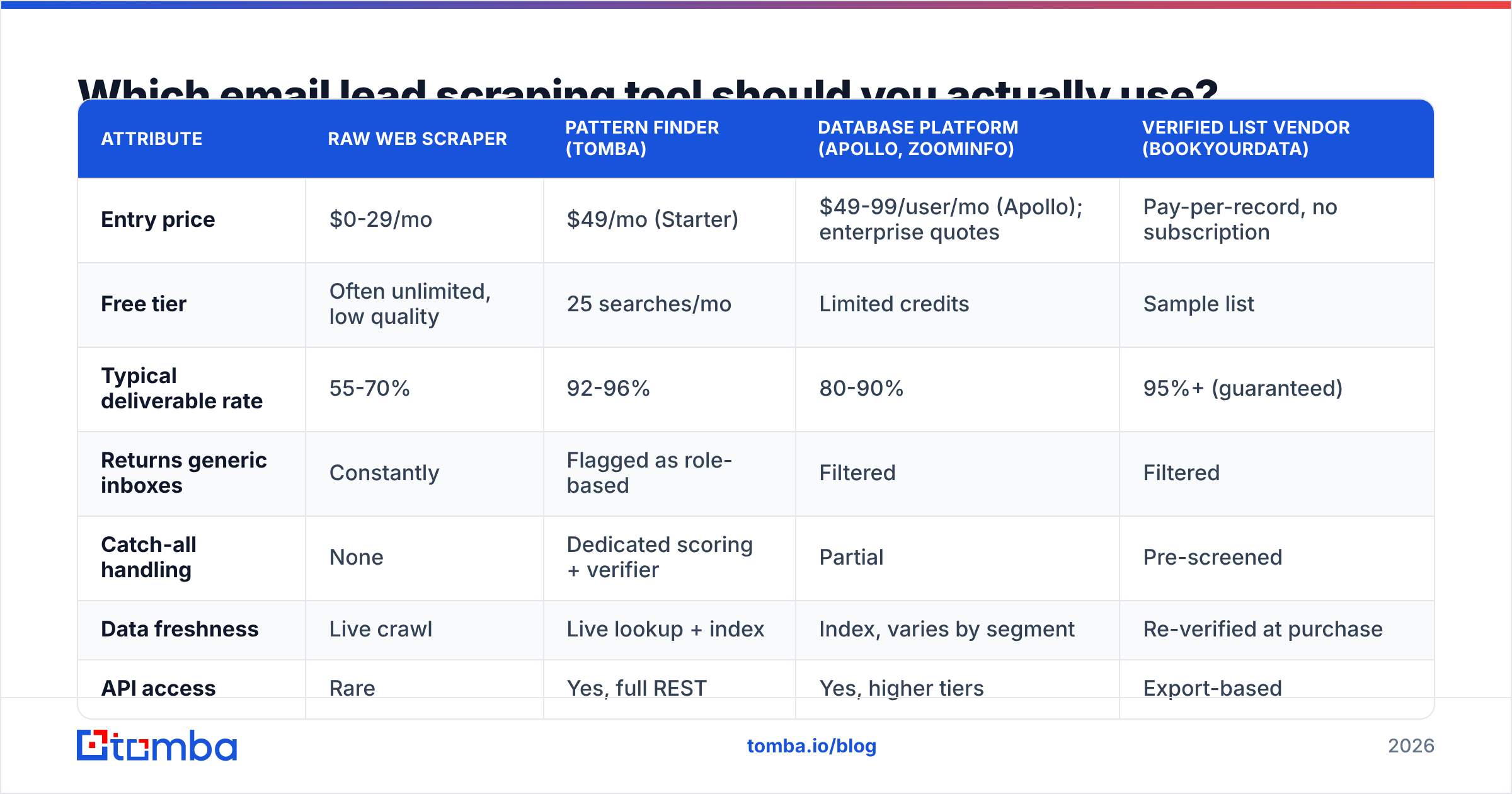
Depends on what you're optimizing for. Here's how the main approaches compare on the attributes that change outcomes.
| Attribute | Raw web scraper | Pattern finder (Tomba) | Database platform (Apollo, ZoomInfo) | Verified list vendor (BookYourData) |
|---|---|---|---|---|
| Entry price | $0-29/mo | $49/mo (Starter) | $49-99/user/mo (Apollo); enterprise quotes | Pay-per-record, no subscription |
| Free tier | Often unlimited, low quality | 25 searches/mo | Limited credits | Sample list |
| Typical deliverable rate | 55-70% | 92-96% | 80-90% | 95%+ (guaranteed) |
| Returns generic inboxes | Constantly | Flagged as role-based | Filtered | Filtered |
| Catch-all handling | None | Dedicated scoring + verifier | Partial | Pre-screened |
| Data freshness | Live crawl | Live lookup + index | Index, varies by segment | Re-verified at purchase |
| API access | Rare | Yes, full REST | Yes, higher tiers | Export-based |
| Best for | Quick domain sweeps | Precision list building at scale | All-in-one prospecting + sequencing | One-off verified list buys |
| Worst for | Anything touching your primary domain | Bulk unverified volume plays | Budget-constrained solo founders | Continuous enrichment workflows |
A few honest reads on that table.
Raw scrapers are not useless — they're just misused. If you need to map 4,000 companies in a vertical and pull their domains, tech stacks, and general contact points, a scraper does that job perfectly well. The mistake is treating scraper output as a send-ready list.
Apollo and ZoomInfo sell a workflow, not just data. If you want sequencing, dialers, intent signals, and CRM sync in one seat, the per-user cost can make sense. If you want clean contact data feeding a stack you already built, you're paying for a lot of unused surface area — which is why the Apollo alternative search volume keeps climbing.
BookYourData occupies a genuinely different lane. It sells pre-verified, pay-as-you-go lists with a deliverability guarantee and no subscription. For a team that needs 5,000 verified contacts once and doesn't want a recurring bill, that model is cleaner than any API. It's a poor fit if your requirement is continuous, in-workflow enrichment — different tool, different job.
Pattern finders win on cost-per-usable-lead when your workflow is "I have companies and roles, I need the people." That's the most common B2B motion, which is why the category exists.

Is email scraping legal in 2026?#
Short answer: B2B scraping of publicly available business contact data is legal in most jurisdictions with conditions attached — and the conditions are where teams get burned.
In the EU (GDPR). A work email tied to a named person is personal data even in a B2B context. You need a lawful basis. Most cold outreach runs on Article 6(1)(f) legitimate interest, which requires a documented balancing test, relevance between your offer and the recipient's job function, disclosure of where you got the data on first contact, and a functioning opt-out. Blast a scraped list to everyone at a company regardless of role and the legitimate-interest argument collapses.
In the US (CAN-SPAM). No opt-in requirement for commercial email. You must not use deceptive headers or subject lines, must identify the message as commercial, must include a physical postal address, and must honor opt-outs within 10 business days. Scraping itself is not what CAN-SPAM regulates. The FTC's compliance guide is the primary source, not a blog summary.
Platform terms are separate from law. LinkedIn's user agreement prohibits automated scraping. hiQ Labs v. LinkedIn established that scraping public data isn't a Computer Fraud and Abuse Act violation, but that ruling doesn't stop LinkedIn from banning your account for breach of contract. If a tool requires your personal LinkedIn cookie to function, your account is the collateral.
Canada (CASL) is the strict one. Express or implied consent is required before commercial electronic messages, with penalties up to CAD $10 million. A published business address for a relevant role gives you implied consent in narrow circumstances — verify against current guidance before running Canadian campaigns.
Practical compliance posture: target by role relevance, keep provenance records for every contact, disclose your source in the first email, honor unsubscribes immediately and permanently, and prefer vendors that publish their data sources over ones that won't say where anything came from.
Why do scraped lists destroy your sender reputation?#
Because mailbox providers score you on recipient behavior, and scraped lists produce the exact behaviors that get you filtered.
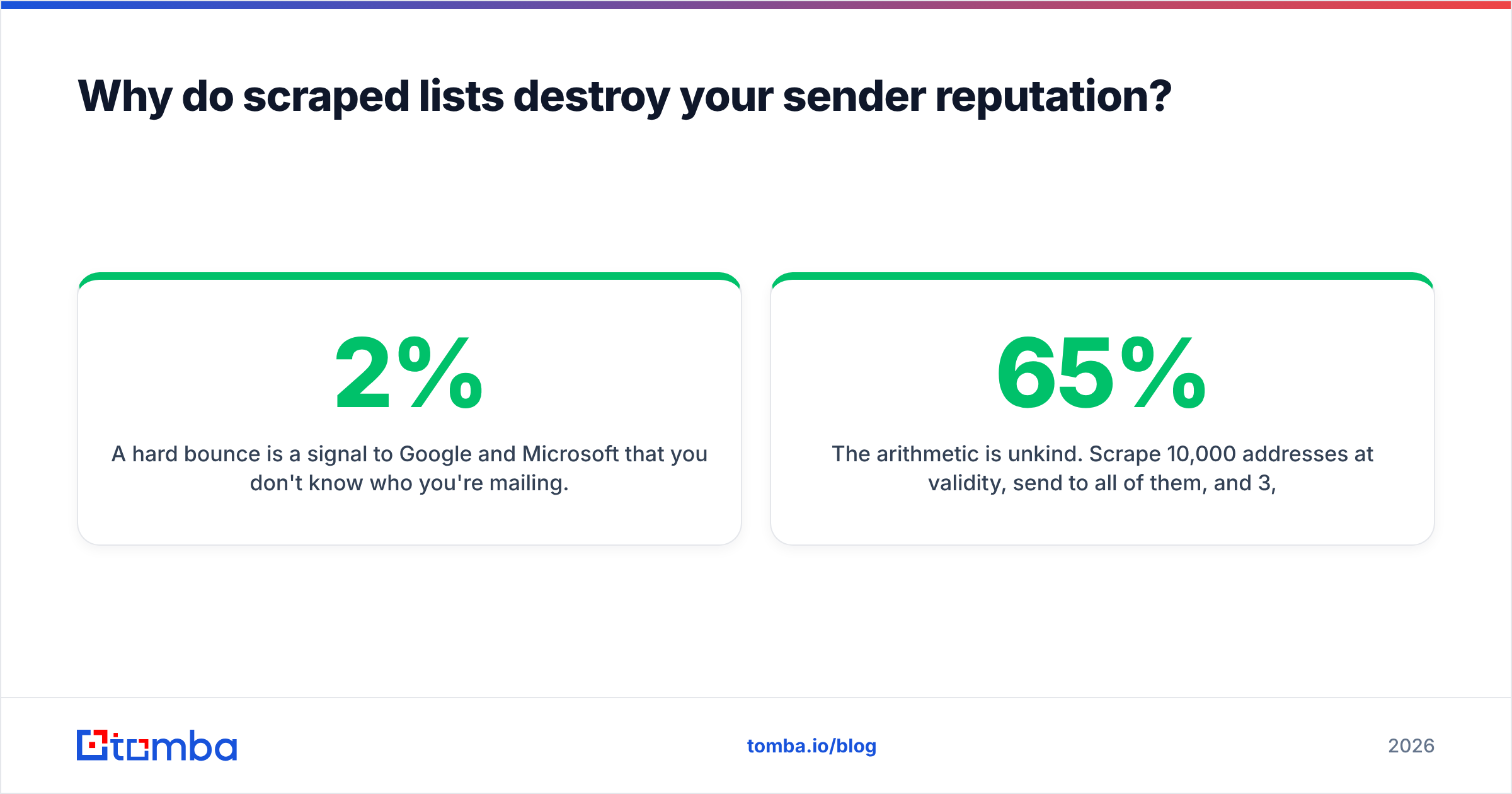
A hard bounce is a signal to Google and Microsoft that you don't know who you're mailing. Legitimate senders keep bounce rates under 2%. Cross 5% and throttling begins. Cross 10% and you're in the spam folder for everyone, including your existing customers and your invoices.
Spam traps are worse. Recycled traps are abandoned addresses reactivated by providers specifically to catch senders using stale data — precisely what a scraper harvesting a 2019 team page will hand you. Pristine traps were never valid addresses at all and exist only on scraped lists. A single pristine trap hit can blacklist your sending domain.
The compounding problem: sender reputation attaches to your domain, not your campaign. Burn it on a scraped-list experiment and every email your company sends — support replies, password resets, contract PDFs — degrades with it. Recovery takes months of low-volume warm sending, assuming it works at all.
The arithmetic is unkind. Scrape 10,000 addresses at 65% validity, send to all of them, and 3,500 bounce. You've just told every major mailbox provider that you're a list buyer. The 6,500 good addresses now land in Promotions or worse, and you've paid for the privilege.
Running the same list through an email verifier before send costs a fraction of the volume budget and preserves the asset the whole operation depends on.
What does a good list-building workflow look like?#
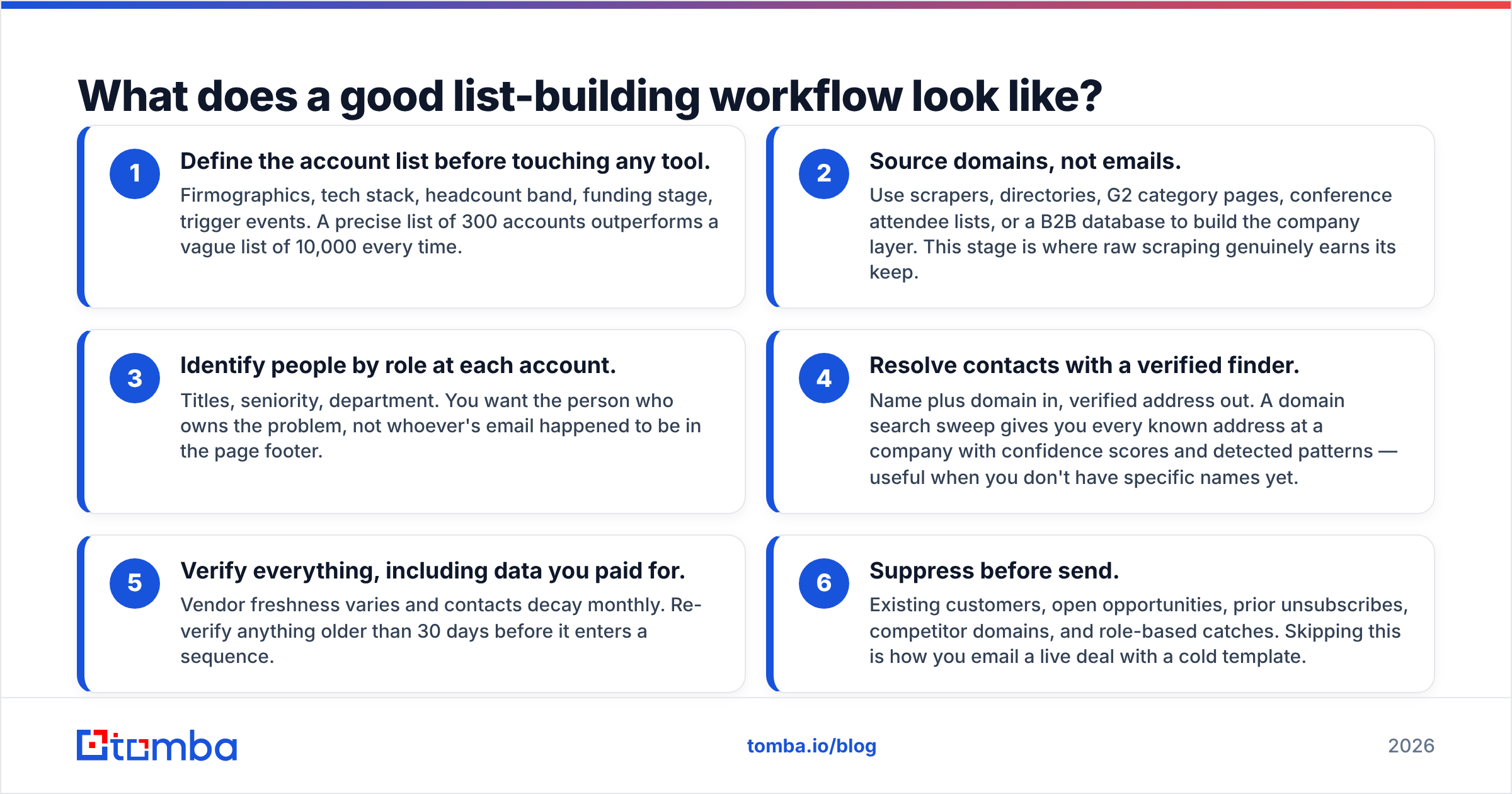
Stop thinking of scraping as a single step. The teams with 3%+ reply rates run a pipeline where each stage does one thing well.
- Define the account list before touching any tool. Firmographics, tech stack, headcount band, funding stage, trigger events. A precise list of 300 accounts outperforms a vague list of 10,000 every time.
- Source domains, not emails. Use scrapers, directories, G2 category pages, conference attendee lists, or a B2B database to build the company layer. This stage is where raw scraping genuinely earns its keep.
- Identify people by role at each account. Titles, seniority, department. You want the person who owns the problem, not whoever's email happened to be in the page footer.
- Resolve contacts with a verified finder. Name plus domain in, verified address out. A domain search sweep gives you every known address at a company with confidence scores and detected patterns — useful when you don't have specific names yet.
- Verify everything, including data you paid for. Vendor freshness varies and contacts decay monthly. Re-verify anything older than 30 days before it enters a sequence.
- Suppress before send. Existing customers, open opportunities, prior unsubscribes, competitor domains, and role-based catches. Skipping this is how you email a live deal with a cold template.
For volume, batch the middle stages. A bulk email finder run against a prepared CSV handles thousands of resolutions and returns confidence-scored results, so you can set a threshold and drop anything beneath it rather than gambling on the whole file.
For continuous workflows, the API is the better shape. The email finder API resolves contacts inside your existing system — a form fill enriched on submit, a CRM record completed on creation, an inbound signup matched to a company profile. No CSVs, no manual imports, no stale exports sitting in someone's Downloads folder.
How do you evaluate accuracy claims honestly?#
Every vendor advertises 95%+ accuracy. Test it yourself, because the definitions differ enough to make the marketing numbers meaningless.
Build a control set of 100 contacts you can independently confirm — people who've emailed you, contacts in your CRM with reply history, colleagues at other companies. Then run the same set through each tool you're evaluating and measure four things:
- Coverage. What percentage returned any result? A tool with 99% accuracy on the 30% of contacts it can find is worse than 94% accuracy on 80% coverage.
- Precision. Of the returned addresses, how many match your known-good value exactly? This is the number vendors quote and the one they define most loosely.
- Catch-all behavior. How many results are catch-all domains marked "valid"? Compare against a dedicated catch-all finder check to see whether the tool is padding.
- Credit policy on failure. Does a no-result or unverifiable lookup consume a credit? Over 10,000 lookups this reshapes your effective cost more than the sticker price does.
Run the test on your actual ICP, not a generic sample. Coverage varies enormously by geography and company size — a tool that's excellent on US SaaS mid-market can be thin on European manufacturing SMBs. Third-party review data on G2 is useful for spotting patterns in complaints, but no substitute for testing against your own segment.
Also check the free tier before you commit. Tomba's free plan includes 25 searches per month, which is enough to sanity-check a sample. Paid plans run $49/mo for Starter, $99/mo for Growth, and $249/mo for Pro, with enterprise pricing on request — full Tomba pricing is public, which is itself a useful filter given how many vendors in this category hide numbers behind a sales call.
What are the most common mistakes with lead scraping tools?#
Optimizing for volume over deliverability. A 50,000-contact list at 60% valid is a worse asset than a 5,000-contact list at 96%. The first one costs you a domain.
Trusting a tool that never returns "not found." Any finder that always produces an answer is guessing on the hard cases and charging you for it.
Skipping verification because the vendor "already verified." Verification has a shelf life. A contact verified in January is not verified in August.
Scraping generic inboxes and treating them as leads. info@company.com reaches a shared inbox nobody owns. Reply rates on role-based addresses are a rounding error.
Ignoring the catch-all problem entirely. A third of your list may be unverifiable at the SMTP layer. Know which third and decide deliberately whether to send.
Running scraped lists on your primary domain. Use dedicated sending domains for cold outreach. Your corporate domain should never carry that risk.
No provenance records. When a GDPR request arrives asking where you got someone's data, "we scraped it" is not an answer that ends the conversation well.
Where should you start?#
If you're building lists at any real scale, the sequence that works is: source the accounts cheaply, resolve the people accurately, verify before you send, and never let unverified data touch your sending domain.
The resolution step is the one worth paying for, because it's the one that determines whether everything downstream works. Tomba Email Finder handles that step directly — name and domain in, SMTP-verified address with a confidence score out, with catch-all detection built in rather than bolted on. Start on the free tier's 25 searches, run your own control set against it, and compare the result to whatever you're using now. If the numbers don't hold up on your ICP, you'll know in an afternoon instead of after a burned domain.
Related guides#
Ready to find emails that actually work?
Join 150,000+ professionals who stopped guessing and started sending. Free credits on signup — no credit card required.
Get the Tomba newsletter
Practical outbound tactics and product updates — once every two weeks.
About the author