Email List Validation Free: The 2026 Guide to Free Tools
Free email validators exist, they work, and they run out fast. Here's exactly how far each free tier goes in 2026, what those checks actually catch, and the point where paying beats stitching together trial credits.

TL;DR: email list validation free in 2026
- Email list validation free of charge is real, but it is metered. Most reputable vendors give you 25–1,000 one-time or monthly credits. After that you pay roughly $0.001–$0.008 per email.
- Free browser tools that only run regex and MX checks catch typos and dead domains. They do not catch abandoned mailboxes, spam traps, or role accounts — which is where bounce damage actually comes from.
- Stacking three or four free tiers to clean a 10,000-row list costs you more hours than the $20–$40 you'd spend paying for it once.
- Validate at capture and at export, not once a quarter. B2B data decays roughly 2–3% per month, so a list you cleaned in January is measurably worse by March.
- The cheapest validation is the validation you never run: source contacts from a provider that returns verification status with the address.
What is email list validation, and why does it matter?#
Email list validation is the process of checking whether an address on your list can actually receive mail before you send to it. Think of it like calling ahead to confirm a restaurant is open instead of driving there with four friends and finding the lights off — the trip costs the same either way, but only one version wastes everyone's evening.
A validator runs a series of escalating checks: syntax, domain, mail exchanger records, and finally a conversation with the receiving mail server using SMTP to ask whether a specific mailbox exists. Each layer is cheaper and less conclusive than the one that follows.
The reason this matters is arithmetic, not hygiene theater. Mailbox providers score you on complaint rate and bounce rate. Google and Yahoo both formalized bulk-sender rules in 2024 that put a hard 0.3% spam-complaint ceiling on senders, and bounce rate feeds the same reputation signal. Send 5,000 emails to a list with 12% dead addresses. You have not just wasted 600 sends. You have told every receiving server that you do not know who your recipients are. Recovery from a burned sending domain takes weeks. Validation takes minutes.
The second reason is measurement. If 15% of your list bounces, your open rate, reply rate, and every conversion metric below them rest on a number you cannot trust. You end up A/B testing subject lines against noise.
Email list validation free tiers: how much do you really get in 2026?#
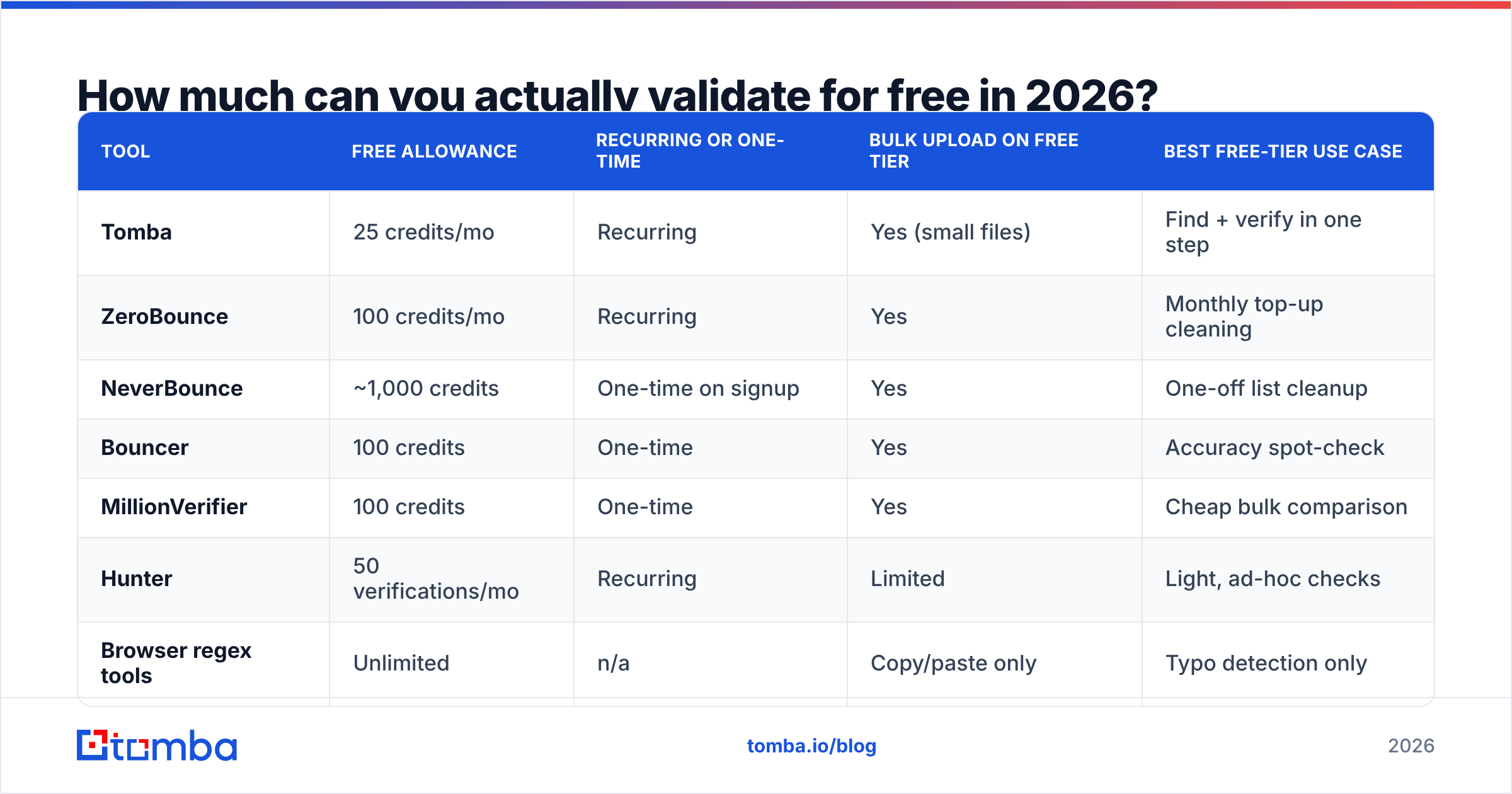
Here is the honest answer: enough to clean a small list once, or to spot-check a big one. Not enough to run continuous hygiene on a growing database.
Free tiers move constantly. Treat the numbers below as the shape of the market, not a contract, and check each vendor's current page before you commit. The pattern has been stable for years: one-time trial credits in the hundreds, or a recurring monthly allowance in the tens.
| Tool | Free allowance | Recurring or one-time | Bulk upload on free tier | Best free-tier use case |
|---|---|---|---|---|
| Tomba | 25 credits/mo | Recurring | Yes (small files) | Find + verify in one step |
| ZeroBounce | 100 credits/mo | Recurring | Yes | Monthly top-up cleaning |
| NeverBounce | ~1,000 credits | One-time on signup | Yes | One-off list cleanup |
| Bouncer | 100 credits | One-time | Yes | Accuracy spot-check |
| MillionVerifier | 100 credits | One-time | Yes | Cheap bulk comparison |
| Hunter | 50 verifications/mo | Recurring | Limited | Light, ad-hoc checks |
| Browser regex tools | Unlimited | n/a | Copy/paste only | Typo detection only |
Two things fall out of that table. First, recurring free tiers are built for upkeep, not migration. Twenty-five to 100 addresses a month keeps a hand-built prospect list clean, and nothing more. Second, the one-time allowances are generous because the vendor expects your list to be bigger than the allowance. A thousand free credits against a 12,000-row list is a sample. Samples are exactly how you decide who to pay.
If you want a zero-signup sanity check before you commit to any vendor, a free email checker will tell you whether a single address resolves without spending a credit anywhere.

What do free email validators actually check?#
Not all "validation" is the same word. Free tools cluster into two very different capability levels, and the gap between them is where most people get burned.
- Syntax and format checks. Does
john.smith@@acmeparse as a valid address? This is a regular expression. It costs nothing, catches fat-finger typos, and is available in every free tool including spreadsheet formulas. It tells you nothing about deliverability. - Domain and MX record checks. Does
acme.ioexist, and does it publish mail exchanger records? This kills addresses at dead companies and misspelled domains (gmial.com). Still cheap, still free almost everywhere, still not proof a mailbox exists. - SMTP mailbox verification. The validator opens a connection to the receiving server and asks whether the specific mailbox accepts mail. This is the expensive step. It needs clean IPs, throttling logic, and retry handling, and it is the reason free tiers are metered at all.
Those first three layers are table stakes. The next three are where tools pull apart.
- Role and disposable detection. Flags
info@,sales@,support@, and throwaway domains like Mailinator. Role accounts do receive mail, but they draw far more complaints than personal inboxes, so most senders suppress them. - Catch-all identification. Some domains accept mail sent to any address, real or not. That makes an SMTP check a coin flip. Good tools label these "accept-all" rather than guessing. Tools that call them "valid" are inflating their own accuracy number.
- Spam-trap and abuse-flag screening. The hardest layer, built on proprietary blocklists and historical complaint data. Almost never available on a free tier, and the single biggest reason paid verification exists.
A tool that stops at steps 1 and 2 is free forever because it costs the vendor nothing to run. A tool that reaches step 6 meters you because every check has a real cost. When a service advertises email list validation free and unlimited, assume it lives in the first bucket until it proves otherwise.
Are free email validation tools accurate enough?#
Accuracy depends almost entirely on how the tool handles ambiguity, not on how it handles easy cases. Every validator on earth correctly rejects notarealperson@thisdomaindoesnotexist.xyz. Tools split apart on catch-all domains, greylisting servers, and big providers that hide whether a mailbox exists.

Three practical rules for judging any validator, free or paid:
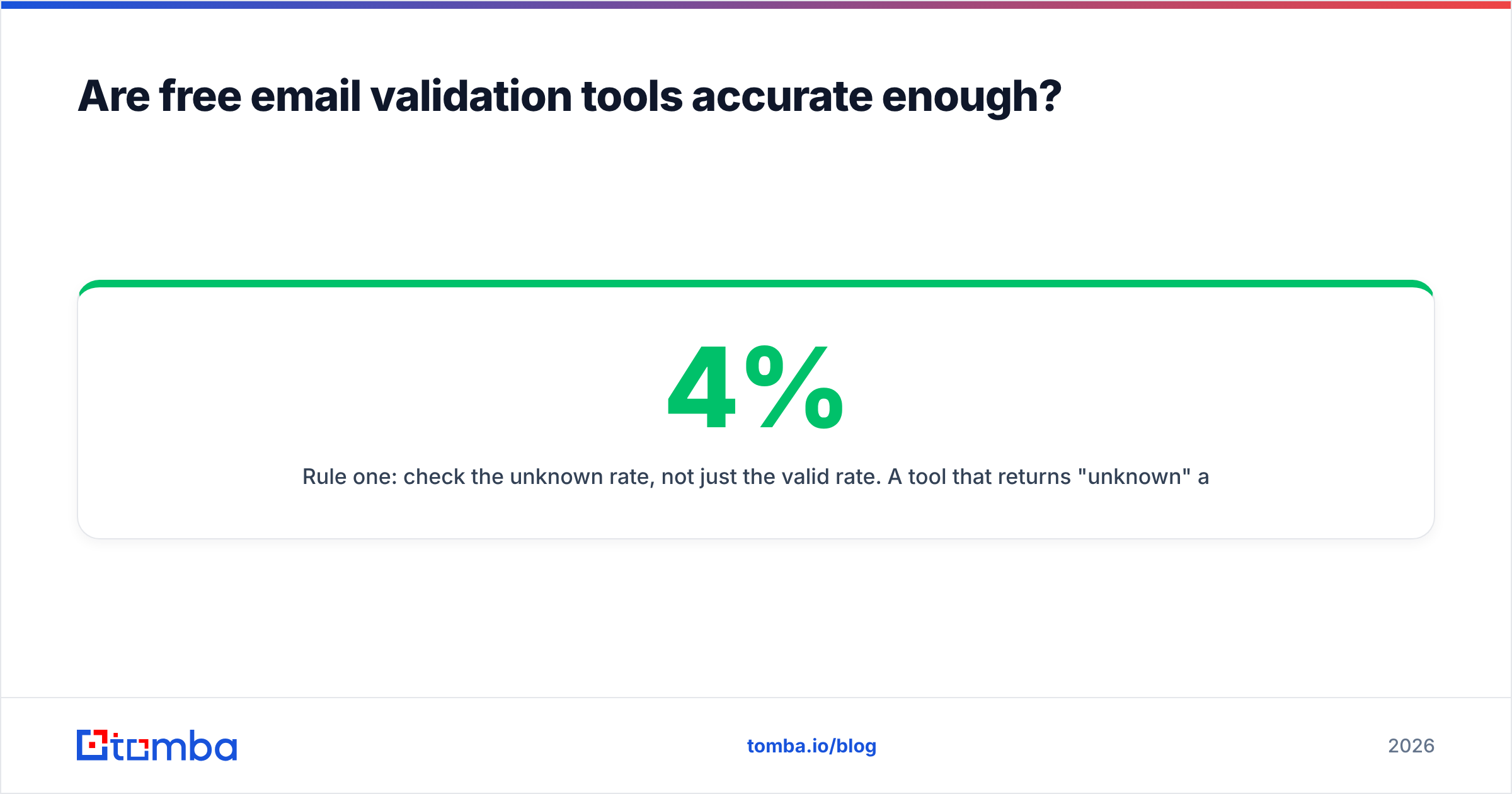
Rule one: check the unknown rate, not just the valid rate. A tool that returns 4% "unknown" and 88% "valid" is more honest than one that returns 0% unknown and 94% valid. The second one is guessing on catch-alls and passing that risk to your sending domain. Ask for the breakdown, not the headline number.
Rule two: test with a known-answer seed list. Take 100 addresses you have ground truth on: 40 you have successfully emailed in the last 30 days, 40 that hard-bounced, 20 you invented. Run that list through two or three free tiers. Any tool that marks your invented addresses valid, or your known-good contacts invalid, has just disqualified itself for free.
Rule three: treat catch-all handling as a separate product. Roughly one in five B2B domains is set to accept-all, and the share is higher at big companies. If most of your prospects sit behind Microsoft 365 tenants with accept-all turned on, generic validation hands you a pile of shrugs. A dedicated catch-all verifier uses pattern data and past send outcomes to resolve those cases instead of labelling them unknown.
Independent buyer reviews on G2 are useful for spotting support and billing complaints, but they are close to useless for accuracy claims — nobody reviewing a validator has ground truth either. Your own seed list beats every star rating.
How do the main free-tier validators compare?#

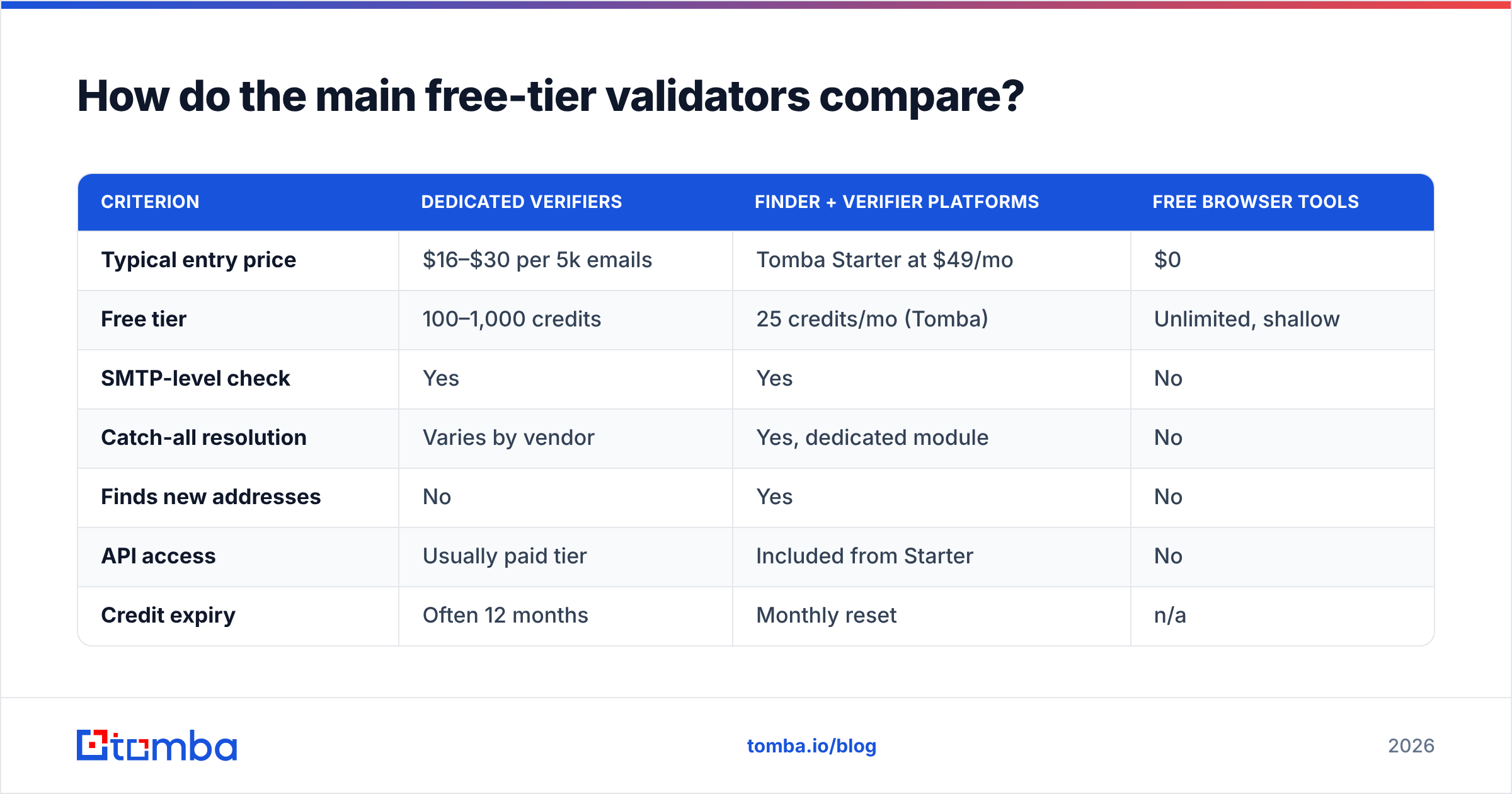
Once you exhaust free credits, the decision becomes a per-email price question with three variables: unit cost, whether credits expire, and whether you also need to find addresses rather than just check them.
| Criterion | Dedicated verifiers | Finder + verifier platforms | Free browser tools |
|---|---|---|---|
| Typical entry price | $16–$30 per 5k emails | Tomba Starter at $49/mo | $0 |
| Free tier | 100–1,000 credits | 25 credits/mo (Tomba) | Unlimited, shallow |
| SMTP-level check | Yes | Yes | No |
| Catch-all resolution | Varies by vendor | Yes, dedicated module | No |
| Finds new addresses | No | Yes | No |
| API access | Usually paid tier | Included from Starter | No |
| Credit expiry | Often 12 months | Monthly reset | n/a |
| Best for | One-time list hygiene | Ongoing outbound | Single-address checks |
The structural point is simple. If you only ever clean lists someone else gave you, a pay-as-you-go verifier with non-expiring credits is the cheapest path, and you should shop on unit price. If you build lists yourself, paying twice — once to find an address, again to verify it — is the expensive mistake. A platform where the email verifier and the finder share the same credit pool removes an entire integration and an entire invoice.
For teams that would rather buy pre-verified contacts than build and clean them, providers like BookYourData sell filtered B2B lists with accuracy guarantees attached, which shifts validation cost onto the vendor. That is a legitimate strategy when you need volume fast and your ICP is well-defined by firmographics.

What are the hidden costs of "free"?#
Free tiers are marketing, and that is fine — but price the friction before you build a workflow on them.
Your time is the real invoice. Splitting a 10,000-address list across four free tiers means four signups, four CSV formats, four result schemas, and a manual dedupe at the end. Call it three hours. At any realistic loaded hourly rate, you just spent $150 of labor to avoid a $30 bill.
Result formats do not agree. One tool returns valid / invalid / catch-all / unknown. Another returns deliverable / risky / undeliverable. A third adds a 0–10 confidence score. Merging them into one suppression list means writing your own mapping. Every mapping choice is a chance to drop a real prospect by mistake.
Data handling terms vary. You are uploading customer contact data to a third party. Under GDPR you need a lawful basis and, in practice, a data processing agreement. Free tiers frequently exclude DPAs, and some free services reserve the right to keep uploaded addresses. Read the terms before you upload EU or UK contacts. This is the one hidden cost that can become a real liability, not just a wasted afternoon.
No API means no automation. Nearly every free tier is manual-upload only. That is workable for a quarterly clean, but it means every new form signup, every scraped lead, every CRM import enters your database unvalidated. The bad addresses come back within weeks.
Credits expire. One-time allowances usually do not roll over, and several paid plans expire unused credits after 12 months. If your sending volume is lumpy, monthly-reset plans waste less than big prepaid blocks.
How should you build a free-first validation workflow?#
You can get most of the benefit at close to zero cost if you sequence the checks by price instead of running everything against everything.
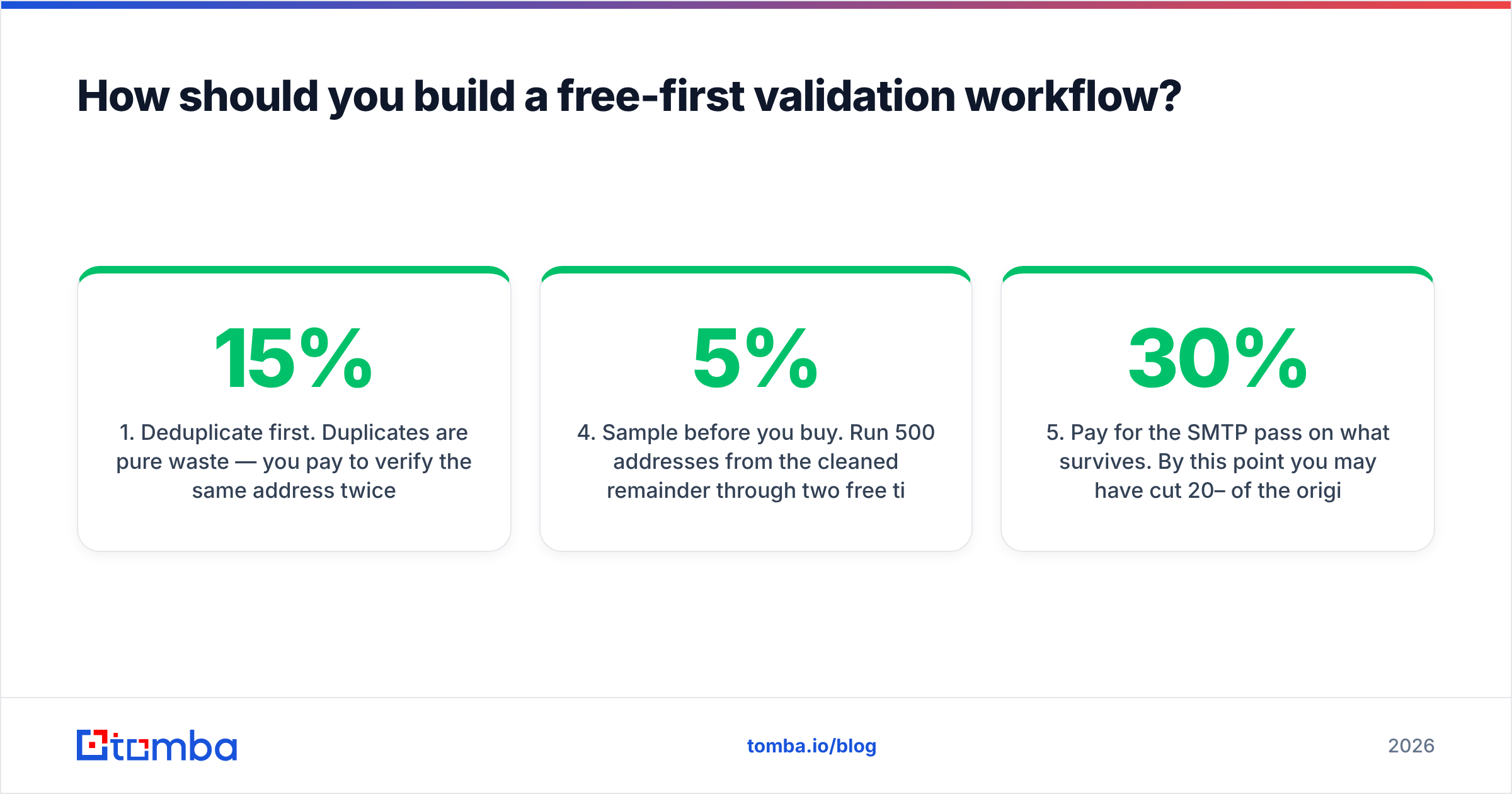
- Deduplicate first. Duplicates are pure waste — you pay to verify the same address twice. A remove duplicates pass before upload routinely cuts 5–15% off a merged list, and it costs nothing.
- Filter syntax and dead domains locally. Regex plus an MX lookup removes the obvious failures before you spend a single credit. This is the step every free browser tool does well.
- Suppress role accounts by rule. Strip or segment
info@,admin@,noreply@,careers@unless your offer genuinely targets a shared inbox. No API call required.
Those three steps are free. The next three decide where your money goes.
- Sample before you buy. Run 500 addresses from the cleaned remainder through two free tiers. Compare the valid/invalid/unknown splits. Disagreement rates above 5% tell you which vendor is guessing.
- Pay for the SMTP pass on what survives. By this point you may have cut 20–30% of the original file, so the metered step runs against a smaller, better list.
- Validate at the point of capture, from then on. Wire verification into your form handler or CRM so nothing enters unchecked. This is where an email verification API earns its keep — validation becomes a background property of your database rather than a chore you schedule.
If you are cleaning at real volume, do the whole thing in one pass with a bulk verify upload rather than chunking across services. One schema, one export, one suppression list.
Should you validate or just source verified data instead?#
Validation is clean-up work. It is what you do because your acquisition process let bad data in. The cheaper move is to stop importing addresses whose status you do not already know.
That reframes the question. Instead of "which tool gives me email list validation free", ask "why does my list contain addresses I cannot vouch for?" The usual answers: a scraped export from two years ago, a conference badge dump, a bought list with no clear source, or a form with no validation on the input field. Each of those has a fix that lasts longer than a quarterly cleaning ritual.
Build lists from a finder that returns a confidence score and a verification status with every result, and the validation step becomes a simple filter. You are no longer testing whether an address exists — the source already told you, and told you why it thinks so. HubSpot's research on database decay is a reasonable starting point on how source quality drives everything downstream. Contact data does not go bad in one event. It erodes month by month, which is why a one-time free clean has a short shelf life.
The practical compromise most teams land on: source new contacts from a verified-by-default provider, run a metered validation pass only on inherited or imported lists, and keep a free tier around for one-off checks on individual addresses.
What should you do next?#
Start with a seed test. Take 100 addresses you already know the answers to, run them through the free tiers of two or three vendors, and compare the unknown rates. That single hour tells you more than any comparison post, including this one.
Then decide which problem you actually have. If it is a one-time inherited list, buy pay-as-you-go credits from a dedicated verifier and be done. If it is an ongoing outbound motion, paying separately to find and to verify is the expensive path.
If you want both in one place, start with Tomba Email Finder. The free tier gives you 25 credits a month to test find-and-verify on your own ICP with no card, and paid plans start at $49/mo on Starter with verification, domain search, catch-all handling, and API access sharing a single credit pool. Compare the tiers on the Tomba pricing page and run your seed list before you commit to anything.
Related guides#
Ready to find emails that actually work?
Join 150,000+ professionals who stopped guessing and started sending. Free credits on signup — no credit card required.
Get the Tomba newsletter
Practical outbound tactics and product updates — once every two weeks.
About the author