Email Lists Generator: How to Build B2B Lists That Convert
Most "email list generators" either scrape junk or resell stale CSVs. Here's how the good ones actually build lists, what accuracy to expect, and what 5,000 verified contacts should cost in 2026.
TL;DR
- An email lists generator is not one thing. It's three different products wearing the same label: pattern guessers, database exporters, and verified discovery engines. Only the third one is safe to send to.
- Pattern-only generators (first.last@domain.com and friends) are free and roughly 40–60% accurate. Fine for a hypothesis, dangerous as a send list.
- The realistic accuracy ceiling for a well-built B2B list in 2026 is 93–97% deliverable — anyone promising 99%+ on 10,000 rows is measuring something else.
- Budget roughly $0.01–$0.05 per verified contact at SMB volume. A 5,000-contact list should land between $50 and $250, not $2,000.
- The generator matters less than the verification layer behind it. Generate wide, verify hard, send narrow.
What is an email lists generator?#
An email lists generator is any tool that turns a target definition — a domain, a company list, a job title, an industry — into a structured list of business email addresses you can actually load into a sequencer.
The confusion starts because three very different product categories all use the phrase:
- Pattern generators (permutators). You give them a name and a domain, they output every plausible combination:
john.smith@,jsmith@,smith.j@,john@. Zero data, pure combinatorics. A email permutator is genuinely useful — as a hypothesis machine, not an output. - Database exporters. You filter a pre-built contact database by firmographics and export rows. Speed is the selling point. Freshness is the risk: a record captured 18 months ago on a 25%-annual-churn job market is a coin flip.
- Discovery engines. These crawl and cross-reference live sources — company sites, public profiles, published bylines, DNS and MX records — then verify each candidate at the SMTP layer before returning it. Slower per query, dramatically higher hit rate.
Most real workflows combine two of the three. You pull a company list from a database, then run discovery + verification per contact so what reaches your sequencer is current rather than archived.

How does an email lists generator actually build a list?#
Under the hood, a competent generator runs a pipeline. Understanding the stages tells you exactly where a bad list goes wrong.
- Domain resolution. Company name → canonical domain. "Acme Logistics" has to become
acmelogistics.com, notacme-logistics.net(a parked lookalike). Failures here poison everything downstream — you'll generate perfectly formatted emails at a domain nobody works at. - Pattern detection. The engine samples known-good addresses at that domain and infers the dominant format. Enterprises are usually consistent; agencies and startups often run two or three patterns simultaneously after acquisitions. A company email pattern check is the cheap way to see this before you commit credits.
- Candidate generation. Name + pattern produces one primary candidate and two or three fallbacks. This is the permutation step, but constrained by evidence rather than brute force.
- Source corroboration. The candidate gets checked against places the address may have appeared publicly — press releases, GitHub commits, conference speaker pages, article bylines. Corroborated addresses carry a much higher confidence score than inferred ones.
- SMTP verification. A handshake with the receiving mail server, without sending a message, confirms whether the mailbox exists. This is the step that separates a list from a guess.
- Risk classification. Catch-all domains, role accounts (
info@,sales@), disposable providers, and known spam traps get flagged rather than silently included.
Skip stage five and six and you have a spreadsheet, not a list.
Are generated lists better than purchased lists?#
They solve different problems, and the honest answer is "it depends on your ICP's stability."
Purchased and pre-built lists win on speed and on coverage of stable roles. If you sell to hospital procurement directors or municipal facilities managers — roles with long tenure and low churn — a well-maintained database is efficient and perfectly legitimate. Vendors like BookYourData built their reputation on exactly this: curated, human-verified B2B records with a stated accuracy guarantee, sold by the record rather than by subscription. For teams that need 2,000 contacts once and don't want to run a pipeline, that model is a reasonable buy.
Generated lists win on freshness and on niche targeting. If you're chasing Series A heads of growth — a role that turns over every 14 months — anything pre-collected is decaying faster than it's being refreshed. Generating on demand, against a company list you assembled this week, beats any static export.
The failure mode people actually hit isn't "bought vs generated." It's unverified vs verified. A bought list that was verified last week outperforms a freshly generated list that was never checked. Both approaches need the same final gate.
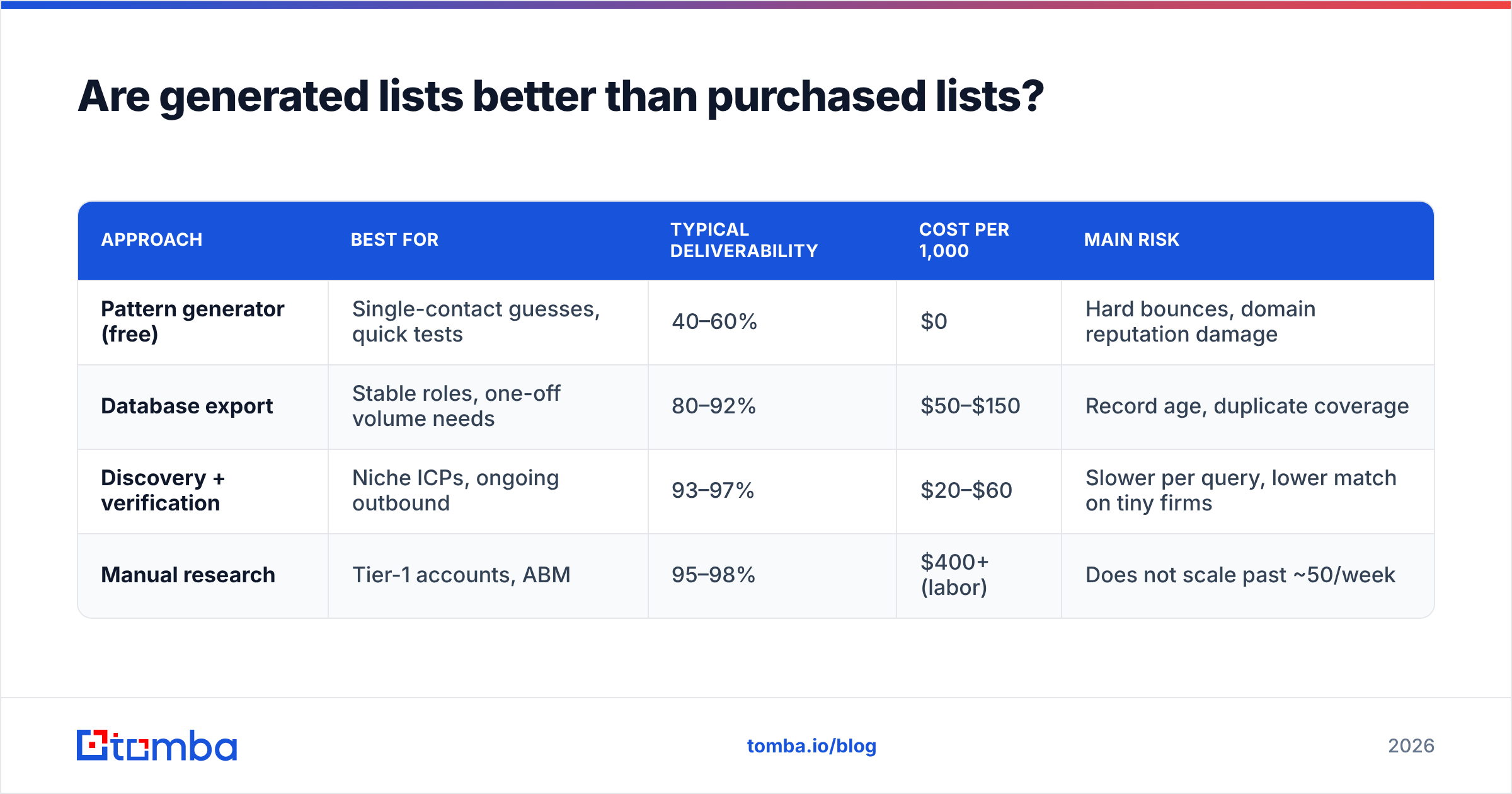
| Approach | Best for | Typical deliverability | Cost per 1,000 | Main risk |
|---|---|---|---|---|
| Pattern generator (free) | Single-contact guesses, quick tests | 40–60% | $0 | Hard bounces, domain reputation damage |
| Database export | Stable roles, one-off volume needs | 80–92% | $50–$150 | Record age, duplicate coverage |
| Discovery + verification | Niche ICPs, ongoing outbound | 93–97% | $20–$60 | Slower per query, lower match on tiny firms |
| Manual research | Tier-1 accounts, ABM | 95–98% | $400+ (labor) | Does not scale past ~50/week |
How accurate is an email lists generator in 2026?#
Accuracy claims in this category are close to meaningless without a definition, so here's the one that matters: the percentage of returned addresses that accept mail and reach a human, measured on your list, after your first send.
Two numbers get conflated constantly. Match rate is how many of your input rows returned any address at all. Accuracy is how many of those returned addresses were real. A tool can advertise a 98% match rate by returning a guess for every row — and still bounce a third of them.

Three things move accuracy more than the vendor you pick:
- Company size. Sub-20-employee companies have thin public footprints. Expect 15–25 points lower match rate there than at 500+ headcount firms, on any tool.
- Catch-all domains. Roughly a third of business domains accept all mail regardless of whether the mailbox exists. SMTP verification returns "accepted" for everything, which is useless. This is why a dedicated catch-all verifier exists as a separate step — it uses behavioral signals instead of the handshake.
- Region. Coverage on North American and Western European domains is consistently better than on APAC or LATAM domains across every vendor I've tested. Nobody advertises this.
A practical rule: run any generator against 100 contacts you can independently confirm before you commit to a plan. Vendors' own accuracy pages are marketing; your 100-row control set is data.
Which email lists generator should you use?#
Here's the comparison that actually helps, scoped to tools that do discovery rather than only reselling static rows.

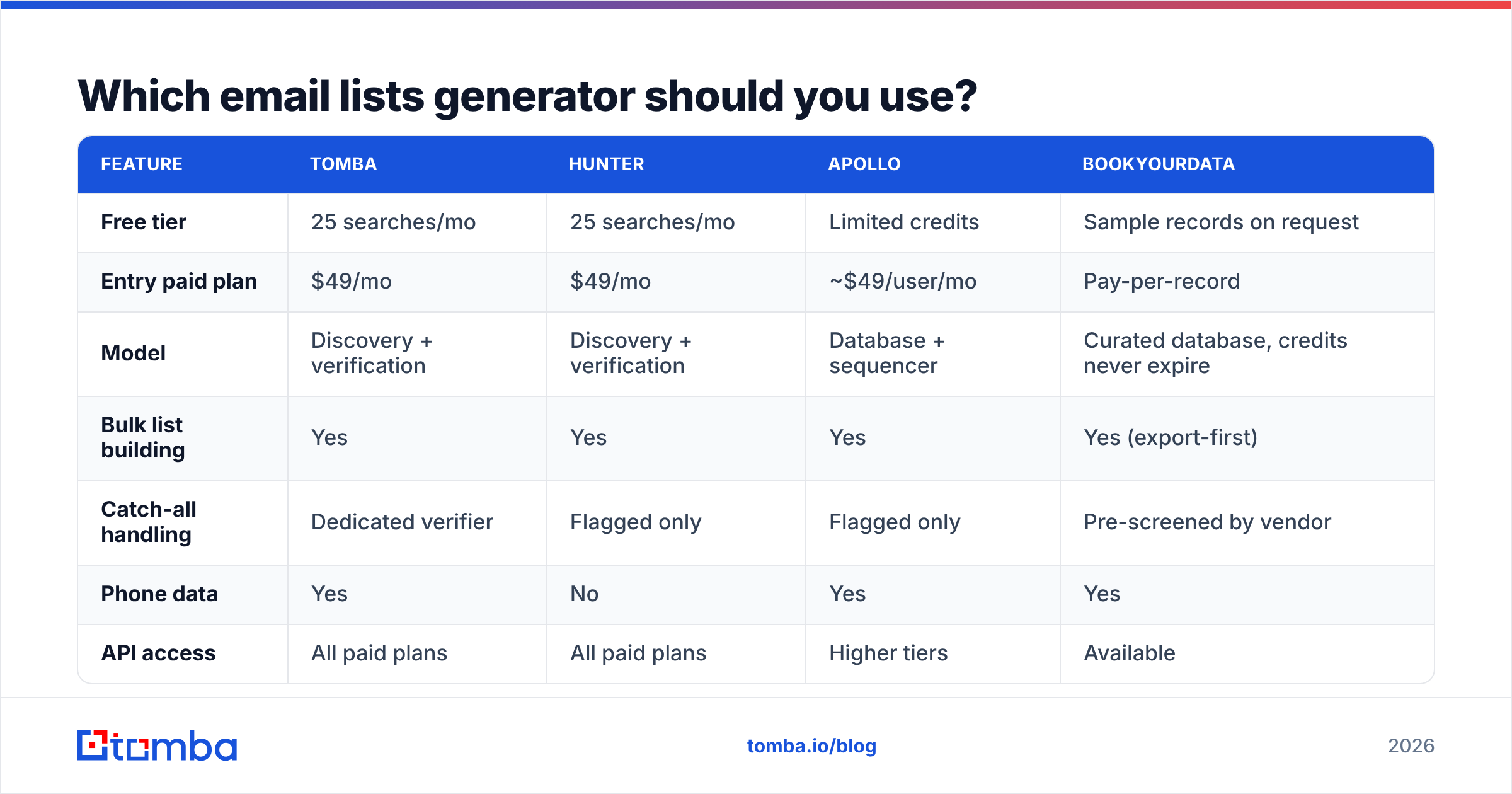
| Feature | Tomba | Hunter | Apollo | BookYourData |
|---|---|---|---|---|
| Free tier | 25 searches/mo | 25 searches/mo | Limited credits | Sample records on request |
| Entry paid plan | $49/mo | $49/mo | ~$49/user/mo | Pay-per-record |
| Model | Discovery + verification | Discovery + verification | Database + sequencer | Curated database, credits never expire |
| Bulk list building | Yes | Yes | Yes | Yes (export-first) |
| Catch-all handling | Dedicated verifier | Flagged only | Flagged only | Pre-screened by vendor |
| Phone data | Yes | No | Yes | Yes |
| API access | All paid plans | All paid plans | Higher tiers | Available |
| Best fit | Teams generating fresh lists weekly | Domain-first prospecting | All-in-one outbound stack | One-off volume buys, stable ICPs |
Read that table as four different answers, not a ranking:
- You already have a company list and need contacts at each. A domain search plus bulk enrichment is the shortest path. This is where a discovery engine earns its price.
- You want prospecting and sending in one login. Apollo's integrated model is genuinely convenient, with the tradeoff that its data quality varies by segment and you're renting the whole stack.
- You need 3,000 records once, this quarter, and never again. A pay-per-record vendor beats any subscription. Credits that don't expire matter more than a lower monthly price when your usage is lumpy.
- You're building a repeatable weekly motion. Subscription + API + bulk email finder wins on cost per contact once you're past ~2,000/month.

What should generating 5,000 emails actually cost?#
Run the arithmetic before you buy anything, because the sticker price and the effective price diverge badly.
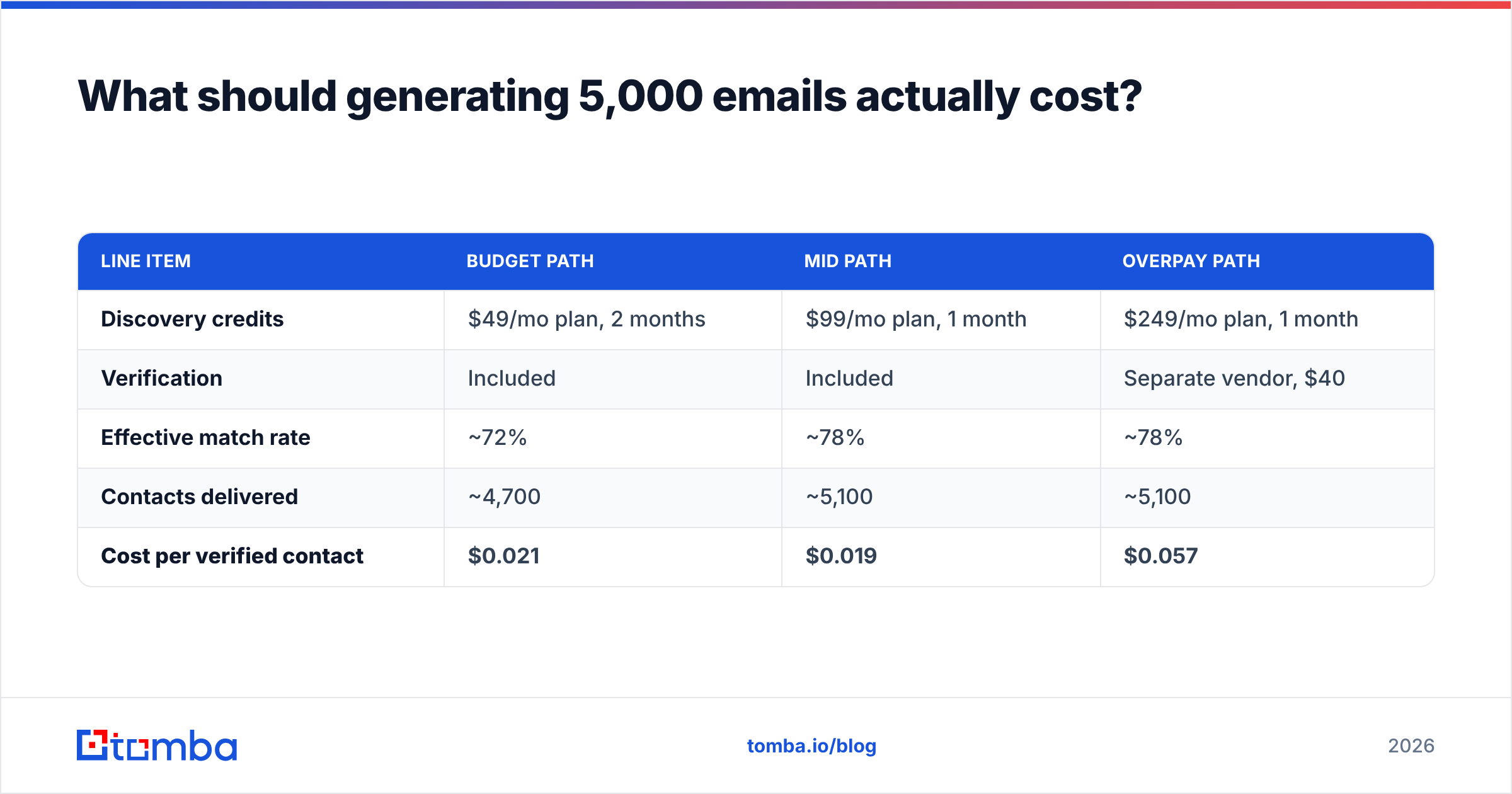
Say you need 5,000 verified contacts. Your input list is 6,500 companies (you'll lose some to no-match).
| Line item | Budget path | Mid path | Overpay path |
|---|---|---|---|
| Discovery credits | $49/mo plan, 2 months | $99/mo plan, 1 month | $249/mo plan, 1 month |
| Verification | Included | Included | Separate vendor, $40 |
| Effective match rate | ~72% | ~78% | ~78% |
| Contacts delivered | ~4,700 | ~5,100 | ~5,100 |
| Cost per verified contact | $0.021 | $0.019 | $0.057 |
Two things fall out of this. First, the cheapest plan is rarely the cheapest per contact — throughput caps force you to stretch a project across billing cycles. Second, paying separately for verification is the single most common way teams double their real cost for no accuracy gain. Check whether verification credits are bundled before comparing headline prices; Tomba pricing bundles the verifier into every tier, which is the pattern you want.
How do you keep a generated list out of the spam folder?#
A clean list is necessary and not sufficient. The list determines your bounce rate; everything else determines your placement.
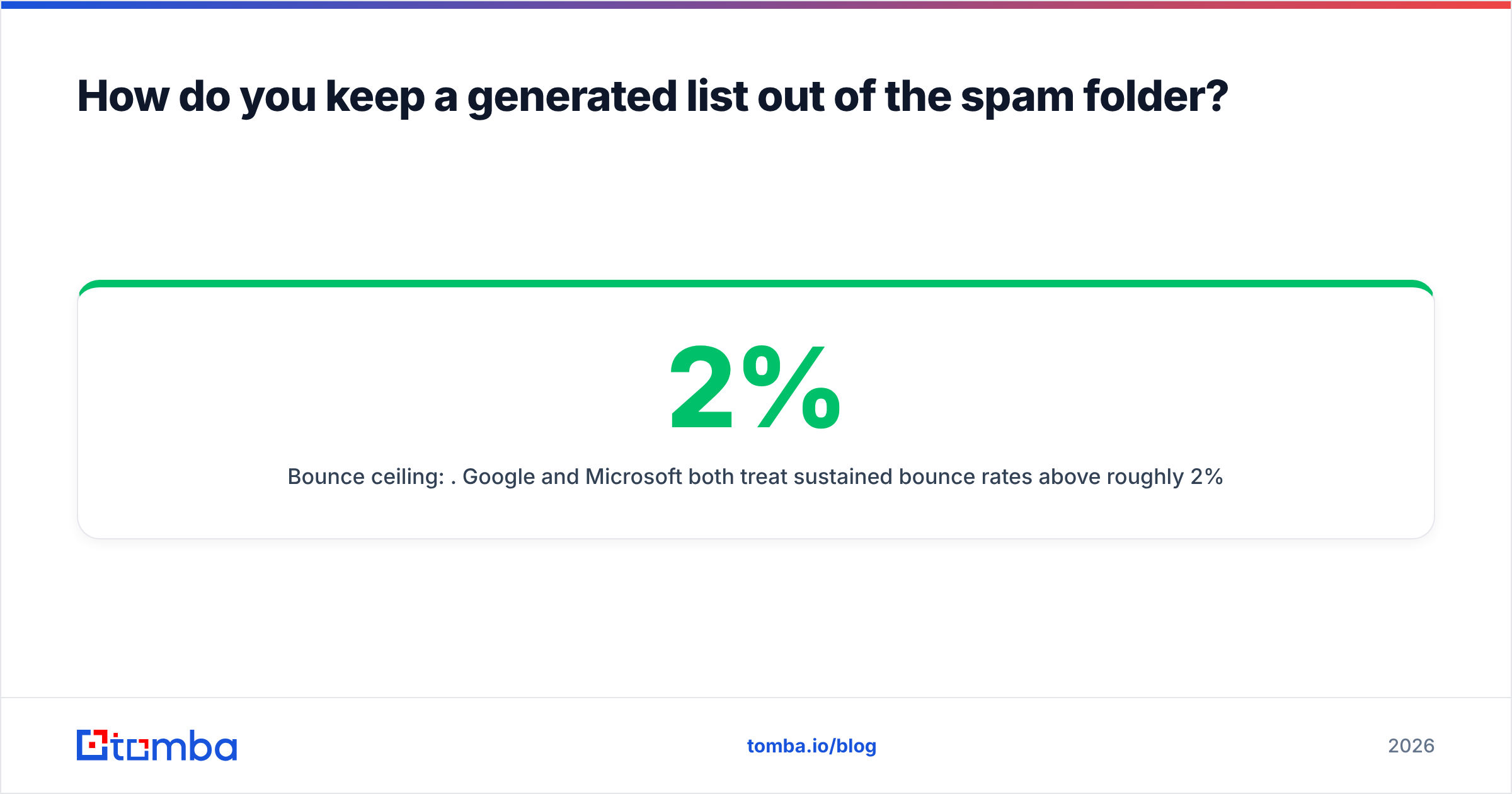
- Bounce ceiling: 2%. Google and Microsoft both treat sustained bounce rates above roughly 2% as a spam signal. On a 5,000-row list that's 100 bad addresses — which a 93% accurate list will blow past on the first send. Re-run an email verifier on any list older than 30 days, and split large sends into batches so an early bounce spike doesn't burn your whole domain.
- Strip role accounts.
info@,support@, andsales@inflate your list size and depress every downstream metric. Most generators flag them; actually removing them is on you. - Warm the sending domain first. A brand-new domain firing 500 cold emails on day one gets filtered regardless of list quality. Ramp over two to three weeks.
- Authenticate properly. SPF, DKIM, and DMARC are table stakes since the 2024 bulk-sender requirements. Verify your records with an SPF checker before the first send, not after the first complaint.
- Segment by confidence score. Send to your corroborated, high-confidence contacts first. If those land, the inferred tier is safer to try. Sending your worst rows first is how good lists get blamed for bad infrastructure.
Is generating email lists legal?#
Short answer: generating B2B contact data is legal in most jurisdictions; what you do next is where the rules bite.
In the US, the CAN-SPAM Act does not require prior consent for commercial email. It requires accurate headers, a non-deceptive subject line, a physical postal address, and a working opt-out honored within 10 business days. Cold B2B outreach is compliant if you do those four things.
In the EU and UK, GDPR applies to business email addresses that identify a person (sarah.jones@company.com is personal data; info@company.com generally isn't). Legitimate interest is a workable lawful basis for B2B outreach when the offer is genuinely relevant to the recipient's professional role — but you owe transparency about where you got the data and a straightforward objection path. Country-level rules vary; Germany and Italy are materially stricter than Ireland or the Netherlands.
Practical compliance posture, regardless of geography: keep provenance for every record, honor unsubscribes across your whole database rather than per-campaign, don't email personal or generic mailboxes, and suppress anyone who objects permanently. Vendor documentation on data sources is worth reading before you buy — if a provider can't say where a record came from, you can't answer a data subject request about it. Buyer reviews on G2's lead intelligence category are also a decent smell test for how vendors handle deletion requests in practice.
What's the fastest workflow that actually works?#
Five steps, repeatable weekly:
- Define the account list first, contacts second. 300 well-chosen companies beats 3,000 filtered by "industry = software."
- Resolve domains in bulk and manually eyeball 20 of them. Domain errors are silent and expensive.
- Generate contacts by role, not by name-matching a stale CSV. Titles change; functions don't.
- Verify everything, then cut the bottom tier. If a row comes back risky or catch-all-unknown, it goes to a nurture segment, not the main sequence.
- Measure bounce rate per source after the first send, and kill whichever source underperforms. Most teams never do this and keep paying for the same bad segment for a year.
If you're building lists weekly and want the discovery and verification steps in one place, start with the Tomba Email Finder — the free tier gives you 25 searches to run against your own control set before you spend anything, and verification is bundled at every paid tier so your cost per verified contact stays honest. Test it on 100 contacts you can independently confirm. That's the only benchmark that counts.
Related guides#
Ready to find emails that actually work?
Join 150,000+ professionals who stopped guessing and started sending. Free credits on signup — no credit card required.
Get the Tomba newsletter
Practical outbound tactics and product updates — once every two weeks.
About the author