Email Locator Guide 2026: How to Find Any Work Email
An email locator turns a name and a company into a verified work address. Here's how the tech actually works, what accuracy claims really mean, and how the main tools compare on price and coverage in 2026.
TL;DR
- An email locator is software that takes a name plus a company domain and returns the most likely work email address, then checks whether that address actually accepts mail.
- The good ones do two jobs: pattern inference (how this company builds addresses) and verification (does the mailbox respond). Tools that skip step two are guessers with a nice UI.
- Headline "98% accuracy" numbers are marketing until you know the denominator. What matters is found rate on your list and bounce rate after send.
- Pricing splits into three shapes: per-credit finders ($29–$99/mo), all-in-one prospecting suites ($99–$500+/mo), and static database downloads (one-time per record).
- For most teams, a dedicated finder plus a verifier beats a bundled suite on cost per usable contact — and you keep your sending domain out of trouble.
What is an email locator?#
An email locator is a lookup engine for professional email addresses. You give it two inputs — usually a person's name and a company domain, sometimes a LinkedIn URL — and it returns an address like first.last@company.com along with a confidence score and, in better tools, a verification status.
Think of it like a building directory versus a doorbell. The directory tells you which apartment the person probably lives in based on how the building numbers its units. The doorbell tells you whether anyone answers. A locator that only reads the directory hands you a plausible address. A locator that also rings the bell hands you a deliverable one. The gap between those two things is where most cold email campaigns quietly die.
The term gets used interchangeably with "email finder," "email lookup tool," and "email search." They describe the same category. What separates products is not the label but the pipeline underneath.
How does an email locator actually find an address?#
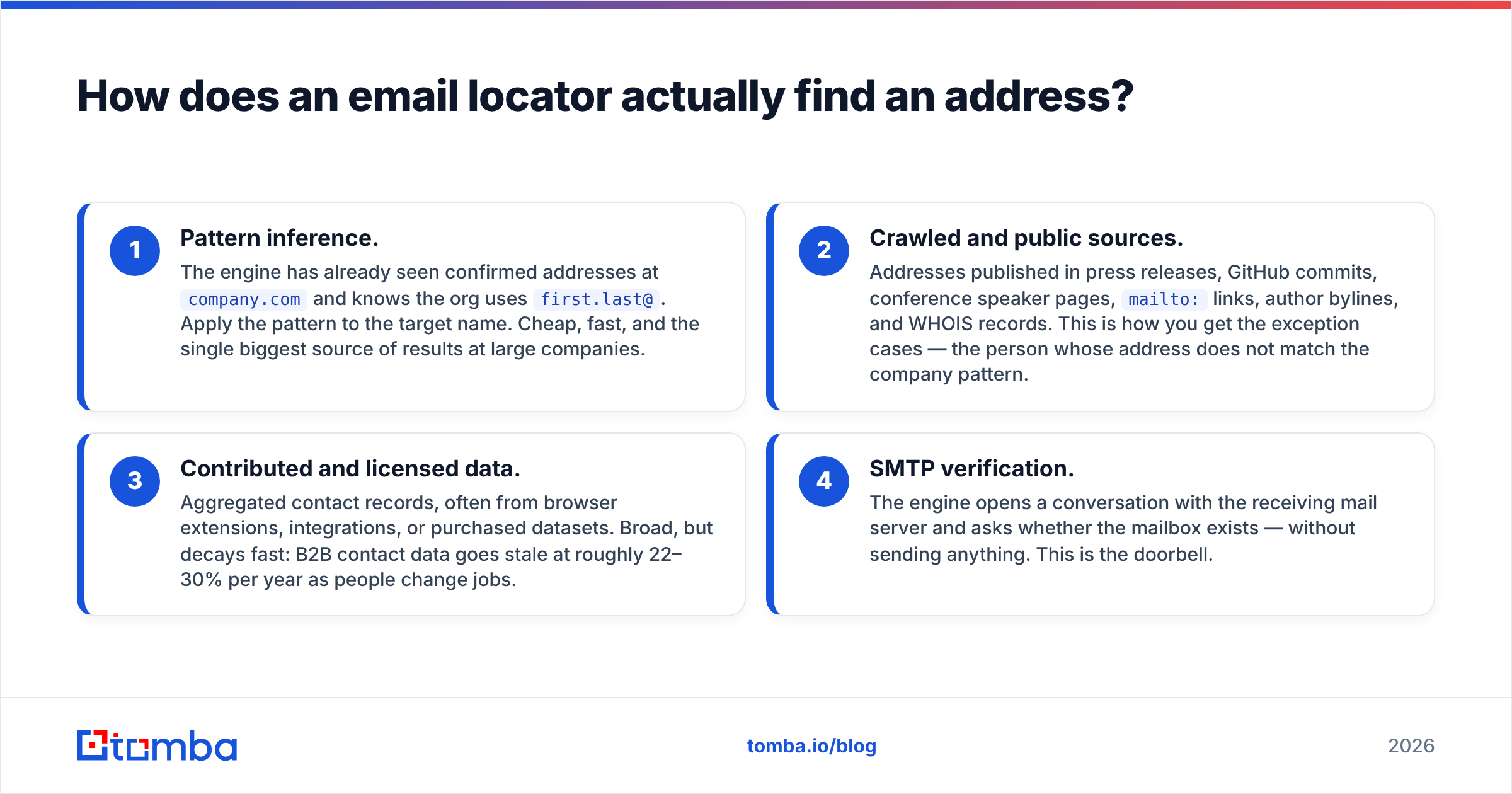
Four mechanisms, usually layered:
- Pattern inference. The engine has already seen confirmed addresses at
company.comand knows the org usesfirst.last@. Apply the pattern to the target name. Cheap, fast, and the single biggest source of results at large companies. - Crawled and public sources. Addresses published in press releases, GitHub commits, conference speaker pages,
mailto:links, author bylines, and WHOIS records. This is how you get the exception cases — the person whose address does not match the company pattern. - Contributed and licensed data. Aggregated contact records, often from browser extensions, integrations, or purchased datasets. Broad, but decays fast: B2B contact data goes stale at roughly 22–30% per year as people change jobs.
- SMTP verification. The engine opens a conversation with the receiving mail server and asks whether the mailbox exists — without sending anything. This is the doorbell.
The last step is the one you should interrogate hardest. Plenty of tools generate permutations with an email permutator-style guess and return the highest-scoring string with no live check at all. That is a coin flip dressed as a data product.

What separates a real locator from a permutation guesser?#
Use this as a buying checklist. A tool that fails three or more of these is a guesser.
- Verification status is explicit. You should see
valid,invalid,accept-all, orunknown— not just a percentage. A number without a state is a vibe. - Catch-all handling is named. Roughly 15–20% of B2B domains accept every address at the server level, which makes standard SMTP checks useless. Serious tools flag these and offer a dedicated catch-all verifier path rather than pretending the address is clean.
- Sources are disclosed. You should be able to see why the tool believes this address is right — pattern match, crawled citation, or verified record. Tomba publishes its data sources for exactly this reason.
- Found rate is separated from accuracy. These are different metrics and vendors love to blur them. Found rate = how many of your inputs returned anything. Accuracy = how many of those returned addresses were real.
- There's an API and a bulk path. Manual one-off lookups do not scale past a few dozen prospects. A proper email finder API and bulk email finder are table stakes for any team-level use.
- Compliance posture is documented. GDPR/CCPA handling, opt-out processing, and a real data-subject request flow. This matters more every year.
How do the main email locator tools compare in 2026?#
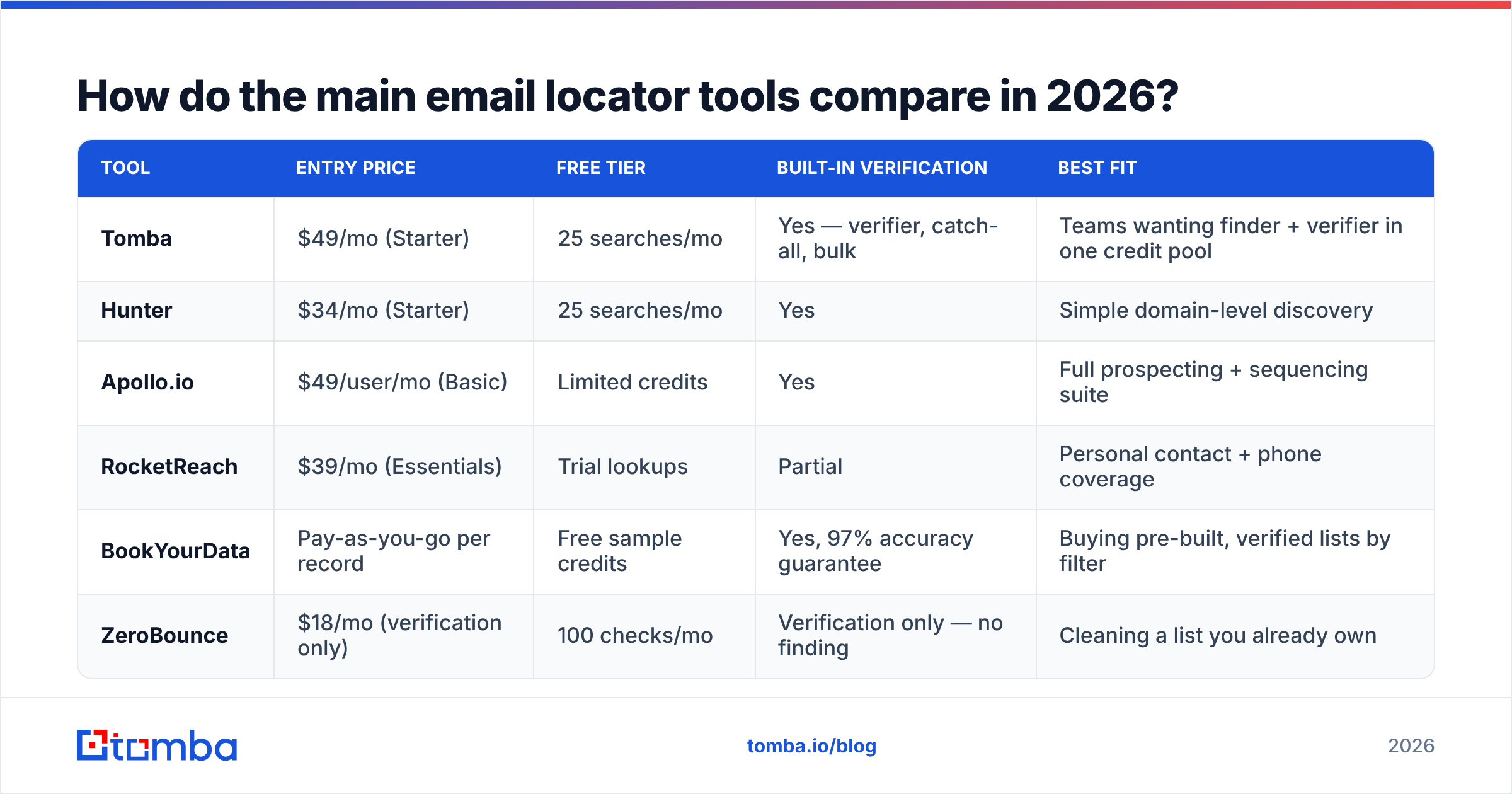
Pricing below reflects publicly listed entry tiers. Credit definitions differ between vendors — some charge for a search whether or not it returns a result, which is the single biggest hidden cost in this category.
| Tool | Entry price | Free tier | Built-in verification | Best fit |
|---|---|---|---|---|
| Tomba | $49/mo (Starter) | 25 searches/mo | Yes — verifier, catch-all, bulk | Teams wanting finder + verifier in one credit pool |
| Hunter | $34/mo (Starter) | 25 searches/mo | Yes | Simple domain-level discovery |
| Apollo.io | $49/user/mo (Basic) | Limited credits | Yes | Full prospecting + sequencing suite |
| RocketReach | $39/mo (Essentials) | Trial lookups | Partial | Personal contact + phone coverage |
| BookYourData | Pay-as-you-go per record | Free sample credits | Yes, 97% accuracy guarantee | Buying pre-built, verified lists by filter |
| ZeroBounce | $18/mo (verification only) | 100 checks/mo | Verification only — no finding | Cleaning a list you already own |
Two structural notes worth more than any feature row:
Per-seat vs per-credit changes the math entirely. Suite tools like Apollo price per user. If you have six SDRs, a $49/user plan is $294/mo before you find a single address. Credit-based finders like Tomba and Hunter charge for volume, not headcount — usually cheaper for small teams, sometimes more expensive for very high-volume single users. Run your own numbers against Tomba pricing and the vendor's before committing to an annual term.
Verification-only tools are not competitors — they're complements. ZeroBounce, Bouncer, and similar products clean lists. They cannot find anything. If a comparison article puts them head-to-head with finders, it does not understand the category.

What does "98% accuracy" actually mean?#
It means whatever the vendor wants it to mean, unless they define the denominator.
Here are the three definitions in circulation, ranked from most honest to least:
- Of all addresses returned as
valid, X% did not bounce on a real send. This is the number you care about. It's testable. - Of all addresses returned (any status), X% were correct. Weaker, because it lumps in
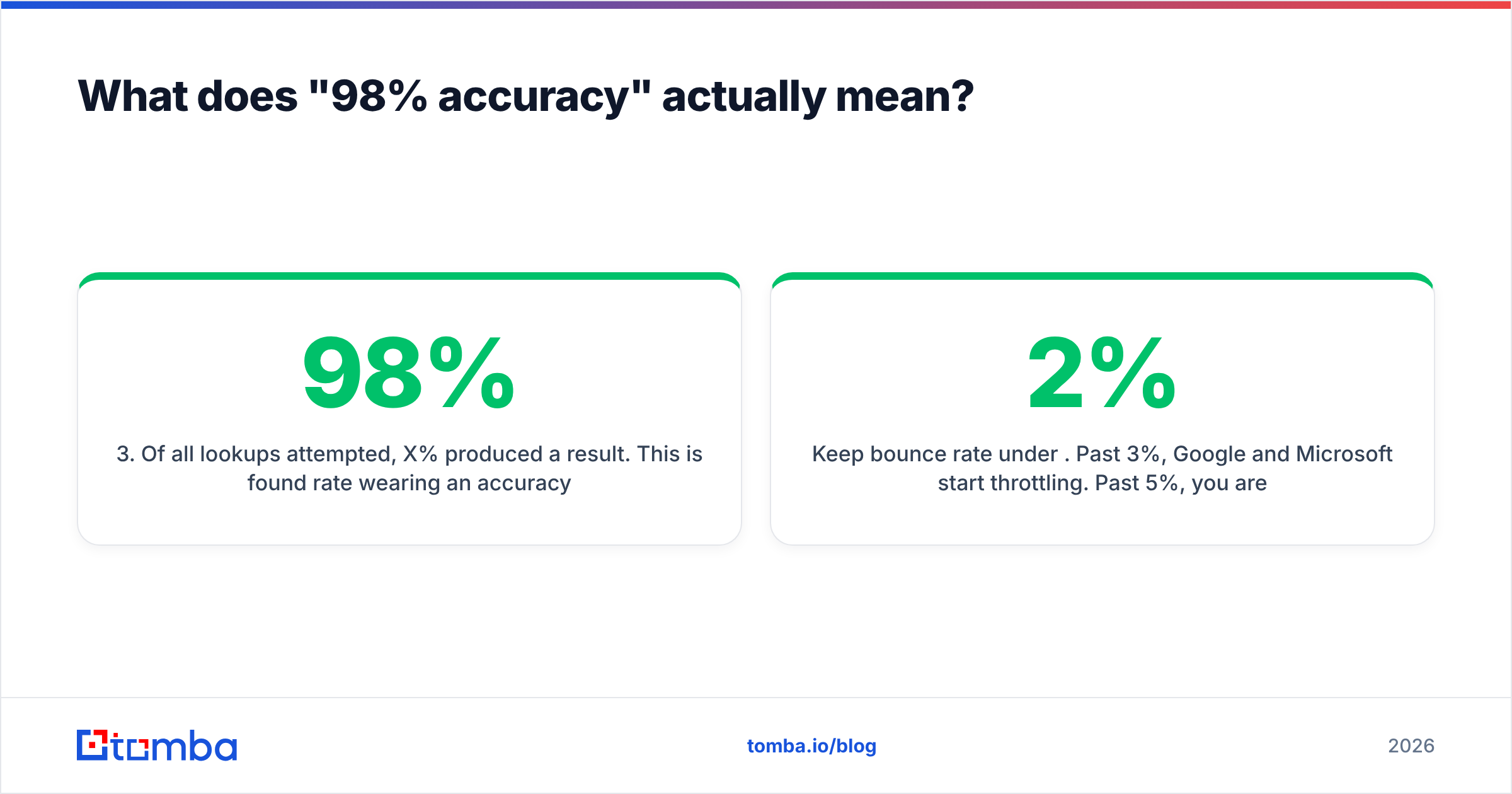
unknownandaccept-allresults. - Of all lookups attempted, X% produced a result. This is found rate wearing an accuracy costume. A tool can hit 98% here and still bounce a third of your sends.
The only defensible test is your own. Take 200 contacts from your actual ICP — not a vendor-provided sample list — run them through two or three tools on free tiers, and compare three columns: how many returned an address, how many of those were flagged deliverable, and what your real bounce rate was after sending. That last number is the only one your mailbox provider cares about.
Keep bounce rate under 2%. Past 3%, Google and Microsoft start throttling. Past 5%, you are actively burning sender reputation that takes weeks to rebuild. Google's own bulk sender guidelines spell out the spam-rate thresholds — they are not suggestions.
When should you use a locator vs. a database vs. enrichment?#
Three different jobs that people constantly conflate:
- Email locator — you know who you want. Named person, named company. You need their address. Best when your target list comes from research, events, LinkedIn, or inbound signals.
- B2B database — you know the profile you want, not the names. "VP Marketing at Series B SaaS in DACH, 50–200 employees." You filter and export. A B2B database or a per-record vendor like BookYourData fits here, and BookYourData's pay-per-record model is genuinely good when you want a clean filtered list without a subscription.
- Data enrichment — you already have partial records. A CRM full of rows with company names and no contacts, or emails with no job titles. Contact enrichment fills gaps in bulk against what you already own.
Most teams need two of the three. The common stack: database or scraped list for volume, locator for the named accounts that matter, enrichment to keep the CRM from rotting.
If your inputs are LinkedIn profiles specifically, a LinkedIn finder is a narrower and usually more accurate path than pushing the name through a generic search, because the profile URL disambiguates people with common names.
How do you use an email locator without wrecking deliverability?#
Finding the address is half the job. The other half is not getting flagged.
Verify at send time, not at scrape time. A record verified four months ago is a guess today. Re-run your list through an email verifier within 7 days of launching a sequence. Job-change churn alone justifies it.
Drop unknown and treat accept-all separately. Do not merge risky statuses into your main send. Route catch-all addresses to a lower-volume, higher-personalization segment where a bounce costs you less. Better: run them through a catch-all finder that uses alternative signals rather than pure SMTP.
Cut generic role addresses. info@, sales@, support@, admin@. They inflate your found rate, tank your reply rate, and are disproportionately monitored by spam traps.
Warm the domain before volume. New sending domain plus 500 cold sends on day one is the fastest way to a permanent reputation problem. Use a warmup calculator to set a ramp, and keep an eye on your email deliverability fundamentals — SPF, DKIM, DMARC all aligned before the first campaign.
Log bounces per source. If you use two locators, tag which tool supplied each address. After 1,000 sends you will have real per-vendor bounce data, which beats any review article — including this one.
What does the workflow look like end to end?#
A tight, repeatable loop:
- Define the account list. Firmographic filters first, names second. Ten well-chosen accounts beat a thousand random domains.
- Resolve contacts per account. Run a domain search to see every known address at the company, then pick by role. This is faster than looking people up one at a time and surfaces contacts you didn't know existed.
- Fill named gaps. For specific people the domain search missed, run individual lookups with name plus domain.
- Verify the whole batch. Bulk verification, not per-record. Split output into send / hold / drop.
- Push to CRM with source tags. Which tool, which date, which status. Your future self will thank you when bounce rates drift.
- Re-verify on a 60–90 day cycle. Or before any campaign touching records older than that.
Steps 2 and 4 are where teams save the most time and where most homegrown scripts fall over. If you're already living in a spreadsheet, a Google Sheets add-on or the Tomba Chrome extension removes the export-import round trip entirely.

Are free email locators good enough?#
For low volume, sometimes. For anything sustained, no — and the reason is structural, not stingy.
Free tiers exist to prove found rate, so vendors weight them toward easy lookups: large companies, common name patterns, well-crawled domains. Your hard cases — 40-person consultancies, non-Latin names, recently rebranded domains — are exactly where free tools return nothing and paid indexes earn their keep.
That said, free tiers are the correct way to evaluate. Tomba's 25 searches/mo, Hunter's 25, and free sample credits from list vendors are enough to run the 200-contact bake-off described above across two or three tools. Do that before you buy anything annual.
Free standalone utilities are also genuinely useful for adjacent tasks: a free email checker for one-off syntax and MX validation, or a company email pattern lookup when you just need to know how one org formats addresses.
What free tools cannot give you: bulk throughput, API access, catch-all resolution, or any SLA on data freshness. Those are the paid product.
Which email locator should you pick?#
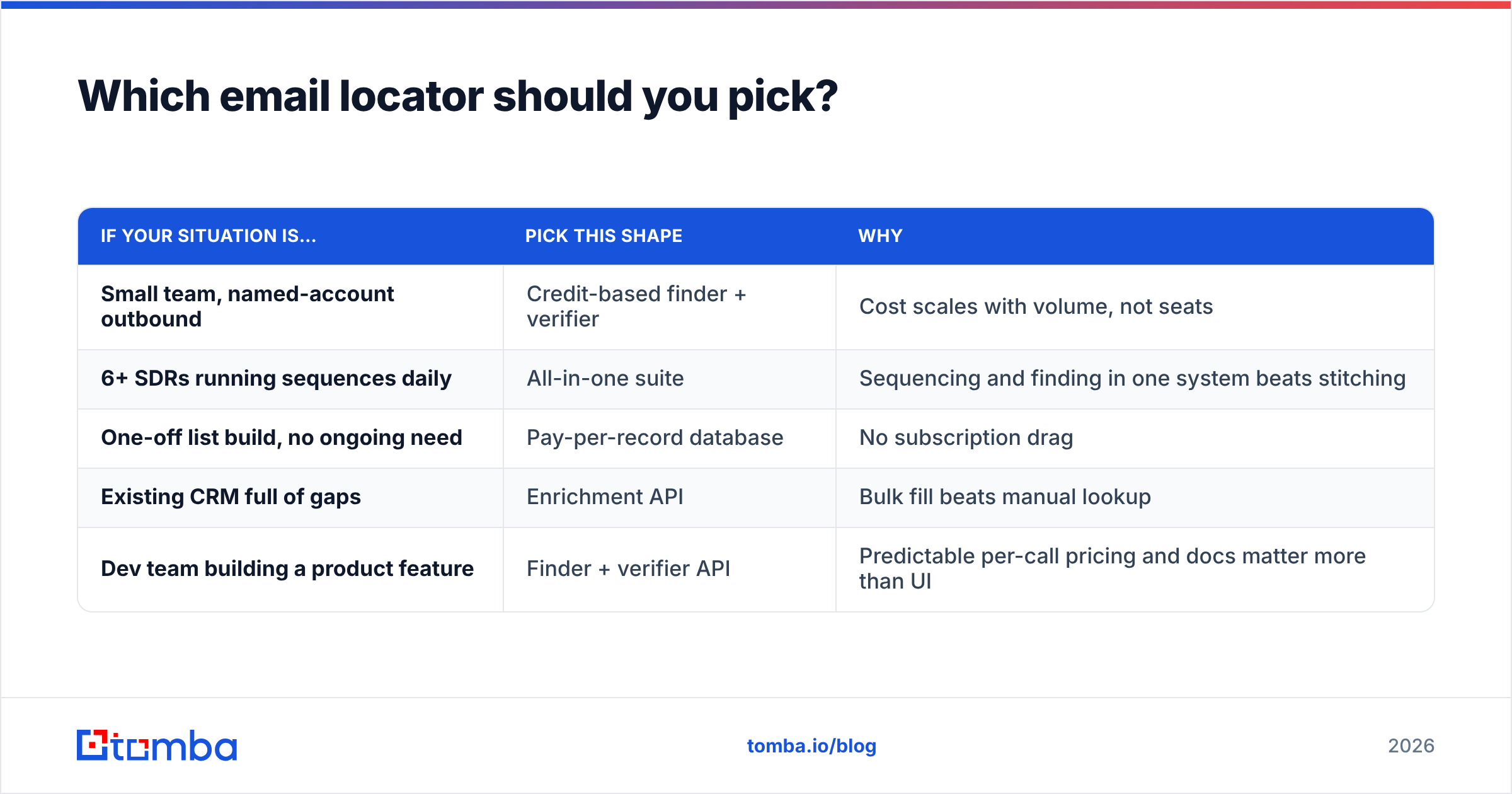
Match the tool to the shape of your problem, not to the review scores.
| If your situation is… | Pick this shape | Why |
|---|---|---|
| Small team, named-account outbound | Credit-based finder + verifier | Cost scales with volume, not seats |
| 6+ SDRs running sequences daily | All-in-one suite | Sequencing and finding in one system beats stitching |
| One-off list build, no ongoing need | Pay-per-record database | No subscription drag |
| Existing CRM full of gaps | Enrichment API | Bulk fill beats manual lookup |
| Dev team building a product feature | Finder + verifier API | Predictable per-call pricing and docs matter more than UI |
If you want an outside reference point before deciding, G2's email-finder category has enough volume of recent reviews to be useful for spotting support and billing complaints — the things vendors never mention and that surveys from firms like Gartner consistently rank as top switching triggers.
Getting started#
Pick one workflow and instrument it properly. Take a 200-contact slice of your real ICP, run it through the Tomba Email Finder free tier alongside whatever you use today, and compare found rate, verified rate, and post-send bounce rate side by side. Twenty-five free searches is enough to see the pattern on a targeted sample, and the Starter plan at $49/mo covers most small-team volume once you've confirmed the numbers hold. The finder, verifier, catch-all checks, and domain search share one credit pool, so you're not paying three vendors to complete one job — and the API and bulk tools are there when your process outgrows the dashboard.
Related guides#
Ready to find emails that actually work?
Join 150,000+ professionals who stopped guessing and started sending. Free credits on signup — no credit card required.
Get the Tomba newsletter
Practical outbound tactics and product updates — once every two weeks.
About the author