Email Lookup Tool: How They Work and Which to Use in 2026
An email lookup tool turns a name and a domain into a verified inbox. Here's how the tech actually works, what accuracy claims really mean, and how the main options compare on price and coverage in 2026.
TL;DR
- An email lookup tool takes what you already know — a name, a domain, a LinkedIn URL, or an existing address — and returns a verified business email plus the confidence data behind it.
- The three real technologies underneath are pattern inference, sourced-record matching, and SMTP verification. Every vendor uses some mix; the mix determines your hit rate more than the marketing does.
- "98% accuracy" almost never means "98% of your list gets found." It usually means bounce rate on emails the tool chose to return. Read the denominator.
- Cost per usable contact is the only fair comparison metric. A $49/mo plan with a 70% hit rate beats a $99/mo plan with a 40% hit rate.
- Free tiers exist and are genuinely useful for testing: Tomba gives 25 searches/month, Hunter 25, Snov.io 50 credits. Test on a list you already know the answers to.
What is an email lookup tool?#
An email lookup tool is software that resolves partial identity information into a working professional email address. You feed it something anchoring — "Sarah Chen, stripe.com" or a LinkedIn profile URL — and it returns sarah.chen@stripe.com along with a confidence score, the source type, and usually a verification status.
The everyday analogy: it's a reverse phone book for work inboxes. You know the person and the building; the tool tells you the extension. Technically, it's a lookup layer sitting on top of a crawled corpus, a pattern engine, and an SMTP prober.
The category has drifted. Five years ago "email lookup" meant one thing — guess the pattern, test it. In 2026 the same phrase covers at least four distinct jobs:
- Single lookup — one person, one answer, usually done in a browser extension while you're reading their profile.
- Domain harvesting — give a company domain, get every discoverable address at that company with roles and departments. This is what domain search does.
- Bulk enrichment — upload 5,000 rows of names and companies, get emails back. This is where cost per contact starts mattering enormously.
- Reverse lookup — you have the email, you want the person. Useful for inbound form fills and list hygiene, handled by reverse email lookup.
Most buyers only need one of these well. Buying a platform that does all four adequately is often worse than buying a tool that does your one job excellently.
How does an email lookup tool actually find addresses?#
Three mechanisms, and knowing which one produced your result tells you how much to trust it.
- Pattern inference. The tool has seen enough verified addresses at
acme.comto know the format isfirst.last@. Given a new name at that domain, it constructs the candidate. Cheap, fast, and only as good as the pattern sample. Companies with mixed formats (post-acquisition, or with a legacyflast@cohort) break this badly. You can inspect a company's dominant format yourself with a company email pattern checker before you commit budget to a domain. - Sourced-record matching. The address was observed somewhere public and real — a conference speaker page, a GitHub commit, a press release, an author byline, a WHOIS record. This is the highest-trust result type because nobody guessed anything. It's also the type that varies most between vendors, since it depends entirely on crawl breadth. Vendors who publish their data sources make this auditable; many don't.
- SMTP verification. The tool opens a conversation with the receiving mail server and asks whether the mailbox exists, without sending anything. Works well on standard configurations. Fails silently on catch-all domains, which accept every address at the SMTP layer regardless of whether a human reads it.
That third failure mode is the one that quietly ruins campaigns. Roughly a fifth to a third of B2B domains run catch-all, and a naive verifier marks all of them "valid." You then send to addresses that route to a black hole, your engagement rate craters, and your sender reputation takes the hit. Tools that separate catch-all handling into its own pipeline — a dedicated catch-all verifier — give you a real answer instead of a shrug labelled "valid."

What do accuracy claims really mean?#
Here's the part vendors would rather you skip: accuracy and hit rate are different numbers, and only one of them is usually advertised.
Hit rate = of the contacts you asked about, what percentage did the tool return an address for?
Accuracy (or deliverability, or bounce rate) = of the addresses returned, what percentage actually land?
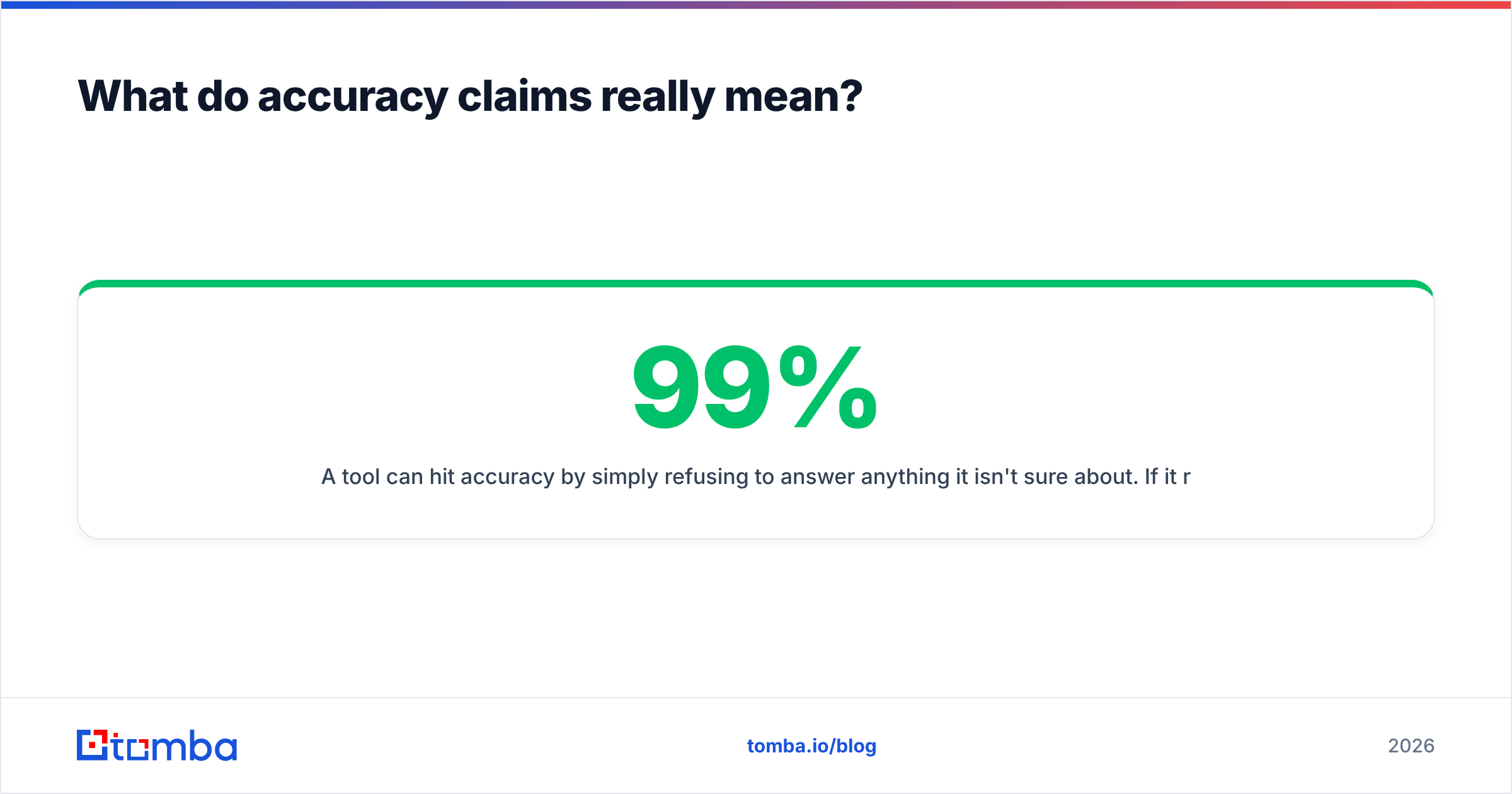
A tool can hit 99% accuracy by simply refusing to answer anything it isn't sure about. If it returns addresses for only 35% of your list, that 99% describes a very small slice. Meanwhile a tool returning 75% of your list at 93% accuracy gives you more than twice the usable contacts.
The number that matters is the product of both, divided by price:
usable contacts = list size × hit rate × accuracy
cost per usable contact = monthly price ÷ usable contacts
Run that on your own data before you sign anything. Take 100 contacts where you already know the correct email — your CRM's closed-won accounts work perfectly — strip the emails, and run the list through every free tier you can get. You'll learn more in an afternoon than from any review site, including this article.

The second thing accuracy claims hide is segment variance. Almost every tool performs well on US-based SaaS companies with 50–5,000 employees, because that's where the training data is dense. Performance drops on:
- Non-English domains, especially German, Japanese, and Nordic companies
- Sub-20-person companies with no web presence beyond a landing page
- Enterprise organizations that route everything through generic aliases
- Regulated industries (healthcare, finance) with restrictive directory policies
If your ICP sits in one of those buckets, headline accuracy is nearly meaningless to you. Test in your segment.
Which email lookup tool should you use in 2026?#
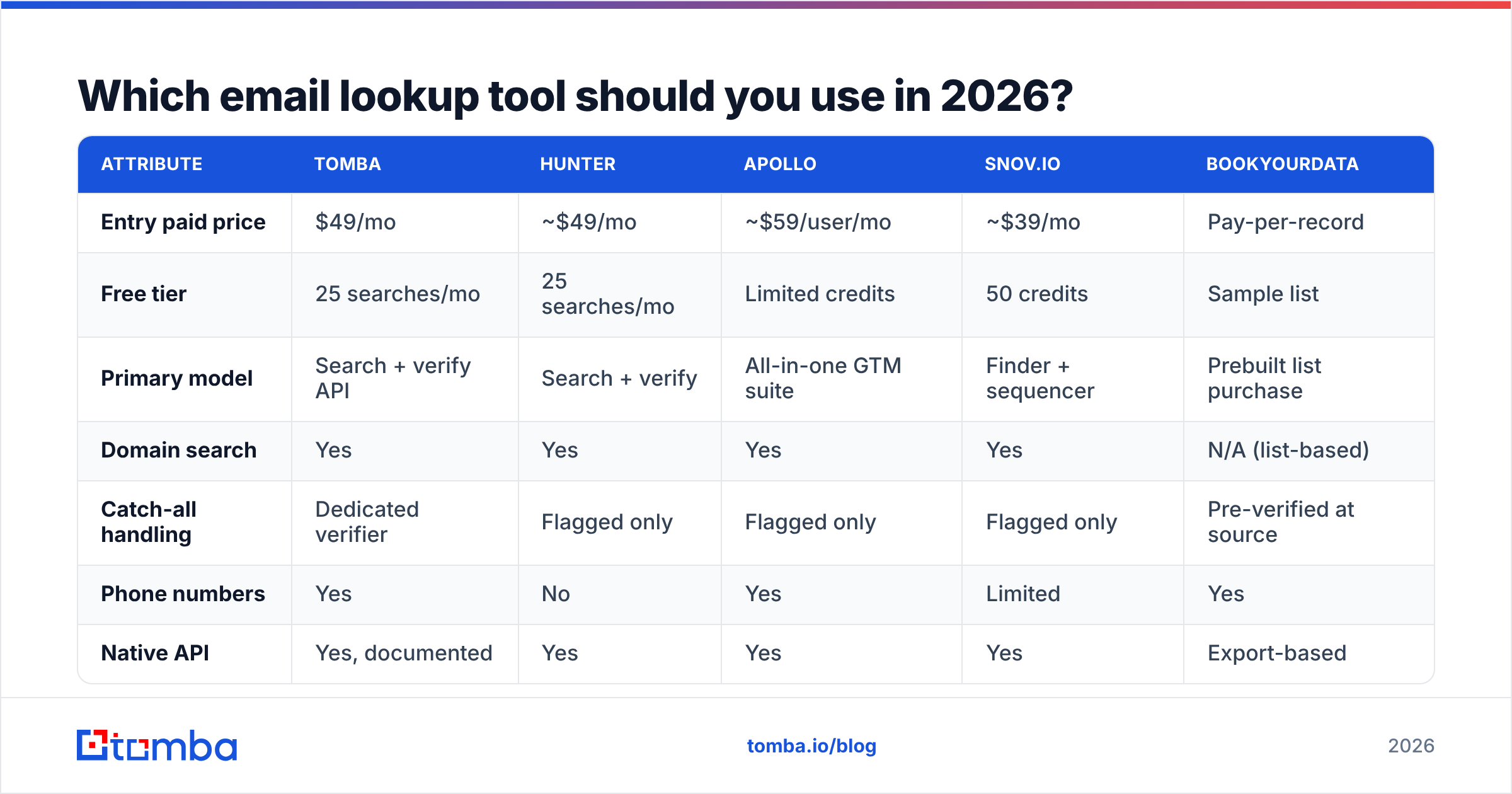
The honest answer depends on volume and workflow shape. Here's how the main options line up on the attributes that change the decision.
| Attribute | Tomba | Hunter | Apollo | Snov.io | BookYourData |
|---|---|---|---|---|---|
| Entry paid price | $49/mo | ~$49/mo | ~$59/user/mo | ~$39/mo | Pay-per-record |
| Free tier | 25 searches/mo | 25 searches/mo | Limited credits | 50 credits | Sample list |
| Primary model | Search + verify API | Search + verify | All-in-one GTM suite | Finder + sequencer | Prebuilt list purchase |
| Domain search | Yes | Yes | Yes | Yes | N/A (list-based) |
| Catch-all handling | Dedicated verifier | Flagged only | Flagged only | Flagged only | Pre-verified at source |
| Phone numbers | Yes | No | Yes | Limited | Yes |
| Native API | Yes, documented | Yes | Yes | Yes | Export-based |
| Sequencing built in | No | No | Yes | Yes | No |
| Best fit | Data layer for a custom stack | Simple single lookups | Teams wanting one platform | SMB doing find + send | Buying a defined segment outright |
Read that table as a set of trade-offs, not a ranking.
If you want an all-in-one platform, Apollo's argument is real: prospecting, enrichment, and sequencing in one seat. The cost is per-seat pricing that scales with headcount and a data layer you can't swap out when it underperforms in your segment. Teams that outgrow it usually look for an Apollo alternative specifically to decouple data from sending.
If you want a clean data layer, tools built API-first fit better. You keep your own sequencer, your own CRM, your own logic, and you buy contact resolution as a service. Tomba sits here — the Tomba API plus Google Sheets, Excel, and CLI surfaces mean the same credits work whether you're a RevOps engineer or an SDR in a spreadsheet.
If you want a defined list you can inspect before buying, BookYourData's model is genuinely different and worth considering: you filter down a segment, see the count, and pay per record with a bounce guarantee rather than subscribing to search capacity. For a one-time campaign into a well-defined vertical, that arithmetic can beat any subscription.
If you're doing fewer than 30 lookups a month, don't pay anything yet. Chain the free tiers, use a free email checker to validate the results, and revisit when volume justifies it.


How do you evaluate a tool without wasting a month?#
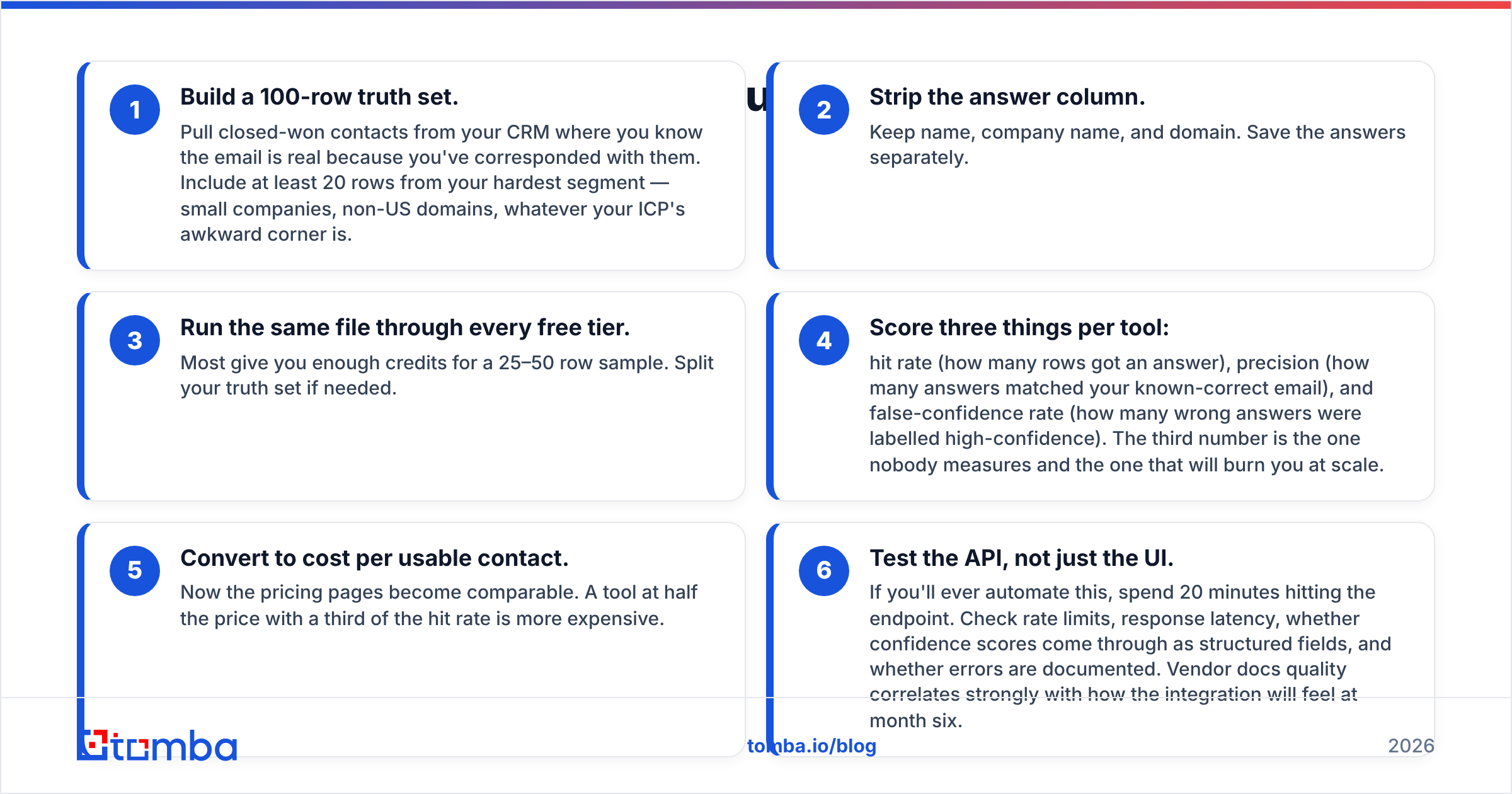
Run this in one sitting. It takes about two hours and it beats reading a hundred G2 reviews.
- Build a 100-row truth set. Pull closed-won contacts from your CRM where you know the email is real because you've corresponded with them. Include at least 20 rows from your hardest segment — small companies, non-US domains, whatever your ICP's awkward corner is.
- Strip the answer column. Keep name, company name, and domain. Save the answers separately.
- Run the same file through every free tier. Most give you enough credits for a 25–50 row sample. Split your truth set if needed.
- Score three things per tool: hit rate (how many rows got an answer), precision (how many answers matched your known-correct email), and false-confidence rate (how many wrong answers were labelled high-confidence). The third number is the one nobody measures and the one that will burn you at scale.
- Convert to cost per usable contact. Now the pricing pages become comparable. A tool at half the price with a third of the hit rate is more expensive.
- Test the API, not just the UI. If you'll ever automate this, spend 20 minutes hitting the endpoint. Check rate limits, response latency, whether confidence scores come through as structured fields, and whether errors are documented. Vendor docs quality correlates strongly with how the integration will feel at month six.
That false-confidence metric deserves emphasis. A tool that returns "no result" on a hard row is being useful. A tool that returns a guessed firstname@domain.com marked 90% confident is actively harmful — it costs you a bounce, and enough bounces cost you your domain. Google and Yahoo's bulk sender requirements formalized this in 2024, and the Google Postmaster guidance remains the reference for what receiving providers actually penalize.
When should you verify separately from looking up?#
Always, if the data is more than 60 days old or came from anywhere other than a live lookup.
Business email decays at roughly 22–30% per year through job changes alone, and that rate spiked during the 2023–2025 tech layoff cycles. A list you built in January is measurably worse by June. The three situations that demand a separate verification pass:
- Purchased or scraped lists. Never send to these unverified. Run them through an email verifier first, then discard anything that comes back risky rather than gambling.
- Dormant CRM segments. Re-engagement campaigns to two-year-old contacts are the single fastest way to spike a bounce rate. Re-verify before the send, not after.
- Form fills and inbound. Typos, disposable addresses, and role accounts all arrive through forms. Real-time verification at the point of capture is cheaper than cleaning later.
The economics favor verification heavily. Verification credits cost a fraction of lookup credits at every vendor, and a single bounce spike can suppress an entire domain's deliverability for weeks. If you're weighing whether to spend $20 on a verification pass before a 5,000-contact send, the answer is yes, every time.
What about compliance and data sourcing?#
Worth stating plainly since most tool comparisons skip it: how a vendor sources data affects your legal exposure, not just your hit rate.
Under GDPR, B2B contact processing generally proceeds on legitimate interest grounds, but that requires you to be able to document the source of each record and honor deletion requests. Vendors that publish their sourcing methodology and offer a suppression/opt-out mechanism make this manageable. Vendors that treat their corpus as a black box make it your problem.
Ask three questions before signing:
- Where does each record come from, and is that provenance exposed per-record or only in aggregate? Per-record provenance is the stronger answer.
- What's the opt-out flow for a data subject, and how fast does it propagate? Under 30 days is the requirement; ask what they actually do.
- Is there a DPA available, and does it name sub-processors? If the sales team has to go ask, that's informative.
The ICO's guidance on legitimate interests is the clearest free reference here, and it's short enough to read in fifteen minutes. Under CAN-SPAM in the US the bar is lower — accurate headers, a working opt-out, a physical address — but the reputational math is identical either way.
What's the practical setup for most teams?#
For a team of two to ten people doing outbound, the configuration that holds up looks like this:
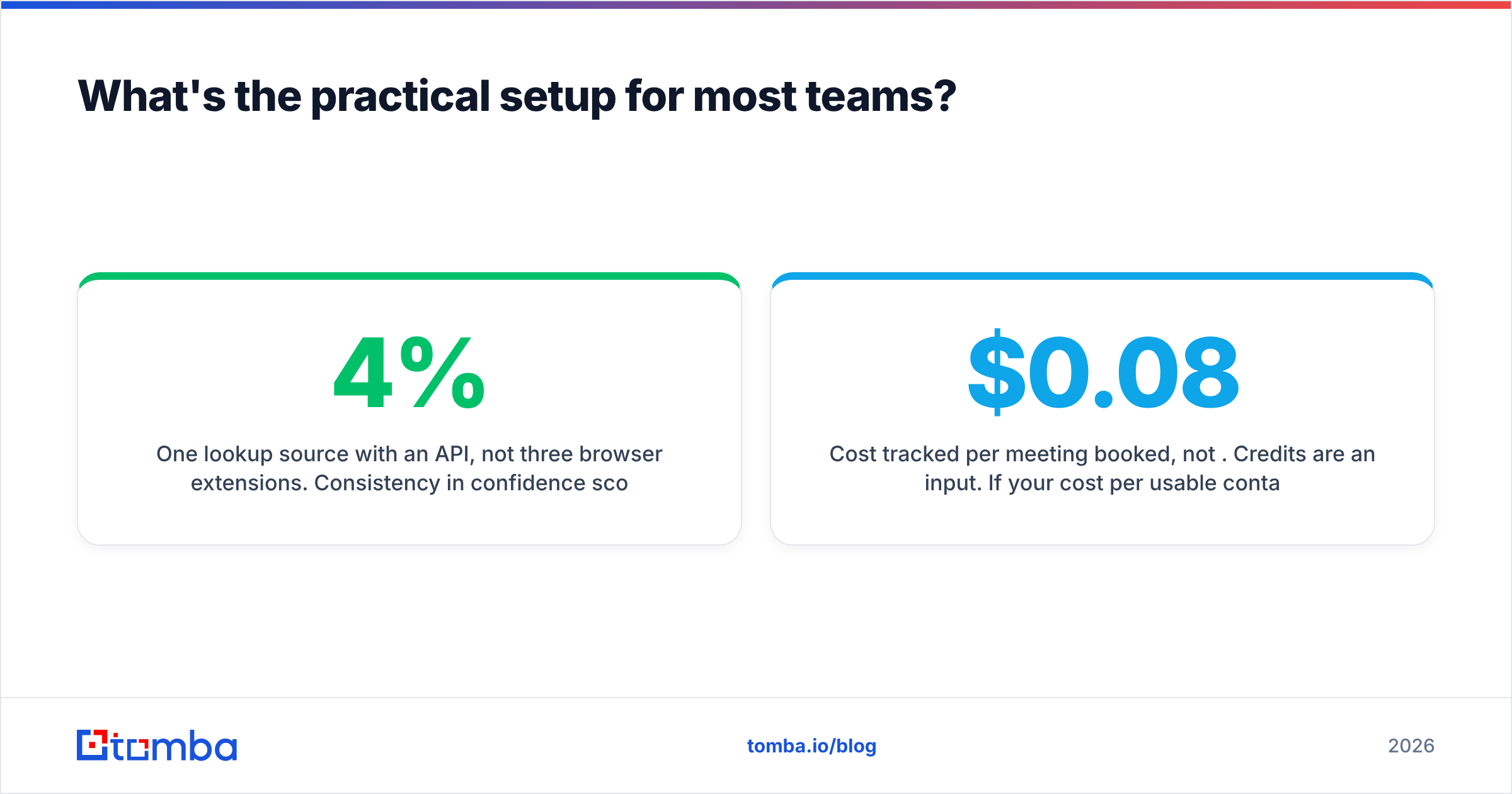
- One lookup source with an API, not three browser extensions. Consistency in confidence scoring matters more than squeezing an extra 4% hit rate from a second vendor.
- Verification as a separate gate before anything enters a sequencer, with risky and catch-all results routed to a manual-review bucket instead of the send list.
- A quarterly re-verification job on any segment older than a quarter. Automate it; nobody remembers to do it manually.
- Cost tracked per meeting booked, not per credit. Credits are an input. If your cost per usable contact is $0.08 and your reply rate is 4%, you know exactly what a conversation costs.
- A fallback path for misses. Roughly a quarter of any real list won't resolve. Route those to LinkedIn, phone, or an account-based motion rather than dropping them — the phone finder route often converts better on exactly the enterprise contacts email lookup struggles with.
The teams that get this wrong usually over-invest in the tool and under-invest in the process. A mediocre lookup tool inside a disciplined verify-and-route workflow outperforms an excellent one dumped straight into a sequencer.
Where to start#
If you want to run the two-hour evaluation described above, start with the free tiers and your own truth set — that's the only benchmark that describes your segment rather than someone else's.
When you're ready to put a real data layer behind it, the Tomba Email Finder gives you 25 free searches a month to test against your list, with per-result confidence scores and source attribution so you can see why an address was returned rather than just trusting a number. Paid plans start at $49/mo, and the same credits work across the finder, verifier, domain search, and API — see Tomba pricing for the full breakdown. Build your 100-row truth set first, then let the data decide.
Related guides#
Ready to find emails that actually work?
Join 150,000+ professionals who stopped guessing and started sending. Free credits on signup — no credit card required.
Get the Tomba newsletter
Practical outbound tactics and product updates — once every two weeks.
About the author