Email Marketing Audit: The 2026 Step-by-Step Framework
Most email programs don't collapse — they leak. Here's a 7-part email marketing audit that finds the leaks in list health, deliverability, segmentation, and copy in a single afternoon.
TL;DR
- An email marketing audit is a structured review of five systems — list health, technical deliverability, segmentation, content, and measurement — scored against thresholds you decide in advance, not against vibes.
- Most programs don't fail loudly. They leak: a 3% bounce rate creeps to 9%, inbox placement slides from 94% to 71%, and open rates "mysteriously" halve over two quarters.
- Run the technical and list-hygiene checks first. Fixing subject lines on a domain with a broken DMARC record is decorating a house that's on fire.
- Budget one focused afternoon for the audit itself and 30 days for remediation. Quarterly cadence for active senders; monthly if you send more than 100k emails a month.
- The highest-ROI single fix for most B2B senders is re-verifying the list. Bounces are the fastest way to lose sender reputation, and they're also the cheapest problem to solve.
What is an email marketing audit?#
An email marketing audit is a scheduled inspection of everything between your database and your recipient's inbox — the data, the authentication, the sending infrastructure, the segmentation logic, the creative, and the reporting that tells you whether any of it worked.
Think of it like a pre-flight checklist. A pilot doesn't check the flaps because she expects them to be broken; she checks because the cost of one unchecked failure is catastrophic and the cost of checking is four minutes. Email is the same. A single bad send to a stale list can put your domain on a blocklist that takes six weeks to escape.
Technically, an audit produces three artifacts:
- A scorecard — every check marked pass, warn, or fail against a numeric threshold.
- A ranked fix list — ordered by impact-to-effort, not by which team owns it.
- A baseline — the numbers you'll compare against next quarter, so you can prove the fixes worked.
Without the third artifact, an audit is just an opinion with a spreadsheet attached.
Why do email programs decay without an audit?#
Because nothing about email decay is visible from inside your sending tool.
Your ESP reports deliveries, not inbox placement. A message routed to the spam folder is reported as "delivered." A message silently dropped by a receiving server is often reported as "delivered." So the dashboard stays green while the revenue chart bends down, and the team blames creative fatigue.
Meanwhile, the underlying assets rot on a predictable schedule:
- B2B contact data decays at roughly 22–30% per year as people change jobs, companies rebrand, and domains consolidate after acquisitions.
- Authentication drifts. Someone adds a new sending tool, forgets the SPF include, and now a third of your mail fails alignment.
- Segments freeze. The "engaged in last 90 days" list built in 2024 is a static list nobody rebuilt.
- Suppression logic breaks during a CRM migration, and you start re-mailing people who unsubscribed 14 months ago.
Each of these is boring in isolation. Together they explain why a program that hit 42% opens in Q1 is at 19% by Q4 with the same copy.
What does a complete email marketing audit cover?#
Seven areas. Run them in this order — the earlier ones gate the later ones.
- List health and data hygiene — bounce rate, unknown-user rate, role-account share, catch-all share, duplicate records, opt-in provenance, and the age of your oldest never-engaged contact.
- Technical deliverability — SPF, DKIM, DMARC, reverse DNS, custom tracking domain, blocklist status, sending-domain separation between marketing and transactional mail.
- Reputation and infrastructure — Google Postmaster domain reputation, complaint rate, IP warmup state, send-volume volatility, and whether you're sharing an IP pool with senders you can't vet.
- List growth and consent — where new contacts enter, whether the source is documented per record, double opt-in coverage, and preference-center completeness.
- Segmentation and lifecycle logic — how many distinct segments actually receive different content, sunset policy for non-openers, re-engagement flow existence, and suppression rules.
- Content and creative — subject-line variance, spam-trigger scoring, plain-text version presence, image-to-text ratio, mobile rendering, link count, and unsubscribe visibility.
- Measurement — what you count as an open in a post-MPP world, whether click-to-conversion is tracked end to end, and whether any of it reaches revenue attribution.
If you only have two hours, do 1, 2, and 3. Those three explain the majority of unexplained performance drops in B2B email.
How do you audit list health and deliverability?#
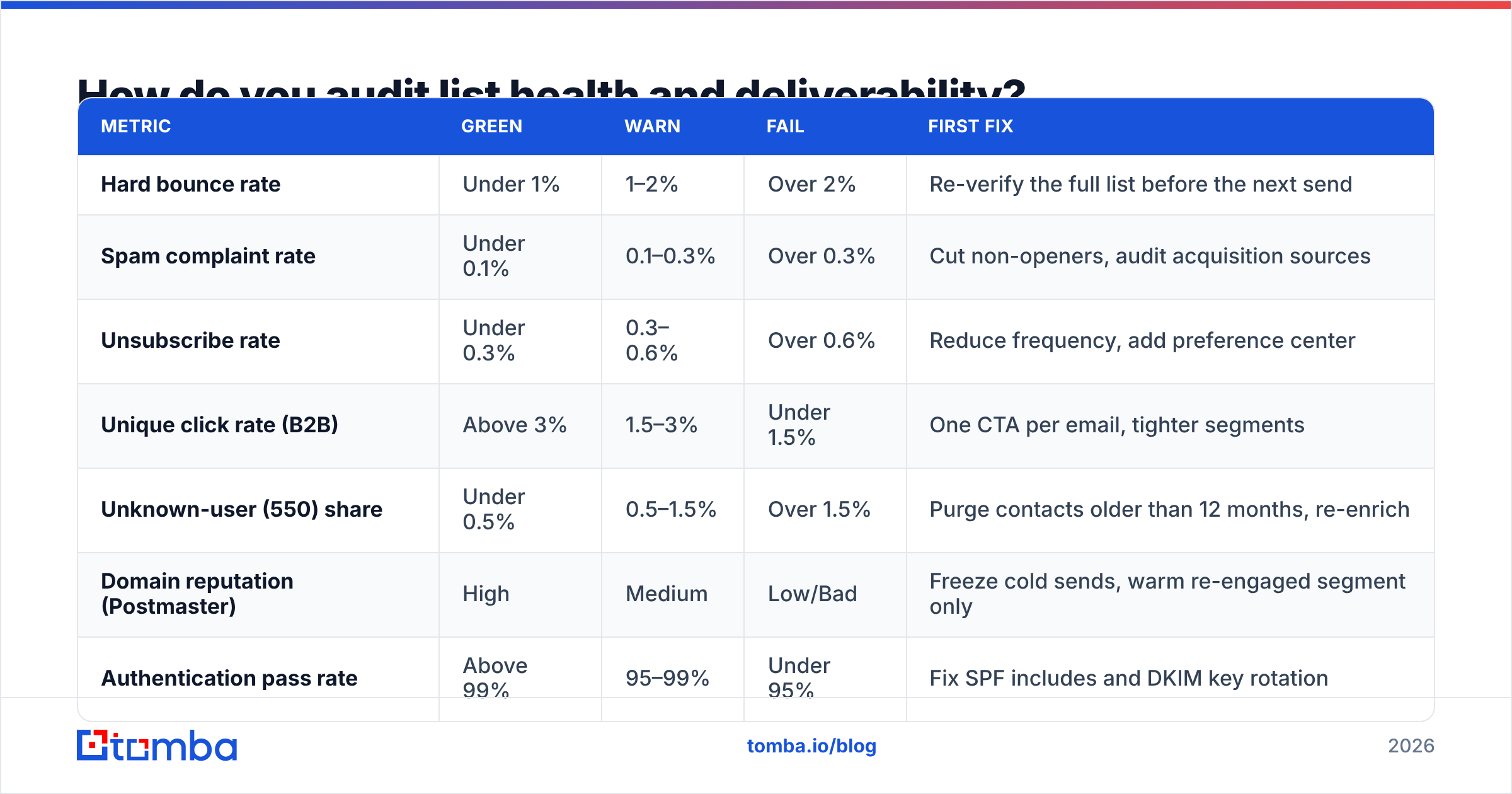
Start with numbers, not narrative. Pull the last 90 days of send data and compare each metric against a threshold you set before you look at the result — otherwise you'll rationalize whatever you find.
| Metric | Green | Warn | Fail | First fix |
|---|---|---|---|---|
| Hard bounce rate | Under 1% | 1–2% | Over 2% | Re-verify the full list before the next send |
| Spam complaint rate | Under 0.1% | 0.1–0.3% | Over 0.3% | Cut non-openers, audit acquisition sources |
| Unsubscribe rate | Under 0.3% | 0.3–0.6% | Over 0.6% | Reduce frequency, add preference center |
| Unique click rate (B2B) | Above 3% | 1.5–3% | Under 1.5% | One CTA per email, tighter segments |
| Unknown-user (550) share | Under 0.5% | 0.5–1.5% | Over 1.5% | Purge contacts older than 12 months, re-enrich |
| Domain reputation (Postmaster) | High | Medium | Low/Bad | Freeze cold sends, warm re-engaged segment only |
| Authentication pass rate | Above 99% | 95–99% | Under 95% | Fix SPF includes and DKIM key rotation |
Two of those thresholds deserve explanation.
Spam complaints at 0.3% is not a soft guideline anymore. Google's bulk sender guidelines make a sub-0.3% complaint rate an explicit requirement for anyone sending over 5,000 messages a day to Gmail addresses, and enforcement is automated. If you cross it, the fix isn't better copy — it's a smaller, more consenting list.
Unknown-user rate is the metric almost nobody tracks, and it's the most diagnostic. A high 550 rate means your data is stale, not that your content is bad. That's a data problem with a data fix: run the list through an email verifier before you send, and route the ambiguous ones through a catch-all verifier rather than guessing. Catch-all domains accept everything at the SMTP layer and then bounce silently later, which is exactly how a "clean" list produces a 9% bounce.
For anything above a few thousand records, do this in batch — a bulk verify pass on the whole database costs less than one blocklisting incident and takes minutes rather than days.
What does the technical checklist look like?#
Six DNS and infrastructure checks, each of which is binary. You either pass or you don't.
- SPF — one record, under 10 DNS lookups, every current sending service included. Multiple SPF records is an automatic fail at most receivers.
- DKIM — 2048-bit key, signing on every stream, rotated within the last 12 months.
- DMARC — published, and at
p=quarantineorp=rejectif you've been atp=nonefor more than a quarter.p=noneforever means you set up monitoring and never read it. - Custom tracking domain — your click-tracking links should resolve on your domain, not a shared ESP domain that a thousand other senders are also burning.
- Stream separation — marketing, transactional, and cold outbound on separate subdomains. One bad campaign should never be able to take down your password-reset emails.
- Blocklist status — check Spamhaus, SURBL, and Barracuda for both your sending domain and your IPs.
You can run the DNS half of this in a few minutes with a SPF checker and a blacklist checker, then re-run them after every infrastructure change. Set a calendar reminder — DNS records are the thing most likely to be quietly broken by a colleague provisioning a new tool.
For the copy side, a spam checker run on your three highest-volume templates will catch the obvious content triggers, though content is genuinely a smaller factor than most marketers assume. If your email deliverability is failing, the cause is almost always list quality, authentication, or complaint rate — in that order.
How often should you run an email marketing audit?#
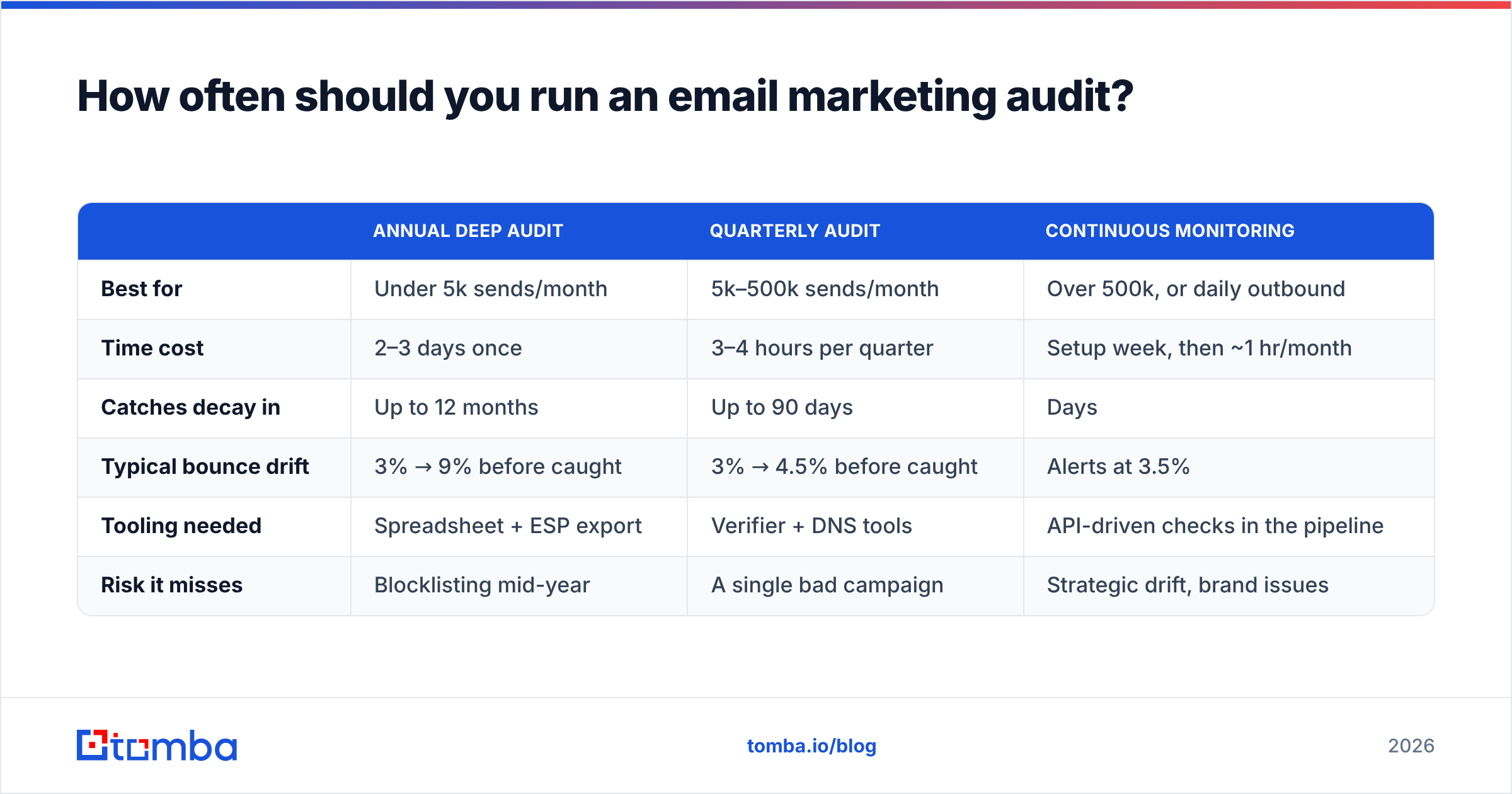
Match the cadence to your send volume and how fast your data decays. Here's how the three common models compare.
| Annual deep audit | Quarterly audit | Continuous monitoring | |
|---|---|---|---|
| Best for | Under 5k sends/month | 5k–500k sends/month | Over 500k, or daily outbound |
| Time cost | 2–3 days once | 3–4 hours per quarter | Setup week, then ~1 hr/month |
| Catches decay in | Up to 12 months | Up to 90 days | Days |
| Typical bounce drift | 3% → 9% before caught | 3% → 4.5% before caught | Alerts at 3.5% |
| Tooling needed | Spreadsheet + ESP export | Verifier + DNS tools | API-driven checks in the pipeline |
| Risk it misses | Blocklisting mid-year | A single bad campaign | Strategic drift, brand issues |
Most B2B teams land on quarterly audits plus continuous monitoring for the two metrics that move fastest: bounce rate and complaint rate. Everything else can wait 90 days.
If you send cold outbound at all, treat that as a separate program with its own monthly audit. Cold sending burns reputation faster than opt-in marketing by an order of magnitude, and it should never share a domain with your nurture stream.
Which tools do you actually need?#
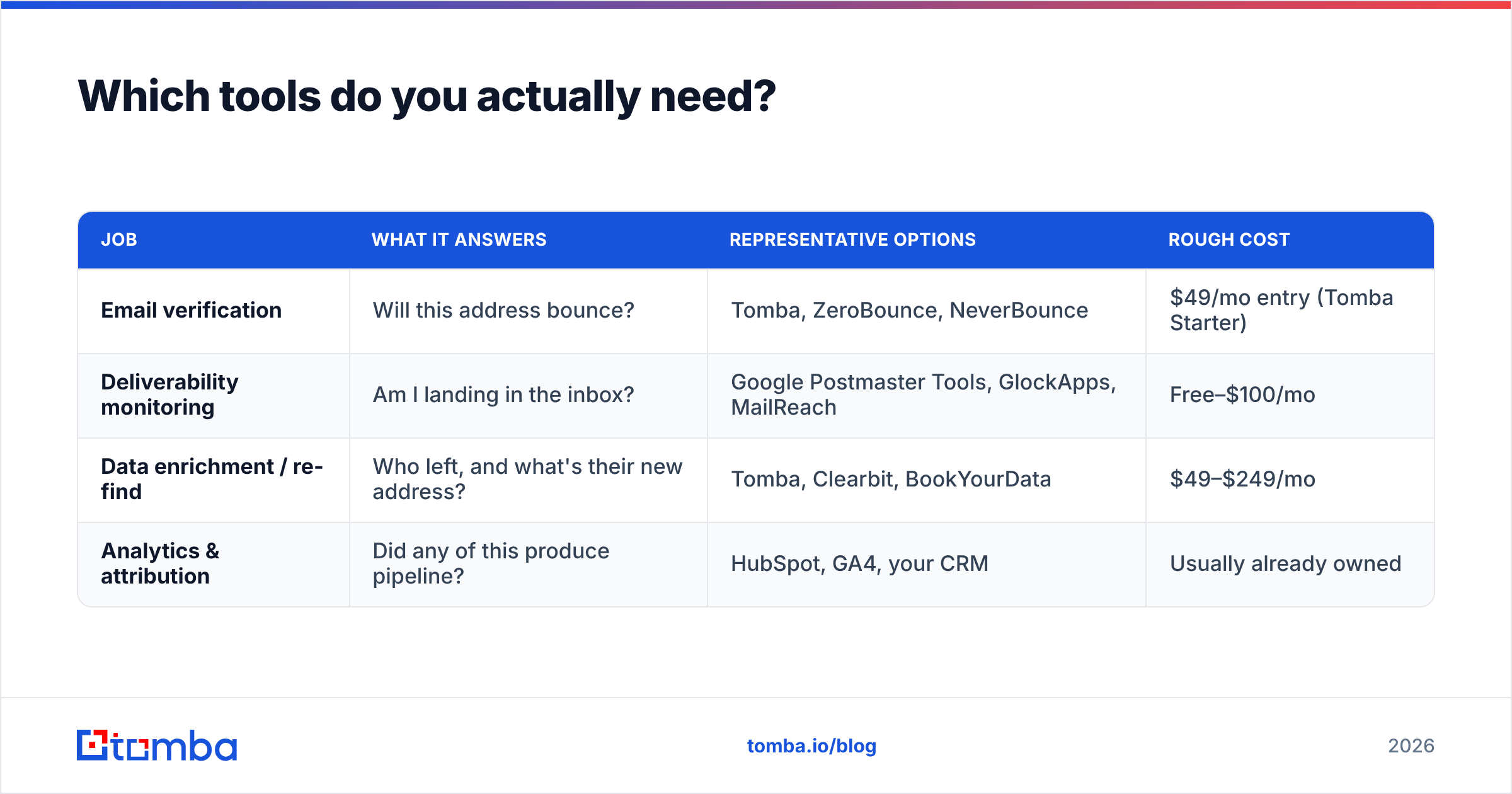
You don't need a platform. You need coverage across four jobs, and a lot of teams already own three of them without realizing it.
| Job | What it answers | Representative options | Rough cost |
|---|---|---|---|
| Email verification | Will this address bounce? | Tomba, ZeroBounce, NeverBounce | $49/mo entry (Tomba Starter) |
| Deliverability monitoring | Am I landing in the inbox? | Google Postmaster Tools, GlockApps, MailReach | Free–$100/mo |
| Data enrichment / re-find | Who left, and what's their new address? | Tomba, Clearbit, BookYourData | $49–$249/mo |
| Analytics & attribution | Did any of this produce pipeline? | HubSpot, GA4, your CRM | Usually already owned |
A note on the third row: when your audit finds that 18% of a segment has gone stale, deleting those records is only half the job. Those contacts didn't die — they changed employers. Running the company domain through a domain search or re-resolving individuals through a reverse email lookup recovers a meaningful share of them at their new address, which is usually a better lead than a net-new cold contact. BookYourData is a solid option if you'd rather buy a pre-verified list outright than re-derive one; the two approaches complement each other more than they compete.
For benchmarking your results against your industry rather than against last quarter, Mailchimp's published benchmark data and HubSpot's marketing statistics are the two most widely cited public datasets. Treat them as rough context, not targets — segment definitions vary wildly between programs.

What should you fix first?#
Rank by impact divided by effort, and resist the urge to start with the fun stuff. In practice the order is nearly always:
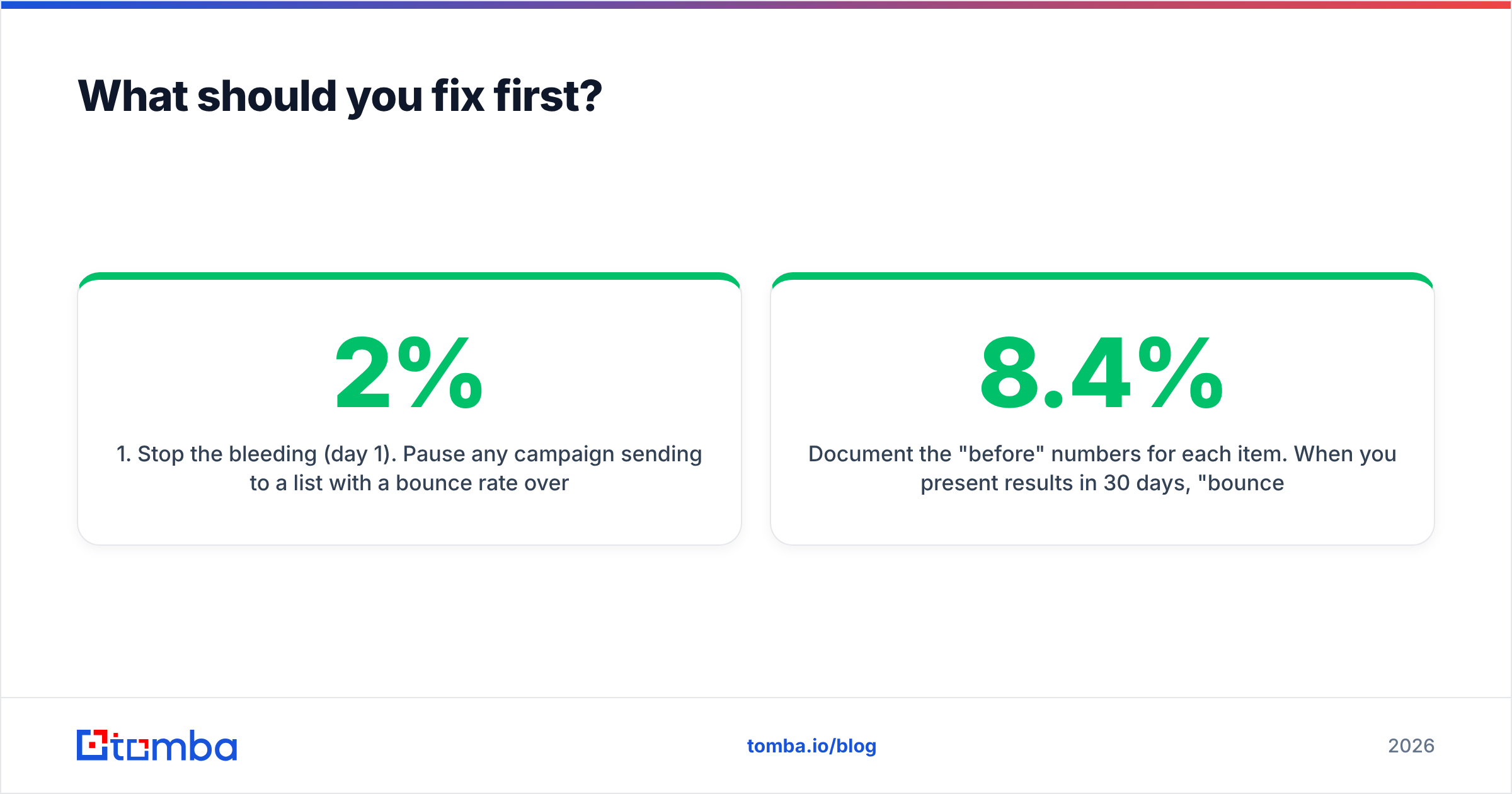
- Stop the bleeding (day 1). Pause any campaign sending to a list with a bounce rate over 2%. Every additional send compounds the reputation damage.
- Verify and purge (days 1–3). Run the full database through verification. Remove hard-invalid addresses, quarantine catch-alls into a separate low-frequency stream, and suppress role accounts like info@ and sales@ for anything but transactional mail.
- Fix authentication (days 3–5). SPF, DKIM, DMARC, tracking domain. This is a one-time engineering task measured in hours and it never needs to be redone if you document it.
- Implement a sunset policy (week 2). Anyone who hasn't opened in 180 days goes into a single re-engagement sequence, then off the main list. This one change fixes complaint rates faster than anything else.
- Rebuild segments (weeks 2–3). Every segment should have a written definition and a refresh mechanism. Static lists are technical debt.
- Then, and only then, touch the creative (week 4). Subject lines, CTA count, plain-text versions, mobile rendering. Copy improvements on a healthy list compound; copy improvements on a broken list are invisible.
Document the "before" numbers for each item. When you present results in 30 days, "bounce rate fell from 8.4% to 0.9% and click rate rose 61%" is a very different conversation than "we cleaned things up."
What are the most common audit findings?#
Across B2B programs, the same handful of problems come up over and over:
- A list nobody has verified since import. Usually a CSV from a trade show, a scraped export, or a database inherited from a departed employee. This single issue accounts for most catastrophic bounce rates.
- Marketing and cold outbound on the same domain. The cold program's complaint rate poisons the nurture program's reputation, and nobody connects the two because they live in different tools.
p=noneDMARC for three years. Monitoring configured, reports never read, spoofing unaddressed.- Non-openers never sunset. A list of 80,000 where 62,000 haven't opened anything in two years. The dead weight suppresses every rate metric and inflates every cost.
- Opens treated as a real metric. Post Mail Privacy Protection, open rate is a directional signal at best. Programs still optimizing subject lines against inflated open data are optimizing noise.
- No source field on contact records. When something goes wrong, you can't isolate which acquisition channel caused it, so you either keep the bad channel or kill a good one.
None of these are exotic. They're all the result of nobody having a scheduled reason to look.
How do you keep the audit from being a one-time event?#
Automate the checks that can be automated and calendar the ones that can't.
The verification and enrichment steps are genuinely automatable — hook them into the point of entry rather than running them retroactively. Verify at form submission, verify on CRM import, and re-verify anything older than 90 days on a rolling basis. The Tomba API handles this as a single call per record, so the check happens before a bad address ever reaches your ESP. Preventing one bad record costs a fraction of a cent; cleaning up after 10,000 of them costs a quarter of pipeline.
For the parts that need human judgment — segmentation logic, creative, measurement definitions — put a recurring 3-hour block on the calendar every quarter with the scorecard template open. The discipline matters more than the depth. An imperfect audit run four times a year beats a perfect one run never.
Start with the data layer. Most of what an email marketing audit uncovers traces back to contacts that were wrong, stale, or never validated in the first place — and that's the one problem you can fix this week rather than this quarter. Run your list through Tomba's Email Finder to re-resolve the contacts who changed jobs, verify what's left, and start your next campaign from a list you can actually defend. The free tier covers 25 searches a month if you want to test the accuracy on a sample before committing; paid plans start at $49/mo, and full Tomba pricing scales with volume rather than seats.
Related guides#
Ready to find emails that actually work?
Join 150,000+ professionals who stopped guessing and started sending. Free credits on signup — no credit card required.
Get the Tomba newsletter
Practical outbound tactics and product updates — once every two weeks.
About the author