Email Marketing Automation Tools: The 2026 Buyer's Guide
Most email marketing automation tools sell you the same drag-and-drop builder at five different prices. Here's what actually separates them in 2026 — and how to pick without overpaying for seats you never use.
TL;DR
- Email marketing automation tools split into three families — broadcast/newsletter platforms, lifecycle marketing automation suites, and cold outbound sequencers. Buying the wrong family is the single most expensive mistake teams make.
- Pricing is almost never quoted per email. It's quoted per contact, which means your bill grows whether or not those contacts open anything. Suppressed and unsubscribed contacts often still count.
- Deliverability is a data problem before it's a tooling problem. No automation platform saves a list with 12% invalid addresses.
- A realistic 2026 stack: one sending platform, one verification layer, one enrichment/finding layer. Three tools, not eight.
- If you're doing outbound to prospects who never opted in, a newsletter platform will suspend you. Use a sequencer plus a compliant data source instead.
What are email marketing automation tools, exactly?#
Email marketing automation tools are platforms that send email based on rules rather than on a human clicking "send." That's the whole definition. Everything else — the templates, the AI subject lines, the drag-and-drop canvas — is packaging around a trigger engine.
Think of it like a building's thermostat versus someone walking around opening windows. Broadcast email is the window-opener: a person decides, a person acts. Automation is the thermostat: you set conditions once, and the system responds to signals — a signup, a cart abandon, a pricing-page visit, a 30-day silence — without you in the loop.
That distinction matters because it determines what you should be evaluating. A tool with 400 templates and no behavioral triggers isn't an automation tool. A tool with excellent triggers and a mediocre editor probably is.
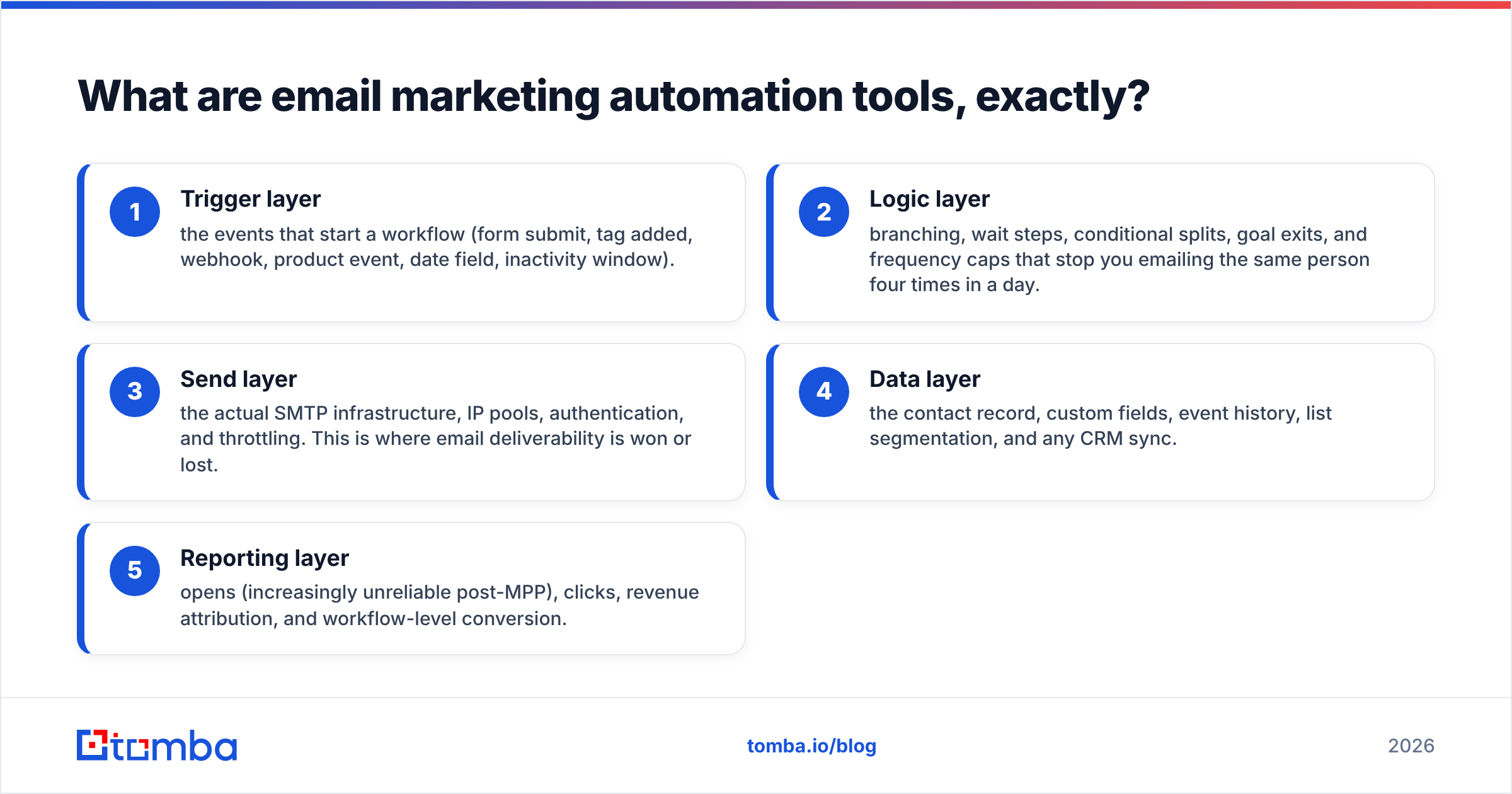
Here's the functional breakdown of what sits inside a real platform:
- Trigger layer — the events that start a workflow (form submit, tag added, webhook, product event, date field, inactivity window).
- Logic layer — branching, wait steps, conditional splits, goal exits, and frequency caps that stop you emailing the same person four times in a day.
- Send layer — the actual SMTP infrastructure, IP pools, authentication, and throttling. This is where email deliverability is won or lost.
- Data layer — the contact record, custom fields, event history, list segmentation, and any CRM sync.
- Reporting layer — opens (increasingly unreliable post-MPP), clicks, revenue attribution, and workflow-level conversion.
When two tools "look the same," it's usually because they have identical trigger and logic layers. The differences hide in the send and data layers — and those are the two that decide whether your campaign lands in an inbox or a spam folder.
What are the three types of email automation platform?#
Most buyer confusion comes from treating these as one market. They are not.
Type 1 — Newsletter and broadcast platforms. Mailchimp, Beehiiv, ConvertKit, Substack. Built for opted-in audiences. Strong editors, simple automations, cheap at small list sizes, punitive at large ones. They will terminate you for cold outreach — this is in the terms of service, not a gray area.
Type 2 — Lifecycle marketing automation suites. HubSpot, Klaviyo, Braze, ActiveCampaign, Customer.io. Built around a customer record with events. Deep branching, product-event triggers, revenue attribution. Expensive, slow to implement, worth it once you have real behavioral data to act on. HubSpot's own automation documentation is a decent free education on how lifecycle logic is supposed to be structured, regardless of what you buy.
Type 3 — Outbound sequencers. Instantly, Smartlead, Lemlist, Reply.io, Saleshandy. Built for one-to-one-looking email at scale to people who don't know you. Mailbox rotation, warmup, reply detection, per-mailbox sending limits. These are sales tools wearing marketing clothes.
The failure pattern is predictable: a founder buys a newsletter platform, imports 5,000 scraped contacts, sends a promotional blast, gets a 9% bounce rate, and has the account frozen within 48 hours. The tool wasn't bad. It was the wrong family.
How do email marketing automation tools compare on price and fit?#
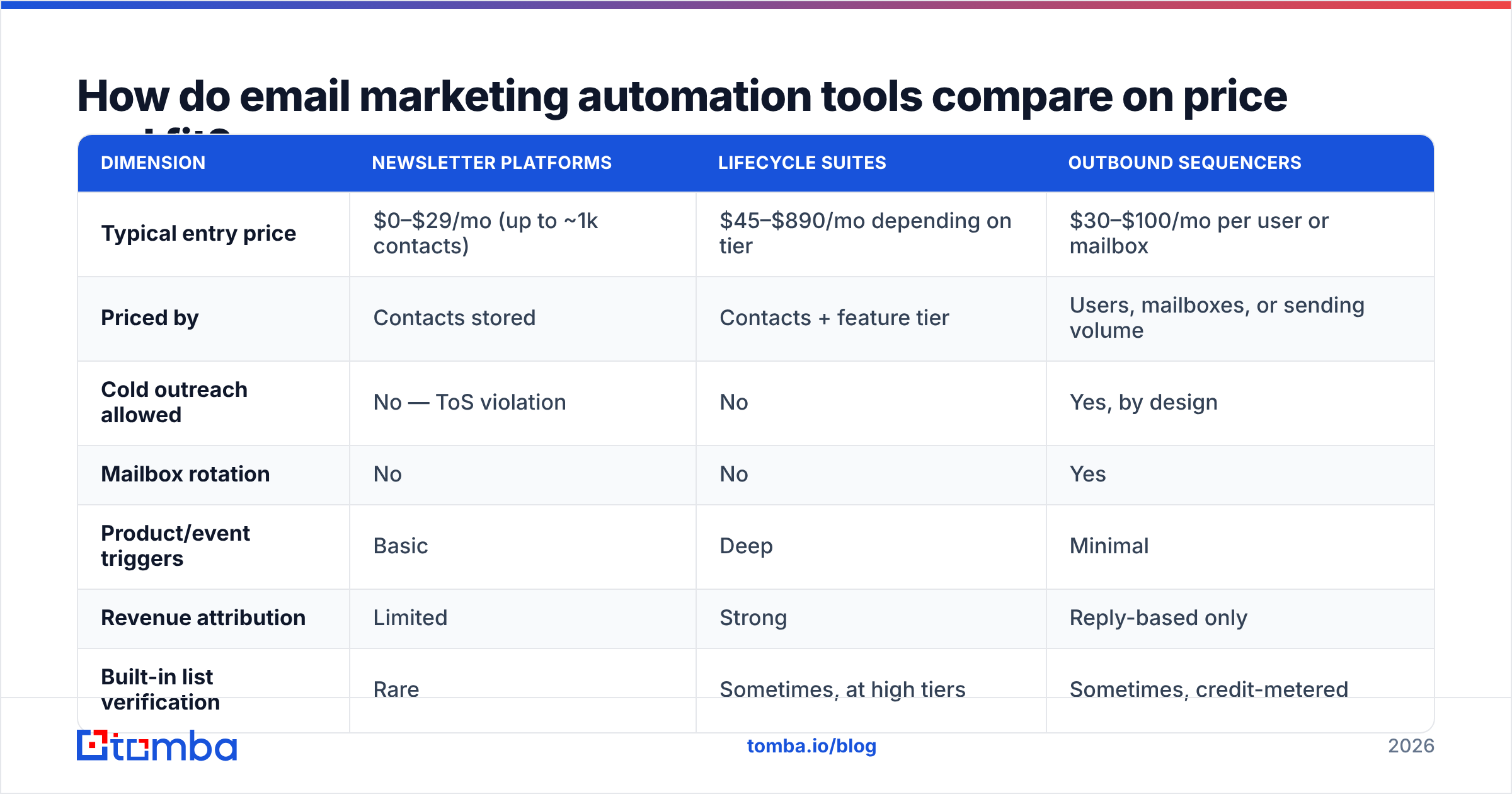
Pricing models differ enough that headline numbers mislead. Newsletter tools charge per contact stored. Sequencers charge per user or per mailbox. Suites charge per contact and per feature tier. Here's the honest shape of the market as of 2026:
| Dimension | Newsletter platforms | Lifecycle suites | Outbound sequencers |
|---|---|---|---|
| Typical entry price | $0–$29/mo (up to ~1k contacts) | $45–$890/mo depending on tier | $30–$100/mo per user or mailbox |
| Priced by | Contacts stored | Contacts + feature tier | Users, mailboxes, or sending volume |
| Cold outreach allowed | No — ToS violation | No | Yes, by design |
| Mailbox rotation | No | No | Yes |
| Product/event triggers | Basic | Deep | Minimal |
| Revenue attribution | Limited | Strong | Reply-based only |
| Built-in list verification | Rare | Sometimes, at high tiers | Sometimes, credit-metered |
| Best for | Content, ecommerce, community | SaaS, ecommerce at scale | B2B sales, agencies, recruiters |
| Real cost driver | List growth | Seat count + tier upgrades | Mailbox count + data spend |
The trap in column one is that your bill scales with contacts you no longer email. A 40,000-contact list where 14,000 haven't opened anything in a year costs the same as a 40,000-contact engaged list. Cleaning is free money.
The trap in column two is the implementation cost nobody quotes. Budget three to eight weeks of someone's time for a real lifecycle suite migration. G2's marketing automation category is useful here mostly for the review text about onboarding — skim the two-star reviews, not the five-star ones.
The trap in column three is that sequencers are only as good as the addresses you feed them. Which brings us to the part most guides skip.
Why does data quality beat feature count?#
Because every deliverability metric that matters is downstream of whether the address exists.
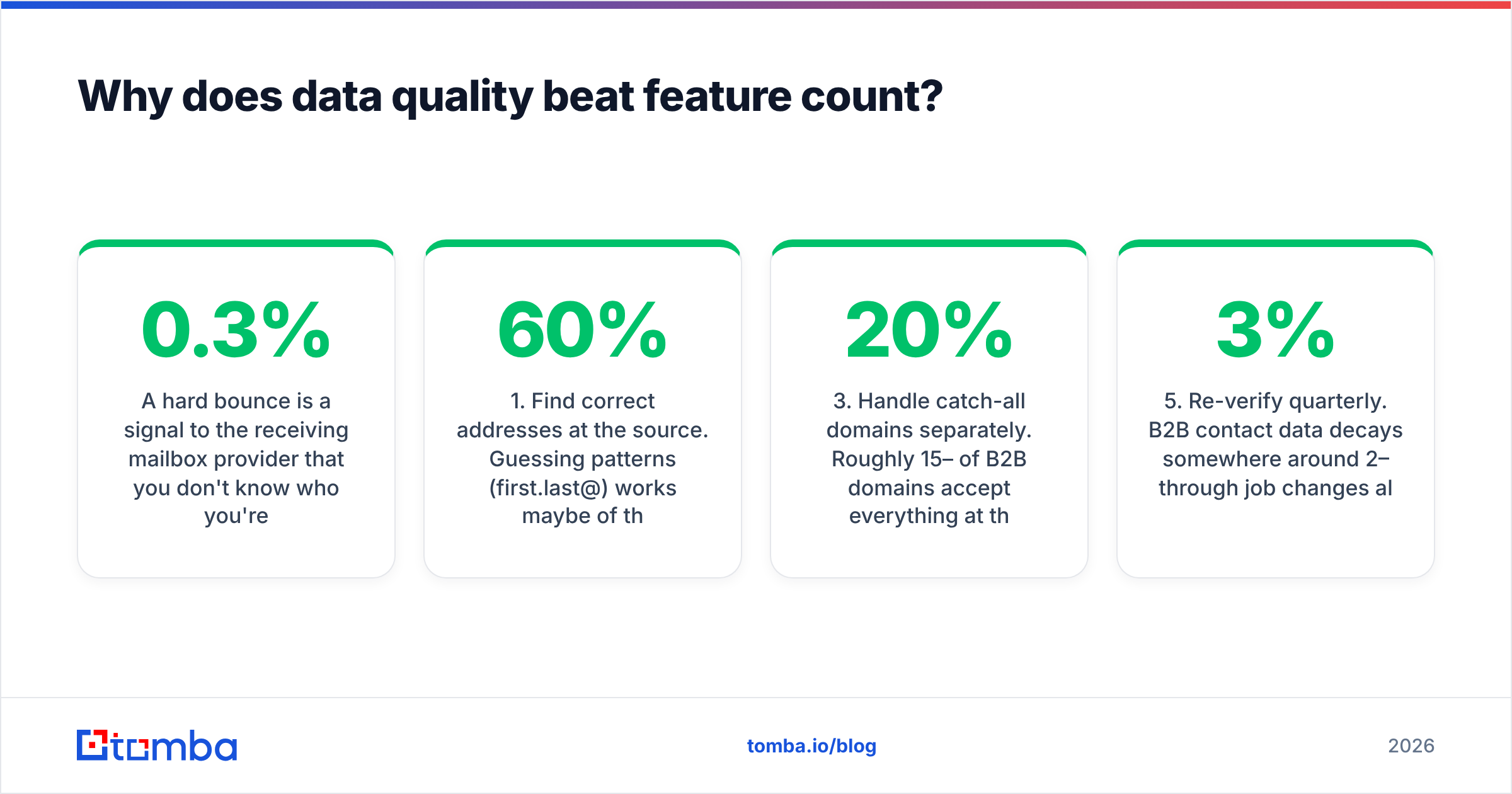
A hard bounce is a signal to the receiving mailbox provider that you don't know who you're emailing. Stack enough of those and your sender reputation degrades — at which point your beautifully branched automation delivers to spam, and every other metric becomes fiction. Google and Yahoo's bulk sender requirements formalized this: a spam complaint rate above 0.3% is a documented threshold, and bounce behavior feeds the same reputation model. Google's Postmaster guidelines are the primary source worth reading in full.
The practical order of operations:
- Find correct addresses at the source. Guessing patterns (
first.last@) works maybe 60% of the time and pollutes your list with the other 40%. A dedicated email finder that returns a confidence score is cheaper than the reputation damage from guessing. - Verify before import, not after. Run the list through an email verifier before it ever touches your sending platform. Catching a bad address costs a fraction of a cent; sending to it costs reputation.
- Handle catch-all domains separately. Roughly 15–20% of B2B domains accept everything at the SMTP layer, so standard verification returns "unknown." A catch-all verifier uses secondary signals to resolve those instead of forcing you to guess.
- Suppress by engagement, not just by unsubscribe. Anyone who hasn't opened or clicked in 180 days should move to a re-engagement flow, then out of the main send. This lowers your bill and raises your inbox placement at the same time.
- Re-verify quarterly. B2B contact data decays somewhere around 2–3% per month through job changes alone. A list verified in January is meaningfully worse by July.
Teams that do these five things with a mediocre sending platform outperform teams that skip them with an expensive one. Consistently.
What should you actually look for when evaluating a tool?#
Ignore the feature matrix on the vendor's own site — every vendor checks every box. Evaluate these instead:
Sending infrastructure transparency. Do they tell you whether you're on a shared or dedicated IP? Shared pools mean your placement depends on strangers' sending habits. At scale, ask about dedicated IPs and what warmup they provide.
Authentication support. SPF, DKIM, and DMARC setup should be documented, guided, and verifiable inside the product. If a tool can't confirm your SPF record is correct, that's a signal about the rest of the product. You can sanity-check yours with a free SPF checker before you commit.
Frequency capping. Multiple automations firing at one contact is the most common self-inflicted unsubscribe cause. Does the platform enforce a global cap, or do you have to hand-build suppression logic?
Export and API access. Can you get your contacts, events, and engagement history out in a usable format? Platforms that make export painful are betting on switching costs. Check whether the API is real (documented, rate-limits published) or a marketing bullet.
Deliverability reporting granularity. Aggregate open rate is nearly meaningless in 2026 with Apple Mail Privacy Protection inflating it. You want per-domain placement data — Gmail vs. Outlook vs. Yahoo — and bounce reason codes, not just a bounce count.
Contract and overage terms. Ask specifically what happens when you exceed your contact limit mid-month. Some platforms auto-upgrade you. Some throttle. Some just charge overage at a rate you didn't notice in the terms.

How do you build a 2026 stack without overpaying?#
Three layers. Not eight tools.
Layer 1 — Sending. Pick one platform from the family that matches your motion. If you have opted-in subscribers and content, a newsletter platform. If you have product events and a purchase funnel, a lifecycle suite. If you're prospecting cold, a sequencer. Do not buy two.
Layer 2 — Data acquisition. This is where your addresses come from. A domain search pulls the known addresses and email pattern for a target company; a bulk email finder handles the list-scale version. For teams pushing volume, an email finder API removes the CSV round-trip entirely and lets enrichment happen at the moment a lead enters your CRM.
Layer 3 — Verification and hygiene. Verification on ingest, catch-all resolution, and a quarterly re-verify job. This layer is boring and it is the one that protects the other two.
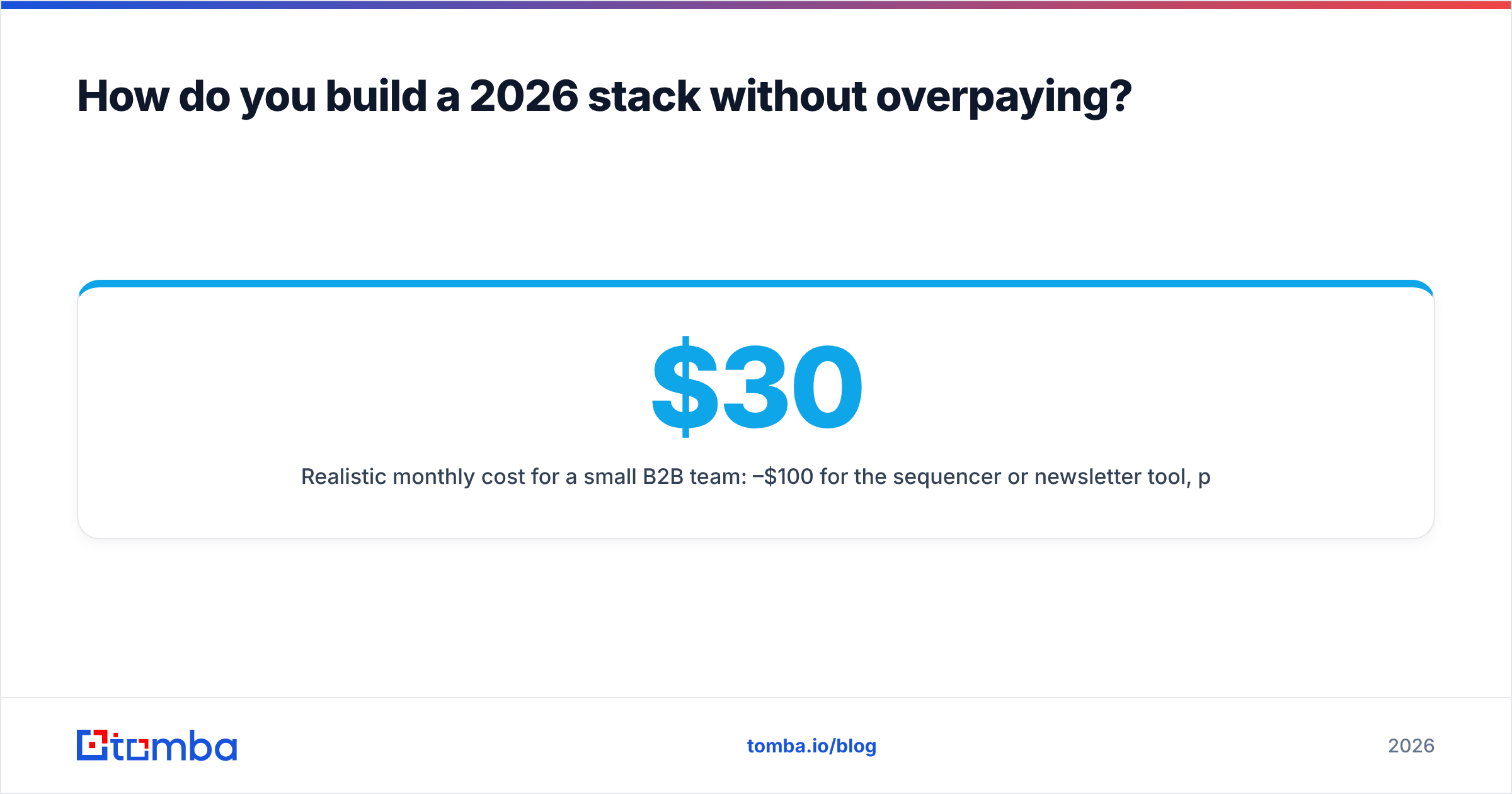
Realistic monthly cost for a small B2B team: $30–$100 for the sequencer or newsletter tool, plus a data plan. Tomba's pricing runs a free tier at 25 searches/month, Starter at $49/mo, Growth at $99/mo, and Pro at $249/mo — so a functional two-tool stack lands well under $200/mo before you're at real scale. Compare that to a lifecycle suite's entry tier plus mandatory onboarding fee and the math for early-stage teams gets obvious fast.
A note on the data-source side: providers differ in how they source records. Some, like BookYourData, sell pre-built B2B lists with verification included, which suits teams that want a static file to work from. Others, including Tomba, are built around real-time lookup against live sources — better when you're enriching leads that arrive continuously rather than buying a snapshot. Neither is wrong; they solve different problems. Match the model to whether your prospecting is batch or streaming.
When is automation actually the wrong answer?#
Three situations.
Under 200 contacts. Automation overhead exceeds the benefit. Send manually, learn what resonates, then encode it. Building a nine-branch workflow for an audience you could email individually is procrastination with a UI.
No differentiated content. Automation multiplies whatever you put into it. If the message doesn't work when sent by hand, sending it automatically to 10,000 people produces 10,000 people who now ignore you. Fix the message first — a subject line tester and honest reply-rate tracking beat another workflow branch.
Unclean data. Already covered, but worth repeating: automating sends to a list you haven't verified is automating reputation damage. The system will execute your mistake faster and more consistently than you could manually.
What's changing in 2026?#
Two shifts worth planning around.
Open rates are functionally dead as a metric. Apple's Mail Privacy Protection, and now similar behavior across other clients, pre-fetches images. Your open rate measures proxy servers. Build your reporting on clicks, replies, and downstream conversion. Any tool whose primary dashboard leads with open rate is optimizing for a number you can't trust.
Authentication enforcement keeps tightening. DMARC alignment moved from best practice to prerequisite for bulk senders at the major providers. One-click unsubscribe in the header is required, not optional. Tools that treat these as advanced settings buried three menus deep are going to cost you.
The underlying trend is the same in both cases: mailbox providers are raising the floor on sender quality. Volume tactics degrade. Precision — right person, correct address, relevant message — appreciates. That's less a prediction than an observation of where the last five years of policy changes have pointed.
Where should you start?#
Pick your family first, your platform second, and fix your data before either. Most teams do this in reverse and spend six months blaming a tool for a list problem.
If your bottleneck is finding correct, current contact addresses to feed whatever automation platform you choose, start there. The Tomba Email Finder returns verified professional addresses by name and domain with a confidence score attached, so you know what you're importing before it touches your sender reputation. The free tier covers 25 searches a month — enough to test accuracy against a list you already have and see the hit rate for yourself before you commit to a plan.
Related guides#
Ready to find emails that actually work?
Join 150,000+ professionals who stopped guessing and started sending. Free credits on signup — no credit card required.
Get the Tomba newsletter
Practical outbound tactics and product updates — once every two weeks.
About the author