Email Marketing Cadence: How to Time Every Send in 2026
Most email programs don't fail on copy — they fail on timing. Here's how send frequency, sequence spacing, and stop rules actually work, with benchmark numbers you can plan against.
TL;DR
- An email marketing cadence is two decisions, not one: how often you contact a list (frequency) and how you space the touches inside a single sequence (spacing). Most teams tune one and ignore the other.
- Newsletter and lifecycle programs generally peak somewhere between 1 and 4 sends per month. Outbound sequences peak at 4–7 touches spread over 14–28 days.
- The single biggest cadence mistake is compressing touches: five emails in seven days looks like automation, gets ignored, and drags your domain reputation down with it.
- Cadence only works on a clean list. Bounces from stale addresses do more damage to inbox placement than any send-frequency choice you make.
- Build the cadence around a stop rule — reply, click, unsubscribe, or exhaustion — before you write a single email.
What is an email marketing cadence?#
An email marketing cadence is the schedule that governs how often you email a given contact and how much time sits between each message in a sequence.
Think of it like watering a plant. Skip a week and it wilts; water it daily and you drown the roots. The right amount is neither "as much as possible" nor "whenever we remember" — it's a fixed rhythm matched to what the plant can absorb.
Two layers stack on top of each other, and confusing them is where most programs break:
- Program frequency — how many emails a subscriber receives from you across a month, counting every source: newsletter, product updates, promos, lifecycle triggers, and sales outreach. This is the number your unsubscribe rate reacts to.
- Sequence spacing — the gap between touch 1, touch 2, and touch 3 inside one campaign. This is the number your reply rate reacts to.
- Stop rules — the conditions that pull a contact out of the sequence early (replied, booked, clicked, unsubscribed, bounced). Without these, cadence becomes harassment.
- Suppression windows — the cooldown after a sequence ends before that contact is eligible for another one. Most teams set 30–90 days.
You can run a beautiful three-email sequence and still torch your list because that contact is simultaneously in a nurture track, a webinar promo, and a product announcement. Cadence is a portfolio problem, not a campaign problem.
Why does cadence matter more than copy?#
Because timing decides whether the copy is ever read.
The mechanics are unglamorous. Mailbox providers score you on engagement signals — opens with real dwell time, replies, moves out of spam, and the inverse: deletes-without-reading, spam complaints, and hard bounces. Send too often to people who aren't engaging, and you accumulate negative signals faster than positive ones. Google's bulk sender guidelines are explicit that spam complaint rate is a threshold you sit under or above, and volume amplifies whatever rate you have.
That means cadence is upstream of everything else. A 40% better subject line applied to a program that's already throttled into the promotions tab produces a rounding error. Fixing frequency first is the cheaper lever.
The second reason: cadence determines how many chances your message gets. Reply data from outbound teams consistently shows that touch 1 accounts for well under half of all replies in a multi-touch sequence. Follow-ups 2 through 4 carry the rest. Cut the sequence at two emails and you're voluntarily discarding a large share of your pipeline — not because the copy failed, but because you stopped.
How often should you actually send?#
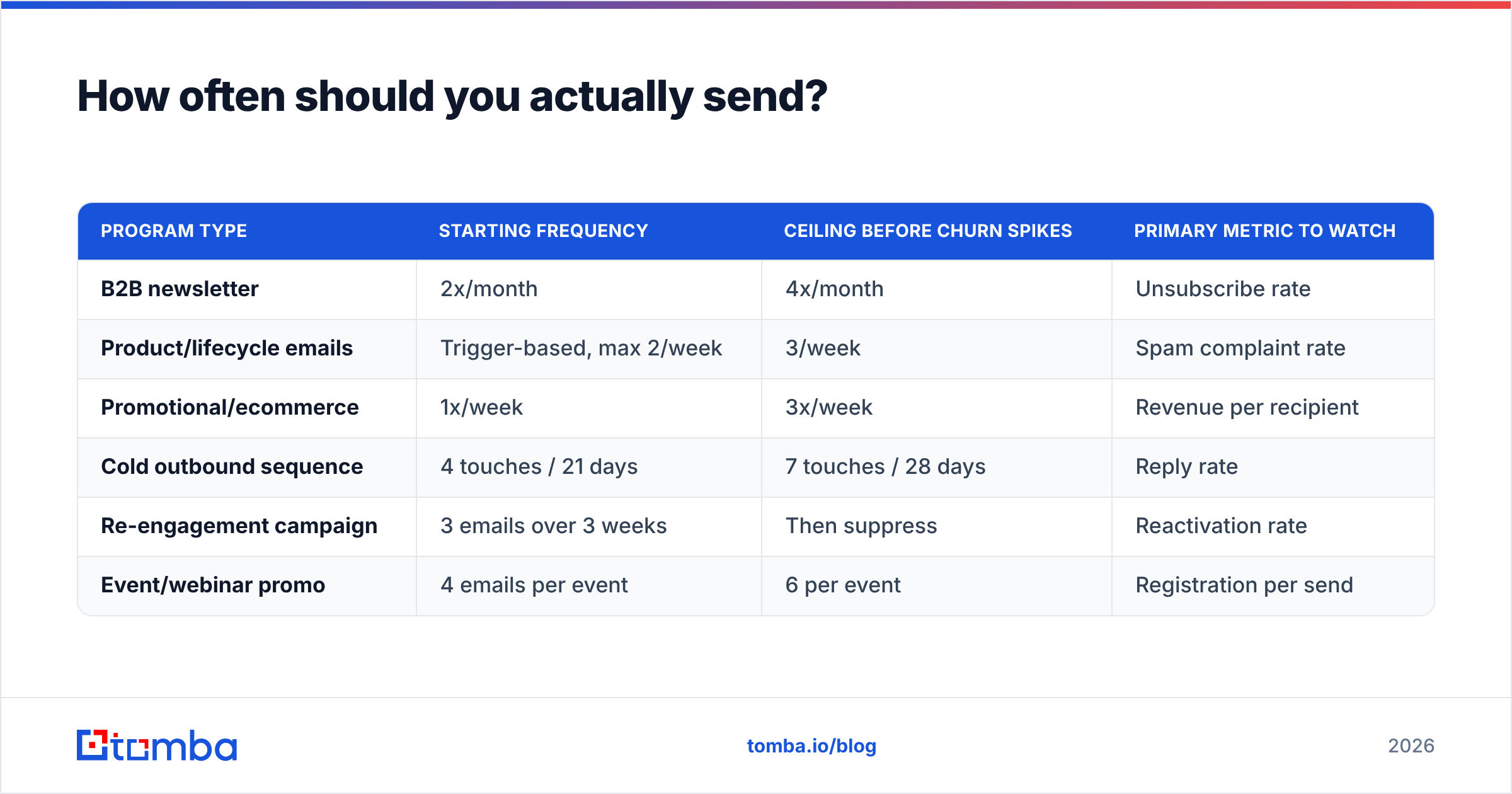
There's no universal number, but there are defensible starting points by program type. Benchmarks from Mailchimp's industry data and HubSpot's marketing statistics both land in the same neighborhood: engagement per send declines as frequency rises, but total engagement keeps climbing until you cross the unsubscribe cliff. Your job is to find that cliff before your subscribers do.
| Program type | Starting frequency | Ceiling before churn spikes | Primary metric to watch |
|---|---|---|---|
| B2B newsletter | 2x/month | 4x/month | Unsubscribe rate |
| Product/lifecycle emails | Trigger-based, max 2/week | 3/week | Spam complaint rate |
| Promotional/ecommerce | 1x/week | 3x/week | Revenue per recipient |
| Cold outbound sequence | 4 touches / 21 days | 7 touches / 28 days | Reply rate |
| Re-engagement campaign | 3 emails over 3 weeks | Then suppress | Reactivation rate |
| Event/webinar promo | 4 emails per event | 6 per event | Registration per send |
Read the ceiling column as a warning line, not a target. The correct move is to start at the low end, add one send per period, and watch unsubscribe and complaint rates for two full cycles before adding another. If unsubscribes climb more than about 20% relative to baseline after a frequency increase, you've overshot.
One nuance that trips up B2B teams: your ceiling is lower than ecommerce's, and it isn't close. A retail subscriber who bought shoes expects weekly sales emails. A VP of Engineering who downloaded one whitepaper does not expect three emails a week from you, ever.
What does a good cadence look like by program type?#
Here's the practical shape of each, with spacing that survives contact with real inboxes.
- Cold outbound (4–6 touches over 21 days). Day 1 initial email, day 3 short bump, day 7 new angle with a different value prop, day 12 case study or proof point, day 18 short "should I close the file?" break-up. Never two touches in the same 48 hours after touch 2. Every touch after the first should be shorter than the one before it.
- B2B nurture (bi-weekly, indefinite). One useful thing every two weeks beats four mediocre things every week. The metric that matters is click-to-open over a rolling 90 days, not any single send.
- Onboarding/lifecycle (front-loaded, then decaying). Days 0, 1, 3, 7, 14, 30. Compress early when intent is highest, then stretch. This is the one program where a day-1 and day-3 email back to back is correct — the user just signed up and is expecting you.
- Re-engagement (3 emails, then a hard decision). Space these 7 days apart, escalate the directness each time, and suppress or delete non-responders at the end. Keeping unresponsive contacts on the list to protect your "subscriber count" is how deliverability dies quietly.
- Event promotion (4 sends anchored to the date). Announcement at T-21 days, value/agenda at T-10, urgency at T-3, and a same-day reminder. Then a single post-event follow-up with the recording.
- Renewal/expansion (2–3 touches, calendar-anchored). T-60, T-30, T-7 relative to renewal date. These get opened because they're operationally relevant — do not pad them with marketing copy.
Is a longer sequence always better than a shorter one?#
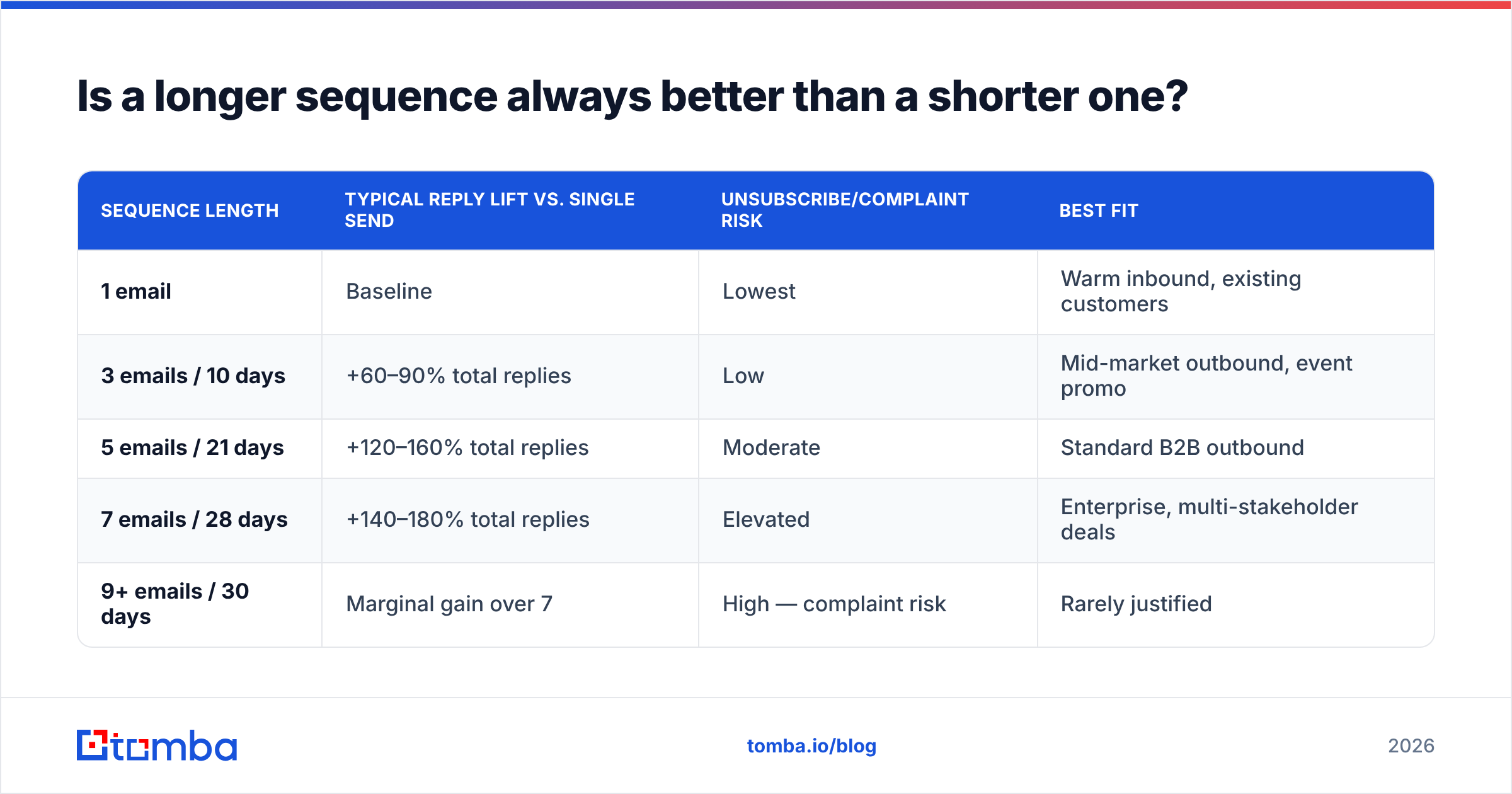
No — longer sequences win on total replies but lose on list health, and the tradeoff is real.
| Sequence length | Typical reply lift vs. single send | Unsubscribe/complaint risk | Best fit |
|---|---|---|---|
| 1 email | Baseline | Lowest | Warm inbound, existing customers |
| 3 emails / 10 days | +60–90% total replies | Low | Mid-market outbound, event promo |
| 5 emails / 21 days | +120–160% total replies | Moderate | Standard B2B outbound |
| 7 emails / 28 days | +140–180% total replies | Elevated | Enterprise, multi-stakeholder deals |
| 9+ emails / 30 days | Marginal gain over 7 | High — complaint risk | Rarely justified |
The pattern is a curve with a knee, not a straight line. Touches 2 through 5 are where the compounding happens. Past touch 7, you're mostly harvesting diminishing returns while accumulating the negative signals that make touches 1 through 5 land in spam next quarter.
The practical rule: extend the timeline, not the count. Seven touches over 45 days reads as persistent. Seven touches over 10 days reads as a bot, and recipients treat it accordingly.
What breaks when your cadence is wrong?#
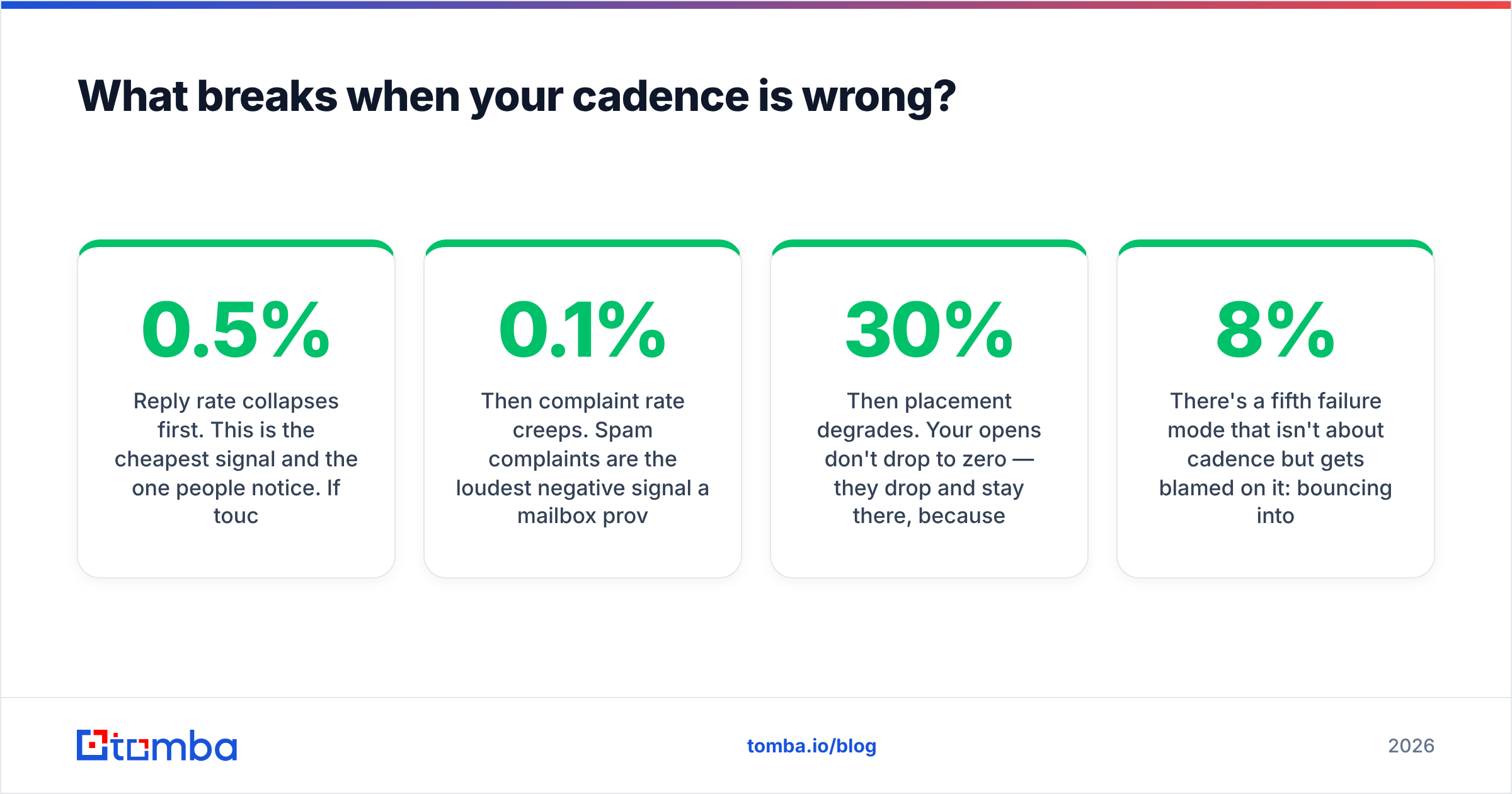
Four failure modes, roughly in the order they show up:
Reply rate collapses first. This is the cheapest signal and the one people notice. If touch 3 and touch 4 are pulling under 0.5% replies while touch 1 pulls 3%, your spacing is too tight — recipients are pattern-matching your follow-ups as noise before reading them.
Then complaint rate creeps. Spam complaints are the loudest negative signal a mailbox provider receives. A rate that drifts above roughly 0.1% is a problem; above 0.3% you're in active trouble. Frequency is almost always the cause, not content.
Then placement degrades. Your opens don't drop to zero — they drop 30% and stay there, because you've been quietly moved to the promotions tab or a spam folder for a subset of domains. This is the hardest failure to diagnose, because nothing errors out. Run your domain through a blacklist checker and confirm your SPF record is correct before blaming cadence, but if the auth is clean and placement dropped after a frequency change, you have your answer.
Then the list stops recovering. Once a domain's reputation is damaged, dialing frequency back down doesn't restore it in a week. You're looking at 4–8 weeks of reduced volume plus warmup. This is why cadence is worth getting right up front — the cost of being wrong is asymmetric.
There's a fifth failure mode that isn't about cadence but gets blamed on it: bouncing into dead addresses. If 8% of your list is invalid, no send schedule saves you. Run the list through an email verifier before you touch the schedule, because bounce rate corrupts every other measurement you're about to take.
How do you build a cadence from scratch?#
Six steps, in this order. Skipping step 1 is the most common mistake.
- Audit total contact volume per person. Pull every automated and manual send a single contact could receive in a 30-day window, across every team. Marketing, sales, product, and support all email the same people. If the total is above 6–8 for a B2B contact, you have a coordination problem, not a cadence problem.
- Clean and verify the list. Remove hard bounces, role addresses, and anything unverified. Use a catch-all verifier for domains that accept everything — those are the addresses that silently inflate your "delivered" number while going nowhere.
- Pick a stop rule per sequence. Reply, click, meeting booked, or unsubscribe. Write it down before you write email 1. Sequences without a documented exit condition are the ones that email people who already said yes.
- Set spacing with a decay curve. Tighter early, looser later: 2 days, then 4, then 6, then 8. Never uniform. Uniform spacing is the most obvious automation tell there is.
- Warm the sending infrastructure to match. If you're going from 200 sends a day to 1,500, ramp over three to four weeks. A warmup calculator gives you a defensible ramp schedule instead of a guess.
- Instrument per-touch, not per-campaign. Track reply rate, unsubscribe rate, and bounce rate by touch number. Campaign-level averages hide the exact touch that's killing you.
How do you measure whether the cadence is working?#
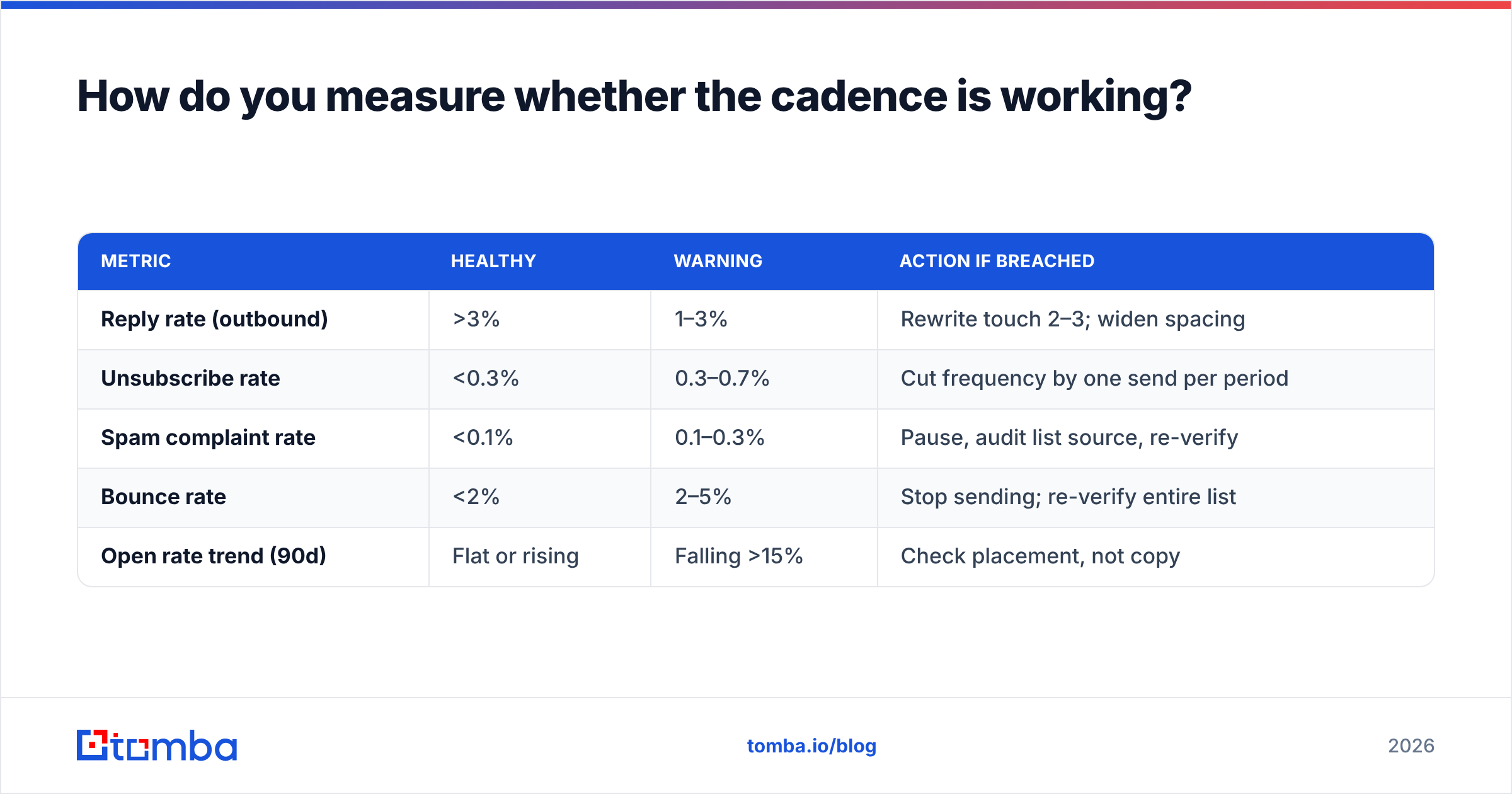
Four metrics, four thresholds. If you only track one, track complaint rate — it's the one with the slowest recovery time.
| Metric | Healthy | Warning | Action if breached |
|---|---|---|---|
| Reply rate (outbound) | >3% | 1–3% | Rewrite touch 2–3; widen spacing |
| Unsubscribe rate | <0.3% | 0.3–0.7% | Cut frequency by one send per period |
| Spam complaint rate | <0.1% | 0.1–0.3% | Pause, audit list source, re-verify |
| Bounce rate | <2% | 2–5% | Stop sending; re-verify entire list |
| Open rate trend (90d) | Flat or rising | Falling >15% | Check placement, not copy |
Measure over a rolling 90-day window, not per campaign. Cadence effects are cumulative and lag by weeks — a frequency increase in March shows up as a placement problem in May. Single-campaign readings will tell you the schedule is fine right up until it isn't.
One more discipline worth adopting: segment your reporting by list source. A cadence that's perfectly healthy for opted-in newsletter subscribers can be destructive for a purchased or scraped list, and blended averages will hide that completely.
What tools do you actually need to run a cadence?#
Fewer than vendors would like you to believe. You need four things:
- A verified contact source, so your bounce rate stays under 2% and your engagement metrics mean something.
- A sending platform with per-touch reporting, so you can see which touch is failing rather than which campaign.
- Deliverability monitoring — blacklist checks, sender reputation tracking, and inbox placement testing.
- A suppression system that enforces your stop rules automatically across every team touching the list.
Notice what's not on that list: AI copy generators, sending-time optimizers, and most of the "smart cadence" features sold as differentiation. They optimize the last 10% of a problem where the first 90% is list quality and total contact volume.
If you're comparing vendors for the first layer, tools like BookYourData and other verified-data providers cover the list-building side well, and G2's email marketing category is a reasonable place to compare sending platforms on real user reviews rather than feature grids.
Where should you start this week?#
Start with the layer everything else depends on: the addresses themselves. Pull a sample of 500 contacts from your most-emailed segment, verify them, and see what percentage comes back invalid, risky, or catch-all. That number tells you whether your cadence problem is actually a data problem — and for most teams running programs older than a year, it is.
Tomba's Email Finder gives you verified, deliverable addresses so your cadence is measured against contacts who can actually receive it, with a free tier at 25 searches a month and paid plans starting at $49/mo on Tomba pricing. Find the addresses, verify them, then set the schedule — in that order. Getting the sequence right on a list that bounces is optimization theater.
Related guides#
Ready to find emails that actually work?
Join 150,000+ professionals who stopped guessing and started sending. Free credits on signup — no credit card required.
Get the Tomba newsletter
Practical outbound tactics and product updates — once every two weeks.
About the author