Email Marketing Deliverability: The Complete 2026 Guide
Delivery rate says 99%. Inbox placement says 71%. This guide breaks down what actually decides where your email marketing lands in 2026 — authentication, list hygiene, engagement, volume — and the 30-day fix order that works.
TL;DR
- "Delivered" is not "inboxed." Your ESP reports a 99% delivery rate. Meanwhile 20-30% of those messages sit in spam. You cannot see the gap unless you seed-test.
- Authentication (SPF, DKIM, DMARC) is table stakes since the Google/Yahoo bulk-sender rules landed in 2024. It gets you to the door. It does not get you into the inbox.
- Engagement is the real signal in 2026. Opens are noisy after Apple MPP. Replies, clicks, folder moves, and "not spam" clicks carry the weight now.
- List quality beats every tactic. Unverified addresses drive bounces and spam-trap hits. Nothing wrecks email marketing deliverability faster.
- A broken sender reputation takes 3-6 weeks to repair. Fix order matters: stop the bleeding, prune the list, then re-ramp volume on engaged segments only.
What is email marketing deliverability, exactly?#
Email marketing deliverability is the share of your sent emails that reach the inbox — not just the recipient's mail server. That gap is where most teams lose money without knowing it.
Think of a package delivery. The tracking says "delivered." It does not say whether the box landed on your doorstep or in the alley out back. Both count as delivered. Only one gets opened.
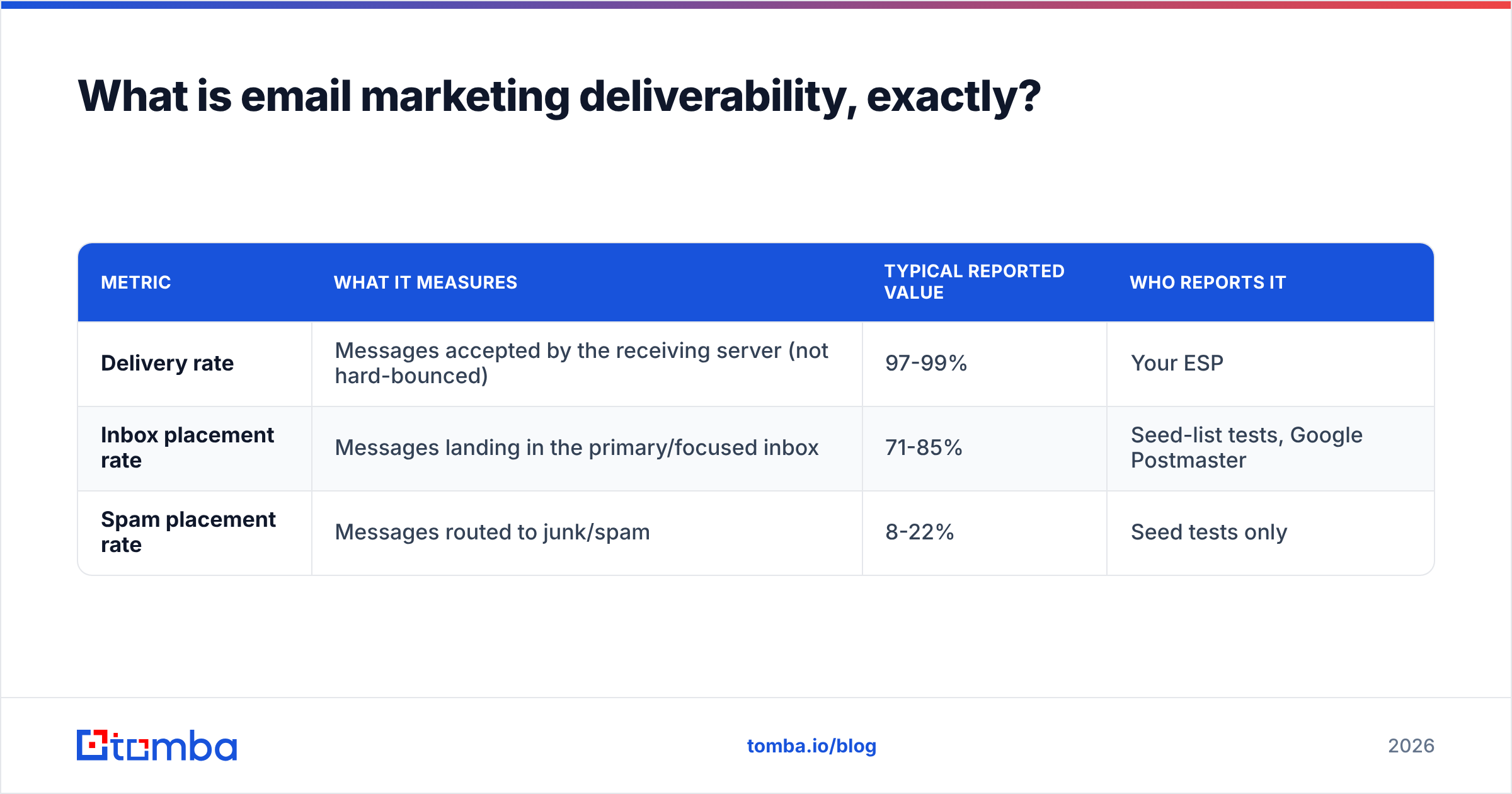
Three metrics get confused all the time:
| Metric | What it measures | Typical reported value | Who reports it |
|---|---|---|---|
| Delivery rate | Messages accepted by the receiving server (not hard-bounced) | 97-99% | Your ESP |
| Inbox placement rate | Messages landing in the primary/focused inbox | 71-85% | Seed-list tests, Google Postmaster |
| Spam placement rate | Messages routed to junk/spam | 8-22% | Seed tests only |
Your ESP cannot see folder placement at Gmail or Outlook. It only knows the SMTP handshake worked. So "delivery rate" is the wrong yardstick for email marketing deliverability. It will read 98% right up to the day your campaign stops producing pipeline.
One more thing to know. Filters judge you per sending domain and per IP, and more and more per subdomain. Reputation is not one company-wide score. Your transactional subdomain can be spotless while your marketing subdomain burns.
Why did email marketing deliverability get harder in 2026?#
Four shifts piled up.
- Bulk-sender rules went from "nice to have" to enforced. Google and Yahoo set their February 2024 bar: SPF and DKIM and DMARC for senders over 5,000 messages a day, one-click unsubscribe, and a spam complaint rate under 0.3%. Soft-fail warnings turned into flat rejections. Microsoft added similar rules for high-volume senders.
- Open rates stopped being trustworthy. Apple Mail Privacy Protection pre-fetches images. That inflates opens by 20-40%, depending on your audience. Filters know it. So do you, now. Mailbox providers weigh clicks, replies, reading time, and manual folder moves instead.
The other two shifts are about volume and tolerance.
- AI-generated volume flooded the pipes. Reply rates on generic cold sequences collapsed as send volume exploded. Filters answered by tightening limits on new domains and low-engagement senders.
- Complaint tolerance dropped. A 0.3% ceiling sounds generous until you do the math. On a 10,000-send campaign, 30 people hitting "report spam" puts you in the penalty box.

What actually decides whether you hit the inbox?#
Filters score you on roughly six weighted signals. Here they are, ranked by leverage.
- List quality and bounce rate — The biggest lever by far. Hard bounces above 2% signal a bought or stale list. Above 5%, expect throttling within one campaign. Spam traps are worse. One hit can cost you weeks.
- Complaint rate — Aim for under 0.1%, not 0.3%. The 0.3% figure is where enforcement starts, not where safety ends.
- Engagement recency — Filters ask one question: has this person engaged in the last 30, 60, or 90 days? Segments that have not opened in 180 days drag down placement for everyone else on the send.
Those three decide most of your email marketing deliverability. The next three still matter.
- Authentication and alignment — SPF, DKIM, and a DMARC record with at least
p=noneand reporting on. Alignment matters as much as the records themselves. The From domain has to match the DKIM and SPF domain. - Sending pattern consistency — Ramping from 200 a day to 20,000 a day overnight looks like a hacked account. Filters model your normal and flag the spike.
- Content and infrastructure — Link shorteners, mismatched link domains, image-only emails, spammy phrasing, shared IPs with bad neighbors. Real, but far smaller than the five above. A better subject line will not save a 9% bounce rate.
Most teams spend 80% of their effort on item 6 and 5% on item 1. Flip that.
How do the major mailbox providers differ?#
They do not share one rulebook. Tune only for Gmail and your Outlook-heavy B2B list stays exposed.
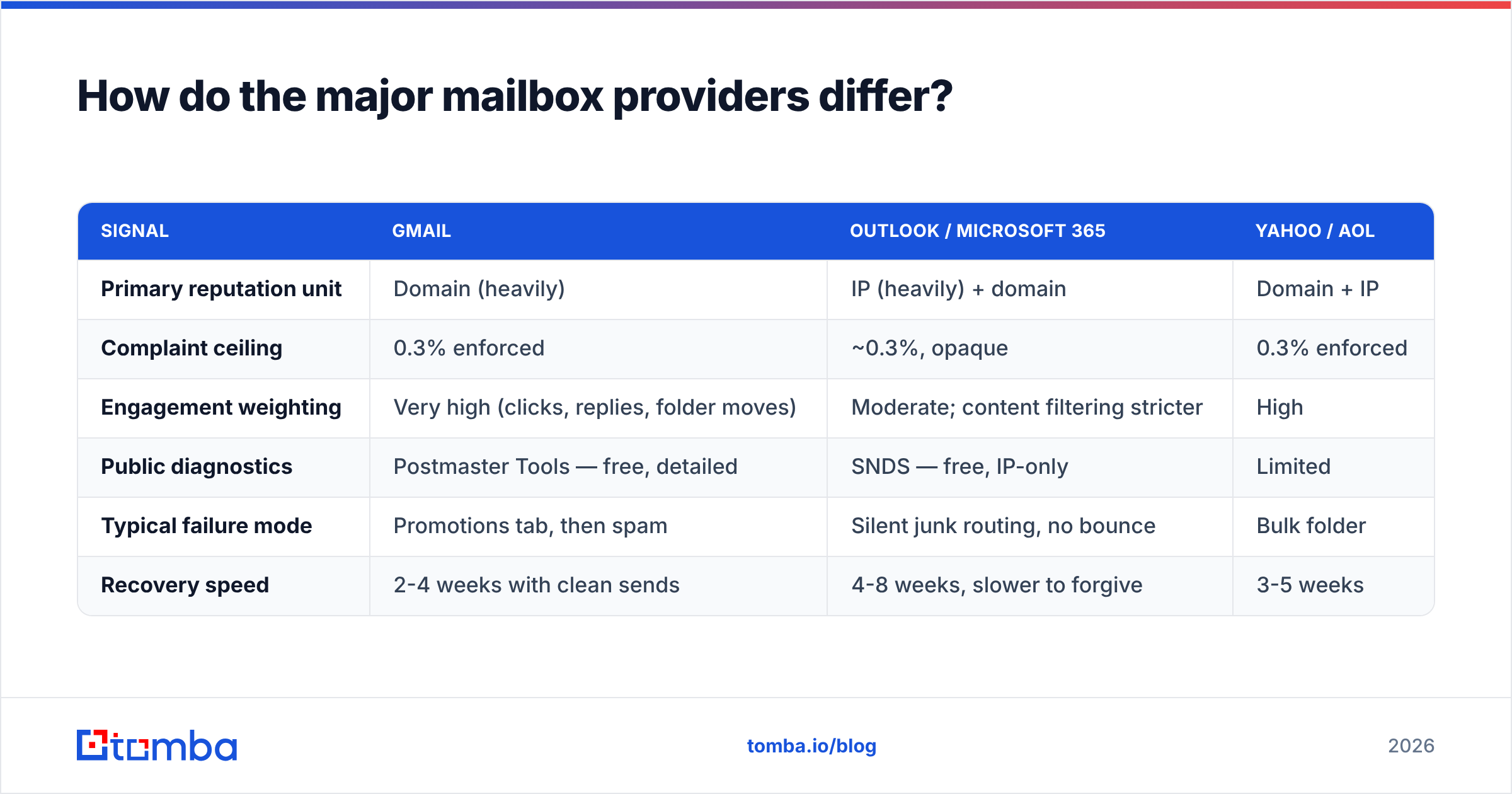
| Signal | Gmail | Outlook / Microsoft 365 | Yahoo / AOL |
|---|---|---|---|
| Primary reputation unit | Domain (heavily) | IP (heavily) + domain | Domain + IP |
| Complaint ceiling | 0.3% enforced | ~0.3%, opaque | 0.3% enforced |
| Engagement weighting | Very high (clicks, replies, folder moves) | Moderate; content filtering stricter | High |
| Public diagnostics | Postmaster Tools — free, detailed | SNDS — free, IP-only | Limited |
| Typical failure mode | Promotions tab, then spam | Silent junk routing, no bounce | Bulk folder |
| Recovery speed | 2-4 weeks with clean sends | 4-8 weeks, slower to forgive | 3-5 weeks |
Here is the practical takeaway. Microsoft punishes content and IP harder, and it tells you almost nothing when it does. Most enterprise lists skew toward Microsoft 365 tenants. If yours does, you need seed testing. Outlook will junk you in silence while your dashboard looks perfect.
Google gives you real data for free. Not enrolled in Postmaster Tools yet? Do that before you read further. It is a 10-minute DNS record, and it is the only public window into your domain reputation.
What email marketing deliverability benchmarks should you hold?#
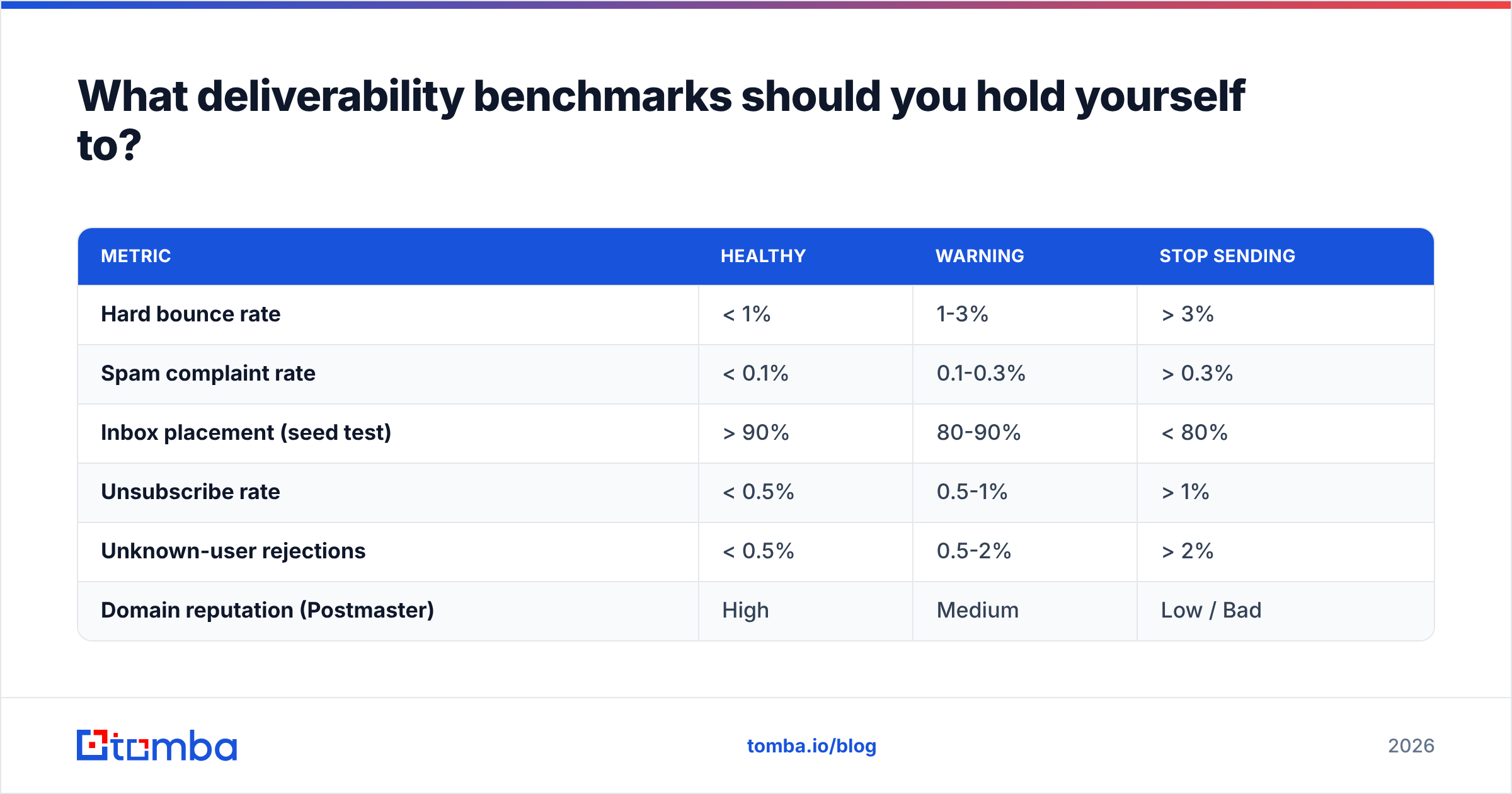
Aim for these numbers. Treat a breach as a stop-the-campaign event, not a "watch it next month" item.
| Metric | Healthy | Warning | Stop sending |
|---|---|---|---|
| Hard bounce rate | < 1% | 1-3% | > 3% |
| Spam complaint rate | < 0.1% | 0.1-0.3% | > 0.3% |
| Inbox placement (seed test) | > 90% | 80-90% | < 80% |
| Unsubscribe rate | < 0.5% | 0.5-1% | > 1% |
| Unknown-user rejections | < 0.5% | 0.5-2% | > 2% |
| Domain reputation (Postmaster) | High | Medium | Low / Bad |
One caveat on inbox placement. Seed tests measure a synthetic panel, not your real audience. Treat the number as directional. A drop from 94% to 68% between two campaigns is real information. The absolute value is not gospel.
How do you fix a broken sender reputation in 30 days?#
Repair happens in order. Do step 4 before step 2 and you waste the work.
Week 1 — Stop the bleeding. Pause every campaign to non-engaged segments. Send only to people who opened or clicked in the last 30 days. Yes, volume drops 70%. That is the point. You are proving to filters that people want your mail.
Week 1 — Audit authentication. Check that SPF resolves in under 10 DNS lookups. Confirm DKIM signs with a 2048-bit key. Make sure DMARC exists with an rua reporting address. Run a SPF checker and confirm alignment, not just presence. Then check your IP and domain against a blacklist checker. Spamhaus and SURBL listings block every other fix until you clear them.
Week 2 — Prune the list, properly. Remove hard bounces, role accounts (info@, sales@, admin@), and anyone with zero engagement in 12 months. Run everything left through an email verifier. This step is not optional. Verification catches typos, dead mailboxes, and disposable domains. It also flags catch-all domains, which accept everything and tell you nothing. For those, a catch-all verifier gives you a confidence tier instead of a coin flip.
Week 3 — Re-ramp slowly. Raise volume by no more than 30-50% a day. Start with your most engaged tier. Watch Postmaster domain reputation daily. If it dips, hold volume flat for 48 hours instead of pushing through.
Week 4 — Rebuild the content baseline. Now fix what everyone starts with. Cut image weight. Use your own tracking domain instead of a shared shortener. Keep the text-to-image ratio sane. Run drafts through a spam checker before you schedule.
Those four weeks are the whole email marketing deliverability recovery plan. Skip a step and you restart it.

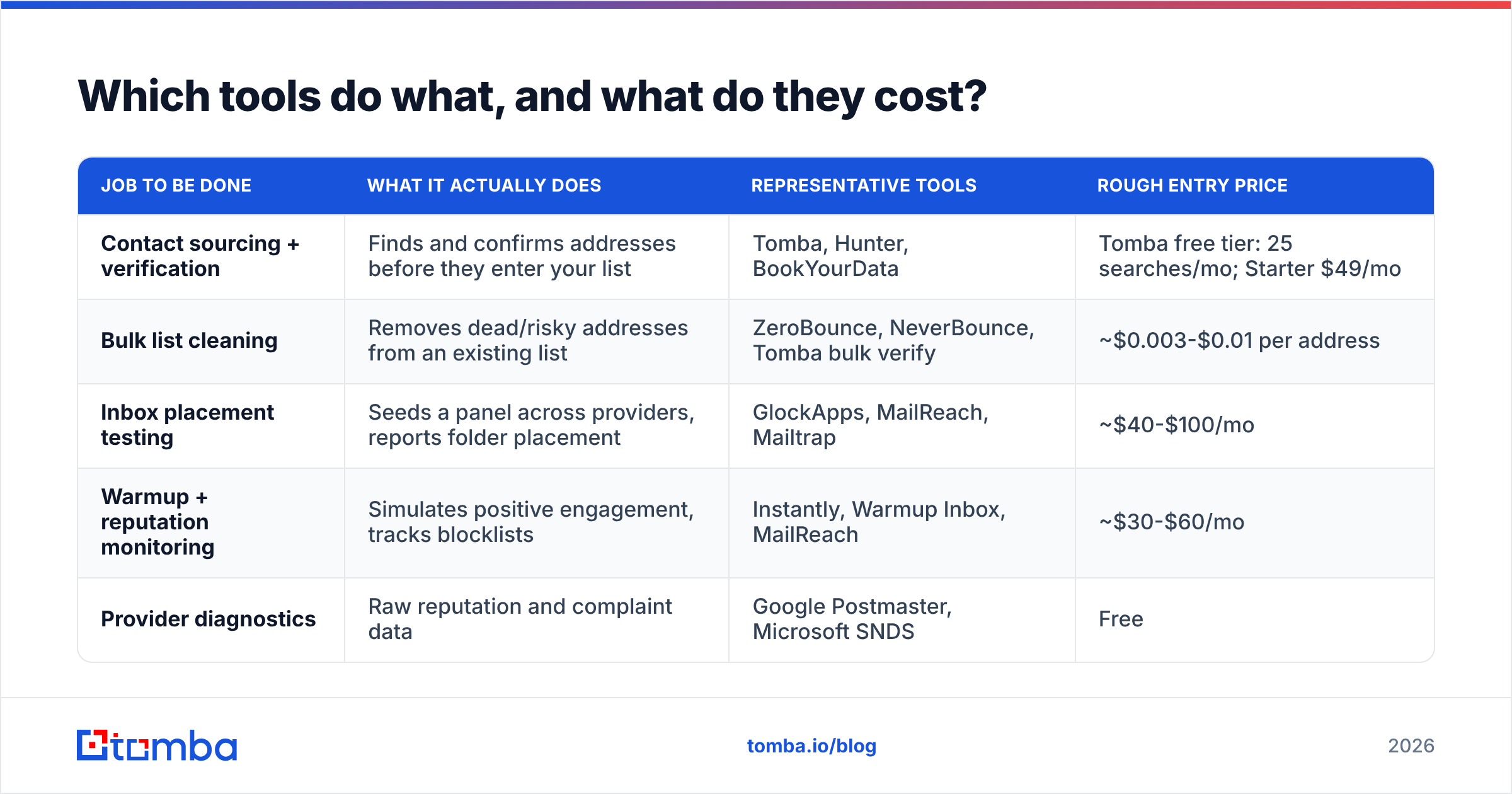
Which tools do what, and what do they cost?#
The email marketing deliverability tool market splits into four jobs. People confuse them constantly. Buying a warmup tool when your problem is list quality is the most common and most expensive mistake here.
| Job to be done | What it actually does | Representative tools | Rough entry price |
|---|---|---|---|
| Contact sourcing + verification | Finds and confirms addresses before they enter your list | Tomba, Hunter, BookYourData | Tomba free tier: 25 searches/mo; Starter $49/mo |
| Bulk list cleaning | Removes dead/risky addresses from an existing list | ZeroBounce, NeverBounce, Tomba bulk verify | ~$0.003-$0.01 per address |
| Inbox placement testing | Seeds a panel across providers, reports folder placement | GlockApps, MailReach, Mailtrap | ~$40-$100/mo |
| Warmup + reputation monitoring | Simulates positive engagement, tracks blocklists | Instantly, Warmup Inbox, MailReach | ~$30-$60/mo |
| Provider diagnostics | Raw reputation and complaint data | Google Postmaster, Microsoft SNDS | Free |
Prices move, so check vendor pages before you budget. The ordering is stable, though. Sourcing and verification sit upstream of everything else. That is why fixing them produces the biggest downstream effect. A warmup tool on a dirty list is a treadmill: you manufacture fake engagement while real bounces keep eating the reputation you are paying to build.
Tomba pricing works like this. The free tier gives 25 searches a month. Starter is $49/mo, Growth $99/mo, and Pro $249/mo, with verification included alongside finding. Running build-the-list and clean-the-list across two vendors? One vendor is usually cheaper. It also closes the window where unverified addresses sit in your CRM until someone imports them by accident.
What email marketing deliverability mistakes still kill campaigns in 2026?#
- Sending marketing from your primary domain. Use a subdomain (
mail.yourcompany.com,go.yourcompany.com). If reputation tanks, your invoices and password resets still arrive. - Buying a list and "verifying it after." Verification removes invalid addresses. It does not remove the fact that nobody asked to hear from you. It also cannot catch every recycled spam trap. Source addresses properly instead, with a domain search against companies that fit your ICP.
- Treating unsubscribes as losses. Someone who unsubscribes protects your sender reputation. Someone who hits "report spam" because the unsubscribe link was buried costs you 100x more. Make it one click, and honor it within 48 hours.
The rest are habits rather than one-off errors.
- Ignoring the reply signal. Replies are the strongest positive signal you can get. A campaign built for 3% replies out-delivers one built for 45% opens, every time. That is why plain-looking emails to a small, well-targeted list beat template-heavy blasts.
- Optimizing subject lines while the list rots. Deck chairs. Fix bounces first.
- Assuming a shared IP is fine forever. On shared infrastructure you inherit your neighbors' behavior. Above roughly 100k sends a month, move to a dedicated IP and warm it properly.
- No monitoring cadence. Check Postmaster weekly, not when the pipeline dries up. By the time reply volume drops, you are three weeks into the damage.
Want a broader frame? HubSpot keeps a solid overview of email deliverability fundamentals. Peer reviews on G2's email deliverability category help you sanity-check vendor claims against real user experience.
Is email marketing deliverability a data problem or a sending problem?#
Both. But the data problem comes first, and it has the shorter fix cycle.
Sending problems — cadence, warmup, content, infrastructure — take weeks to correct. You are waiting for filters to update their model of you. Data problems clear in an afternoon. Verify the list, drop the risky tiers, and your bounce rate falls on the very next send.
Let that gap set your priorities. With one week and one budget line, spend both on making every address real, current, and attached to a person who fits your ICP. Everything else in this email marketing deliverability guide gets easier once that is true.
Start upstream. The cheapest fix is never adding a bad address in the first place. Tomba's Email Finder finds professional addresses by domain, name, or company. It verifies them at the point of discovery, so your list starts clean instead of getting cleaned. The free tier includes 25 searches a month. Starter is $49/mo when you need volume. Find the contact, confirm it is live, and stop letting your bounce rate explain why campaigns underperform.
Related guides#
Ready to find emails that actually work?
Join 150,000+ professionals who stopped guessing and started sending. Free credits on signup — no credit card required.
Get the Tomba newsletter
Practical outbound tactics and product updates — once every two weeks.
About the author