Email Marketing Prospecting: The 2026 Playbook That Works
Email marketing prospecting is not newsletter marketing with a sales twist. Here's the 2026 workflow — list building, verification, sequencing, and the metrics that tell you whether it's working.
TL;DR
- Email marketing prospecting is outbound email sent to people who never opted in — which means the rules of newsletter marketing (segmentation, design, unsubscribe hygiene) only get you halfway there.
- The single biggest predictor of campaign performance is list quality, not copy. A 2% bounce rate ceiling is now enforced by Google and Microsoft, and blowing past it kills the domain, not just the campaign.
- Build lists from a defined ICP, enrich them with a verified source, then verify again before send. Two verification passes cost pennies and save your sending reputation.
- Four to six touches over 18–21 days outperforms both one-shot blasts and 12-step marathon sequences on reply rate per hour invested.
- Track reply rate and positive reply rate. Open rate has been unreliable since Apple Mail Privacy Protection, and click rate on a plain-text prospecting email is close to meaningless.
What is email marketing prospecting?#
Email marketing prospecting is the practice of using structured, campaign-style email to start conversations with people who have never heard of you — borrowing the tooling and discipline of email marketing (segmentation, sequencing, testing, measurement) and applying it to cold outbound.
The everyday version: newsletter marketing is a restaurant emailing its loyalty members about a new menu. Prospecting is the same restaurant emailing chefs at nearby offices who might book a catering order. Same channel, same infrastructure, completely different consent situation and completely different success bar.
Technically, the difference matters because email deliverability systems treat the two differently. A marketing list has engagement history: mailbox providers have watched those recipients open, click, and not complain. A prospecting list has none of that. Every send is a fresh audition in front of a filter that assumes the worst.
That's why the tactics that work in email marketing — heavy HTML templates, image headers, tracking pixels on everything — actively hurt you in prospecting. They're signals of bulk sending in a context where bulk sending has no permission behind it.
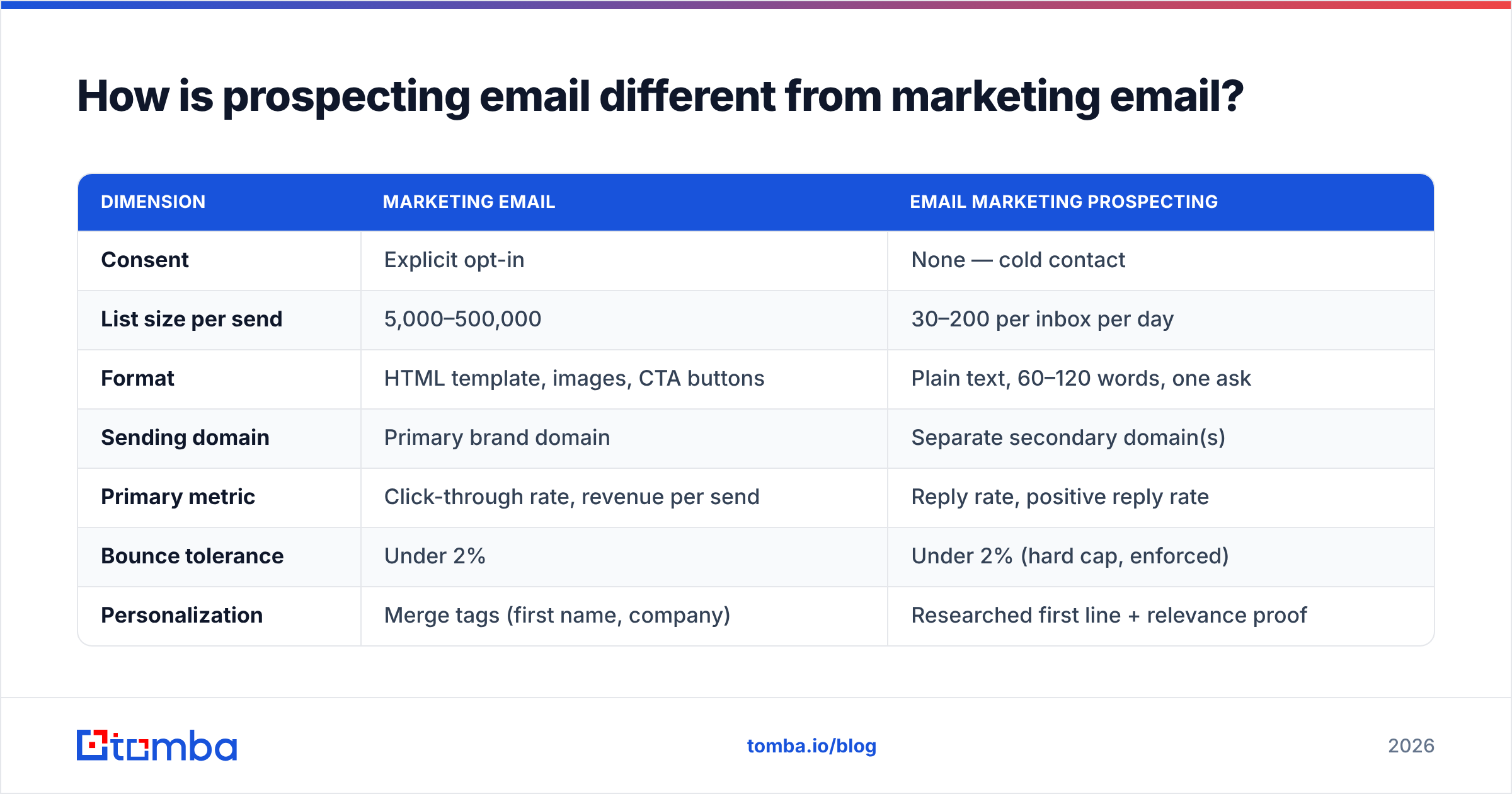
How is prospecting email different from marketing email?#
| Dimension | Marketing email | Email marketing prospecting |
|---|---|---|
| Consent | Explicit opt-in | None — cold contact |
| List size per send | 5,000–500,000 | 30–200 per inbox per day |
| Format | HTML template, images, CTA buttons | Plain text, 60–120 words, one ask |
| Sending domain | Primary brand domain | Separate secondary domain(s) |
| Primary metric | Click-through rate, revenue per send | Reply rate, positive reply rate |
| Bounce tolerance | Under 2% | Under 2% (hard cap, enforced) |
| Personalization | Merge tags (first name, company) | Researched first line + relevance proof |
| Legal frame | CAN-SPAM / GDPR consent basis | CAN-SPAM / GDPR legitimate interest |
| Tooling | ESP (Mailchimp, Klaviyo, HubSpot) | Sending tool + data provider + verifier |
The row that trips up most teams is sending domain. If you run prospecting through the same ESP and same domain as your customer newsletter, one bad campaign takes your billing emails, password resets, and onboarding sequence down with it. Separate the infrastructure before you send the first cold email, not after the first incident.
Why do most email marketing prospecting campaigns fail?#
Failure is rarely about the copy. In practice it clusters into five causes, roughly in order of how much damage they do:
- Unverified list data. Scraped or aged contacts bounce. Google's sender guidelines put a hard spam-complaint ceiling at 0.3% and expect bounce rates well under 2%. Cross that and your messages route to spam for weeks, regardless of what you write next.
- Wrong ICP, right email. A beautifully written message to a job title that has no budget and no pain is still a zero. Most "our cold email doesn't work" diagnoses are targeting problems wearing a copywriting costume.
- Volume before warmup. A brand-new domain sending 300 emails on day one is behaving exactly like a spammer. Ramp over 3–4 weeks.
- No follow-up. Roughly half of all replies to a well-built sequence arrive after the first message. Teams that send one email and move on are throwing away the half they paid for.
- Template stuffing. Fifteen merge tags don't make an email personal. One specific, verifiable observation about the prospect's business does.
Notice what isn't on that list: subject line length, emoji use, send-day-of-week. Those are optimization variables. They matter at the margin, once the four items above are handled. Optimizing them first is like tuning a carburetor on a car with no wheels.
How do you build a prospect list that doesn't bounce?#
Work in four passes. Each one narrows the list and raises its quality.
Pass 1 — Define the account list, not the contact list. Start with companies that match a firmographic profile you can defend: industry, headcount band, tech stack, funding stage, geography. If you can't explain in one sentence why a company belongs on the list, it doesn't. Fifty accounts you can justify beat 5,000 you can't.
Pass 2 — Find the humans. Once you have domains, run a domain search to pull the people at each company along with their role, then filter to the two or three titles that actually own the problem you solve. For named individuals you already know — from a conference list, a LinkedIn export, an author byline — an email finder resolves name plus domain into a deliverable address.
Pass 3 — Verify, then verify again. Data providers return addresses with a confidence score; that score is a prediction, not a guarantee, and it decays. Run the whole list through an email verifier immediately before the campaign launches, not when you built the list three months ago. B2B contact data goes stale at roughly 2–2.5% per month through job changes alone.
Pass 4 — Decide what to do with catch-alls. Catch-all domains accept everything at the SMTP layer, so standard verification can't confirm a specific mailbox exists. They're typically 15–25% of a B2B list. Don't delete them and don't blast them — isolate them into a separate segment, run a catch-all verifier to sort the salvageable from the risky, and send that segment from a different inbox so any bounce damage stays contained.
For lists over a few hundred rows, doing this by hand is a waste of a workday. A bulk email finder that takes a CSV of names and domains and returns verified, status-tagged rows turns a full day of manual lookups into a coffee break.
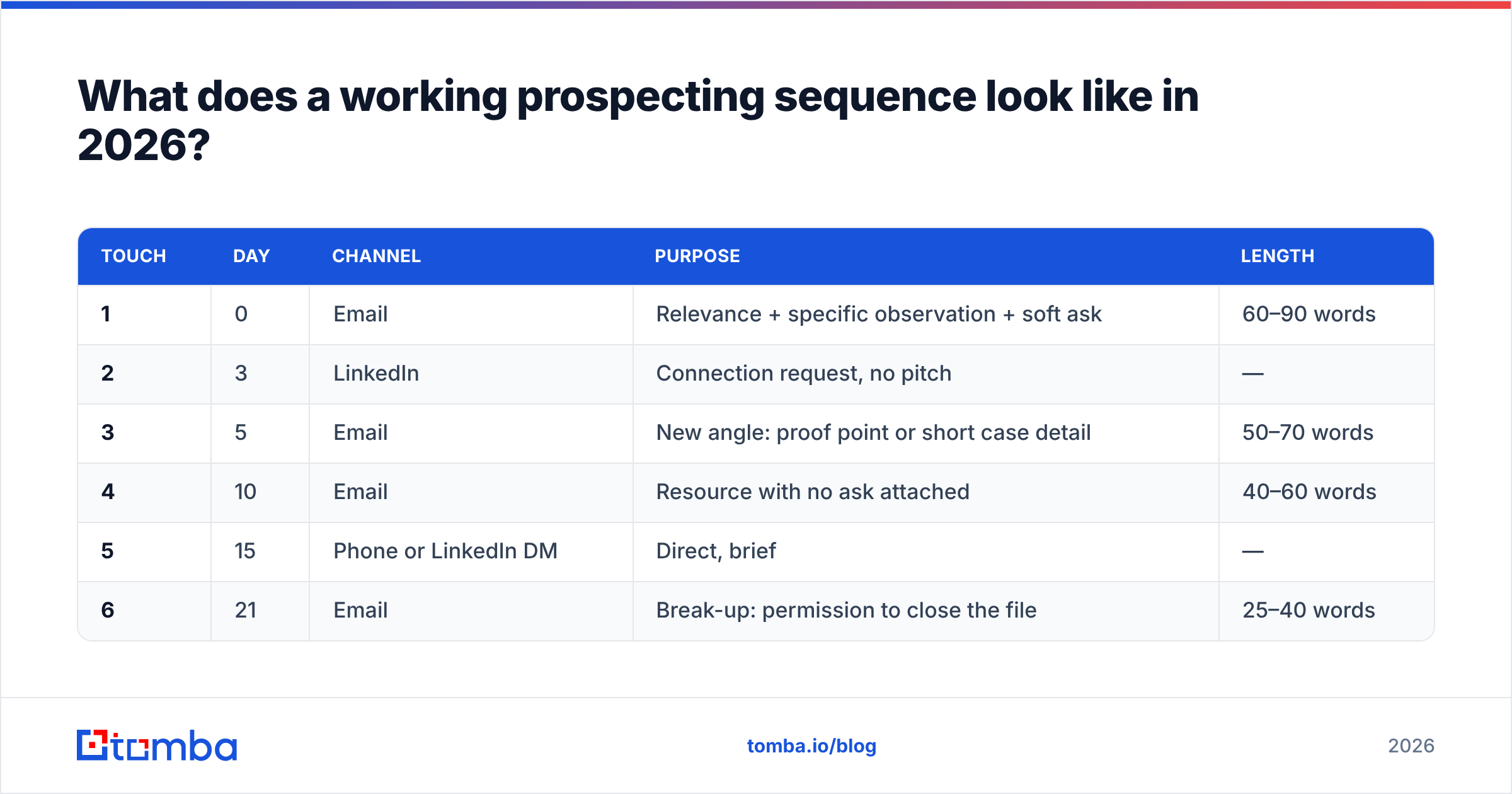
What does a working prospecting sequence look like in 2026?#
Shorter than it was in 2020, and more spread out.
| Touch | Day | Channel | Purpose | Length |
|---|---|---|---|---|
| 1 | 0 | Relevance + specific observation + soft ask | 60–90 words | |
| 2 | 3 | Connection request, no pitch | — | |
| 3 | 5 | New angle: proof point or short case detail | 50–70 words | |
| 4 | 10 | Resource with no ask attached | 40–60 words | |
| 5 | 15 | Phone or LinkedIn DM | Direct, brief | — |
| 6 | 21 | Break-up: permission to close the file | 25–40 words |
Two rules make this work. First, each email must stand alone — assume the prospect never saw the previous one, because most of the time they didn't. Threaded "just bumping this up" follow-ups add zero new information and read as nagging. Second, every touch needs a different reason to exist. If touches 2 through 5 are the same message with rising desperation, you've built a nuisance, not a sequence.
The break-up email is the most underrated slot in the table. It regularly produces the second-highest reply rate in a sequence because it removes pressure and gives a busy person an easy, low-cost way to respond.
Which tools do you actually need for email marketing prospecting?#
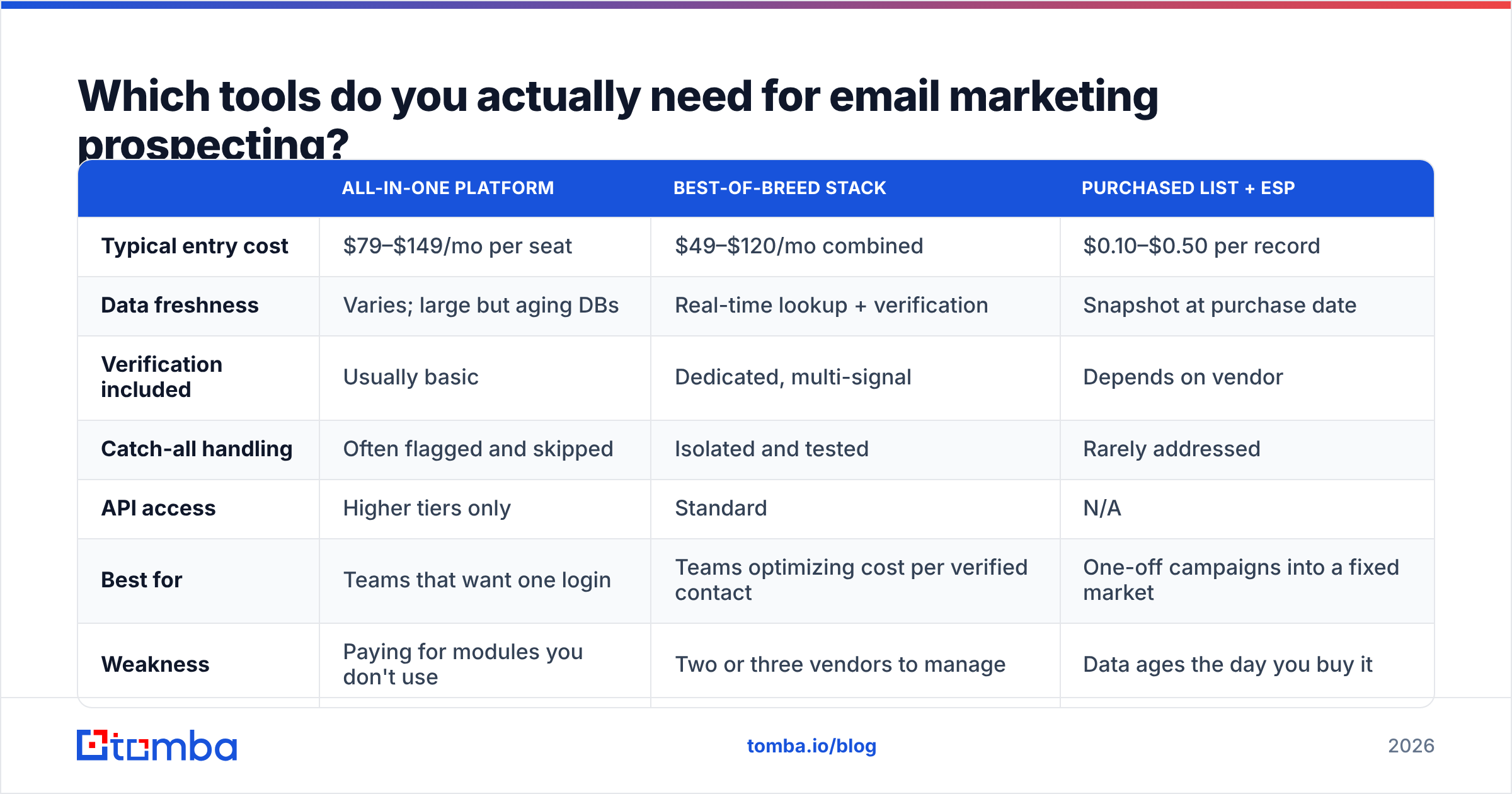
Four functions, and they're rarely all one product: find contacts, verify them, send and sequence, and track outcomes in a CRM. Here's how the common approaches compare on the parts that matter.
| All-in-one platform | Best-of-breed stack | Purchased list + ESP | |
|---|---|---|---|
| Typical entry cost | $79–$149/mo per seat | $49–$120/mo combined | $0.10–$0.50 per record |
| Data freshness | Varies; large but aging DBs | Real-time lookup + verification | Snapshot at purchase date |
| Verification included | Usually basic | Dedicated, multi-signal | Depends on vendor |
| Catch-all handling | Often flagged and skipped | Isolated and tested | Rarely addressed |
| API access | Higher tiers only | Standard | N/A |
| Best for | Teams that want one login | Teams optimizing cost per verified contact | One-off campaigns into a fixed market |
| Weakness | Paying for modules you don't use | Two or three vendors to manage | Data ages the day you buy it |
A few concrete data points to anchor the pricing column. Tomba pricing runs a free tier at 25 searches per month, Starter at $49/mo, Growth at $99/mo, and Pro at $249/mo — with finding, verification, catch-all checks, and enrichment on the same credit pool, so you're not paying separate line items to look up an address and then confirm it. Purchased-list vendors like BookYourData work well when you need a large, pre-built list in a defined market immediately and are willing to re-verify on arrival; they're a genuinely good fit for one-off market tests where lookup-by-lookup enrichment would be slower. Full sales-engagement suites price higher per seat and earn it when you need sequencing, dialer, and reporting under one roof.
If your team already lives inside a CRM, connect the data layer directly rather than exporting CSVs forever — a HubSpot integration or a Tomba API call inside your enrichment workflow keeps the verified status attached to the record instead of trapped in someone's downloads folder.

Which metrics actually tell you if it's working?#
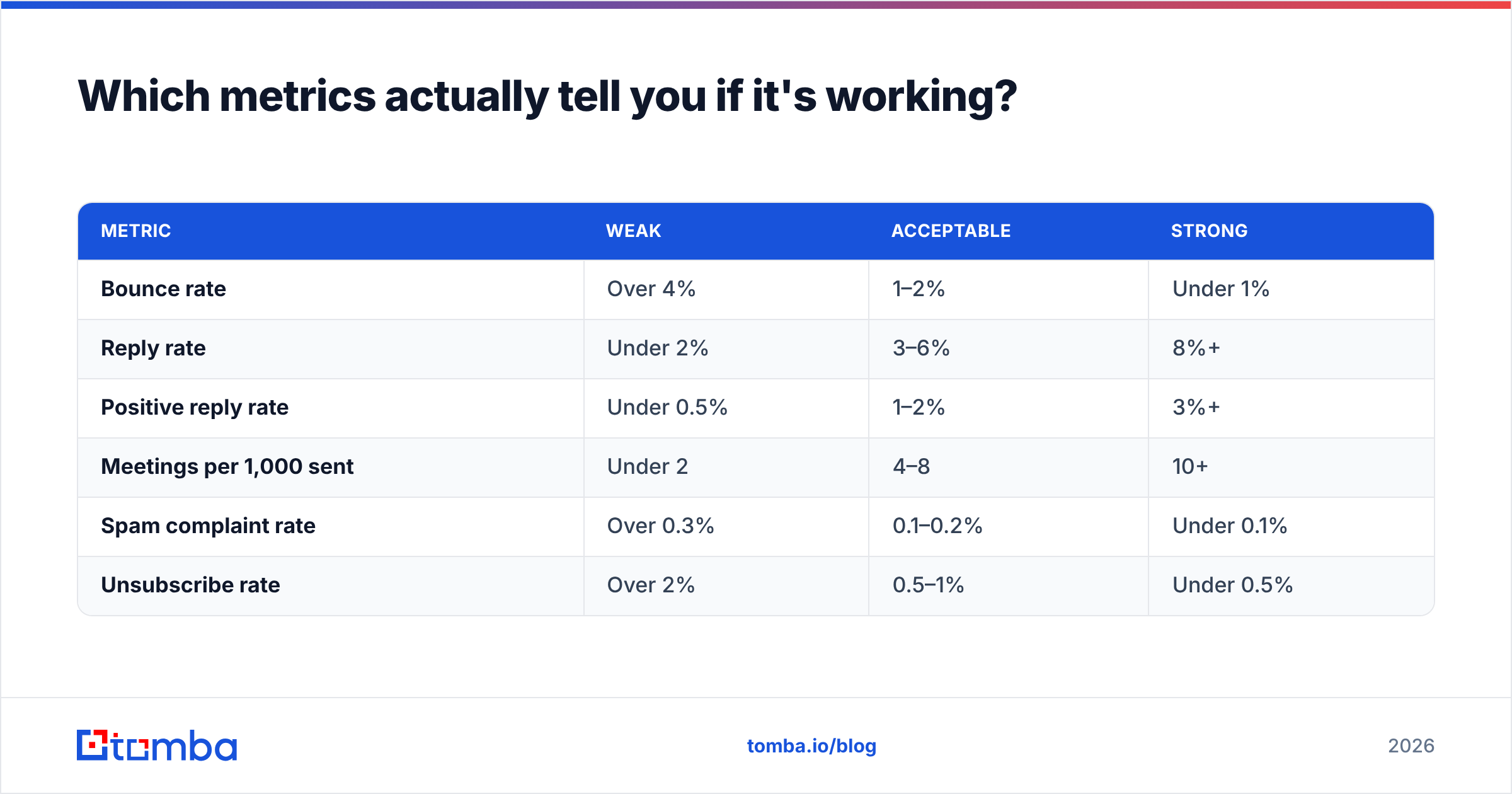
Open rate is no longer a measurement — it's a rumor. Apple Mail Privacy Protection pre-fetches images for a large share of consumer and mixed-mode inboxes, inflating opens without a human ever seeing the message. Treat it as directional at best, and never optimize a subject line against it in isolation.
| Metric | Weak | Acceptable | Strong |
|---|---|---|---|
| Bounce rate | Over 4% | 1–2% | Under 1% |
| Reply rate | Under 2% | 3–6% | 8%+ |
| Positive reply rate | Under 0.5% | 1–2% | 3%+ |
| Meetings per 1,000 sent | Under 2 | 4–8 | 10+ |
| Spam complaint rate | Over 0.3% | 0.1–0.2% | Under 0.1% |
| Unsubscribe rate | Over 2% | 0.5–1% | Under 0.5% |
The number to manage against is positive reply rate, not raw response rate. "Not interested, remove me" is a reply. It is not progress. Splitting the two forces an honest conversation about whether your targeting is right — a high reply rate paired with a low positive rate almost always means you're reaching real people who simply don't have the problem you solve.
Track these per segment, not per campaign. Aggregated numbers hide the fact that one ICP slice is converting at 9% while another drags the blended average into mediocrity. HubSpot's sales research and vendor-review data on G2 are useful for sanity-checking your benchmarks against category norms, but your own segment-level history is the only comparison that really counts.
How do you keep the domain healthy while you scale?#
Scaling prospecting volume is a reputation problem before it's a copy problem.
- Use secondary domains. Buy lookalike domains (yourbrand-hq.com, getyourbrand.com), point them at your main site, and send from those. Your primary domain never touches cold traffic.
- Cap per-inbox volume. 30–50 sends per inbox per day is the sustainable range. To send 500/day, you need 10–15 inboxes, not one inbox working overtime.
- Warm up for 3–4 weeks before real campaigns, ramping gradually rather than jumping to full volume.
- Authenticate properly. SPF, DKIM, and DMARC are non-negotiable now for bulk senders at both Google and Microsoft. Check your records with an SPF checker before launch, not after messages start disappearing.
- Re-verify every 60–90 days. Any list you plan to re-touch has decayed since you built it. Treat verification as recurring maintenance, not a one-time gate.
- Watch the complaint rate weekly. It's the one metric that moves slowly right up until it moves catastrophically.
Where should you start if you're building this from scratch?#
Pick one narrow segment — one industry, one title, 100 accounts. Build the list properly: firmographic filter, contact discovery, verification, catch-all isolation. Write four emails that each stand alone. Send 30 a day from a warmed secondary domain. Measure reply and positive reply rate by segment after 200 sends.
That's a two-week experiment that tells you more than a 5,000-contact blast ever will, and it costs less than a single wasted month of a sales rep's time.
The data layer is where this either works or quietly falls apart, so start there. Tomba Email Finder resolves names and domains into verified, deliverable addresses — with verification, catch-all handling, and enrichment drawing on the same credit pool, so a clean list costs one line item instead of three. The free tier covers 25 searches a month, which is enough to build and test your first segment before you commit a dollar.
Related guides#
Ready to find emails that actually work?
Join 150,000+ professionals who stopped guessing and started sending. Free credits on signup — no credit card required.
Get the Tomba newsletter
Practical outbound tactics and product updates — once every two weeks.
About the author