Email Outreach in 2026: The Complete No-Fluff Playbook
Reply rates are down, filters are smarter, and the spray-and-pray playbook is dead. Here is what email outreach actually looks like in 2026: the sequence structure, the benchmarks, and the list hygiene that still work.
TL;DR
- Email outreach in 2026 is a deliverability problem first and a copywriting problem second. If 12% of your list bounces, no subject line saves you.
- The median reply rate for cold B2B sequences sits around 3-5%. Teams clearing 8%+ almost always send fewer emails to a tighter, verified list.
- A working sequence is 3-4 touches over 12-16 days, one idea per email, no attachments, no tracking pixels on the first send.
- Verify every address before it enters a sequence. Bounce rate above 3% is the single fastest way to torch a sending domain.
- Tooling splits into three buckets: data (finding contacts), sending (sequencing and warmup), and hygiene (verification). Most teams overbuy on sending and underbuy on data quality.
What is email outreach in 2026?#
Email outreach is the practice of contacting people who did not ask to hear from you, at scale, with a specific commercial ask. That includes cold sales prospecting, link-building and PR pitches, recruiting, partnership development, and investor outreach. It is distinct from email marketing, which goes to an opted-in list you already own.
What changed by 2026 is not the channel, it is the filter layer. Gmail and Yahoo's bulk-sender requirements — SPF, DKIM, DMARC alignment, one-click unsubscribe, and a spam-complaint rate under 0.3% — became enforced defaults rather than recommendations. Microsoft followed with its own thresholds for high-volume senders. The practical effect: mailbox providers now judge you on infrastructure and recipient behavior before they ever look at your words.
That means the old volume math broke. Sending 10,000 emails a month from three rotated domains used to be a growth tactic. Now it is a reliable way to get every one of those domains flagged inside six weeks. The teams still getting meetings from cold email are sending less, to better-researched lists, from properly authenticated infrastructure.

Why do most email outreach campaigns fail?#
Failure is almost always upstream of the copy. Here is the honest ranking of causes, from most to least common:
- Bad list data. Guessed or scraped addresses produce hard bounces. Hard bounces above 3% trigger throttling; above 5% you are effectively shadowbanned at Gmail. This is the number one killer and the easiest to fix.
- Wrong person, right company. You found a valid address for someone who has no budget, no pain, and no authority. The email lands, gets read, and gets ignored — which is worse than bouncing, because it teaches the filter your mail is unwanted.
- Broken authentication. No DMARC policy, a misaligned return-path, or a shared IP with a bad neighbor. Run an SPF checker before you blame your subject lines.
- Volume ramped too fast. A brand-new domain sending 200 emails on day one is a spam signal, full stop. Warmup is not optional; it is the cost of entry.
- Generic copy. Yes, it matters — but it is the fifth problem, not the first. A perfect email to a dead address is still a bounce.
The uncomfortable truth is that most "our cold email doesn't work" diagnoses are really "our data doesn't work." HubSpot's marketing research has consistently shown that list quality and segmentation move reply rates more than any single copy variable.
What does a high-performing email outreach sequence look like?#
Four touches, spread over roughly two weeks, each carrying exactly one idea. Anything longer reads as automation, and anything shorter does not survive a busy inbox.
- Email 1 — the specific observation (day 0). Two to four sentences. Name something true about their company that took you thirty seconds to find, connect it to a problem you solve, and ask one low-friction question. No attachments, no links, no calendar invite.
- Email 2 — the proof point (day 3-4). Reply in the same thread. Add one concrete result from a comparable company: a number, a timeframe, a before/after. Still no pitch deck.
- Email 3 — the reframe (day 8-9). Change the angle entirely. If email 1 led with cost, lead with risk or speed. This is where you find out whether you were pitching the wrong problem the whole time.
- Email 4 — the clean close (day 14-16). One line. "Sounds like this isn't a priority right now — want me to close the loop?" Permission-to-close emails routinely out-reply every other message in the sequence, because they cost the recipient nothing to answer.
Two rules that apply to all four: disable open tracking on the first send (tracking pixels are a documented spam signal for cold traffic), and keep every message under 120 words. If you cannot make the ask in 120 words, you do not understand the ask yet.
How should you build an outreach list that doesn't burn your domain?#
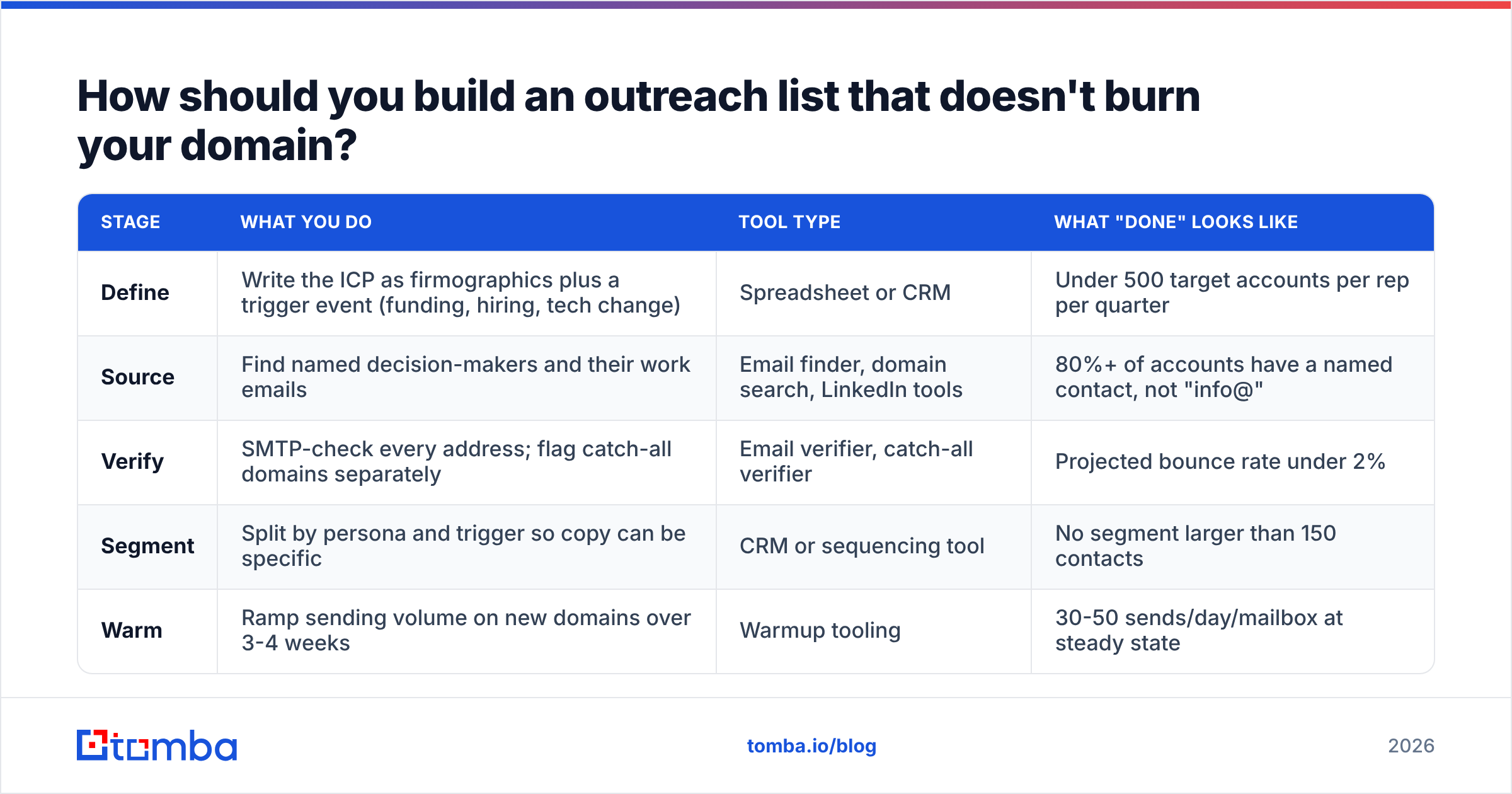
Work in this order: define, source, verify, segment. Skipping verification is the mistake that costs the most, because the damage is delayed — you feel fine for two weeks, then your reply rate collapses and you cannot tell why.
| Stage | What you do | Tool type | What "done" looks like |
|---|---|---|---|
| Define | Write the ICP as firmographics plus a trigger event (funding, hiring, tech change) | Spreadsheet or CRM | Under 500 target accounts per rep per quarter |
| Source | Find named decision-makers and their work emails | Email finder, domain search, LinkedIn tools | 80%+ of accounts have a named contact, not "info@" |
| Verify | SMTP-check every address; flag catch-all domains separately | Email verifier, catch-all verifier | Projected bounce rate under 2% |
| Segment | Split by persona and trigger so copy can be specific | CRM or sequencing tool | No segment larger than 150 contacts |
| Warm | Ramp sending volume on new domains over 3-4 weeks | Warmup tooling | 30-50 sends/day/mailbox at steady state |
Catch-all domains deserve their own note. Roughly a fifth of B2B domains accept mail to any address, so a standard verifier returns "unknown" rather than valid or invalid. Do not treat unknown as valid and do not delete it either — isolate catch-alls into their own campaign with lower volume, or run them through a dedicated catch-all verifier that uses pattern confidence rather than a raw SMTP handshake.
Which email outreach tools do you actually need?#
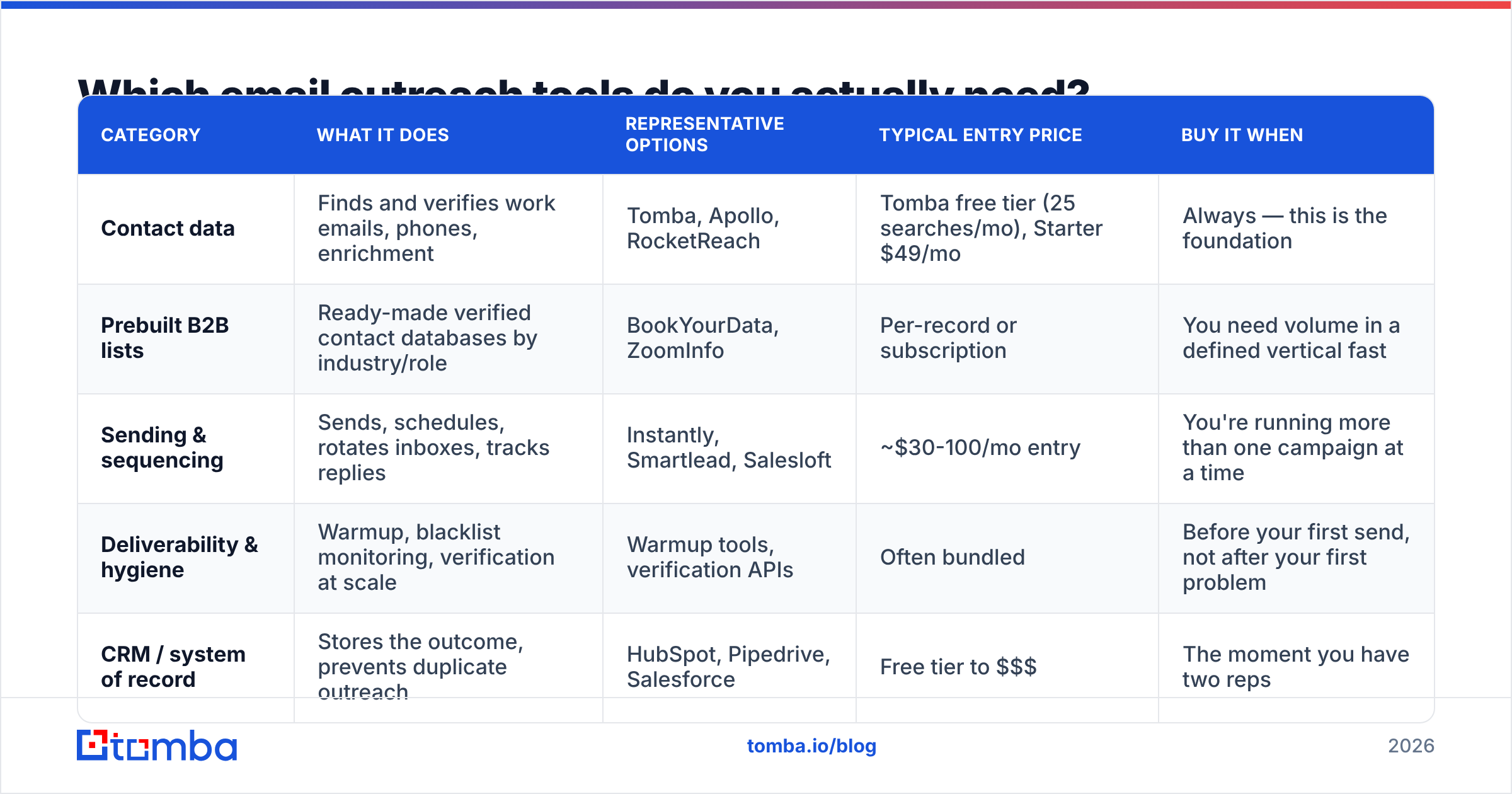
Three categories, and you need one from each. The common failure is buying an expensive all-in-one platform and then discovering its bundled data is thin, so you pay twice anyway.
| Category | What it does | Representative options | Typical entry price | Buy it when |
|---|---|---|---|---|
| Contact data | Finds and verifies work emails, phones, enrichment | Tomba, Apollo, RocketReach | Tomba free tier (25 searches/mo), Starter $49/mo | Always — this is the foundation |
| Prebuilt B2B lists | Ready-made verified contact databases by industry/role | BookYourData, ZoomInfo | Per-record or subscription | You need volume in a defined vertical fast |
| Sending & sequencing | Sends, schedules, rotates inboxes, tracks replies | Instantly, Smartlead, Salesloft | ~$30-100/mo entry | You're running more than one campaign at a time |
| Deliverability & hygiene | Warmup, blacklist monitoring, verification at scale | Warmup tools, verification APIs | Often bundled | Before your first send, not after your first problem |
| CRM / system of record | Stores the outcome, prevents duplicate outreach | HubSpot, Pipedrive, Salesforce | Free tier to $$$ | The moment you have two reps |
A note on cost discipline: data pricing is where budgets quietly leak. Credit-based models punish you for bad guesses, so check whether a provider charges for failed lookups. Tomba pricing runs Free (25 searches/mo), Starter $49/mo, Growth $99/mo, and Pro $249/mo, with Enterprise custom — and unfound contacts don't consume credits. Compare that structure against any vendor you're evaluating on G2 before you commit annually.
If you're running outreach from a spreadsheet-first workflow, the Google Sheets add-on and Tomba API both remove the manual export/import loop that eats an hour a day on most teams.
What benchmarks should you hold your email outreach to?#
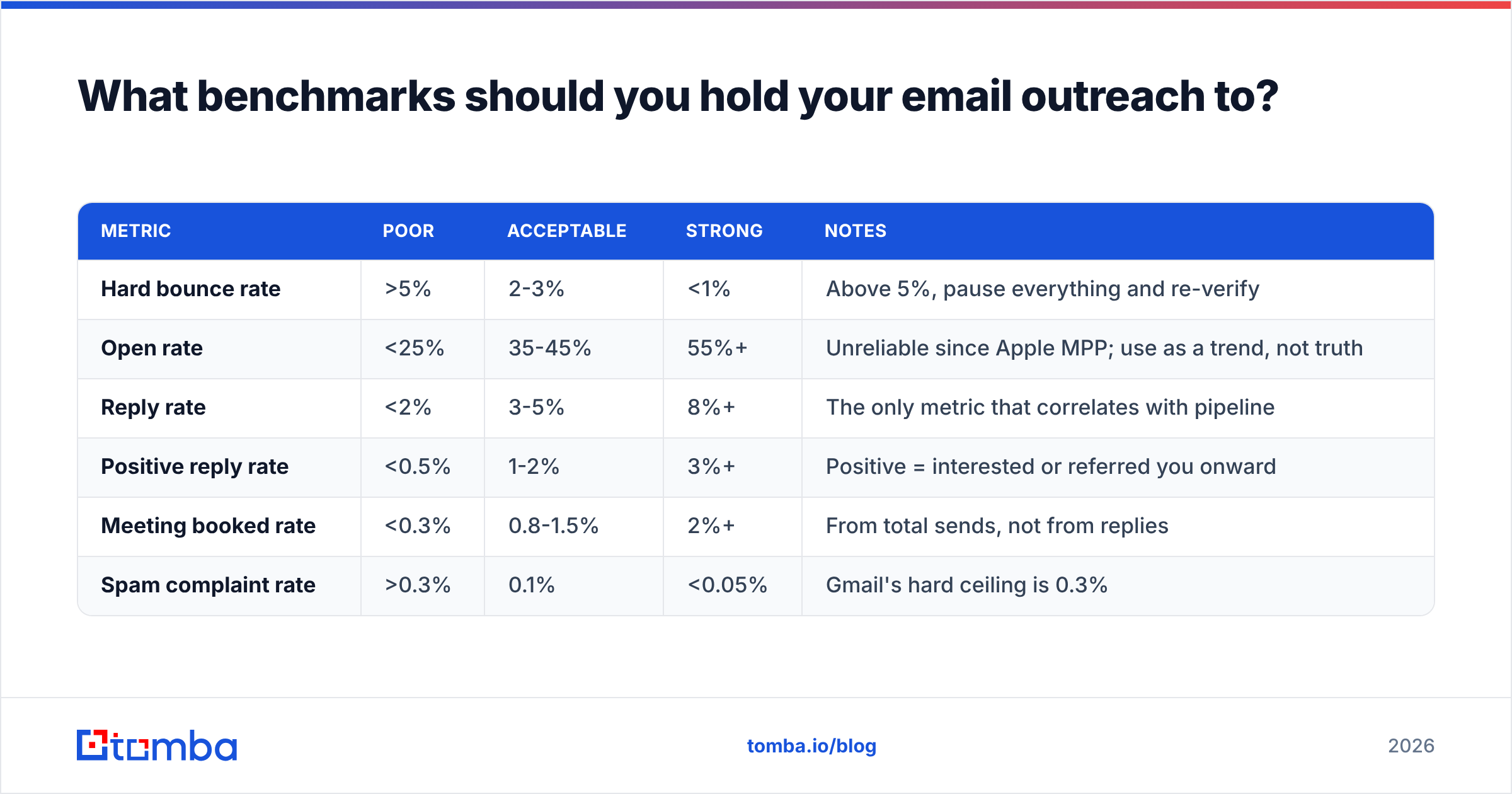
Set your thresholds before the campaign, not after, so you cannot rationalize a bad result. These are realistic 2026 numbers for cold B2B outreach to a well-defined ICP:
| Metric | Poor | Acceptable | Strong | Notes |
|---|---|---|---|---|
| Hard bounce rate | >5% | 2-3% | <1% | Above 5%, pause everything and re-verify |
| Open rate | <25% | 35-45% | 55%+ | Unreliable since Apple MPP; use as a trend, not truth |
| Reply rate | <2% | 3-5% | 8%+ | The only metric that correlates with pipeline |
| Positive reply rate | <0.5% | 1-2% | 3%+ | Positive = interested or referred you onward |
| Meeting booked rate | <0.3% | 0.8-1.5% | 2%+ | From total sends, not from replies |
| Spam complaint rate | >0.3% | 0.1% | <0.05% | Gmail's hard ceiling is 0.3% |
Track reply rate per segment, not per campaign. A blended 4% can hide one segment at 11% and three at 0.5%. The 11% segment is your real ICP and nobody notices it when they only look at the average.
How do you write cold emails people actually answer?#
Strip the email down to four components and delete everything else.
- The opener earns the next line, nothing more. "I saw you're hiring three AEs in EMEA" beats "I hope this email finds you well" because it proves a human spent time. Never open with your own company name.
- The problem statement is theirs, not yours. Describe the pain in their vocabulary. If you write "streamline your GTM motion," you have described your product, not their Tuesday.
- The proof is one number. Not a case study, not a logo wall. "Cut their list-building time from 6 hours to 40 minutes" is enough.
- The ask is smaller than a meeting. "Worth a look?" or "Want me to send the two-line version?" converts better than "Do you have 15 minutes Thursday?" because it costs one word to answer.
- The signature is plain text. No banners, no images, no legal boilerplate on a cold send. Every image increases spam-filter weight.
Subject lines: three to five words, lowercase, no punctuation tricks. "quick question re: hiring" outperforms "Transform Your Sales Pipeline Today!" every single time. If you want to test variants systematically, run them through a subject line tester before you commit a segment to them.
One more thing that separates 8% reply rates from 3%: personalization at the segment level beats personalization at the individual level, at scale. Writing a bespoke first line for 400 prospects is not sustainable. Writing one genuinely sharp email for 40 prospects who share a trigger event is — and it performs better.
Is email outreach still legal and compliant?#
Yes, in most jurisdictions, with conditions that differ by region. In the US, the CAN-SPAM Act permits unsolicited commercial email provided you identify yourself accurately, use a non-deceptive subject line, include a valid physical address, and honor opt-outs within 10 business days. In the EU and UK, GDPR and PECR require a lawful basis — legitimate interest is workable for B2B outreach to business addresses, but you must document the balancing test and provide an opt-out on every message. Canada's CASL is stricter and closer to a consent regime.
Practical compliance checklist for any outbound program: a real physical address in the footer, working one-click unsubscribe, accurate From/Reply-To identity, suppression list honored across every tool you own, and DMARC published at least at p=none with reporting enabled. Verify your sending setup at Google Postmaster Tools so you can see your reputation and complaint rate rather than guessing at them.
What should you do this week?#
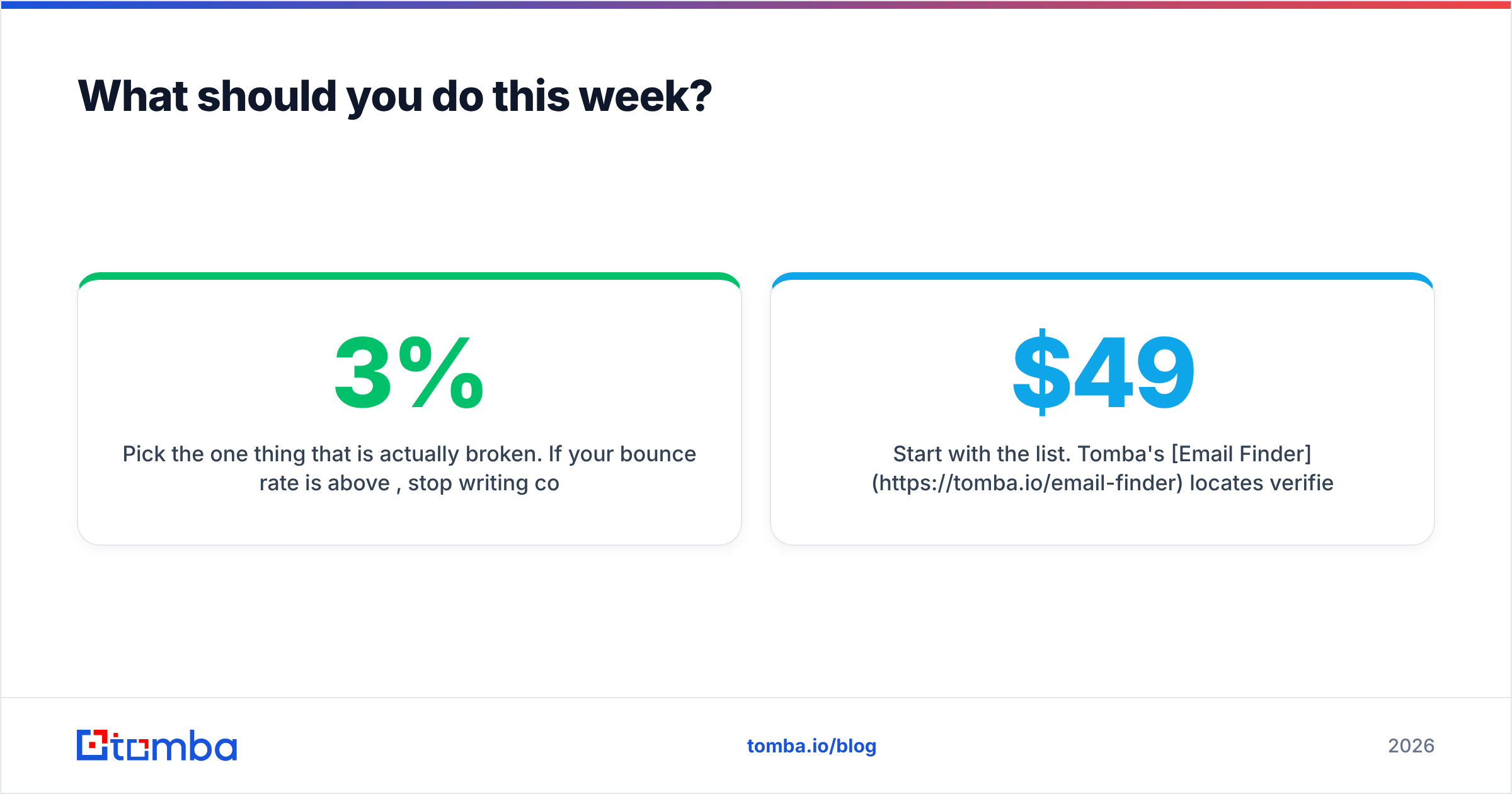
Pick the one thing that is actually broken. If your bounce rate is above 3%, stop writing copy and go clean your list — nothing else will move until that does. If bounces are fine but replies are under 2%, your ICP definition is too wide; cut it in half and rewrite for the half you kept. If replies are healthy but meetings are not, your ask is too big and your sequence ends too early.
Order of operations, every time: fix data, fix infrastructure, then fix words.
Start with the list. Tomba's Email Finder locates verified work emails by domain, name, or company, with confidence scoring and source attribution on every result — so you know why an address is trusted before it enters a sequence. The free tier gives you 25 searches a month to test accuracy against a list you already have, and Starter is $49/mo when you're ready to run real volume. Verify first, send second, and the rest of your outreach math starts working.
Related guides#
Ready to find emails that actually work?
Join 150,000+ professionals who stopped guessing and started sending. Free credits on signup — no credit card required.
Get the Tomba newsletter
Practical outbound tactics and product updates — once every two weeks.
About the author