Email Outreach Campaign: The 2026 Playbook That Books Meetings
Most email outreach campaigns fail before the first send — bad lists, no warmup, and templates written for the sender. Here's the sequence, math, and stack that actually books meetings in 2026.
TL;DR
- An email outreach campaign lives or dies on list quality. A 12% bounce rate does more damage to your domain than a bad subject line ever will.
- The math that matters: 1,000 verified contacts × 45% open × 6% reply × 30% positive = ~8 real conversations. Work backwards from your meeting target.
- Warm your sending domain for 3-4 weeks before volume. Use a separate domain from your primary — never burn the domain your invoices come from.
- Four to five touches over 14-18 days outperforms both the single "just checking in" nudge and the 9-step monster sequence.
- Budget roughly $150-$400/month for a solo-to-small-team stack: finding + verification + a sending tool. Anything above that is usually sequencer bloat.
What is an email outreach campaign, exactly?#
An email outreach campaign is a planned sequence of emails sent to a defined list of people who did not ask to hear from you, with a single measurable goal — a reply, a booked call, a download, a backlink.
Think of it like a restaurant reservation system. You are not cooking for whoever walks in. You decided in advance how many covers you can serve, who you invited, what time they arrive, and what happens if they no-show. Cold email fails when people treat it like a street-food cart: blast volume at whoever passes, hope somebody's hungry.
Technically, a campaign has five components, and every one of them is a place where the whole thing can break:
- The list — a set of contacts with verified addresses and a shared, non-obvious qualifier (they hired an SDR last month, they run Shopify Plus, they published a post about pipeline hygiene).
- The infrastructure — sending domain, SPF/DKIM/DMARC, mailbox warmup, per-inbox daily caps.
- The sequence — the number of touches, spacing, and what each one is allowed to say.
- The copy — subject, opener, relevance proof, ask.
- The measurement loop — what you track, at what sample size, and what you change based on it.
Miss the first two and the last three are decoration.
Why do most email outreach campaigns fail before the first send?#
Because the list was never validated. This is not a stylistic complaint — it is a deliverability mechanic.
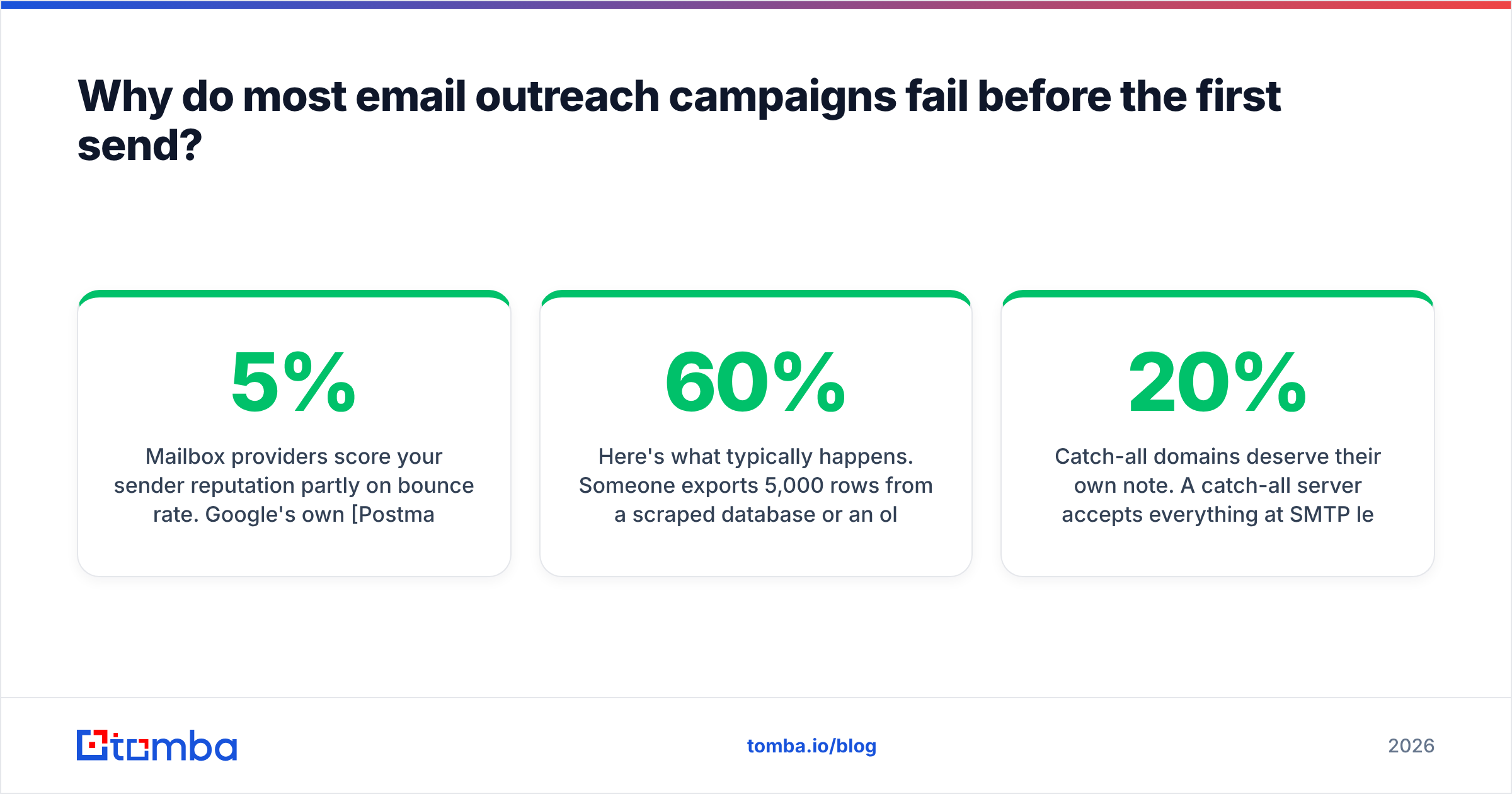
Mailbox providers score your sender reputation partly on bounce rate. Google's own Postmaster Tools documentation is explicit that sending to invalid addresses is a spam signal. Once you cross roughly 3-5% hard bounces on a young domain, inbox placement degrades for everyone on that domain, including the recipients whose addresses were perfectly fine.
Here's what typically happens. Someone exports 5,000 rows from a scraped database or an old trade-show list. Maybe 60% of those addresses still resolve — people change jobs at roughly 20% per year in B2B SaaS, and the data was already 18 months old when it was scraped. They send 500 on day one from a domain with no warmup history. Forty-something bounce. The provider throttles. By day three, the campaign is landing in Promotions or nowhere at all, and the founder concludes "cold email doesn't work anymore."
Cold email works fine. The list didn't.

The fix is boring and mechanical: find addresses from a source that maintains freshness, then run them through an email verifier before the list ever touches your sending tool. Treat any address that comes back as risky, unknown, or catch-all as a separate segment — do not mix it with your clean sends.
Catch-all domains deserve their own note. A catch-all server accepts everything at SMTP level, so standard verification returns "unknown." That's not the same as invalid. Roughly 15-20% of B2B domains run catch-all, and if you discard all of them you're throwing away a fifth of your enterprise TAM. A dedicated catch-all verifier uses pattern confidence and secondary signals to grade those instead of dumping them.
How do you build the list for an email outreach campaign?#
Start from a qualifier, not a job title. "VP of Sales at companies with 50-200 employees" is a filter, not a reason to email. "VP of Sales at companies that posted two SDR roles in the last 30 days" is a reason.
Once you have the qualifier, the sourcing options split into four practical routes:
- Domain-first — you know the companies, you need the people. Feed the domain into a domain search and pull every public role at that company, filtered by department. Best for account-based motions where the target account list came from a signal, not a database filter.
- Person-first — you have names and companies from a LinkedIn export or a conference attendee list. An email finder resolves name + domain to a verified address. Best when the list came from a community, event, or manual research.
- Database-first — you filter a maintained B2B dataset by firmographics and pull contacts directly. Fastest, lowest relevance ceiling, highest risk of hitting the same person three vendors already emailed this week.
- Enrichment-first — you already have partial records (form fills, CRM rot, website visitors) and need to complete them. Data enrichment fills the gaps on records you already earned, which is almost always your highest-converting segment.
Most good campaigns use two of these together. A common pattern: pull target accounts from a signal source, run domain search to map the buying committee, then enrich the top three contacts per account with role and phone data before any email goes out.

Accuracy claims from finder vendors are all marketing until you test them on your own ICP. Run the same 100 contacts through two tools, send to both segments, and compare the actual bounce rate from your ESP — not the vendor's confidence score.
What does a working email outreach sequence look like?#
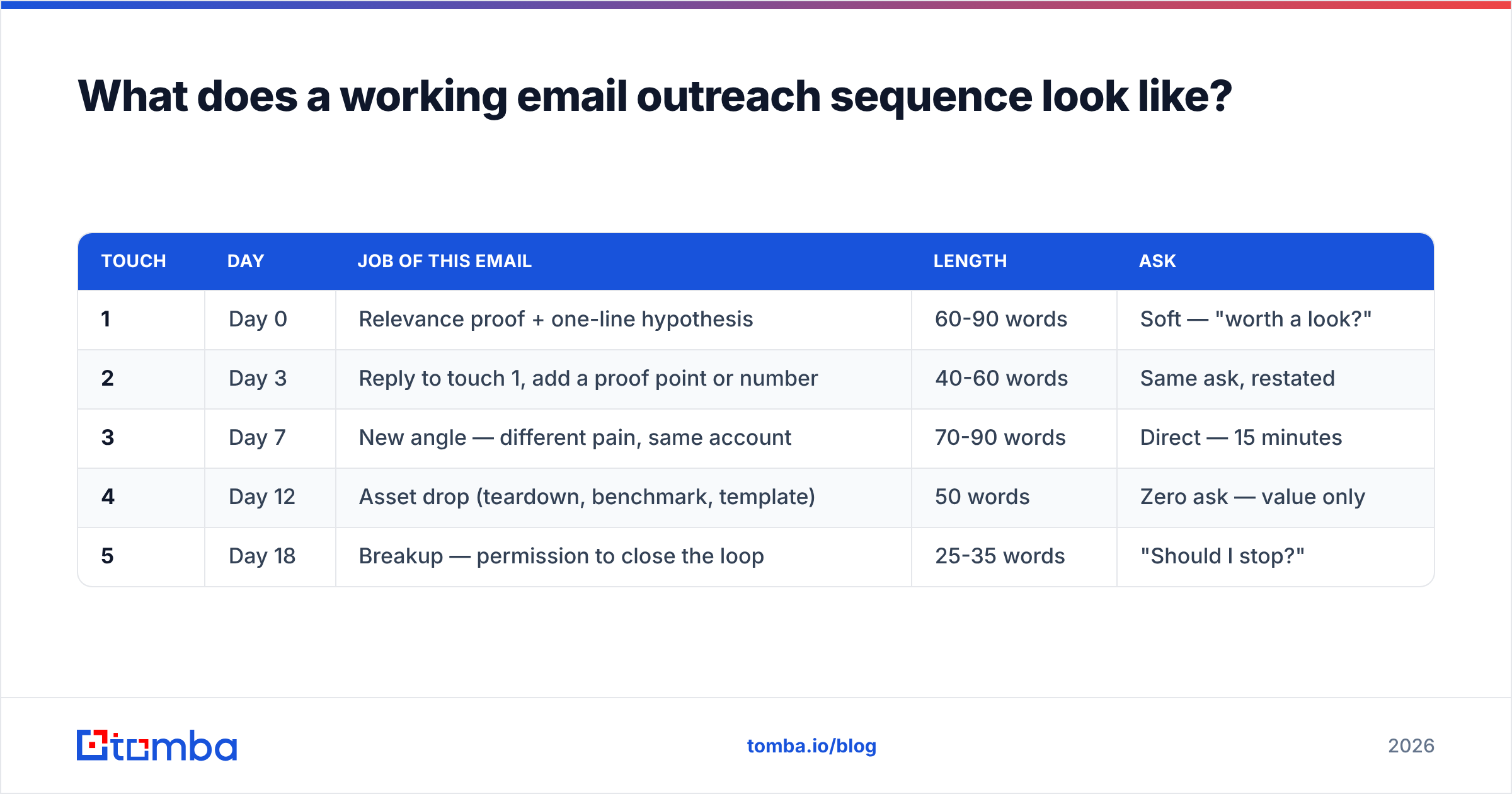
Four to five touches over 14-18 business days. Here is a structure that consistently holds up across B2B SaaS, agency, and services outbound:
| Touch | Day | Job of this email | Length | Ask |
|---|---|---|---|---|
| 1 | Day 0 | Relevance proof + one-line hypothesis | 60-90 words | Soft — "worth a look?" |
| 2 | Day 3 | Reply to touch 1, add a proof point or number | 40-60 words | Same ask, restated |
| 3 | Day 7 | New angle — different pain, same account | 70-90 words | Direct — 15 minutes |
| 4 | Day 12 | Asset drop (teardown, benchmark, template) | 50 words | Zero ask — value only |
| 5 | Day 18 | Breakup — permission to close the loop | 25-35 words | "Should I stop?" |
Two rules that matter more than the structure itself.
Rule one: the first email must prove you looked. Not "I saw you're the VP of Sales" — that's a field merge. Something that required thirty seconds of human attention: a hiring pattern, a product change, a specific line from their pricing page. If you cannot write that line, the contact does not belong on the list.
Rule two: never restate the same ask five times. Touch 4 with no ask at all outperforms a fourth "just bumping this" by a wide margin, because it's the only email in the sequence that costs the recipient nothing to read.
For subject lines, shorter beats clever. Three to five words, lowercase, no punctuation gymnastics. If you're stuck, a subject line generator gives you a starting set to A/B against — but test on a minimum of 400 sends per variant or you're reading noise.
How much volume can you actually send?#
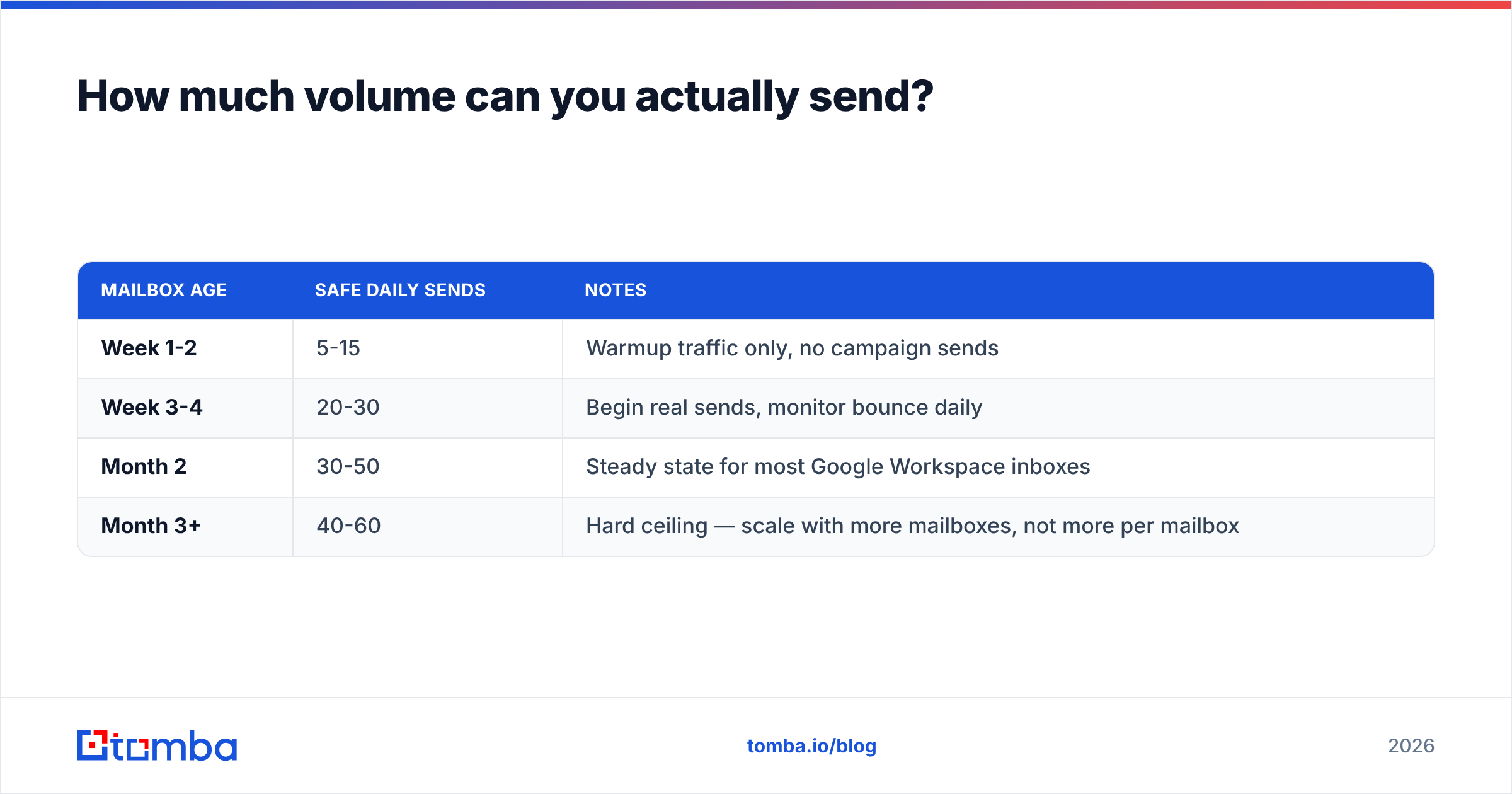
Less than you think, and the ceiling is per-mailbox, not per-campaign.
| Mailbox age | Safe daily sends | Notes |
|---|---|---|
| Week 1-2 | 5-15 | Warmup traffic only, no campaign sends |
| Week 3-4 | 20-30 | Begin real sends, monitor bounce daily |
| Month 2 | 30-50 | Steady state for most Google Workspace inboxes |
| Month 3+ | 40-60 | Hard ceiling — scale with more mailboxes, not more per mailbox |
To send 200 cold emails a day you need four to five warmed mailboxes, typically across two or three sending domains, all separate from your primary corporate domain. Buy getcompany.com and trycompany.com, point them at your main site, and send from those. If deliverability collapses, your invoices and support threads survive.
Before you send anything, confirm your SPF record, DKIM, and DMARC are all passing. Google and Yahoo's 2024 bulk-sender requirements made DMARC effectively mandatory, and that bar has only risen since. Run an SPF checker and a blacklist checker on every sending domain before day one and monthly after.

What should an email outreach campaign stack cost?#
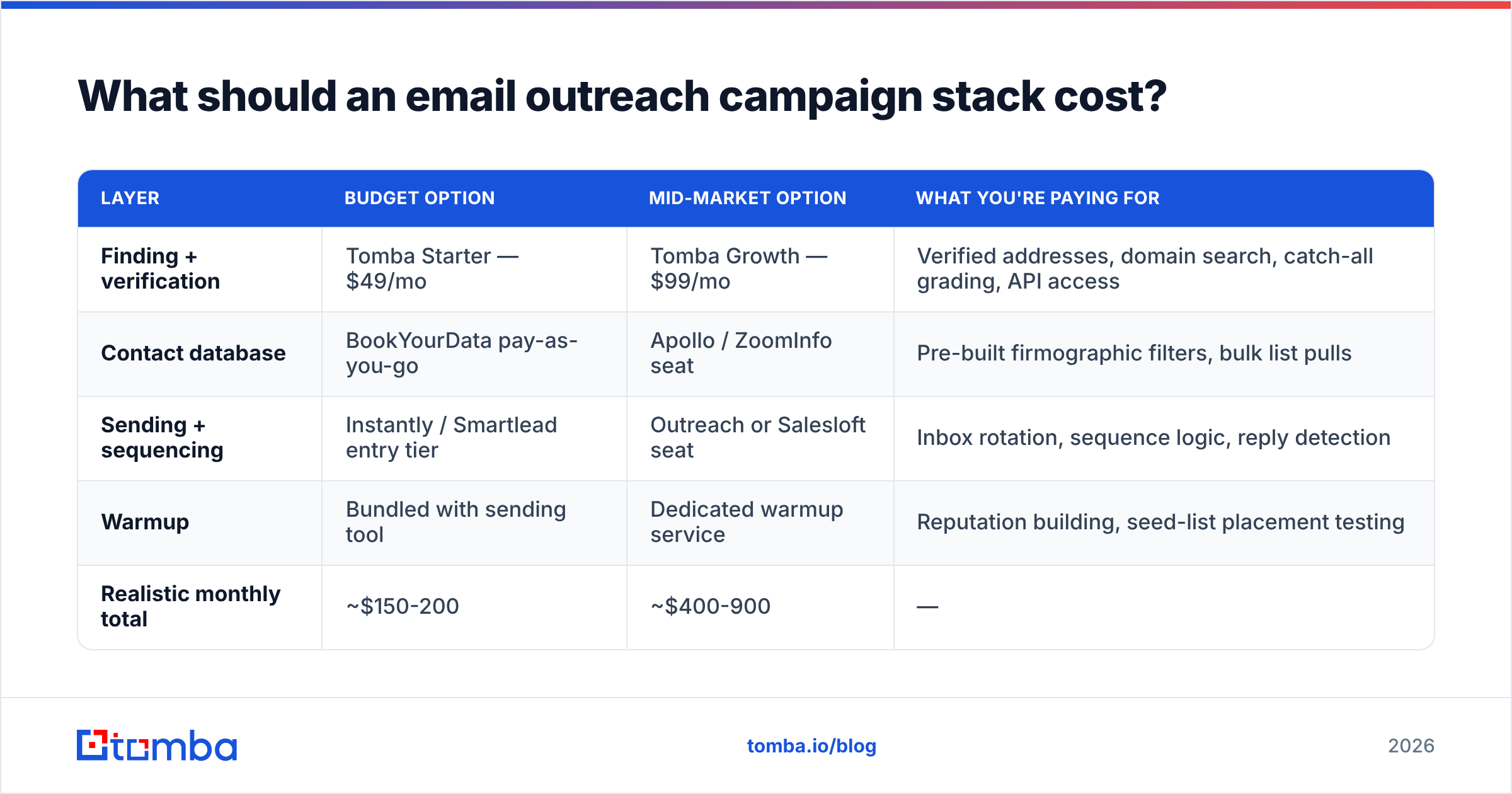
Here's a realistic comparison of what different stacks cost and where they fit. Prices are list prices at time of writing — always check current Tomba pricing and each vendor's page before budgeting.
| Layer | Budget option | Mid-market option | What you're paying for |
|---|---|---|---|
| Finding + verification | Tomba Starter — $49/mo | Tomba Growth — $99/mo | Verified addresses, domain search, catch-all grading, API access |
| Contact database | BookYourData pay-as-you-go | Apollo / ZoomInfo seat | Pre-built firmographic filters, bulk list pulls |
| Sending + sequencing | Instantly / Smartlead entry tier | Outreach or Salesloft seat | Inbox rotation, sequence logic, reply detection |
| Warmup | Bundled with sending tool | Dedicated warmup service | Reputation building, seed-list placement testing |
| Realistic monthly total | ~$150-200 | ~$400-900 | — |
Tomba's own tiers: Free (25 searches/mo), Starter $49/mo, Growth $99/mo, Pro $249/mo, Enterprise custom. The free tier is enough to validate one small campaign end to end before you commit budget anywhere.
Two spending traps worth naming. First, enterprise sequencers priced per seat rarely pay for themselves under five SDRs — the sequencing logic in a $97/month tool is functionally identical for a two-person team. Second, buying a huge database subscription before you've proven your ICP converts is how teams end up with 40,000 contacts and eleven meetings. Prove the motion on 300 hand-built contacts first.
For teams already running outbound at scale, the bulk email finder and Tomba API matter more than the UI — you want enrichment happening inside your CRM workflow, not in a browser tab.
Which metrics tell you the campaign is working?#
Track four, in this order. Fixing them out of order wastes weeks.
- Bounce rate — target under 2%. Above 4%, stop sending and re-verify the list. This gates everything downstream.
- Open rate — target 40-55% on a verified B2B list. Below 30% with a clean list means deliverability, not subject lines. Check placement with a seed test before you rewrite copy.
- Reply rate — target 5-10%. This is where copy and targeting actually show up. Below 3% with healthy opens means your relevance proof isn't landing.
- Positive reply rate — target 25-40% of total replies. If you're getting replies but they're all "not interested," your targeting is off by one layer — right company, wrong person, or right person, wrong timing.
Open rate has gotten noisier since Apple Mail Privacy Protection started pre-fetching images, so treat it as directional rather than precise. Reply rate is the honest number.
Sample size discipline matters here. Do not declare a winner on 80 sends. A reply-rate difference between 5% and 7% needs roughly 800-1,000 sends per variant to distinguish from randomness. Most "we tested it and version B won" conclusions in outbound are coin flips reported as insight.
How do you keep a campaign from degrading over time?#
Campaigns decay. The list ages, the angle gets stale, and competitors start emailing the same accounts with the same trigger. Three maintenance habits:
- Re-verify quarterly. Any list older than 90 days should go back through verification before reuse. B2B contact data decays at roughly 2-2.5% per month.
- Rotate the angle, not the offer. If reply rate drops from 7% to 4% on the same ICP, the offer is probably fine — the hypothesis in touch one has been said to those people too many times.
- Suppress aggressively. Anyone who replied, bounced, unsubscribed, or opted out at the company level goes into a permanent suppression list that every future campaign checks against. This is a compliance requirement under GDPR and CAN-SPAM, not a nicety — the FTC's CAN-SPAM guidance sets a 10-business-day maximum for honoring opt-outs.
One more: keep a running document of every email that got a positive reply. Not templates — actual sent emails with the account context. After six months that document is more useful than any swipe file you'll buy.
Where should you start this week?#
Pick one qualifier. Build 100 contacts against it by hand. Verify every address. Warm one mailbox on a secondary domain while you write the sequence. Send 25 a day starting week three. Read the replies — all of them, including the rude ones — and rewrite touch one based on what people actually pushed back on.
That's a two-week ramp to a campaign you can trust the numbers from. Skipping to 2,000 sends on day one just gets you a burned domain and a wrong conclusion faster.
When you're ready to build the list, start with the Tomba Email Finder. The free tier covers 25 searches a month — enough to source and verify your first test cohort, confirm the addresses resolve, and prove the motion before you spend a dollar on a sequencer. Find them right, and the rest of the campaign is just writing.
Related guides#
Ready to find emails that actually work?
Join 150,000+ professionals who stopped guessing and started sending. Free credits on signup — no credit card required.
Get the Tomba newsletter
Practical outbound tactics and product updates — once every two weeks.
About the author