Email Outreach Platforms in 2026: How to Pick the Right One
Most email outreach platforms sell the same core features at wildly different prices. Here's what actually separates sequencers, sales engagement suites, and all-in-one data platforms — and how to pick without overpaying.
TL;DR
- Email outreach platforms split into three real categories: lightweight sequencers ($30–$100/mo, unlimited inboxes), sales engagement suites ($100–$165/user/mo, CRM-native), and all-in-one data + sending platforms ($49–$149/user/mo, database included).
- Price per seat is the wrong first question. Ask how the tool prices inboxes and contacts — that's where the bill actually grows.
- The all-in-one platforms bundle contact data, but bundled data is usually the weakest part of the stack. Most high-performing teams pair a cheap sender with a dedicated data source.
- Deliverability infrastructure (inbox rotation, warmup, per-domain throttling) is now table stakes. If a vendor charges extra for it in 2026, that's a red flag.
- Nothing in this category fixes a bad list. A 40% bounce rate on a $37/mo sequencer and a $165/mo suite produce the same result: a burned domain.
What is an email outreach platform?#
An email outreach platform is the software that sends, schedules, and tracks multi-step cold email campaigns from your own mailboxes — as opposed to a marketing tool like Mailchimp, which blasts one message from a shared IP to an opted-in list.
Think of it like the difference between a delivery van and a freight train. Marketing email is freight: one big shipment, one route, one schedule. Outreach is a fleet of vans making individually addressed drops, each one needing its own route plan so no single van gets pulled over. Technically, the platform manages per-mailbox sending limits, thread continuity, reply detection, and sequence branching.
Every serious platform in this category does five things:
- Multi-inbox sending — connect 5, 50, or 500 mailboxes and rotate volume across them so no single domain exceeds safe daily limits.
- Sequence logic — step 1 on day 0, step 2 on day 3 if no reply, branch to a LinkedIn task or a call if step 3 bounces.
- Reply detection and auto-pause — the moment a prospect answers, the rest of the sequence stops. Miss this and you look like a bot.
- Warmup and reputation management — automated peer-to-peer sending that builds engagement signals on new domains before real volume starts.
- Reporting that ties to pipeline — opens are noise in 2026 (Apple Mail Privacy Protection wrecked them years ago); reply rate, positive reply rate, and meetings booked are the metrics that matter.
What they mostly do not do well is supply the contact data. That's the seam where teams overpay or under-deliver.
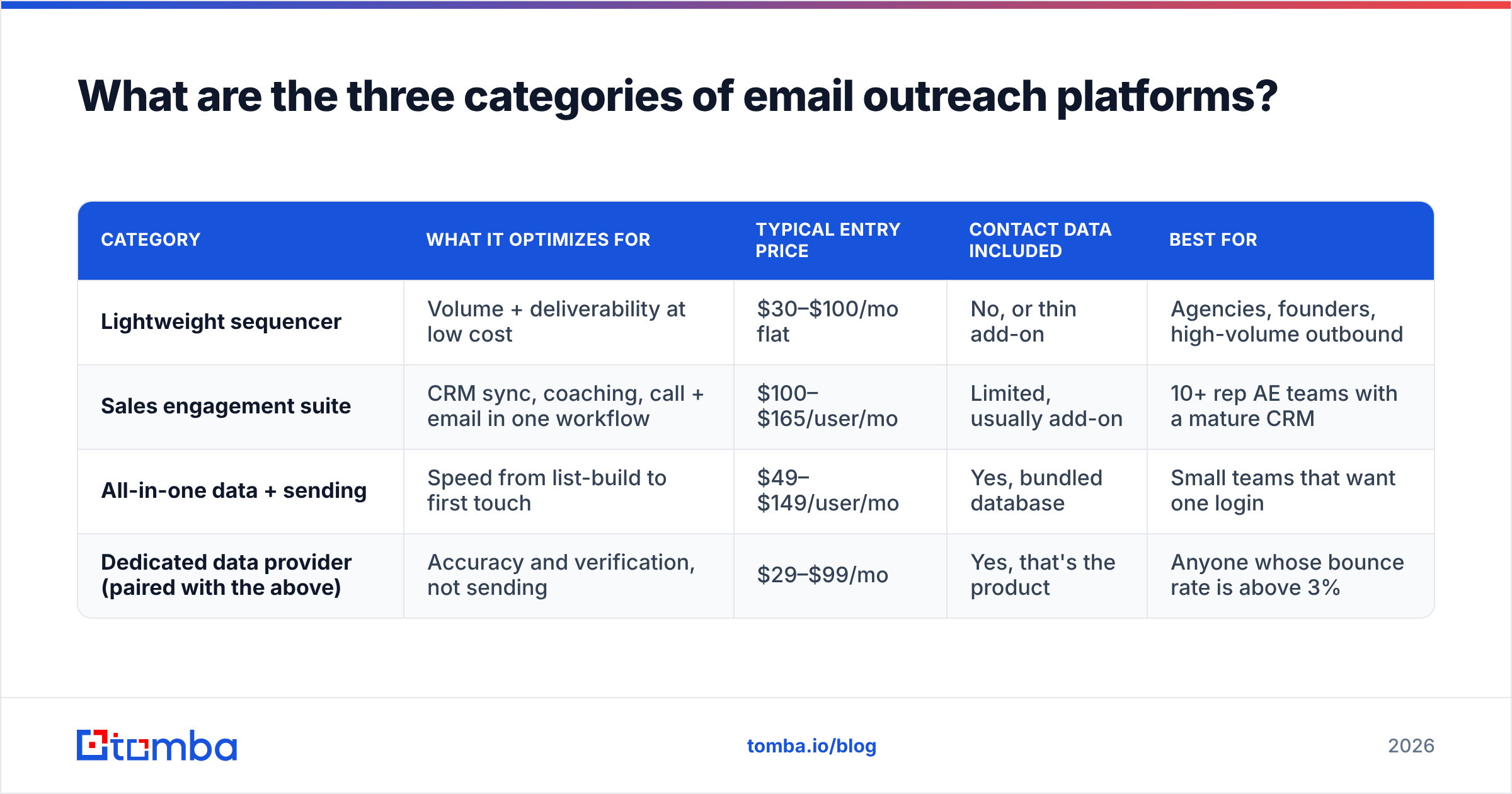
What are the three categories of email outreach platforms?#
Vendors blur this line deliberately, but the buying decision gets much easier once you sort tools by architecture rather than marketing copy.
| Category | What it optimizes for | Typical entry price | Contact data included | Best for |
|---|---|---|---|---|
| Lightweight sequencer | Volume + deliverability at low cost | $30–$100/mo flat | No, or thin add-on | Agencies, founders, high-volume outbound |
| Sales engagement suite | CRM sync, coaching, call + email in one workflow | $100–$165/user/mo | Limited, usually add-on | 10+ rep AE teams with a mature CRM |
| All-in-one data + sending | Speed from list-build to first touch | $49–$149/user/mo | Yes, bundled database | Small teams that want one login |
| Dedicated data provider (paired with the above) | Accuracy and verification, not sending | $29–$99/mo | Yes, that's the product | Anyone whose bounce rate is above 3% |
The fourth row isn't an outreach platform — it's the piece most buyers forget to budget for. Skip it and you'll spend $165/user/mo on a suite that mails bad addresses beautifully.
Which email outreach platforms matter in 2026?#
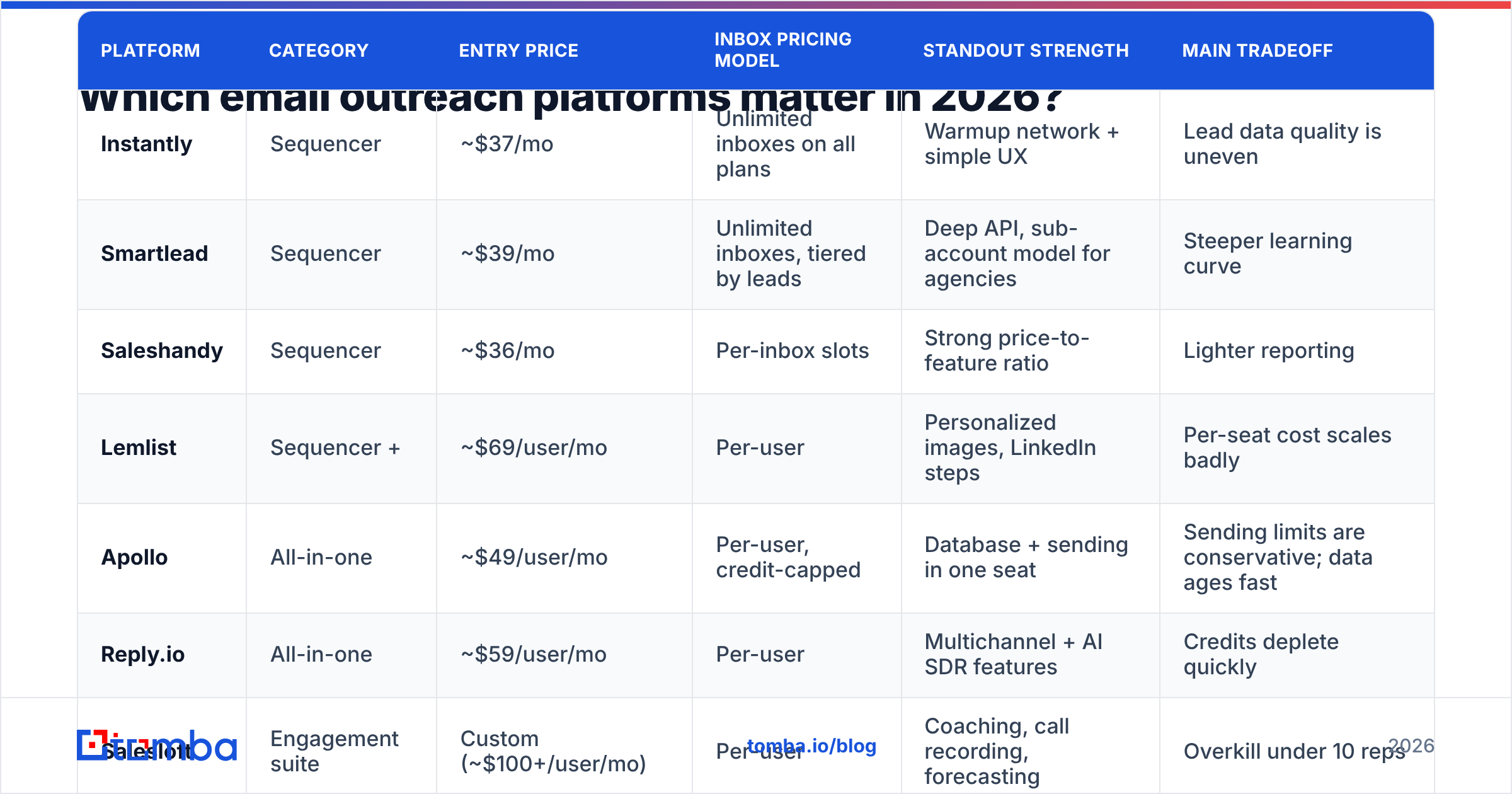
Prices below are published list rates at the time of writing and change often. Check the vendor page before you commit — several of these moved pricing twice in the last 18 months.
| Platform | Category | Entry price | Inbox pricing model | Standout strength | Main tradeoff |
|---|---|---|---|---|---|
| Instantly | Sequencer | ~$37/mo | Unlimited inboxes on all plans | Warmup network + simple UX | Lead data quality is uneven |
| Smartlead | Sequencer | ~$39/mo | Unlimited inboxes, tiered by leads | Deep API, sub-account model for agencies | Steeper learning curve |
| Saleshandy | Sequencer | ~$36/mo | Per-inbox slots | Strong price-to-feature ratio | Lighter reporting |
| Lemlist | Sequencer + | ~$69/user/mo | Per-user | Personalized images, LinkedIn steps | Per-seat cost scales badly |
| Apollo | All-in-one | ~$49/user/mo | Per-user, credit-capped | Database + sending in one seat | Sending limits are conservative; data ages fast |
| Reply.io | All-in-one | ~$59/user/mo | Per-user | Multichannel + AI SDR features | Credits deplete quickly |
| Salesloft | Engagement suite | Custom (~$100+/user/mo) | Per-user | Coaching, call recording, forecasting | Overkill under 10 reps |
| Outreach | Engagement suite | Custom (~$100+/user/mo) | Per-user | Enterprise governance + CRM depth | Long implementation, annual contracts |
Two structural patterns fall out of that table.
First, flat-fee sequencers win on cost per sent email, and it isn't close. Unlimited inboxes at $39/mo versus $165/user/mo means an agency running 200 mailboxes pays roughly the price of one enterprise seat.
Second, per-seat suites win on process control. If your VP of Sales needs call recordings, sequence approval workflows, and territory-level reporting piped into Salesforce, no $39/mo tool will get you there. G2's sales engagement category reflects that split clearly — the two groups rarely appear on each other's shortlists.
How much do email outreach platforms actually cost?#
The sticker price is rarely the bill. Three multipliers do the damage.
Inboxes. A safe 2026 sending posture is 20–30 emails per mailbox per day. To send 3,000 emails a month you need roughly 5 mailboxes; to send 30,000 you need 40–50. On a platform that charges per inbox slot, that's a 10x line item. On a flat-fee unlimited platform, it's zero. But you still pay Google or Microsoft for the mailboxes themselves — budget $6–$7 per mailbox per month plus domain registration.
Contacts or credits. All-in-one platforms meter contact reveals. The "unlimited emails" headline usually sits next to a credit cap that resets monthly and doesn't roll over. Read the credit table, not the pricing hero.
Verification. Every list needs a verification pass before it enters a sequence, and most sending platforms either don't verify or charge separately. This is the line item people forget, and it's the one that protects everything else.
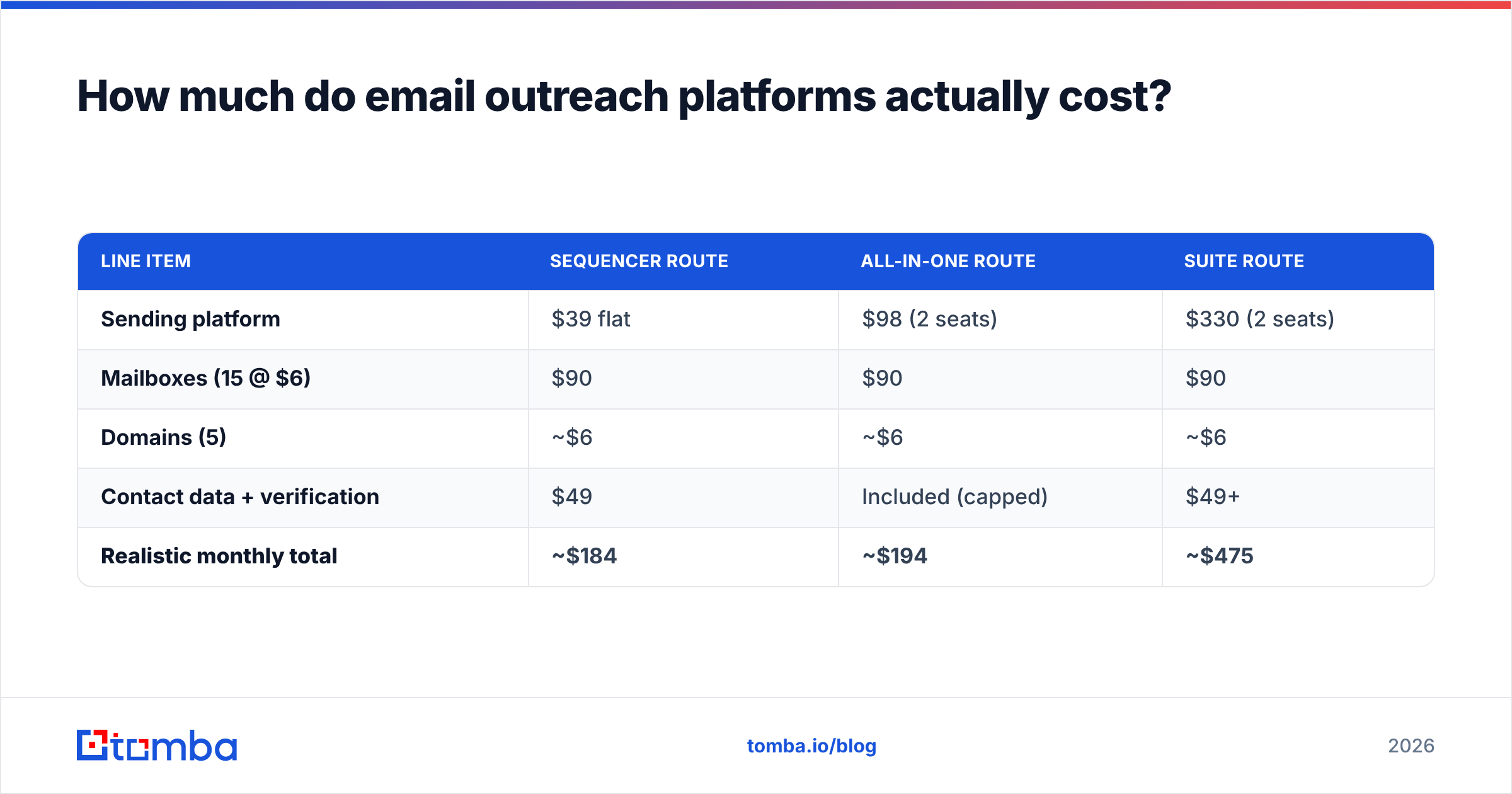
Here's a realistic monthly cost for a two-person team sending 10,000 emails a month:
| Line item | Sequencer route | All-in-one route | Suite route |
|---|---|---|---|
| Sending platform | $39 flat | $98 (2 seats) | $330 (2 seats) |
| Mailboxes (15 @ $6) | $90 | $90 | $90 |
| Domains (5) | ~$6 | ~$6 | ~$6 |
| Contact data + verification | $49 | Included (capped) | $49+ |
| Realistic monthly total | ~$184 | ~$194 | ~$475 |
The sequencer and all-in-one routes land within $10 of each other. That's the honest headline: the platform choice barely moves your budget at small scale. What moves your results is which column your contact data comes from.
Why does data quality beat platform choice?#
Because bounce rate is the single input every mailbox provider watches, and no sequencer can compensate for it.
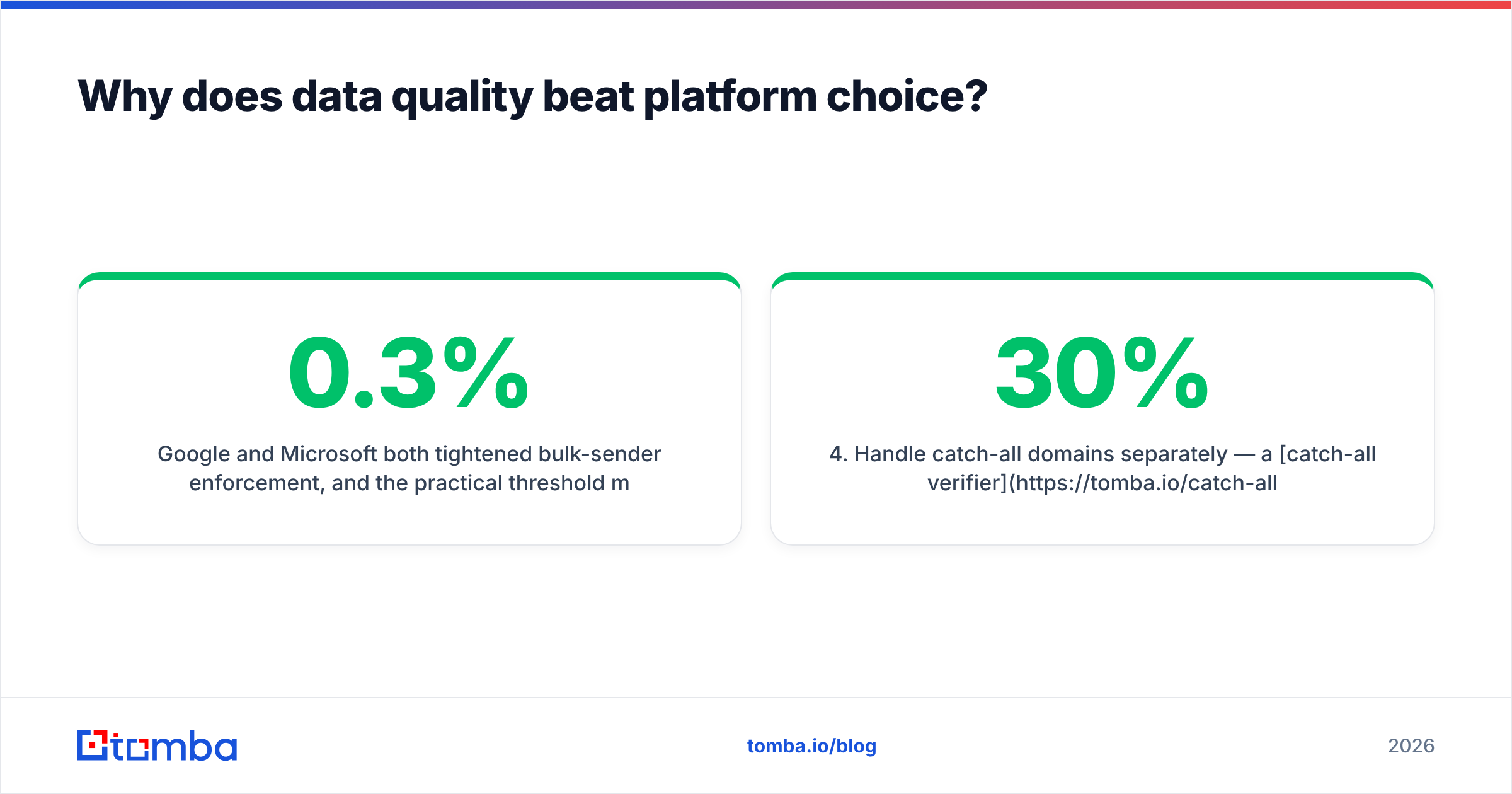
Google and Microsoft both tightened bulk-sender enforcement, and the practical threshold most deliverability teams now work to is a spam complaint rate under 0.3% and a hard bounce rate under 2–3%. Google's own sender guidelines spell out the authentication and complaint-rate requirements. Cross those lines and your carefully warmed domains start landing in spam within days — on any platform, at any price.
A bundled database inside an all-in-one platform is optimized for coverage, not freshness. It has to return something for every search, because an empty result looks like a broken product. Dedicated data tools are optimized for the opposite: returning nothing rather than returning a guess.
That's the core reason the sequencer-plus-data-source stack outperforms the single-login stack. You get one vendor whose entire incentive is deliverable addresses, and another whose entire incentive is safe sending.
Practically, the workflow looks like this:
- Build the account list from your ICP filters — firmographics, tech stack, hiring signals.
- Find contacts at those accounts with a dedicated email finder rather than exporting whatever the sequencer's database returns.
- Verify before import with an email verifier so hard bounces never reach your mailboxes.
- Handle catch-all domains separately — a catch-all verifier tells you whether an accept-all domain is actually deliverable, instead of forcing a coin flip on 20–30% of enterprise targets.
- Push the clean list into your sequencer and let the platform do what it's good at: pacing, rotation, and reply detection.
For teams that prefer buying static lists outright rather than searching per-prospect, providers like BookYourData offer prepaid, verified B2B lists — a reasonable fit when you need a one-time regional dataset instead of an ongoing API-driven workflow. Different buying model, same principle: verify before you send.
Do you still need a separate email finder in 2026?#
Yes, for most teams — with one honest exception.
If your total addressable market is under about 2,000 companies and you only touch it once a year, an all-in-one platform's bundled database is fine. You're not stressing coverage, and the convenience of one login is worth the accuracy gap.
Everyone else runs into the same three walls:
- Coverage gaps in non-US markets. Bundled databases skew heavily toward North American tech. European mid-market, LATAM, and APAC coverage drops off sharply.
- Stale records. B2B contact data decays roughly 2–3% per month through job changes alone. A database refreshed quarterly is 8–9% wrong before you export it.
- No verification layer. Getting an address and knowing it accepts mail are two different operations. Most bundled databases only do the first.
A dedicated finder handles the second and third. Tomba runs pattern detection across a domain, cross-references public sources, then verifies at the SMTP layer before returning a result — and returns nothing when confidence is low. You can see the methodology on the data sources page. For list-building at scale, bulk email finder processes a CSV of names and domains in one pass instead of one lookup at a time.
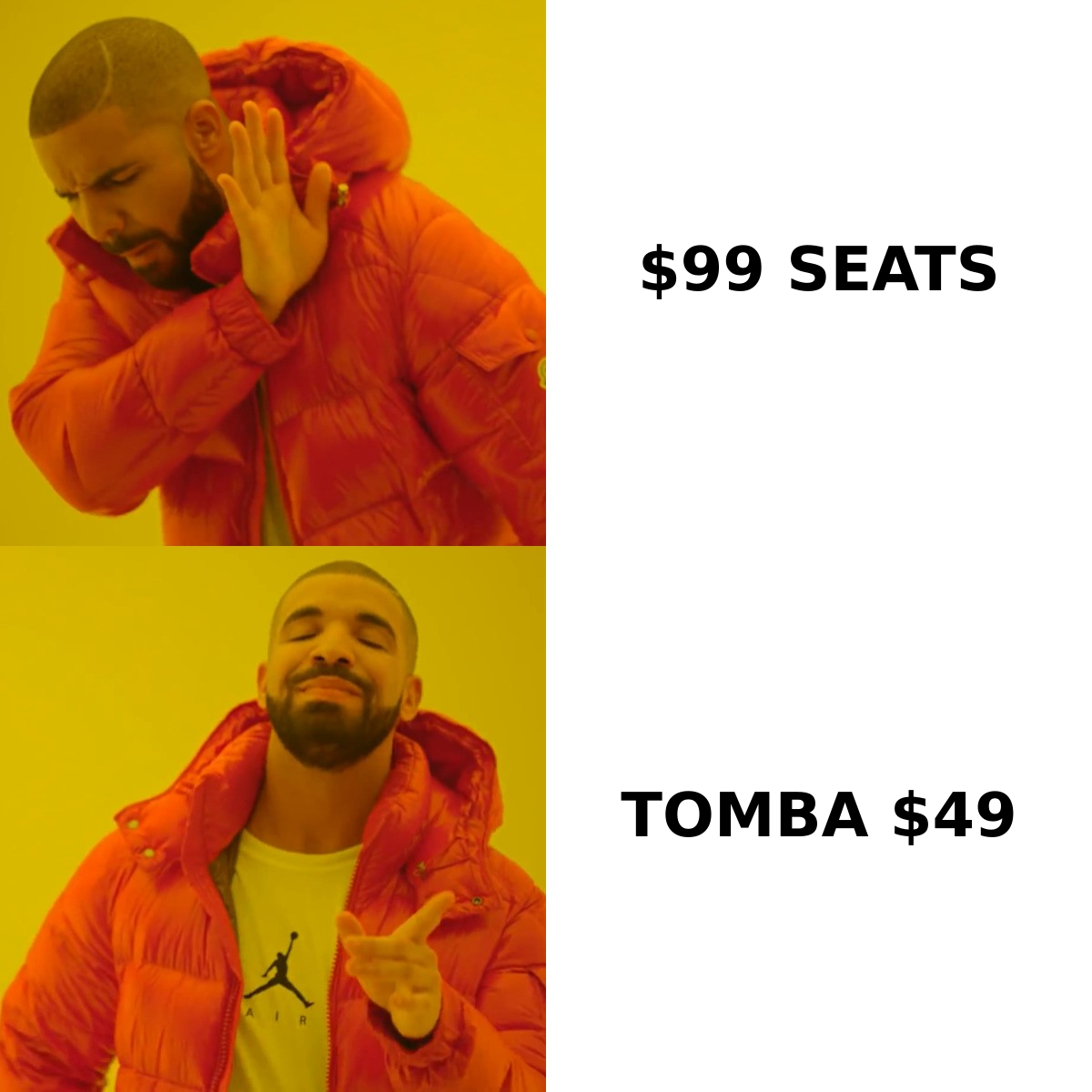
The cost math is favorable too. Tomba pricing starts free at 25 searches/mo, with Starter at $49/mo, Growth at $99/mo, and Pro at $249/mo — flat, not per seat. Adding it to a $39/mo sequencer still costs less than two seats on an engagement suite.
How should you choose an email outreach platform?#
Work through these in order. The first question that gets a hard answer usually decides the category for you.
- How many mailboxes will you run? Over 20, go flat-fee sequencer. Under 10, per-seat pricing is survivable.
- Is your CRM the system of record for rep activity? If sales leadership manages by CRM dashboards, you need a suite with native bi-directional sync. If nobody looks at it, don't pay for it.
- Do you need phone and LinkedIn in the same sequence? Multichannel steps are standard in suites and in Lemlist/Reply.io, thinner in pure sequencers. If cold calling is part of the motion, you'll also want a phone finder feeding verified direct dials in.
- Who owns deliverability? If nobody on the team can read a DMARC report, prioritize platforms with built-in warmup and automatic throttling over platforms with better analytics.
- What's your current bounce rate? Above 5%, fix data before you change platforms. Switching sequencers with a dirty list just moves the problem to a new UI.
- Do you need an API? Agencies and RevOps teams building custom workflows should test the API on a trial before signing. Smartlead and Instantly both expose solid ones; so does the Tomba API on the data side, which lets you enrich and verify inside your own pipeline before anything reaches the sender.
What about deliverability infrastructure?#
Three things now separate platforms that keep you in the inbox from platforms that just send.
Inbox rotation with per-domain caps. Good platforms cap sends per domain, not just per mailbox. Five mailboxes on one domain sending 30 each is 150 emails from one domain per day — enough to trip filters even though each mailbox looks fine individually.
Automatic bounce circuit-breakers. If a campaign crosses a bounce threshold mid-send, the platform should pause it automatically. Ask about this in the demo; not all of them do it.
Authentication checks. SPF, DKIM, and DMARC need to be right on every sending domain. Most platforms validate at connection time now, but verify with an independent SPF checker rather than trusting a green checkmark in a vendor UI.
Warmup deserves one caution: it builds engagement signals, not sender legitimacy. It cannot rescue a domain that's already sending to invalid addresses. Warmup is the seatbelt; clean data is not driving into the wall.
The bottom line#
The email outreach platform market has converged. Sequencing, rotation, warmup, and reply detection work roughly the same everywhere, and the price differences between categories are smaller than the vendors' positioning suggests. Pick the category that matches your mailbox count and CRM dependency, then stop optimizing there.
Spend the remaining attention on the list. A $39/mo sequencer mailing verified, current addresses will beat a $165/user/mo suite mailing a stale export every single quarter — and it will do it without torching the domains you spent three weeks warming up.
Start by fixing the input. Run your next target account list through the Tomba Email Finder — find addresses by domain, name, or company, verified before they land in your CSV. The free tier gives you 25 searches a month to benchmark accuracy against whatever your current platform's bundled database returns. Compare the bounce rates on your next two campaigns, then decide where your budget actually belongs.
Related guides#
Ready to find emails that actually work?
Join 150,000+ professionals who stopped guessing and started sending. Free credits on signup — no credit card required.
Get the Tomba newsletter
Practical outbound tactics and product updates — once every two weeks.
About the author