Email Outreach Tools in 2026: The Complete Stack Guide
Most teams buy five email outreach tools and use two. Here's the honest layer-by-layer breakdown of what an outbound stack actually needs in 2026, what each layer costs, and where the money gets wasted.
TL;DR
- An email outreach stack has five layers: data, verification, sending, deliverability infrastructure, and reporting. Most vendors sell you two and imply they cover all five.
- All-in-one platforms (Apollo, Instantly, Smartlead) are cheap per seat but weakest exactly where it matters most: contact accuracy and catch-all handling.
- Budget roughly 30–40% of your outreach spend on data and verification. Teams that flip that ratio burn domains and blame the copy.
- A realistic two-person outbound stack runs $150–$400/month in 2026. A 10-seat team runs $1,200–$3,000/month. Anything above that is usually seat bloat, not capability.
- Verify every address before it enters a sequence. A 4% bounce rate is the difference between landing in the inbox and landing in spam — and no subject line fixes it.
What are email outreach tools?#
Email outreach tools are the software layer between "I know who I want to talk to" and "that person replied." That covers four distinct jobs that people constantly conflate: finding the contact, confirming the address is real, sending the sequence, and keeping the sending domain healthy enough that the sequence arrives.
The confusion is commercially useful for vendors. A sending platform that bundles a mediocre contact database can market itself as an "all-in-one outreach platform," and you won't discover the database is 60% accurate until three weeks of bounces have already damaged your sender reputation.
Think of it like a restaurant. The sending platform is the waiter — fast, visible, easy to judge. The data layer is the supplier. Nobody compliments the supplier, but bad ingredients ruin every plate regardless of how good the service is.
What are the five layers of an outreach stack?#
Every functioning outbound motion in 2026 has these five layers, whether you bought them separately or got them bundled:
- Data / contact discovery — turning a company or a person's name into a work email address and, increasingly, a direct phone number. Tools: Tomba Email Finder, Apollo, RocketReach, BookYourData, Clay.
- Verification — SMTP-level confirmation that the mailbox exists and will accept mail, plus catch-all classification. Tools: Tomba, ZeroBounce, NeverBounce, Bouncer.
- Sending / sequencing — multi-step campaigns, inbox rotation, reply detection, A/B testing. Tools: Instantly, Smartlead, Lemlist, Salesloft, Outreach.
- Deliverability infrastructure — secondary domains, SPF/DKIM/DMARC, warmup pools, blacklist monitoring. Tools: Google Workspace/Microsoft 365, Mailreach, warmup features inside sending tools.
- Reporting and routing — where replies land, how they get scored, how they reach the CRM. Tools: HubSpot, Salesforce, Pipedrive, or a spreadsheet if you're honest about your stage.
You can skip layer 5 for a while. You cannot skip layers 1, 2, or 4 — you can only pretend you have them.
How do the main sending platforms compare?#
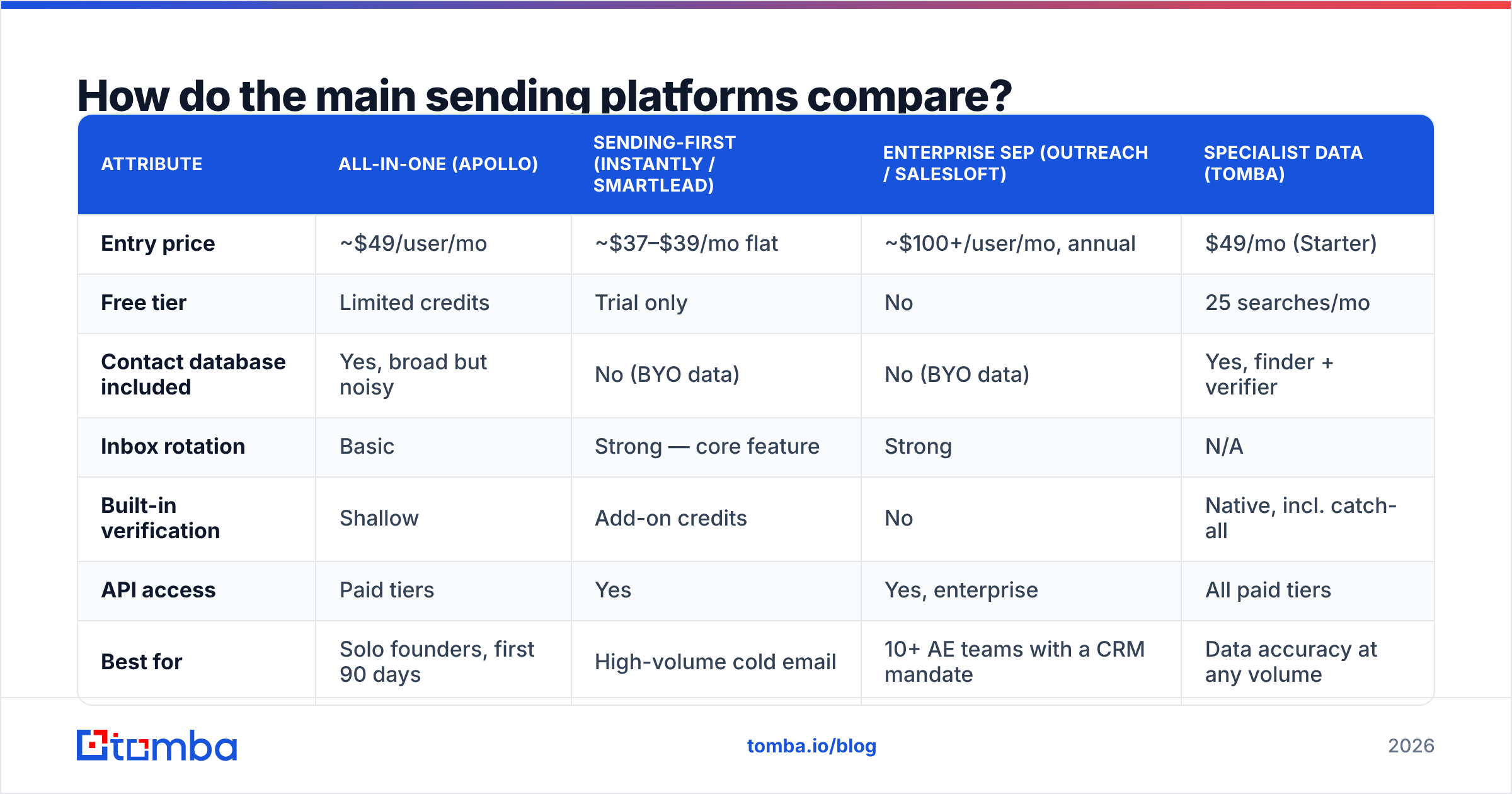
Sending platforms are the most crowded layer and the easiest to switch. Here's how the categories break down on the attributes that actually change your monthly bill and your reply rate. Prices are list pricing at time of writing — always confirm on the vendor's own page before you budget.
| Attribute | All-in-one (Apollo) | Sending-first (Instantly / Smartlead) | Enterprise SEP (Outreach / Salesloft) | Specialist data (Tomba) |
|---|---|---|---|---|
| Entry price | ~$49/user/mo | ~$37–$39/mo flat | ~$100+/user/mo, annual | $49/mo (Starter) |
| Free tier | Limited credits | Trial only | No | 25 searches/mo |
| Contact database included | Yes, broad but noisy | No (BYO data) | No (BYO data) | Yes, finder + verifier |
| Inbox rotation | Basic | Strong — core feature | Strong | N/A |
| Built-in verification | Shallow | Add-on credits | No | Native, incl. catch-all |
| API access | Paid tiers | Yes | Yes, enterprise | All paid tiers |
| Best for | Solo founders, first 90 days | High-volume cold email | 10+ AE teams with a CRM mandate | Data accuracy at any volume |
| Where it breaks | Data decay, credit games | You still need clean lists | Cost per seat, slow setup | Not a sequencer |
The pattern here matters more than any individual row. Sending-first tools priced at a flat monthly rate assume you bring your own data. That's not a flaw — it's the design. Their $39/month looks cheap next to a $99 data plan until you realize you need both, and the $39 tool will happily send to a list that's 30% invalid.
Apollo's bundle is genuinely convenient for a founder sending their first 500 emails. Past that, the shared database gets hammered by every other user in your niche, and the contacts you export have been emailed by six competitors this quarter. That's the real cost of bundled data, and it's why Apollo alternatives are one of the most-searched categories in this space.
Which data provider should sit under the sequencer?#
This is the layer worth over-investing in, because the failure mode is invisible. Bad copy gets you ignored. Bad data gets you blocked.
Three archetypes exist:
Databases sell you pre-compiled records. BookYourData and similar providers do this well — you buy a filtered list, you own it outright, and there's no credit meter running. Strong fit when you need a defined list for a defined campaign (all HR directors at US manufacturers, 200–1,000 employees) and you'd rather pay once than subscribe.
Real-time finders resolve an address at query time from the live web plus pattern inference. This is what Tomba's email finder does — you give it a name and a domain, it returns the address with a confidence score and the sources it used. Better freshness, because nothing sits in a warehouse decaying at 25–30% a year.
Enrichment platforms (Clay, Clearbit-style) orchestrate multiple providers and waterfall between them. Powerful, expensive, and overkill until you're running enough volume that a 5-point coverage gain is worth $800/month.
Most teams should run a finder as the primary and treat databases as a supplement for bulk list-building. If you're pulling from LinkedIn exports, a dedicated LinkedIn finder converts profile URLs into verified work addresses without the browser-extension scraping risk.
Why does deliverability break before your copy does?#
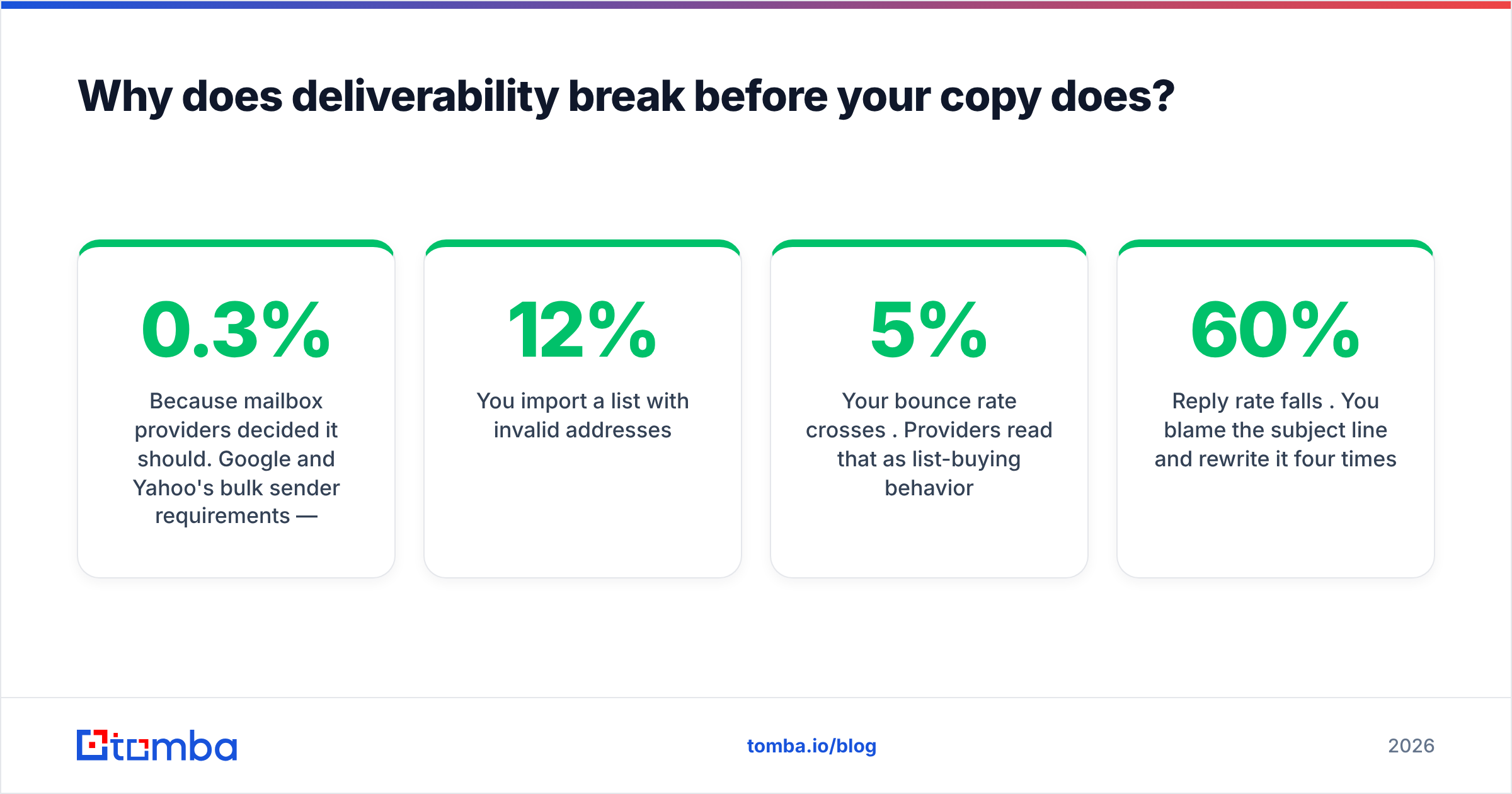
Because mailbox providers decided it should. Google and Yahoo's bulk sender requirements — SPF, DKIM, DMARC, one-click unsubscribe, and a spam complaint rate under 0.3% — moved from "recommended" to "enforced." Google's own bulk sender guidelines are the reference document, and they are not aspirational.
Here's the causal chain nobody puts on a pricing page:
- You import a list with 12% invalid addresses.
- Your bounce rate crosses 5%. Providers read that as list-buying behavior.
- Your domain reputation drops from "high" to "medium" in Postmaster Tools.
- Emails that used to hit the inbox now hit Promotions, then spam.
- Reply rate falls 60%. You blame the subject line and rewrite it four times.
The fix is upstream, not downstream. Run every address through an email verifier before it enters a sequence, and handle catch-all domains explicitly rather than guessing. Catch-all servers accept everything at the SMTP handshake, which means naive verifiers mark them "valid" and let garbage through. A dedicated catch-all verifier uses secondary signals instead of trusting the handshake — worth checking, because on enterprise domains catch-alls can be 20–30% of your list.
Practical deliverability floor for 2026:
- Bounce rate: keep under 2%. Above 4%, stop sending and clean the list.
- Spam complaints: under 0.1%. The 0.3% threshold is where enforcement starts, not where safety ends.
- Volume per mailbox: 30–50 cold sends per day, per inbox. Not 200.
- Warmup period: 3–4 weeks on a new domain before any real campaign volume.
- Domain separation: never send cold from your primary company domain. Buy variants.
What does a realistic stack cost in 2026?#
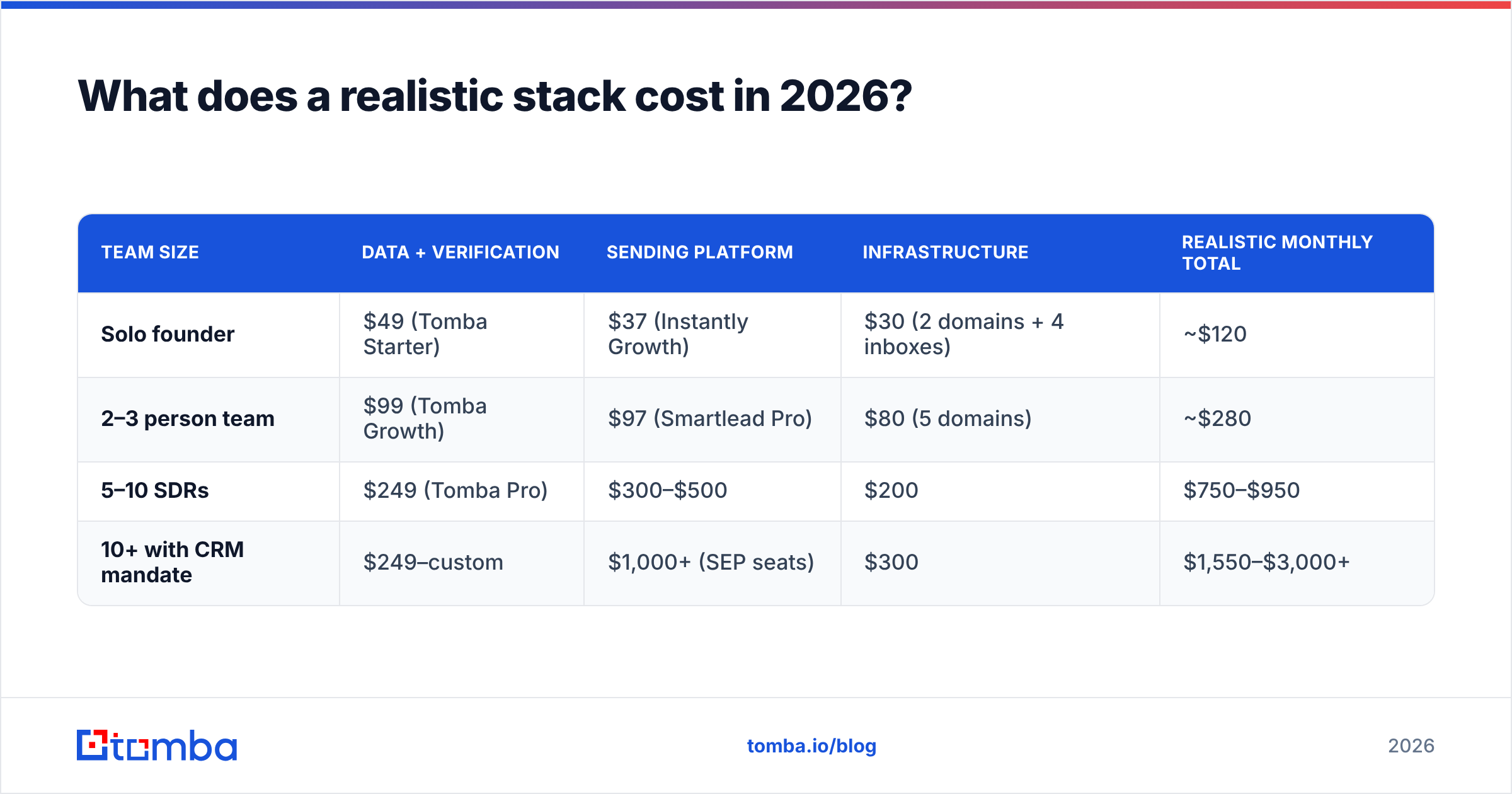
Cost scales with seats and volume in ways that surprise people, because the data layer scales with contacts touched while the sending layer scales with humans employed. Here's what functional stacks actually cost:
| Team size | Data + verification | Sending platform | Infrastructure | Realistic monthly total |
|---|---|---|---|---|
| Solo founder | $49 (Tomba Starter) | $37 (Instantly Growth) | $30 (2 domains + 4 inboxes) | ~$120 |
| 2–3 person team | $99 (Tomba Growth) | $97 (Smartlead Pro) | $80 (5 domains) | ~$280 |
| 5–10 SDRs | $249 (Tomba Pro) | $300–$500 | $200 | $750–$950 |
| 10+ with CRM mandate | $249–custom | $1,000+ (SEP seats) | $300 | $1,550–$3,000+ |
Full Tomba pricing sits at Free (25 searches/mo), $49 Starter, $99 Growth, $249 Pro, and custom Enterprise — the same API and verification features across paid tiers rather than gating capabilities behind the top plan.
The line item that reliably balloons is seats. Enterprise sales engagement platforms charge per user whether that user sends 400 emails a month or four. If you have five reps and one is running all the outbound, you're paying for four seats of dashboard access. Check G2's sales engagement category for current per-seat comparisons before renewing anything annual.
Where you should spend more: verification credits and secondary domains. Both are cheap relative to the cost of a burned sending domain, which is roughly "one month of pipeline plus four weeks of rewarming."
Which stack should you actually buy?#
Match the stack to the motion, not to the review site rankings.
- Founder-led sales, under 500 sends/month. A finder with a generous free tier, one sending tool, two secondary domains. Skip the CRM. Skip enrichment. Total under $150/month. Use the free tier first — 25 searches is enough to test whether the data quality holds on your specific ICP.
- Agency running campaigns for clients. Data accuracy is your product, so buy the accuracy tier. You need bulk email finder throughput and API access to automate list-building per client, plus a sending platform with strong inbox rotation. Don't share domains between clients.
- Product-led SaaS adding outbound. You already have a CRM. Add data + verification via API so enrichment happens on signup, not in a spreadsheet. The Tomba API or an equivalent belongs in the onboarding flow, not the sales workflow.
- 10+ person sales org. You're buying process compliance as much as software, which is the honest argument for Outreach or Salesloft. Keep the data layer separate and vendor-neutral so you can renegotiate the SEP contract without also migrating your contact source.
- Recruiting or partnerships outreach. Volume is low, precision is everything. A finder plus a verifier plus Gmail is a complete stack. You do not need a sequencer for 40 emails a month, and using one makes your emails look like the thing you're trying not to look like.
What should you stop paying for?#
Three common line items that rarely earn their cost:
- Enrichment platforms below 5,000 contacts/month. Waterfall enrichment is real value at scale and expensive theater below it. One good provider beats an orchestration layer over three mediocre ones.
- Standalone warmup subscriptions when your sender already includes it. Instantly and Smartlead both bundle warmup. Paying separately duplicates the function.
- Seats for people who don't send. Managers need reporting access, and most platforms sell a cheaper read-only tier. Ask.
And one thing worth adding that most teams skip: a phone finder for the top 10% of your list. Reply rates on cold email hover in the 1–5% range for most B2B categories. Adding a call to the highest-fit accounts moves the needle further than another A/B test on the subject line. HubSpot's own sales tooling documentation makes the same multi-channel argument, and their data isn't self-serving here — they sell the sequencer, not the phone list.
How do you evaluate an email outreach tool in one week?#
Run the same 100 contacts through every candidate. Not their sample data — yours, from your actual ICP.
Measure four things: match rate (how many addresses returned), verified rate (how many survived verification), bounce rate when you actually send, and cost per verified contact. That last number is the only one that matters, and it's the one no vendor publishes, because match rate looks better in marketing when you don't subtract the invalid results.
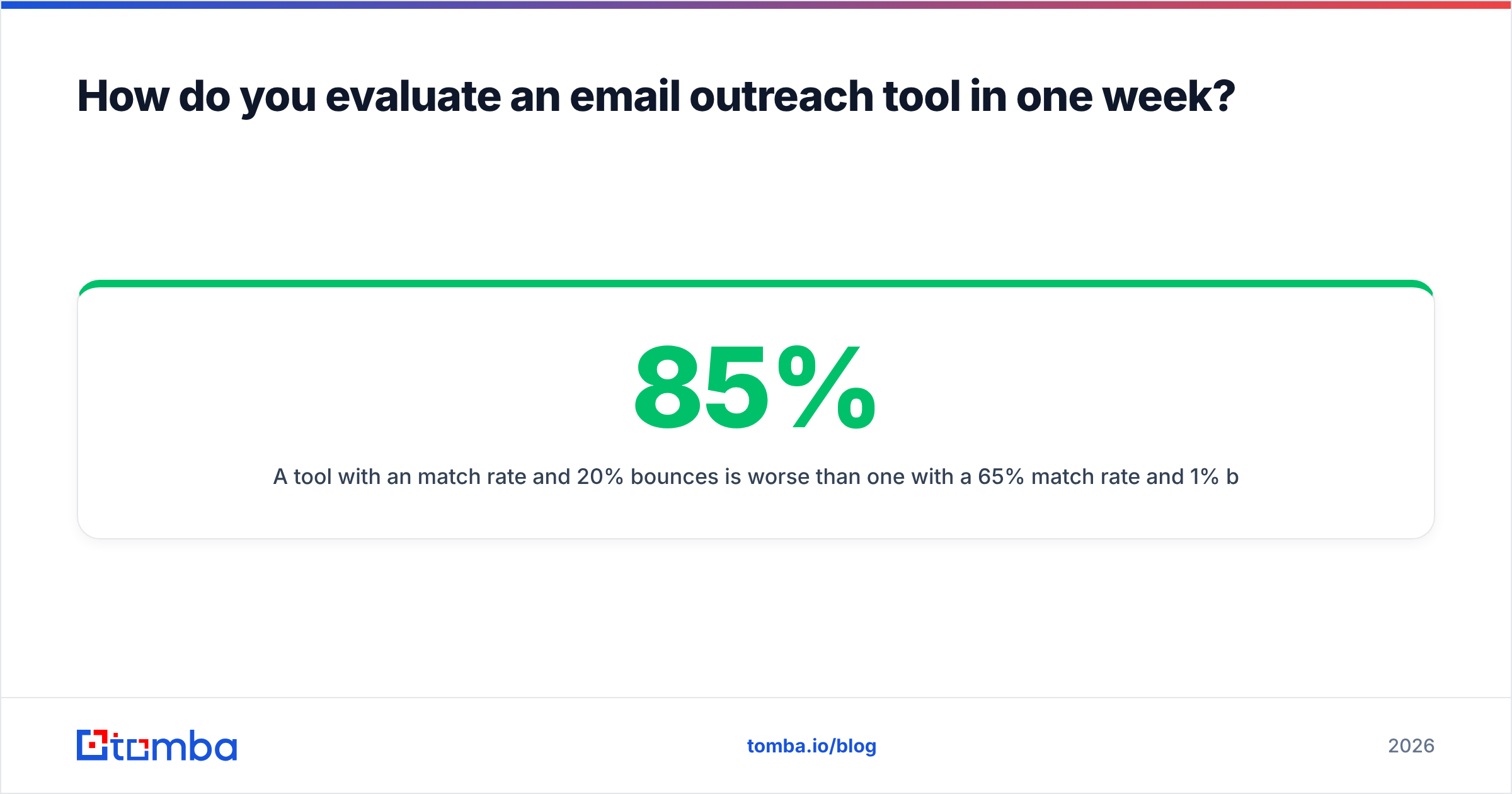
A tool with an 85% match rate and 20% bounces is worse than one with a 65% match rate and 1% bounces. The first one costs you a domain.
Start with the data layer. If your sequences are getting sent but not answered, the fastest diagnostic isn't a copy rewrite — it's running your current list through a verifier and seeing what percentage was never deliverable in the first place. Tomba's Email Finder returns addresses with confidence scores and source attribution, includes catch-all handling on every paid tier, and the free tier gives you 25 searches to test against your own ICP before you spend anything. Test it on the accounts you already tried to reach and couldn't.
Related guides#
Ready to find emails that actually work?
Join 150,000+ professionals who stopped guessing and started sending. Free credits on signup — no credit card required.
Get the Tomba newsletter
Practical outbound tactics and product updates — once every two weeks.
About the author