Email Owner Finder: How to Identify Who Owns an Email
An email owner finder tells you who is behind an address — sometimes. Here's what reverse lookup actually returns in 2026, where it breaks, and the workflow that beats it for B2B prospecting.
TL;DR
- An email owner finder (reverse email lookup) takes an address you already have and returns the person or company behind it — name, job title, company, sometimes LinkedIn profile and phone.
- It works well on corporate domains with a known pattern (
first.last@company.com) and poorly on free mailboxes (Gmail, Outlook, Proton) unless the address leaked into a public dataset. - Expect 40–70% match rates on B2B addresses and far less on personal ones. Any vendor promising 95%+ on cold Gmail addresses is selling you scraped junk.
- The cheaper, higher-yield play for prospecting is usually the reverse: start from a name + domain and run a forward email finder, then verify. Match rates run 80%+.
- Verify before you send. An unverified "owner" match is a guess with a confidence score attached to it.
What is an email owner finder?#
An email owner finder is a lookup tool that runs in the opposite direction from a normal prospecting tool. Instead of "give me the email for Sarah Chen at Acme," you say "here is s.chen@acme.com — who is this?"
Think of it like a reverse phone directory. A phone book is sorted by name; a reverse directory is sorted by number. Both hold the same rows, but one is indexed for the question you're actually asking. Technically, an email owner finder queries an identity graph keyed on the email address itself, joining it against company records, professional profiles, public web mentions, and pattern-derived name guesses.
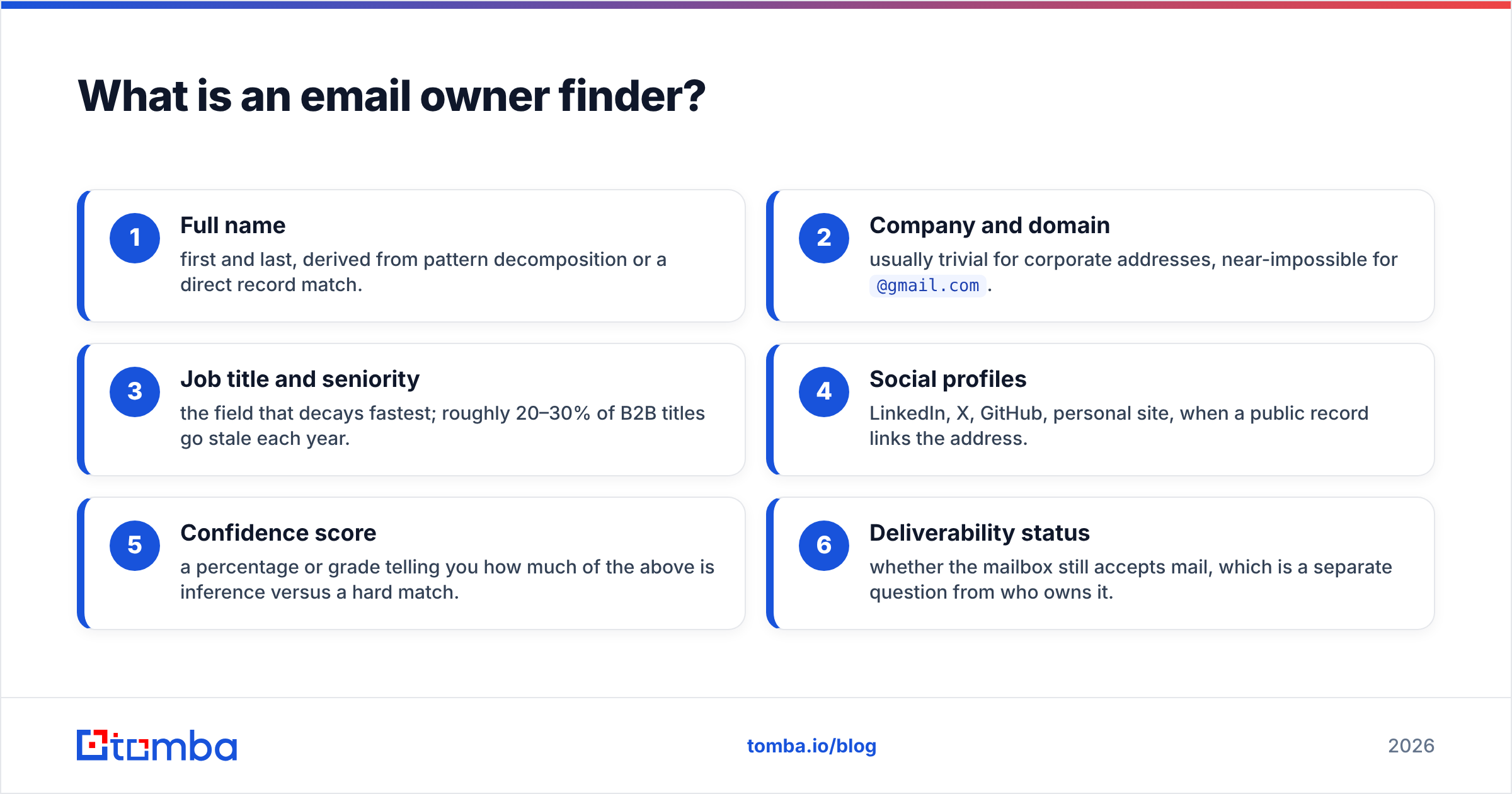
The output you should expect from a decent tool:
- Full name — first and last, derived from pattern decomposition or a direct record match.
- Company and domain — usually trivial for corporate addresses, near-impossible for
@gmail.com. - Job title and seniority — the field that decays fastest; roughly 20–30% of B2B titles go stale each year.
- Social profiles — LinkedIn, X, GitHub, personal site, when a public record links the address.
- Confidence score — a percentage or grade telling you how much of the above is inference versus a hard match.
- Deliverability status — whether the mailbox still accepts mail, which is a separate question from who owns it.
Those last two matter more than the first four. A tool that hands you a name with no provenance is asking you to trust a black box. Where the data comes from should be a question you can answer before you send anything.
Wait — corrected image syntax below.
How does an email owner finder actually work?#
Four mechanisms, stacked, in roughly this order of reliability.
Direct record match. The address already exists in the provider's database, tied to a person from a signup, a public profile, a company directory, a conference attendee list, or a partner data feed. This is the only path that gives you a genuine match rather than a guess. It's also the path that varies most between vendors — database size and freshness are the whole game here.
Pattern decomposition. The tool knows Acme uses first.last@, so s.chen@acme.com gets parsed to "S. Chen" and then matched against known Acme employees to resolve "Sarah Chen." This works surprisingly well and is why a company email pattern check is a useful sanity step on its own. It also fails silently when a company runs two patterns at once (common after acquisitions) or when two employees share initials.
Public web crawl. The address appears in a byline, a WHOIS record, a GitHub commit, a press release, a support forum post, a PDF. Crawl-based matching is how most tools find authors and technical staff. It skews heavily toward people who publish.
Domain-level inference. No person-level match exists, so the tool returns the company, industry, size, and tech stack instead. Useful for routing and account scoring, useless for personalization.
Free mailboxes break three of these four. There is no pattern to decompose, no corporate directory to join against, and no domain intelligence beyond "this is Gmail." That's why reverse lookup on personal addresses is dominated by breach-data resellers — and why using them carries compliance risk most B2B teams shouldn't take on.
Why do email owner lookups fail so often?#
Because the index is thinner than the marketing implies. Some concrete failure modes worth knowing before you buy:
- Role addresses.
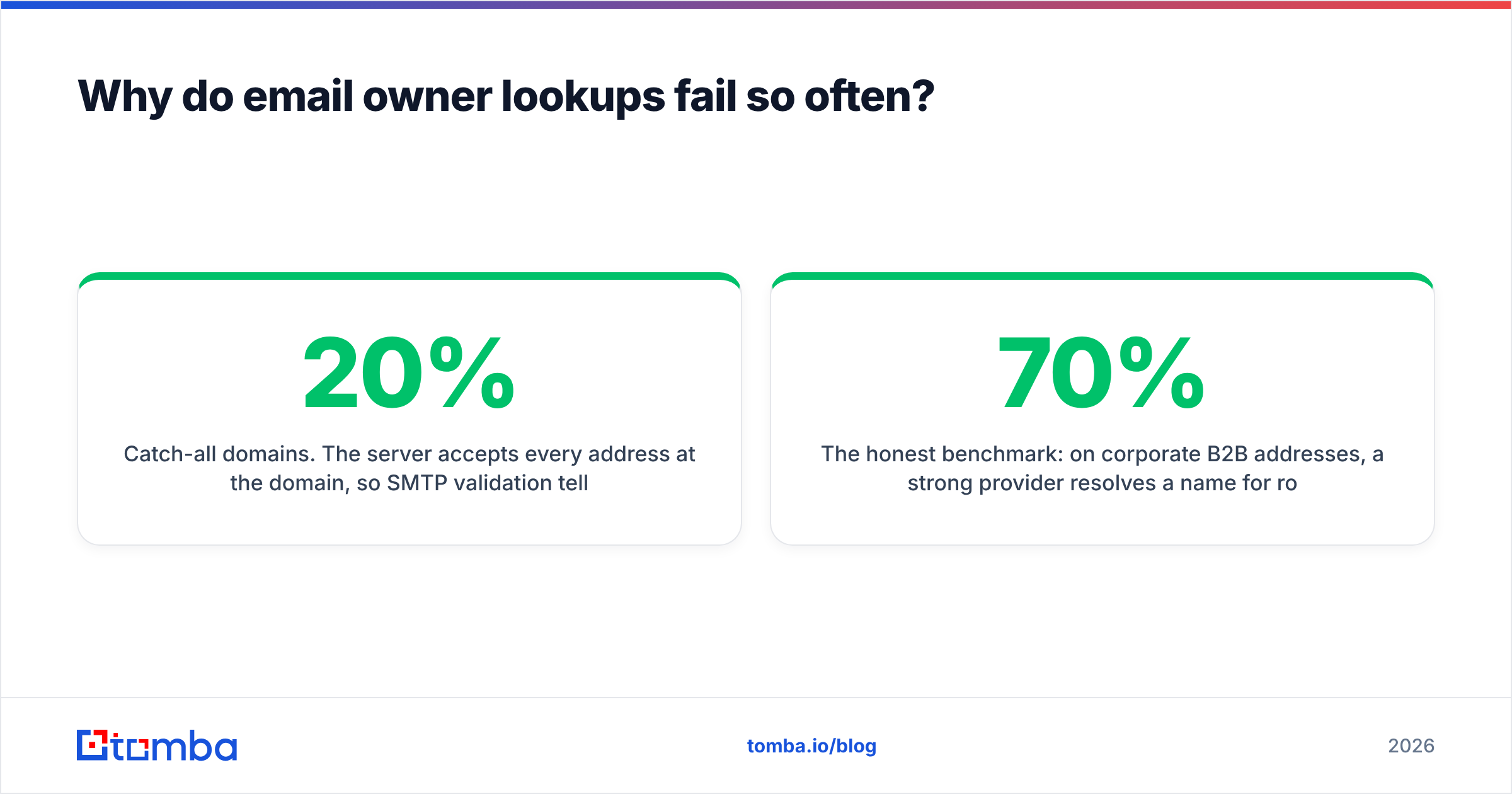
info@,sales@,support@,hello@have no owner by design. A tool that returns a confident person forinfo@acme.comis hallucinating. Good tools flag these as role accounts and stop. - Catch-all domains. The server accepts every address at the domain, so SMTP validation tells you nothing. Roughly 15–20% of B2B domains are configured this way. You need a dedicated catch-all verifier to separate real mailboxes from black-hole acceptance.
- Aliases and plus-addressing.
sarah+newsletter@acme.comandschen@acme.comroute to the same human but look like different records. - Departures. The person left 14 months ago; the mailbox forwards to their successor. The lookup returns a real name attached to the wrong human.
- Shared and generic personal addresses.
sarah.chen1987@gmail.commaps to a person only if that person put it somewhere public.

The honest benchmark: on corporate B2B addresses, a strong provider resolves a name for roughly 55–70% of inputs and a title for maybe 45%. On mixed lists that include free mailboxes, the blended number drops toward 30–40%. Plan your campaign math around that, not around a vendor's headline figure.
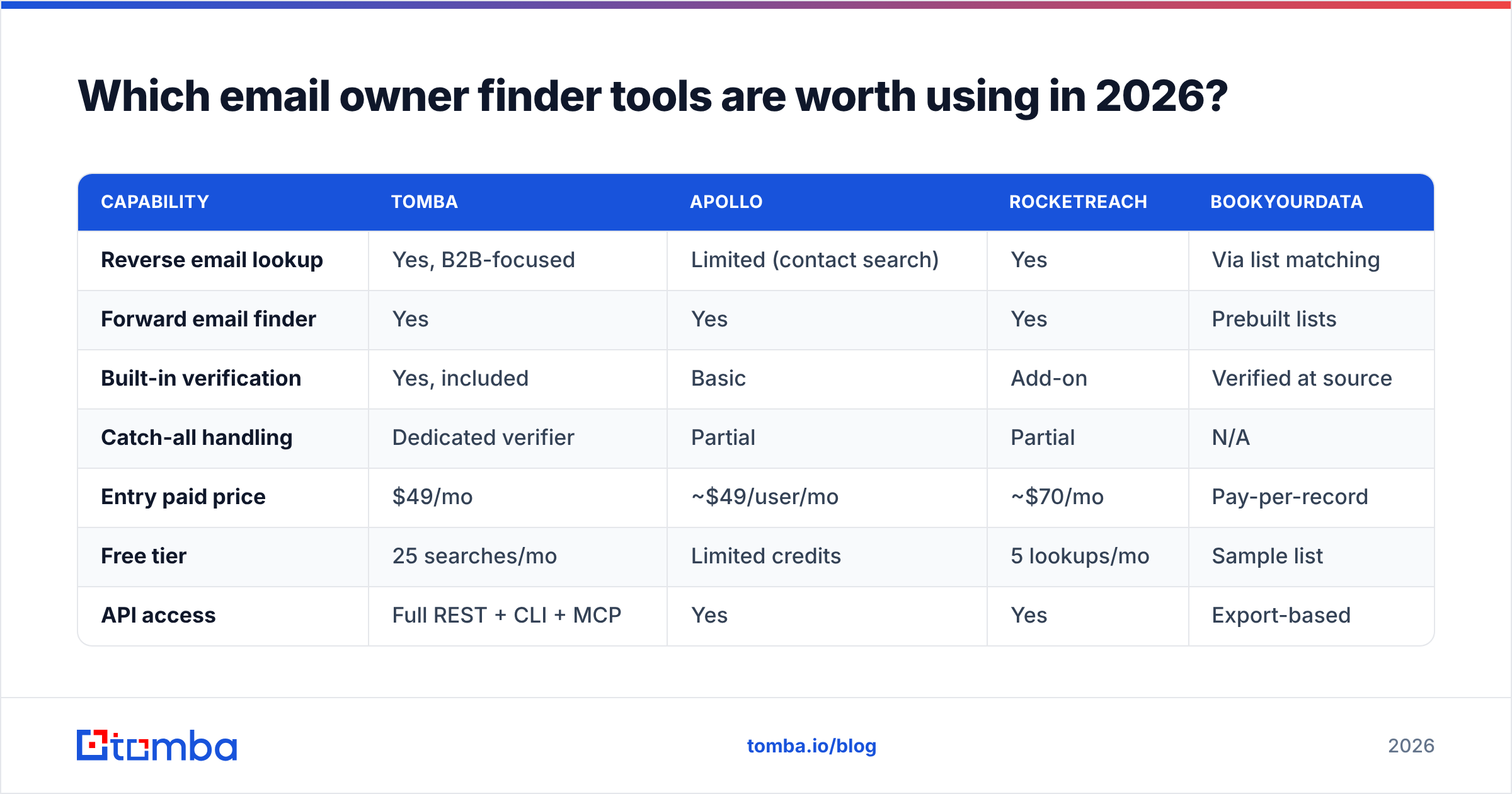
Which email owner finder tools are worth using in 2026?#
Different tools optimize for different questions. Reverse lookup is a feature in most of them, not a standalone product — the real differentiator is whether the underlying database is broad (consumer-heavy, breach-sourced) or deep (B2B, verified, refreshed).

| Capability | Tomba | Apollo | RocketReach | BookYourData |
|---|---|---|---|---|
| Reverse email lookup | Yes, B2B-focused | Limited (contact search) | Yes | Via list matching |
| Forward email finder | Yes | Yes | Yes | Prebuilt lists |
| Built-in verification | Yes, included | Basic | Add-on | Verified at source |
| Catch-all handling | Dedicated verifier | Partial | Partial | N/A |
| Entry paid price | $49/mo | ~$49/user/mo | ~$70/mo | Pay-per-record |
| Free tier | 25 searches/mo | Limited credits | 5 lookups/mo | Sample list |
| API access | Full REST + CLI + MCP | Yes | Yes | Export-based |
| Best for | B2B enrichment + verification | All-in-one sales engagement | Recruiting, exec search | Buying targeted lists outright |
A few notes so this table isn't read as a scoreboard:
- Apollo is an engagement platform first. If you want sequences, dialer, and CRM sync in one bill, its reverse coverage being merely adequate may not matter. If you only need identity resolution, you're paying for a lot of surface area you won't touch. Teams in that spot often look at an Apollo alternative built around data rather than workflow.
- RocketReach indexes personal profiles aggressively and does well on senior and technical people. Pricing climbs fast per seat.
- BookYourData solves a different problem well: rather than resolving addresses one at a time, you buy a pre-filtered, verified list for a defined segment. If your bottleneck is "I need 3,000 verified CFOs in DACH" rather than "who is this one person," a purchased list is often the faster route, and their pay-per-record model means no subscription overhead.
- Tomba leans B2B: reverse email lookup plus verification in the same credit pool, with Tomba pricing starting at a $49/mo Starter tier and a free tier at 25 searches per month for testing before you commit.
Check current standing on a neutral source before you buy — G2's lead intelligence category tracks review volume and recency across all of these.
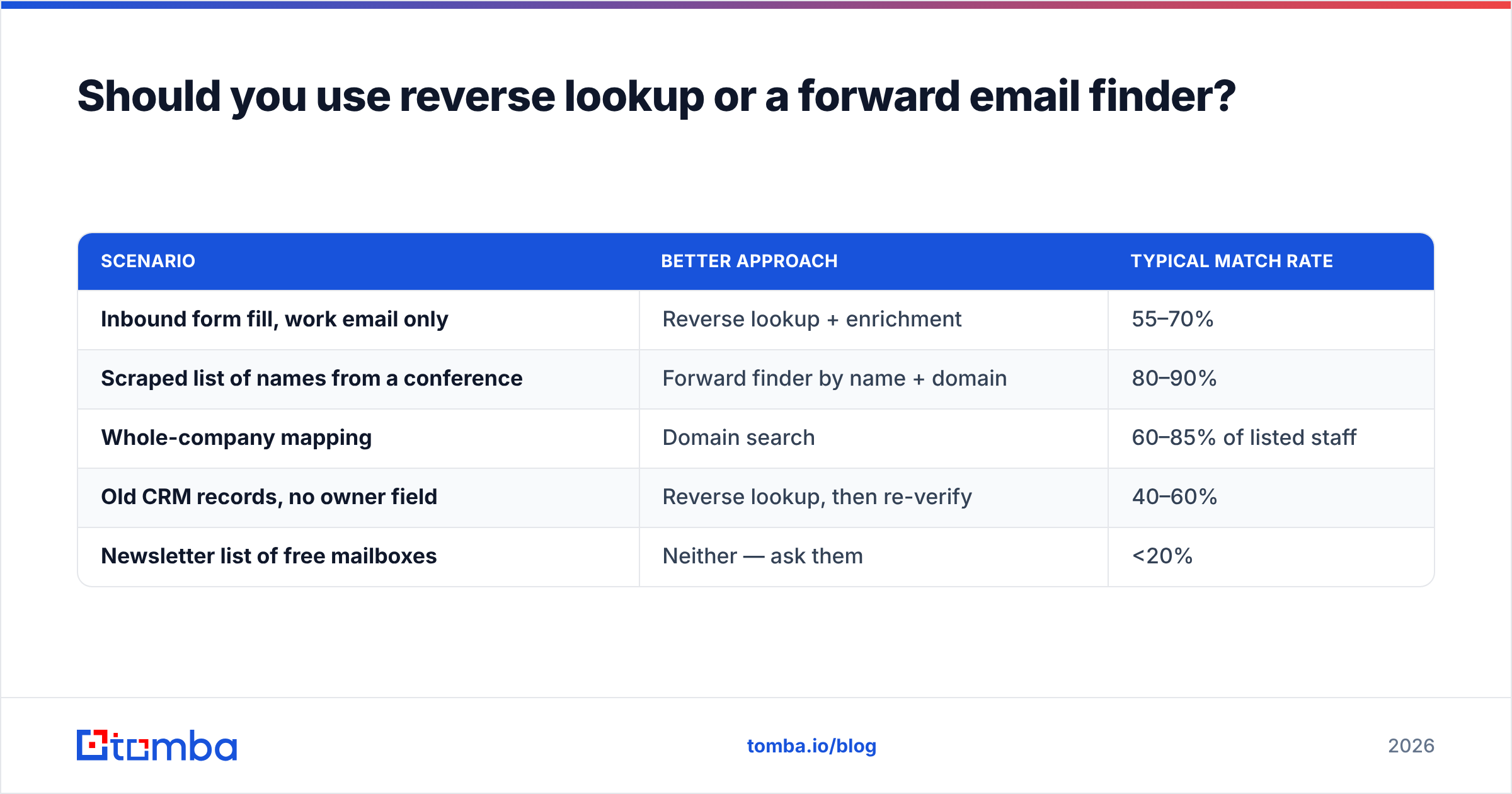
Should you use reverse lookup or a forward email finder?#
Start forward whenever you can. It's cheaper and the match rate is roughly double.
Reverse lookup exists because you already have an orphaned address and no context. Forward finding exists because you have a name and a company and need the address. Most B2B pipelines can be restructured so the second question is the one you ask.
| Scenario | Better approach | Typical match rate |
|---|---|---|
| Inbound form fill, work email only | Reverse lookup + enrichment | 55–70% |
| Scraped list of names from a conference | Forward finder by name + domain | 80–90% |
| Whole-company mapping | Domain search | 60–85% of listed staff |
| Old CRM records, no owner field | Reverse lookup, then re-verify | 40–60% |
| Newsletter list of free mailboxes | Neither — ask them | <20% |
The pattern to notice: reverse lookup is a repair tool. It fixes data you already have but can't use. It is not an acquisition channel. Teams that treat it as one end up paying per-credit for a 40% hit rate when a forward email finder on the same accounts would have returned 85%.
How do you verify the owner once you have a match?#
A match is a hypothesis. Verification is the test. Run three checks, in this order, and stop at the first hard failure.
- Syntax and domain health. Does the domain resolve, does it have MX records, is it on a blacklist? A blacklist checker takes seconds and saves your sender reputation.
- Mailbox existence. SMTP-level validation confirms the server will accept mail for that specific address. Use an email verifier rather than sending a test email — test sends to dead addresses are exactly what damages email deliverability.
- Identity corroboration. Cross-check the returned name against a second independent source: the company's team page, a LinkedIn profile, a conference bio, a published byline. If the tool says "Sarah Chen, VP Marketing" and the company site lists Sarah Chen as VP Marketing, you have two sources. If it says "Sarah Chen" and nothing else on the open web agrees, treat it as low confidence.
For anything over a few hundred records, run the whole thing through bulk verify rather than one at a time, and drop everything below your confidence threshold instead of sending to it. HubSpot's research on list hygiene consistently finds that pruning unengaged and unverifiable contacts raises deliverability more than any subject-line change — their email marketing benchmarks are a reasonable place to sanity-check your own numbers.
Is it legal to look up who owns an email address?#
Short answer: in a B2B context, usually yes, with conditions. In a consumer context, be much more careful.
Under GDPR, a work email address tied to a named individual is personal data. Processing it for direct marketing can rest on legitimate interest, but you need a documented balancing test, a clear opt-out in every message, and the ability to honor deletion requests. The GDPR text on lawful bases is short and worth reading once rather than relying on a vendor's summary.
Practical guardrails:
- Stick to business contexts. Reverse-looking-up a personal Gmail address to identify a private individual is a different legal and ethical category from resolving a corporate address for a B2B sales conversation.
- Know your vendor's sources. If a provider can't tell you where a record came from, you can't answer a data subject access request about it. That's a real operational problem, not a theoretical one.
- Honor suppression immediately. Deleted means deleted, including from the enrichment cache.
- CAN-SPAM in the US is more permissive but still requires accurate headers, a physical address, and a working unsubscribe.
For background on how addresses are structured and what's technically inferable from them, the Wikipedia entry on email addresses is a decent primer on the RFC-level constraints tools work within.
What's the fastest workflow for identifying email owners at scale?#
Here's the sequence that produces the most usable records per credit spent:
- Segment the input list. Split corporate domains from free mailboxes. Route free mailboxes to a separate, lower-priority track — or drop them.
- Detect the domain pattern first. One pattern check per domain is cheaper than one lookup per address, and it upgrades every subsequent guess on that domain.
- Run reverse lookup on the corporate segment. Keep matches above your confidence floor; a floor of 80% is a reasonable default for outbound.
- Verify every survivor. Catch-all domains go to a separate queue for the catch-all verifier rather than being marked "valid" by default.
- Enrich the confirmed set. Title, seniority, company size, tech stack — this is where data enrichment turns an identity into a segmentation input.
- Push to CRM with source and date stamps. Every record should carry where it came from and when it was last verified. Records older than six months get re-verified before reuse.
Automate steps 2 through 5 through the Tomba API so this runs on every inbound record without a human touching it. The manual version of this workflow is fine at 50 records and unmanageable at 5,000.
The bottom line#
An email owner finder is the right tool for a specific job: you have an address, you have no context, and you need to know whether it's worth a conversation. It's a repair tool, not a growth engine. Expect 40–70% resolution on B2B inputs, treat free-mailbox lookups as low-yield, and verify every match before it touches a sending domain.
If most of your work runs the other direction — you know the company and the person, you just need the address — start with the Tomba Email Finder. Verification is bundled into the same credits, the free tier gives you 25 searches a month to test match rates against your own list, and Starter is $49/mo when you're ready to run volume. Test it on 25 addresses you already know the answer to; that's the only benchmark that matters.
Related guides#
Ready to find emails that actually work?
Join 150,000+ professionals who stopped guessing and started sending. Free credits on signup — no credit card required.
Get the Tomba newsletter
Practical outbound tactics and product updates — once every two weeks.
About the author