What Is Email Reputation? The 2026 Guide to Sender Trust
Email reputation decides whether your cold outreach lands in the inbox or dies in spam. Here is how mailbox providers actually score you, the thresholds that matter, and a 30-day repair plan that works.
TL;DR
- Email reputation is a per-mailbox-provider trust score built from your bounce rate, spam complaints, engagement, authentication, and sending consistency. There is no single global number.
- Domain reputation now matters more than IP reputation for most B2B senders, because you are almost certainly on shared infrastructure.
- The thresholds that get you filtered are tighter than most teams assume: spam complaints above 0.3%, hard bounces above 2%, and open rates that collapse below ~15% on a cold list.
- List quality moves reputation faster than copy, warmup, or send volume. A dirty list can burn a healthy domain in under two weeks.
- Repair is possible but slow — expect 3 to 6 weeks of reduced volume, verified-only recipients, and reply-generating sends before Gmail and Outlook re-trust you.
What is email reputation?#
Email reputation is the trust score mailbox providers assign to the domain and IP address you send from. Think of it like a credit score at a bank you can never call. Gmail, Outlook, and Yahoo each keep their own private ledger on you, update it every time you send, and never publish the formula. When your score is high, your mail lands in the primary inbox. When it drops, you get routed to spam, throttled, or rejected at the gateway — usually with no error message that says why.
The practical definition: your sender reputation is the aggregate of every signal recipients and their providers have generated about your mail over a rolling window, typically 30 to 90 days. It is not one score. Gmail may consider you fine while Outlook has quietly been filtering you for a month.
Two things make this hard in 2026. First, mailbox providers have shifted heavily toward engagement-based filtering — they care less about your content and more about whether real humans open, reply, and don't complain. Second, Google and Yahoo's bulk sender requirements made authentication (SPF, DKIM, DMARC) table stakes rather than a differentiator. Passing auth no longer earns you credit; failing it just kills you outright.
What actually goes into your email reputation score?#
Providers weight these signals differently, but the same six inputs show up in every published guideline and every deliverability post-mortem:
- Spam complaint rate — the percentage of recipients who hit "Report spam." This is the single most destructive metric. Google's bulk sender guidelines ask senders to stay under 0.3% and treat 0.1% as the healthy target. At 0.5% you are already being filtered.
- Hard bounce rate — invalid or non-existent addresses. High bounce rates signal a purchased or scraped list. Keep it under 2%; under 1% is where clean senders live.
- Engagement signals — opens, replies, forwards, "move to inbox," and time spent reading. Replies are weighted far more heavily than opens, especially post-Apple-MPP where open data is noisy.
- Negative engagement — deletes without reading, unsubscribes, and "move to spam" actions. Silent deletion is a real signal, not a neutral one.
- Authentication and alignment — valid SPF, DKIM signing on every message, and a DMARC policy that isn't
p=noneforever. Check yours with an SPF checker before you diagnose anything else. - Sending pattern consistency — sudden volume spikes, erratic schedules, and new domains blasting 500 emails on day one all read as spam behavior. Providers reward boring, predictable senders.
Notice what's missing: subject line wording, number of links, and image-to-text ratio. Those affect content filters, which are a separate layer. They rarely move your underlying reputation on their own.
How do domain reputation and IP reputation differ?#
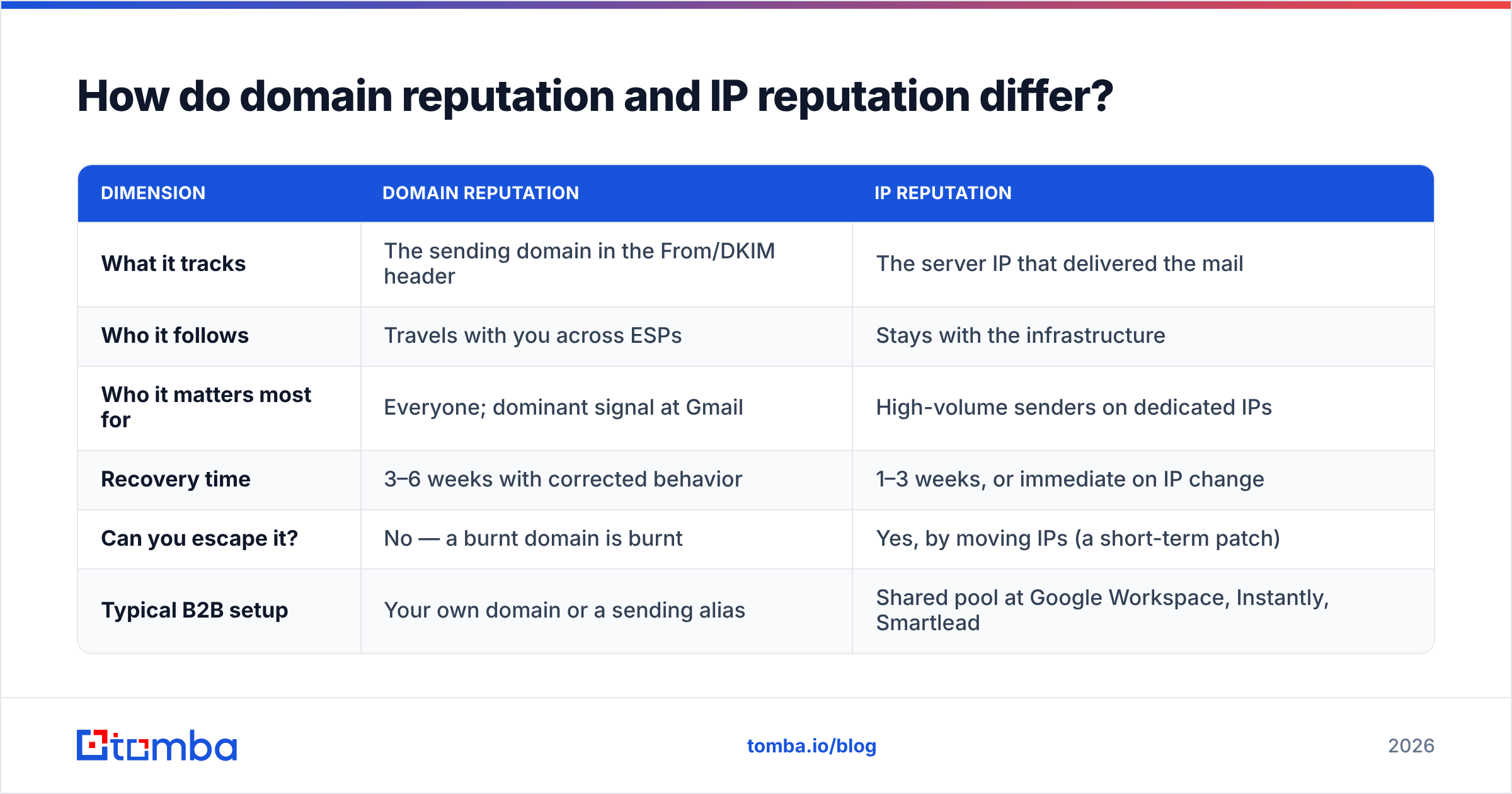
Most B2B senders obsess over IP reputation when domain reputation is doing the heavy lifting. Here's the split:
| Dimension | Domain reputation | IP reputation |
|---|---|---|
| What it tracks | The sending domain in the From/DKIM header | The server IP that delivered the mail |
| Who it follows | Travels with you across ESPs | Stays with the infrastructure |
| Who it matters most for | Everyone; dominant signal at Gmail | High-volume senders on dedicated IPs |
| Recovery time | 3–6 weeks with corrected behavior | 1–3 weeks, or immediate on IP change |
| Can you escape it? | No — a burnt domain is burnt | Yes, by moving IPs (a short-term patch) |
| Typical B2B setup | Your own domain or a sending alias | Shared pool at Google Workspace, Instantly, Smartlead |
If you send from Google Workspace or a shared-pool cold email platform, you have essentially no control over IP reputation and total control over domain reputation. That's where your effort belongs. It's also why burning a primary domain is so expensive — you can rotate IPs, you cannot rotate the domain your customers already know.
What numbers should you actually hold yourself to?#
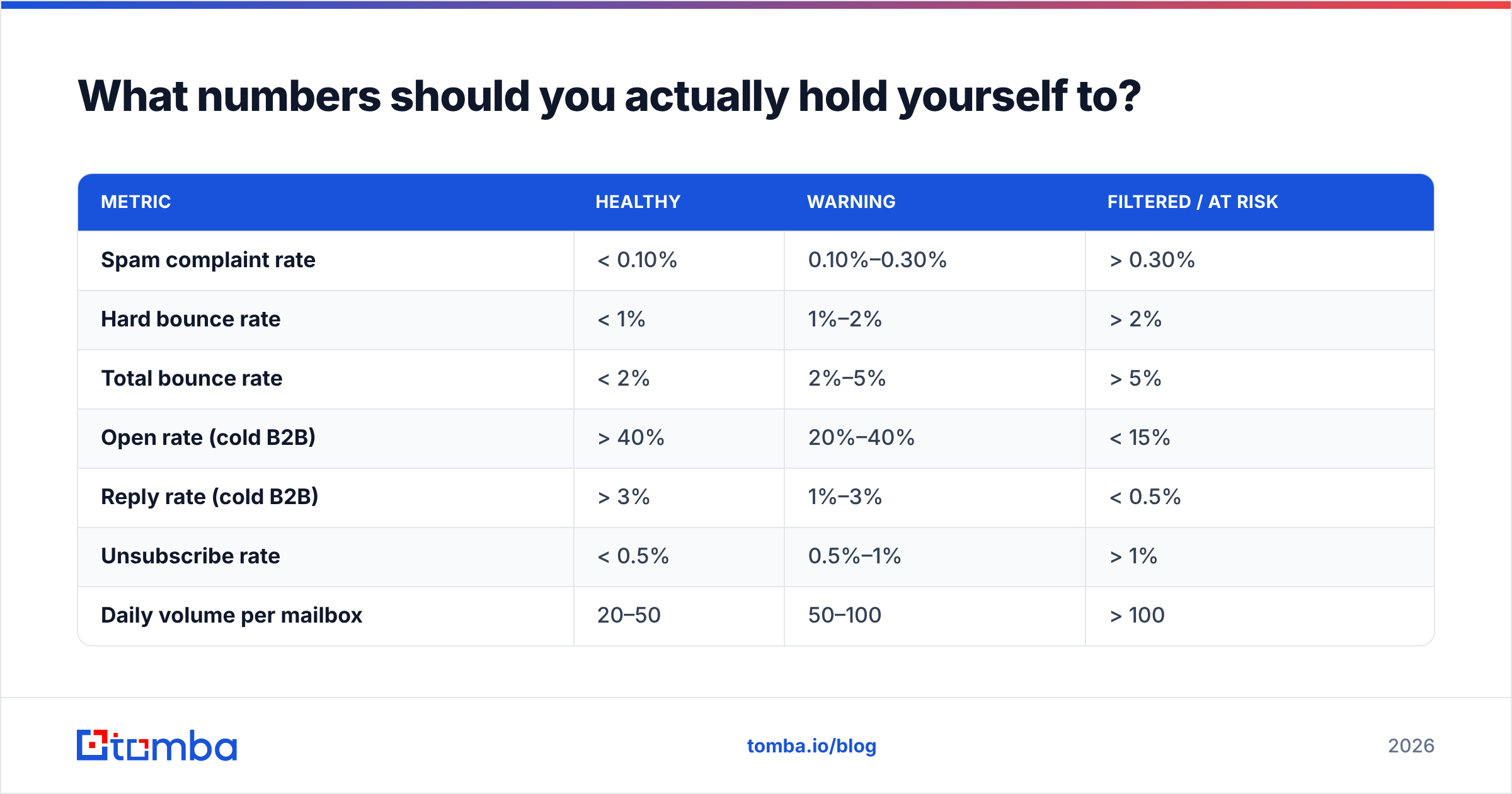
Vague advice ("keep bounces low") is useless when a campaign is dying. These are the working thresholds most deliverability teams use:
| Metric | Healthy | Warning | Filtered / at risk |
|---|---|---|---|
| Spam complaint rate | < 0.10% | 0.10%–0.30% | > 0.30% |
| Hard bounce rate | < 1% | 1%–2% | > 2% |
| Total bounce rate | < 2% | 2%–5% | > 5% |
| Open rate (cold B2B) | > 40% | 20%–40% | < 15% |
| Reply rate (cold B2B) | > 3% | 1%–3% | < 0.5% |
| Unsubscribe rate | < 0.5% | 0.5%–1% | > 1% |
| Daily volume per mailbox | 20–50 | 50–100 | > 100 |
A single send at 8% bounce rate will not permanently destroy you. Three sequential campaigns at 8% will. Reputation systems are trend-sensitive, not snapshot-sensitive — which is why a slow drift is more dangerous than one bad day.
How do you check your email reputation?#
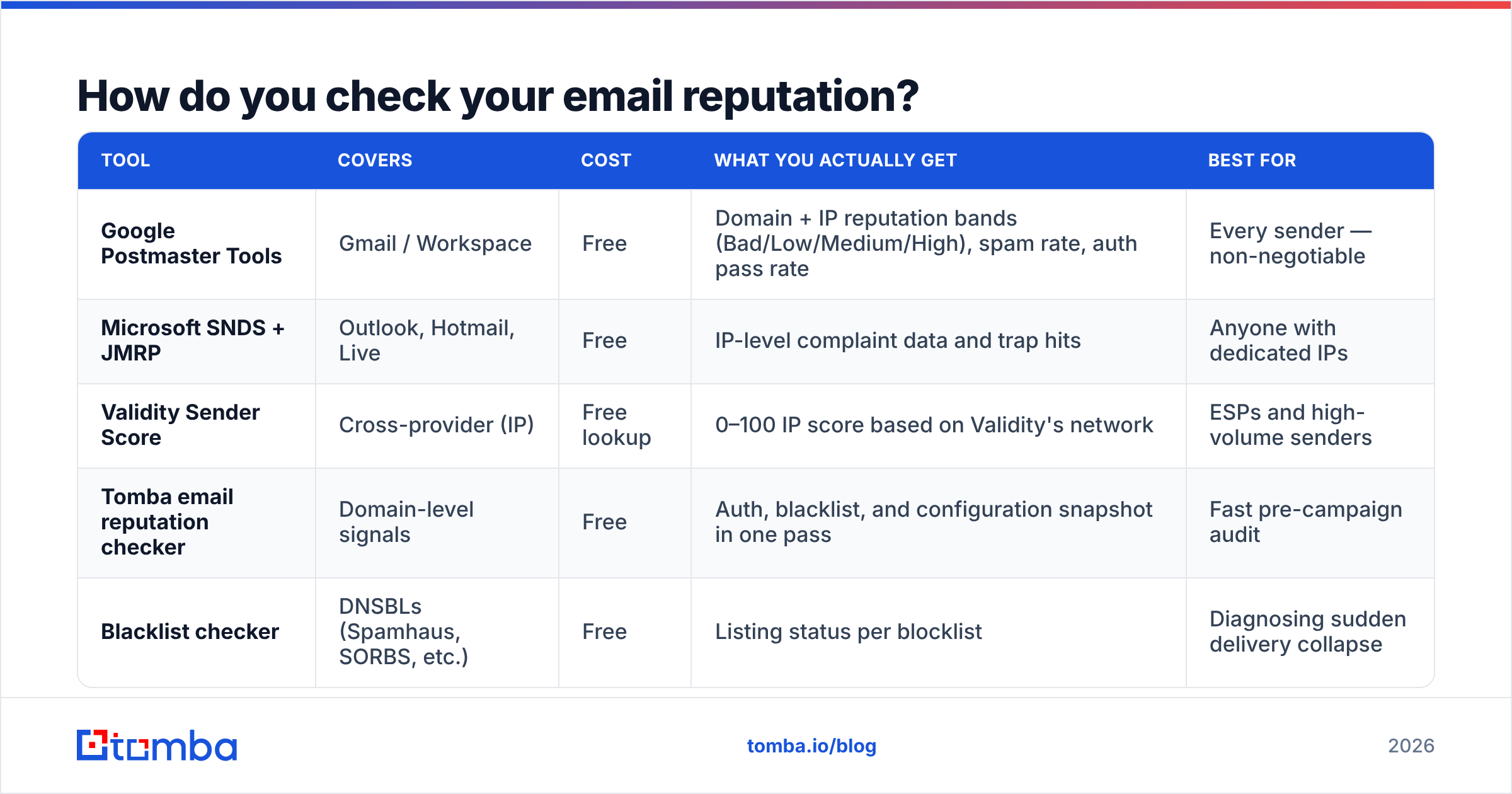
You can't see your score directly, but four sources give you usable proxies. Use more than one, because each provider only reports on its own turf.
| Tool | Covers | Cost | What you actually get | Best for |
|---|---|---|---|---|
| Google Postmaster Tools | Gmail / Workspace | Free | Domain + IP reputation bands (Bad/Low/Medium/High), spam rate, auth pass rate | Every sender — non-negotiable |
| Microsoft SNDS + JMRP | Outlook, Hotmail, Live | Free | IP-level complaint data and trap hits | Anyone with dedicated IPs |
| Validity Sender Score | Cross-provider (IP) | Free lookup | 0–100 IP score based on Validity's network | ESPs and high-volume senders |
| Tomba email reputation checker | Domain-level signals | Free | Auth, blacklist, and configuration snapshot in one pass | Fast pre-campaign audit |
| Blacklist checker | DNSBLs (Spamhaus, SORBS, etc.) | Free | Listing status per blocklist | Diagnosing sudden delivery collapse |
The order of operations when deliverability drops: check blacklists first (fastest to confirm, sometimes fastest to fix), then Postmaster Tools for the reputation band, then your own bounce and complaint logs from the last three campaigns. Nine times out of ten the answer is in the third step.
Why does list quality wreck reputation faster than bad copy?#
Because bounces and complaints are direct inputs to the score, and copy is not.
Run the math. You send 1,000 cold emails to a list you scraped six months ago and never verified. B2B email data decays at roughly 22–30% per year as people change jobs, so 12% of those addresses no longer exist. That's 120 hard bounces in one send — six times the threshold that gets you flagged. Gmail sees a sender blasting a list full of dead addresses, which is the textbook signature of a purchased list. Your domain reputation band drops from High to Medium, and your next campaign, sent to a perfectly clean list, underperforms by 30% because the damage is already logged.
Now compare that to sending a mediocre subject line to a verified list. Worst case: low opens. Opens are a soft signal. Nobody blacklists you for being boring.
This is why the sequence matters more than the tactics. Verify before you send, not after you notice the problem. A pre-send pass through an email verifier removes the invalid addresses that generate hard bounces, and a catch-all verifier resolves the accept-all domains that ordinary verification marks "unknown" — the category most teams either delete entirely (wasting good leads) or send to blindly (generating bounces).
Does inbox warmup actually fix a damaged reputation?#
Partially, and it's the most oversold fix in cold email.
Warmup networks work by having seed accounts open, reply to, and move your messages out of spam. That does generate positive engagement signals. But mailbox providers have gotten measurably better at recognizing warmup traffic patterns — reciprocal reply loops between accounts that never interact with anything else look nothing like organic mail. Warmup helps a new domain establish a baseline. It does not undo 5,000 hard bounces on an established one.
What actually repairs reputation, in priority order:
- Stop sending to the source of the damage. If a specific list segment produced the complaints, cut it entirely. Do not re-send to it "more carefully."
- Drop volume by 70–80% for two weeks. Low volume with high engagement rebuilds the ratio that providers track.
- Send only to addresses that have replied or opened in the last 90 days. You are manufacturing positive signals deliberately.
- Verify every remaining address. Zero tolerance for unknown-status recipients during a repair window.
- Fix authentication properly. DKIM on every message, SPF aligned, DMARC at
p=quarantineminimum. - Ramp back up over 3–4 weeks, adding roughly 20% volume per week and watching Postmaster Tools after each step.
If your domain reputation band still reads "Bad" after six weeks of disciplined sending, the domain is likely unrecoverable for cold outreach. Move to a fresh sending domain — a lookalike like get-yourcompany.com — and keep your primary domain for transactional and customer mail only. That separation should have been in place from day one anyway.
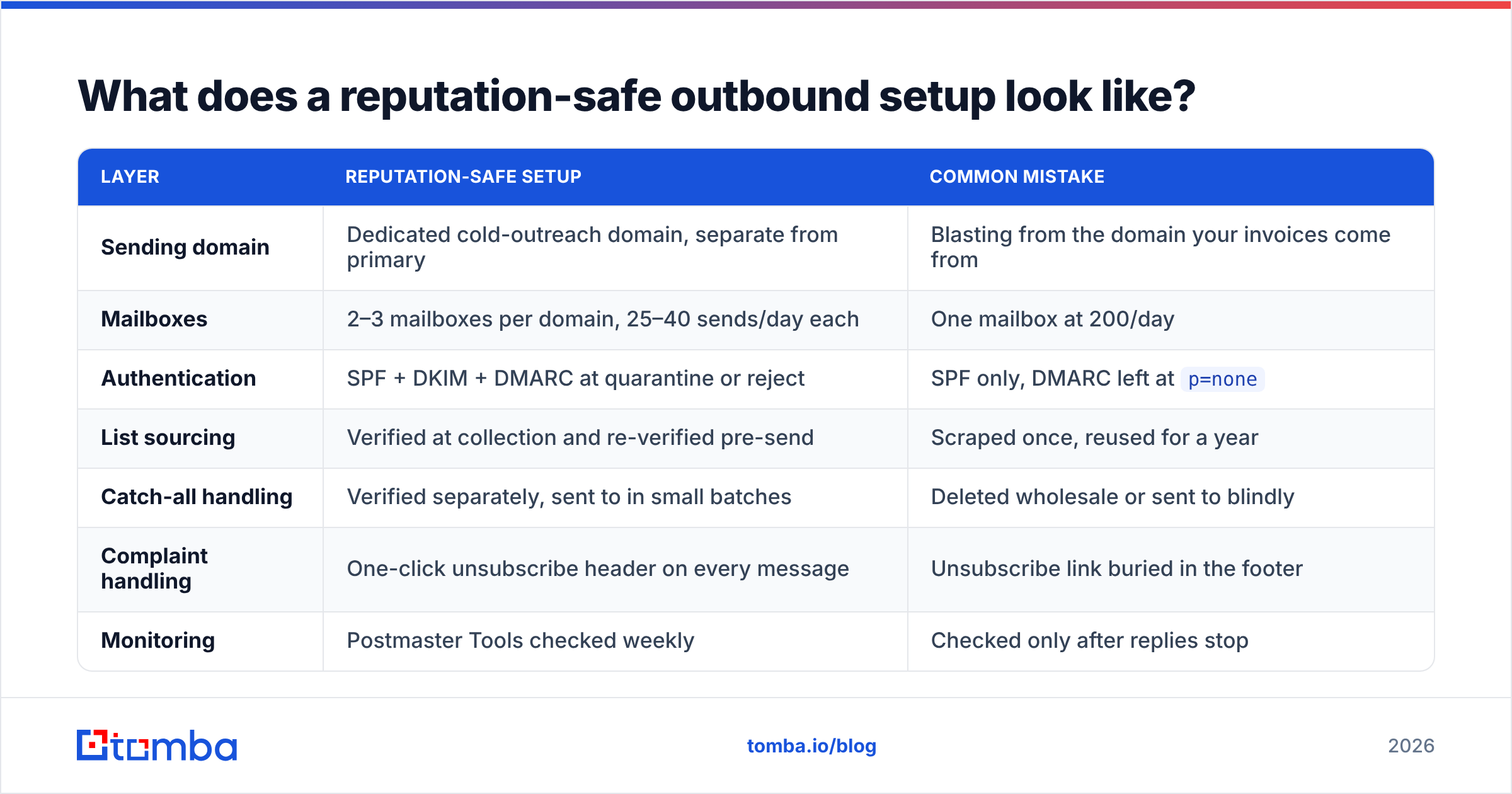
What does a reputation-safe outbound setup look like?#
| Layer | Reputation-safe setup | Common mistake |
|---|---|---|
| Sending domain | Dedicated cold-outreach domain, separate from primary | Blasting from the domain your invoices come from |
| Mailboxes | 2–3 mailboxes per domain, 25–40 sends/day each | One mailbox at 200/day |
| Authentication | SPF + DKIM + DMARC at quarantine or reject | SPF only, DMARC left at p=none |
| List sourcing | Verified at collection and re-verified pre-send | Scraped once, reused for a year |
| Catch-all handling | Verified separately, sent to in small batches | Deleted wholesale or sent to blindly |
| Complaint handling | One-click unsubscribe header on every message | Unsubscribe link buried in the footer |
| Monitoring | Postmaster Tools checked weekly | Checked only after replies stop |
The single highest-leverage line in that table is list sourcing. If you build lists from a source that returns verification status at the point of discovery — rather than dumping raw addresses you clean later — you eliminate the bounce problem before it becomes a reputation problem. The Tomba API returns a confidence score with every result for exactly this reason, so verification is part of collection rather than a separate cleanup job.
How long does it take to build good email reputation from scratch?#
Roughly 8 to 12 weeks for a new domain to reach a stable "High" band at Gmail, assuming you do everything right.
Weeks 1–2 are DNS and warmup only: buy the domain, configure authentication, let it age at least two weeks before any real send. Weeks 3–4 you start manual, highly personalized sends at 5–10 per day per mailbox to verified addresses likely to reply. Weeks 5–8 you scale to 25–40 per day and begin normal sequences. By week 9 you have enough history for providers to have formed a view.
Rushing this is the most common failure in outbound. A domain that sends 200 emails on day three has told Gmail exactly what it is. There is no copy good enough to outrun that signal.
Two other things worth knowing. Reputation is asymmetric — it takes weeks to build and days to lose. And it is recipient-domain-specific in practice: you can hold a great reputation at Gmail while getting quietly junked at Outlook, because Microsoft weights complaint data and content heuristics differently. Test both, always, with seed accounts on each major provider.
What's the fastest way to protect your reputation this week?#
Three actions, in order.
Run your current active list through verification and delete everything that comes back invalid. This is a one-hour job that removes the largest single reputation risk you have. If your list lives in a spreadsheet, bulk verification handles it in a single upload.
Second, pull up Postmaster Tools and check your domain reputation band and spam rate for the last 30 days. If spam rate is above 0.2%, pause your largest-volume sequence today and audit who is on it.
Third, confirm your authentication is complete and aligned. Broken DKIM on a subset of mail is shockingly common after ESP migrations, and it produces exactly the kind of intermittent, unexplainable filtering that teams spend months chasing.
Do those three and you will have addressed the causes of most reputation damage. Everything else — send-time optimization, subject line testing, copy frameworks — is optimization on top of a foundation that has to exist first.
Where does Tomba fit?#
Reputation problems are usually data problems wearing a deliverability costume. If the addresses you send to are real, current, and confidence-scored before they enter a sequence, your bounce rate stays under 1% and the largest input to your reputation score takes care of itself.
That's the job the Tomba Email Finder is built for: find professional email addresses by domain, name, or company, with a confidence score and verification status attached to every result — so nothing unverified ever reaches your sending infrastructure. The free tier gives you 25 searches a month to test the data quality against a list you already trust, and paid plans start at $49/mo on Starter with Growth at $99/mo; full details are on the Tomba pricing page. Clean inputs, boring sending patterns, and a weekly look at Postmaster Tools will keep you in the inbox longer than any warmup network will.
Related guides#
Ready to find emails that actually work?
Join 150,000+ professionals who stopped guessing and started sending. Free credits on signup — no credit card required.
Get the Tomba newsletter
Practical outbound tactics and product updates — once every two weeks.
About the author