Email Reputation Management: The Complete 2026 Playbook
Your sender reputation is scored before a single subject line is read. Here is what mailbox providers actually measure, how to check your score today, and a 30-day repair plan that works.
TL;DR
- Email reputation management is the ongoing practice of keeping the trust signals attached to your sending domain, IP, and mailbox above the thresholds Gmail, Outlook, and Yahoo use to decide inbox vs. spam.
- Domain reputation now matters more than IP reputation for most B2B senders, because almost everyone sends from shared infrastructure (Google Workspace, Microsoft 365, or an ESP pool).
- The four signals that move the needle fastest: bounce rate, spam complaint rate, engagement (replies and opens on a warm list), and authentication (SPF, DKIM, DMARC).
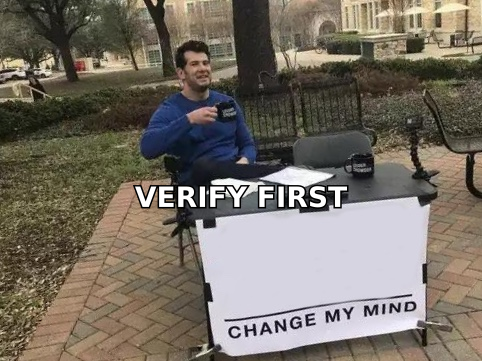
- Most reputation damage traces back to one thing — sending to addresses that were never verified. A 2% bounce rate is the ceiling; 8% is a throttle order.
- Repair takes 3–6 weeks of disciplined volume reduction, list cleaning, and re-engagement. There is no reset button, and buying a new domain only moves the problem.
What is email reputation management?#
Email reputation management is the practice of monitoring and improving the trust score that mailbox providers assign to your sending identity — your domain, your IP address, and the individual mailbox doing the sending.
Think of it like a credit score for your outbound program. You never see the number directly. Gmail does not publish a "742/850" figure. But every provider maintains an internal score built from your history: how many messages bounced, how many people marked you as spam, how many replied, whether your authentication records check out, and whether your sending pattern looks like a human or a script.
That score decides three things before a recipient ever sees your subject line:
- Delivery — does the message get accepted at all, or rejected at the SMTP handshake?
- Placement — inbox, Promotions, or spam folder?
- Rate limiting — how many messages per hour will the provider accept from you before deferring the rest?
The uncomfortable part is that reputation is lagging. You damage it on Monday and feel it on the following Thursday, after 4,000 messages have already gone out. That delay is why reputation management has to be a standing process, not a fire drill.
What signals actually determine your sender reputation?#
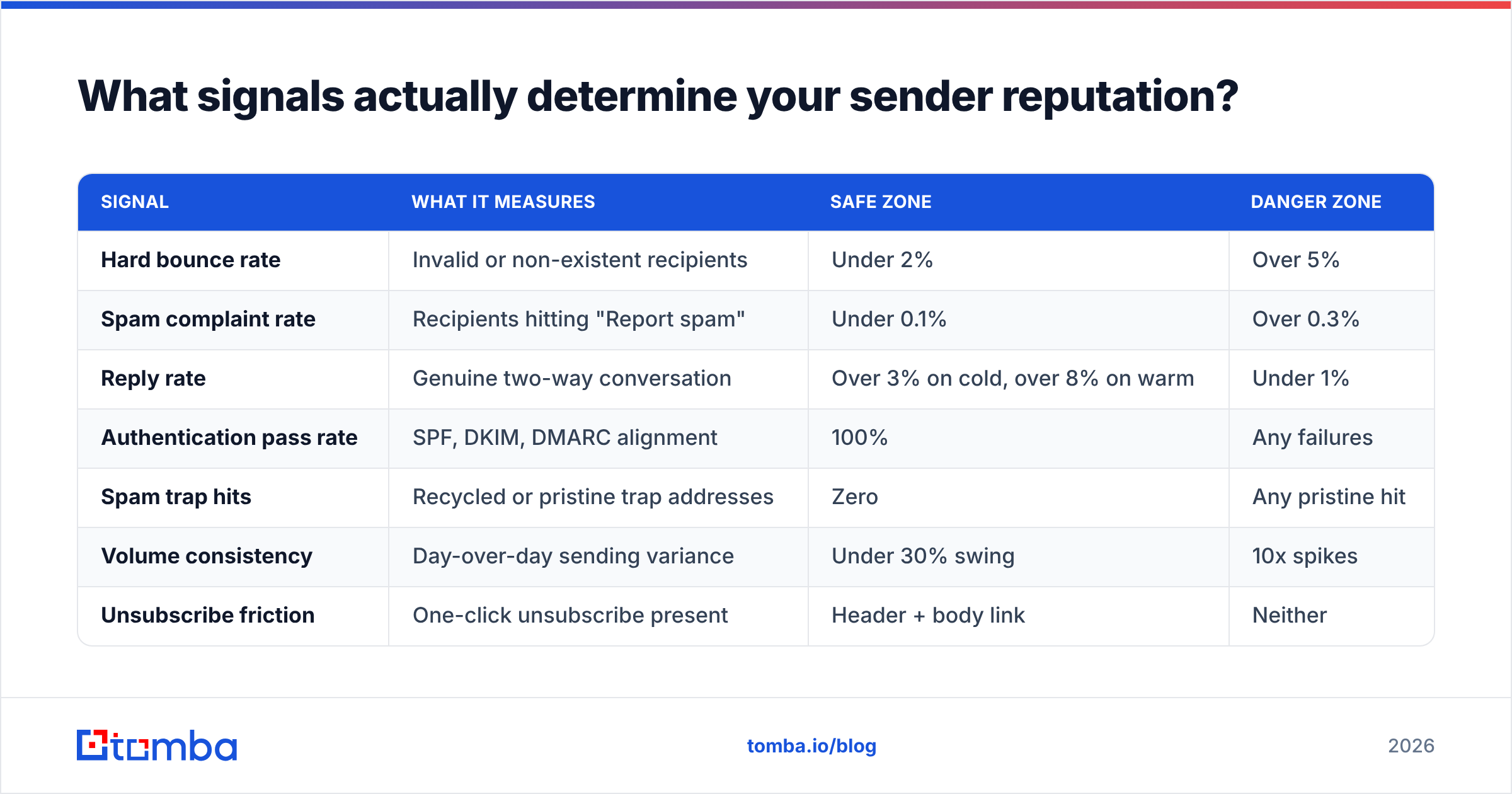
Providers weight signals differently, but the same core set appears in Google's, Microsoft's, and Yahoo's published guidance. Here is what each signal means and what threshold you should hold yourself to.
| Signal | What it measures | Safe zone | Danger zone |
|---|---|---|---|
| Hard bounce rate | Invalid or non-existent recipients | Under 2% | Over 5% |
| Spam complaint rate | Recipients hitting "Report spam" | Under 0.1% | Over 0.3% |
| Reply rate | Genuine two-way conversation | Over 3% on cold, over 8% on warm | Under 1% |
| Authentication pass rate | SPF, DKIM, DMARC alignment | 100% | Any failures |
| Spam trap hits | Recycled or pristine trap addresses | Zero | Any pristine hit |
| Volume consistency | Day-over-day sending variance | Under 30% swing | 10x spikes |
| Unsubscribe friction | One-click unsubscribe present | Header + body link | Neither |
Two of those deserve extra attention.
Spam complaint rate is the hardest ceiling. Google's bulk sender requirements set 0.3% as the line you must stay under, and recommend staying below 0.1%. At scale that is brutal math: send 10,000 emails and 30 complaints puts you over. Complaints are also the one signal you cannot argue with — there is no "but they were interested" appeal.
Spam traps are the silent killer. A recycled trap is an abandoned address a provider reactivated to catch senders using stale lists. A pristine trap was never a real person at all; it was seeded on a webpage to catch scrapers. Hitting a pristine trap is close to an automatic blocklisting, and it is almost always the result of buying or scraping a list rather than sourcing addresses properly.
Is domain reputation more important than IP reputation?#
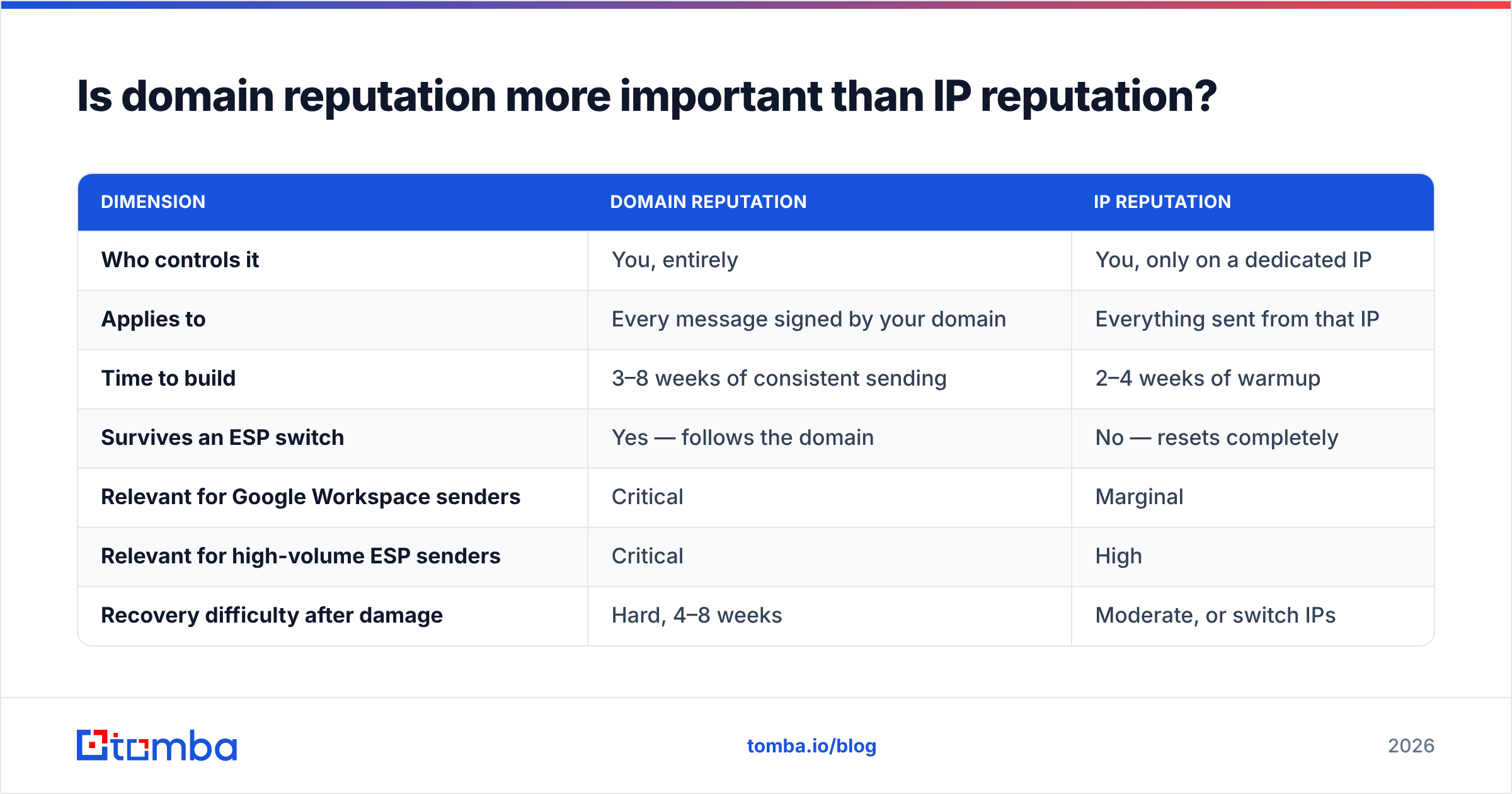
For most B2B senders in 2026, yes — domain reputation is what you should optimize for.
The logic is straightforward. If you send from Google Workspace or Microsoft 365, your outbound traffic leaves via a shared IP pool that thousands of other companies also use. You have essentially zero control over that IP's reputation, and providers know it. So they lean on the signal that is uniquely yours: the domain in the From address and the DKIM signature.
| Dimension | Domain reputation | IP reputation |
|---|---|---|
| Who controls it | You, entirely | You, only on a dedicated IP |
| Applies to | Every message signed by your domain | Everything sent from that IP |
| Time to build | 3–8 weeks of consistent sending | 2–4 weeks of warmup |
| Survives an ESP switch | Yes — follows the domain | No — resets completely |
| Relevant for Google Workspace senders | Critical | Marginal |
| Relevant for high-volume ESP senders | Critical | High |
| Recovery difficulty after damage | Hard, 4–8 weeks | Moderate, or switch IPs |
The practical takeaway: switching sending tools does not fix a reputation problem. If your domain is burned, moving from one platform to another carries the damage with you. Conversely, if you have built a clean domain reputation over months, you can change ESPs without starting from zero.
One more nuance worth knowing — subdomain strategy. Sending cold outbound from mail.yourcompany.com rather than yourcompany.com insulates your primary domain from outbound damage. Subdomain reputation is partially inherited from the root domain but is scored separately, which means a cold-outreach experiment gone wrong will not torch the domain your invoices and support replies come from.
How do you check your email reputation right now?#
You do not need to guess. Five checks, roughly 20 minutes total, give you a defensible picture.
- Google Postmaster Tools — Set up Postmaster Tools for your sending domain and add the DNS TXT verification record. Once you cross the volume threshold you get domain reputation (High / Medium / Low / Bad), spam rate, and authentication pass rates for Gmail recipients specifically. This is the single most useful free data source in deliverability.
- Microsoft SNDS and JMRP — Register with Smart Network Data Services if you run dedicated IPs, and join the Junk Mail Reporting Program to receive complaint feedback loops from Outlook and Hotmail recipients.
- Blocklist status — Check whether your domain or IP appears on Spamhaus, SURBL, or Barracuda. A quick pass with a blacklist checker tells you if you are on a public list; if you are, the delisting process is documented on each list's site and usually requires fixing the underlying cause first.
- Authentication audit — Confirm your SPF record resolves in under 10 DNS lookups, DKIM signs with a 2048-bit key, and DMARC is published at minimum
p=nonewith an rua address collecting reports. Run your domain through an SPF checker and read the DMARC aggregate reports — they show every source sending as you, including ones you forgot about. - Seed testing — Send a copy of your live campaign to a spread of seed accounts (Gmail personal, Google Workspace, Outlook.com, Microsoft 365, Yahoo, and one corporate server) and record folder placement. Do this monthly, not once.
Record the results in a sheet with dates. Reputation is a trend line, and a single snapshot tells you almost nothing about direction.
What damages sender reputation fastest?#
Ranked by how much damage they do per unit of effort:
- Unverified lists. Sending to a scraped or purchased list is the number-one cause of catastrophic reputation loss. Bounce rates of 15–30% are typical, and spam traps come bundled in.
- Volume spikes. Going from 40 emails a day to 800 overnight reads as a compromised account. Providers throttle first and ask questions never.
- No unsubscribe path. If the only way out of your sequence is the spam button, people will use the spam button.
- Aggressive follow-up cadence. Six touches in eight days on a cold contact drives complaints even when the copy is good.
- Link and domain mismatches. Tracking domains that do not match your sending domain, URL shorteners, and links to domains with poor reputations all inherit risk onto your message.
- Stale re-engagement. Emailing a list you last touched 18 months ago is a direct route to recycled spam traps.
Notice that four of six are list problems, not copy problems. Marketers spend weeks A/B testing subject lines while the actual constraint is a contact database nobody validated.
How do you repair a damaged sender reputation?#
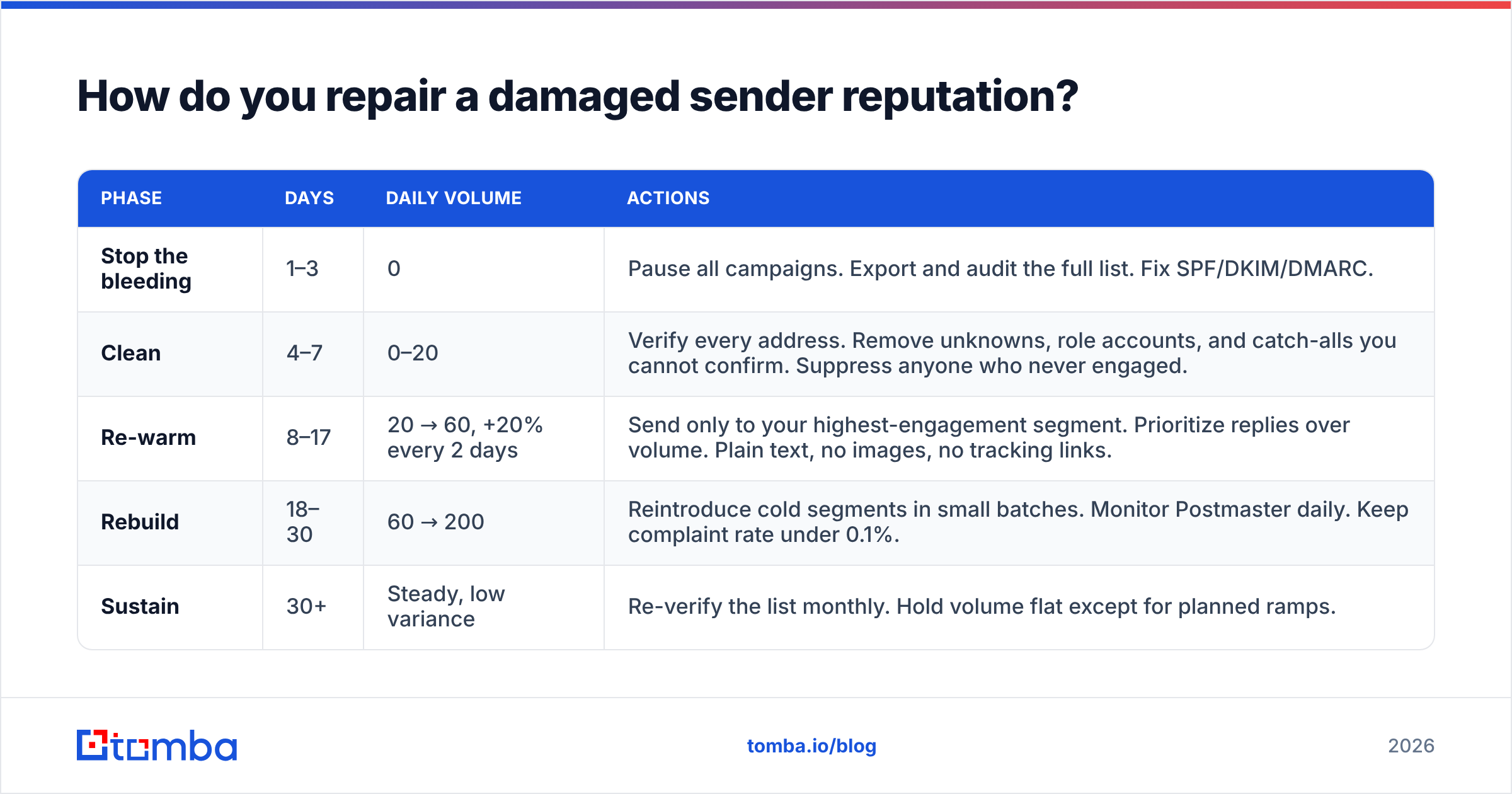
Repair is a volume-and-hygiene problem. Here is a 30-day protocol that works when the damage is moderate (Medium or Low domain reputation, bounce rate 5–12%).
| Phase | Days | Daily volume | Actions |
|---|---|---|---|
| Stop the bleeding | 1–3 | 0 | Pause all campaigns. Export and audit the full list. Fix SPF/DKIM/DMARC. |
| Clean | 4–7 | 0–20 | Verify every address. Remove unknowns, role accounts, and catch-alls you cannot confirm. Suppress anyone who never engaged. |
| Re-warm | 8–17 | 20 → 60, +20% every 2 days | Send only to your highest-engagement segment. Prioritize replies over volume. Plain text, no images, no tracking links. |
| Rebuild | 18–30 | 60 → 200 | Reintroduce cold segments in small batches. Monitor Postmaster daily. Keep complaint rate under 0.1%. |
| Sustain | 30+ | Steady, low variance | Re-verify the list monthly. Hold volume flat except for planned ramps. |
Two rules make or break the protocol.
Do not skip the cleaning phase. Re-warming on a dirty list just re-teaches the provider that you send to invalid addresses. Run the whole database through an email verifier before a single message goes out, and handle catch-all domains explicitly — they return "accept all" at the SMTP layer and will silently inflate your risk unless you resolve them with a dedicated catch-all verifier.
Do not chase volume during re-warm. The temptation is to jump back to full sending as soon as Postmaster flips from Low to Medium. Resist it. A second collapse from the same domain is materially harder to recover from than the first.

Which tools do you actually need for email reputation management?#
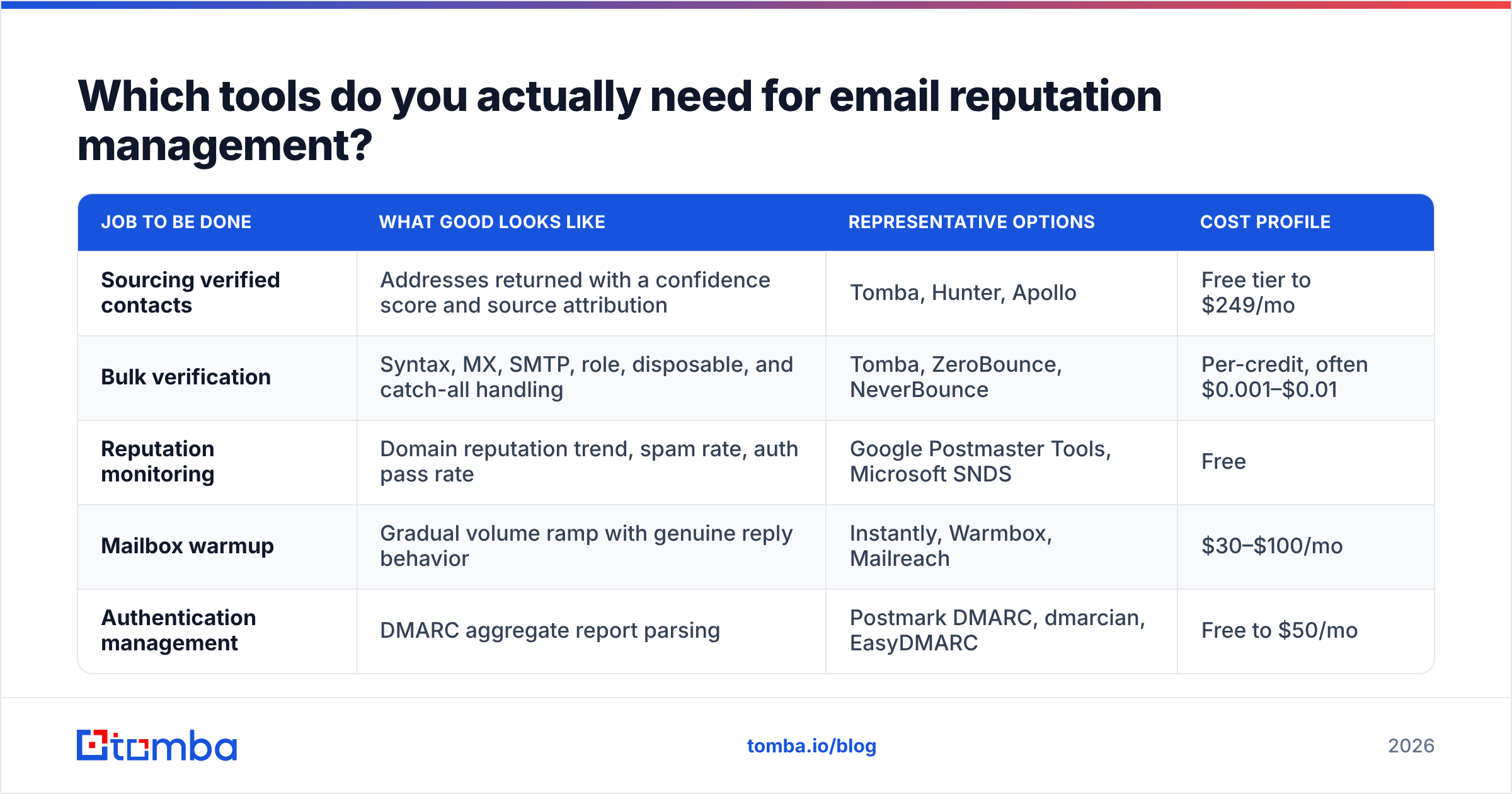
You need coverage across four jobs: sourcing clean addresses, verifying them, monitoring reputation, and warming the mailbox. Very few products do all four well, so most teams assemble a small stack.
| Job to be done | What good looks like | Representative options | Cost profile |
|---|---|---|---|
| Sourcing verified contacts | Addresses returned with a confidence score and source attribution | Tomba, Hunter, Apollo | Free tier to $249/mo |
| Bulk verification | Syntax, MX, SMTP, role, disposable, and catch-all handling | Tomba, ZeroBounce, NeverBounce | Per-credit, often $0.001–$0.01 |
| Reputation monitoring | Domain reputation trend, spam rate, auth pass rate | Google Postmaster Tools, Microsoft SNDS | Free |
| Mailbox warmup | Gradual volume ramp with genuine reply behavior | Instantly, Warmbox, Mailreach | $30–$100/mo |
| Authentication management | DMARC aggregate report parsing | Postmark DMARC, dmarcian, EasyDMARC | Free to $50/mo |
On the sourcing and verification side, Tomba pricing runs a free tier at 25 searches a month, Starter at $49/mo, Growth at $99/mo, and Pro at $249/mo, with an Enterprise tier for custom volume. The reason sourcing and verification belong together is workflow: if the tool that finds the address also scores it and flags catch-all domains before it lands in your sequencer, you remove the handoff where most bad data slips through. For large migrations or quarterly hygiene passes, running the whole file through a bulk email finder in one job is faster and cheaper than verifying record-by-record inside your CRM.
Monitoring should be free. If a vendor is charging you for Gmail reputation data, they are reselling Postmaster Tools.
How do authentication records fit into reputation?#
Authentication is a gate, not a score. Passing SPF, DKIM, and DMARC does not earn you inbox placement — it only qualifies you to be evaluated on the signals that do.
- SPF publishes which servers may send for your domain. Keep the record under 10 DNS lookups or it fails silently.
- DKIM cryptographically signs each message so the receiver can confirm it was not altered and did originate from your domain. Use a 2048-bit key and rotate it annually.
- DMARC tells receivers what to do when SPF or DKIM fails, and — more usefully — sends you aggregate reports of everyone sending as your domain. Start at
p=none, read reports for four weeks, then move toquarantineand finallyreject. The DMARC specification is worth skimming once so you understand alignment, which is where most misconfigurations hide.
Since 2024, bulk senders to Gmail and Yahoo must have all three plus one-click unsubscribe headers. Treat that as the floor, not the goal.
How do you keep reputation healthy long term?#
Build these five habits into your operating cadence and reputation stops being an emergency:
- Verify at the point of entry. Every new contact gets validated before it enters the sequencer, not after the bounce report comes back.
- Re-verify quarterly. B2B email data decays roughly 2–3% per month as people change jobs. A list verified in January is meaningfully dirty by June.
- Cap complaint exposure. Segment aggressively, keep sequences to four touches, and make the unsubscribe link visible rather than buried in 8pt gray.
- Watch the trend, not the day. Pull Postmaster domain reputation weekly into a sheet. Act when the trend turns, not when placement collapses.
- Separate your domains. Transactional mail, marketing mail, and cold outbound should not share a sending identity. One bad campaign should never take down your password reset emails.
If you want the shared vocabulary for these conversations across your team, the sender reputation entry in the glossary covers the definitions your SDRs and your ops lead should be using consistently.
Where should you start this week?#
Start upstream. Reputation problems almost never begin in the copy or the cadence — they begin the moment an unverified address enters your database.
Pull your active outbound list, run it through validation, and look honestly at the invalid percentage. If it is over 5%, you have found your deliverability problem and you can stop reading deliverability blog posts. Fix the input and most of the downstream symptoms resolve on their own.
Tomba's Email Finder returns professional addresses with a confidence score and source attribution attached, so you know what you are sending to before you send it — and the free tier gives you 25 searches a month to test the workflow against your own accounts before committing to a plan. Clean data in, clean reputation out. That ordering does not change.
Related guides#
Ready to find emails that actually work?
Join 150,000+ professionals who stopped guessing and started sending. Free credits on signup — no credit card required.
Get the Tomba newsletter
Practical outbound tactics and product updates — once every two weeks.
About the author