Email Response Time in 2026: Benchmarks, Data, and Fixes
Speed is the cheapest competitive advantage in B2B sales — and most teams measure it wrong. Here are the 2026 email response time benchmarks, how to set an SLA that survives contact with reality, and the fixes that actually move the number.
TL;DR
- Email response time is a revenue metric, not a support metric. Inbound leads contacted within 5 minutes qualify at dramatically higher rates than leads contacted an hour later — the decay curve is steep and it does not flatten out politely.
- Median B2B first-response time still sits between 12 and 42 hours, depending on which study you trust. The gap between "we reply fast" and what the data shows is where deals leak.
- Most teams measure the wrong thing. Average response time hides your worst cases. Track median plus 90th percentile, business-hours-adjusted, or you are grading yourself on a curve you drew.
- Your response time is capped by your routing, not your effort. Alerting, ownership rules, and enrichment-on-arrival fix more than "reply faster" ever will.
- Outbound response time matters too — replies to your cold sequences decay just as fast, and a 3-day gap on a warm reply is the single most expensive delay in outbound.
What is email response time?#
Email response time is the elapsed time between an email arriving in your inbox and your first substantive human reply leaving it. That's the whole definition, and every argument about the metric comes from the three words people quietly drop from it.
Think of it like a restaurant. Response time isn't when the food arrives — it's when a server makes eye contact and says "I'll be right with you." The auto-reply is not eye contact. The bot is not eye contact. In B2B, the clock starts when the message lands and stops when a human says something the recipient can act on.
Three variants get conflated constantly:
- First response time (FRT) — arrival to first human reply. This is the number that correlates with conversion, and the one you should default to.
- Average handle time — total time across the whole thread until resolution. Useful for support, misleading for sales.
- Lead response time — a specific case of FRT measured from form submission rather than email arrival. It's the version most sales benchmarks quote, and it's the harshest.
If your team reports one number and can't tell you which of the three it is, the number is decorative.
Why does email response time matter more than reply rate?#
Because reply rate is a property of your message, and response time is a property of your company — and buyers read the second one as a signal of what working with you will feel like.
The foundational research here is old but has never been meaningfully contradicted. Harvard Business Review's study of online sales leads found firms that responded within an hour were roughly seven times more likely to have a meaningful conversation with a decision-maker than those that waited even two hours — and about 60 times more likely than firms that waited 24 hours or more. Every replication since has found the same shape: a cliff in the first hour, a long tail of diminishing returns after that.
The mechanism is not mysterious. When a buyer emails you, they are in an active evaluation window. They have three tabs open. Two of them are your competitors. Whoever answers first sets the frame for the entire evaluation — they define the criteria, the demo agenda, and the price anchor. Everyone else spends the rest of the cycle reacting.
There's a second-order effect that rarely makes it into the dashboards: slow first responses cause worse conversations, not just fewer of them. By hour 20 the buyer has re-read the competitor's pricing page, formed an opinion, and your reply now has to dislodge it.
What is a good email response time in 2026?#
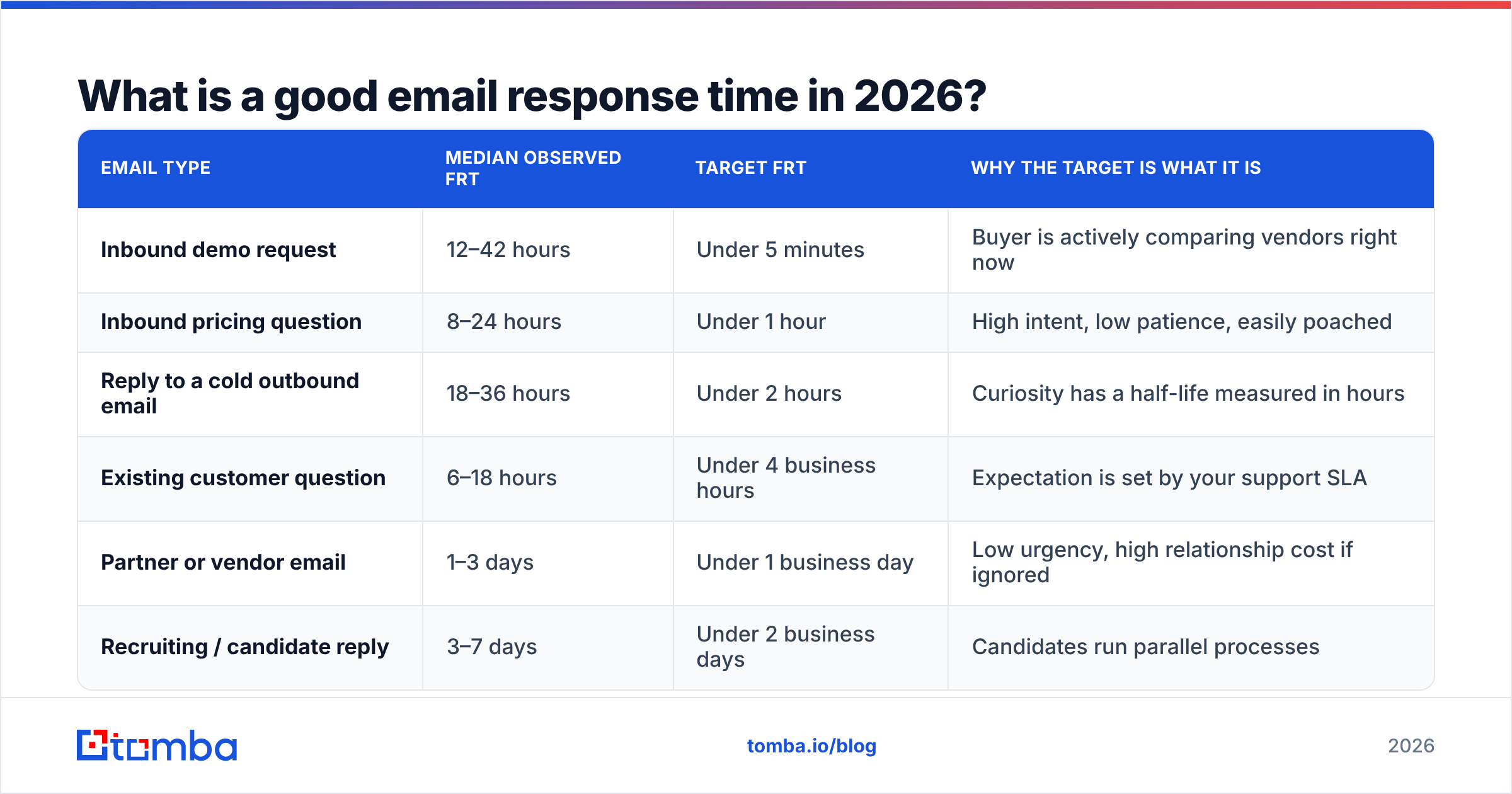
Here's the benchmark table you actually need — the thresholds differ enormously by email type, and holding your whole org to one SLA is how you end up missing all of them.
| Email type | Median observed FRT | Target FRT | Why the target is what it is |
|---|---|---|---|
| Inbound demo request | 12–42 hours | Under 5 minutes | Buyer is actively comparing vendors right now |
| Inbound pricing question | 8–24 hours | Under 1 hour | High intent, low patience, easily poached |
| Reply to a cold outbound email | 18–36 hours | Under 2 hours | Curiosity has a half-life measured in hours |
| Existing customer question | 6–18 hours | Under 4 business hours | Expectation is set by your support SLA |
| Partner or vendor email | 1–3 days | Under 1 business day | Low urgency, high relationship cost if ignored |
| Recruiting / candidate reply | 3–7 days | Under 2 business days | Candidates run parallel processes |
Two things stand out. First, the gap between median and target is largest exactly where the money is. Second, nobody is failing at partner emails — teams fail at the high-intent categories because those arrive unpredictably and nobody owns them by default.
A practical rule that survives audits: if the sender could plausibly be talking to a competitor this week, your SLA is measured in minutes. Otherwise it's measured in business days. That single question routes 90% of your inbox correctly.
How do you measure email response time without fooling yourself?#
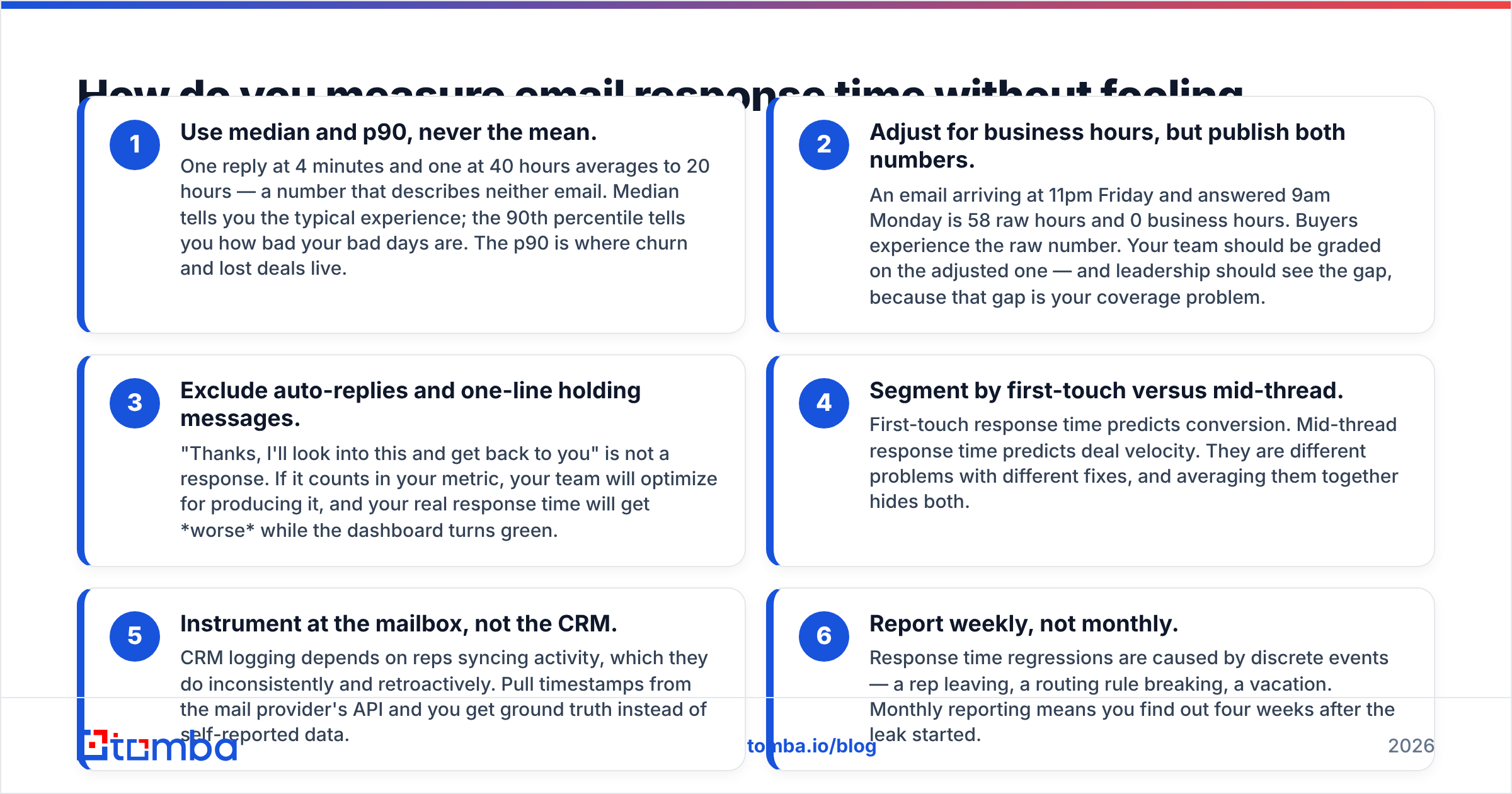
Most response-time dashboards are optimistic fiction. Here's how to build one that isn't:
- Use median and p90, never the mean. One reply at 4 minutes and one at 40 hours averages to 20 hours — a number that describes neither email. Median tells you the typical experience; the 90th percentile tells you how bad your bad days are. The p90 is where churn and lost deals live.
- Adjust for business hours, but publish both numbers. An email arriving at 11pm Friday and answered 9am Monday is 58 raw hours and 0 business hours. Buyers experience the raw number. Your team should be graded on the adjusted one — and leadership should see the gap, because that gap is your coverage problem.
- Exclude auto-replies and one-line holding messages. "Thanks, I'll look into this and get back to you" is not a response. If it counts in your metric, your team will optimize for producing it, and your real response time will get worse while the dashboard turns green.
- Segment by first-touch versus mid-thread. First-touch response time predicts conversion. Mid-thread response time predicts deal velocity. They are different problems with different fixes, and averaging them together hides both.
- Instrument at the mailbox, not the CRM. CRM logging depends on reps syncing activity, which they do inconsistently and retroactively. Pull timestamps from the mail provider's API and you get ground truth instead of self-reported data.
- Report weekly, not monthly. Response time regressions are caused by discrete events — a rep leaving, a routing rule breaking, a vacation. Monthly reporting means you find out four weeks after the leak started.
Keep in mind that response time and email deliverability interact. If your reply lands in spam, you have a perfect measured response time and a zero effective one. Check your sending domain with an SPF checker before you spend a quarter optimizing minutes that never get read.
Why do teams miss their SLA even when they care?#
Because response time is an infrastructure problem wearing a motivation costume.
Watch a slow response in slow motion and the delay is almost never a rep deciding to procrastinate. It's this sequence: the email lands in a shared inbox nobody owns → it sits for 90 minutes → someone forwards it to the "right" person → that person doesn't recognize the company → they spend 20 minutes researching who this is → they discover it's a 400-person target account → now the reply needs to be good, so it gets deferred to a block of focus time tomorrow.
Total elapsed: 26 hours. Total keyboard time: 6 minutes.
Every one of those delays is structural:
- No default owner → shared inboxes with no round-robin are response-time black holes.
- No context on arrival → the rep has to research before replying, so replying becomes a project.
- No alerting → high-intent emails look identical to newsletters in an inbox list.
- Perfectionism on high-value replies → the emails that matter most get delayed the longest, which is exactly backwards.
The context problem is the most fixable and the most ignored. If an inbound reply arrives with company size, funding stage, tech stack, and the sender's role already attached, the rep can respond in three minutes instead of deferring for a day. That's what contact enrichment on inbound is for — it isn't a data-hygiene nicety, it's a latency fix.

How do you actually cut email response time?#
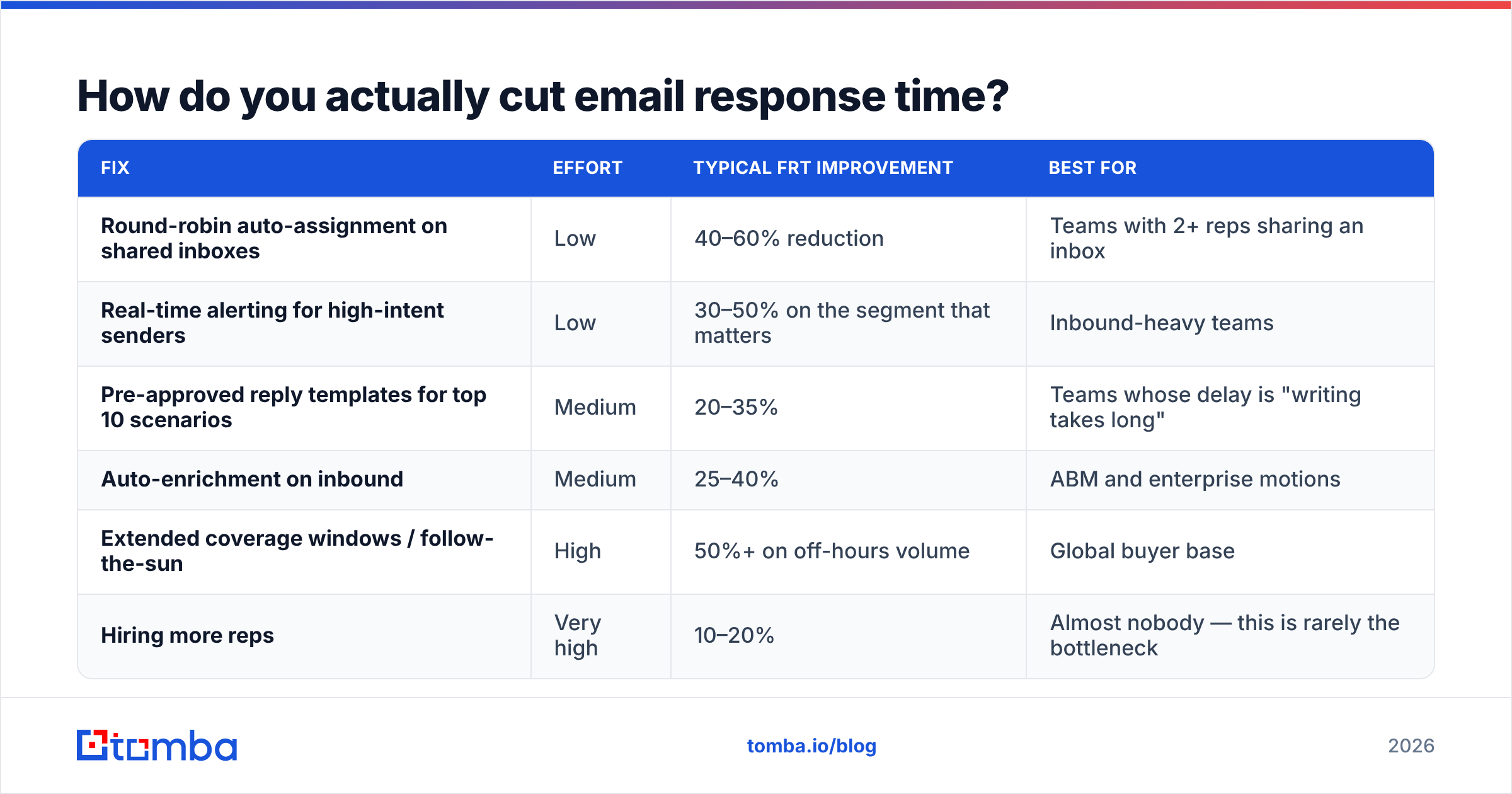
Ranked by impact-per-hour-of-effort, based on what consistently moves the number:
| Fix | Effort | Typical FRT improvement | Best for |
|---|---|---|---|
| Round-robin auto-assignment on shared inboxes | Low | 40–60% reduction | Teams with 2+ reps sharing an inbox |
| Real-time alerting for high-intent senders | Low | 30–50% on the segment that matters | Inbound-heavy teams |
| Pre-approved reply templates for top 10 scenarios | Medium | 20–35% | Teams whose delay is "writing takes long" |
| Auto-enrichment on inbound | Medium | 25–40% | ABM and enterprise motions |
| Extended coverage windows / follow-the-sun | High | 50%+ on off-hours volume | Global buyer base |
| Hiring more reps | Very high | 10–20% | Almost nobody — this is rarely the bottleneck |
Note the last row. Headcount is the most expensive and least effective lever on this list, and it's the one most teams reach for first. If your p90 is 40 hours, adding a rep gets you to 34. Fixing routing gets you to 8.
For the template row specifically: don't write 40 templates. Write ten, cover 80% of your inbound, and keep the first two sentences personal. HubSpot's research on sales email performance consistently shows personalization matters most in the opening — the rest can be structured without hurting reply rates. A library of cold email templates gives you a starting skeleton to adapt rather than a script to paste.
Does faster always win?#
No, and this is where the "5-minute rule" gets abused.
Speed wins when the buyer is in an active comparison window. It stops helping — and starts hurting — in three situations:
When the reply is wrong. A three-minute response that misunderstands the question costs more than a two-hour response that answers it. Speed is a tiebreaker between competent replies, not a substitute for one.
When speed signals desperation. Replying to an enterprise procurement email in 45 seconds at 11pm reads as "this vendor has nothing else going on." For large deals, same-business-day is the ceiling of useful speed.
When you're optimizing outbound send speed instead of reply speed. Blasting sequences faster does not improve response time — it degrades your sender reputation and eventually your deliverability. These are opposite levers that get confused because both contain the word "fast."
There's also a data-quality floor under all of this. Response time only matters on emails that reach a real person. If a meaningful share of your outbound bounces, your reply-speed work is being applied to a shrinking denominator. Running your list through an email verifier before a campaign is the unglamorous prerequisite — the same way checking your response rate is meaningless if 30% of the sends never landed.
What should your team do this week?#
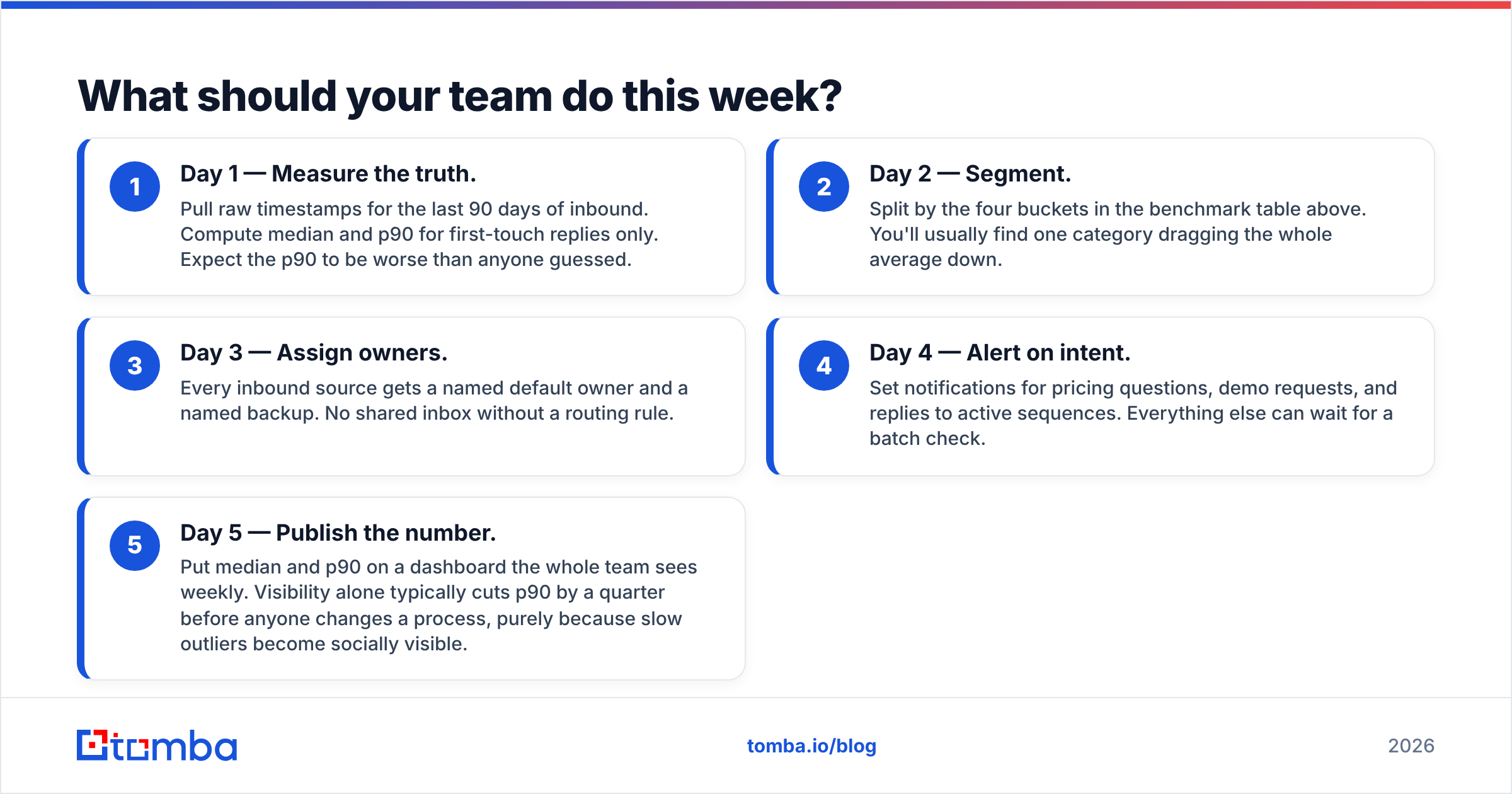
A concrete 5-day sequence that doesn't require a new tool purchase:
- Day 1 — Measure the truth. Pull raw timestamps for the last 90 days of inbound. Compute median and p90 for first-touch replies only. Expect the p90 to be worse than anyone guessed.
- Day 2 — Segment. Split by the four buckets in the benchmark table above. You'll usually find one category dragging the whole average down.
- Day 3 — Assign owners. Every inbound source gets a named default owner and a named backup. No shared inbox without a routing rule.
- Day 4 — Alert on intent. Set notifications for pricing questions, demo requests, and replies to active sequences. Everything else can wait for a batch check.
- Day 5 — Publish the number. Put median and p90 on a dashboard the whole team sees weekly. Visibility alone typically cuts p90 by a quarter before anyone changes a process, purely because slow outliers become socially visible.
Re-measure after 30 days. If p90 hasn't moved, the problem is routing, not effort — go back to step 3.
Where does data quality fit into response time?#
Directly, and earlier than most teams realize. Response time is arrival-to-reply, but the reply-worthiness of your pipeline is set upstream, at list build. Reps stall on replies when they don't know who they're talking to; they don't know who they're talking to when the contact record is a bare email address with no role, company, or seniority attached.
Building lists with verified, enriched contacts from the start — rather than scraping addresses and hoping — removes the research tax from every single reply. If you're sourcing contacts by company, a domain search that returns verified addresses with job titles attached gives reps enough context to answer immediately instead of deferring. Compare that to a raw address list where every reply starts with fifteen minutes of LinkedIn archaeology.
Vendors in this space vary widely on how much context ships with each contact. G2's category listings are a reasonable neutral starting point for comparing coverage and accuracy claims across providers before you commit budget.
Cut the research tax on every reply. The fastest response times come from reps who already know who they're talking to. Build your prospect lists with the Tomba Email Finder — verified professional emails with role and company context attached, so your team replies in minutes instead of deferring to tomorrow. Start free with 25 searches a month; paid plans begin at $49/mo, with full Tomba pricing available if you need bulk volume or API access.
Related guides#
Ready to find emails that actually work?
Join 150,000+ professionals who stopped guessing and started sending. Free credits on signup — no credit card required.
Get the Tomba newsletter
Practical outbound tactics and product updates — once every two weeks.
About the author