Email Scheduling Best Practices: Send Times That Get Replies
Most send-time advice is recycled from 2014 consumer marketing data. Here is what actually moves reply rates in 2026: sending windows, daily volume caps, follow-up spacing, and the scheduling mistakes that quietly kill your domain.
TL;DR
Most email scheduling best practices chase a magic 9:47 a.m. slot. Send pattern matters more: drip-fed volume, a business-hours window, a weekday bias.
The "best time to send" studies you keep seeing are mostly B2C newsletter data. For cold B2B, aim for Tuesday–Thursday, 7–11 a.m. in the recipient's time zone. List quality still outranks all of it.
Cap each mailbox at 30–50 cold sends per day. Spread them over hours, not minutes. Burst sending is the loudest spam signal a scheduler controls.
Space follow-ups on an expanding curve (3 / 4 / 7 / 14 days), not a fixed 2-day drumbeat.
Scheduling can't rescue a dirty list. Verify before you queue, or a well-timed campaign hits dead mailboxes and spam traps.
What Are Email Scheduling Best Practices, and Why Do They Decide Reply Rates?#
Email scheduling best practices come down to one thing: the rules that decide when each message leaves the mailbox. The day. The hour. The gap between sends. The gap between follow-ups. The daily cap per sending account.
Think of it like a restaurant kitchen. You can have perfect ingredients (your list) and a perfect recipe (your copy). But if every plate leaves the pass at the same second, the dining room falls apart. Scheduling is the expediter. It sets the rhythm.
That rhythm gets read by two audiences:
Humans. A message that lands at 3 a.m. sits under forty overnight newsletters by morning. A message that lands at 7:40 a.m. sits near the top of a list your prospect is actively sorting.
Filters. Gmail, Outlook, and every gateway in between profile your sending behavior over time. Google's own bulk sender guidelines are explicit: steady volume and low complaint rates matter more than any single message. A mailbox that sends 8 emails on Monday and 900 on Tuesday looks compromised, not enthusiastic.
Most teams optimize the first audience and ignore the second. That's backwards. Filters decide whether the human ever gets a vote.
What Does the Send-Time Data Actually Say in 2026?#
Here's the uncomfortable part. Almost every "best time to send email" chart on LinkedIn traces back to consumer newsletter data. HubSpot's marketing statistics library is genuinely useful. But its open-rate-by-hour numbers blend e-commerce blasts with B2B outreach, and those are different animals.
What holds up across B2B-specific datasets, and in practice:
Weekday bias is real, and it's not subtle. Tuesday through Thursday beat Monday (inbox backlog) and Friday (checked out). Weekend cold sends get opened and ignored.
Morning wins, but "morning" means recipient-local morning. A 9 a.m. send from Berlin lands at 3 a.m. in New York. If your scheduler doesn't localize, your 9 a.m. rule becomes a 3 a.m. mistake for half the list.
The 7–11 a.m. window is a broad plateau, not a spike. The gap between 8:15 and 9:45 is noise. The gap between 9 a.m. and 11 p.m. is not.
Apple Mail Privacy Protection broke open-rate timing. MPP pre-fetches images, so "opens" cluster at delivery time no matter when a human looked. Judge send time by reply rate instead.
The honest conclusion: good email scheduling best practices pick a sane window and then stop touching it. Send-hour tuning buys you a few points. A clean, verified list often buys you several times that.
How Do You Build a Sending Schedule That Doesn't Burn Your Domain?#
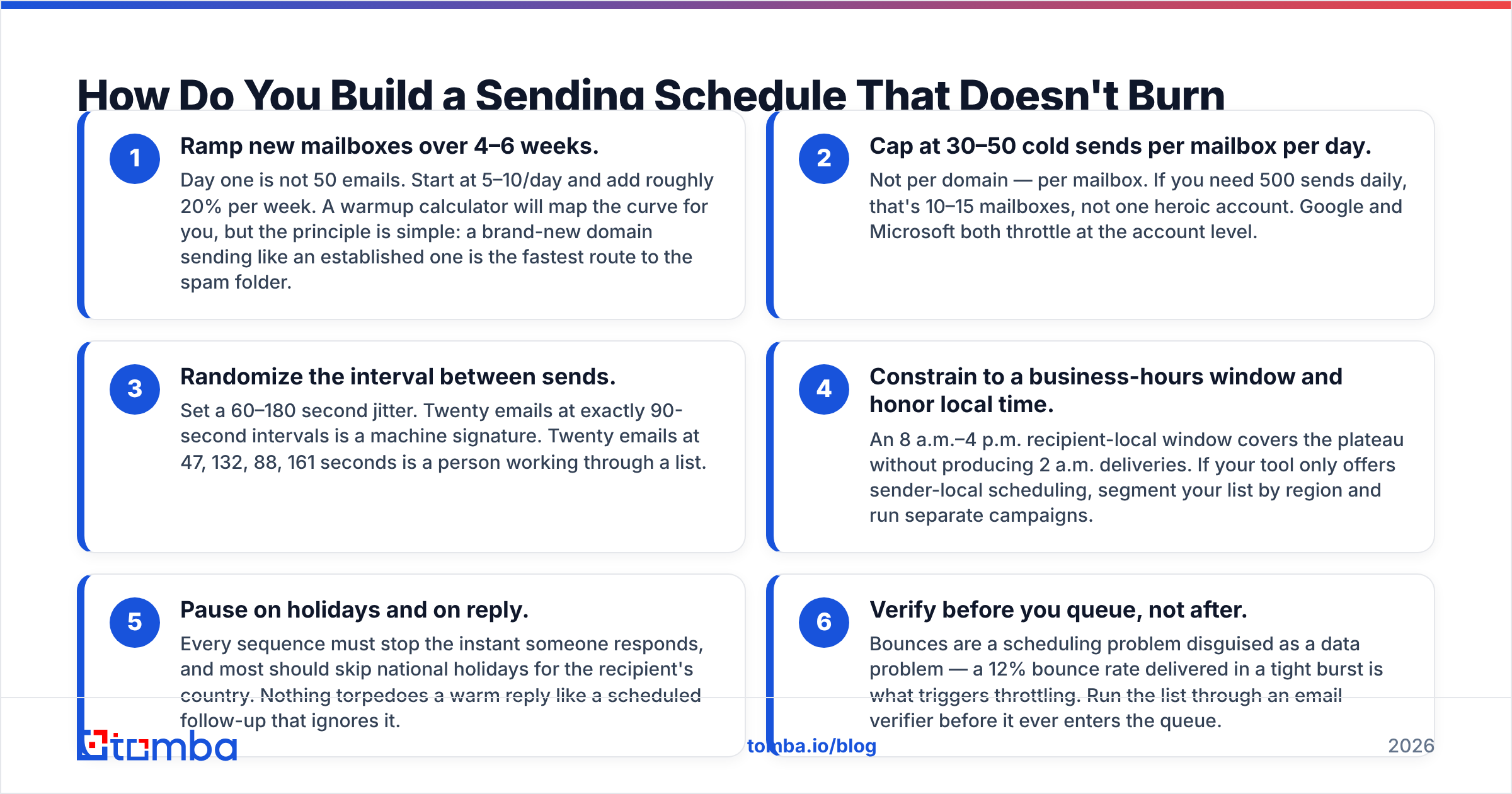
This is where email scheduling best practices earn their keep. Six rules, in priority order:
Ramp new mailboxes over 4–6 weeks. Day one is not 50 emails. Start at 5–10 a day and add about 20% per week. A warmup calculator will map the curve for you. The principle is simple: a brand-new domain that sends like an old one lands in spam.
Cap at 30–50 cold sends per mailbox per day. Not per domain — per mailbox. If you need 500 sends a day, that's 10–15 mailboxes, not one heroic account. Google and Microsoft both throttle at the account level.
Randomize the gap between sends. Set a 60–180 second jitter. Twenty emails at exactly 90-second intervals is a machine signature. Twenty emails at 47, 132, 88, and 161 seconds is a person working through a list.
Use a business-hours window in local time. An 8 a.m.–4 p.m. recipient-local window covers the plateau and avoids 2 a.m. deliveries. If your tool only schedules in sender-local time, split the list by region and run separate campaigns.
Pause on holidays and on reply. Every sequence must stop the moment someone responds. Most should skip national holidays for the recipient's country too. Nothing kills a warm reply like a follow-up that ignores it.
Verify before you queue, not after. Bounces are a scheduling problem in disguise. A 12% bounce rate delivered in a tight burst is what triggers throttling. Run the list through an email verifier before it enters the queue.
Rule six is the one teams skip, and it's the one that compounds. The rest is damage control for a list you should have cleaned first.
Which Scheduling Approach Fits Your Team?#
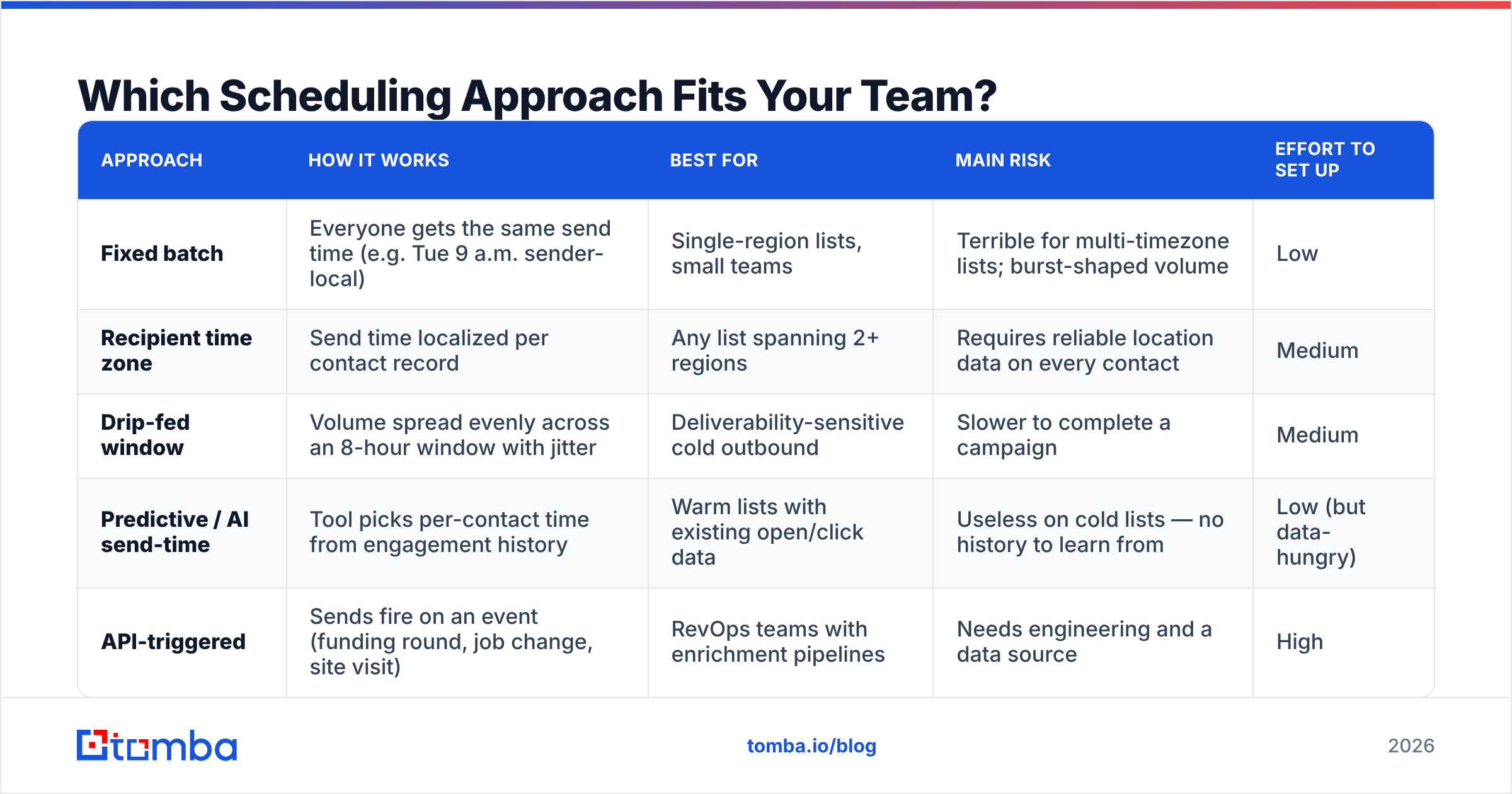
There are five common models. They are not equally good, but they are good at different things.
| Approach | How it works | Best for | Main risk | Effort to set up |
|---|---|---|---|---|
| Fixed batch | Everyone gets the same send time (e.g. Tue 9 a.m. sender-local) | Single-region lists, small teams | Terrible for multi-timezone lists; burst-shaped volume | Low |
| Recipient time zone | Send time localized per contact record | Any list spanning 2+ regions | Requires reliable location data on every contact | Medium |
| Drip-fed window | Volume spread evenly across an 8-hour window with jitter | Deliverability-sensitive cold outbound | Slower to complete a campaign | Medium |
| Predictive / AI send-time | Tool picks per-contact time from engagement history | Warm lists with existing open/click data | Useless on cold lists — no history to learn from | Low (but data-hungry) |
| API-triggered | Sends fire on an event (funding round, job change, site visit) | RevOps teams with enrichment pipelines | Needs engineering and a data source | High |
For most B2B outbound teams, the answer is a drip-fed window localized to the recipient's time zone. Predictive send-time is oversold for cold email. An algorithm trained on engagement history can't predict anything for a contact who has never engaged with you.
The API-triggered model has the most leverage, but it's a different discipline. If you pull contacts programmatically — through the Tomba API or an equivalent — you can schedule sends against real trigger events instead of the calendar. A message that arrives three days after someone joins a new company beats any Tuesday-morning heuristic.
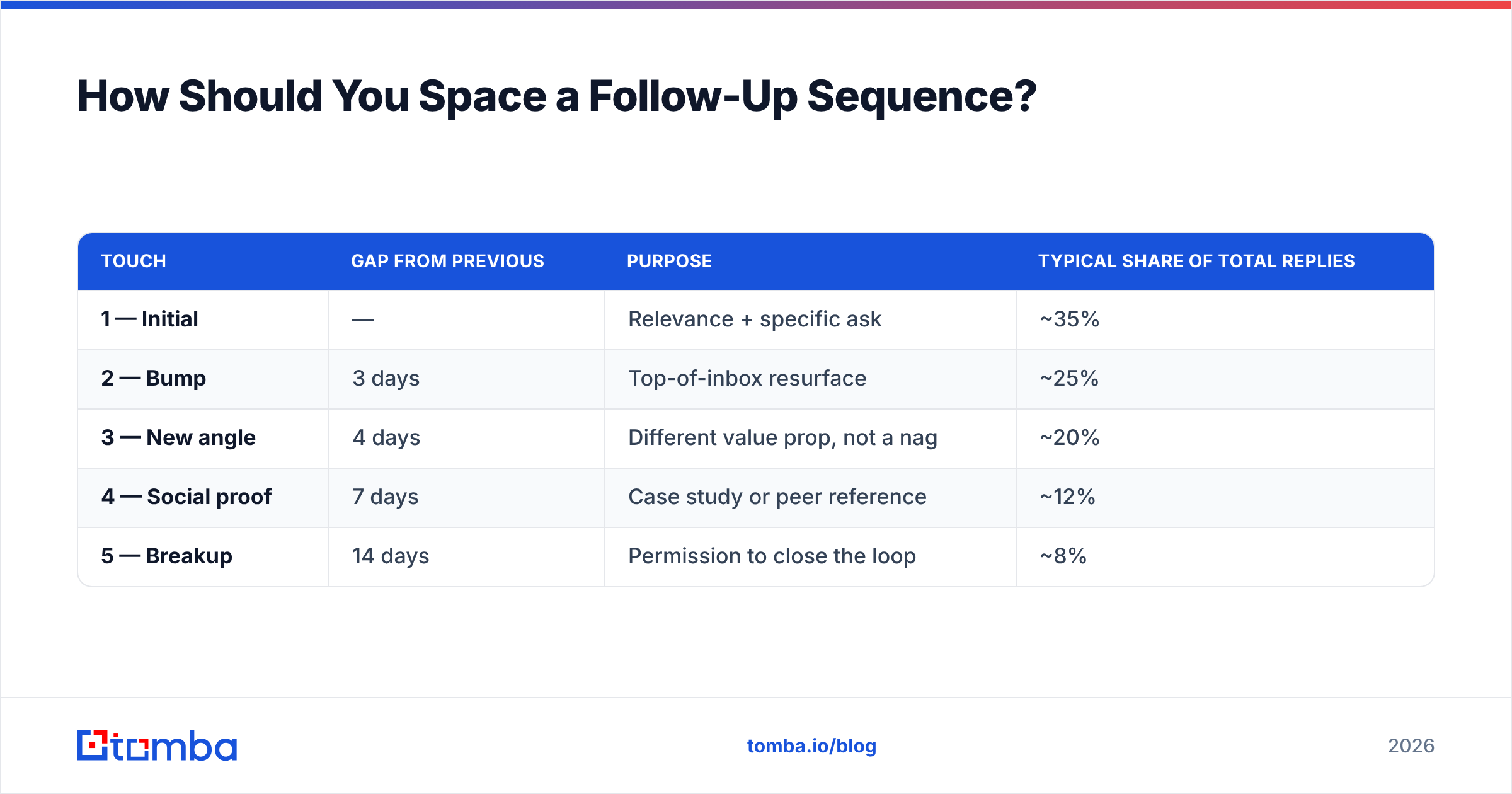
How Should You Space a Follow-Up Sequence?#
Send time gets all the attention. Spacing is where most email scheduling best practices fall apart. Sending every two days for eight touches reads as automated pestering, because it is.
Use an expanding curve instead:
| Touch | Gap from previous | Purpose | Typical share of total replies |
|---|---|---|---|
| 1 — Initial | — | Relevance + specific ask | ~35% |
| 2 — Bump | 3 days | Top-of-inbox resurface | ~25% |
| 3 — New angle | 4 days | Different value prop, not a nag | ~20% |
| 4 — Social proof | 7 days | Case study or peer reference | ~12% |
| 5 — Breakup | 14 days | Permission to close the loop | ~8% |
Three things this shape gets right:
It front-loads. Roughly 60% of replies land on touches one and two. If you only have room for a short sequence, a tight 3-day bump beats three extra late touches.
It widens. Each gap grows, which mimics how a real person follows up: persistent early, respectful later.
It ends. Five touches over about 28 days is a complete sequence. Sequences that run 12 touches over three months generate complaints. Complaints are the metric mailbox providers weigh most heavily against your sender reputation.
One legal note. Your scheduling logic must respect opt-outs right away. In the US, the CAN-SPAM Act gives you 10 business days to process one. Any scheduler worth using suppresses on unsubscribe automatically — check that yours does before you trust it.

What Breaks When You Schedule Around Time Zones and Holidays?#
Time zone handling breaks more email scheduling best practices than any other single factor. It fails in three predictable ways.
Missing location data. Say a contact record has no country, city, or phone country code. Your scheduler falls back to a default, usually the sender's zone. On a list where 30% of records lack location, that's 30% of your campaign sending at random local hours. Fix it upstream with contact enrichment instead of patching it downstream.
Daylight saving drift. The US, EU, and Australia change clocks on different dates. For several weeks each year, a schedule built on fixed UTC offsets is off by an hour. Store zones as IANA identifiers (America/New_York), never as offsets (UTC-5).
Holiday blindness. A cold pitch on Thanksgiving, Diwali, or the second week of August in France is wasted volume. Most schedulers let you exclude dates. Almost nobody sets it up.
There's a subtler failure too: the reply-window mismatch. Say you send at 7 a.m. recipient-local, but your SDRs all work one shift in one time zone. Replies from APAC prospects then sit unanswered for 14 hours. Reply speed tracks meeting-booked rate more closely than send time does. Either stagger coverage or shift your send windows toward hours your team can cover.
Which Tools Handle Scheduling, and Where Does Data Fit In?#
Two categories get conflated constantly. Keep them separate.
Sending platforms (Instantly, Smartlead, Saleshandy, Reply.io, Outreach, Salesloft) own the schedule itself: mailbox rotation, warmup, jitter, sequence logic, reply detection. This is where your scheduling rules live.
Data platforms (Tomba, and others in the enrichment space) own what goes into the schedule. They find the address, verify it's deliverable, and add the location and company fields your time zone logic depends on. Peer providers like BookYourData take a database-first approach to the same problem, which suits teams that prefer buying a pre-built list over building one query by query.
You need both. A sending platform with a great scheduler and a 15% bounce rate will still get throttled.
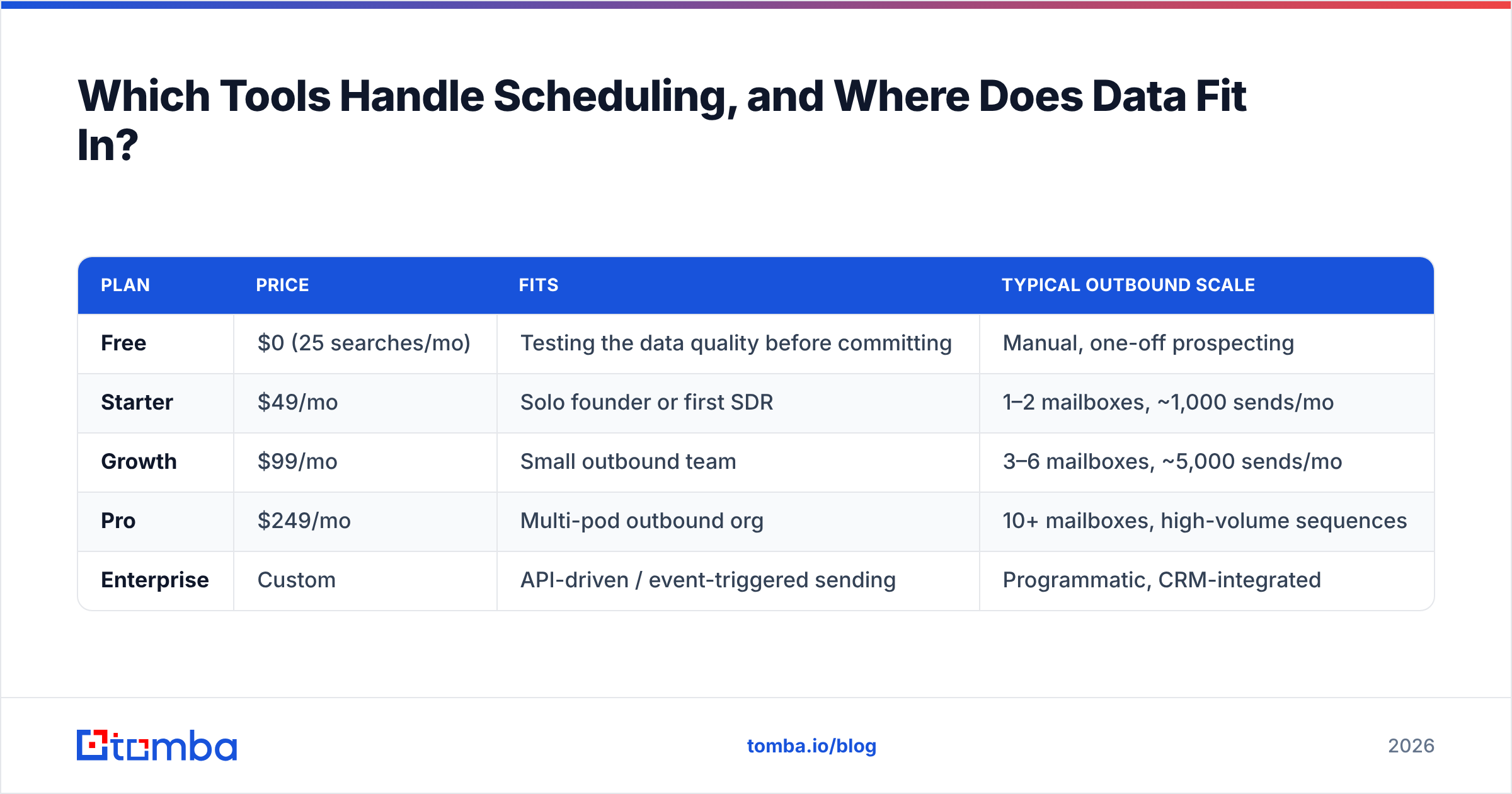
Here's how Tomba's tiers map to outbound volume, since sending capacity and data capacity have to be planned together:
| Plan | Price | Fits | Typical outbound scale |
|---|---|---|---|
| Free | $0 (25 searches/mo) | Testing the data quality before committing | Manual, one-off prospecting |
| Starter | $49/mo | Solo founder or first SDR | 1–2 mailboxes, ~1,000 sends/mo |
| Growth | $99/mo | Small outbound team | 3–6 mailboxes, ~5,000 sends/mo |
| Pro | $249/mo | Multi-pod outbound org | 10+ mailboxes, high-volume sequences |
| Enterprise | Custom | API-driven / event-triggered sending | Programmatic, CRM-integrated |
Full Tomba pricing covers credit allocations per tier. The practical point: if you send 5,000 emails a month, you need about 5,000 verified contacts a month feeding the queue. Sizing data at a fraction of send volume is how campaigns end up recycling the same tired list.
Building lists in batches? Run a bulk email finder job the week before a campaign, then verify the output. Find, verify, enrich, then schedule.
Which Email Scheduling Best Practices Do Teams Get Wrong Most Often?#
Optimizing send hour before fixing bounce rate. A 20-minute list cleanup beats 20 hours of send-time A/B testing.
Sending the whole campaign in one burst. 500 emails in six minutes is the clearest "this is a bot" signal you can send.
One mailbox doing all the work. Rotate across mailboxes and domains. Never risk your primary corporate domain on cold volume.
A/B testing send time and copy at once. You'll learn nothing. Fix the schedule, then test copy against it.
Ignoring reply-detection edge cases. Out-of-office auto-replies shouldn't count as engagement or stop the sequence. Check how your tool classifies them.
Never re-verifying. B2B contact data decays about 2–2.5% per month from job changes alone. A list verified in January is meaningfully worse by June.
Scheduling into catch-all domains blind. Catch-all servers accept everything, then bounce later. That often happens mid-campaign, the worst possible time. Screen them with a catch-all verifier before the send.
What Should You Actually Change This Week?#
These three email scheduling best practices give you the most gain for the least work:
Move every campaign to a recipient-local 8 a.m.–4 p.m. window with 60–180 second jitter.
Cap each mailbox at 40 sends a day, and add mailboxes rather than raising the cap.
Re-verify your entire active list and suppress anything that isn't confirmed deliverable.
That's a couple of hours of work. It will do more for your reply rate than any send-hour experiment you run this quarter.
Start with the list, not the calendar. Every one of the email scheduling best practices above assumes the addresses are real. The best schedule in the world delivers to whatever you put in it. So the highest-leverage move is making sure those addresses are real, current, and complete enough for your time zone logic to work. Tomba's Email Finder pulls verified professional addresses by domain, name, or company, with location and company fields attached. Your scheduler then knows when local morning actually is. The free tier gives you 25 searches to test the accuracy on your own target accounts — run it against ten prospects you already know, then compare.
Related guides#
Ready to find emails that actually work?
Join 150,000+ professionals who stopped guessing and started sending. Free credits on signup — no credit card required.
Get the Tomba newsletter
Practical outbound tactics and product updates — once every two weeks.
About the author