Email Search Tools in 2026: How to Choose and Compare Them
Every email search tool claims 95%+ accuracy. Real-world hit rates land far lower. Here's how the main categories differ, what they actually cost per usable contact, and how to test them before you commit.
TL;DR
- "Email search tools" covers four different product types — pattern finders, database lookups, LinkedIn extractors, and prebuilt list vendors. Buying the wrong type is the most common and most expensive mistake.
- Advertised accuracy (95%+) and delivered accuracy (55–85% on real prospect lists) are not the same number. The gap comes from stale records, catch-all domains, and role accounts.
- Judge tools on cost per verified, deliverable email, not on headline price or credit count. A $39/mo plan with a 50% hit rate is more expensive than a $99/mo plan at 88%.
- Search and verification are separate jobs. Any tool that returns an address without a deliverability status is handing you an unfinished result.
- Test with 100 known-good contacts from your actual ICP before you subscribe. Vendor demo domains are cherry-picked.
What are email search tools, and how do they actually work?#
An email search tool takes something you know — a name, a company domain, a LinkedIn URL, an article byline — and returns a business email address you can actually send to.
Think of it like finding a phone number for a house when you know the street address. One approach is to look it up in a directory that already recorded it. Another is to work out the numbering pattern on that street and infer it. Email search tools do both, and the good ones do them in the same request.
Under the hood, three mechanisms are doing the work:
1. Pattern inference. Most companies use one dominant format: first.last@, flast@, first@, or f.last@. A tool crawls public sources for a domain, detects the dominant pattern, then applies it to your target's name. This is why a company email pattern check is a useful first move before any bulk run.
2. Database lookup. The vendor has already indexed hundreds of millions of contact records from public pages, press releases, GitHub commits, conference sites, job boards, and partner data. Your query hits an index, not the live web.
3. SMTP validation. Once a candidate address exists, the tool opens a conversation with the recipient's mail server and asks whether the mailbox exists — without sending anything. This is where a returned address earns a confidence score.
A tool that only does step 1 is a guesser. A tool that only does step 2 is a static database that decays roughly 25–30% per year as people change jobs. The combination is what produces a usable hit rate.
Which types of email search tools should you compare?#
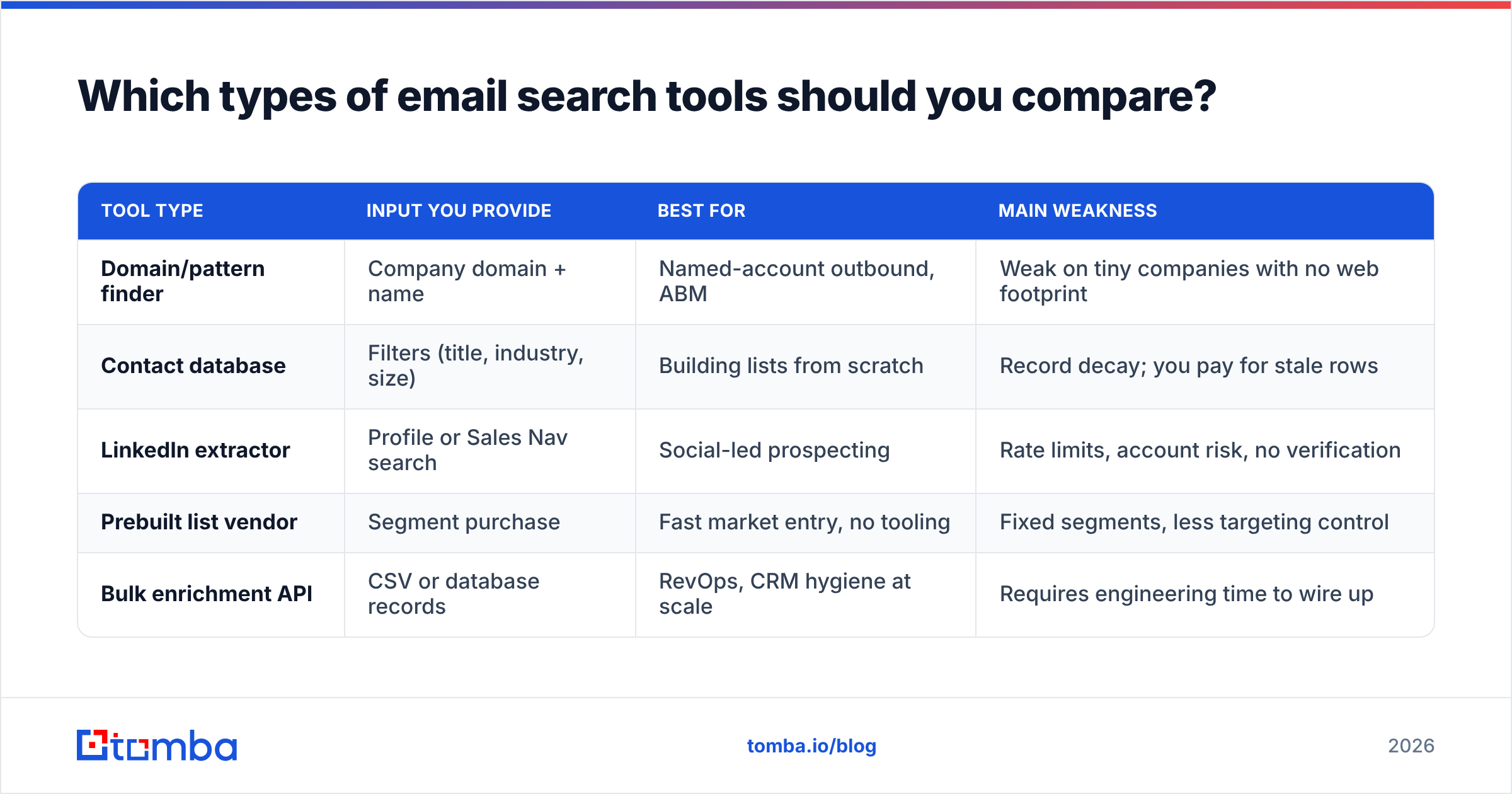
Not all of these compete with each other. Pick the row that matches how you actually source prospects.
| Tool type | Input you provide | Best for | Main weakness |
|---|---|---|---|
| Domain/pattern finder | Company domain + name | Named-account outbound, ABM | Weak on tiny companies with no web footprint |
| Contact database | Filters (title, industry, size) | Building lists from scratch | Record decay; you pay for stale rows |
| LinkedIn extractor | Profile or Sales Nav search | Social-led prospecting | Rate limits, account risk, no verification |
| Prebuilt list vendor | Segment purchase | Fast market entry, no tooling | Fixed segments, less targeting control |
| Bulk enrichment API | CSV or database records | RevOps, CRM hygiene at scale | Requires engineering time to wire up |
Most teams end up running two: a database or list source for breadth, and a finder plus verifier for the accounts that matter. The domain search approach — give it a company URL, get every discoverable mailbox with confidence scores — is usually the fastest way to check whether a vendor's coverage is real for your segment.

How accurate are email search tools in 2026?#
Short answer: the honest range is 60–90%, and where you land depends far more on your target list than on the vendor's marketing page.

Three variables move accuracy more than anything else:
Company size. Enterprise domains (1,000+ employees) are heavily indexed and highly patterned — expect 85–92% hit rates. Sub-20-person companies using Google Workspace with no public directory can drop to 45–55% across every vendor tested.
Geography. North American and Western European coverage is deep. APAC, LATAM, and Eastern European mid-market coverage is materially thinner at every vendor, including the ones that do not say so.
Catch-all domains. Roughly 15–20% of business domains accept mail to any address, so SMTP validation returns "accepted" for asdfgh@company.com just as readily as for the real person. A tool that reports these as "valid" is inflating its own score. This is exactly the case a catch-all verifier exists to handle — it uses secondary signals instead of trusting the server's blanket yes.
When you read a comparison, insist on the distinction between:
- Hit rate — percentage of queries that returned any address at all.
- Accuracy — percentage of returned addresses that were genuinely deliverable.
- Bounce rate — what actually happened when you sent.
A vendor reporting 97% is almost always quoting accuracy on the subset it chose to answer, while quietly declining 40% of your list. Multiply the two: 60% hit rate × 97% accuracy = 58% of your list reached. That is the number that matters.
Which email search tools compare best in 2026?#
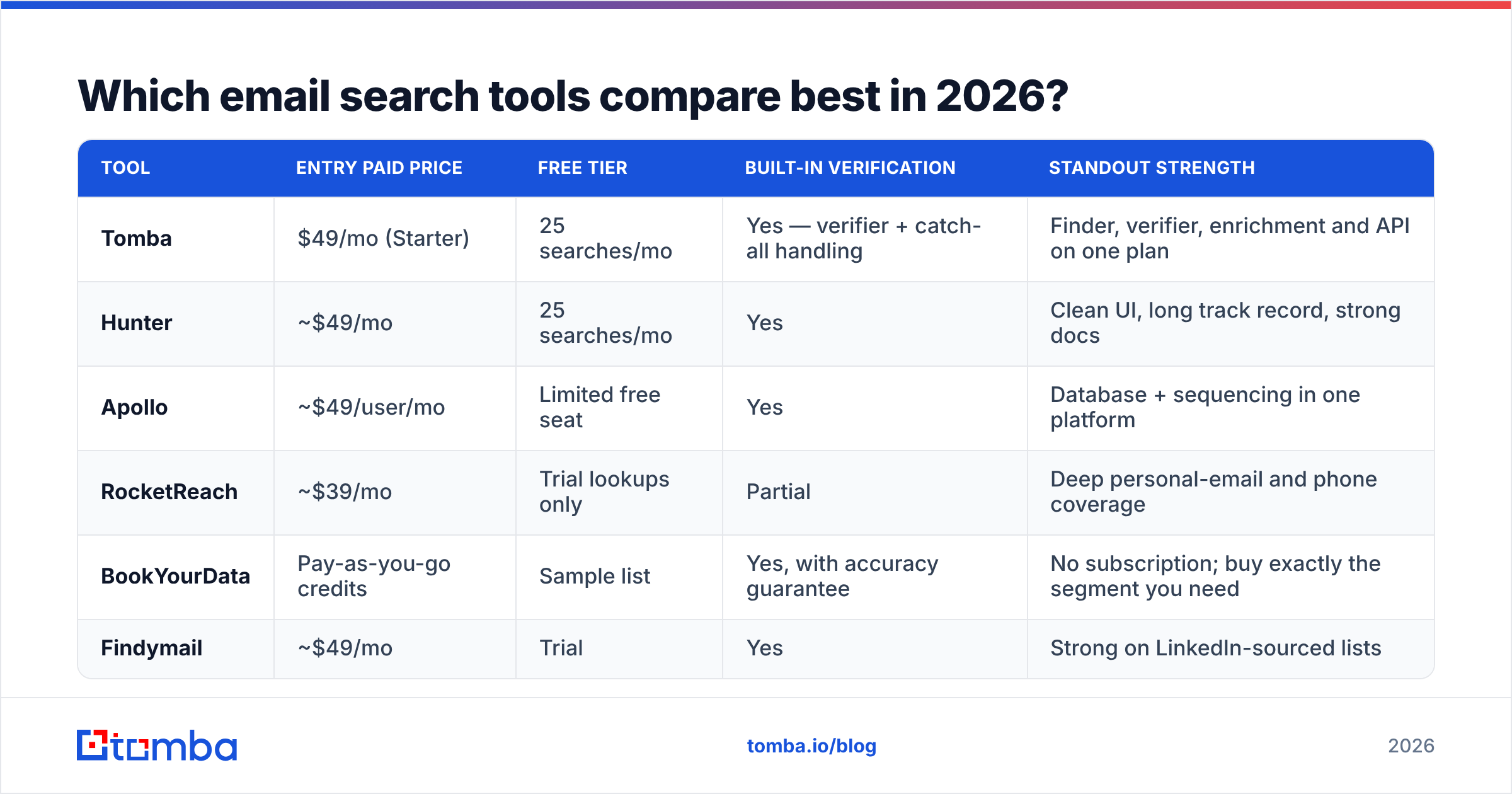
Here is a like-for-like view of the tools most B2B teams shortlist. List prices are as published in early 2026 — always confirm on the vendor's own pricing page before you buy, since credit structures change often.

| Tool | Entry paid price | Free tier | Built-in verification | Standout strength |
|---|---|---|---|---|
| Tomba | $49/mo (Starter) | 25 searches/mo | Yes — verifier + catch-all handling | Finder, verifier, enrichment and API on one plan |
| Hunter | ~$49/mo | 25 searches/mo | Yes | Clean UI, long track record, strong docs |
| Apollo | ~$49/user/mo | Limited free seat | Yes | Database + sequencing in one platform |
| RocketReach | ~$39/mo | Trial lookups only | Partial | Deep personal-email and phone coverage |
| BookYourData | Pay-as-you-go credits | Sample list | Yes, with accuracy guarantee | No subscription; buy exactly the segment you need |
| Findymail | ~$49/mo | Trial | Yes | Strong on LinkedIn-sourced lists |
A few honest notes on that table:
- Apollo is not really a finder — it is a database plus a sequencer. If you already own an outbound sending stack, you may be paying twice. If you don't, the bundling is genuinely good value. Teams who want the data without the sequencer usually look at an Apollo alternative that bills on credits instead of seats.
- RocketReach wins when you need mobile numbers and personal addresses alongside work email. Its per-lookup ceiling on lower tiers catches people out.
- BookYourData takes a different shape entirely: pay-as-you-go credits with an accuracy guarantee and no monthly commitment. If your motion is "buy 3,000 verified CFOs in fintech once a quarter" rather than "search continuously," that model is cleaner and often cheaper than a subscription you underuse.
- Hunter remains the reference point for pattern-based search, and its public confidence scoring is well documented. Coverage skews toward companies with a solid web presence.
- Tomba bundles finder, verifier, catch-all detection, phone finder, and enrichment under one credit pool, which matters when you would otherwise pay two vendors for one workflow.
For third-party sentiment rather than vendor claims, G2's email-finder category is the least-bad source — filter reviews to your own company size, because enterprise and SMB experiences diverge sharply.
How should you compare pricing across email search tools?#
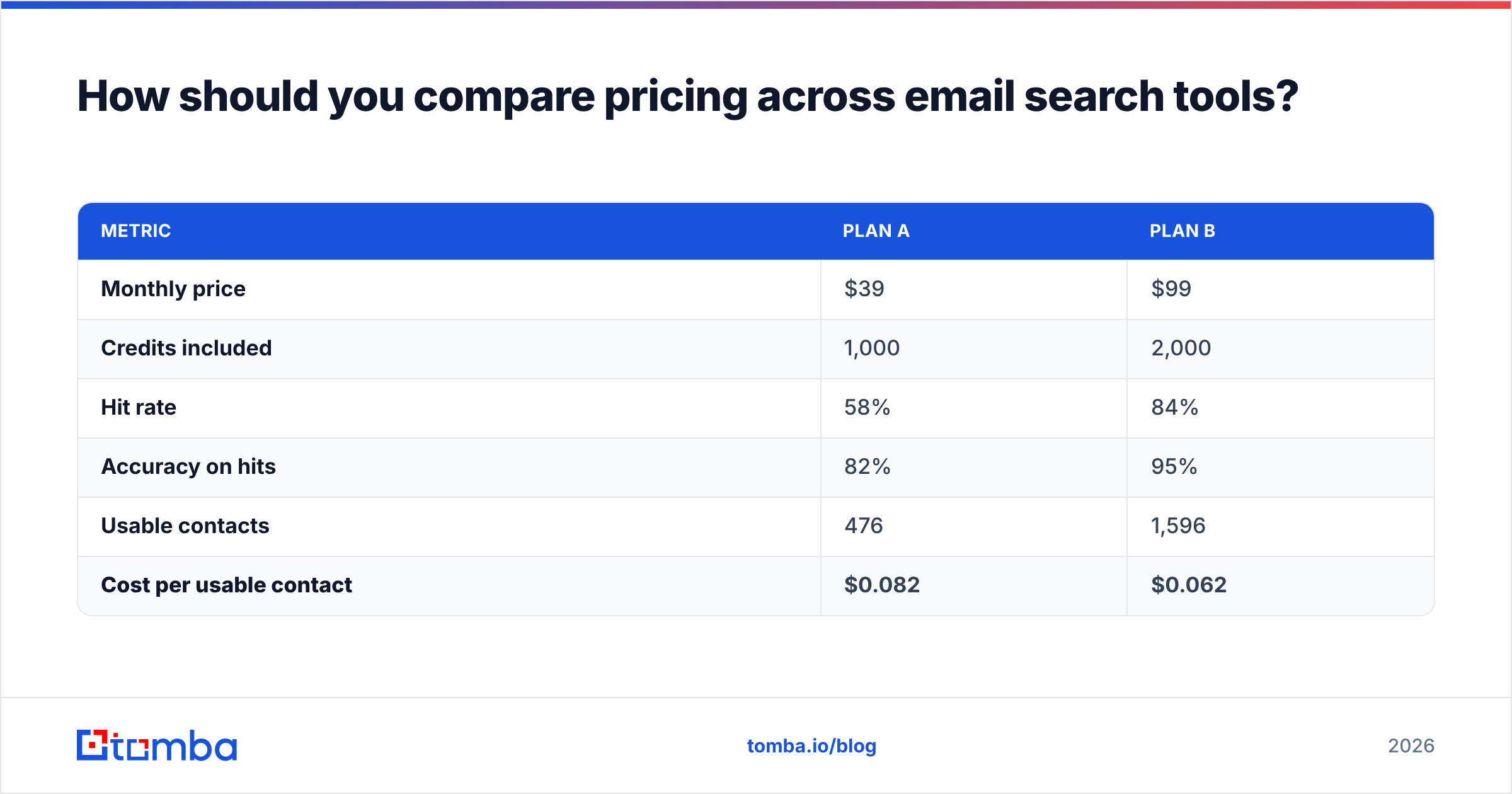
Stop comparing monthly prices. Compare cost per verified, deliverable contact.
The formula:
Cost per usable contact = monthly price ÷ (credits × hit rate × accuracy)Run it on two hypothetical plans:
| Metric | Plan A | Plan B |
|---|---|---|
| Monthly price | $39 | $99 |
| Credits included | 1,000 | 2,000 |
| Hit rate | 58% | 84% |
| Accuracy on hits | 82% | 95% |
| Usable contacts | 476 | 1,596 |
| Cost per usable contact | $0.082 | $0.062 |
Plan A looks 60% cheaper and is 32% more expensive per outcome — before you count the reputation damage from the extra bounces.
Four credit-model traps to check in the contract before signing:
- Do failed searches consume credits? Some vendors charge for a miss. Over a 5,000-row list with a 60% hit rate, that is 2,000 credits burned for nothing.
- Do verifications cost separate credits? If so, add them to the denominator. A finder that includes verification at no extra charge is materially cheaper than the sticker price suggests.
- Do credits roll over? Most don't. Seasonal outbound teams lose 30–40% of what they buy.
- Is billing per seat or per credit? Per-seat pricing punishes teams where five reps each do light research. Compare against transparent Tomba pricing tiers — Free at 25 searches/mo, Starter $49, Growth $99, Pro $249 — to see where a per-seat model stops making sense.
Do you still need a verifier if the search tool verifies?#
Yes, in two situations.
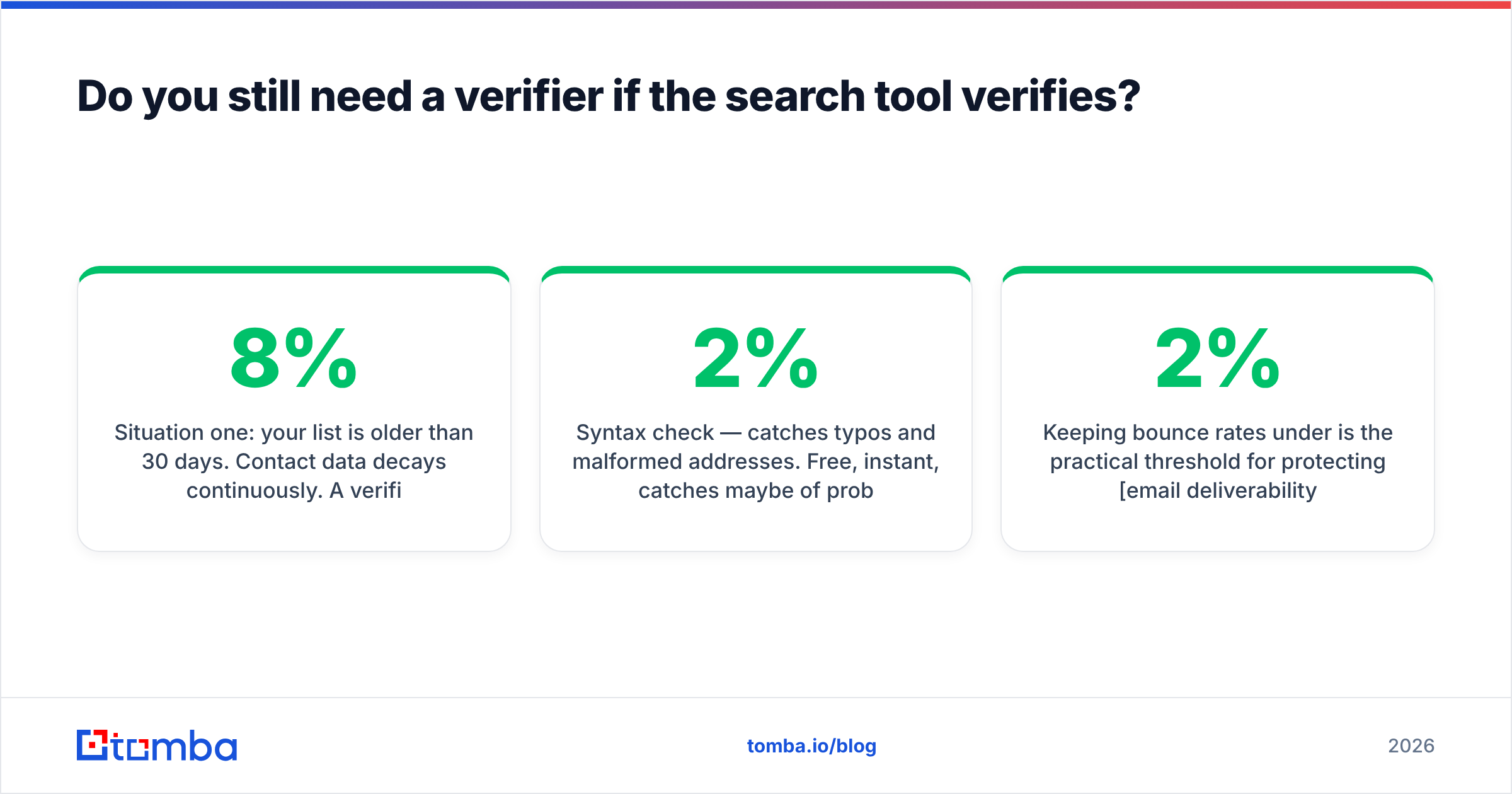
Situation one: your list is older than 30 days. Contact data decays continuously. A verified-at-search-time address that has sat in a spreadsheet for a quarter is roughly 7–8% stale. Re-running an email verifier pass immediately before a send costs pennies and protects your domain.
Situation two: you're mixing sources. Anything scraped, exported from an old CRM, bought as a list, or collected at an event has not been through the same validation your finder applies. Treat it as unverified until proven otherwise.
The mechanics are worth understanding because they explain what a verifier can and cannot tell you:
- Syntax check — catches typos and malformed addresses. Free, instant, catches maybe 2% of problems.
- Domain and MX check — confirms the domain exists and accepts mail at all. Catches dead companies.
- SMTP probe — asks the mail server whether the specific mailbox exists. The core signal.
- Catch-all detection — flags domains that answer yes to everything, so you can route them to a different confidence bucket rather than treating them as clean.
- Role and disposable filtering — strips
info@,sales@,support@and burner domains that inflate your list and depress reply rates.
Keeping bounce rates under 2% is the practical threshold for protecting email deliverability. Above 5%, mailbox providers start throttling you, and no amount of copy quality recovers that. Google's own sender guidelines make the bounce-and-complaint thresholds explicit — worth reading once before you scale sending volume.
What does a working email search workflow look like?#
The tool is a component, not a process. This sequence is what separates 2% bounce rates from 15% ones:
- Define the account list first. Pull companies by firmographics before you touch a single contact. Searching for people at companies you haven't qualified wastes credits.
- Detect the email pattern per domain. One pattern check per company beats one search per person on cost, especially for accounts where you're targeting three or four people.
- Run the finder in bulk. Use a bulk email finder or the API rather than the UI once you're past a few hundred rows. Manual searching does not scale past about 50 contacts an hour.
- Segment by confidence score. High-confidence goes into your primary sequence. Catch-all and medium-confidence goes into a separate, smaller-volume send so a bad batch can't poison your main domain.
- Re-verify immediately before send. Non-negotiable if more than 30 days have passed since the search.
- Feed results back. Log bounces by source and by segment. After two months you'll know exactly which vendor performs on your ICP — which is the only benchmark that ever really mattered.
Teams running this at scale wire it into the CRM directly through the Tomba API or a Zapier/HubSpot connection, so enrichment happens at record creation rather than as a monthly cleanup project.
What mistakes quietly ruin hit rates?#
Testing on the wrong sample. Vendors demo on Fortune 500 domains where every tool scores 90%+. Test on 100 companies drawn from your actual pipeline — the same size, region, and industry mix — and the spread between vendors becomes obvious.
Ignoring role accounts in the count. If 12% of returned addresses are info@, your effective hit rate is 12 points lower than reported.
Sending to every catch-all. These addresses accept everything, then silently discard most of it. They inflate your "delivered" number while producing zero replies and, in some configurations, spam-trap hits.
Buying on credits per dollar. More credits at a lower hit rate is a worse deal, every time. Run the cost-per-usable-contact formula.
Treating enrichment as optional. An email with no title, company size, or tech stack attached gives you nothing to personalize with. Contact enrichment at the same moment as the search is what makes the first line of the email writable.
Where should you start?#
If you're evaluating email search tools right now, do this in order: pull 100 contacts you already have verified addresses for, run them blind through two or three vendors' free tiers, and score each on hit rate and accuracy separately. That test costs you an afternoon and saves you a year of paying for a tool that quietly misses half your market.
When you're ready to run that test, the Tomba Email Finder gives you 25 free searches a month with verification and catch-all detection included — no credit card, no separate verifier subscription, and the same credit pool covers domain search, enrichment, and the API when you outgrow the UI. Start with your own worst-case account list, not the easy one. The results will tell you everything the pricing page won't.
Related guides#
Ready to find emails that actually work?
Join 150,000+ professionals who stopped guessing and started sending. Free credits on signup — no credit card required.
Get the Tomba newsletter
Practical outbound tactics and product updates — once every two weeks.
About the author