Email Sender Score: How It Works and How to Fix Yours
Your email sender score is not one number — it's four different systems judging you at once. Here's what each mailbox provider actually measures, how to check your score for free, and a 30-day repair plan that works.

TL;DR
- There is no single "email sender score." Gmail, Microsoft, Validity, and Cisco Talos each run separate reputation systems, and they disagree with each other constantly.
- The Validity Sender Score (0–100) that most people mean is an IP-level metric — useful for shared/dedicated IP monitoring, close to useless if you send from Google Workspace or Microsoft 365.
- Recipient behavior outweighs technical setup. Spam complaints above 0.3% and low reply rates sink you faster than a missing DMARC record.
- Bounces are the fastest fixable input: verify every address before sending and you remove the single biggest score-killer in cold outreach.
- Recovery takes 3–6 weeks of disciplined sending. There is no reset button, no "reputation repair" vendor that works, and no way to buy your way out.
What is an email sender score?#
An email sender score is a numerical estimate of how much a mailbox provider trusts mail coming from your IP address or your sending domain. Think of it like a credit score for your outbound email: nobody shows you the formula, everyone scores you slightly differently, and the consequences show up long after the behavior that caused them.
The confusion starts with the name. When people say "sender score," they usually mean one of four things:
- Validity Sender Score — a 0–100 score published at senderscore.org, calculated on your sending IP address using data from Validity's cooperative network of mailbox providers.
- Gmail domain reputation — a four-band label (Bad / Low / Medium / High) shown inside Google Postmaster Tools, calculated on your domain.
- Microsoft SNDS reputation — a green/yellow/red status for IPs sending to Outlook, Hotmail, and Live inboxes.
- Cisco Talos SenderBase reputation — Good / Neutral / Poor, used by Cisco email security appliances that sit in front of a lot of enterprise mail.
These are different numbers measuring different objects. A domain can have High reputation in Postmaster Tools while the shared IP behind it scores 62 at Validity, because 400 other senders share that IP. That is not a contradiction — it's the system working as designed.
The practical takeaway: identify which score actually governs your delivery before you spend a week optimizing the wrong one.
Who actually assigns your sender score?#
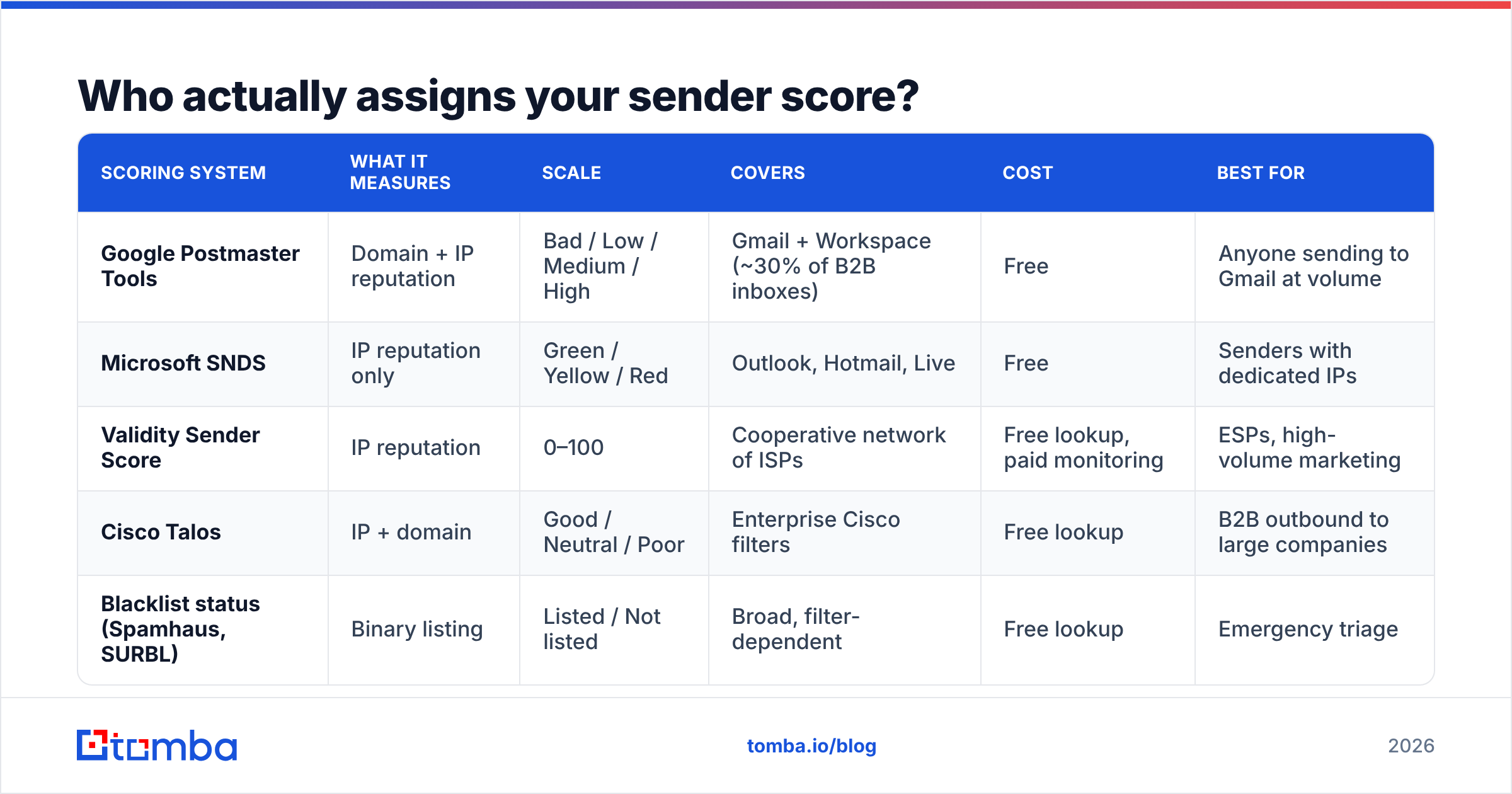
Nobody assigns it centrally. Four systems score you in parallel, and each one gates a different slice of your recipient list.
| Scoring system | What it measures | Scale | Covers | Cost | Best for |
|---|---|---|---|---|---|
| Google Postmaster Tools | Domain + IP reputation | Bad / Low / Medium / High | Gmail + Workspace (~30% of B2B inboxes) | Free | Anyone sending to Gmail at volume |
| Microsoft SNDS | IP reputation only | Green / Yellow / Red | Outlook, Hotmail, Live | Free | Senders with dedicated IPs |
| Validity Sender Score | IP reputation | 0–100 | Cooperative network of ISPs | Free lookup, paid monitoring | ESPs, high-volume marketing |
| Cisco Talos | IP + domain | Good / Neutral / Poor | Enterprise Cisco filters | Free lookup | B2B outbound to large companies |
| Blacklist status (Spamhaus, SURBL) | Binary listing | Listed / Not listed | Broad, filter-dependent | Free lookup | Emergency triage |
Two things follow from that table.
First, if you send cold email from Google Workspace or Microsoft 365 on shared infrastructure, Validity Sender Score is not your problem — you don't control that IP, thousands of others share it, and the number tells you nothing actionable. Your domain reputation in Google Postmaster Tools is the number that matters.
Second, Postmaster Tools only populates once you send roughly 100+ messages per day to Gmail from the same authenticated domain. Below that threshold, you get an empty dashboard and have to infer reputation from bounce and reply patterns instead.
What actually moves your email sender score?#
Ranked by real-world impact on cold outbound, not by how often each factor gets blogged about:
- Spam complaint rate — The single heaviest input. Google's bulk sender requirements set 0.10% as the target and 0.30% as the hard ceiling. Three complaints per thousand sends is enough to tank a domain that took months to build.
- Hard bounce rate — Sending to addresses that don't exist signals a purchased or scraped list. Above 3% you're throttled; above 5% you're effectively filtered. This is the fastest input to fix and the one most senders ignore.
- Engagement signals — Opens are increasingly noisy after Apple Mail Privacy Protection, so providers weight replies, forwards, "move to inbox," and "not spam" actions. A 2% reply rate protects a domain better than any DNS record.
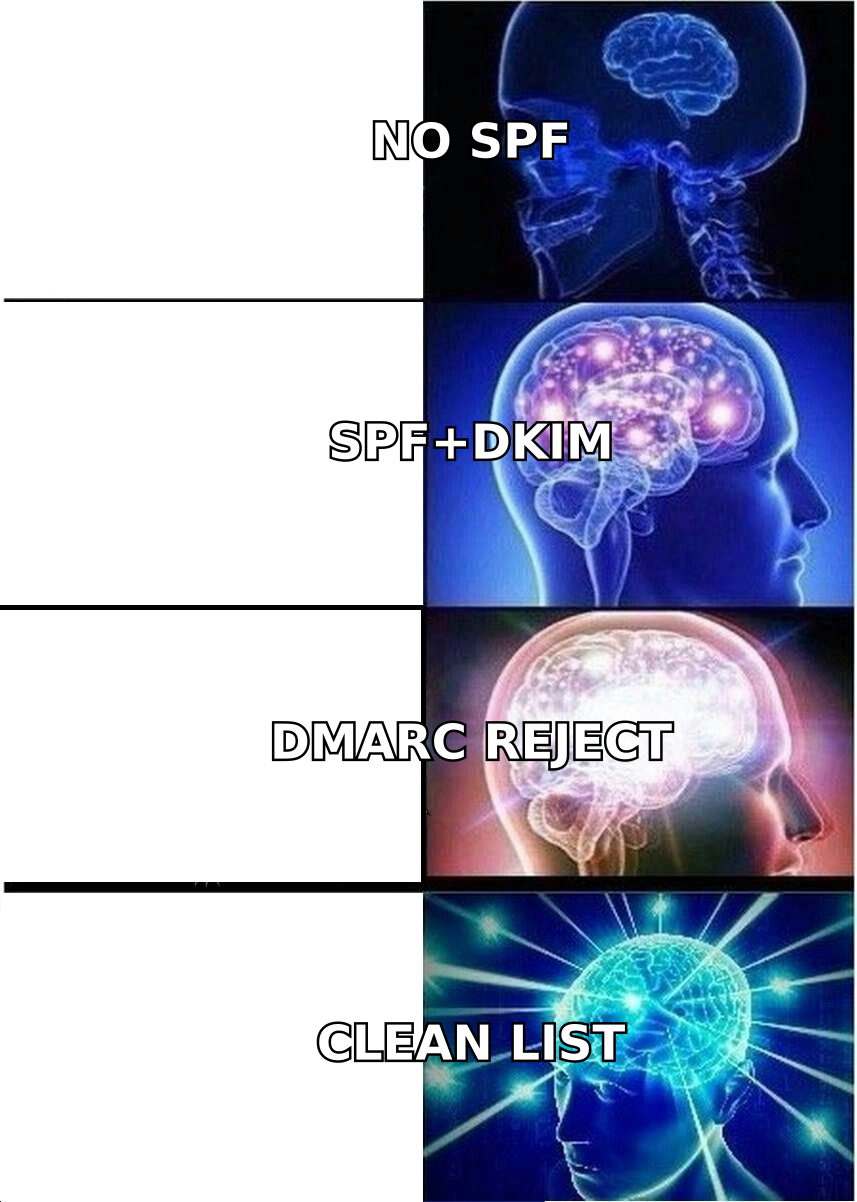
- Authentication completeness — SPF, DKIM, and DMARC are table stakes, not a boost. Having them earns you nothing; missing them costs you everything. Check yours with an SPF checker before you touch anything else.
- Volume consistency — Sending 40 emails a day for a month and then 4,000 on a Tuesday looks like a compromised account. Ramp by no more than 30–50% week over week.
- Spam trap hits — Recycled traps (dead addresses reactivated as traps) and pristine traps (addresses never used by a human) come almost exclusively from old or purchased lists. One pristine trap hit can trigger a Spamhaus listing.
Notice what isn't on that list: subject line word choice, the number of links in your email, and whether you used the word "free." Content filtering exists, but it's a per-message check layered on top of reputation. A trusted domain can send a message with three links and an image; an untrusted domain can send plain text and still land in spam.
What counts as a good sender score?#
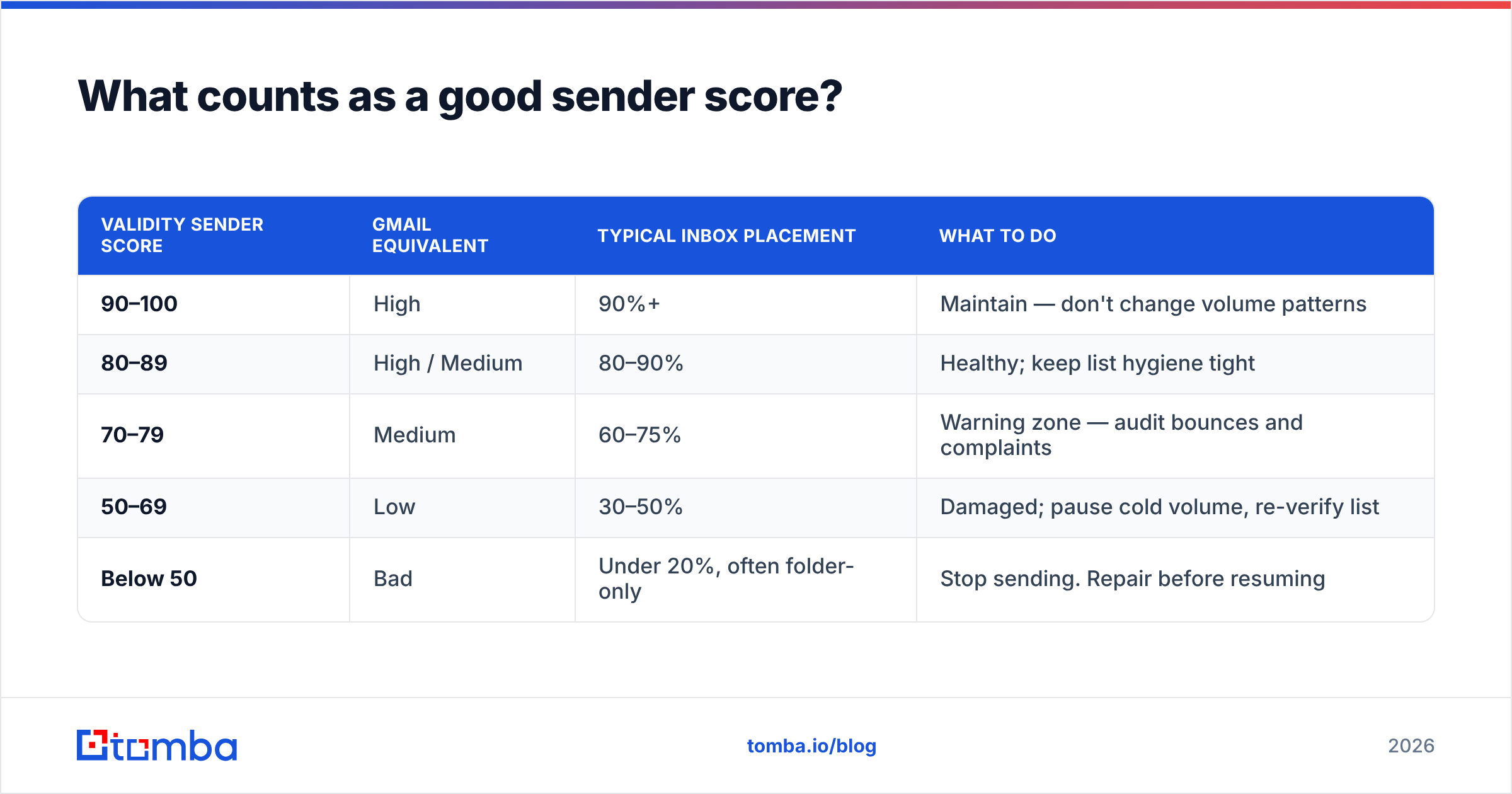
Score bands map to delivery outcomes roughly like this:
| Validity Sender Score | Gmail equivalent | Typical inbox placement | What to do |
|---|---|---|---|
| 90–100 | High | 90%+ | Maintain — don't change volume patterns |
| 80–89 | High / Medium | 80–90% | Healthy; keep list hygiene tight |
| 70–79 | Medium | 60–75% | Warning zone — audit bounces and complaints |
| 50–69 | Low | 30–50% | Damaged; pause cold volume, re-verify list |
| Below 50 | Bad | Under 20%, often folder-only | Stop sending. Repair before resuming |
The number to watch isn't the absolute value, it's the slope. A domain sitting flat at 78 for six months is fine. A domain that fell from 94 to 78 in ten days has an active problem — usually a bad list segment that went out on a specific day. Line up your score history against your send calendar and the culprit campaign is usually obvious within one pass.
Why does a good sender score still land you in spam?#
Because reputation is scored per-mailbox-provider, per-domain, and increasingly per-recipient.
A few patterns that trip up senders with "good" scores:
- Shared IP contamination. Your domain reputation is High, but you're on a shared Workspace IP pool where another tenant is blasting. Your mail gets throttled by association at the IP layer.
- Subdomain vs root domain. You warmed
mail.company.combut send fromcompany.com. Reputation does not fully transfer between them, and Gmail evaluates the DKIM d= domain. - Recipient-side rules. Enterprise Microsoft 365 tenants layer their own transport rules and third-party filters on top of Microsoft's baseline. Your Talos score can be Good and still hit a company-specific block.
- Cold-start penalty. A brand-new domain has no reputation at all — which providers treat as suspicious, not neutral. Domains under 90 days old get filtered harder regardless of technical setup.
- Content-reputation mismatch. A high-trust domain that suddenly changes template style, link domains, or tracking pixels triggers anomaly detection.
The diagnostic question is always: which provider is rejecting me? Segment your bounce and reply data by recipient domain. If Gmail placement is fine and Outlook is at zero, that's an SNDS/IP problem, not a domain reputation problem, and the fix is completely different.
How do you check your email sender score?#
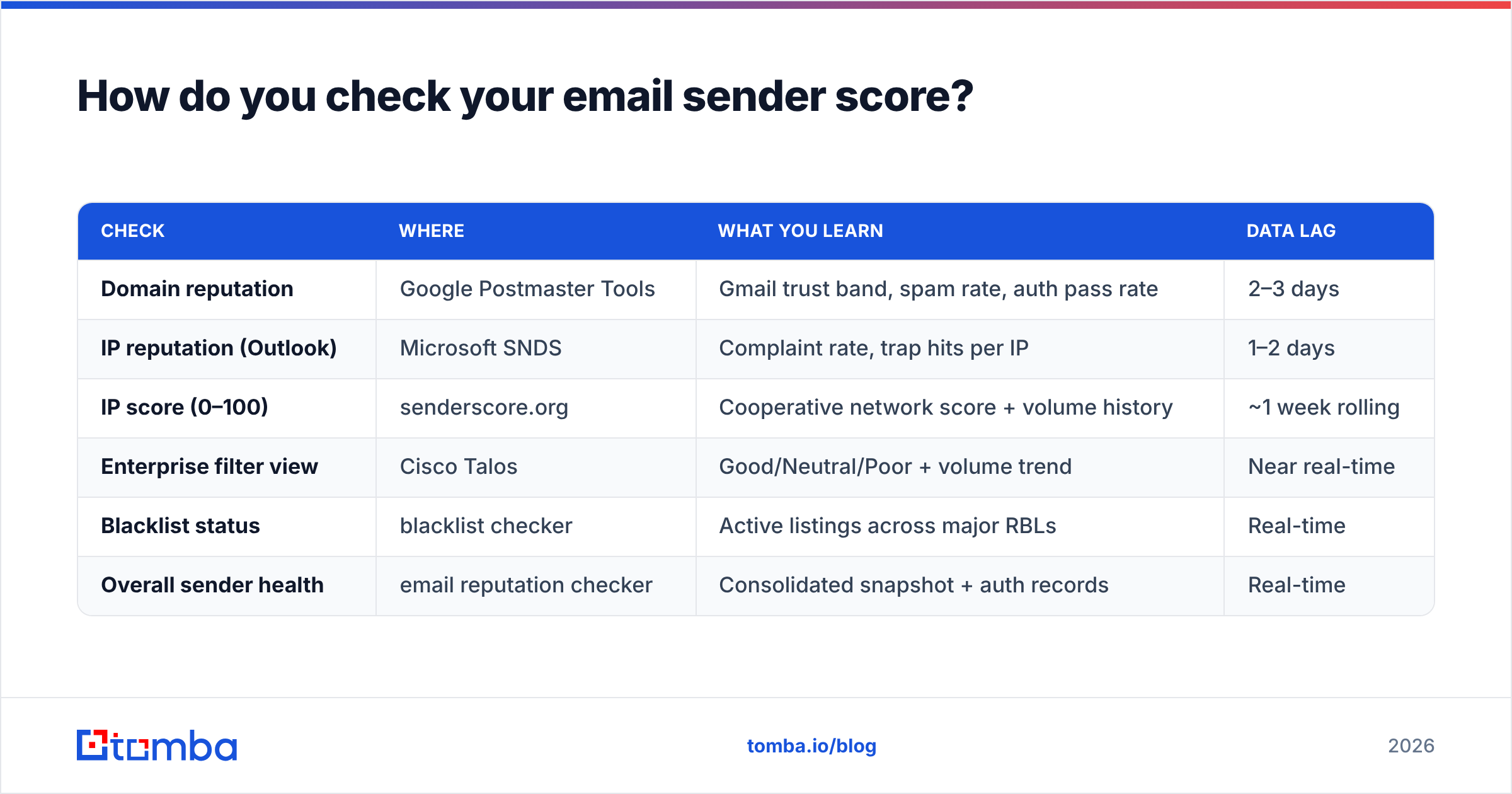
Run all four checks — they take about twenty minutes and cost nothing.
| Check | Where | What you learn | Data lag |
|---|---|---|---|
| Domain reputation | Google Postmaster Tools | Gmail trust band, spam rate, auth pass rate | 2–3 days |
| IP reputation (Outlook) | Microsoft SNDS | Complaint rate, trap hits per IP | 1–2 days |
| IP score (0–100) | senderscore.org | Cooperative network score + volume history | ~1 week rolling |
| Enterprise filter view | Cisco Talos | Good/Neutral/Poor + volume trend | Near real-time |
| Blacklist status | blacklist checker | Active listings across major RBLs | Real-time |
| Overall sender health | email reputation checker | Consolidated snapshot + auth records | Real-time |
Do this monthly at minimum, weekly if you send more than 1,000 cold emails a week. Reputation damage is cheap to fix in week one and expensive in week six.
How do you fix a damaged email sender score?#
There's no shortcut. The recovery sequence that works:
Days 1–3: Stop the bleeding. Pause all cold campaigns from the affected domain. Not "reduce" — pause. Every additional send on a damaged domain reinforces the pattern that damaged it. Keep transactional and reply-thread mail flowing; that's your positive-engagement signal.
Days 3–5: Find the source. Pull the last 60 days of send data and segment by campaign, list source, and recipient domain. You are looking for one of three signatures: a bounce spike (bad list), a complaint spike (bad targeting or bad copy), or a flat decline with clean metrics (volume ramp too aggressive, or shared-IP contamination).
Days 5–7: Clean the list. Re-verify every address you plan to send to, including ones verified three months ago — B2B contact data decays at roughly 2–2.5% per month as people change jobs. A list verified in January is meaningfully wrong by June. Run the whole file through an email verifier and drop everything that isn't a confirmed valid mailbox. For catch-all domains, which return "accept-all" at the SMTP layer and hide dead mailboxes, use a dedicated catch-all verifier rather than guessing.

Days 7–35: Rewarm slowly. Restart at 10–20 sends per day to your warmest, most likely-to-reply segment — existing customers, past repliers, inbound leads. Increase 30% per week. Prioritize messages that generate replies over messages that generate opens. A conversation thread is the strongest positive signal a mailbox provider can see.
Ongoing: Instrument it. Set a weekly calendar reminder to check Postmaster Tools and SNDS. Set a hard internal rule: any campaign with a bounce rate above 2% gets stopped mid-flight and its list re-verified.
Expect 3–4 weeks to move from Low to Medium in Postmaster Tools, and 6–8 weeks from Bad to High. Domains that have been blacklisted take longer and may never fully recover — at which point a fresh domain, properly warmed, beats fighting the old one.
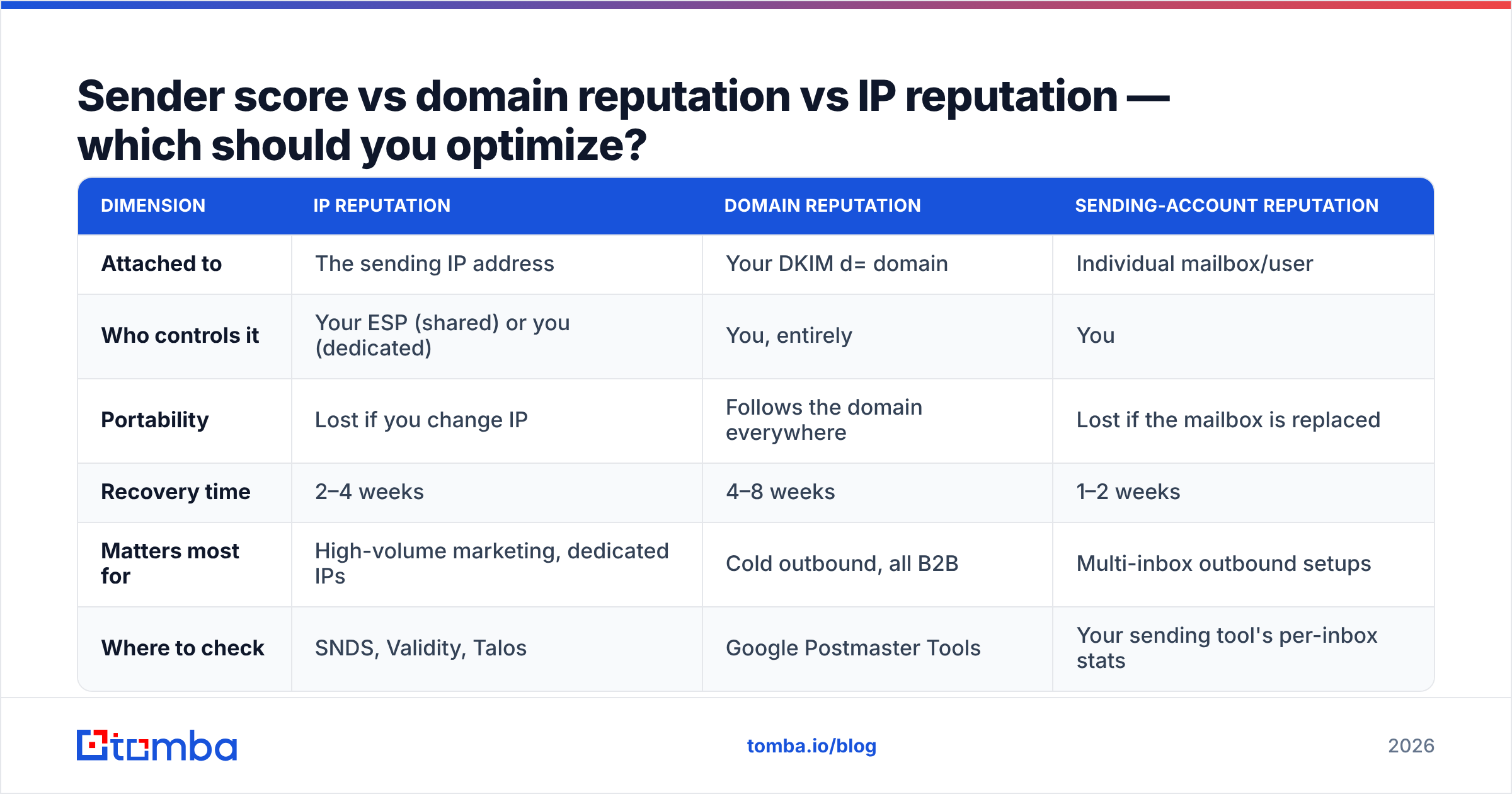
Sender score vs domain reputation vs IP reputation — which should you optimize?#
| Dimension | IP reputation | Domain reputation | Sending-account reputation |
|---|---|---|---|
| Attached to | The sending IP address | Your DKIM d= domain | Individual mailbox/user |
| Who controls it | Your ESP (shared) or you (dedicated) | You, entirely | You |
| Portability | Lost if you change IP | Follows the domain everywhere | Lost if the mailbox is replaced |
| Recovery time | 2–4 weeks | 4–8 weeks | 1–2 weeks |
| Matters most for | High-volume marketing, dedicated IPs | Cold outbound, all B2B | Multi-inbox outbound setups |
| Where to check | SNDS, Validity, Talos | Google Postmaster Tools | Your sending tool's per-inbox stats |
For nearly every B2B outbound team in 2026, domain reputation is the asset worth protecting. IPs are rented and swappable. Your domain is not — it carries your brand, your website, and years of accumulated trust. That's the practical argument for sending cold outreach from a dedicated lookalike domain rather than your primary: you're isolating reputation risk to an asset you can afford to lose.
If you want the underlying concepts, Tomba's glossary entries on sender reputation and email deliverability cover the mechanics in more depth.
What should you do this week?#
Concretely, in order:
- Open Google Postmaster Tools and record your current domain reputation band. If it's empty, you're under the volume threshold — use bounce rate as your proxy.
- Look up your sending IP at senderscore.org and Talos. Note whether you're on shared or dedicated infrastructure.
- Check blacklist status across the major RBLs.
- Pull your last 30 days of bounce data. If you're above 2%, your list is the problem, not your DNS.
- Re-verify your active prospect list before the next send.
Steps 1–4 are diagnostics. Step 5 is the one that changes the number.
Protect your score at the source#
Most damaged sender scores trace back to the same root cause: sending to addresses that were never valid, or stopped being valid months ago. Every hard bounce is a direct deposit into the "this sender doesn't know who they're emailing" column, and no amount of DMARC configuration compensates for it.
The Tomba Email Finder returns verified business emails with a confidence score and SMTP-level validation at the point of discovery, so bad addresses never reach your sequencer in the first place. It runs free for 25 searches a month, with paid plans starting at $49/mo on Starter and $99/mo on Growth — see Tomba pricing for the full breakdown. Combine it with a pre-send pass through the bulk email finder for existing lists, and bounce rate stops being the thing that decides your sender score for you.
Related guides#
Ready to find emails that actually work?
Join 150,000+ professionals who stopped guessing and started sending. Free credits on signup — no credit card required.
Get the Tomba newsletter
Practical outbound tactics and product updates — once every two weeks.
About the author