Email Sequence Strategy in 2026: Build Ones That Convert
Most email sequences fail before the first send because the list is wrong, not the copy. Here is how to structure, time, and measure a sequence that actually books meetings in 2026.
TL;DR
- An email sequence is a pre-planned series of messages sent to one contact on a schedule, with rules that stop the series when the contact replies or converts.
- Sequence length is not the lever most people think it is. Steps 1–4 produce roughly 80% of replies in typical B2B outbound; steps 5+ mostly generate unsubscribes and spam complaints.
- The single biggest predictor of sequence performance is list quality. A 3% bounce rate can cut inbox placement across your whole domain, which quietly kills every step downstream.
- Different sequence types need different rules: cold outbound (4–6 steps, 12–18 days), onboarding (5–7 steps, event-triggered), re-engagement (3 steps, then suppress).
- Measure reply rate and meetings booked per 100 contacts. Open rate has been unreliable since Apple Mail Privacy Protection started pre-fetching images.
What is an email sequence?#
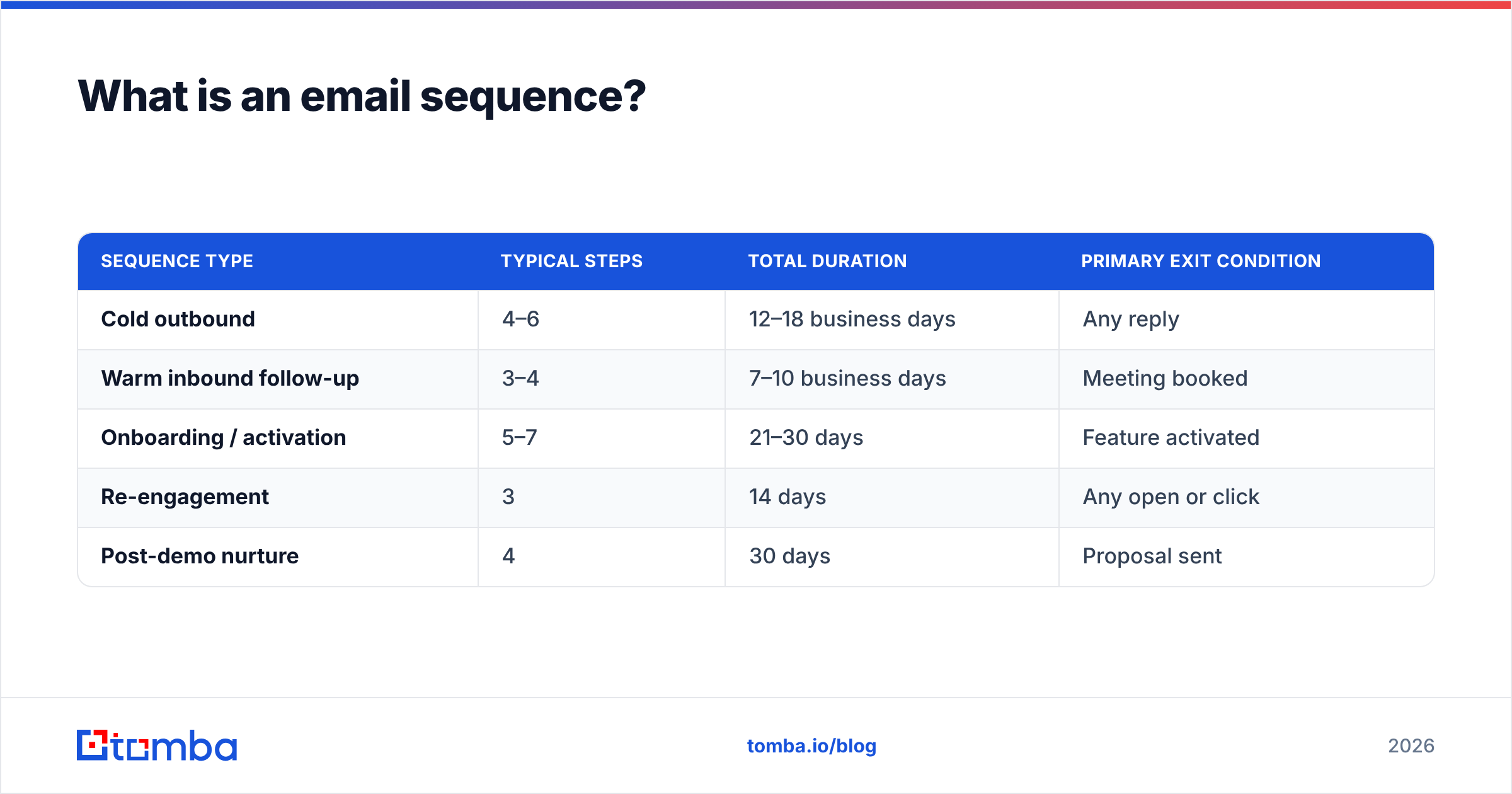
An email sequence is a series of emails sent to the same contact on a defined schedule, where each send is conditional on what happened before it.
Think of it like a doctor's follow-up protocol. You don't prescribe everything on day one. You send the patient home, check in on day three, adjust on day ten, and stop the protocol entirely if they recover. The stopping rule is the part people forget — a sequence without exit conditions is just a mailing list with extra steps.
Three components define one:
- Steps — the individual emails, each with its own angle. Not the same message rephrased.
- Delays — the wait between steps, measured in business days, not calendar days.
- Exit conditions — what stops the sequence: a reply, a meeting booked, a link click, a hard bounce, an unsubscribe.
That third component separates a sequence from a drip campaign. A drip fires on a calendar regardless of behavior. A sequence reacts. In practice most modern tools blur the line, but the distinction matters when you're debugging why a prospect who already replied got email four.
| Sequence type | Typical steps | Total duration | Primary exit condition |
|---|---|---|---|
| Cold outbound | 4–6 | 12–18 business days | Any reply |
| Warm inbound follow-up | 3–4 | 7–10 business days | Meeting booked |
| Onboarding / activation | 5–7 | 21–30 days | Feature activated |
| Re-engagement | 3 | 14 days | Any open or click |
| Post-demo nurture | 4 | 30 days | Proposal sent |
Why do most email sequences fail before the first send?#
Because the data is wrong, not the copy.
Here's the chain of failure. You upload 2,000 contacts scraped from a list vendor. Six percent are dead addresses. Your first send produces 120 hard bounces. Mailbox providers read that bounce rate as a signal that you don't know your recipients — which is exactly what spammers look like. Your domain reputation drops. Steps two through five land in spam for the good addresses too. You conclude the copy didn't work and rewrite it. The rewrite lands in spam as well.
Google and Yahoo's bulk sender requirements, in effect since February 2024, formalized this: spam complaint rates must stay under 0.3%, and authentication (SPF, DKIM, DMARC) is mandatory for anyone sending at volume. Google's own sender guidelines spell out the thresholds. Bounces aren't explicitly capped, but they feed directly into the reputation score that decides placement.
So before you write a single line of copy:
- Verify every address. Run the list through an email verifier and remove hard bounces and unknowns. A sub-2% bounce rate is the working target; sub-1% is where healthy senders sit.
- Handle catch-all domains separately. Catch-all servers accept everything, so standard verification returns "unknown." A dedicated catch-all verifier uses pattern confidence and secondary signals instead of a plain SMTP check.
- Check your authentication. Run an SPF checker and confirm DKIM and DMARC are aligned on the sending domain.
- Warm the domain if it's new. A domain registered last week sending 500 emails a day is a textbook spam pattern.
Only after those four are clean does copy become the variable worth testing.
How many steps should an email sequence have?#
Four to six for cold outbound. Fewer if your list is highly targeted, more only if you have a genuinely new angle for each additional step.
The reply distribution across steps is consistently front-loaded. In most B2B outbound data, the first email produces the largest single share of replies, step two adds meaningfully, step three still pays, and by step five you're mostly harvesting unsubscribes and complaints. The math flips: each additional step adds a shrinking number of replies while adding a fixed amount of reputation risk.
There's a second reason to cap it. Every extra step is a message you had to invent, which means it's usually the weakest one. The classic "just bumping this to the top of your inbox" email is a step someone added to hit a number, not because they had something to say.
Here's a structure that holds up across industries:
- Step 1 — Specific observation. One line about their company, one line about the problem, one ask. Under 90 words.
- Step 2 (day 3) — Proof. A concrete result from a comparable company. Named if you can, anonymized if you must.
- Step 3 (day 7) — Different angle. Reframe the problem entirely. Not "following up" — a new reason to care.
- Step 4 (day 12) — Resource. Send something useful with no ask attached. A benchmark, a teardown, a short guide.
- Step 5 (day 18) — Clean break. "I'll stop here — should I close the file or is this worth a look next quarter?" This gets a surprising number of replies because it's easy to answer.
Reply-to-thread for steps 2 and 3, new thread with a new subject for steps 4 and 5. Threading everything makes the fifth email a wall of quoted text; threading nothing makes each message contextless.
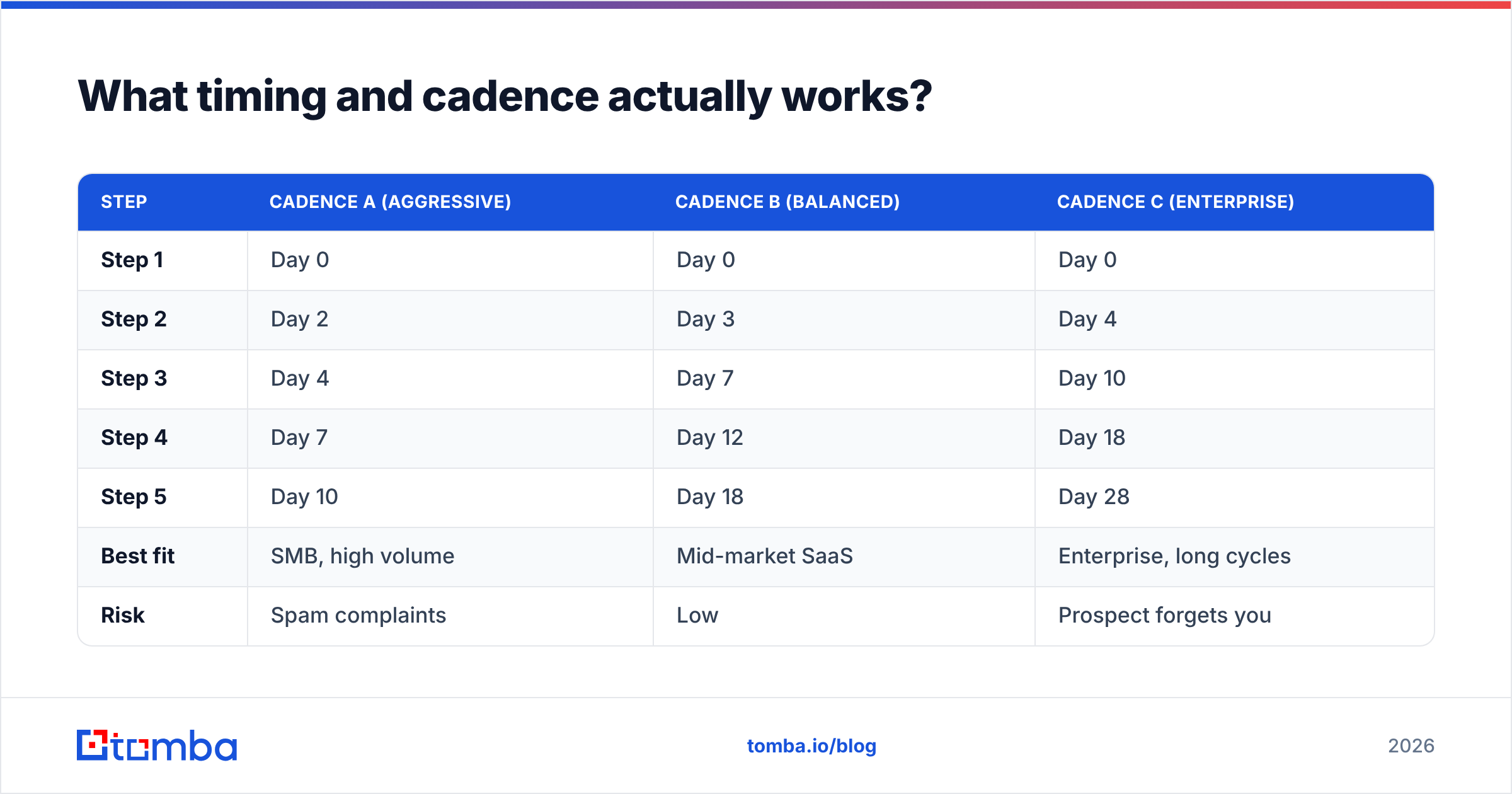
What timing and cadence actually works?#
Business days, expanding intervals, and a total window of 12–18 days for cold outbound.
Expanding intervals — 3, 4, 5, 6 days — mirror how attention works. Someone who ignored you twice in a week is not going to change their mind on day eight; they might on day fifteen when their quarter turns over. Compressing everything into a week makes you look automated, which you are, but the point is not to look it.
| Step | Cadence A (aggressive) | Cadence B (balanced) | Cadence C (enterprise) |
|---|---|---|---|
| Step 1 | Day 0 | Day 0 | Day 0 |
| Step 2 | Day 2 | Day 3 | Day 4 |
| Step 3 | Day 4 | Day 7 | Day 10 |
| Step 4 | Day 7 | Day 12 | Day 18 |
| Step 5 | Day 10 | Day 18 | Day 28 |
| Best fit | SMB, high volume | Mid-market SaaS | Enterprise, long cycles |
| Risk | Spam complaints | Low | Prospect forgets you |
Send-time details that measurably matter:
- Skip weekends and holidays. Not because nobody reads email on Saturday, but because your message sits under 40 Monday-morning arrivals.
- Randomize send times within a window. Sending 300 emails at exactly 09:00:00 is a machine fingerprint. Spread them across 09:00–11:30.
- Respect the recipient's timezone, not yours. A 9am send from Berlin lands at 3am in Chicago.
- Cap daily volume per mailbox. 30–50 cold sends per mailbox per day is the conservative ceiling. Scale with more mailboxes, not more sends per mailbox.
How do you build the list a sequence runs on?#
Start from a definition of the account, then find the person, then find the address — in that order. Most bad sequences run in reverse, starting from whatever addresses were easy to acquire.
A workable process:
- Define the trigger. Hiring for a role, new funding, a specific tech in the stack, a competitor's logo on their site. A trigger gives step one its opening line.
- Build the account list from that trigger, not from a generic industry filter.
- Identify the right title per account. One or two people, not eight. Sequencing an entire department is how you get internal forwards that say "we're all getting this."
- Find and verify the addresses. A domain search returns known addresses and the company's email pattern; an email finder resolves a specific name against that pattern.
- Enrich for personalization tokens. Role, team size, tech stack, recent news — whatever your step-one line actually references.
- Suppress. Existing customers, open opportunities, past unsubscribes, anyone another rep is already sequencing.
Step six is the one that gets skipped and causes the most damage. Emailing an active customer a cold pitch for something they already pay for is a support ticket you created yourself.
For pattern-heavy work — one company, several contacts, format unknown — a company email pattern check first will save you a pile of guessed addresses that bounce.
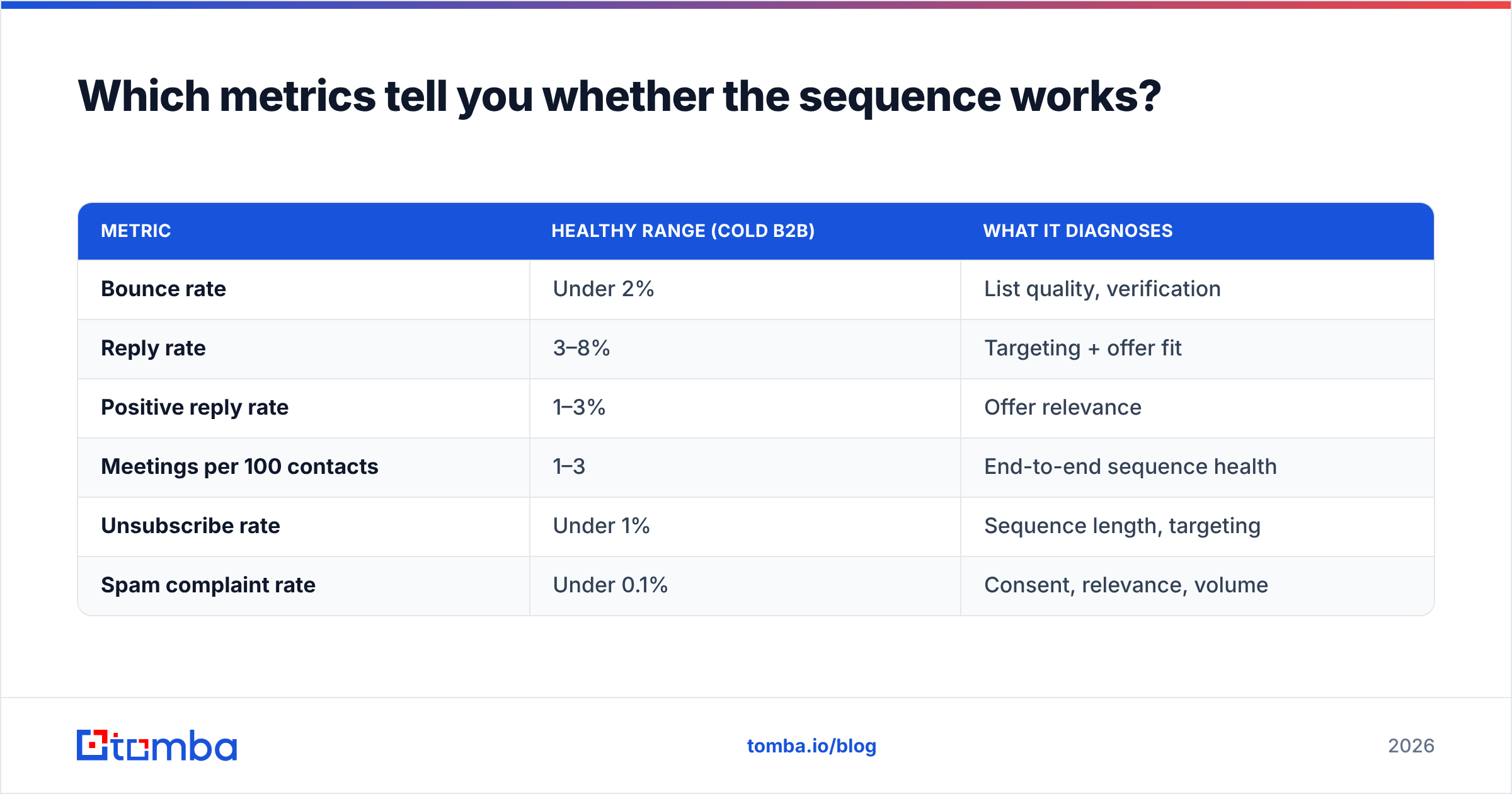
Which metrics tell you whether the sequence works?#
Reply rate and meetings booked per 100 contacts. Everything else is diagnostic.
Open rate stopped being trustworthy when Apple Mail Privacy Protection began pre-fetching tracking pixels for Mail app users, inflating opens for a large slice of your list. It's still useful for spotting a collapse — if opens drop from 45% to 8% overnight, you have a deliverability problem, not a copy problem — but it's not a performance metric anymore.
| Metric | Healthy range (cold B2B) | What it diagnoses |
|---|---|---|
| Bounce rate | Under 2% | List quality, verification |
| Reply rate | 3–8% | Targeting + offer fit |
| Positive reply rate | 1–3% | Offer relevance |
| Meetings per 100 contacts | 1–3 | End-to-end sequence health |
| Unsubscribe rate | Under 1% | Sequence length, targeting |
| Spam complaint rate | Under 0.1% | Consent, relevance, volume |
Read them together, not individually:
- High opens, low replies → targeting is fine, the ask is wrong or too big.
- Low opens, low replies → deliverability. Check authentication, domain age, bounce history.
- Good replies, few meetings → the reply is interest, the CTA is friction. Drop "30-minute call" for "worth a look?"
- Rising unsubscribes at step 4+ → your sequence is too long for this segment.
Segment by persona before you conclude anything. A 2% reply rate that's 6% for VPs of Engineering and 0.3% for CFOs is not a 2% sequence. It's a good sequence pointed at the wrong second persona.
How do sequence tools compare in 2026?#
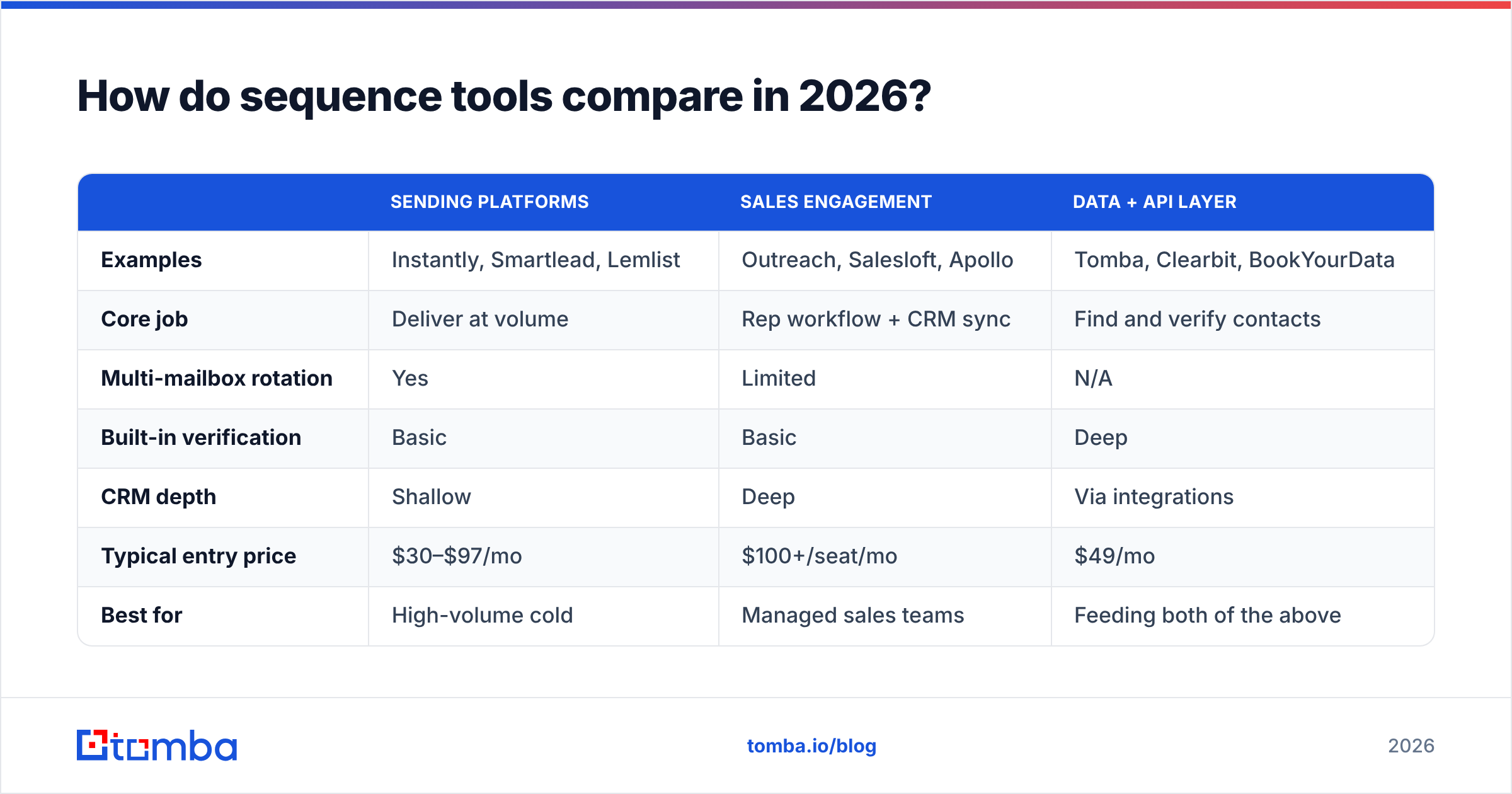
The category splits into three groups, and choosing across groups is more consequential than choosing within one.
| Sending platforms | Sales engagement | Data + API layer | |
|---|---|---|---|
| Examples | Instantly, Smartlead, Lemlist | Outreach, Salesloft, Apollo | Tomba, Clearbit, BookYourData |
| Core job | Deliver at volume | Rep workflow + CRM sync | Find and verify contacts |
| Multi-mailbox rotation | Yes | Limited | N/A |
| Built-in verification | Basic | Basic | Deep |
| CRM depth | Shallow | Deep | Via integrations |
| Typical entry price | $30–$97/mo | $100+/seat/mo | $49/mo |
| Best for | High-volume cold | Managed sales teams | Feeding both of the above |
Most functioning stacks use two of the three: a data layer to build and clean the list, and a sending or engagement layer to run it. Trying to make one tool do everything is where teams end up with a sequencer that has mediocre data and a data tool with mediocre sending.
If you're evaluating replacements for a specific incumbent, the Instantly alternative and Apollo alternative breakdowns cover the feature-by-feature detail. G2's sales engagement category is a reasonable place to sanity-check vendor claims against practitioner reviews.
What are the most common sequence mistakes?#
- Same message, five times. If step three could be deleted without losing information, delete it.
- "Just following up." It signals you have nothing new. Lead with the new thing instead.
- Personalization tokens that fire empty. "Hi {{first_name}}" rendered literally is the fastest possible delete. Validate token coverage before launch and drop rows with gaps.
- No exit on reply. Sending step four to someone who replied on step two undoes the reply.
- Too many CTAs. One ask per email. Two asks halve the response to both.
- Running the same sequence across segments. A sequence built for 20-person startups will not work on a 5,000-person enterprise, and the reverse is worse.
- Testing everything at once. Change one variable per cohort — subject line or opening line or CTA, not all three — or you learn nothing from the result.
- No suppression sync. Unsubscribes must propagate across every tool and every mailbox, immediately. This is a legal requirement under CAN-SPAM and GDPR, not a nicety.
How do you launch and iterate?#
Run it small, read the diagnostics, then scale the version that worked.
- Pilot on 100–200 verified contacts in one segment. Enough for signal, small enough that a mistake is cheap.
- Wait for the full window before judging. Reading results on day three tells you about step one only.
- Fix the diagnostic first. Bounce rate over 2% means go back to verification before touching copy.
- Change one variable. Split step one's opening line across two cohorts of 100. Keep the rest identical.
- Scale in increments. Double volume per week at most, and watch bounce and complaint rates at every increment.
- Re-verify quarterly. B2B contact data decays roughly 25–30% per year through job changes. A list that was clean in January is not clean in October.
That last point catches people who built a great sequence, paused it for two quarters, and restarted it against a stale list. The sequence didn't degrade — the data did.
Where should you start?#
Start with the list, because it determines the ceiling on everything else.
Build the account list from a real trigger, resolve the right contacts at each account, and verify every address before the first send. Tomba's Email Finder handles the find-and-verify half — domain search to surface a company's addresses and pattern, name-level lookup to resolve specific people, and verification built in so bad addresses never reach your sequencer. The free tier covers 25 searches a month if you want to test the accuracy on a handful of accounts you can verify by hand; paid Tomba plans start at $49/mo, and the Tomba API fits the same checks into an automated list-build pipeline.
Get the data right, then let the copy be the variable you actually get to test.
Related guides#
Ready to find emails that actually work?
Join 150,000+ professionals who stopped guessing and started sending. Free credits on signup — no credit card required.
Get the Tomba newsletter
Practical outbound tactics and product updates — once every two weeks.
About the author