Email Sequence Best Practices: The 2026 Playbook That Books Meetings
Most email sequences don't fail on copy — they fail on cadence, list quality, and step count. Here's what actually moves reply rates in 2026, with cadence tables, step templates, and the tests worth running.
TL;DR
- Sequence length beats sequence cleverness: 4–7 steps over 14–21 business days captures most of the replies you'll ever get from a cold list.
- Roughly half of "bad copy" problems are actually data problems. Verify the list before you write a single line.
- One idea per email, one ask per email. Emails over 120 words reply worse in almost every test we've seen reported publicly.
- Follow-ups should add a new angle, not repeat the first email with "just bumping this."
- Test one variable at a time — subject line, opener, or CTA — with at least 200 sends per arm before you call a winner.
What is an email sequence, and how is it different from a drip campaign?#
An email sequence is a pre-planned series of messages sent to a single contact over a defined window, where each step has a distinct job and the whole series stops the moment the person replies.
Think of it like a doctor's follow-up call. The first call is the diagnosis. The second checks whether the treatment landed. The third offers a different option. Nobody calls five times to say the exact same sentence — and yet that's what most cold sequences do.
A drip campaign is different. Drips are usually triggered by behavior (signup, download, trial start) and run on marketing automation. Sequences in a sales context are outbound-first, one-to-one in tone, and sent from a real mailbox rather than a bulk sending domain.
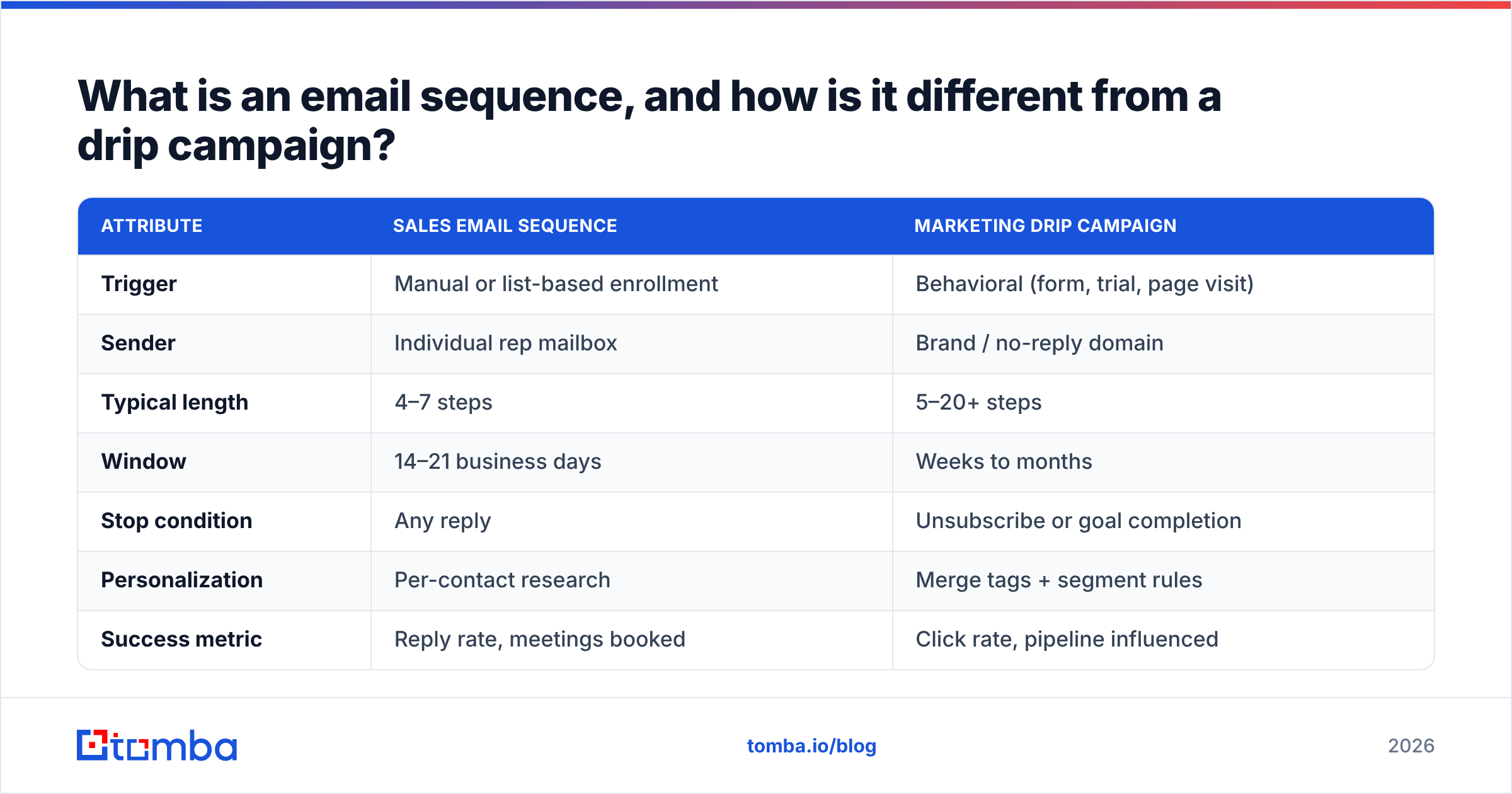
| Attribute | Sales email sequence | Marketing drip campaign |
|---|---|---|
| Trigger | Manual or list-based enrollment | Behavioral (form, trial, page visit) |
| Sender | Individual rep mailbox | Brand / no-reply domain |
| Typical length | 4–7 steps | 5–20+ steps |
| Window | 14–21 business days | Weeks to months |
| Stop condition | Any reply | Unsubscribe or goal completion |
| Personalization | Per-contact research | Merge tags + segment rules |
| Success metric | Reply rate, meetings booked | Click rate, pipeline influenced |
The distinction matters because the best practices don't transfer. Drip copy that works in a nurture flow — long, branded, image-heavy — will get a cold sequence filtered before anyone sees it.
Why do most email sequences fail before the first send?#
Because the list is wrong. Copy gets the blame, but the failure usually happens upstream.
Run this diagnostic before you touch a template:
- Is the address real? Every bounce above 2–3% starts eroding domain reputation, and once reputation drops, your good emails land in spam too. Run the list through an email verifier before enrollment, not after the first bounce report.
- Is the person still in that role? B2B contact data decays somewhere in the range of 20–30% per year, driven by job changes and company churn. A twelve-month-old list is meaningfully different from the one you exported.
- Does the persona actually own the problem? A VP of Engineering does not care about your SDR productivity pitch. Wrong persona reads as bad copy.
- Is the trigger current? A funding round from 2024 is not a reason to reach out in 2026.
- Is the sending infrastructure warm? New domains need weeks of gradual volume ramp. Google and Yahoo both tightened bulk-sender requirements, and Google's sender guidelines now make authentication and low spam-complaint rates table stakes rather than nice-to-haves.
Fix those five and your reply rate moves before you rewrite a word. Skip them and you're A/B testing subject lines on a list that can't receive mail.
How many emails should an email sequence have?#
Four to seven steps, spread across 14–21 business days. That's the range where incremental replies still justify the send.
The shape of the curve is consistent across most published outbound benchmarks: email one produces the largest single share of replies, emails two and three together produce roughly as many again, and by email six or seven you're harvesting a thin tail. Past step eight you're mostly generating spam complaints from people who were never going to answer.
Here's a practical structure to steal:
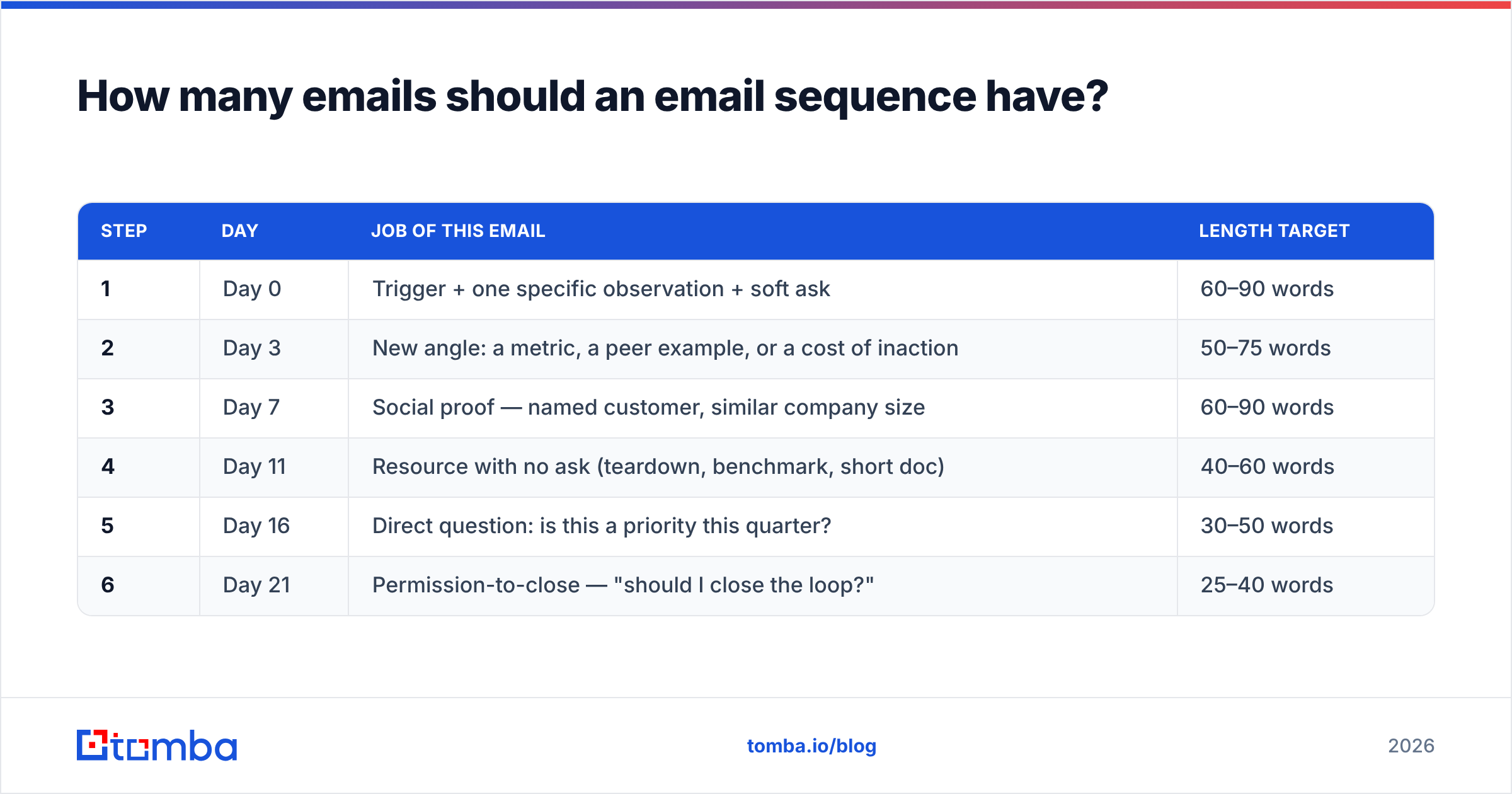
| Step | Day | Job of this email | Length target |
|---|---|---|---|
| 1 | Day 0 | Trigger + one specific observation + soft ask | 60–90 words |
| 2 | Day 3 | New angle: a metric, a peer example, or a cost of inaction | 50–75 words |
| 3 | Day 7 | Social proof — named customer, similar company size | 60–90 words |
| 4 | Day 11 | Resource with no ask (teardown, benchmark, short doc) | 40–60 words |
| 5 | Day 16 | Direct question: is this a priority this quarter? | 30–50 words |
| 6 | Day 21 | Permission-to-close — "should I close the loop?" | 25–40 words |
Note what's missing: there is no step whose only content is "bumping this to the top of your inbox." Every step carries new information. That's the single biggest structural difference between sequences that convert and sequences that annoy.
If you sell to enterprise buyers with long committee cycles, extend the window rather than adding steps — six emails over 30 days beats ten emails over 20.
What makes each email in the sequence actually get replies?#
Five rules, in order of impact.
- One idea, one ask. If your email contains a case study, a feature list, and a calendar link, the reader has to make three decisions. They'll make none. Cut until a single question remains.
- Lead with them, not you. The first sentence should reference something about their business. "I saw you're hiring three AEs in EMEA" outperforms "I'm reaching out because Tomba helps companies like yours" every time.
- Keep it under 120 words. Mobile previews cut off fast, and long cold emails read as mass mail. Short emails also make follow-ups easier — there's room left to say something new.
- Ask for a reply, not a meeting. "Worth a look?" or "Are you the right person for this?" converts better on step one than a 30-minute calendar link. Low-friction asks get low-friction yeses, and yeses compound.
- Write the subject line last. Four to seven words, lowercase, no brackets, no "Re:" fakery. The subject's only job is to make the preview text worth reading. If you're stuck, run options through a subject line generator and then cut every option down to fewer words.
One anti-pattern worth naming: the fake personalization line. "Love what you're doing at {{company}}" fools nobody in 2026. Buyers have seen ten thousand of them. Either do real research or don't pretend.
What is the right cadence and timing for a sequence?#
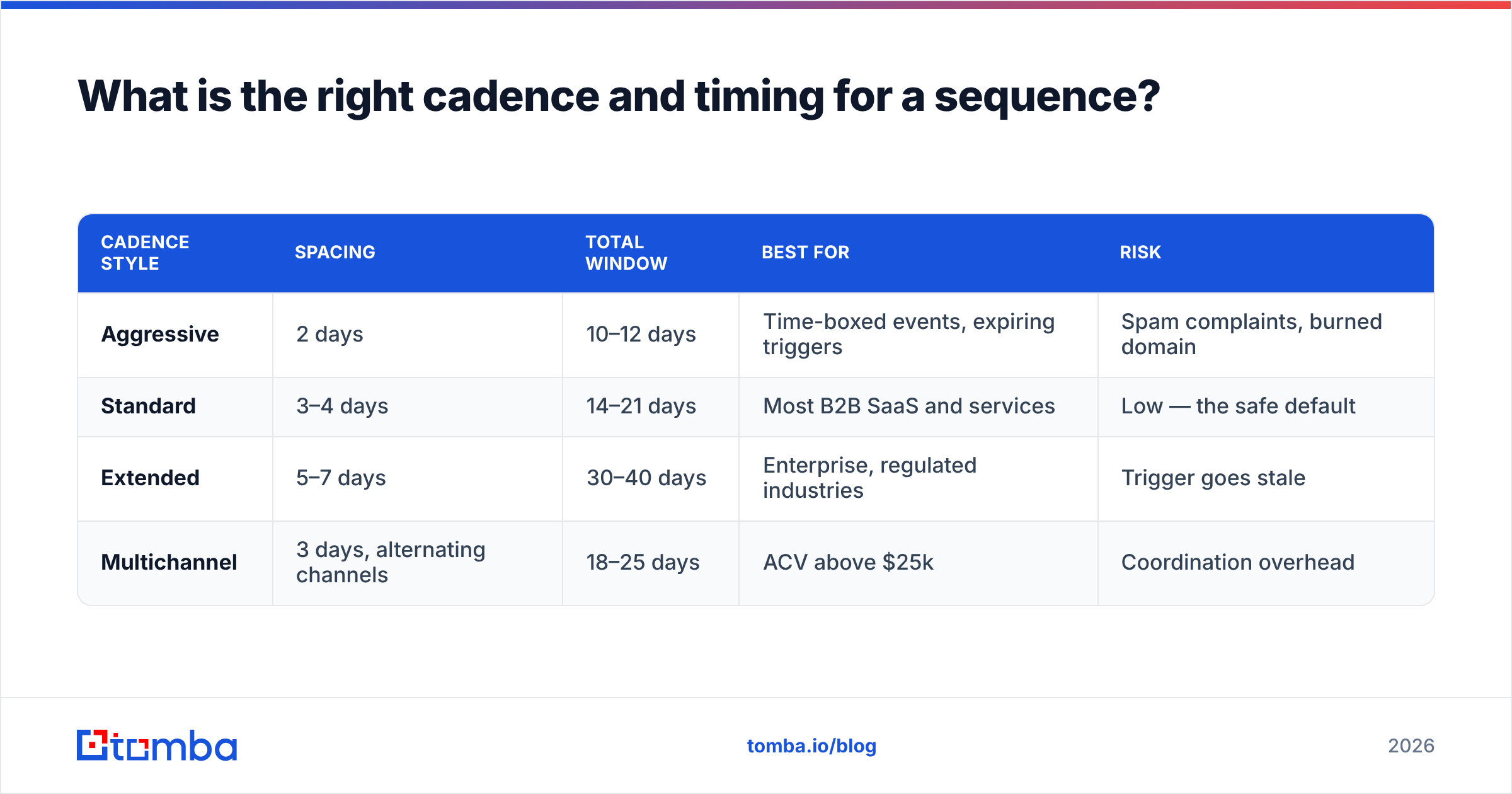
Spacing matters more than the specific send hour. Here's how the common cadences compare:
| Cadence style | Spacing | Total window | Best for | Risk |
|---|---|---|---|---|
| Aggressive | 2 days | 10–12 days | Time-boxed events, expiring triggers | Spam complaints, burned domain |
| Standard | 3–4 days | 14–21 days | Most B2B SaaS and services | Low — the safe default |
| Extended | 5–7 days | 30–40 days | Enterprise, regulated industries | Trigger goes stale |
| Multichannel | 3 days, alternating channels | 18–25 days | ACV above $25k | Coordination overhead |
Three timing principles hold up across cadences:
- Increase the gap as the sequence progresses. Day 0, 3, 7, 11, 16, 21 — not 0, 3, 6, 9, 12, 15. Widening gaps signal patience rather than desperation.
- Send on business days in the recipient's timezone. Tuesday through Thursday mornings remain the crowded default, which is precisely why Monday afternoon and Friday morning are worth testing.
- Stop instantly on reply. Every sequence tool supports this. Check it anyway — a sequence that keeps firing after someone answers is the fastest way to lose a warm lead.
If you're layering in calls or LinkedIn, alternate rather than stacking. Email on day 0, connection request on day 2, email on day 4, call on day 7. Hitting someone on three channels the same morning reads as surveillance, not persistence.
Should you personalize every email or use templates?#
Use templates as scaffolding and personalize the first two sentences. Full manual writing doesn't scale past about 30 emails a day; full templating gets filtered.
The workable split looks like this:
- Sentence 1–2 (personalized): A specific, checkable observation. A job posting, a product launch, a podcast appearance, a change in their pricing page.
- Sentence 3–4 (templated): The problem you solve, phrased for their persona.
- Sentence 5 (templated with a variable): The proof point, ideally from a company of similar size or segment.
- Sentence 6 (templated): The ask.
That's roughly 20% custom writing and 80% reusable, which is a workload a rep can sustain. If you need a starting library, a set of cold email templates is faster to adapt than writing from scratch — just rewrite the opener every time.
Research from HubSpot's sales blog and the sales-engagement category reviews on G2 consistently point the same direction: relevance beats volume once your list exceeds a few hundred contacts. Personalization is the cheapest relevance signal available.
How do you keep a sequence out of the spam folder?#
Deliverability is not a separate project from sequence design — it's a constraint on it.
The controllable levers, ranked:
- Authentication. SPF, DKIM, and DMARC configured and passing. Non-negotiable. Check your records with an SPF checker before any campaign launch.
- List hygiene. Keep hard bounces under 2%. Verified lists also mean your engagement metrics reflect real humans, which is what mailbox providers actually score.
- Volume ramp. New mailbox: start at 10–20 sends/day and increase roughly 20% weekly. Never dump 500 emails from a two-week-old domain.
- Complaint rate. Google's threshold is 0.3%. One badly targeted campaign can blow past it.
- Content signals. No image-only emails, no link shorteners, minimal tracking pixels, one link maximum in a cold email. Plain text sends better than HTML for outbound.
- Reply rate. This is the underrated one. Sequences that generate real replies build sender reputation, which improves inbox placement, which generates more replies. Bad targeting breaks this loop at step one.
Rotating multiple sending domains is common practice for high-volume teams, but it treats the symptom. If you need six domains to sustain your volume, the underlying problem is usually list quality.
What should you measure and test in an email sequence?#
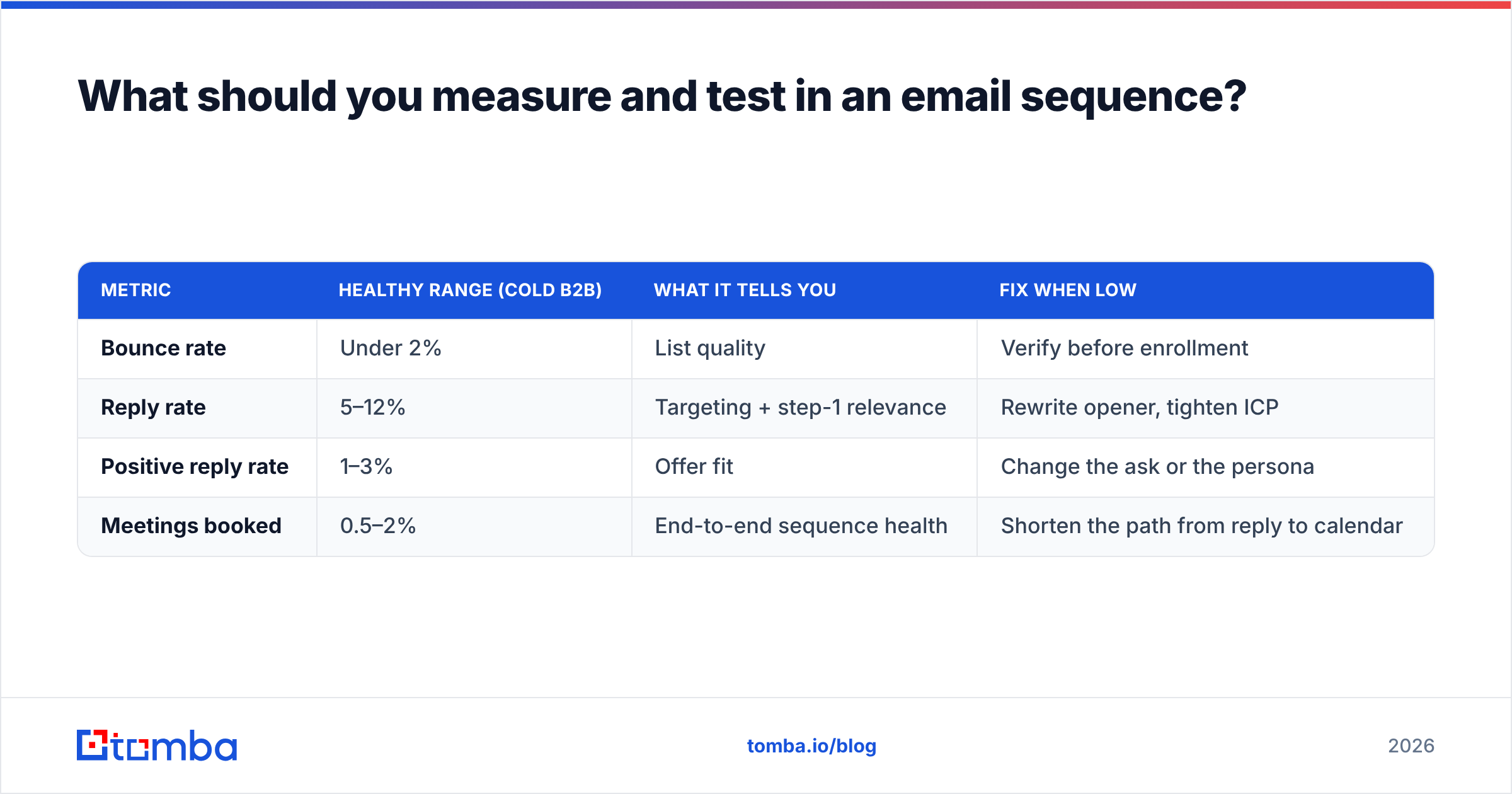
Track four metrics and ignore the rest early on.
| Metric | Healthy range (cold B2B) | What it tells you | Fix when low |
|---|---|---|---|
| Bounce rate | Under 2% | List quality | Verify before enrollment |
| Reply rate | 5–12% | Targeting + step-1 relevance | Rewrite opener, tighten ICP |
| Positive reply rate | 1–3% | Offer fit | Change the ask or the persona |
| Meetings booked | 0.5–2% | End-to-end sequence health | Shorten the path from reply to calendar |
Open rate deserves a footnote: since Apple Mail Privacy Protection and similar features inflate opens with automated prefetching, treat it as directional at best. Don't optimize a sequence around a number a machine generates.
For testing, three rules keep results honest:
- One variable per test. Change the subject line or the opener, never both.
- Minimum 200 sends per arm. Below that, you're reading noise. A 6% versus 9% reply rate on 50 sends each is three replies of difference.
- Test steps, not just step one. The highest-leverage untested element in most sequences is email four — the one everybody copies from a template and never revisits.
Run the test for a full sequence window before judging. Replies to step one arrive on day one; replies to step five arrive on day 18.
Which sequence type fits your motion?#
| Sequence type | Steps | Window | Personalization level | Typical reply rate |
|---|---|---|---|---|
| High-volume cold outbound | 5–6 | 18 days | Templated + variable opener | 3–6% |
| Targeted account-based | 6–8 | 30 days | Heavy, per-contact research | 10–20% |
| Inbound lead follow-up | 4 | 10 days | Medium, references the trigger | 20–35% |
| Re-engagement / closed-lost | 3 | 14 days | Medium, references prior context | 8–15% |
| Event / conference | 4 | 12 days | Light, references the event | 10–18% |
The mistake teams make is running one sequence design across all five motions. An inbound lead who just downloaded your pricing page does not need a day-11 "cost of inaction" email — they need a reply within an hour and a calendar link.
Build the list before you build the sequence#
Every practice above assumes one thing: that the addresses in your sequence belong to real people who currently hold the role you're targeting. That assumption fails more often than most teams check.
Start there. Use Tomba's Email Finder to source verified professional addresses by name and domain, then push the list through verification before a single step fires. The free plan includes 25 searches a month if you want to test the accuracy on a handful of accounts first; Starter runs $49/mo and Growth $99/mo when you're ready to build lists at volume.
Better data doesn't just raise your reply rate — it protects the sending reputation that every future sequence depends on.
Related guides#
Ready to find emails that actually work?
Join 150,000+ professionals who stopped guessing and started sending. Free credits on signup — no credit card required.
Get the Tomba newsletter
Practical outbound tactics and product updates — once every two weeks.
About the author