Email Sequence Strategy: How to Build Sequences That Reply
Most B2B sequences fail before the first send because the list is wrong and the cadence is copied from a template. Here's how to design an email sequence strategy around timing, message count, and data quality that actually earns replies in 2026.
TL;DR
- A sequence is not a cadence template. It's a set of decisions about who you contact, how many times, how far apart, and what each message is allowed to ask for.
- Four to six emails over 18–24 business days outperforms both the 3-email "polite" sequence and the 12-email grind for most B2B motions.
- Reply rate collapses from bad data long before it collapses from bad copy. Verify before you send, not after you bounce.
- Every email in the sequence needs a distinct job — new angle, new proof, new ask. Repeating "just bumping this" trains people to ignore you.
- Measure reply rate and positive reply rate per step, not open rate. Open tracking has been unreliable since Apple Mail Privacy Protection, and it got worse from there.
What is an email sequence strategy?#
An email sequence strategy is the plan behind a multi-touch outbound campaign: which segment gets contacted, how many messages they receive, the spacing between them, the angle each message takes, and the exit rules that stop the sequence.
Think of it like a conversation you're having across a crowded room over three weeks. You wouldn't shout the same sentence six times. You'd change your approach, add context, and eventually stop if the person clearly isn't turning around. Most "sequences" in the wild are the shouting version.
Technically, a sequence is the container. Strategy is what determines whether that container holds something a buyer wants to open. The distinction matters because tooling has made the container free — every sales engagement platform ships with a 7-step template — while the strategy part still requires you to make choices nobody can make for you.
Three components define it:
- Audience definition — the segment, the trigger, and the disqualifiers. If you can't write a one-sentence description of who's in this sequence and why now, the sequence isn't ready.
- Cadence architecture — count, spacing, channel mix, and business-day logic. This is the part most teams copy from a blog post and never revisit.
- Message ladder — what each touch contributes that the previous one didn't, and how the ask escalates or de-escalates.
Why do most email sequences fail before the first send?#
Because the list is wrong. It's the least glamorous answer and it's the one the data keeps pointing at.
A sequence that hits a 4% bounce rate is not a copy problem, it's a data problem — and it damages your domain in a way no amount of A/B testing recovers. Mailbox providers treat bounce rate as a proxy for whether you know who you're emailing. Once your sender reputation drops, even your good sends land in Promotions or Spam, and your reply-rate experiments become noise.
The failure chain looks like this:
- Unverified addresses → hard bounces → reputation damage → inbox placement drops for the whole domain
- Stale contacts → the person left 14 months ago → your "personalized" opener references a role they don't hold
- Wrong persona → technically valid email, zero authority, no reply, and no signal about why
- Duplicate records → the same prospect gets the sequence twice from two reps, which is the fastest way to get manually reported
Run the list through an email verifier before the first send and re-verify anything older than 90 days. B2B contact data decays at roughly 2–3% per month through job changes alone; a list you built in January is materially different by April.
Correction — as a plain image:
How many emails should a sequence actually contain?#
Four to six for cold outbound. Two to four for warm follow-up after a demo, a content download, or an event.
The argument for longer sequences is that reply rates compound — touch 5 and touch 6 do produce replies. That's true and it's incomplete. What longer sequences also produce is spam complaints, and complaint rate is the metric that gets your domain throttled. Google and Yahoo both formalized bulk-sender complaint thresholds in 2024, and enforcement has only tightened since. A 12-touch sequence to a cold list is a complaint-generation machine.
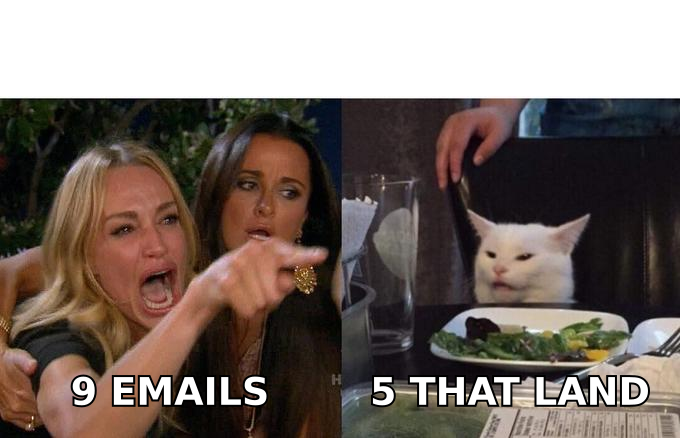
Here's how the common structures compare in practice:
| Sequence length | Typical reply rate | Complaint risk | Best fit | Main failure mode |
|---|---|---|---|---|
| 3 emails / 10 days | 2–4% | Low | Warm leads, inbound follow-up | Quits before the second decision cycle |
| 5 emails / 21 days | 5–9% | Low–moderate | Standard cold B2B outbound | Needs five genuinely distinct angles |
| 8 emails / 35 days | 6–11% | Moderate–high | High-ACV enterprise, named accounts | Touches 6–8 recycle earlier angles |
| 12+ emails / 60 days | 7–12% | High | Almost nothing | Complaint rate erodes domain health |
| Multichannel 5 emails + 3 LinkedIn | 9–14% | Low–moderate | Competitive categories | Coordination overhead across tools |
Treat those reply ranges as directional, not as a benchmark to hit. They vary enormously by ACV, category, and how targeted the segment is. A five-email sequence to 40 hand-picked accounts will outperform a twelve-email sequence to 4,000 scraped ones on every metric that matters, including total meetings booked.
What does good sequence timing look like?#
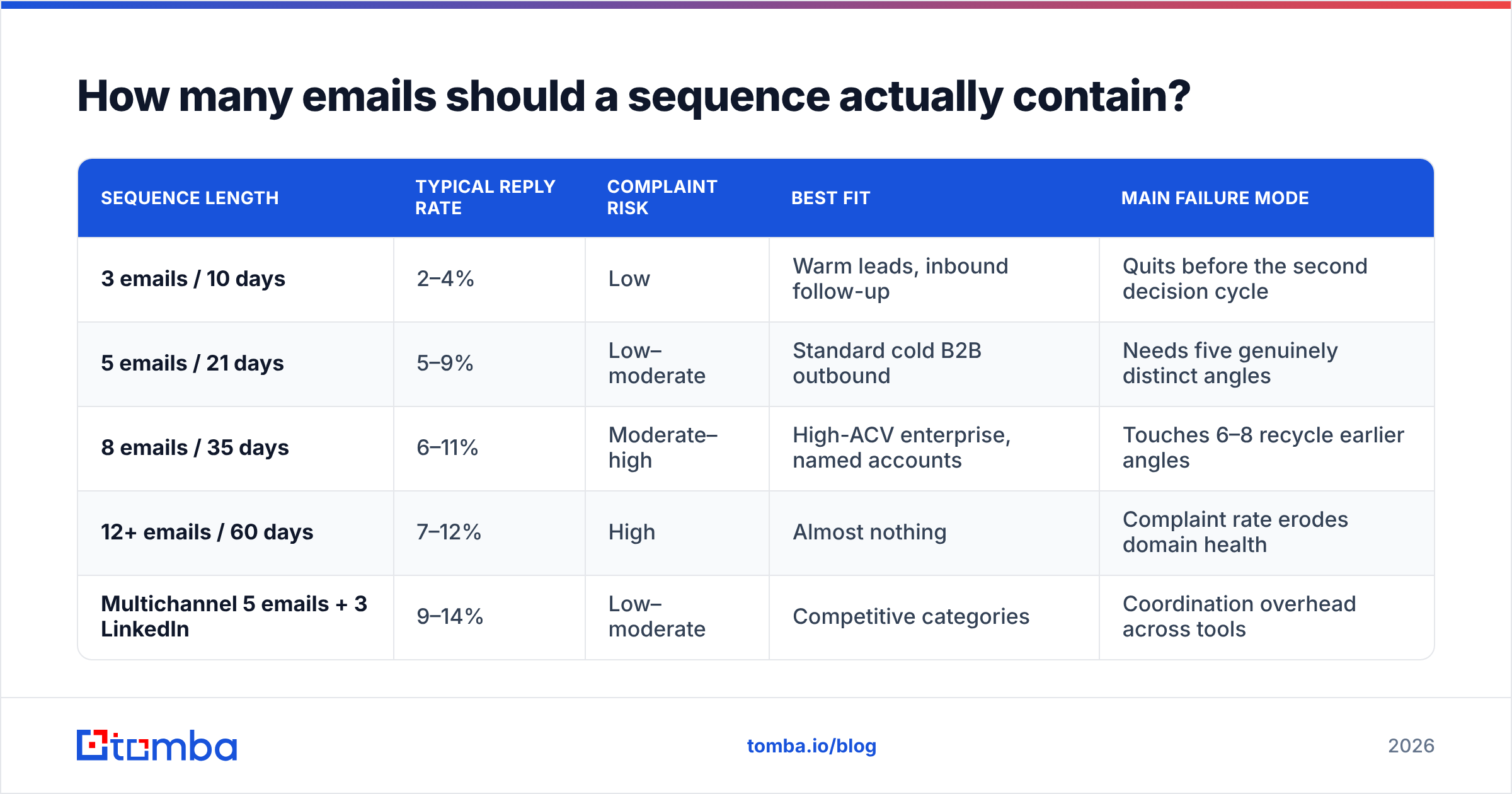
Front-load the first two touches, then widen the gaps. The logic is that early proximity creates recognition ("this name again"), while later spacing avoids the pestering effect.
| Step | Day (business days) | Channel | Purpose | Ask level |
|---|---|---|---|---|
| 1 | Day 0 | Relevance + one specific observation | Soft — a question | |
| 2 | Day 3 | New angle, not a bump | Soft — a question | |
| 3 | Day 8 | Email + LinkedIn view | Proof: customer result or benchmark | Medium — 15 min |
| 4 | Day 14 | Reframe around a different pain | Medium — 15 min | |
| 5 | Day 21 | Permission-to-close | Binary — yes/no/timing |
Two timing rules that hold up across most tests:
- Never send two touches on consecutive days in a cold sequence. It reads as automation, because it is.
- Skip Monday morning and Friday afternoon for the opening touch. Not because of mystical "best time to send" data — send-time optimization is mostly overfitted — but because those windows have the highest volume of competing mail and the lowest read intent.
If you're running multichannel, stagger the channels rather than stacking them. A LinkedIn connection request the same hour as an email lands as surveillance. Two days apart lands as diligence. The mechanics of coordinating that are covered well in most LinkedIn outreach playbooks.
What job does each email in the sequence do?#
This is where most sequences break, and it's the part no tool can automate for you. Each message needs a distinct reason to exist.
- Email 1 — the specific observation. One sentence proving you looked at their company, not their industry. Not "I see you're scaling" — something like "you posted three SDR roles in Chicago last month." Then one question. Under 90 words.
- Email 2 — the different angle. Same buyer, different problem. If email 1 was about hiring velocity, email 2 is about ramp time. This is not a bump. Never write "just following up."
- Email 3 — the proof. A named customer with a number, or a benchmark from your own data. Specific enough to be falsifiable. "Similar teams cut research time from 6 hours to 40 minutes per week" beats "our customers see great results."
- Email 4 — the reframe. Assume your first three framings were wrong and try a fourth. Sometimes the buyer's problem isn't the one you're selling against. This is the touch that most often surfaces the real objection.
- Email 5 — permission to close. Short, direct, no guilt. "Sounds like this isn't a priority this quarter — should I close the file or check back in Q3?" This message reliably outperforms every other step for reply volume, because it's easy to answer.
Note what's absent: there is no "sharing a case study!" email with a PDF attached, no "did you get my last email?" and no third bump. Those touches produce opens and no replies, which is the worst possible combination — activity that looks like progress.
Keep each message under 120 words. If you need a subject line sanity check before launch, run candidates through a subject line tester rather than guessing, and keep subjects to two to five lowercase-ish words that read like internal mail, not marketing.
Should you automate the whole sequence?#
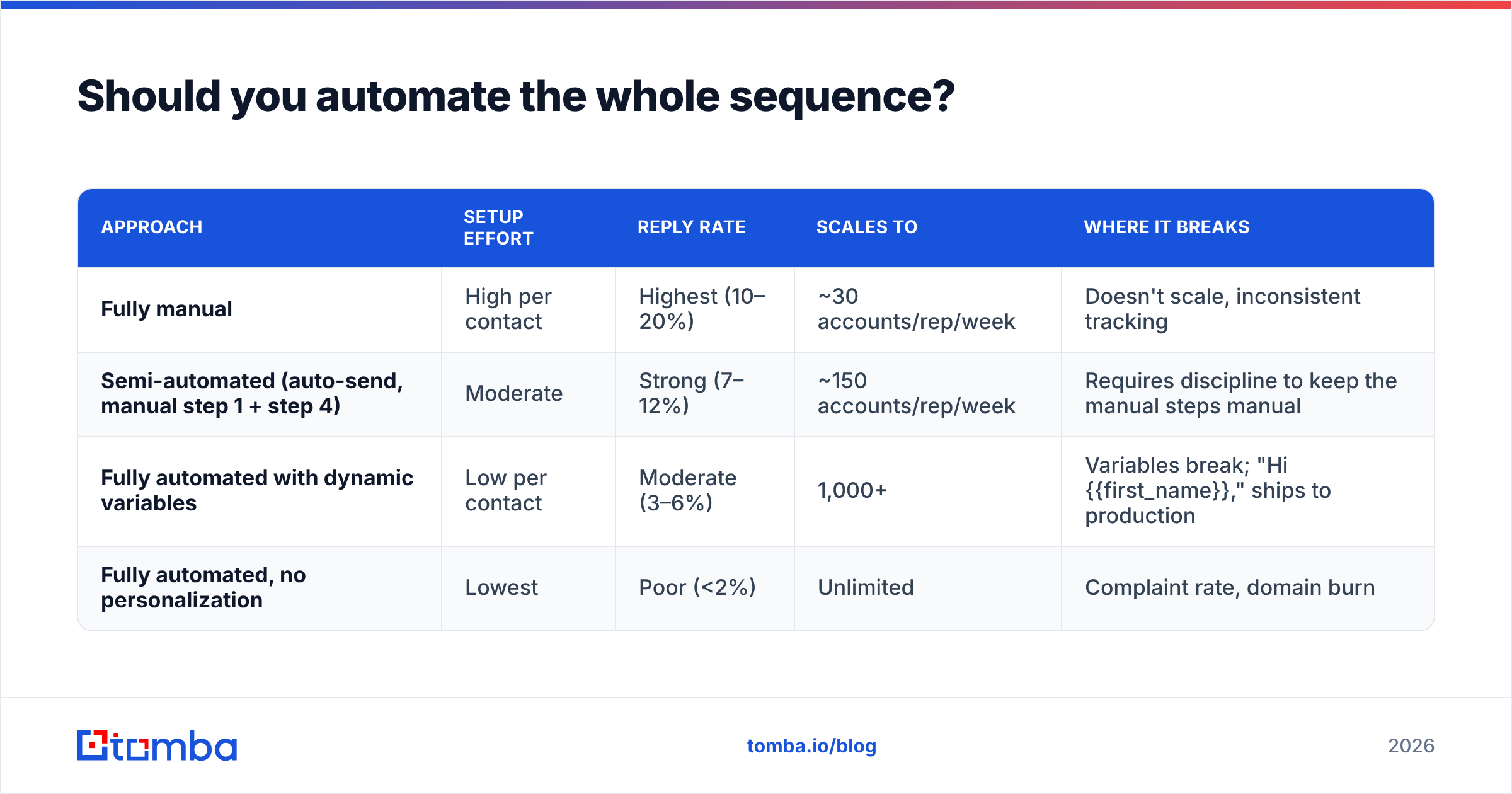
Partially. Full automation is fine for the mechanical steps and terrible for the steps where a human judgment call changes the outcome.
| Approach | Setup effort | Reply rate | Scales to | Where it breaks |
|---|---|---|---|---|
| Fully manual | High per contact | Highest (10–20%) | ~30 accounts/rep/week | Doesn't scale, inconsistent tracking |
| Semi-automated (auto-send, manual step 1 + step 4) | Moderate | Strong (7–12%) | ~150 accounts/rep/week | Requires discipline to keep the manual steps manual |
| Fully automated with dynamic variables | Low per contact | Moderate (3–6%) | 1,000+ | Variables break; "Hi {{first_name}}," ships to production |
| Fully automated, no personalization | Lowest | Poor (<2%) | Unlimited | Complaint rate, domain burn |
Semi-automated is the honest answer for most teams. Write email 1 and email 4 by hand for accounts above your ACV threshold; let 2, 3, and 5 run on rails. The sequencing tool handles timing, reply detection, and exit rules — things humans do badly — while the human handles relevance, which tools still do badly despite four years of AI-personalization claims.
If you're evaluating tooling, G2's sales engagement category is a reasonable starting point for feature comparison, though read the reviews for team size similar to yours — enterprise reviews of these platforms describe a different product than what a five-person team experiences.
How do you measure whether the sequence is working?#
Stop reporting open rate. Apple Mail Privacy Protection pre-fetches images for a large share of recipients, which inflates opens for reasons unrelated to human behavior. Reporting it isn't just imprecise, it actively misleads step-level decisions.
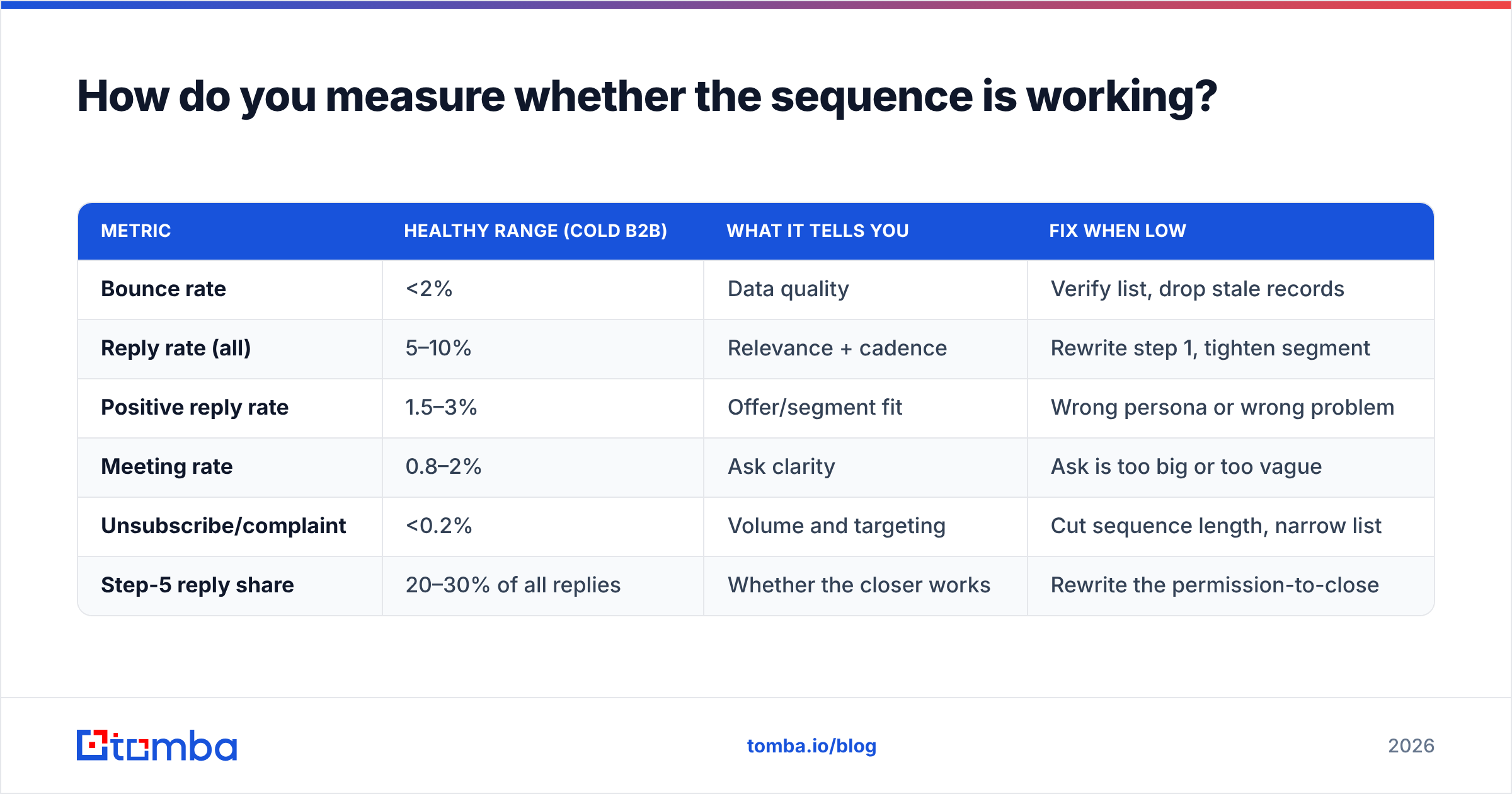
Track these instead, per step:
| Metric | Healthy range (cold B2B) | What it tells you | Fix when low |
|---|---|---|---|
| Bounce rate | <2% | Data quality | Verify list, drop stale records |
| Reply rate (all) | 5–10% | Relevance + cadence | Rewrite step 1, tighten segment |
| Positive reply rate | 1.5–3% | Offer/segment fit | Wrong persona or wrong problem |
| Meeting rate | 0.8–2% | Ask clarity | Ask is too big or too vague |
| Unsubscribe/complaint | <0.2% | Volume and targeting | Cut sequence length, narrow list |
| Step-5 reply share | 20–30% of all replies | Whether the closer works | Rewrite the permission-to-close |
The step-level view is the useful one. If 70% of your replies come from email 1, your later touches are dead weight and you should cut to three. If replies are flat across steps 2–4, those emails are indistinguishable and need genuinely different angles. Compare your numbers against the definitions in this response rate breakdown rather than against screenshots on LinkedIn.
Also give yourself a floor on volume before drawing conclusions. Below roughly 200 sends per variant, the difference between a 4% and a 7% reply rate is mostly noise.
What are the fastest ways to break a sequence?#
- Sending to a catch-all domain without checking it. Catch-all servers accept everything and bounce later, or silently discard. Use a catch-all verifier so those addresses go into a slower, lower-volume track instead of your main sequence.
- Personalizing the first line and nothing else. Buyers pattern-match. A bespoke sentence bolted onto a generic pitch is more suspicious than no personalization at all.
- Merge-field failures. One
{{company}}that didn't populate discredits the entire campaign. Preview 10 random records before every launch, not the first one. - Ignoring compliance basics. Physical address, honest headers, working opt-out. The CAN-SPAM Act sets the US floor and GDPR is stricter for EU recipients. Compliance also correlates with deliverability, because the same signals feed spam filtering.
- No exit rules. If someone replies "not now," the sequence must stop. Auto-continuing after a human reply is the single most damaging automation error, and it happens constantly.
- One domain, all volume. Split sending across secondary domains and keep per-mailbox volume conservative. Warm up properly — a warmup calculator will tell you how long your ramp actually needs to be, and it's usually longer than you'd like.
For research on how B2B buying committees actually consume outreach — which should inform how many people per account you sequence — Gartner's B2B buying journey research remains the most-cited source, and it's worth reading before you decide to sequence one contact per account. Most deals now involve six to ten stakeholders; sequencing a single champion is leaving the account half-worked.
How do you build a sequence-ready list?#
Work backwards from the segment definition, not forwards from whatever list you can buy.
Start with 50–200 accounts that share a trigger — funding, hiring, a tech-stack change, a leadership move. Identify two or three roles per account. Then find and verify addresses for those specific people rather than importing everyone with a matching job title. Providers like BookYourData are a solid option when you need pre-built, verified B2B records at volume, and pairing a purchased list with independent verification is standard practice regardless of source.
Tomba's email finder handles the find-and-verify step in one pass, and domain search is the faster route when you want every contact at a target company before deciding who to sequence. Tomba pricing starts with a free tier at 25 searches per month, then Starter at $49/mo, Growth at $99/mo, and Pro at $249/mo — enough range that you can validate the segment before committing budget to volume.
The sequencing tool you choose matters far less than this step. A mediocre cadence to a precisely-defined, verified list beats a brilliant cadence to a fuzzy one every time.
Where should you start this week?#
Pick one segment. Write five emails with five distinct jobs. Verify every address. Send to 200 people over three weeks. Read the step-level reply data. Then change exactly one variable and run it again.
That loop — narrow segment, clean data, distinct angles, step-level measurement — is the whole discipline. Everything else is tooling preference.
Before you write a single line of copy, get the list right. Tomba Email Finder finds professional email addresses by domain, name, or company and verifies them in the same request, so your sequence starts with contacts that exist and mailboxes that accept mail. Start on the free tier, build one clean 200-contact segment, and let the reply data tell you what to fix next.
Related guides#
Ready to find emails that actually work?
Join 150,000+ professionals who stopped guessing and started sending. Free credits on signup — no credit card required.
Get the Tomba newsletter
Practical outbound tactics and product updates — once every two weeks.
About the author