Email Signature Call to Action: Examples That Convert
Your signature is the most-viewed real estate in every email you send, and most people waste it on a job title and a logo. Here's how to build an email signature call to action people actually click.
TL;DR
- An email signature call to action is a single, low-friction link in your footer that turns routine email volume into measurable pipeline — not a second sales pitch.
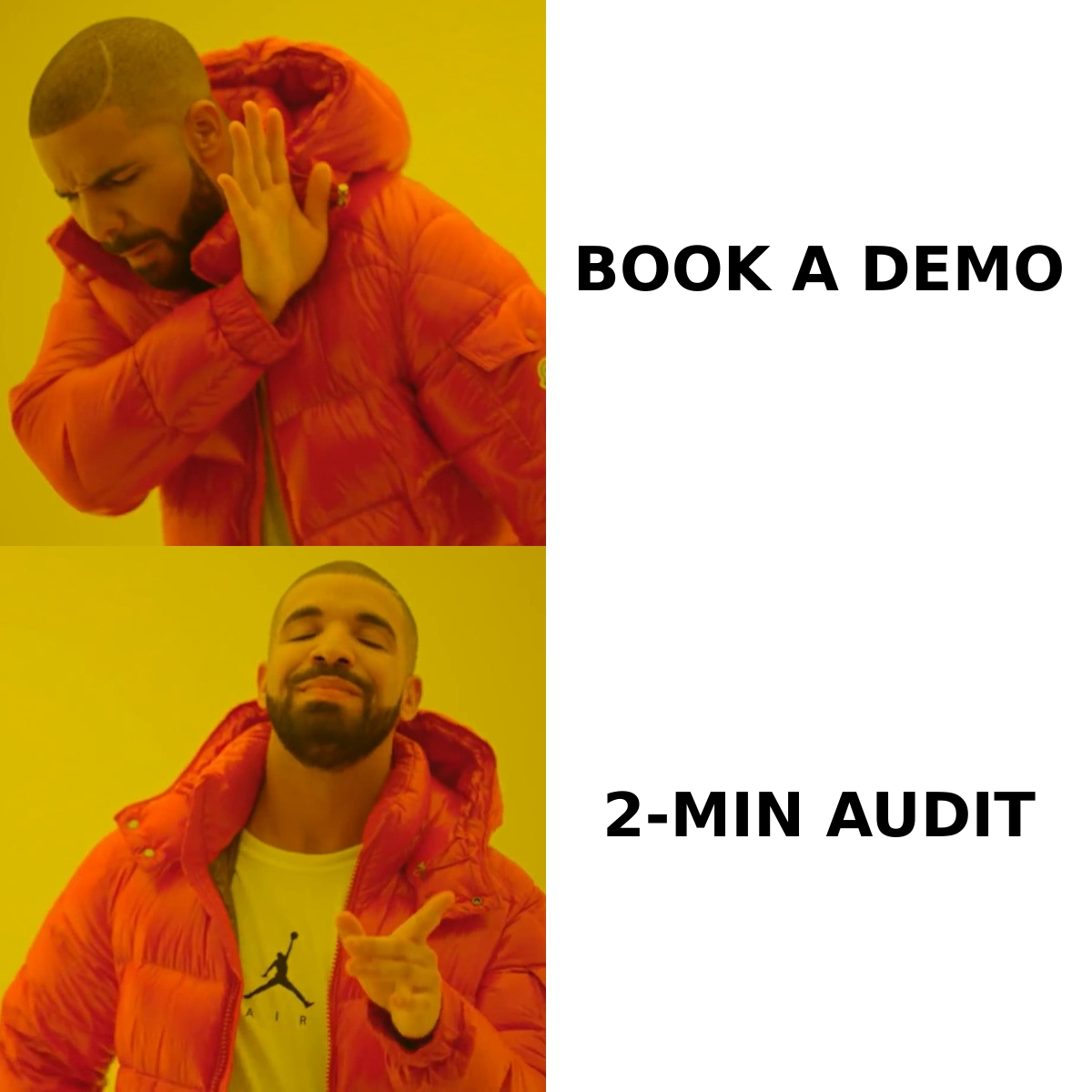
- The CTAs that work share three traits: one option, a concrete outcome, and zero commitment beyond a click ("See the 2-minute teardown" beats "Book a demo").
- Expect roughly 0.3%–2% click rate on a well-built signature CTA. That sounds tiny until you multiply it by 3,000 emails a quarter per rep.
- Rotate the CTA every 4–8 weeks and tag every link with UTMs, or you will never know which one earned the meetings.
- Signature CTAs compound with everything else: cold outreach, support replies, invoices, calendar confirmations. Build once, benefit on every send.
What is an email signature call to action?#
An email signature call to action is a short, clickable prompt placed inside your signature block — under your name, title, and contact details — that asks the reader to take one specific next step.
Think of it like the sticker on a delivery driver's van. Nobody buys because of the sticker. But the van is already driving 200 miles a day, and the sticker costs nothing extra. Your outbound, your support replies, your invoice emails, your "sounds good, Tuesday works" one-liners — all of it is already in motion. The signature CTA is the sticker.
The distinction that matters: a signature CTA is ambient, not primary. The body of your email has its own ask. The signature CTA is the fallback for the 95% of readers who aren't ready for that ask yet but might click something smaller.
That single constraint drives every design decision below. Ambient means quiet. Ambient means one link. Ambient means it never competes with the actual message.
Why do most signature CTAs get ignored?#
Here are the five failure modes I see in almost every audit, ranked by how much damage they do:
- Too many links. LinkedIn, Twitter, calendar, website, blog, podcast, and a banner. Seven choices equals zero choices. The reader's eye skims past the whole block as decoration.
- The ask is too heavy. "Book a 30-minute demo" asks a stranger for half an hour before they know if you're relevant. That's a body-copy ask, not a footer ask.
- No outcome in the copy. "Learn more" and "Check out our website" describe an action, not a result. Rewrite as what the reader walks away with.
- Image-only CTAs. Banners render as blocked placeholders in Outlook desktop, in dark mode, and in most corporate clients that strip external images by default. If your CTA is an image, a large share of your audience sees a broken box.
- No tracking. Untagged links mean you're guessing. Six months later you still can't say whether the signature drove one meeting or forty.
Fix those five and you're ahead of most B2B teams before you've written a word of copy.
What makes an email signature call to action convert?#
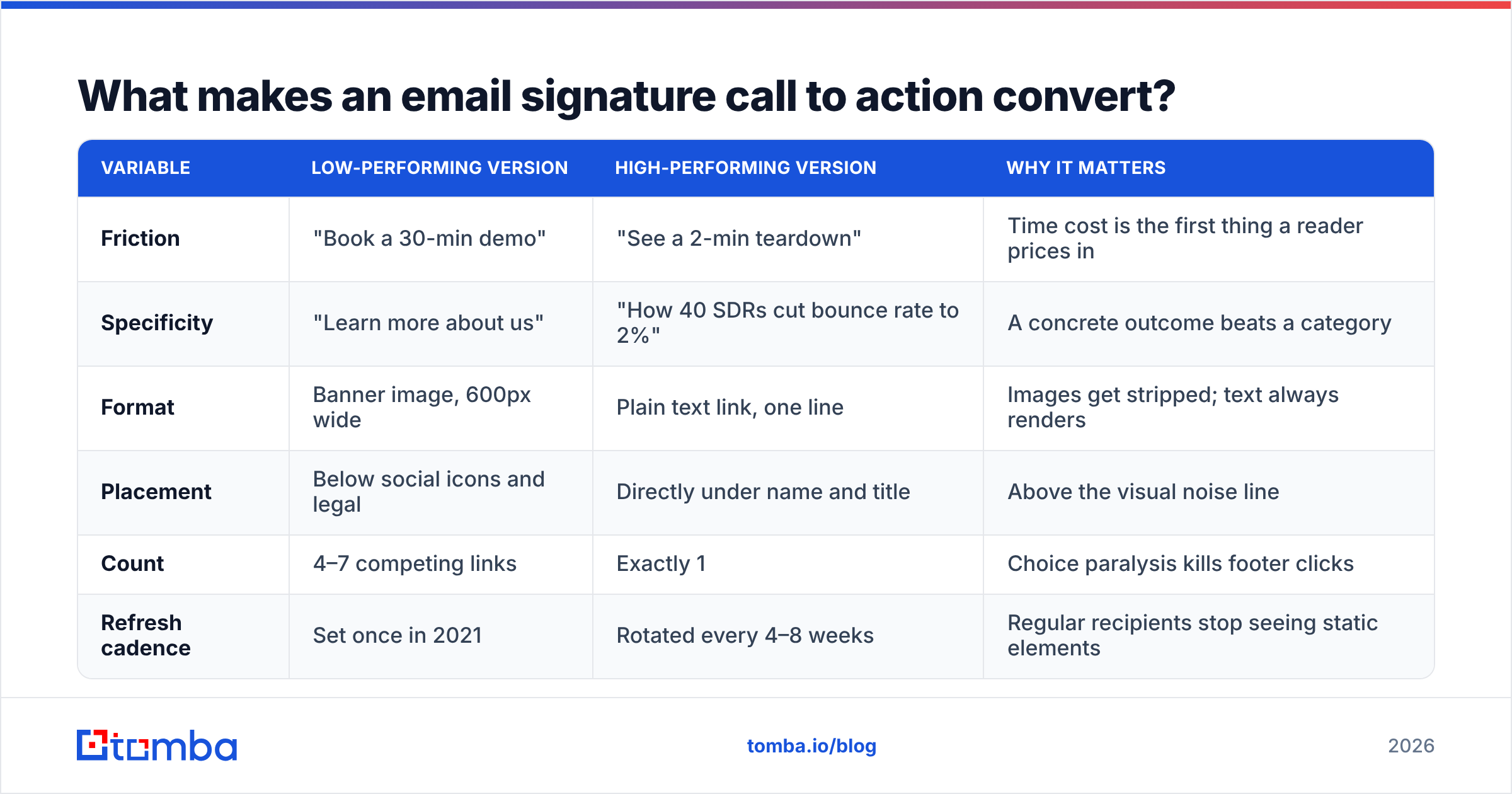
Three variables do most of the work: friction, specificity, and placement. Here's how they trade off.
| Variable | Low-performing version | High-performing version | Why it matters |
|---|---|---|---|
| Friction | "Book a 30-min demo" | "See a 2-min teardown" | Time cost is the first thing a reader prices in |
| Specificity | "Learn more about us" | "How 40 SDRs cut bounce rate to 2%" | A concrete outcome beats a category |
| Format | Banner image, 600px wide | Plain text link, one line | Images get stripped; text always renders |
| Placement | Below social icons and legal | Directly under name and title | Above the visual noise line |
| Count | 4–7 competing links | Exactly 1 | Choice paralysis kills footer clicks |
| Refresh cadence | Set once in 2021 | Rotated every 4–8 weeks | Regular recipients stop seeing static elements |
The friction row is the one people fight hardest. Sales leaders want the demo link because the demo is the conversion event they're measured on. But the footer is not where a demo gets booked — it's where curiosity gets captured. Put the heavy ask in the body where you've earned it, and let the signature catch everyone else.
One more rule that shows up in the data repeatedly: the CTA should be readable in under two seconds. If the reader has to parse a sentence, they've already scrolled.
Which signature CTA should you use for your role?#
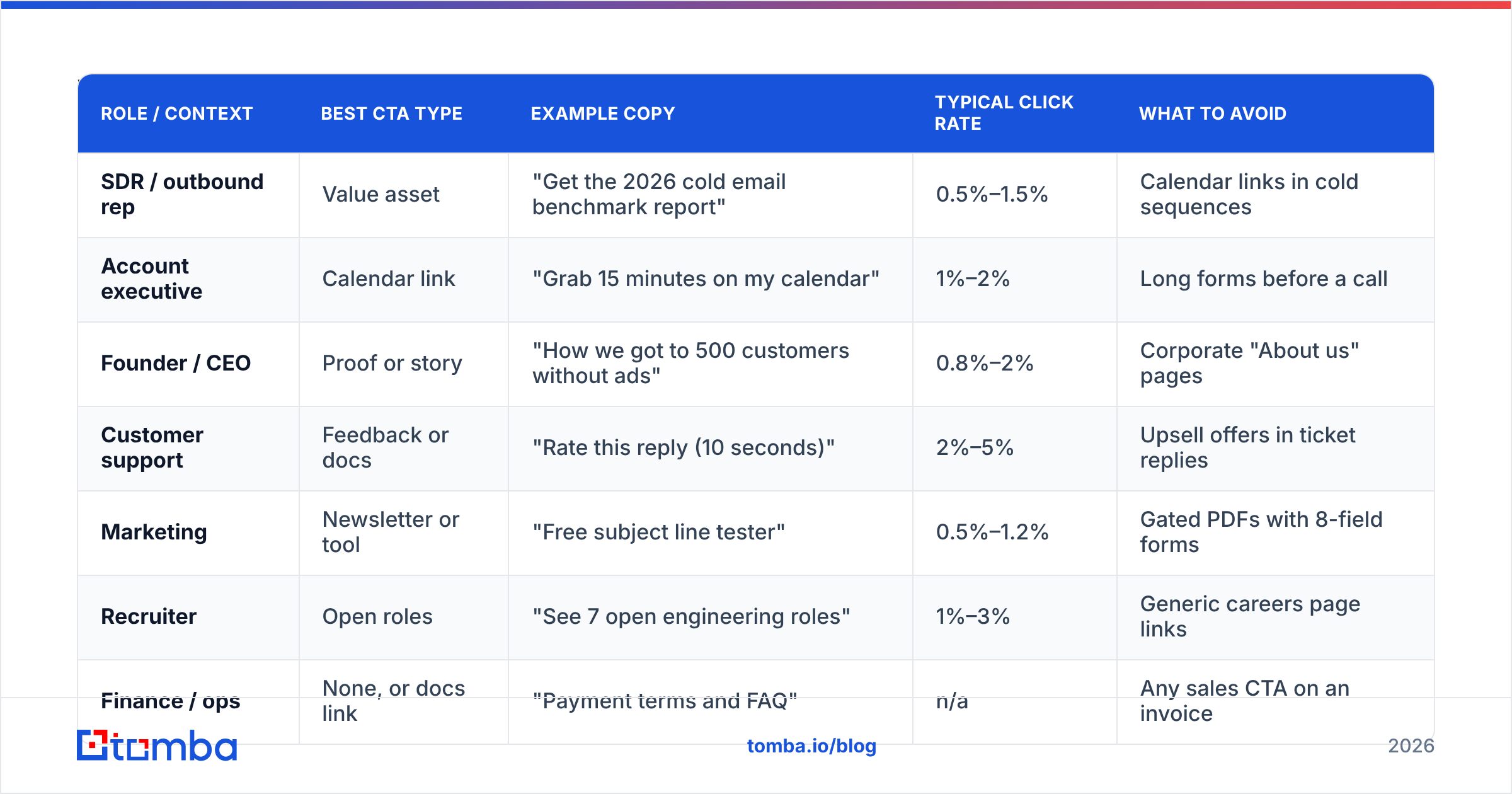
There is no universal best CTA. The right one depends on what your emails are already doing and who's on the other end. This table maps common roles to the CTA that tends to earn the most clicks.
| Role / context | Best CTA type | Example copy | Typical click rate | What to avoid |
|---|---|---|---|---|
| SDR / outbound rep | Value asset | "Get the 2026 cold email benchmark report" | 0.5%–1.5% | Calendar links in cold sequences |
| Account executive | Calendar link | "Grab 15 minutes on my calendar" | 1%–2% | Long forms before a call |
| Founder / CEO | Proof or story | "How we got to 500 customers without ads" | 0.8%–2% | Corporate "About us" pages |
| Customer support | Feedback or docs | "Rate this reply (10 seconds)" | 2%–5% | Upsell offers in ticket replies |
| Marketing | Newsletter or tool | "Free subject line tester" | 0.5%–1.2% | Gated PDFs with 8-field forms |
| Recruiter | Open roles | "See 7 open engineering roles" | 1%–3% | Generic careers page links |
| Finance / ops | None, or docs link | "Payment terms and FAQ" | n/a | Any sales CTA on an invoice |
Two notes on those click-rate ranges. First, they're clicks measured against emails sent, not opens — footer clicks are hard to attribute to opens because a signature renders whether or not tracking pixels fire. Second, support replies outperform everything else because the reader is already engaged and the ask is genuinely tiny. If you have a support team, that's the highest-yield signature in your company and almost nobody optimizes it.
What does a good email signature CTA look like in practice?#
Below are patterns you can adapt. Keep the whole signature under six lines including the CTA.
The teardown offer (best for outbound):
Sarah Chen | Head of Growth, Northwind
sarah@northwind.io | +1 415 555 0132

→ Free 2-minute audit of your outbound list quality
The proof link (best for founders):
Marcus Vale | Founder, Ledgerbase
marcus@ledgerbase.com

→ Read: how we cut CAC 38% by killing 3 channels
The micro-ask (best for support and CS):
Priya N. | Customer Success, Helpstack
→ Was this reply helpful? Yes / No
The soft calendar (best for AEs mid-cycle):
Dan Okafor | Enterprise AE, Vertica
→ 15 minutes, Tuesday or Thursday: [calendar]
Notice what's missing from all four: logos, social icons, legal disclaimers, quotes, and "please consider the environment before printing." Every one of those elements pushes your CTA further down and lowers the odds anyone reads it. If compliance forces a disclaimer, put it in a smaller, lighter font below the CTA, not above it.
For the mechanics of building this in Gmail or Outlook, Google's own signature docs cover the client-side setup, and free builders like the HubSpot email signature generator or Tomba's email signature generator will output clean HTML you can paste directly.
How do you measure an email signature call to action?#
You measure it the same way you'd measure any campaign link: with UTM parameters and a destination you control.
Tag every signature link like this:
https://yoursite.com/audit?utm_source=email&utm_medium=signature&utm_campaign=q1-audit&utm_content=sarahThe utm_content field carrying the rep's name is what makes the whole thing useful. Now you can see which rep's signature drives clicks, which means you can find out what they're doing differently and copy it across the team.
Four metrics worth tracking, in order of usefulness:
- Clicks per 1,000 emails sent. The only volume-normalized number. Compare CTAs against each other with this, never with raw click counts.
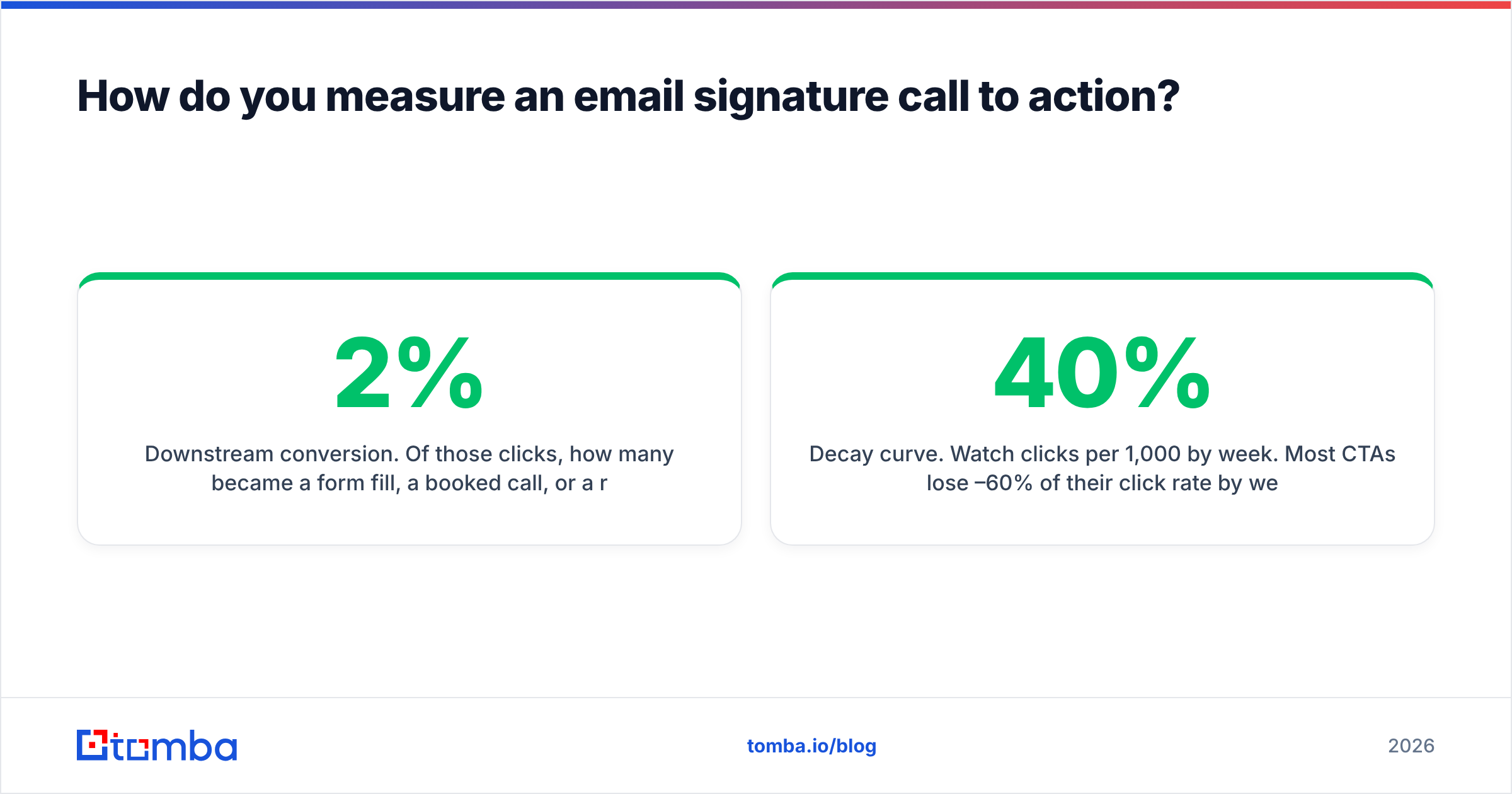
- Downstream conversion. Of those clicks, how many became a form fill, a booked call, or a reply? A CTA with a 2% click rate and 0% conversion is worse than one at 0.4% that books meetings.
- Time to first click. If most clicks arrive on the first email of a thread, your CTA is working as an ambient prompt. If they cluster on email four or five, it's working as a trust signal — keep it stable longer.
- Decay curve. Watch clicks per 1,000 by week. Most CTAs lose 40%–60% of their click rate by week six with a repeat audience. That's your rotation signal.
If your CTA collects email addresses, run those addresses through an email verifier before they hit your CRM. Signature CTAs attract a fair share of typo'd and disposable addresses, and letting those into a sending list is how a healthy domain quietly becomes a flagged one. The same principle behind email deliverability hygiene applies here.
How does a signature CTA compare to other low-effort channels?#
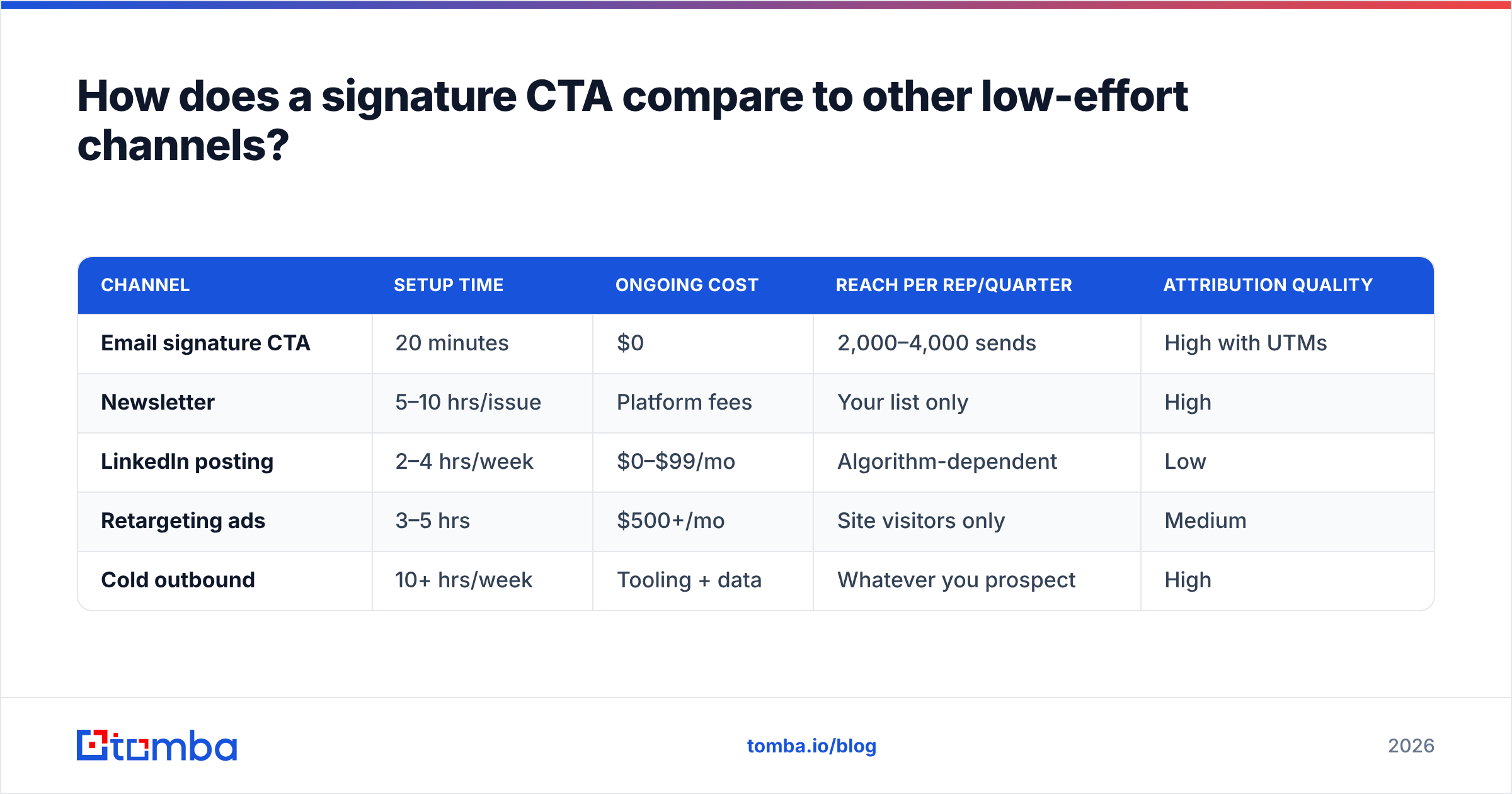
Signature CTAs get judged unfairly because their click rates look small next to a newsletter. The honest comparison is effort-adjusted.
| Channel | Setup time | Ongoing cost | Reach per rep/quarter | Attribution quality |
|---|---|---|---|---|
| Email signature CTA | 20 minutes | $0 | 2,000–4,000 sends | High with UTMs |
| Newsletter | 5–10 hrs/issue | Platform fees | Your list only | High |
| LinkedIn posting | 2–4 hrs/week | $0–$99/mo | Algorithm-dependent | Low |
| Retargeting ads | 3–5 hrs | $500+/mo | Site visitors only | Medium |
| Cold outbound | 10+ hrs/week | Tooling + data | Whatever you prospect | High |
Signature CTAs are the only row where setup is measured in minutes and marginal cost is genuinely zero. They will never be your biggest channel. They're the one with the best ratio of outcome to effort, which is a different and often more useful thing.
They also stack. A signature CTA sitting under a well-targeted cold email amplifies a campaign you were already running. If you're building those campaigns, the quality of the underlying contact data drives far more variance than the footer does — which is why teams usually fix their find email addresses workflow before they optimize signature copy. Do both, in that order.
What mistakes should you avoid?#
- Don't A/B test two CTAs at once inside one team. Signature rendering varies too much by client to trust a split that small. Test sequentially, 4 weeks each, same audience mix.
- Don't use tracking pixels in your signature. They inflate open rates, they break in privacy-first clients, and some corporate filters treat pixel-laden footers as a spam signal. Link tracking is enough.
- Don't put a sales CTA on transactional email. Invoices, receipts, and password resets are the fastest way to burn goodwill for a 0.2% click rate.
- Don't let the signature exceed six lines. Beyond that, mobile clients collapse it behind a "..." and your CTA is invisible.
- Don't reuse the same CTA for outbound and inbound. Someone who emailed you first deserves a different, warmer ask than a cold prospect.
- Don't skip the mobile check. Over half of B2B email is read on a phone. Send yourself a test and look at it on the device your buyers actually use. Vendor comparison sites like G2 list signature-management tools that handle cross-client rendering if you're deploying across a large team.
How often should you rotate your signature CTA?#
Every 4–8 weeks for a repeat audience, every quarter for mostly-cold audiences.
The reason is banner blindness applied to text. A prospect who has received eight emails from you has stopped seeing your footer entirely — it's furniture. Changing the offer resets attention, even if the underlying destination is similar. A useful rotation for a full year:
- Q1 — a benchmark or data asset ("2026 outbound benchmark report")
- Q2 — a free tool or calculator ("Free subject line tester")
- Q3 — a customer story with a number in it ("How Acme cut bounce rate to 1.8%")
- Q4 — a soft calendar link ("15 minutes before year-end planning")
Keep a shared doc of every CTA you've run with its clicks-per-1,000 number. After a year you'll have a ranked list of what your specific audience responds to, which is worth more than any general advice — including this article.
Where should you start?#
Pick one CTA. Make it text, not an image. Put it directly under your name and title. Tag it with UTMs including your own name in utm_content. Run it for four weeks and write down the clicks per 1,000 sends. Then change one thing and run it again.
That's the whole method. It takes twenty minutes to set up and it works on volume you're already sending.
The bigger lever, though, sits upstream. A perfectly tuned signature CTA on emails going to the wrong people, or to addresses that bounce, earns nothing. If you want more from your outbound, start by making sure every message reaches a real person at a real company — then let the footer do its quiet, compounding work. Tomba's Email Finder does exactly that: find verified professional addresses by name, domain, or company, with a free tier of 25 searches a month and paid plans starting at $49/mo on the Starter tier. Check Tomba pricing to see which tier matches your send volume, then go fix your signature while you wait for the list to build.
Related guides#
Ready to find emails that actually work?
Join 150,000+ professionals who stopped guessing and started sending. Free credits on signup — no credit card required.
Get the Tomba newsletter
Practical outbound tactics and product updates — once every two weeks.
About the author