Email Tester Online: How to Test Deliverability in 2026
Most online email testers grade your spam words and stop there. Here is what an email tester online actually measures, what it quietly ignores, and the 15-minute test sequence that predicts inbox placement.
TL;DR
- "Email tester online" covers four different jobs: spam-score testing, authentication testing, rendering testing, and address validity testing. Most people run one and assume they covered all four.
- A 10/10 spam score is not a deliverability guarantee. It grades your message in isolation, with no knowledge of your sending history, list quality, or engagement.
- The single biggest predictor of inbox placement is not your copy. It is your bounce rate, which is decided before you write a word.
- Run the checks in the right order: address validity, then authentication, then content, then rendering. Testing copy on a domain with a broken DKIM record is wasted effort.
- Budget 15 minutes for a full pre-send test. Re-test authentication monthly, and re-test list validity every single send.
What is an email tester online?#
An email tester online is any browser-based tool that inspects some part of your email before or after you send it, and returns a diagnosis. That definition is deliberately loose, because the category is loose. Four very different products all market themselves with the same phrase.
Think of it like a car inspection. One shop checks the emissions, another checks the brakes, another checks whether the paint matches the original. All three call it an "inspection." If you only ever visit the emissions shop, you will pass the test and still have no brakes.
Here are the four jobs, and what each one actually measures:
- Spam-score testers — You send a test message to a generated address, and the tool runs it through SpamAssassin-style rules plus a few authentication lookups. Output is a score out of 10 and a list of triggered rules. Fast, free, and the most commonly misread result in email marketing.
- Authentication and DNS testers — These query your domain's public records: SPF, DKIM, DMARC, MX, and reverse DNS. No email is sent. The output is binary per record: present and valid, present and broken, or missing.
- Rendering and preview testers — These screenshot your HTML across dozens of client/device combinations. Outlook 2019 on Windows still renders differently from Apple Mail on iOS, and this is the only category that catches it.
- Address validity testers — These check whether the recipient address exists at all, using MX lookup, SMTP handshake, syntax rules, and disposable-domain lists. This is the category people skip, and it is the one that determines whether the other three matter.
The fourth category is where an email verifier lives, and it is the one with the most direct effect on your sender reputation. A message that bounces is worse than a message that lands in spam. Spam placement costs you a reply. A hard bounce costs you reputation with the mailbox provider, and reputation is cumulative.

Why does a 10/10 spam score still land in spam?#
Because the spam score grades the message, and the mailbox provider grades the sender.
This is the most expensive misunderstanding in cold email. You paste your draft into a spam checker, remove the word "free," swap an exclamation mark for a period, get your perfect score, and send to 2,000 people. Half of it goes to spam anyway.
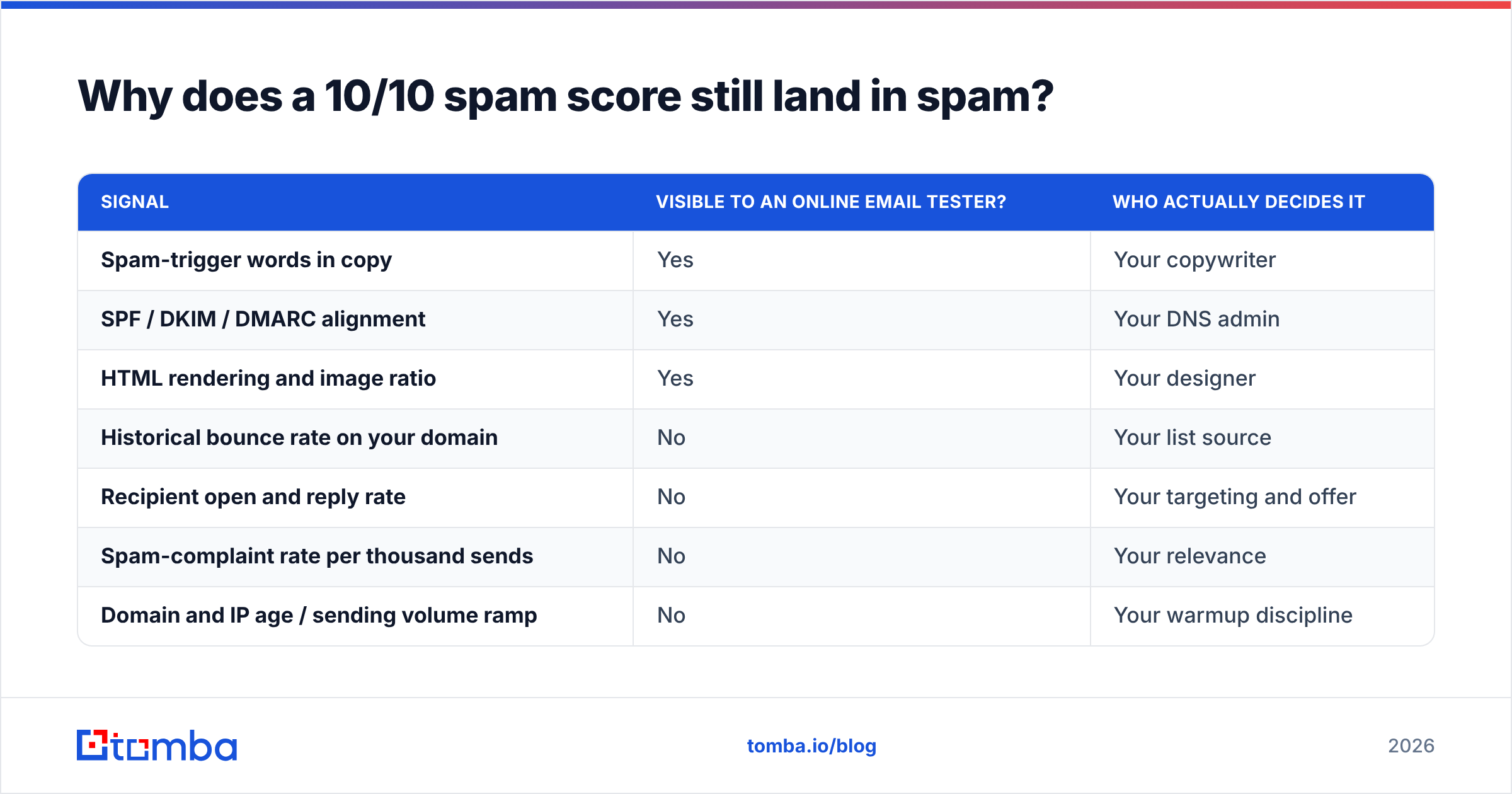
The reason is that Gmail and Microsoft do not run SpamAssassin. They run engagement models trained on billions of signals, and the signals they weight most heavily are ones no browser-based tester can see:
| Signal | Visible to an online email tester? | Who actually decides it |
|---|---|---|
| Spam-trigger words in copy | Yes | Your copywriter |
| SPF / DKIM / DMARC alignment | Yes | Your DNS admin |
| HTML rendering and image ratio | Yes | Your designer |
| Historical bounce rate on your domain | No | Your list source |
| Recipient open and reply rate | No | Your targeting and offer |
| Spam-complaint rate per thousand sends | No | Your relevance |
| Domain and IP age / sending volume ramp | No | Your warmup discipline |
Look at the split. Everything an email tester online can see is decided by you before you hit send. Everything it cannot see is decided by your recipients after you hit send. The second column is the one Gmail weights.
Google's own sender guidelines put a hard number on one of these: keep your spam-complaint rate below 0.3%, and ideally below 0.1%. No spam-score tool can predict that number for you. Only your list quality and offer relevance can.
So treat the spam score as a floor, not a ceiling. A bad score tells you something is definitely broken. A perfect score tells you nothing is obviously broken. Those are not the same claim.
Which email tester online should you use for each job?#
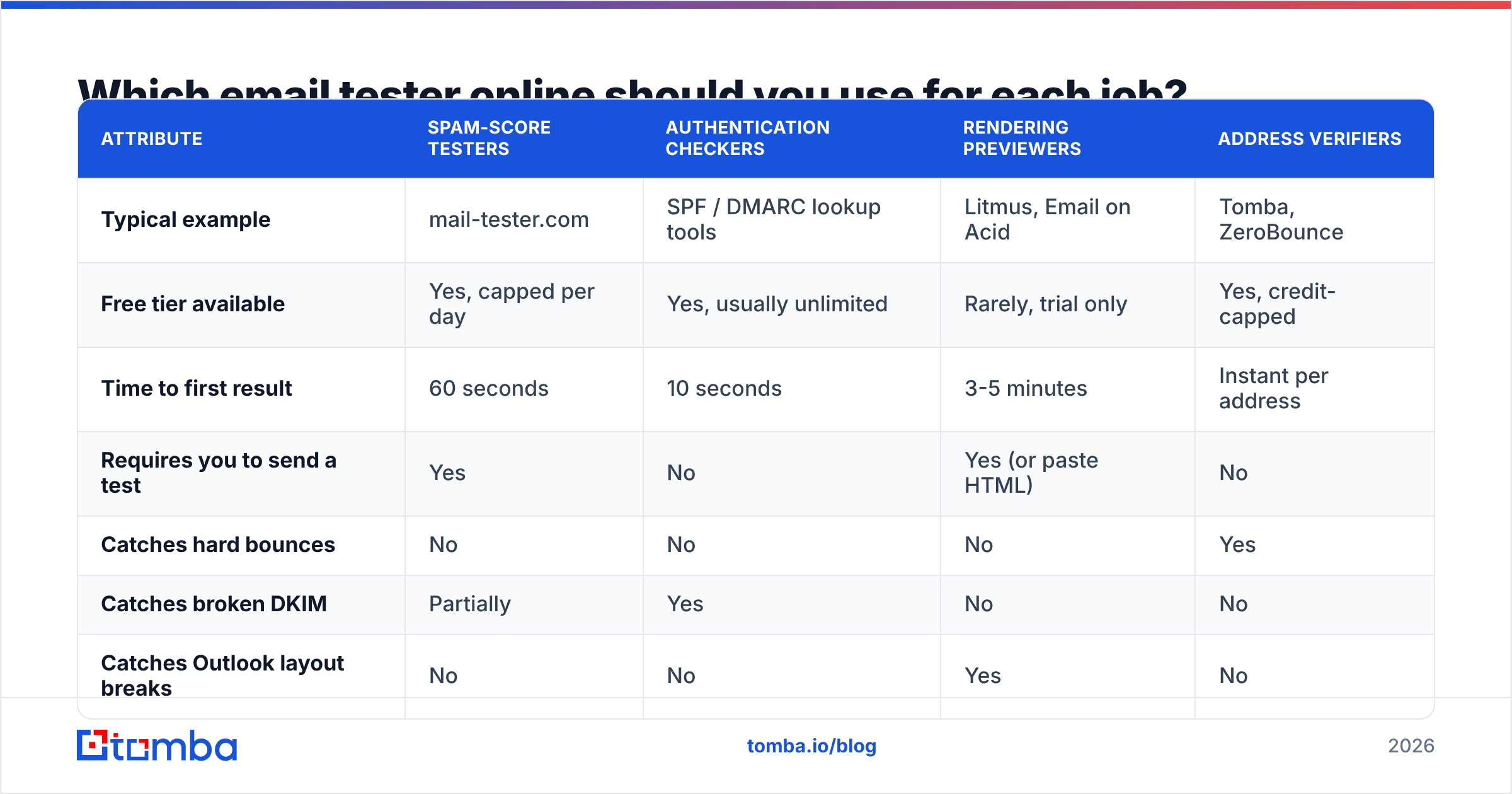
There is no single tool that does all four jobs well, and vendors that claim otherwise are usually strong at one and shallow at the rest. Here is how the categories compare on the attributes that matter when you are choosing.
| Attribute | Spam-score testers | Authentication checkers | Rendering previewers | Address verifiers |
|---|---|---|---|---|
| Typical example | mail-tester.com | SPF / DMARC lookup tools | Litmus, Email on Acid | Tomba, ZeroBounce |
| Free tier available | Yes, capped per day | Yes, usually unlimited | Rarely, trial only | Yes, credit-capped |
| Time to first result | 60 seconds | 10 seconds | 3-5 minutes | Instant per address |
| Requires you to send a test | Yes | No | Yes (or paste HTML) | No |
| Catches hard bounces | No | No | No | Yes |
| Catches broken DKIM | Partially | Yes | No | No |
| Catches Outlook layout breaks | No | No | Yes | No |
| Re-test frequency | Per campaign | Monthly, or after DNS edits | Per template | Every send |
| Cost driver | Tests per day | Free | Seats + client count | Credits per address |
The practical read: authentication checkers are free and should be run monthly regardless. Spam-score testers are free and worth 60 seconds per campaign. Rendering previewers only earn their price if you send designed HTML rather than plain-text-style cold email. Address verifiers are the only paid category most outbound teams genuinely cannot skip, because they are the only ones touching the metric that compounds.
For the free half of that stack, you can run a spam checker and an SPF checker side by side in under two minutes, then check whether your sending IP or domain appears on a public blacklist checker. Those three cover roughly 80% of the diagnosable problems in a pre-send audit.
How do you run a full email test in 15 minutes?#
Order matters here, because each step invalidates the ones after it if it fails. Testing copy on a domain that fails DMARC is like tuning the radio in a car with no engine.
- Verify the list first (5 minutes). Run the entire send list through verification and drop everything marked invalid. If your invalid rate is above 5%, the list source is the problem, not the copy. Catch-all domains are their own category and need a catch-all verifier rather than a standard SMTP check, because the receiving server accepts everything at the handshake stage and tells you nothing.
- Check authentication (2 minutes). Confirm SPF resolves within the 10-lookup limit, DKIM signs with a key of at least 1024 bits, and DMARC exists with at least
p=none. A missing DMARC record is now a hard blocker for bulk senders to Gmail and Yahoo, not a nice-to-have. - Check reputation signals (2 minutes). Look up your sending domain and IP on the major blocklists. Then check Google Postmaster Tools if you have volume through Gmail. Postmaster is the only place you see Google's own view of your domain reputation, and it is free.
- Run the spam-score test (3 minutes). Send your actual campaign HTML, from your actual sending address, through your actual sending tool. Testing a copy-pasted draft from your personal Gmail measures nothing useful.
- Preview rendering (3 minutes). Check at minimum: Gmail web, Gmail iOS, Outlook desktop, Apple Mail. If your template survives those four, it survives most of the market.
Fifteen minutes. The reason teams skip it is not time cost, it is that steps 1 through 3 have no visible payoff on the day you run them. They only show up as an absence of disasters three weeks later.
What does an email tester online never tell you?#
Four things, and each one has burned a campaign I have seen.
It does not tell you if the address is a role account. info@, support@, sales@, and admin@ addresses often pass every syntax and SMTP check while being routed to a shared inbox that nobody reads, or worse, into a ticketing system that auto-replies and inflates your apparent engagement. Filter role accounts separately from invalid accounts. They are a targeting problem, not a validity problem.
It does not tell you if the contact still works there. B2B data decays at roughly 2 to 2.5% per month through job changes alone, which compounds to about a quarter of your list per year. An address can remain technically deliverable for months after the person leaves, because the company keeps the mailbox alive for forwarding. Your test passes; your reply rate does not.
It does not tell you whether your warmup is sufficient for the volume. Sending 500 emails on day one from a domain registered last week will fail regardless of a 10/10 score. Volume ramp is a schedule problem, not a content problem, and no online tester inspects your schedule.
It does not tell you whether your offer is relevant. This is the uncomfortable one. Spam-complaint rate, the metric that most directly kills sender reputation, is a function of how irrelevant your message felt to the person receiving it. No tool measures relevance. Better targeting is the only fix, and better targeting starts with better data, not better subject lines.
Are free email testers good enough, or do you need paid?#
Split it by category, because the answer is genuinely different for each.
Free is sufficient for: authentication checks, blacklist lookups, DNS record validation, single-address spot checks, and basic spam scoring. These are lookups against public data. Paying for them buys you a nicer interface and sometimes an API, not better answers. If a vendor charges you for an SPF lookup, walk away.
Free breaks down for: list-scale verification, catch-all resolution, and rendering across client matrices. All three have real marginal cost per unit — SMTP connections, proxy infrastructure, virtual machines running actual mail clients — so free tiers are capped hard, usually at 25 to 100 units per month. That is enough to evaluate a vendor, not enough to run outbound.
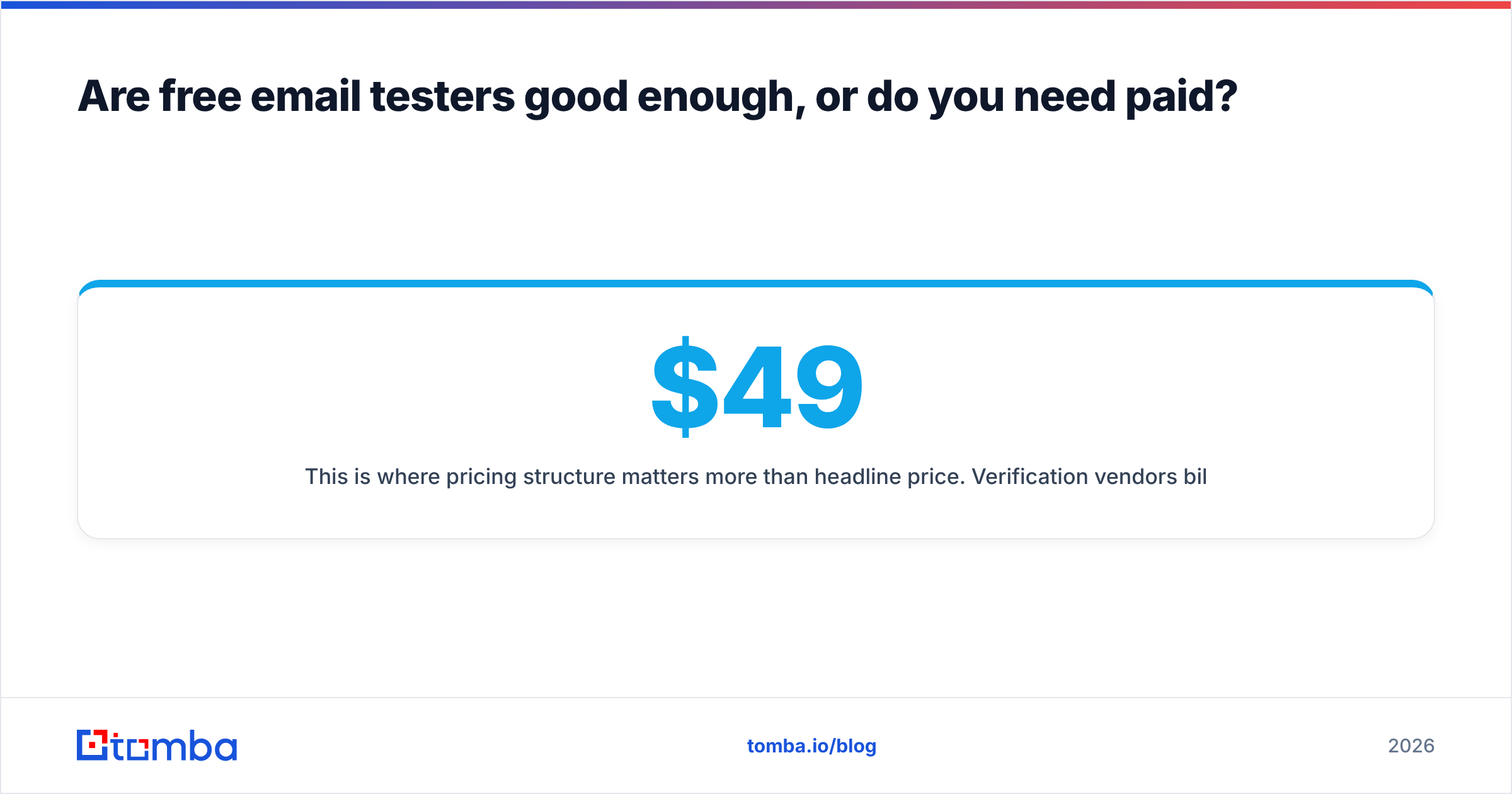
This is where pricing structure matters more than headline price. Verification vendors bill per address, and rates vary by an order of magnitude depending on volume commitment and whether unused credits roll over. For reference, Tomba pricing starts with a free tier at 25 searches per month, then Starter at $49/mo, Growth at $99/mo, and Pro at $249/mo, with enterprise pricing negotiated. Compare like-for-like on cost per thousand verified addresses rather than on monthly sticker price, because a $49 plan with 500 credits is more expensive per unit than a $99 plan with 5,000.
Independent review data on G2 is useful for one specific thing here: filtering reviews by company size. A tool that delights 10-person startups often collapses at 10,000-address batches, and the review distribution shows it clearly.
How often should you re-test each layer?#
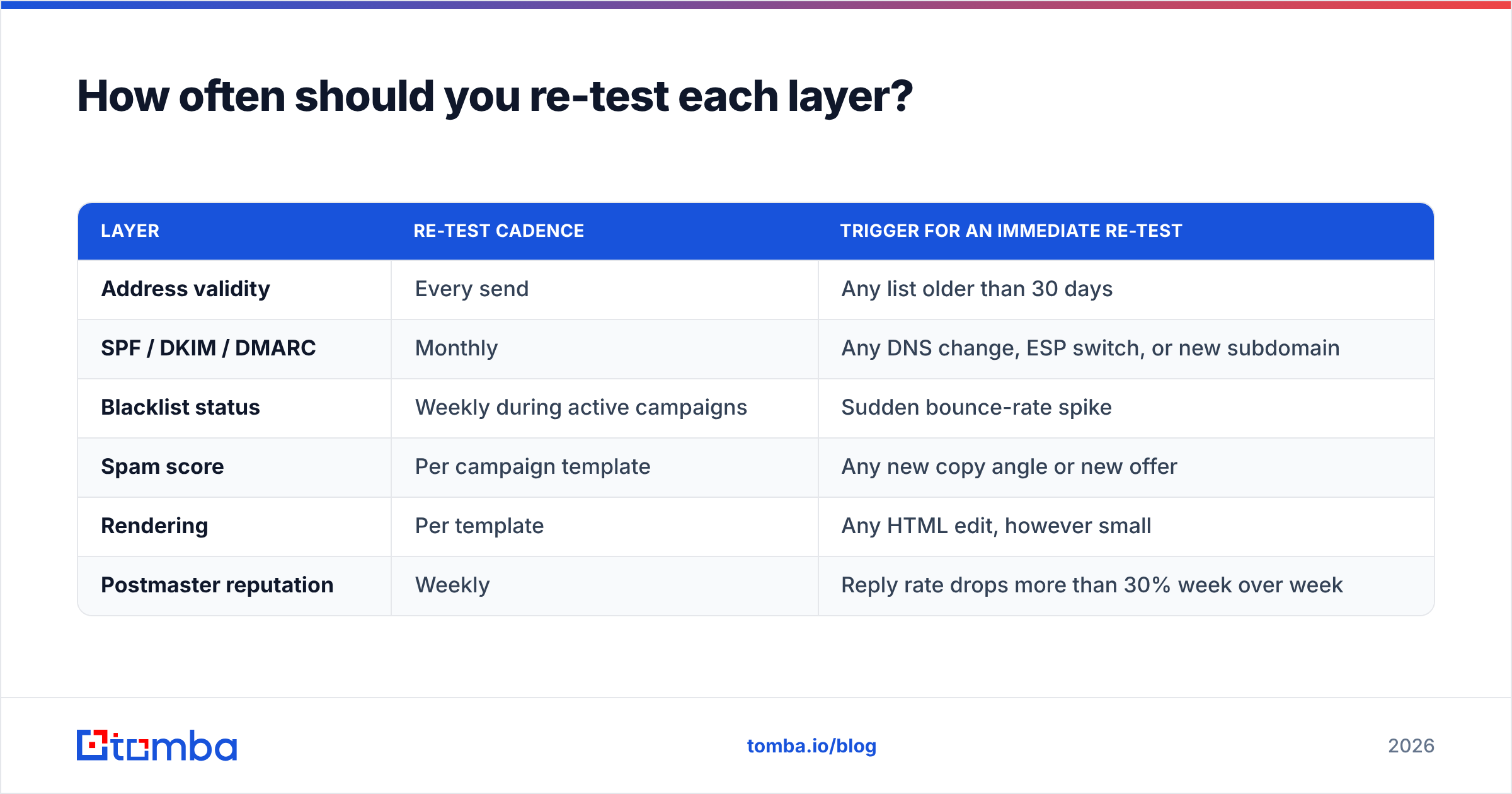
Different layers decay at different speeds, and treating them uniformly is why teams either over-test (wasting hours) or under-test (discovering a broken DKIM key in month four).
| Layer | Re-test cadence | Trigger for an immediate re-test |
|---|---|---|
| Address validity | Every send | Any list older than 30 days |
| SPF / DKIM / DMARC | Monthly | Any DNS change, ESP switch, or new subdomain |
| Blacklist status | Weekly during active campaigns | Sudden bounce-rate spike |
| Spam score | Per campaign template | Any new copy angle or new offer |
| Rendering | Per template | Any HTML edit, however small |
| Postmaster reputation | Weekly | Reply rate drops more than 30% week over week |
The two rows people get wrong are the first and the last. Address validity gets treated as a one-time cleanup, when it is a per-send requirement — a list verified in January is meaningfully stale by March. And Postmaster reputation gets checked only after something breaks, when its entire value is as a leading indicator.
If your workflow is spreadsheet-based, running validity checks per send is easier than it sounds. A Google Sheets add-on or a bulk email finder run against the CSV takes minutes and removes the excuse.
What should you fix first if you only have an hour?#
Fix in this order, because the return per minute drops sharply as you go down:
- Remove invalid addresses. Largest single lever on bounce rate, which is the largest single lever on sender reputation.
- Publish or repair DMARC. Now effectively mandatory for bulk sending to the major consumer providers.
- Cut image weight and link count. Image-heavy, link-heavy HTML in a cold email is a reliable spam signal. Plain text with one link outperforms in almost every cold-outbound test I have seen.
- Reduce daily volume per mailbox. If you are above 50 cold sends per mailbox per day, you are trading reputation for reach.
- Then, and only then, rewrite the copy. Copy matters for reply rate. It matters far less for placement than the four items above it.
Most teams do this list in reverse. They spend the hour rewriting the subject line, which is the cheapest thing to fix and the least likely thing to be broken.
Getting the input right before you test the output#
Every layer of email testing is downstream of one question: are you emailing real people who actually exist at the companies you think they work for? Fix that, and your spam score, bounce rate, and reply rate all move in the same direction at once. Skip it, and you are optimizing a message that was never going to be delivered.
If your invalid rate is what is dragging your sends down, start at the source. The Tomba Email Finder returns verified professional addresses by name, domain, or company, with confidence scoring on every result — so the list you test is already clean before it reaches your spam checker. Start free with 25 searches, run a sample of your worst-performing segment through it, and compare the bounce rate on your next send.
Related guides#
Ready to find emails that actually work?
Join 150,000+ professionals who stopped guessing and started sending. Free credits on signup — no credit card required.
Get the Tomba newsletter
Practical outbound tactics and product updates — once every two weeks.
About the author